Yes! You can use AI to fill out Form IL444-2790, Self-Employment Record

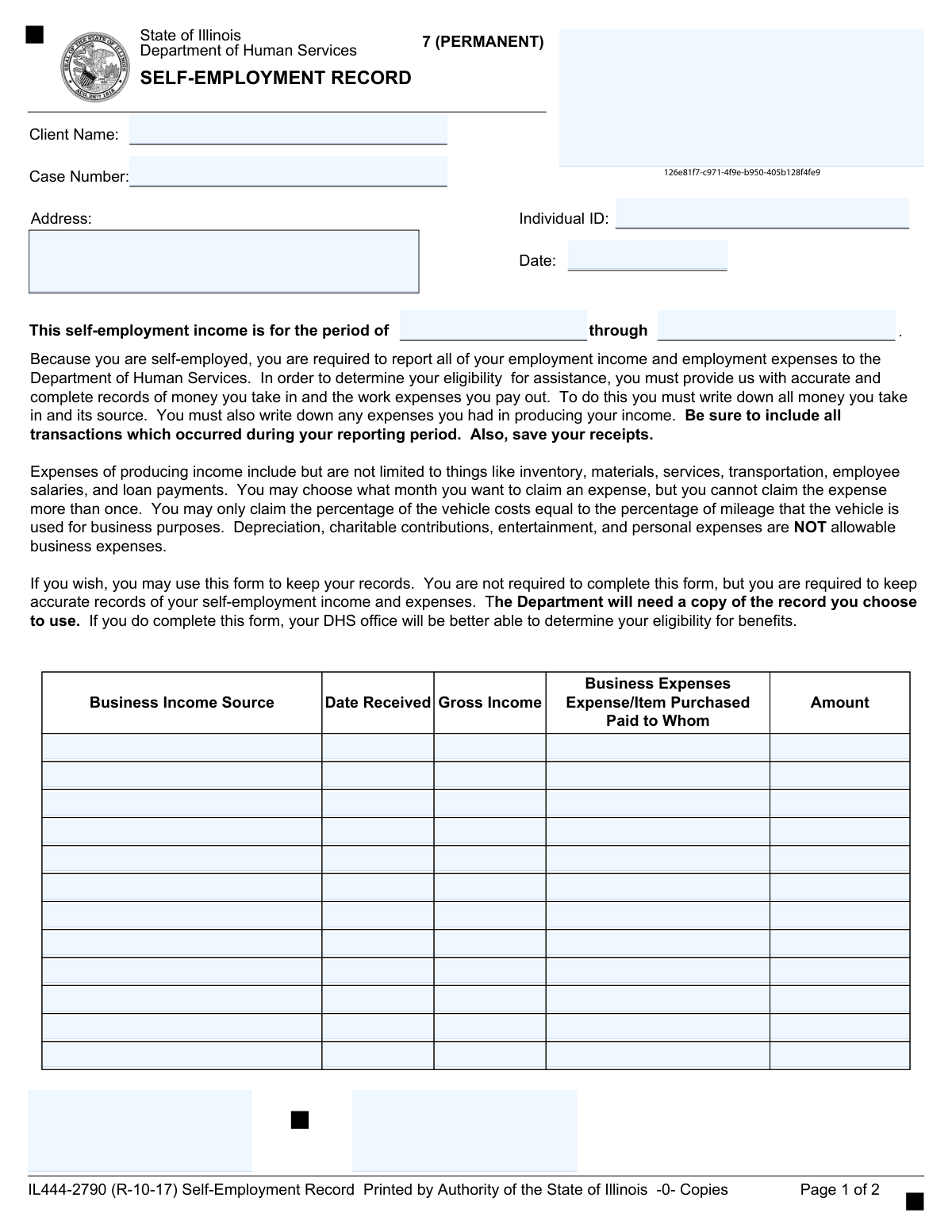
Form IL444-2790, the Self-Employment Record, is a document provided by the Illinois Department of Human Services for self-employed individuals to report their business income and expenses. This detailed record is crucial for the department to accurately determine eligibility for assistance programs by calculating net self-employment income. Today, this form can be filled out quickly and accurately using AI-powered services like Instafill.ai, which can also convert non-fillable PDF versions into interactive fillable forms.
IL444-2790 is part of the self employment forms category on Instafill.
Our AI automatically handles information lookup, data retrieval, formatting, and form filling.
It takes less than a minute to fill out IL444-2790 using our AI form filling.
Securely upload your data. Information is encrypted in transit and deleted immediately after the form is filled out.

Form specifications

Form name: Form IL444-2790, Self-Employment Record
Number of fields: 220
Number of pages: 2
Language: English
main-image

Instafill Demo: How to fill out PDF forms in seconds with AI

How to Fill Out IL444-2790 Online for Free in 2026

Are you looking to fill out a IL444-2790 form online quickly and accurately? Instafill.ai offers the #1 AI-powered PDF filling software of 2026, allowing you to complete your IL444-2790 form in just 37 seconds or less.
Follow these steps to fill out your IL444-2790 form online using Instafill.ai:
  1. 1 Navigate to Instafill.ai and upload or select the IL444-2790 Self-Employment Record form.
  2. 2 Use the AI assistant to automatically populate your personal details, including your name, address, Individual ID, and Case Number.
  3. 3 Specify the start and end dates for the reporting period you are documenting.
  4. 4 Systematically list each source of business income, the date it was received, and the gross amount for the entire reporting period.
  5. 5 For each income entry, detail the corresponding business expenses, including the item purchased, the payee, and the amount paid.
  6. 6 Carefully review all the entered income and expense data for accuracy and completeness before proceeding.
  7. 7 Certify the information with your digital signature and the date, then download or submit the completed form as required by the Illinois DHS.

Our AI-powered system ensures each field is filled out correctly, reducing errors and saving you time.

Why Choose Instafill.ai for Your Fillable IL444-2790 Form?

Speed

Complete your IL444-2790 in as little as 37 seconds.

Up-to-Date

Always use the latest 2026 IL444-2790 form version.

Cost-effective

No need to hire expensive lawyers.

Accuracy

Our AI performs 10 compliance checks to ensure your form is error-free.

Security

Your personal information is protected with bank-level encryption.

Frequently Asked Questions About Form IL444-2790

This form is used to report your self-employment income and business expenses to the Illinois Department of Human Services (DHS). This information is necessary for the DHS to accurately determine your eligibility for assistance programs.

If you are self-employed and applying for or receiving assistance from the Illinois DHS, you are required to keep and report accurate records of all your business income and expenses.

No, you are not required to use this specific form. However, you must keep accurate, complete records in some format and provide a copy to your DHS office.

You will need your personal details like your name, Individual ID, and Case Number, as well as detailed records of your income and expenses for the reporting period. This includes the source of income, date received, gross amount, and details for each expense.

Allowable expenses are costs to produce your income, such as inventory, materials, services, transportation, and employee salaries. You must save your receipts for all claimed expenses.

Yes, you cannot claim depreciation, charitable contributions, entertainment, or any personal expenses as business expenses.

You can only claim the percentage of vehicle costs that equals the percentage of mileage the vehicle is used for business purposes. For example, if you use your car for business 40% of the time, you can only claim 40% of its costs.

The form instructs you to save your receipts. While you may not need to attach them, you must have them available as proof, as the DHS may request them to verify your expenses.

If you run out of space on the form, you can use additional copies of the page or attach a separate sheet with the information in the same format. Make sure your name and case number are on every page you submit.

You must provide a copy of your completed record to your local Illinois Department of Human Services (DHS) office.

Yes, services like Instafill.ai use AI to help auto-fill form fields accurately and quickly. This can save you time and help avoid mistakes when entering your income and expense details.

To fill this form out online, you can upload the PDF to Instafill.ai. The platform will make the document interactive, allowing you to type your information directly into the fields and save or print the completed form.

If you have a non-fillable or 'flat' PDF, you can use a service like Instafill.ai. It can convert the document into an interactive, fillable form that you can easily complete on your computer.

Compliance IL444-2790
Validation Checks by Instafill.ai

1
Reporting Period Chronology
This check ensures that the 'Reporting Period End Date' is on or after the 'Reporting Period Start Date'. This is a fundamental logical check to ensure the time period is valid. If the start date is after the end date, the form is considered invalid and cannot be processed, as the income and expense dates cannot be properly validated.
2
Transaction Date within Reporting Period
Verifies that each 'Date Received' for every business income entry falls within the overall 'Reporting Period Start Date' and 'Reporting Period End Date'. This is crucial for confirming that all reported financial activities are relevant to the specified period. Transactions outside this range will be flagged for review or rejected, as they may belong to a different reporting period.
3
Mandatory Client Identifiers
Ensures that the 'Client Name', 'Individual ID', and 'Case Number' fields are not empty. These fields are essential for linking the submitted financial data to the correct client file within the Department of Human Services system. A failure in this validation would halt processing until the identifying information is provided, as the form cannot be assigned to a case.
4
Valid Date Formatting
This validation confirms that all date fields, including the reporting period dates, form completion date, and all 'Date Received' entries, are in a valid and parseable format (e.g., MM/DD/YYYY). Incorrect date formats can cause system errors and prevent accurate calculation of eligibility. Submissions with invalid formats will be rejected, requiring the user to correct the date entries.
5
Valid Currency Formatting
Checks that all 'Gross Income' and 'Expense Amount' fields contain only valid numeric characters, a decimal point, and are formatted as currency. This prevents data corruption from non-numeric entries like text or symbols. If this check fails, the system cannot perform calculations, and the user will be prompted to correct the invalid amounts.
6
Logical Signature Date
This check validates that the 'Date Signed' is on or after the 'Reporting Period End Date'. A client cannot logically certify the completeness of a reporting period before it has concluded. A signature date that precedes the period end date would invalidate the certification and require the form to be re-signed and re-dated after the period is over.
7
Complete Income Row Logic
For any row where a 'Gross Income' amount is entered, this validation ensures the corresponding 'Business Income Source' and 'Date Received' fields are also filled. An income amount without a source or date lacks the necessary context for verification and processing. Incomplete rows will be flagged, and the user will be required to provide the missing information.
8
Complete Expense Row Logic
For any row where an 'Expense Amount' is entered, this check verifies that the corresponding 'Expense/Item Purchased' and 'Paid to Whom' fields are also completed. An expense amount requires justification to be considered a valid business deduction. If the description is missing, the expense may be disallowed, and the form will be returned for completion.
9
Header Field Consistency Across Pages
This validation compares the 'Client Name' and 'Case Number' fields on Page 1 with the corresponding fields on Page 2 to ensure they are identical. This is important for multi-page forms to prevent data entry errors and ensure the entire document is associated with the same case. A mismatch will trigger an alert for manual review to correct the discrepancy.
10
Prevention of Future Dates
Ensures that no date entered on the form (including 'Date Received', 'Date Signed', and the form 'Date') is in the future relative to the date of submission. Entering future dates is a common data entry error and is logically impossible for recording past events. The system should reject any future dates and prompt the user for correction.
11
Case Number and Individual ID Format
This check validates that the 'Case Number' and 'Individual ID' fields match a predefined format (e.g., a specific number of digits, an alphanumeric pattern, or a specific prefix). This helps ensure the number was transcribed correctly and is a valid identifier in the DHS system. A failure would indicate a likely data entry error, preventing a match with existing records and requiring correction.
12
Address Completeness Check
Verifies that the 'Address' field is not empty and contains plausible components of a mailing address, such as a street, city, state, and ZIP code. While not a full address validation, this check ensures the field is not left blank, which is critical for mailing correspondence. A failure would prompt the user to enter their full mailing address.

Common Mistakes in Completing IL444-2790

Reporting Net Instead of Gross Income

Applicants often mistakenly subtract their expenses from an income source before writing it down. The form specifically requires you to report the 'Gross Income' for each transaction, which is the total amount received before any deductions. Failing to do this provides an inaccurate picture of your business activity and can lead to processing delays or incorrect benefit calculations. Always enter the full amount paid to you in the 'Gross Income' column and list expenses separately.

Claiming Non-Allowable Business Expenses

A frequent error is listing expenses that are not permitted by DHS, such as personal items, entertainment, charitable donations, or depreciation. This often happens when filers don't distinguish clearly between personal and business finances. Claiming unallowed expenses can lead to their rejection and a recalculation of your net income, potentially reducing your eligibility for benefits. Carefully review the form's instructions to ensure you only claim valid costs of producing income.

Incorrectly Calculating Vehicle Expenses

The form states you can only claim the percentage of vehicle costs equal to the business use percentage, a rule many people misinterpret or ignore. Filers may claim 100% of a gas purchase or car repair when the vehicle is also used for personal trips. This overstates business expenses and can be considered fraudulent. To avoid this, keep a mileage log to accurately calculate the business-use percentage and apply it to all vehicle-related costs.

Using Vague Descriptions for Income and Expenses

Entries like 'Client Payment' for income or 'Supplies' for expenses are too generic and may trigger a request for more information. Caseworkers need specific details, such as the client's name or the exact items purchased (e.g., 'Lawn mowing for J. Smith' or 'Paint and brushes from Home Depot'). Vague entries slow down the verification process and can cause your entire report to be questioned. Be as specific as possible in all description fields.

Mismatching Reporting Period and Transaction Dates

People sometimes enter income or expense transactions with dates that fall outside the 'Reporting Period' specified at the top of the form. This happens when filers are not careful about the records they are pulling from or get confused about the required timeframe. This error will cause those specific entries to be disallowed, affecting the final income calculation. Double-check that every date listed in the log is between the reporting period's start and end dates.

Forgetting to Report Small or Cash-Based Income

It's easy to overlook small cash payments, tips, or income from side-jobs when compiling records, but the form requires you to report all self-employment income. Omitting income, even unintentionally, can lead to an incorrect eligibility determination and may result in penalties or a requirement to repay benefits if discovered later. Keep a detailed, daily log of all money you receive, regardless of the amount or payment method.

Inconsistent or Missing Client Identifiers

Applicants may forget to fill in their 'Client Name', 'Individual ID', or 'Case Number' on the second page, or the numbers may not match what is on file with DHS. This simple oversight can cause significant delays, as the pages may be separated or the caseworker may be unable to link the document to the correct file. AI-powered tools like Instafill.ai can help prevent this by auto-filling consistent information across all pages of a form.

Forgetting to Sign and Date the Form

Submitting an unsigned or undated form is a common mistake that renders the document invalid. The signature certifies that the information provided is true and complete, and without it, the DHS cannot process your self-employment record. This will require you to resubmit the form, delaying the determination of your benefits. Always perform a final review to ensure the signature and date fields are completed before submission.

Associating Every Expense with a Specific Income

The form's layout, with income and expense fields on the same line, can mislead people into thinking each expense must be tied to a specific income entry. This is incorrect; expenses and income should be listed chronologically as they occur, even if an expense isn't for a specific job on that line. Forcing this 1-to-1 link can make record-keeping confusing and inaccurate. Simply log all income and all expenses in the order they happened during the reporting period.

Submitting Illegible or Poorly Formatted Information

Handwritten forms can often be difficult to read, and if the form is a non-fillable PDF, typing onto it can be messy. If a caseworker cannot decipher the amounts, dates, or descriptions, they will have to reject the form or contact you for clarification, causing delays. To avoid this, write clearly and legibly. Alternatively, tools like Instafill.ai can convert flat PDFs into easily fillable forms, ensuring all your entries are neat, legible, and correctly formatted.
Saved over 80 hours a year

“I was never sure if my IRS forms like W-9 were filled correctly. Now, I can complete the forms accurately without any external help.”

Kevin Martin Green

Your data stays secure with advanced protection from Instafill and our subprocessors

Robust compliance program

Transparent business model

You’re not the product. You always know where your data is and what it is processed for.

ISO 27001, HIPAA, and GDPR

Our subprocesses adhere to multiple compliance standards, including but not limited to ISO 27001, HIPAA, and GDPR.

Security & privacy by design

We consider security and privacy from the initial design phase of any new service or functionality. It’s not an afterthought, it’s built-in, including support for two-factor authentication (2FA) to further protect your account.

Fill out IL444-2790 with Instafill.ai

Worried about filling PDFs wrong? Instafill securely fills form-il444-2790-self-employment-record forms, ensuring each field is accurate.