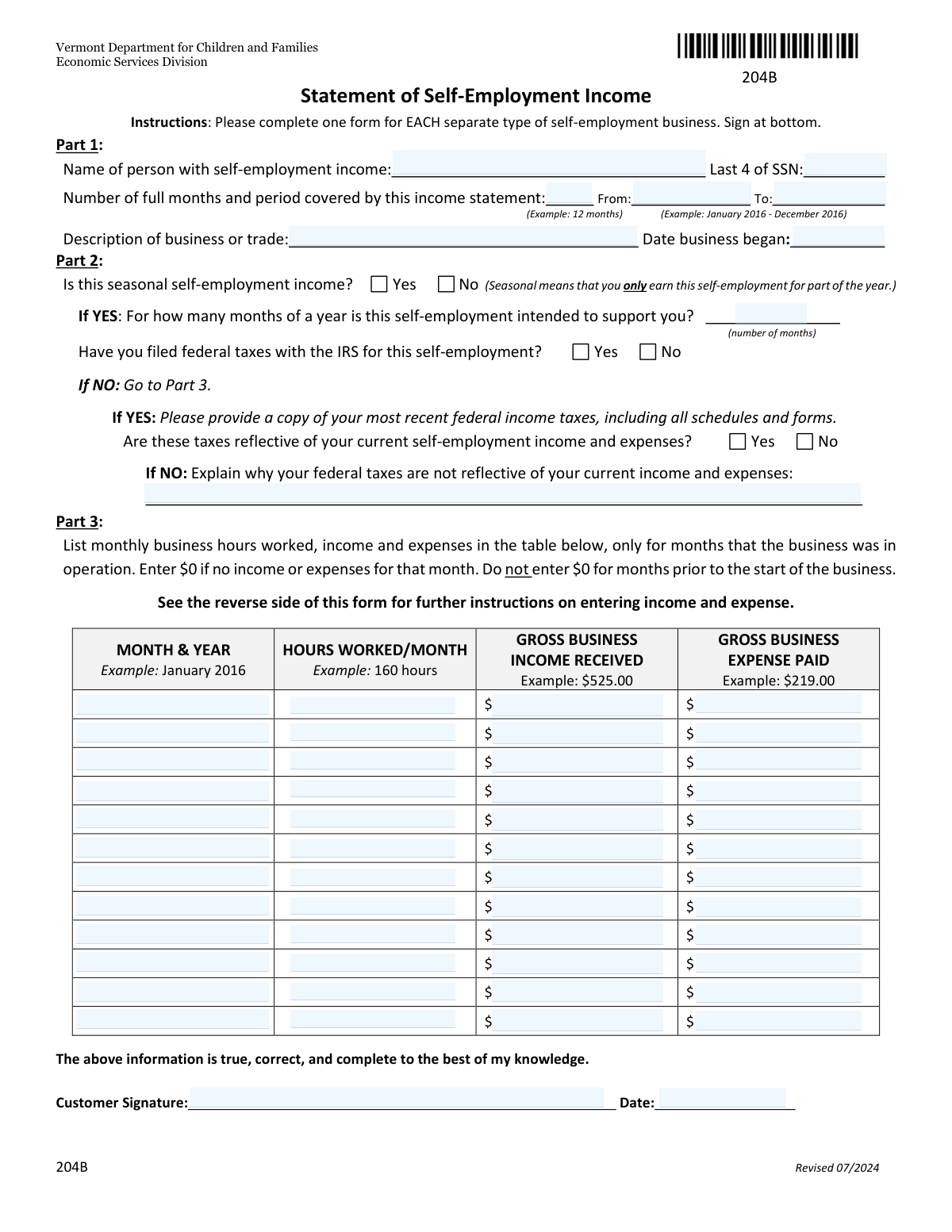
Yes! You can use AI to fill out Form 204B, Statement of Self-Employment Income

Form 204B, the Statement of Self-Employment Income, is a document used by the Vermont Department for Children and Families' Economic Services Division. It allows self-employed individuals to report their business income and expenses, which is crucial for determining eligibility for various state assistance programs. Today, this form can be filled out quickly and accurately using AI-powered services like Instafill.ai, which can also convert non-fillable PDF versions into interactive fillable forms.
Our AI automatically handles information lookup, data retrieval, formatting, and form filling.
It takes less than a minute to fill out 204B using our AI form filling.
Securely upload your data. Information is encrypted in transit and deleted immediately after the form is filled out.

Form specifications

Form name: Form 204B, Statement of Self-Employment Income
Number of pages: 1
Language: English
Categories: employment forms, self employment forms
main-image

Instafill Demo: How to fill out PDF forms in seconds with AI

How to Fill Out 204B Online for Free in 2026

Are you looking to fill out a 204B form online quickly and accurately? Instafill.ai offers the #1 AI-powered PDF filling software of 2026, allowing you to complete your 204B form in just 37 seconds or less.
Follow these steps to fill out your 204B form online using Instafill.ai:
  1. 1 Navigate to Instafill.ai and upload or select Form 204B.
  2. 2 Provide your personal information, business description, and the reporting period in Part 1.
  3. 3 Complete Part 2 by indicating if your income is seasonal and whether you have filed federal taxes for the business.
  4. 4 In Part 3, use the AI-powered table to list your monthly business hours, gross income received, and gross expenses paid for each month of operation.
  5. 5 Carefully review all the information populated by the AI to ensure it is accurate and complete.
  6. 6 Electronically sign and date the form to certify that the provided information is true to the best of your knowledge.

Our AI-powered system ensures each field is filled out correctly, reducing errors and saving you time.

Why Choose Instafill.ai for Your Fillable 204B Form?

Speed

Complete your 204B in as little as 37 seconds.

Up-to-Date

Always use the latest 2026 204B form version.

Cost-effective

No need to hire expensive lawyers.

Accuracy

Our AI performs 10 compliance checks to ensure your form is error-free.

Security

Your personal information is protected with bank-level encryption.

Frequently Asked Questions About Form 204B

This form is used to report your income and expenses from a self-employment business to the Vermont Department for Children and Families. It helps the Economic Services Division determine your eligibility for benefits by providing a clear picture of your business's finances.

You need to fill out this form if you are applying for or receiving benefits and have income from your own business, trade, or profession where you are not considered an employee of another company.

Yes, the instructions state that you must complete a separate Form 204B for each type of self-employment business you operate.

If you have filed taxes, you must provide a copy of your most recent federal income tax return, including all schedules. If those taxes accurately reflect your current income, you may not need to complete the monthly breakdown in Part 3.

You must indicate that your taxes are not reflective of your current situation, explain why, and then complete Part 3 with a detailed monthly breakdown of your current business income and expenses.

Seasonal self-employment means you only earn income from the business during certain parts of the year, not year-round. If this applies to you, you must specify how many months of the year this income is intended to support you.

You should report the gross income (the total amount before any deductions) in the month you actually received the payment, not the month you performed the work. If a month had no income while the business was operating, enter $0.

You can claim direct costs of doing business, such as supplies, raw materials, rent for office space, business insurance, and advertising. You cannot claim personal expenses, depreciation, or wages paid to yourself.

The form instructs you not to enter any information for months prior to the start of your business. Only begin filling out the table from the month your business began operating.

Yes, if you have filed federal taxes for this self-employment, you must provide a copy of your most recent federal income tax return, including all schedules and forms.

Yes, services like Instafill.ai use AI to help you accurately auto-fill form fields based on your information, which can save time and help prevent errors.

You can use a service like Instafill.ai to upload the form and fill it out on your computer. This allows you to type your information, save your progress, and easily print the completed document for submission.

If you have a non-fillable or 'flat' PDF, you can use a tool like Instafill.ai. It can convert the document into an interactive, fillable form that you can complete on your device.

Compliance 204B
Validation Checks by Instafill.ai

1
Validates SSN Format
This check ensures the 'Last 4 of SSN' field contains exactly four numeric digits. This is critical for maintaining data integrity and correctly identifying the individual associated with the income statement. If the entry is not four digits, the form will display an error and prevent submission until corrected.
2
Ensures Logical Coverage Period
This validation confirms that the 'To' date of the coverage period is on or after the 'From' date. A reporting period cannot end before it begins. This check is essential for establishing a valid timeframe for the income being reported and prevents nonsensical data entry.
3
Validates Consistency of Coverage Period Duration
This check verifies that the number entered in the 'Number of full months' field accurately corresponds to the duration between the 'From' and 'To' dates. For instance, a period from January to June should have '6' as the number of months. This ensures the summary information is consistent with the detailed period, which is crucial for accurate income averaging.
4
Verifies Business Start Date is Before Reporting Period
This validation ensures the 'Date business began' is on or before the 'From' date of the income reporting period. It is logically impossible to report income from a business for a period before it was in operation. An error will be triggered if the start date is after the reporting period begins, requiring the user to correct the dates.
5
Conditional Requirement for Seasonal Support Months
This check makes the 'months self-employment intended to support' field mandatory if the user selects 'Yes' for 'Is this seasonal self-employment income?'. This information is vital for correctly annualizing seasonal income to determine eligibility for benefits. The form cannot proceed without this value if the seasonal condition is met.
6
Conditional Requirement for Tax Reflection Explanation
This validation requires the user to fill out the 'Explain why your federal taxes are not reflective' text box if they answer 'No' to the question 'Are these taxes reflective of your current self-employment income and expenses?'. The explanation is critical for an assessor to understand why the provided tax documents differ from the current situation. Submission is blocked until this required explanation is provided.
7
Ensures Completeness of Monthly Data Entries
For each row in the monthly income table (Part 3), if a 'MONTH & YEAR' is entered, this check requires that the 'HOURS WORKED', 'GROSS BUSINESS INCOME', and 'GROSS BUSINESS EXPENSE' fields also contain a numeric value (including $0). This prevents incomplete monthly records that would lead to inaccurate income calculations. The system will highlight any incomplete rows and require them to be filled.
8
Validates Chronology of Monthly Income Entries
This check verifies that each 'MONTH & YEAR' entered in the Part 3 table falls within the 'From' and 'To' date range specified in Part 1. It also ensures that no monthly entry predates the 'Date business began'. This maintains the logical and temporal integrity of the financial data being reported, preventing out-of-scope entries.
9
Verifies Signature Date is After Reporting Period
This validation ensures the 'Date' the form is signed is on or after the 'To' date of the income reporting period. A user cannot legally attest to the completeness and accuracy of a period's income before that period has concluded. This check prevents premature submissions and ensures the attestation is valid.
10
Validates Numeric Format for Financial and Hour Fields
This check ensures that all fields for hours, income, and expenses in the Part 3 table contain only valid numeric characters. It prohibits text, currency symbols, or commas within the field to ensure the data can be used in automated calculations. If non-numeric data is entered, an error message will prompt the user for a valid number.
11
Validates Range for Seasonal Support Months
If employment is marked as seasonal, this check ensures the value for 'months self-employment intended to support' is a whole number between 1 and 12. This prevents illogical entries such as 0 or 15 months in a year. An invalid entry would trigger an error message asking for a number within the correct range.
12
Cross-Validates Monthly Entry Count with Stated Duration
This validation compares the number of completed monthly data rows in Part 3 against the 'Number of full months' declared in Part 1. If the user states the period covers 6 months, the system will expect exactly 6 monthly rows to be filled out. This ensures the detailed breakdown perfectly matches the summary information provided, preventing discrepancies.
13
Mandatory Field Completion
This check verifies that all fields explicitly marked as required, such as 'Name of person with self-employment income', 'Description of business or trade', and 'Customer Signature', are not left blank. This is a fundamental check to ensure the form is complete enough for processing. The user will be notified of any missed required fields before they can submit the form.
14
Conditional Requirement for Tax Reflection Status
This validation ensures that if the user indicates 'Yes' to having filed federal taxes, they must also answer the follow-up question 'Are these taxes reflective of your current self-employment income and expenses?'. This is a critical branching question that determines whether the user needs to complete the detailed income breakdown in Part 3. The form cannot proceed without an answer to this question if the condition is met.

Common Mistakes in Completing 204B

Combining Multiple Businesses on a Single Form

Applicants with multiple distinct self-employment activities, such as rideshare driving and freelance graphic design, often consolidate them onto one form to save time. This leads to an inaccurate financial picture for each business, causing the form to be rejected and delaying the processing of benefits. To avoid this, a separate Form 204B must be completed and submitted for each individual type of self-employment.

Reporting Net Income Instead of Gross Income

Many people are accustomed to thinking about their 'take-home' or net profit, so they mistakenly subtract expenses from their income before entering it in the 'Gross Business Income' column. This makes the form incorrect, as the agency needs to see gross figures to apply the correct deductions according to program rules, leading to rejection and delays. Always enter the total income received before any deductions in the income column and list all costs separately in the expense column.

Claiming Non-Allowable Business Expenses

Applicants frequently list personal expenses or costs that are explicitly disallowed by the program, such as depreciation, mileage from home to a primary work site, or the personal portion of a phone bill. This happens due to a misunderstanding of program rules versus general tax rules and results in an incorrect net income calculation and processing delays. Carefully review the list of non-allowable expenses on the form's second page and exclude them from your calculations.

Mismatching Reporting Period Dates and Duration

An applicant might write '12 months' in the 'Number of full months' field but then enter a date range like 'January 2023 - January 2024,' which covers 13 months. This simple miscalculation creates confusion for the case worker and requires follow-up for clarification, delaying the application. To prevent this, carefully count the number of full months between your 'From' and 'To' dates to ensure the numbers align perfectly.

Reporting Income Based on Work Date, Not Payment Date

The form requires income to be reported in the month it was 'received,' but people often list it in the month the work was completed or invoiced. This can create discrepancies with bank statements and lead to an inaccurate monthly income assessment, potentially delaying benefits. You must record all income in the specific month the payment was actually received, whether by cash, check, or direct deposit.

Forgetting to Sign and Date the Form

Forgetting to sign and date the form is one of the most common and easily avoidable mistakes, often happening when an applicant is rushing. An unsigned form is legally invalid and cannot be processed, causing a complete halt to the application until a signed version is submitted. Always perform a final review of the document, paying special attention to the signature and date fields at the bottom.

Filling Out Table Rows for Pre-Business Months

The instructions state not to enter data for months before the business started, but applicants sometimes fill these rows with '$0' to be thorough. This misrepresents the business's operational history and can confuse the reviewer about the actual start date, requiring clarification. Leave all rows for months prior to your business start date completely blank and only begin entries in the month the business became operational.

Failing to Attach Required Tax Documents

In Part 2, if an applicant indicates they have filed federal taxes for the business, they are required to submit a copy of the return and all schedules. People often forget to include these attachments with their submission. This renders the application incomplete, and all processing stops until the necessary documents are provided. If you check 'Yes' for filing taxes, ensure you have a complete copy ready to submit along with the form.

Incomplete Answers for Conditional Questions

Applicants may answer a 'Yes/No' question in Part 2 but fail to complete the required follow-up field, such as explaining why taxes are not reflective of current income or stating how many months seasonal income is intended to cover. This oversight leaves the form incomplete and requires the agency to contact the applicant for more information, delaying a decision. Read each question carefully and ensure any conditional follow-up fields are fully completed based on your answer.

Using Incorrect Date or Currency Formats

Data entry errors, such as writing dates in an inconsistent format (e.g., 'Jan 24' vs '01/2024') or omitting dollar signs and cents for monetary values, are very common. These inconsistencies can slow down data processing and lead to calculation errors. To avoid this, use a consistent date format (MM/YYYY) and write all monetary values with dollars and cents (e.g., $525.00). Since this form is a non-fillable PDF, using a tool like Instafill.ai can convert it into a smart, fillable version that helps validate data formats as you type.
Saved over 80 hours a year

“I was never sure if my IRS forms like W-9 were filled correctly. Now, I can complete the forms accurately without any external help.”

Kevin Martin Green

Your data stays secure with advanced protection from Instafill and our subprocessors

Robust compliance program

Transparent business model

You’re not the product. You always know where your data is and what it is processed for.

ISO 27001, HIPAA, and GDPR

Our subprocesses adhere to multiple compliance standards, including but not limited to ISO 27001, HIPAA, and GDPR.

Security & privacy by design

We consider security and privacy from the initial design phase of any new service or functionality. It’s not an afterthought, it’s built-in, including support for two-factor authentication (2FA) to further protect your account.

Fill out 204B with Instafill.ai

Worried about filling PDFs wrong? Instafill securely fills form-204b-statement-of-self-employment-income forms, ensuring each field is accurate.