Yes! You can use AI to fill out Application for a Residency and Employment Rights Certificate
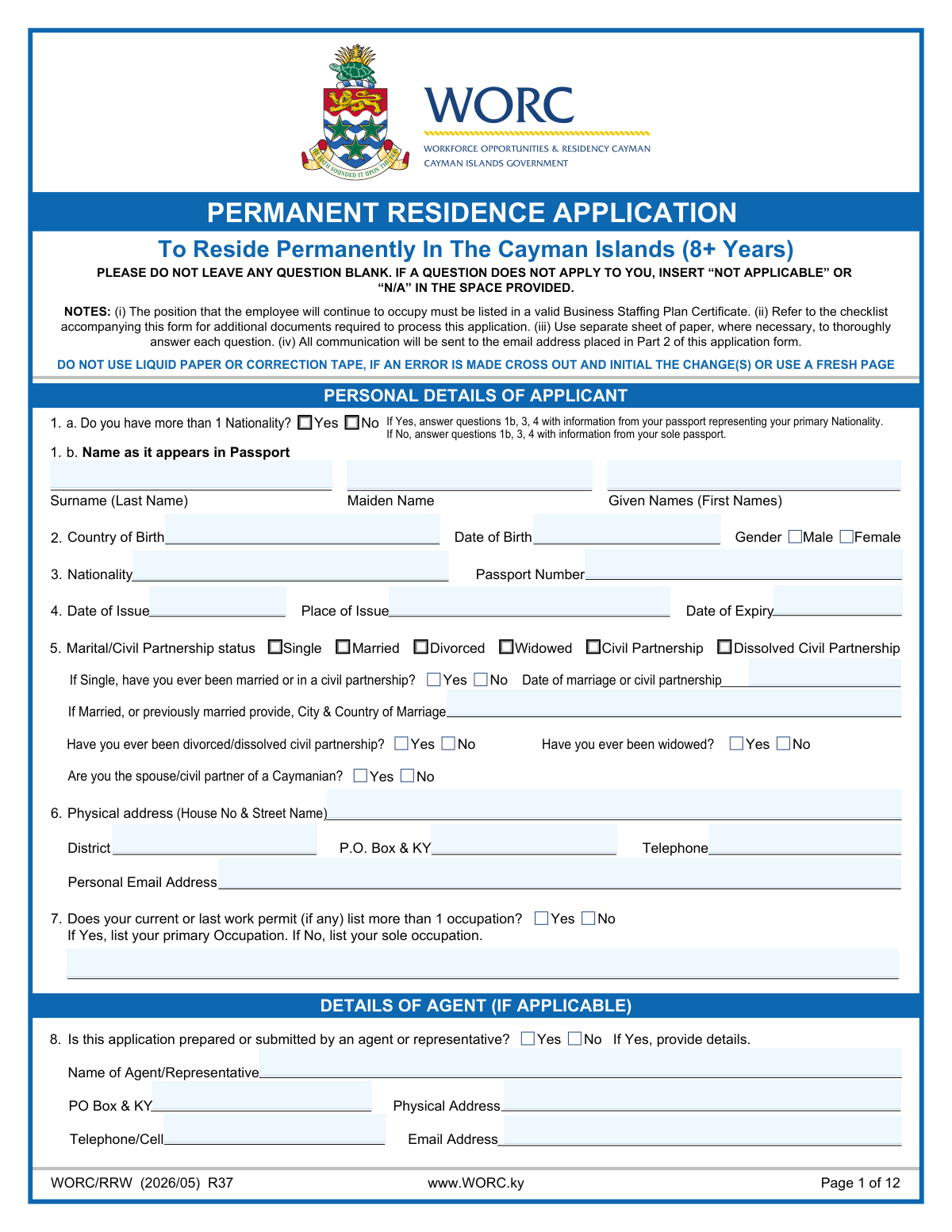
The Application for a Residency and Employment Rights Certificate (RERC) is a comprehensive form submitted to the Cayman Islands government by individuals seeking long-term residency status. This application is a critical step for expatriates who have lived and worked in the islands for a qualifying period and wish to secure their right to remain and work without the need for a standard work permit. The form requires detailed information on personal background, employment history, financial stability, and connections to the Caymanian community. Today, this complex form can be filled out quickly and accurately using AI-powered services like Instafill.ai, which can also convert non-fillable PDF versions into interactive fillable forms.
Cayman Islands RERC Application is part of the
employment application forms, employment forms and residency forms categories on Instafill.
Our AI automatically handles information lookup, data retrieval, formatting, and form filling.
It takes less than a minute to fill out Cayman Islands RERC Application using our AI form filling.
Securely upload your data. Information is encrypted in transit and deleted immediately after the form is filled out.
Form specifications
| Form name: | Application for a Residency and Employment Rights Certificate |
| Number of fields: | 464 |
| Number of pages: | 12 |
| Language: | English |
More forms in Employment application forms
Instafill Demo: How to fill out PDF forms in seconds with AI
How to Fill Out Cayman Islands RERC Application Online for Free in 2026
Are you looking to fill out a CAYMAN ISLANDS RERC APPLICATION form online quickly and accurately? Instafill.ai offers the #1 AI-powered PDF filling software of 2026, allowing you to complete your CAYMAN ISLANDS RERC APPLICATION form in just 37 seconds or less.
Follow these steps to fill out your CAYMAN ISLANDS RERC APPLICATION form online using Instafill.ai:
- 1 Navigate to Instafill.ai and upload the RERC application form, or select it from a template library.
- 2 Use the AI assistant to automatically fill in your personal details, such as name, date of birth, passport information, and contact address.
- 3 Provide comprehensive details about your employment history, spouse's employment, educational qualifications, and professional skills as prompted.
- 4 Enter your financial information, including income, on-island property ownership, local investments, and pension plan details.
- 5 Complete the sections on community involvement and your Caymanian connections, providing details about family ties or local engagement.
- 6 Carefully review all the information entered by the AI and yourself, make any necessary corrections, and then electronically sign and date the form.
- 7 Download the completed application and use the provided checklist to gather all necessary supporting documents like birth certificates, police clearance, and financial statements for submission.
Our AI-powered system ensures each field is filled out correctly, reducing errors and saving you time.
Why Choose Instafill.ai for Your Fillable Cayman Islands RERC Application Form?
Speed
Complete your Cayman Islands RERC Application in as little as 37 seconds.
Up-to-Date
Always use the latest 2026 Cayman Islands RERC Application form version.
Cost-effective
No need to hire expensive lawyers.
Accuracy
Our AI performs 10 compliance checks to ensure your form is error-free.
Security
Your personal information is protected with bank-level encryption.
Frequently Asked Questions About Form Cayman Islands RERC Application
This form is a comprehensive application for individuals seeking a Residency & Employment Rights Certificate in the Cayman Islands. It gathers detailed personal, financial, professional, and familial information to assess your eligibility.
You must enter your name exactly as it appears in your passport for the 'Surname', 'Given Names', and 'Maiden Name' fields. Consistency with your passport is crucial for this application.
Check the box for 'Yes (More than 1 Nationality)' and enter the details of the passport you are using for this application in the main passport section. Be prepared to provide documentation for all nationalities you hold as part of your submission.
For your current status, check the 'Single' box. You must also answer the follow-up questions, indicating 'Yes' to 'Ever been married or in a civil partnership' and 'Yes' to 'Have you ever been divorced/dissolved civil partnership?'.
This section requires you to detail your participation in local Caymanian community activities, such as volunteering for non-profits or assisting in church programs. You need to specify the organization, your role, the number of years involved, and the hours contributed.
This section is for applicants who have a direct family relationship with a Caymanian, such as being a parent, child, grandchild, or sibling. Documenting these ties can be an important factor in the evaluation of your application.
The form has a detailed checklist at the end, which includes items like a cover letter, passport photos, birth certificates, police clearance records, and proof of finances. You must gather all required documents and submit them with your completed application form and fee.
Yes, the form requires detailed personal and employment information for your spouse, regardless of whether they are also applying. You must complete the 'PERSONAL DETAILS OF SPOUSE' and the spouse's employment sections (Questions 11 & 12) if applicable.
No, you are not required to use an agent or representative and can complete the form yourself. If you do use an agent, you must fill out the 'Agent/Representative Details' section completely.
Yes, services like Instafill.ai use AI to auto-fill form fields accurately and save time. This can be especially helpful for a complex, multi-page form like this, ensuring consistency and reducing manual entry.
You can use a service like Instafill.ai to complete this form digitally. Simply upload the PDF, and the platform will make it interactive, allowing you to type your answers directly into the fields and save your progress.
If you have a non-fillable or 'flat' PDF, Instafill.ai can convert it into an interactive, fillable form. This allows you to easily type in your information, save it, and print it without needing to write everything by hand.
You must disclose this information honestly by checking 'Yes' in the relevant sections (32a, 32b, 32c). You are required to provide specific details about the nature of the offense or fine, the date, location, and the outcome.
You must provide details of any property owned or investments made in the Cayman Islands. The form states that certified copies of corresponding documents, such as property deeds, investment statements, and bank references, must be attached to your application.
Compliance Cayman Islands RERC Application
Validation Checks by Instafill.ai
1
Passport Date Chronology
This validation ensures that the 'Passport Date of Expiry' is a date that occurs after the 'Passport Date of Issue'. This is a critical logical check to ensure the passport information provided is valid and not entered erroneously. If the expiry date is before the issue date, the submission should be blocked, and the user prompted to correct the dates, as this represents an impossible scenario.
2
Applicant Age and Event Chronology
This check verifies that the applicant's 'Date of Birth' precedes other key life event dates, such as 'Passport Date of Issue' and 'Date of Marriage/Civil Partnership'. This ensures the chronological integrity of the applicant's history, confirming they were alive when these events occurred. A failure would indicate a data entry error, and the user must correct the dates before proceeding.
3
Conditional Requirement for Agent Details
This validation enforces that if the 'Agent/Representative - Yes' box is checked, then the corresponding agent detail fields ('Agent/Representative Name', 'Physical Address', 'Telephone/Cell', 'Email Address') must be completed. This is important for ensuring that if an agent is involved, their contact information is captured for communication and accountability. If the fields are empty, the form cannot be submitted until the information is provided.
4
Conditional Requirement for Employment Details
This check ensures that if the applicant selects 'Yes' for 'Applicant Full-time Employment', all related employer fields ('Employer / Business Name', 'Employer Physical Address', 'Employer Telephone Number', etc.) become mandatory. This rule guarantees that claims of employment are substantiated with complete and contactable information. If the employment details are missing, the user will be prompted to fill them in before the form can be accepted.
5
Exclusive Gender Selection
This validation ensures that an applicant can only select one option for gender, either 'Male' or 'Female'. It prevents logically impossible submissions where both or neither option is selected. This is a fundamental data integrity check to ensure the data collected is clean and unambiguous. If an invalid selection is made, the user should be immediately notified to select only one option.
6
Email Address Format Validation
This check verifies that the values entered into 'Personal Email Address' and 'Agent/Representative Details - Email Address' fields conform to a standard email format (e.g., '[email protected]'). This is crucial for ensuring that any electronic communication regarding the application will be successfully delivered. If the format is invalid, the user should receive an error message prompting them to enter a valid email address.
7
Minimum Age Verification
This validation calculates the applicant's age based on the 'Date of Birth' provided and ensures it is at least 18 years. This is a common legal or administrative requirement for applications of this nature. If the calculated age is less than 18, the application should be flagged or rejected, with a clear message explaining the minimum age requirement.
8
Conditional Requirement for Criminal Record Details
This rule validates that if 'Yes' is selected for questions regarding arrests, convictions, or administrative fines (e.g., 'Arrested_Yes_19'), the corresponding detail fields ('Nature of Offence', 'Date', 'Location', 'Verdict and Sentence') must be filled out. This ensures that any declaration of a criminal history is accompanied by a mandatory explanation. Failure to provide details would halt submission and require the user to complete the relevant sections.
9
Spouse Information Requirement Based on Marital Status
This check ensures that if the applicant's marital status is anything other than 'Single' (e.g., 'Civil Partnership', 'Widowed', 'Divorced'), the 'PERSONAL DETAILS OF SPOUSE' section is required. This logic ensures that relevant information about a current or former spouse is captured when applicable. If the applicant indicates they are or have been married, but the spouse section is empty, the form should prompt them to complete it.
10
Cayman Islands Postal Code Format
This validation checks that any field labeled 'P.O. Box & KY' contains a postal code that follows the correct Cayman Islands format (e.g., KY1-1101). This ensures mailability and standardizes address data within the system. An invalid format would trigger an error message asking the user to correct the postal code.
11
Logical Check for Years of Experience
This validation compares the 'Years of Full-Time Experience' against the applicant's age calculated from their 'Date of Birth'. The years of experience should not be greater than the applicant's age minus a reasonable starting work age (e.g., 16). This acts as a sanity check to catch significant data entry errors. If the experience seems impossibly high, the user should be warned and asked to confirm the value.
12
Contradictory Answer Prevention
This validation prevents the user from selecting both 'Yes' and 'No' for the same question, such as 'Have you ever been divorced/dissolved civil partnership? — Yes' and '... — No'. Such a submission is logically inconsistent and indicates an error. The system should be designed to make these choices mutually exclusive, for example, by using radio buttons instead of checkboxes, to prevent this error from occurring.
13
Conditional Marital History Details
This check ensures that if an applicant selects 'Single' for marital status but then indicates 'Yes' for 'Ever been married or in a civil partnership', the 'Date of Marriage/Civil Partnership' and 'City and Country of Marriage/Civil Partnership' fields must be completed. This rule ensures that a complete marital history is provided when relevant. If the details are missing, the form submission should be blocked until the required information is entered.
14
Residency Duration Consistency Check
This validation cross-references the 'Date Became Resident' with the number of 'Months' entered for the duration of residency. The system can calculate the number of months from the provided date to the current date and flag any major discrepancy with the user-entered value. This helps catch typos and ensures the residency claim is internally consistent. A significant mismatch should trigger a warning asking the user to review both fields.
Common Mistakes in Completing Cayman Islands RERC Application
Applicants often enter a shortened name, nickname, or omit middle names, instead of providing their full name exactly as it appears on their passport. This discrepancy between the form and official documents like a passport can cause significant processing delays or even outright rejection of the application. To avoid this, meticulously copy your full legal name, including all given names and the exact spelling of your surname, from your passport into the corresponding fields.
The marital status section contains complex conditional logic that is frequently misunderstood. For example, an applicant might check 'Single' but then fail to answer the follow-up question 'Ever been married or in a civil partnership?'. This leaves a critical gap in their history. It is essential to read each question carefully and complete all relevant sub-sections based on your current and past marital status to provide a complete and accurate declaration.
Simple data entry errors in the passport section are extremely common, such as transposing digits in the passport number, using an incorrect date format (e.g., MM/DD/YY instead of DD/MM/YY), or providing an abbreviated 'Place of Issue'. These mistakes can fail verification checks and halt the application process. Double-checking every digit and letter against the physical passport is crucial for accuracy.
This form is filled with sections that only need to be completed if a specific answer, usually 'Yes', is selected in a prior question. A frequent mistake is checking 'Yes' (e.g., 'Agent/Representative - Yes') but then failing to provide the required detailed information in the subsequent fields. This leaves the application incomplete and requires follow-up from the processing authority, causing delays. Always ensure that if you answer 'Yes' to a question, you complete all dependent fields that follow.
The form specifically requests both a physical address and a P.O. Box. Applicants sometimes enter their P.O. Box in the physical address field or use it for both. A physical address is required for residency verification and cannot be a post office box. This error can lead to issues verifying legal residence and cause returned mail or missed communications.
When detailing employment or financial information, such as property ownership or investments, applicants often provide incomplete data. For example, they might list an employer's name but omit the full address and phone number, or list a property's block and parcel but forget the ownership percentage. Each field is required for a reason, and missing details will result in requests for more information, delaying the assessment of the application.
In sections for education and special skills, applicants tend to use generic terms like 'Business Degree' or 'IT skills' instead of providing the specific information requested. The form requires full degree titles, specialisms, awarding institutions, and years of experience. Vague answers make it impossible for reviewers to accurately assess the applicant's qualifications against the criteria, potentially weakening their case. Providing precise and detailed information is essential.
The form asks separately about arrests, convictions, administrative fines, and ethics sanctions. Applicants may mistakenly believe an arrest that didn't lead to a conviction doesn't need to be disclosed, or they may forget to include the date, location, and verdict for each instance. Any omission, intentional or not, can be viewed as misrepresentation and lead to severe consequences, including application denial and future bars on entry. Full and honest disclosure in all parts of this section is non-negotiable.
The final declaration page requires a wet signature, a date, and often notarization with an official seal. Common critical errors include forgetting to sign, dating incorrectly, or obtaining a notarization that is invalid or missing the seal. An application without a valid, properly executed signature and notarization is legally incomplete and will be rejected immediately. This final step must be completed with extreme care.
The form includes a long checklist of required supporting documents, such as birth certificates, police clearance, and financial statements, many of which must be certified copies. A very common mistake is submitting the application form without all the necessary attachments, or providing standard photocopies instead of certified ones. This guarantees the application will be deemed incomplete, stopping the process until the correct documents are provided. AI-powered tools like Instafill.ai can help by managing a checklist and ensuring all required documents are accounted for before submission.
Saved over 80 hours a year
“I was never sure if my IRS forms like W-9 were filled correctly. Now, I can complete the forms accurately without any external help.”
Kevin Martin Green
Your data stays secure with advanced protection from Instafill and our subprocessors

Robust compliance program
Transparent business model
You’re not the product. You always know where your data is and what it is processed for.
ISO 27001, HIPAA, and GDPR
Our subprocesses adhere to multiple compliance standards, including but not limited to ISO 27001, HIPAA, and GDPR.
Security & privacy by design
We consider security and privacy from the initial design phase of any new service or functionality. It’s not an afterthought, it’s built-in, including support for two-factor authentication (2FA) to further protect your account.
Fill out Cayman Islands RERC Application with Instafill.ai
Worried about filling PDFs wrong? Instafill securely fills application-for-a-residency-and-employment-rights-certificate forms, ensuring each field is accurate.