Yes! You can use AI to fill out Claim for Special Employment Advance (SU514)

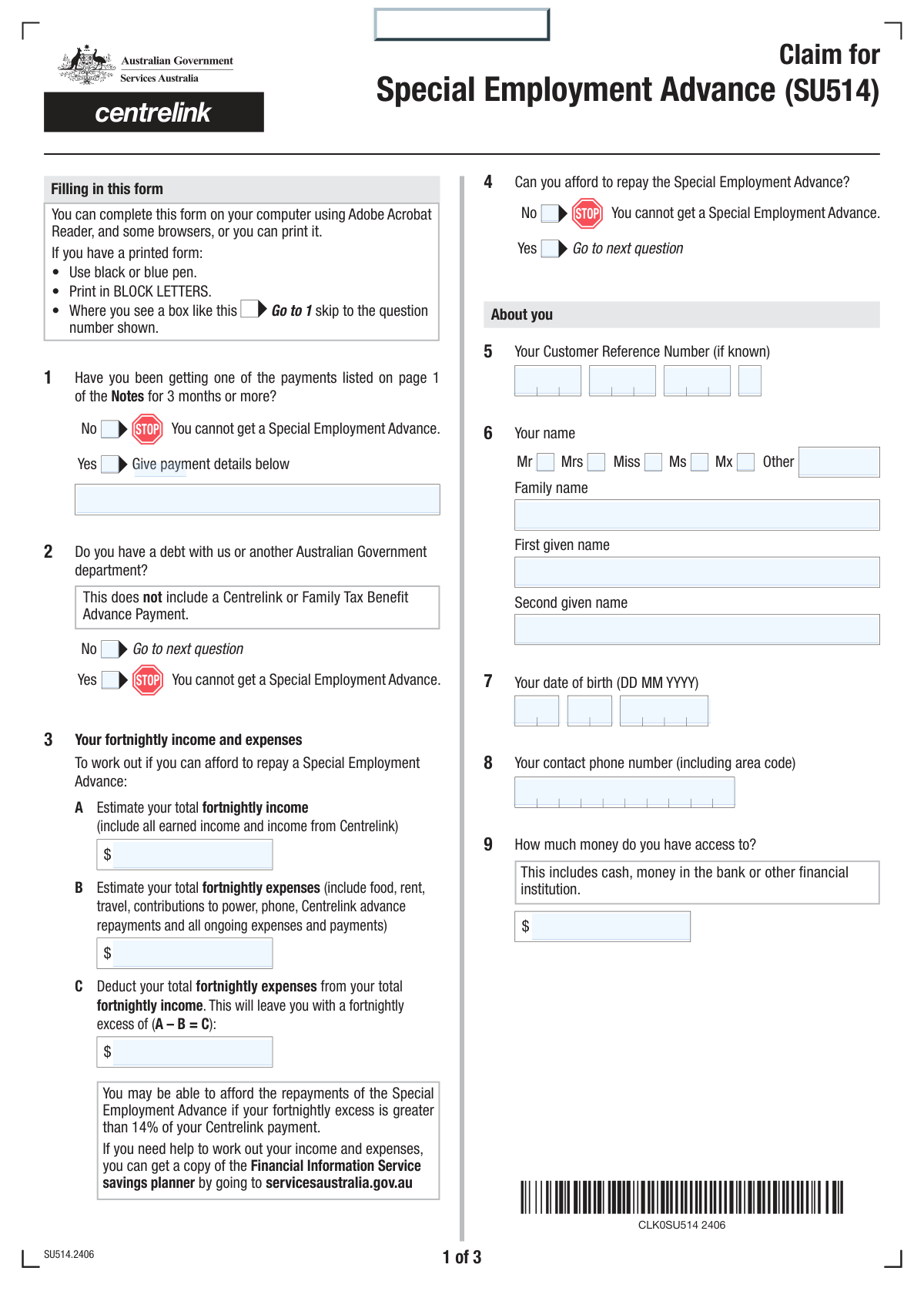
The Claim for Special Employment Advance (SU514) is a Services Australia/Centrelink form that lets eligible payment recipients apply for a repayable advance to cover essential costs related to starting work or managing a short-term cash shortfall when wages are owed but not yet received. The form collects your eligibility details (payment history, debts), your budget (fortnightly income/expenses), personal details, employer/work details, and the amount requested, and it requires supporting evidence to be lodged with the claim. It is important because incomplete claims or missing documents may lead to the claim not being accepted, and the advance must be repaid (usually via deductions from ongoing payments). Today, this form can be filled out quickly and accurately using AI-powered services like Instafill.ai, which can also convert non-fillable PDF versions into interactive fillable forms.
Our AI automatically handles information lookup, data retrieval, formatting, and form filling.
It takes less than a minute to fill out SU514 using our AI form filling.
Securely upload your data. Information is encrypted in transit and deleted immediately after the form is filled out.

Form specifications

Form name: Claim for Special Employment Advance (SU514)
Number of pages: 5
Language: English
Categories: employment forms, Work and Income forms, financial assistance forms, social welfare forms
main-image

Instafill Demo: filling out a legal form in seconds

How to Fill Out SU514 Online for Free in 2026

Are you looking to fill out a SU514 form online quickly and accurately? Instafill.ai offers the #1 AI-powered PDF filling software of 2026, allowing you to complete your SU514 form in just 37 seconds or less.
Follow these steps to fill out your SU514 form online using Instafill.ai:
  1. 1 Go to Instafill.ai and upload the SU514 “Claim for Special Employment Advance” form (or select it from the form library).
  2. 2 Let the AI detect and map the form fields, then enter/confirm your eligibility details (e.g., receiving an eligible payment for 3+ months, any government debt).
  3. 3 Provide your budget figures by entering total fortnightly income, total fortnightly expenses, and the calculated fortnightly excess to confirm you can afford repayments.
  4. 4 Complete your personal details (name, date of birth, contact phone, Customer Reference Number) and the amount of money you can access.
  5. 5 Enter employer details and select the correct reason for the claim (offered a job needing an essential expense, or worked but not yet paid), then fill the relevant work/expense sections (job start date, item/service and costs, unpaid work dates and expected pay dates).
  6. 6 Upload all required supporting documents (e.g., evidence of job offer, proof of essential expense, or evidence of unpaid earnings) and review the completed form for accuracy and consistency.
  7. 7 Accept the declaration/privacy statements, generate the final submission-ready PDF, and lodge it as instructed (e.g., upload via your Centrelink online account or submit in person if required).

Our AI-powered system ensures each field is filled out correctly, reducing errors and saving you time.

Why Choose Instafill.ai for Your Fillable SU514 Form?

Speed

Complete your SU514 in as little as 37 seconds.

Up-to-Date

Always use the latest 2026 SU514 form version.

Cost-effective

No need to hire expensive lawyers.

Accuracy

Our AI performs 10 compliance checks to ensure your form is error-free.

Security

Your personal information is protected with bank-level encryption.

Frequently Asked Questions About Form SU514

The SU514 form is used to claim a Special Employment Advance from Services Australia (Centrelink). It’s a repayable advance to help you start a job or cover costs when you’ve worked but haven’t been paid yet.

You can apply if you have been receiving one of these payments for 3 months or more: Austudy Payment, Carer Payment, Disability Support Pension, JobSeeker Payment, Parenting Payment (Single), or Youth Allowance.

The advance is repayable and can be between $50 and $500. The amount you receive depends on your circumstances and eligibility.

You can claim if (1) you’ve been offered a job lasting at least 6 weeks but can’t afford an essential expense to start, or (2) you (or your partner) have worked but haven’t been paid yet, don’t expect payment within 2 days, and your earnings reduced your Centrelink payment by at least 50%.

You must return all supporting documents at the same time you lodge the claim form, or your claim may not be accepted. The only exception is if you are waiting for documents from a third party (for example, an employer).

If you have not been getting one of the listed payments for 3 months or more, you cannot get a Special Employment Advance. You should not continue the claim because it will be rejected.

If you answer “Yes” to having a debt with Services Australia or another Australian Government department, you cannot get a Special Employment Advance. Note: this does not include a Centrelink or Family Tax Benefit Advance Payment.

Enter your total fortnightly income in 3A (including wages and Centrelink), your total fortnightly expenses in 3B (rent, food, utilities, travel, repayments, etc.), then subtract B from A to get your fortnightly excess in 3C. The notes indicate you may be able to afford repayments if your excess is greater than 14% of your Centrelink payment.

It means the total funds you can access right now, including cash and money in bank accounts or other financial institutions. Do not include a Centrelink or Family Tax Benefit Advance Payment.

Provide the employer’s name, address, a contact person, phone number, and the type of work. If you have more than one employer, attach a separate sheet with the additional employer details.

You must provide evidence you’ve been offered a job, the expected start date, the item/service you need to start work, the total cost, and the amount you need from Centrelink (minimum $50). You also need to state whether someone else (like an Employment Services Provider) can help with the expense.

List the dates worked, the gross amount (before tax) not yet paid, and the date you expect to be paid (you can provide up to two entries). In Question 19, request the amount you need (minimum $50), noting it cannot be more than the amount deducted from your Centrelink payment due to the unpaid employment income.

If you continue receiving a payment, Services Australia will deduct a fortnightly amount until the advance is repaid. If you stop receiving payments, the remaining amount becomes a debt and you’ll be sent an account with repayment instructions.

You can return the form and supporting documents online using your Centrelink online account, or in person at a service centre. A signature is only required if you are returning the form in person (you must print and sign by hand).

Yes—AI tools like Instafill.ai can help by auto-filling form fields accurately from your information, saving time and reducing errors. If your PDF is flat or not fillable, Instafill.ai can convert it into an interactive fillable form and then help you complete it online.

Compliance SU514
Validation Checks by Instafill.ai

1
Q1 eligibility duration selection is exclusive and required
Validate that exactly one of Q1-Yes or Q1-No is selected. This is the primary eligibility gate (must have been on an eligible payment for 3+ months) and drives whether the claim can proceed. If both or neither are selected, the submission must be rejected and the user prompted to choose one option.
2
Q1 payment details required when Q1 = Yes
If Q1-Yes is selected, require Q1 Payment name/code and Q1 Payment details to be present and non-empty. This information is needed to confirm the applicant is receiving an eligible payment and to support assessment. If missing, fail validation and request completion before accepting the claim.
3
Q2 debt status selection is exclusive and enforces ineligibility
Validate that exactly one of Q2-Yes or Q2-No is selected. If Q2-Yes is selected, the form indicates the applicant cannot get a Special Employment Advance, so the system should block submission or route to an ineligible outcome. If the selection is missing or contradictory, stop processing and request correction.
4
Q4 affordability selection is exclusive and enforces ineligibility
Validate that exactly one of Q4-Yes or Q4-No is selected. If Q4-No is selected, the form states the applicant cannot get the advance, so the system should prevent continuing to identity/employment sections and return an ineligible result. If both/neither are selected, fail validation and require a single choice.
5
Identity fields required when proceeding (Q4 = Yes)
When Q4-Yes is selected (the user can afford to repay and proceeds), require core identity/contact fields: name (family and first given), date of birth, and contact phone number. These are necessary to match the claim to a customer record and enable follow-up. If any are missing, the claim should be held as incomplete and not accepted.
6
Date of birth format and plausibility (DD MM YYYY)
Validate that Q7 day/month/year form a real calendar date (including leap years) and are in the required digit lengths (2/2/4). Also apply plausibility checks (e.g., DOB not in the future and applicant age within a reasonable range such as 14–120). If invalid, reject the DOB and require correction to avoid identity mismatches and processing errors.
7
Contact phone number format (Australian numbering with area code)
Validate Q8 is a callable phone number: allow spaces, but require a valid digit count and structure (e.g., Australian landline with area code 02/03/07/08 + 8 digits, or mobile 04 + 8 digits; optionally allow +61 formats). This ensures Services Australia can contact the applicant and reduces failed outreach. If invalid, prompt for a corrected number before submission.
8
Customer Reference Number (CRN) segmented format validation
If CRN parts (Q5 Part 1–4) are provided/required, validate each segment matches expected character rules (digits/letters as per CRN standard), preserves leading zeros, and that all segments are present (no partial CRN). This prevents mis-linking the claim to the wrong customer record. If any segment is missing or malformed, fail validation and request re-entry of the full CRN.
9
Fortnightly income/expenses numeric validation and non-negative constraints
Validate Q3A (income), Q3B (expenses), and Q3C (excess) are numeric currency values (no letters), with sensible precision (e.g., max 2 decimals) and are not negative. These values are used to assess repayment capacity and must be machine-readable. If invalid, block submission and request corrected amounts.
10
Fortnightly excess arithmetic consistency (A − B = C)
Validate that Q3C equals Q3A minus Q3B within an acceptable rounding tolerance (e.g., ±$0.01). This prevents inconsistent financial declarations and reduces manual recalculation. If inconsistent, either auto-calculate C from A and B or fail validation and prompt the user to correct the figures.
11
Q11 pathway selection is exclusive and drives conditional sections
Validate that exactly one of the two Q11 options is selected (Offered a job vs Working but not yet paid). This selection determines which downstream questions are required (Q12–Q17 vs Q18–Q19). If both/neither are selected, stop processing and require a single pathway choice.
12
Employer details completeness and address/postcode format
Require employer name, employer address (at least street + suburb/town/city), and postcode, plus a contact person name and phone number, when the claim proceeds. Validate Australian postcode is exactly 4 digits and not all zeros, and validate employer phone number using similar rules to applicant phone. If incomplete or malformed, fail validation because employer verification may be required for eligibility and evidence checks.
13
Offered-a-job pathway: job start date validity and required evidence flag
If Q11 Option 1 is selected, require Q12 job expected start date and validate it is a real date and not unreasonably far in the past (typically should be today or future for a job offer). The form also states evidence of job offer must be provided; the system should require an attachment indicator or document checklist completion. If the date is invalid or evidence is missing (and not marked as pending third-party), the claim should be rejected as incomplete.
14
Offered-a-job pathway: item/service and amount rules (min $50, requested ≤ cost)
If Q11 Option 1 is selected, require Q13 item/service description, Q14 total cost, and Q15 amount requested. Validate Q15 is at least $50 and no more than $500, and that Q15 does not exceed Q14 (you cannot request more than the item/service cost). If any rule fails, block submission and prompt for corrected amounts to comply with program limits.
15
Working-not-yet-paid pathway: dates worked and expected payment date logic
If Q11 Option 2 is selected, require at least one complete work-period row in Q18 (From date, To date, Amount not yet paid, Expected payment date). Validate each From date is on/before the To date, and the expected payment date is on/after the To date; also validate all dates are real calendar dates. If any row is partially filled or logically inconsistent, fail validation to prevent incorrect assessment of unpaid earnings.
16
Working-not-yet-paid pathway: Q19 requested amount minimum and cap tied to unpaid earnings impact
If Q11 Option 2 is selected, require Q19 amount requested and validate it is at least $50 and no more than $500. Additionally, enforce the form rule that the advance cannot be more than the amount deducted from the Centrelink payment due to the unpaid employment income; operationally, this should be checked against calculated/known reduction or, at minimum, against the total unpaid amounts declared in Q18 as a consistency guard. If the requested amount exceeds allowable limits, the claim should be blocked or adjusted with an explicit validation error.

Common Mistakes in Completing SU514

Answering Q1 incorrectly (3-month payment eligibility)

People often tick the wrong box in Q1 or misunderstand that you must have been receiving an eligible payment for 3 months or more to qualify. If you select 'No' (or leave it blank), the form indicates you cannot get a Special Employment Advance and your claim may be rejected immediately. Double-check you are on one of the listed payments and that the 3-month requirement is met before selecting 'Yes' and adding the payment details. AI-powered form filling tools like Instafill.ai can help by prompting for eligibility checks and preventing contradictory selections.

Providing payment details when Q1 is 'No' (or not providing them when Q1 is 'Yes')

A common error is filling the payment name/code and payment details even though Q1 is marked 'No', or marking 'Yes' but leaving the payment fields empty. This creates an inconsistent application that can trigger follow-up requests or delays because the assessor cannot confirm eligibility. Only complete the payment name/code and details if Q1 is 'Yes', and include enough information to identify the payment clearly. Instafill.ai can reduce this by enforcing conditional logic so the right fields appear (and required fields are completed) based on your answer.

Misunderstanding Q2 debt question (including advances that are excluded)

Applicants frequently answer 'Yes' to Q2 because they have (or had) a Centrelink/Family Tax Benefit advance, even though the form states those advances are not included in this debt question. Selecting 'Yes' can make you ineligible (“you cannot get a Special Employment Advance”), so an incorrect tick can wrongly block your claim. Read the exclusion carefully and only answer 'Yes' if you have a debt with Services Australia or another Australian Government department (other than those advances). Instafill.ai can help by flagging this common misunderstanding and guiding you through what counts as a debt for this question.

Incorrect fortnightly income/expense figures (mixing weekly/monthly amounts)

Many people enter weekly or monthly numbers in Q3A/Q3B instead of converting everything to fortnightly amounts, or they forget to include Centrelink income in Q3A. This can produce an incorrect Q3C “fortnightly excess,” which may lead to a decision that you cannot afford repayments or may trigger requests for clarification. Convert all amounts to a fortnightly basis and include all ongoing expenses (rent, utilities, travel, existing advance repayments, etc.). Instafill.ai can help by standardizing time periods and validating that A − B equals C.

Math errors or leaving Q3C blank (A − B = C)

Applicants often forget to calculate Q3C, enter a number that doesn’t match A minus B, or accidentally reverse the subtraction. Inconsistent totals can slow processing because the form is used to assess repayment affordability and may require manual review. Always compute Q3C directly from the figures you entered in Q3A and Q3B and re-check the arithmetic. Instafill.ai can automatically calculate and validate Q3C to prevent mismatches.

Selecting the wrong option in Q11 (offered a job vs worked but not yet paid)

People sometimes tick both options, tick the wrong one, or don’t follow the skip instruction (e.g., selecting the 'worked but not yet paid' scenario but still filling the 'offered a job' section). This leads to missing required evidence or missing required dates/income details for the correct pathway, which can cause delays or rejection. Choose the single option that matches your situation and complete only the relevant questions that follow (Q12–Q17 for offered-a-job; Q18–Q19 for worked-not-yet-paid). Instafill.ai can enforce the branching logic so you only see and complete the correct section.

Requesting an amount below $50 or above allowable limits (Q15/Q19)

A frequent mistake is requesting less than the $50 minimum, or requesting more than the item/service cost (Q14) in the offered-a-job pathway. In the worked-not-yet-paid pathway, applicants may request more than the amount deducted from their Centrelink payment due to the unpaid employment income, which the form states is not allowed. These errors can result in the claim being adjusted, delayed, or not accepted. Ensure the requested amount meets the minimum and stays within the stated caps for your pathway; Instafill.ai can validate ranges and cross-check requested amounts against related fields.

Missing or insufficient supporting documents (especially job offer evidence)

The notes state you must return all supporting documents at the same time you lodge the claim (except when waiting on third-party documents), but applicants often submit the form without attachments. For the offered-a-job option, evidence of the job offer is explicitly required, and missing it can cause the claim to be not accepted. Gather and upload all required evidence (job offer letter/contract, quotes/invoices for the essential item/service, and any other requested proof) in one submission. Instafill.ai can help by generating a checklist of required documents based on your answers and ensuring you don’t submit without them.

Incomplete employer details (Q10) or not adding a separate sheet for multiple employers

Applicants often provide only an employer name without address, contact person, phone number, or type of work, or they forget to attach a separate sheet when they have more than one employer. Incomplete employer information can prevent Services Australia from verifying employment details, leading to follow-up contact and processing delays. Provide full employer details exactly as per your contract/payslip and include a separate sheet if there are multiple employers. Instafill.ai can prompt for missing employer sub-fields and keep formatting consistent.

Date format mistakes (DOB, job start date, dates worked, expected payment date)

This form requires DD MM YYYY, but people commonly enter MM/DD/YYYY, use text months, or enter single-digit days/months without leading zeros. Invalid or inconsistent dates can cause validation errors (e.g., “Enter a valid 2 digit day/month”) or misinterpretation of employment timelines, which may affect eligibility. Always use two digits for day and month and four digits for year (e.g., 05 04 2026). Instafill.ai can format dates correctly and validate that they are real calendar dates.

Forgetting the declaration tick, date, or signature requirements (Q21)

Applicants often forget to tick the declaration box, omit the declaration date, or misunderstand that a signature is only required if returning the form in person. Missing declaration elements can make the submission incomplete and delay acceptance, while unnecessary signatures can create confusion if the form is lodged online. Always tick the declaration, date it in DD MM YYYY, and only sign if you are submitting in person. Instafill.ai can ensure the declaration fields are completed correctly and remind you when a signature is (and isn’t) required.
Saved over 80 hours a year

“I was never sure if my IRS forms like W-9 were filled correctly. Now, I can complete the forms accurately without any external help.”

Kevin Martin Green

Your data stays secure with advanced protection from Instafill and our subprocessors

Robust compliance program

Transparent business model

You’re not the product. You always know where your data is and what it is processed for.

ISO 27001, HIPAA, and GDPR

Our subprocesses adhere to multiple compliance standards, including but not limited to ISO 27001, HIPAA, and GDPR.

Security & privacy by design

We consider security and privacy from the initial design phase of any new service or functionality. It’s not an afterthought, it’s built-in, including support for two-factor authentication (2FA) to further protect your account.

Fill out SU514 with Instafill.ai

Worried about filling PDFs wrong? Instafill securely fills claim-for-special-employment-advance-su514 forms, ensuring each field is accurate.