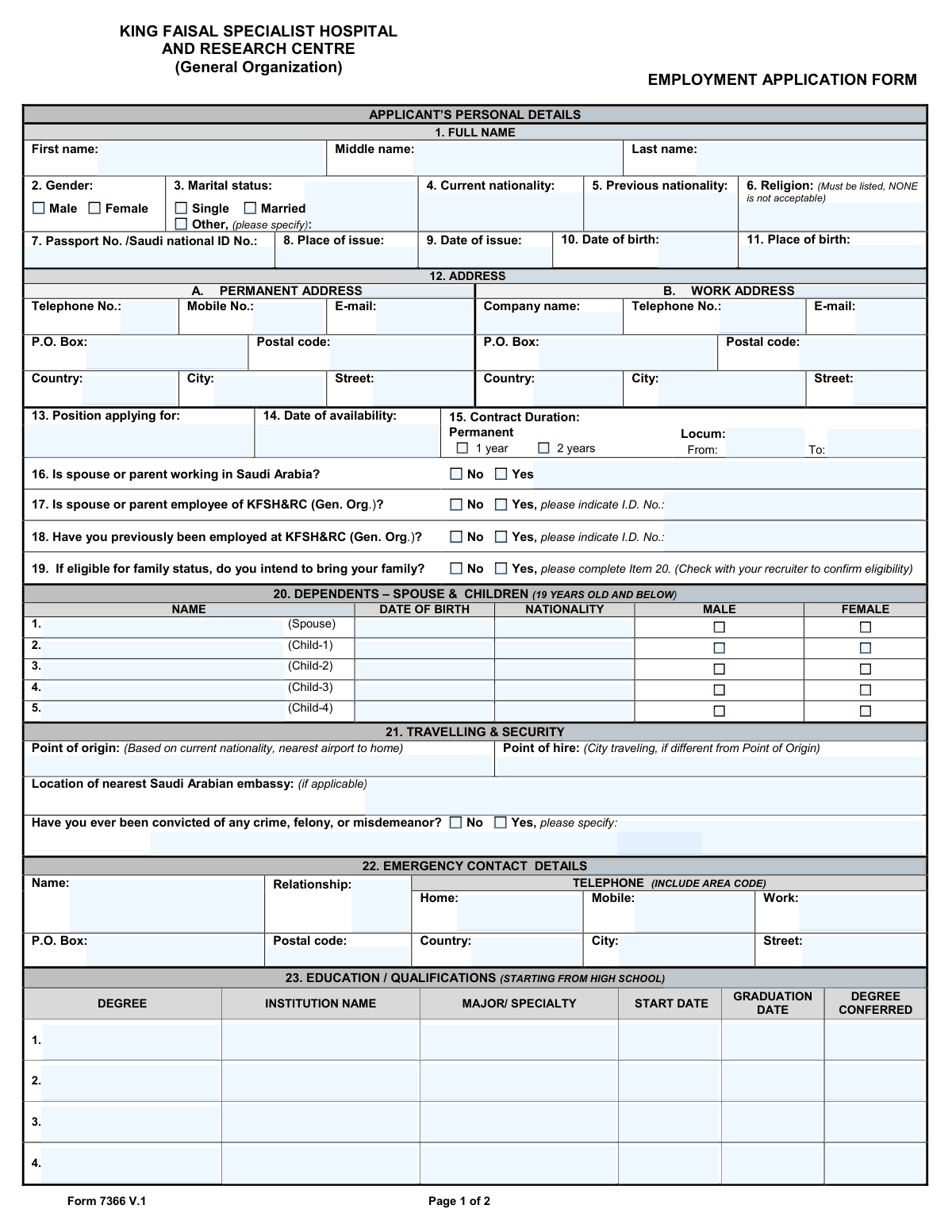
Yes! You can use AI to fill out King Faisal Specialist Hospital and Research Centre (General Organization) Employment Application Form
Form 7366 V.1 is an employment application for individuals seeking a position at the King Faisal Specialist Hospital and Research Centre in Saudi Arabia. It collects comprehensive information from applicants, including personal details, contact information, educational background, professional licenses, and a detailed employment history. This information is crucial for the hospital's recruitment team to assess a candidate's suitability for a role. Today, this form can be filled out quickly and accurately using AI-powered services like Instafill.ai, which can also convert non-fillable PDF versions into interactive fillable forms.
Our AI automatically handles information lookup, data retrieval, formatting, and form filling.
It takes less than a minute to fill out Form 7366 V.1 using our AI form filling.
Securely upload your data. Information is encrypted in transit and deleted immediately after the form is filled out.
Form specifications
| Form name: | King Faisal Specialist Hospital and Research Centre (General Organization) Employment Application Form |
| Number of pages: | 2 |
| Language: | English |
| Categories: | hospital forms, employment forms, employment application forms |
Instafill Demo: How to fill out PDF forms in seconds with AI
How to Fill Out Form 7366 V.1 Online for Free in 2026
Are you looking to fill out a FORM 7366 V.1 form online quickly and accurately? Instafill.ai offers the #1 AI-powered PDF filling software of 2026, allowing you to complete your FORM 7366 V.1 form in just 37 seconds or less.
Follow these steps to fill out your FORM 7366 V.1 form online using Instafill.ai:
- 1 Navigate to Instafill.ai and upload or select the KFSH&RC Employment Application Form.
- 2 Use the AI assistant to automatically fill in your personal details, including your full name, contact information, nationality, and passport details.
- 3 Specify the position you are applying for, your availability, and provide information about your dependents and family status.
- 4 Enter your educational qualifications, starting from high school, and list all relevant professional registrations, licenses, or certifications.
- 5 Detail your employment history, beginning with your most recent job, including company names, dates, and position titles.
- 6 Review all the auto-filled information for accuracy and make any necessary corrections or additions.
- 7 Electronically sign and date the application to affirm that all information provided is true and correct before submitting it.
Our AI-powered system ensures each field is filled out correctly, reducing errors and saving you time.
Why Choose Instafill.ai for Your Fillable Form 7366 V.1 Form?
Speed
Complete your Form 7366 V.1 in as little as 37 seconds.
Up-to-Date
Always use the latest 2026 Form 7366 V.1 form version.
Cost-effective
No need to hire expensive lawyers.
Accuracy
Our AI performs 10 compliance checks to ensure your form is error-free.
Security
Your personal information is protected with bank-level encryption.
Frequently Asked Questions About Form Form 7366 V.1
This is the official Employment Application Form (7366 V.1) for individuals applying for any position at the King Faisal Specialist Hospital and Research Centre (KFSH&RC).
Any candidate seeking employment at KFSH&RC, whether for a permanent, contract, or locum position, must complete this form as part of their application process.
The form requires a religion to be listed as per the organization's policy. You should enter your religion as stated on your official documents or consult with your recruiter for specific guidance on how to complete this field.
This section is for your spouse and children aged 19 years or younger. Before completing this, you should confirm your eligibility for family status with your recruiter.
'Point of origin' refers to the nearest international airport to your home based on your nationality. 'Point of hire' is the city you will be traveling from to start your job, if it is different from your point of origin.
You must list your educational qualifications starting from high school. For each qualification, provide the degree, institution name, major/specialty, and the start and graduation dates.
You should list your work experience beginning with your most recent job first. Ensure you provide all requested details, including the company name, your manager's name, contact information, and employment dates for each role.
Yes, you must disclose any conviction for any crime, felony, or misdemeanor. Check the 'Yes' box and provide a brief explanation in the space provided.
It is helpful to have your passport or Saudi national ID, educational certificates, professional licenses, and a summary of your employment history on hand. This will ensure you can provide accurate dates and details.
You would check 'Yes' for question 16 ('Is spouse or parent working in Saudi Arabia?'). For question 17 ('Is spouse or parent employee of KFSH&RC?'), you would check 'No'.
Yes, services like Instafill.ai use AI to help you accurately auto-fill form fields from your saved profile. This can save you significant time and help prevent errors.
To fill this form online, upload the PDF to the Instafill.ai platform. The AI will make the fields interactive, allowing you to either fill them manually or use the auto-fill feature to complete the application quickly.
If you have a flat or non-fillable PDF, you can use a tool like Instafill.ai. It can convert the document into an interactive, fillable form that you can complete and sign digitally.
Compliance Form 7366 V.1
Validation Checks by Instafill.ai
1
Validates Religion Field Entry
This check ensures the 'Religion' field is not empty and does not contain the word 'NONE' or similar variations. The form explicitly requires this information for processing within the organization's specific context. An invalid or missing entry will halt the application process until a valid religion is provided.
2
Logical Check for Passport Issue Date
This validation compares the 'Date of birth' with the passport's 'Date of issue'. It ensures the issue date is on or after the applicant's date of birth, preventing a logical impossibility. This check helps catch data entry errors and confirms the validity of the provided passport information, which is critical for visa processing and identity verification.
3
Conditional Validation for Previous KFSH&RC Employment ID
This check verifies that if the applicant selects 'Yes' for 'Have you previously been employed at KFSH&RC?', the corresponding 'I.D. No.' field is filled. This ID is crucial for retrieving past employment records, verifying history, and determining re-hire eligibility. If the box is checked but the ID is missing, the form will prompt the user to provide the number before submission.
4
Conditional Validation for Dependent Information
This validation ensures that if an applicant answers 'Yes' to 'do you intend to bring your family?', at least one entry is made in the 'DEPENDENTS' section (Item 20). This information is necessary for assessing visa requirements, housing, and other benefits related to family status. If 'Yes' is selected without dependent details, the application will be considered incomplete.
5
Verifies Dependent Child's Age Limit
This check calculates the age of each dependent listed as a 'Child' based on their 'DATE OF BIRTH' and the current date. It ensures the child's age does not exceed 19 years, as specified by the form's instructions. This is important for determining eligibility for family status benefits like housing and education allowances. Dependents older than 19 will be flagged for review.
6
Ensures Logical Chronology of Education Dates
For each entry in the 'EDUCATION / QUALIFICATIONS' section, this validation confirms that the 'GRADUATION DATE' is after the 'START DATE'. This maintains the logical integrity of the applicant's educational history and prevents simple data entry mistakes. An entry with an impossible date range would require correction before the form can be processed.
7
Ensures Logical Chronology of Employment Periods
For each entry in the 'EMPLOYMENT HISTORY' section, this validation checks that the 'TO' date is after the 'FROM' date. This ensures the employment timeline is logical and allows for accurate calculation of work experience duration. An incorrect sequence would flag the entry for correction by the applicant.
8
Validates Professional License Status and Expiry Date
This check ensures that if the 'Valid, Until:' status is selected for a professional license, the corresponding date field is filled with a date that is in the future. This validation is critical for roles requiring current licensure, ensuring the applicant is legally qualified to practice. An expired or improperly documented license would make the candidate ineligible for certain positions.
9
Conditional Validation for Criminal Conviction Details
This validation verifies that if the applicant checks 'Yes' for 'Have you ever been convicted of any crime...', the corresponding specification text field is not empty. Providing details is mandatory for the security and background check process. An application with 'Yes' checked but no explanation will be flagged as incomplete and require the applicant to provide the necessary information.
10
Validates Format of Email Addresses
This check ensures that the values entered into all 'E-mail' fields follow the standard format of an email address (e.g., [email protected]). Correct email formatting is essential for ensuring the hospital can communicate with the applicant regarding their application status. An invalid format would trigger an error message prompting the user to correct the entry.
11
Ensures 'Position applying for' is Specified
This validation confirms that the 'Position applying for' field is not left blank. This information is fundamental to the entire application process, as it determines which department reviews the application and what qualifications are relevant. An application without a specified position cannot be routed or evaluated, so this field is mandatory.
12
Logical Check for Age at Start of Education
This validation compares the applicant's 'Date of birth' with the 'START DATE' of their first listed education entry (which should be high school). It ensures the applicant was at a reasonable age (e.g., at least 12 years old) when they began their secondary education. This acts as a sanity check to catch significant data entry errors in the dates provided.
13
Conditional Validation for 'Other' Marital Status
This check ensures that if the 'Other' option is selected for 'Marital status', the adjacent text field for specifying the status is filled out. This information is required for HR to correctly understand the applicant's personal situation for benefits and legal documentation. If 'Other' is selected and the specification is blank, the form will prompt the user for input.
14
Completeness Check for Applicant's Full Name
This validation ensures that the 'First name' and 'Last name' fields are both completed. A full legal name is the primary identifier for an applicant and is essential for background checks, communication, and all official employment documents. An application missing a first or last name will be rejected as incomplete.
15
Conditional Requirement for Spouse/Parent KFSH&RC ID
This check verifies that if an applicant selects 'Yes' for 'Is spouse or parent employee of KFSH&RC?', the corresponding 'I.D. No.' field is filled. This information is important for internal policies related to nepotism, conflicts of interest, and potential referral programs. Failure to provide the ID when 'Yes' is selected will result in an incomplete application.
Common Mistakes in Completing Form 7366 V.1
The form explicitly asks applicants to list work experience 'beginning with your most recent job.' Many people default to listing their first job first, which is incorrect and makes it harder for recruiters to see their most relevant experience. This can lead to a negative first impression or require the recruiter to spend extra time reorganizing the information. To avoid this, always read instructions carefully and list your jobs in reverse chronological order, starting with the most recent.
Applicants often make errors in the dependents section by forgetting to fill out all columns (Name, DOB, Nationality, Gender) for each person, or by listing children over the age of 19. Incomplete or inaccurate information can significantly delay the processing of family status visas and benefits. Double-check that every dependent listed meets the age criteria and that all their details are entered correctly and completely.
The form states that the religion field 'Must be listed, NONE is not acceptable,' which is a strict requirement for applications in Saudi Arabia. Applicants may overlook this note or feel uncomfortable, leading them to leave it blank or write 'N/A', which will render the application incomplete. To ensure your application is processed, you must enter a recognized religion as this information is required for visa and residency purposes in the country.
When asked for a 'Date of availability,' applicants frequently write 'ASAP' or 'Immediately.' While this shows enthusiasm, it is not a specific date and creates ambiguity for HR and hiring managers who need to plan interview schedules and start dates. Always provide a specific date (e.g., '15-August-2024') or a clear timeframe (e.g., 'Two weeks after offer') to facilitate smoother recruitment planning.
In the 'Professional Registrations' section, applicants often list a license but fail to properly indicate its status by checking 'Valid' or 'Expired,' and neglect to provide the 'Valid, Until' date. This missing detail is critical for credentialing and can halt the application process, as the hospital must verify that you are legally qualified to practice. If the form is a non-fillable PDF, a tool like Instafill.ai can convert it into an interactive version, making it easier to see and complete all checkboxes and corresponding date fields.
The form requires the name of the immediate manager and contact details for each past employer, which are essential for reference checks. Applicants often leave these fields blank, especially for older jobs, assuming they are not important. Failure to provide this information can be a major red flag and may prevent the hospital from verifying your employment history, potentially leading to your application being rejected.
Applicants often misunderstand the distinction between 'Point of origin' (nearest airport to your home based on nationality) and 'Point of hire' (the city you are traveling from for the job, if different). This information is crucial for arranging travel, calculating relocation benefits, and visa processing. Confusing the two can lead to logistical errors and delays, so carefully read the definitions on the form to ensure you provide the correct city for each field.
Throughout the form, applicants must enter numerous dates (birth, passport issue, employment). A common mistake is using inconsistent formats like MM/DD/YY and DD-MM-YYYY interchangeably, which can cause data entry errors and misinterpretation. AI-powered form filling tools like Instafill.ai excel at preventing this by automatically standardizing all dates into a required, unambiguous format as you fill out the document.
Several questions, such as 'Is spouse or parent employee of KFSH&RC?', require an ID number if the answer is 'Yes.' Applicants frequently check 'Yes' but forget to fill in the corresponding detail field. This omission creates extra work for HR and delays the application's progress. Intelligent form fillers can help by automatically revealing and highlighting required follow-up fields based on your answers, ensuring you don't miss them.
The education section specifically instructs applicants to start from high school, but many professionals only list their university degrees, assuming high school is irrelevant. This fails to follow instructions and can result in an application being flagged as incomplete for credentialing or background verification. Tools like Instafill.ai can help parse your full educational history from a resume and populate all entries, reducing the chance of accidentally omitting required information like high school.
Saved over 80 hours a year
“I was never sure if my IRS forms like W-9 were filled correctly. Now, I can complete the forms accurately without any external help.”
Kevin Martin Green
Your data stays secure with advanced protection from Instafill and our subprocessors

Robust compliance program
Transparent business model
You’re not the product. You always know where your data is and what it is processed for.
ISO 27001, HIPAA, and GDPR
Our subprocesses adhere to multiple compliance standards, including but not limited to ISO 27001, HIPAA, and GDPR.
Security & privacy by design
We consider security and privacy from the initial design phase of any new service or functionality. It’s not an afterthought, it’s built-in, including support for two-factor authentication (2FA) to further protect your account.
Fill out Form 7366 V.1 with Instafill.ai
Worried about filling PDFs wrong? Instafill securely fills king-faisal-specialist-hospital-and-research-centre-general-organization-employment-application-form forms, ensuring each field is accurate.