Yes! You can use AI to fill out Hospital Affiliation and Privileges Form

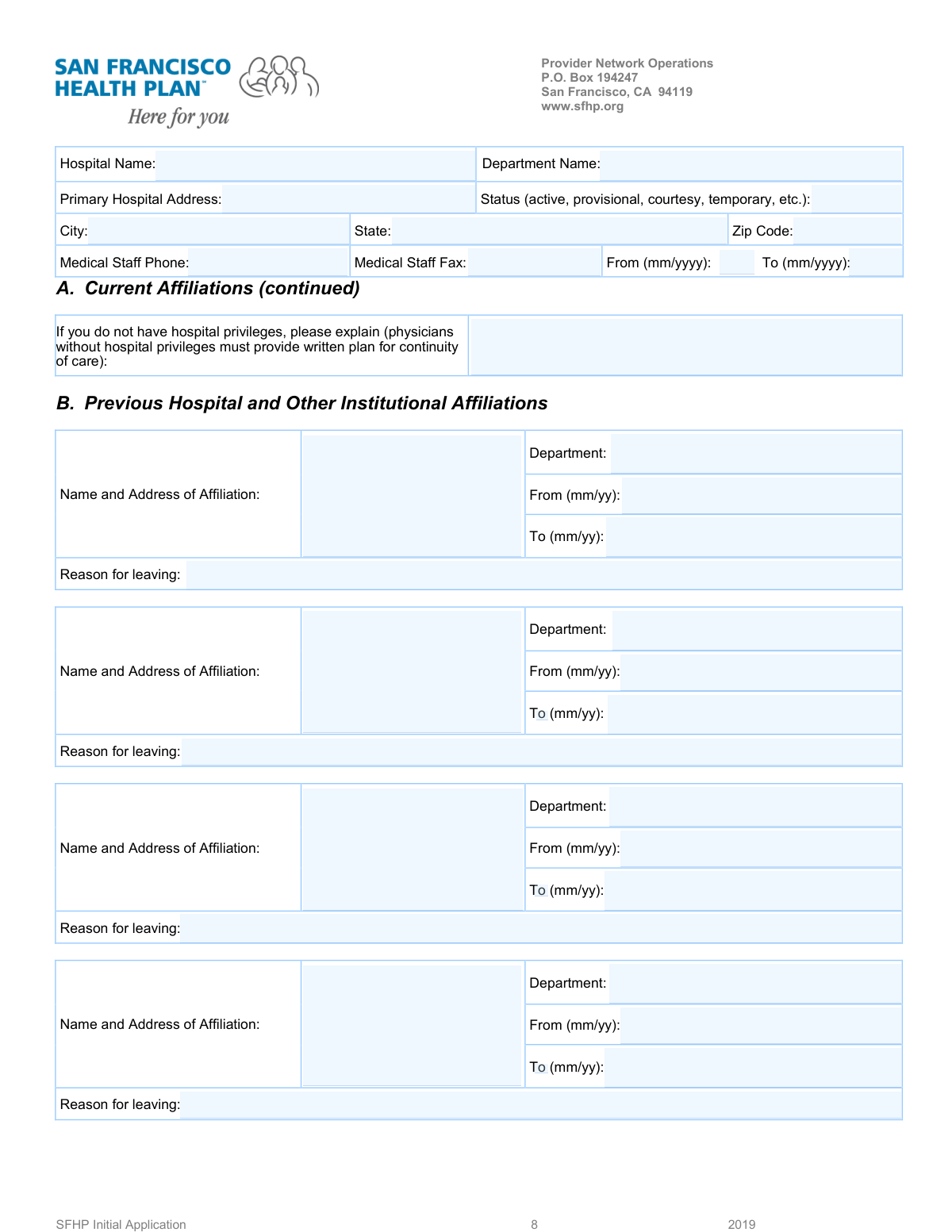
A Hospital Affiliation and Privileges Form is a critical document in the medical credentialing process. It requires healthcare professionals to provide a detailed history of their current and past affiliations with hospitals and other medical institutions, including dates, departments, and reasons for leaving. This information is vital for hospitals and insurance networks to verify a provider's background, experience, and qualifications before granting privileges or network participation. Today, this form can be filled out quickly and accurately using AI-powered services like Instafill.ai, which can also convert non-fillable PDF versions into interactive fillable forms.
Our AI automatically handles information lookup, data retrieval, formatting, and form filling.
It takes less than a minute to fill out Hospital Affiliation Form using our AI form filling.
Securely upload your data. Information is encrypted in transit and deleted immediately after the form is filled out.

Form specifications

Form name: Hospital Affiliation and Privileges Form
Number of fields: 35
Number of pages: 1
Language: English
Categories: hospital forms
main-image

Instafill Demo: How to fill out PDF forms in seconds with AI

How to Fill Out Hospital Affiliation Form Online for Free in 2026

Are you looking to fill out a HOSPITAL AFFILIATION FORM form online quickly and accurately? Instafill.ai offers the #1 AI-powered PDF filling software of 2026, allowing you to complete your HOSPITAL AFFILIATION FORM form in just 37 seconds or less.
Follow these steps to fill out your HOSPITAL AFFILIATION FORM form online using Instafill.ai:
  1. 1 Navigate to Instafill.ai and upload your Hospital Affiliation Form or select it from the available templates.
  2. 2 Provide your basic personal information to allow the AI to begin populating the document.
  3. 3 Enter the details of your current hospital affiliation, including the hospital's name, full address, your department, and status.
  4. 4 Systematically list each previous hospital affiliation. For each entry, provide the institution's name, address, department, start and end dates, and the reason for leaving.
  5. 5 If you have gaps in your affiliation history or lack current hospital privileges, provide a detailed explanation as requested on the form.
  6. 6 Thoroughly review all the information auto-filled by the AI. Verify that all names, dates, and addresses are correct before proceeding.
  7. 7 Electronically sign the form and submit it directly or download the completed document for your records.

Our AI-powered system ensures each field is filled out correctly, reducing errors and saving you time.

Why Choose Instafill.ai for Your Fillable Hospital Affiliation Form Form?

Speed

Complete your Hospital Affiliation Form in as little as 37 seconds.

Up-to-Date

Always use the latest 2026 Hospital Affiliation Form form version.

Cost-effective

No need to hire expensive lawyers.

Accuracy

Our AI performs 10 compliance checks to ensure your form is error-free.

Security

Your personal information is protected with bank-level encryption.

Frequently Asked Questions About Form Hospital Affiliation Form

This form is used to collect and verify a medical professional's current and past hospital or institutional affiliations. It is a standard part of the credentialing, licensing, or employment process.

This form must be completed by healthcare providers, such as physicians, who are applying for or renewing hospital privileges, seeking employment, or undergoing a credentialing review.

For each previous affiliation, you must provide the institution's name and address, your department, the start and end dates of the affiliation, and the reason for leaving.

In the section provided, you must give a clear explanation for why you do not have hospital privileges. You may also need to include your written plan for ensuring continuity of care for your patients.

The form provides space to list up to four previous affiliations. If you have more than four, you should attach a separate document with the additional information in the same format.

Some sections provide a 'Present (no end date)' checkbox for affiliations that are still active. If this option is available, check it instead of entering an end date.

This field refers to the type of privileges you hold or held at the facility. Common examples include 'Active,' 'Provisional,' 'Courtesy,' 'Temporary,' or 'Consulting.'

Provide a brief, factual, and professional reason for your departure. Examples include 'Completion of residency/fellowship,' 'Relocated to another city,' or 'Accepted a new position.'

You should provide the direct phone and fax number for the hospital's Medical Staff Office or credentialing department. This is used to verify your affiliation details.

Yes, you can use services like Instafill.ai to help complete this form. These tools use AI to accurately auto-fill fields with your saved information, saving time and reducing potential errors.

To fill this form online, upload the PDF to the Instafill.ai platform. The AI will make the form fillable, and you can then use your saved profile to populate the fields with a single click.

If your PDF is not interactive, you can use a service like Instafill.ai. It can convert flat, non-fillable PDFs into interactive forms that you can easily complete and sign online.

You must provide the full physical street address for the hospital or institution, including the street name and number, city, state, and ZIP code.

Compliance Hospital Affiliation Form
Validation Checks by Instafill.ai

1
Validates Affiliation Date Chronology
This check ensures that for any given affiliation, the 'Affiliation End Date' is not earlier than the 'Affiliation Start Date'. This is crucial for maintaining a logical and accurate timeline of a person's professional history. If the end date precedes the start date, the system should flag an error and require the user to correct the dates before submission.
2
Ensures Sequential Order of Previous Affiliations
This validation verifies that the timeline of previous affiliations is sequential and does not contain logical impossibilities, such as overlaps. For example, the start date of the 'First Previous Affiliation' must be after the end date of the 'Second Previous Affiliation'. This check is vital for creating an accurate, chronological history, and failure would require the user to review and correct their affiliation dates.
3
Validates Phone and Fax Number Format
This check confirms that the 'Medical Staff Phone' and 'Medical Staff Fax' numbers are entered in a standard, valid format (e.g., 10 digits, optionally with parentheses, spaces, or hyphens). Proper formatting is essential for ensuring the contact information is usable for communication and integrates correctly with other systems. An invalid format would trigger an error message prompting the user to re-enter the number correctly.
4
Validates ZIP Code Format and Consistency
This check ensures the 'ZIP Code' field contains a valid 5-digit or 9-digit (ZIP+4) code. It can also perform a more advanced check to verify that the ZIP code corresponds logically with the entered 'City' and 'State'. This validation prevents data entry errors and ensures the accuracy of the hospital's address for mailings and location services. A mismatch would require the user to confirm and correct the address details.
5
Conditional Requirement for 'Reason for Leaving'
This validation rule makes the 'Reason for Leaving' field mandatory if an 'Affiliation End Date' has been provided for any of the previous affiliations. This ensures that a complete record is captured for every past position, which is often a requirement for credentialing and background checks. If an end date is present without a reason, the form submission will be blocked until the explanation is provided.
6
Completeness Check for Previous Affiliation Blocks
This check verifies that if a user begins to fill out a previous affiliation block (e.g., by entering the 'Affiliation Name and Address'), they must also complete other key fields within that same block, such as 'Department' and 'Affiliation Start Date'. This prevents incomplete or orphaned data entries in the user's history. The system should highlight the missing required fields within the specific affiliation block if this rule is violated.
7
Validates 'Present' Checkbox Logic
This check ensures that if the 'Present (no end date)' checkbox is selected for an affiliation, the corresponding 'Affiliation End Date' field is left empty. This prevents contradictory information where an affiliation is marked as both ongoing and having a past end date. If both are filled, the system should display an error and ask the user to either uncheck the box or clear the end date.
8
Validates Date Format for Fourth Previous Affiliation
This rule specifically checks that the 'Fourth Previous Affiliation Start Date' and 'Fourth Previous Affiliation End Date' are entered in the MM/YYYY format, as specified by the field's instructions. Enforcing the correct format ensures data consistency and prevents processing errors for fields with unique requirements. If the date is not in the correct format, the user will be prompted with an example and asked to correct it.
9
Requires Explanation for No Hospital Privileges
This validation makes the 'Explanation if No Hospital Privileges' field mandatory if the applicant has indicated elsewhere on the form that they do not currently hold hospital privileges. This is a critical compliance and patient safety check, ensuring a documented plan for continuity of care exists. Failure to provide this explanation when required would prevent the form from being submitted.
10
Ensures Hospital Name is Provided
This is a fundamental completeness check to ensure the 'Hospital Name' field is not left blank. The hospital name is a primary identifier for the entire record and is essential for processing the application. The form cannot be submitted without this core piece of information.
11
Validates State Field Entry
This check ensures the 'State' field contains a valid, recognized US state or territory, preferably as a 2-letter abbreviation (e.g., CA, NY, TX). Using a predefined list for validation prevents misspellings and ensures data standardization, which is critical for address verification and reporting. An invalid entry would result in an error, prompting the user to select from a valid list or correct the entry.
12
Requires at Least One Medical Staff Contact Method
This validation ensures that either the 'Medical Staff Phone' or the 'Medical Staff Fax' field is completed. It is important to have at least one valid method of contact for the medical staff office for verification purposes. If both fields are left blank, the system should prompt the user to provide at least one form of contact information.
13
Validates General Date Format (MM/DD/YYYY)
This check verifies that all date fields not otherwise specified (e.g., 'Affiliation Start Date' for the first, second, and third previous affiliations) are in a valid MM/DD/YYYY format. Consistent date formatting is crucial for correct date calculations, sorting, and database storage. An invalid format would trigger an error message asking the user to correct the entry.

Common Mistakes in Completing Hospital Affiliation Form

Inconsistent or Incorrect Date Formatting

Applicants often enter dates in a format different from what is requested (e.g., MM/DD/YYYY instead of MM/YY). This occurs because different sections of the form ask for dates in varying formats, leading to confusion and inconsistent data entry. These errors can cause processing delays as the information must be manually corrected, and it may require follow-up with the applicant. To avoid this, carefully read the format specified for each date field; AI-powered tools like Instafill.ai can automatically format dates correctly based on field requirements.

Creating Gaps or Overlaps in Affiliation History

When listing previous affiliations, a critical mistake is entering dates that create unexplained gaps or overlaps between employment periods. Credentialing bodies require a continuous, chronological history, and any discrepancies are major red flags that halt the verification process. This error usually happens from misremembering dates or careless data entry. Always review your affiliation timeline to ensure each end date is immediately followed by the next start date, accounting for every month.

Using Abbreviations for Hospital and Institution Names

People frequently use unofficial abbreviations or shortened names for hospitals (e.g., 'St. Mary's' instead of 'St. Mary's Regional Medical Center'). This creates ambiguity and makes it difficult for reviewers to verify the affiliation with the correct institution. The consequence is a delay while the credentialing staff seeks clarification. To prevent this, always use the full, official legal name of the hospital or institution as it would appear on official documents.

Providing an Incomplete Address for Affiliations

In fields that ask for 'Affiliation Name and Address,' applicants often omit crucial components like the street address, city, state, or ZIP code, providing only the institution's name. This incomplete information prevents the verification team from mailing necessary forms or confirming the location. Ensure you provide the complete and accurate mailing address for every institution listed. If the form is a non-fillable PDF, a tool like Instafill.ai can convert it to a fillable version and help auto-complete addresses to ensure they are complete.

Vague or Unprofessional 'Reason for Leaving' Explanations

Applicants often provide generic or uninformative reasons for leaving, such as 'Personal reasons' or 'Better opportunity.' Credentialing committees require specific, professional explanations to understand the circumstances of your departure (e.g., 'Completed residency program,' 'Relocated to another state'). Vague answers will almost always trigger a request for more detailed information, delaying your application. Be concise but specific, and maintain a professional tone.

Forgetting to Mark an Affiliation as 'Present'

For a current affiliation, applicants may forget to check the 'Present (no end date)' box, leaving the end date field blank. This makes the entry appear incomplete and forces reviewers to follow up to confirm if the affiliation is ongoing or if the date was simply omitted. This simple oversight creates unnecessary administrative work and delays. Always double-check for a 'Present' or 'Current' checkbox if an affiliation has not ended and ensure it is marked.

Transposing Affiliation Start and End Dates

A common data entry slip-up is accidentally swapping the start and end dates for an affiliation, resulting in an end date that occurs before the start date. This logical error immediately invalidates the entry and signals carelessness to the reviewer. This often happens when filling out the form quickly. To avoid this, slowly and carefully review each date pair after entering it to ensure it makes chronological sense.

Insufficient Explanation for No Hospital Privileges

When an applicant does not have hospital privileges, the form requires a detailed explanation, including a plan for continuity of care. A frequent mistake is providing a one-sentence, inadequate response like 'I work in an outpatient clinic.' This fails to address the core requirement of ensuring patient safety in emergencies. You must provide a thorough, written plan detailing how a patient would be transferred and admitted to a hospital, including any agreements with admitting physicians.

Using Internal Acronyms for Department Names

Applicants often use internal jargon or acronyms for department names (e.g., 'Peds' for Pediatrics, 'MICU' for Medical Intensive Care Unit). These acronyms may not be universally understood by form reviewers, leading to confusion about the applicant's specific role and specialty. This can slow down the review process as clarification is sought. Always write out the full, formal name of the department to ensure clarity and accuracy.

Inconsistent Phone and Fax Number Formats

Users enter phone and fax numbers in many different formats (e.g., (123) 456-7890, 123-456-7890, 1234567890), which can cause data import errors for automated systems. While seemingly minor, this inconsistency creates data cleanup work for administrative staff. The best practice is to use a standard format, typically including dashes (e.g., XXX-XXX-XXXX), unless specified otherwise. Using a form-filling tool like Instafill.ai can help by automatically standardizing such inputs.
Saved over 80 hours a year

“I was never sure if my IRS forms like W-9 were filled correctly. Now, I can complete the forms accurately without any external help.”

Kevin Martin Green

Your data stays secure with advanced protection from Instafill and our subprocessors

Robust compliance program

Transparent business model

You’re not the product. You always know where your data is and what it is processed for.

ISO 27001, HIPAA, and GDPR

Our subprocesses adhere to multiple compliance standards, including but not limited to ISO 27001, HIPAA, and GDPR.

Security & privacy by design

We consider security and privacy from the initial design phase of any new service or functionality. It’s not an afterthought, it’s built-in, including support for two-factor authentication (2FA) to further protect your account.

Fill out Hospital Affiliation Form with Instafill.ai

Worried about filling PDFs wrong? Instafill securely fills hospital-affiliation-and-privileges-form forms, ensuring each field is accurate.