
Yes! You can use AI to fill out Provider Application for Hospital Affiliations and Board Certification
Don't type 55 fields by hand. Tell our AI about yourself, or upload a document you already have, and it fills every field in seconds. You check it, then download, print or sign.
The AI does the filling. You just check it.
No typing into boxes, nothing to install.
What this form asks for
The AI fills all of it, from your answers or your documents.
The AI checks your answers before you download
13 checks built for this form, so a wrong date or a missing answer is caught before anyone else sees it.
This check ensures the National Provider Identifier (NPI) is exactly 10 digits long and contains only numbers. It is critical for uniquely identifying healthcare providers in standard transactions like billing and claims processing. If the NPI is invalid, the submission will be rejected as the provider cannot be correctly identified in national healthcare systems.
This check verifies that the Tax Identification Number (TIN) is exactly 9 digits. The TIN is essential for tax reporting and billing purposes, and an incorrect format can lead to significant financial and legal processing errors. A failed validation will prevent form submission until a valid 9-digit number is provided.
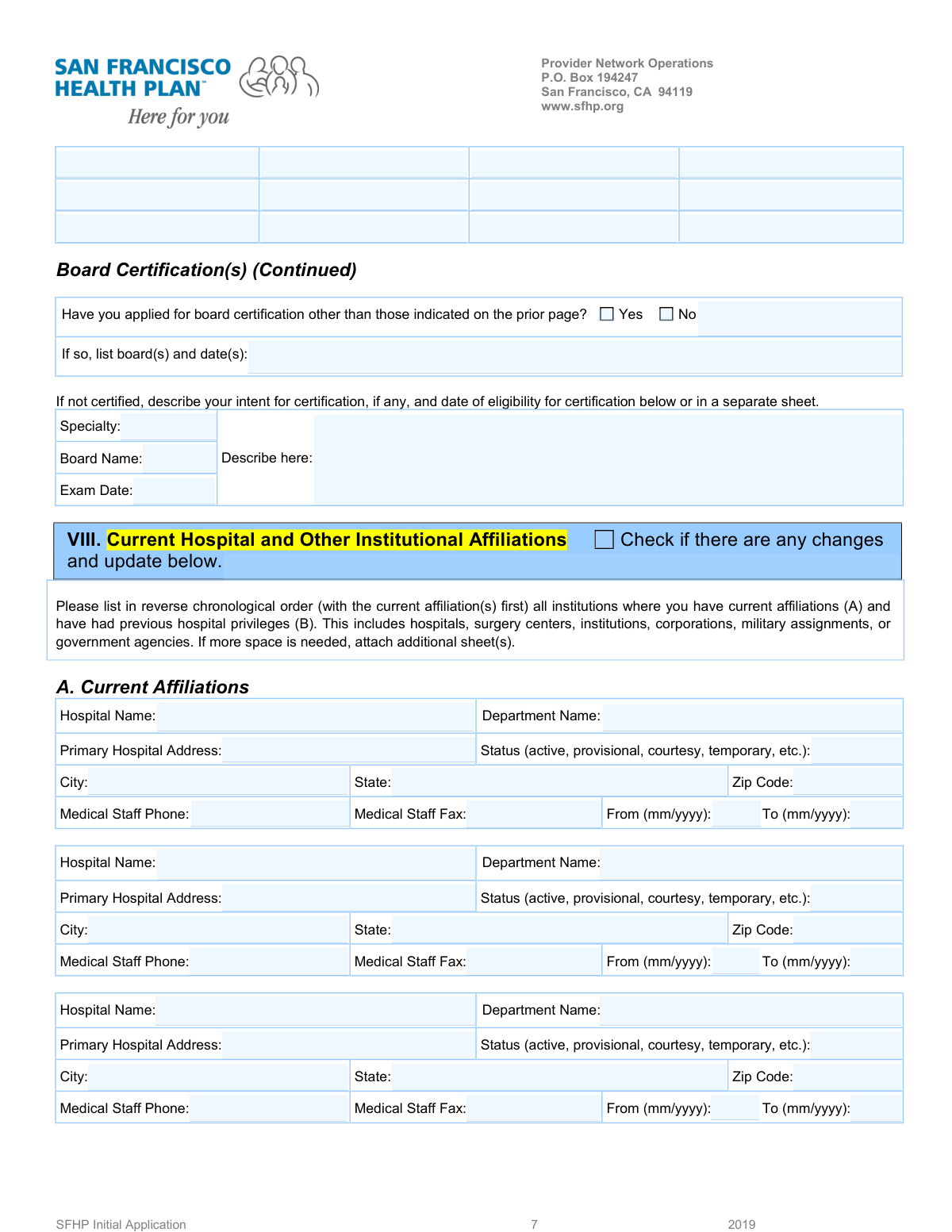
For each hospital affiliation, this validation confirms that the 'Affiliation End Date' is not earlier than the 'Affiliation Start Date'. This is important for maintaining an accurate and logical history of the provider's work experience. An illogical date range would cause the form to be flagged for manual review or rejected.
This check ensures that if the user selects 'Yes' for the 'Applied for Other Board Certification' question, the corresponding text field 'Other Board Applications (Boards and Dates)' must be filled out. This prevents incomplete submissions where the user indicates they have other applications but provides no details. If 'Yes' is checked and the field is empty, an error will prompt the user to provide the required information.
If a 'Hospital Name' is provided for any of the three affiliation sections, this validation requires that all associated core fields (Address, City, State, ZIP, Start Date, and Status) are also completed. This rule prevents partial or incomplete affiliation records, which are unusable for credentialing. Failure to complete the block will result in an error message highlighting the missing fields.
This check verifies that all phone and fax number fields are entered in a standard, recognizable format (e.g., 10 digits, with or without parentheses, spaces, or hyphens). Correctly formatted numbers are crucial for communication with the provider and their affiliated institutions. An invalid format will trigger an error, requiring the user to correct the entry before proceeding.
And 7 more checks
- Verifies ZIP Code and State Consistency
- Ensures Core Provider Identification Fields are Complete
- Validates Reverse Chronological Order of Affiliations
- Ensures All Date Fields Use a Valid Format
- Enforces Mutually Exclusive Selection for 'Other Board' Question
- Validates Dependency of Second Affiliation on First
- Validates Dependency of Third Affiliation on Second
Let AI fill out your Provider Affiliation Form
No typing. Every field filled in seconds, checked, ready to sign.
How to Fill Out Provider Affiliation Form Online for Free in 2026
What the AI walks you through.
- Navigate to Instafill.ai and upload your Provider Affiliation form or select it from the template library.
- Use the AI assistant to automatically fill in your professional details, such as your name, NPI, TIN, and specialty in the top section.
- Begin listing your current and past hospital affiliations in reverse chronological order, starting with the most recent.
- For each affiliation, provide the hospital name, address, department, start/end dates, and your status (e.g., active, provisional).
- Enter the contact information for the medical staff office for each listed affiliation, including phone and fax numbers.
- Complete the section regarding your board certification status. If not yet certified, detail your intent, including the board name and planned exam date.
- Review all the information pre-filled by the AI for accuracy, make any necessary corrections, and then securely sign and submit the completed form.
Common Mistakes in Completing Provider Affiliation Form
The ones the AI is built to catch.
Entering an Invalid NPI or Tax ID
Failing to List Affiliations in Reverse Chronological Order
Using Inconsistent or Abbreviated Hospital Names
Omitting Required Affiliation Dates or Status
Confusing the Multiple Address Sections
Ignoring Conditional 'Yes/No' Logic
Providing a Vague 'Intent for Certification' Description
Entering Incorrect Medical Staff Contact Information
Omitting Information in Unclear 'Row 1' Fields
Using Incorrect Date Formats
Frequently Asked Questions About Provider Affiliation Form
Is it really free for 7 days?
Can I fill other forms too?
How do I cancel?
How does the AI fill out Provider Affiliation Form?
What happens to my information?
How complex is Provider Affiliation Form to fill out?
What is the purpose of this form?
Who needs to fill out this form?
How should I list my hospital affiliations?
What do I do if I have more than three hospital affiliations to report?
What should I enter for 'Affiliation Status'?
My current affiliation is ongoing. What should I put for the 'Affiliation End Date'?
I am not yet board certified. What information do I need to provide?
What is the difference between the NPI and the Tax ID (TIN)?
Do I need to fill out the affiliations section if my information hasn't changed?
What information is required in the top section for 'Provider or Group Name', 'NPI', and 'TIN'?
What are the generic fields like 'Row 1 - Column 1' at the top of the form for?
Can AI tools help me fill out this form?
How can I fill out this form online using Instafill.ai?
The PDF I have is not fillable. What can I do?
Get your Provider Affiliation Form filled out by AI
$0 today. Cancel before Oct 30 and you pay nothing.
Other forms like this one
hospital forms: Center for Infertility & Reproductive Surgery – New Patient Questionnaire and Patient/Guarantor Statement (Brigham and Women’s Hospital, Department of Obstetrics and Gynecology), St. Paul’s Hospital Application for Employment (職位申請表) – SPHF-HRD-035, HDFC ERGO General Insurance Company Limited – Request for Cashless Hospitalisation for Health Insurance (Policy Part – C), Demande de Validation des Acquis de l'Expérience (VAE) – BTS Hospitality Management, Texas Out-of-Hospital Do-Not-Resuscitate (OOH-DNR) Order, St. Jude Children’s Research Hospital IRA Sample Letter of Instruction, King Faisal Specialist Hospital and Research Centre (General Organization) Employment Application Form, Hospital Affiliation and Privileges Form, Form CMS-1763, Request for Termination of Premium Hospital and/or Supplementary Medical Insurance
certification forms: Form HS 200, Licensure & Certification Application, W-9, Request for Taxpayer Identification Number and Certification, Form WH-380-E, Certification of Health Care Provider, Form WH-385, Certification for Serious Injury or Illness, Form WH-380-F, Certification of Health Care Provider, Form WH-385-V, Certification for Serious Injury or Illness, Form 8802, Application for U.S. Residency Certification, Form I-905, Application for Authorization to Issue Certification for Health Care Workers, Form N-648, Medical Certification for Disability Exceptions, Form 01-339, Texas Sales and Use Tax Resale Certificate / Texas Sales and Use Tax Exemption Certification, Dakota County CDA New Admissions Informal Review Request Form (Housing Choice Voucher Program) and HUD Form 5382, Certification of Domestic Violence, Dating Violence, Sexual Assault, or Stalking, and Alternate Documentation, NJ Department of Labor & Workforce Development Form MW-562, Payroll Certification for Public Works Projects (Contractor and Subcontractor’s Weekly and Final Certification), ROTC Cadet Academic Plan / Degree and Credit Hour Worksheet (Student Identification, Term-by-Term Courses, GPA Summary, and Completion Certification), Certification for Special Assessment (Office of Building, Planning, & Code Compliance, City of Knox, Indiana), Outpatient Behavioral Health (BH) – ABA Treatment Request: Required Information for Precertification (GR-69017-4), Form W-9, Request for Taxpayer Identification Number and Certification, 401(k) Program Rollover Certification, WTIA 401(k) Plan Rollover Contribution Employee Certification, Trust Certification and Trustee Powers, Form GR-68831, Precertification Information Request Form
Let AI fill out your Provider Affiliation Form
Your trial starts once a card is added. You pay nothing before Oct 30.
Our AI already knows this form, all 55 fields of it. Skip the typing: tell it about yourself, or upload what you have, and it fills the whole form in seconds.
- AI fills every field on the form, tables and checkboxes included
- No typing into boxes: answer a few questions, or upload a document you already have, an old copy of this form, a photo of a document
- The AI checks the answers; you review and change anything before you download
- Download the finished PDF, print it, or sign it online
- Encrypted, and never used to train AI
Cancel before Oct 30 and you pay nothing.
A card is needed to start the trial. Cancel in two clicks from your account.
Terms · Privacy