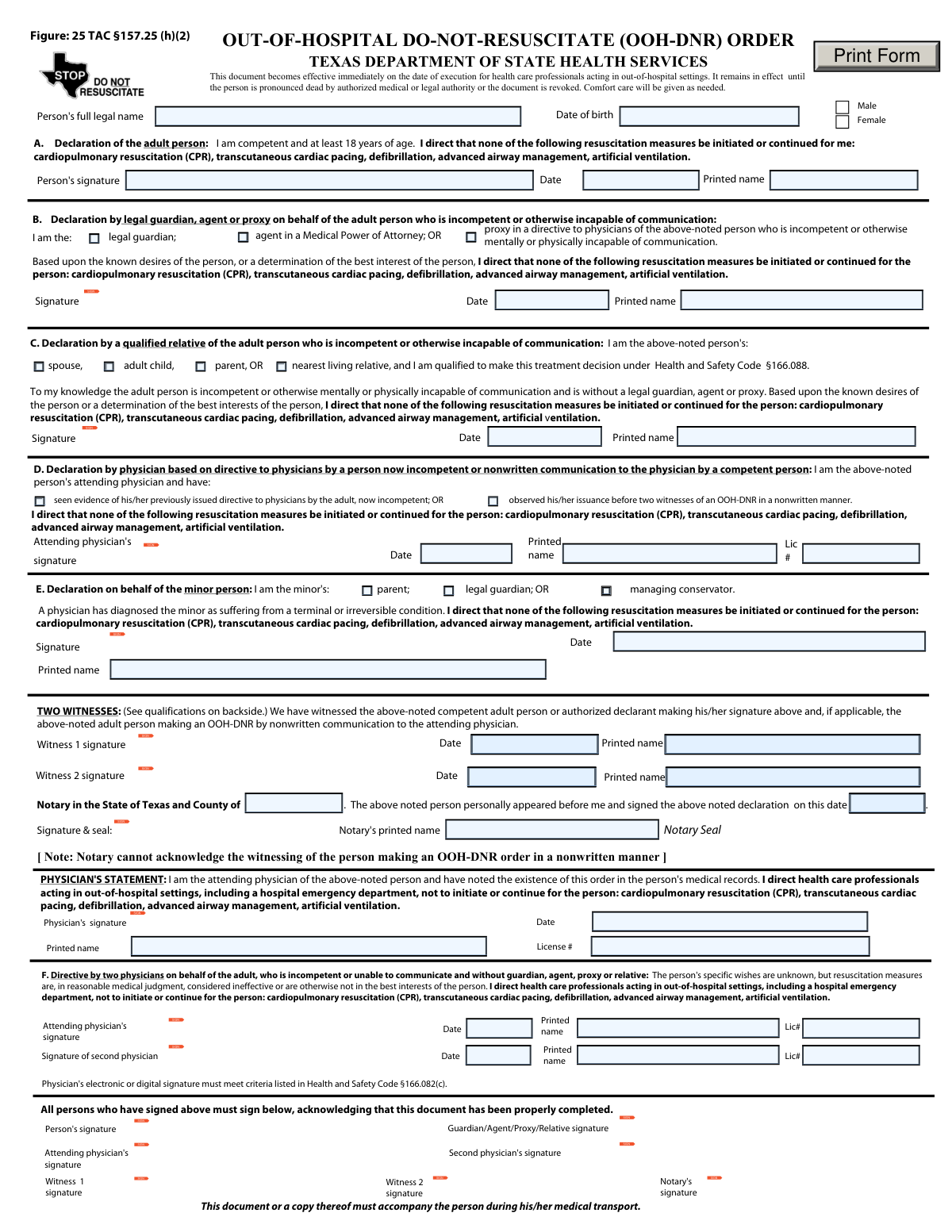
Yes! You can use AI to fill out Texas Out-of-Hospital Do-Not-Resuscitate (OOH-DNR) Order
The Texas OOH-DNR Order is a legally binding document that allows an individual to refuse specific resuscitation efforts in an out-of-hospital setting, ensuring their end-of-life wishes are respected. It directs healthcare professionals to forgo treatments such as CPR, defibrillation, and artificial ventilation, allowing for a natural death. Today, this form can be filled out quickly and accurately using AI-powered services like Instafill.ai, which can also convert non-fillable PDF versions into interactive fillable forms.
Our AI automatically handles information lookup, data retrieval, formatting, and form filling.
It takes less than a minute to fill out Texas OOH-DNR Order (Form EF01-11421) using our AI form filling.
Securely upload your data. Information is encrypted in transit and deleted immediately after the form is filled out.
Form specifications
| Form name: | Texas Out-of-Hospital Do-Not-Resuscitate (OOH-DNR) Order |
| Number of pages: | 1 |
| Language: | English |
| Categories: | hospital forms |
Instafill Demo: How to fill out PDF forms in seconds with AI
How to Fill Out Texas OOH-DNR Order (Form EF01-11421) Online for Free in 2026
Are you looking to fill out a TEXAS OOH-DNR ORDER (FORM EF01-11421) form online quickly and accurately? Instafill.ai offers the #1 AI-powered PDF filling software of 2026, allowing you to complete your TEXAS OOH-DNR ORDER (FORM EF01-11421) form in just 37 seconds or less.
Follow these steps to fill out your TEXAS OOH-DNR ORDER (FORM EF01-11421) form online using Instafill.ai:
- 1 Navigate to Instafill.ai and upload the Texas OOH-DNR Order form or select it from the template library.
- 2 Enter the patient's full legal name, date of birth, and sex in the initial information section.
- 3 Identify the declarant by selecting the appropriate section (e.g., the patient, a legal guardian, a qualified relative, or a physician).
- 4 Follow the AI-powered prompts to complete the information and signature fields specific to the declarant's section.
- 5 Secure the required signatures from the declarant, two qualified witnesses, and the attending physician(s) as applicable.
- 6 If required by the chosen declaration method, have the document notarized by a licensed notary public.
- 7 Review the entire completed form for accuracy, then download and print it to ensure a copy accompanies the person at all times.
Our AI-powered system ensures each field is filled out correctly, reducing errors and saving you time.
Why Choose Instafill.ai for Your Fillable Texas OOH-DNR Order (Form EF01-11421) Form?
Speed
Complete your Texas OOH-DNR Order (Form EF01-11421) in as little as 37 seconds.
Up-to-Date
Always use the latest 2026 Texas OOH-DNR Order (Form EF01-11421) form version.
Cost-effective
No need to hire expensive lawyers.
Accuracy
Our AI performs 10 compliance checks to ensure your form is error-free.
Security
Your personal information is protected with bank-level encryption.
Frequently Asked Questions About Form Texas OOH-DNR Order (Form EF01-11421)
This is a legal document that instructs health care professionals in out-of-hospital settings, like an ambulance or a doctor's office, not to perform life-sustaining resuscitation. It is designed to allow a person to have a natural death with peace and dignity.
A competent adult over 18 can sign for themselves (Section A). If the person is incapacitated, it can be signed by a legal guardian, agent under a medical power of attorney (Section B), a qualified relative (Section C), or under specific circumstances, by physicians (Sections D & F).
This order directs medical professionals to withhold cardiopulmonary resuscitation (CPR), transcutaneous cardiac pacing, defibrillation, advanced airway management, and artificial ventilation.
Yes, absolutely. This order does not affect the provision of other emergency care, including comfort care, which is given as needed to relieve pain and suffering.
The form requires signatures from the person making the declaration (the patient or their representative), two qualified witnesses (or a notary), and the patient's attending physician.
Section B is used when the person has a legally appointed guardian, an agent in a Medical Power of Attorney, or a proxy. Section C is used by a qualified relative (like a spouse or adult child) when no such legal representative exists.
Witnesses must be competent adults. At least one witness cannot be related to the person, entitled to any part of their estate, or be the attending physician or their employee.
The original form or a copy must accompany the person, especially during medical transport. It's important to keep it in a location where emergency responders can easily find it.
The order can be revoked at any time by the person or their representative. Revocation can be done by verbally telling responders, destroying the form, or removing any OOH-DNR identification devices from the person.
Yes, the OOH-DNR order is automatically revoked if the person is known to be pregnant or in the case of an unnatural or suspicious death.
Yes, services like Instafill.ai use AI to auto-fill form fields accurately and save time, which can be helpful for ensuring all information is entered correctly.
You can upload the form to a service like Instafill.ai, which makes the document interactive. This allows you to type in your information, add digital signatures, and then download the completed form.
If you have a non-fillable PDF, you can use a platform like Instafill.ai. It can convert flat PDFs into interactive, fillable forms that you can complete and sign on your computer.
Yes, the patient's attending physician must sign the Physician's Statement on the form. This signature directs other health care professionals to honor the order and confirms it has been noted in the patient's medical records.
Compliance Texas OOH-DNR Order (Form EF01-11421)
Validation Checks by Instafill.ai
1
Exclusive Declaration Section Selection
Checks that only one of the declaration sections (A, B, C, D, E, or F) has been completed. Since each section represents a different legal basis for the DNR order, having multiple sections filled creates ambiguity and invalidates the document. If this check fails, the form must be rejected and returned for clarification on which single declaration applies.
2
Patient Age and Declaration Section Consistency
Validates that the patient's age, calculated from the Date of Birth, is appropriate for the declaration section used. Section E is exclusively for minors (under 18), while Sections A, B, C, D, and F are for adults (18 or older). This check prevents the misapplication of legal standards for minors and adults, which is critical for the order's validity.
3
Completeness of Patient Identifying Information
Ensures the 'Person's full legal name', 'Date of birth', and a gender selection ('Male' or 'Female') are all provided. This basic information is essential for positively identifying the patient to whom the DNR order applies. An incomplete identification section could lead to the order being applied to the wrong person or being deemed invalid by healthcare professionals.
4
Valid and Chronological Signature Dates
Verifies that all date fields associated with signatures are valid dates and are chronologically logical. Specifically, all signature dates must be on or after the patient's date of birth and no later than the current processing date. This prevents impossible dates, such as those in the future, and ensures the document was signed in a valid sequence.
5
Section F Dual Physician Requirement
Confirms that if Section F is completed, all required fields for two distinct physicians are present. This includes the printed name, license number, signature, and date for both the attending physician and the second concurring physician. The validity of a Section F declaration is legally contingent on the documented agreement of two physicians.
6
Witness or Notary Validation for Sections A, B, C, E
Checks that for declarations made under Sections A, B, C, or E, the form is properly attested by either two qualified witnesses or a notary public. The system must verify that the fields for two witnesses are complete OR the notary section is complete, but not both. This attestation is a legal requirement to confirm the authenticity of the signature, and its absence invalidates the order.
7
Exclusion of Witnesses/Notary for Section F
Verifies that if the declaration is made under Section F (by two physicians), the witness and notary sections are left blank. The instructions state that witness or notary signatures are not required in this specific scenario. This check prevents confusion and ensures the form is completed according to its specific legal guidelines.
8
Physician's Statement Completeness
Ensures the mandatory 'PHYSICIAN'S STATEMENT' section is fully completed by the patient's attending physician. This includes the physician's printed name, license number, signature, and date. This statement serves as the physician's official directive to other healthcare professionals and is a cornerstone of the OOH-DNR order's authority.
9
Declarant Role Selection
For sections involving a representative (Sections B, C, and E), this check ensures that exactly one role has been selected. For example, in Section B, the declarant must identify as a 'legal guardian', 'agent', or 'proxy'. Selecting multiple roles or no role creates legal ambiguity about the declarant's authority to make the decision.
10
Physician License Number Format
Validates that any physician license number entered on the form adheres to the expected format for a Texas medical license. This is a data quality check to ensure the license number is captured correctly and can be used for verification purposes. An invalid format could indicate a typo or an incorrect number, hindering the ability to confirm the physician's credentials.
11
Minor Patient Status for Section E
Specifically validates that if Section E is completed, the patient's date of birth confirms they are a minor (under 18 years of age). The form also states the minor must have a diagnosis of a terminal or irreversible condition, which would be a manual review point. This validation ensures the specific legal pathway for issuing a DNR for a minor is correctly applied.
12
Final Acknowledgment Signature Cross-Validation
Cross-references the signatures in the final acknowledgment block at the bottom of the form with the parties who signed in the main declaration sections. For example, if a guardian signed in Section B, their signature must also appear in the 'Guardian/Agent/Proxy/Relative signature' box. This final confirmation step ensures all necessary parties have acknowledged the completed document in its entirety.
Common Mistakes in Completing Texas OOH-DNR Order (Form EF01-11421)
This form has six distinct sections (A-F) for different declarant situations, such as a competent adult (A), a legal guardian (B), or physicians (F). A common error is filling out the wrong section or multiple sections, which creates ambiguity and can invalidate the entire order. To avoid this, carefully read the instructions for each section to determine the single, correct one that applies to the patient's specific circumstances before filling anything out.
A highly common and critical error is overlooking the final signature block at the bottom of the form, which requires every person who signed above (patient, guardian, witnesses, physicians) to sign again. This second set of signatures acknowledges that the form was completed properly and is often missed because it's an unusual requirement. Missing these final signatures can render the entire document invalid, so it's crucial to double-check that all original signers have also signed in this final section.
The form requires two competent adult witnesses, but the instructions specify many people who are disqualified, such as relatives, heirs, the attending physician, or certain healthcare facility employees. People often ask a family member or a direct care nurse to witness, which legally invalidates the document. To prevent this, carefully review the 'Qualified Witnesses' definition and select individuals who have no personal, financial, or medical relationship with the patient as outlined.
The 'PHYSICIAN'S STATEMENT' is not optional; it is the section where the attending physician officially directs other healthcare professionals to honor the DNR. Mistakes include the physician forgetting to sign, date, or provide their printed name and license number. An incomplete physician's statement means the document is not a valid medical order and will not be honored by first responders, defeating its entire purpose.
The form asks for the 'Person's full legal name,' but individuals sometimes enter a nickname, a shortened name, or an initial. This can cause significant problems for emergency personnel trying to verify the patient's identity against their ID, potentially delaying or preventing the DNR from being honored. Always enter the full legal name exactly as it appears on official documents like a driver's license or birth certificate.
Nearly every signature line on the form is accompanied by a field for the date. It is a frequent oversight for signers (including the patient, witnesses, and physicians) to provide a signature but forget to write the corresponding date. A missing date can raise legal questions about when the document was executed and whether it was valid at the time of the medical event, potentially leading to it being disregarded.
When this form is printed and filled out by hand, illegible handwriting can make critical information like names, dates, or a physician's license number unreadable. This is especially problematic in an emergency situation where first responders must quickly and confidently interpret the order. Using an AI-powered tool like Instafill.ai can prevent this by converting the flat PDF into a fillable version, allowing you to type information clearly and ensure legibility.
The form offers the option to use a notary public *instead* of two witnesses for certain declarations, but not all. People may mistakenly believe they need both, or they may use a notary for a situation (like a nonwritten declaration) where only witnesses are permitted. This confusion can lead to an improperly executed document. Carefully read the instructions to understand if you need two qualified witnesses or if a notary is a valid alternative for your specific situation.
Section F is a specific declaration used when an incompetent patient has no available representative, and it requires the signature and details of *two* physicians. A frequent mistake is for only the attending physician to complete this section, forgetting the required concurrence and signature from a second, non-involved physician. Without both physician signatures, a declaration made under Section F is incomplete and invalid.
For every signature, there is a corresponding field for a printed name. Errors occur when the printed name is misspelled, incomplete, or does not reasonably match the signature, which can cause confusion about the signer's identity. To avoid this, ensure the printed name is written legibly and is the full, correct name of the person signing. AI form-filling tools like Instafill.ai can help by consistently populating printed names correctly once entered.
Saved over 80 hours a year
“I was never sure if my IRS forms like W-9 were filled correctly. Now, I can complete the forms accurately without any external help.”
Kevin Martin Green
Your data stays secure with advanced protection from Instafill and our subprocessors

Robust compliance program
Transparent business model
You’re not the product. You always know where your data is and what it is processed for.
ISO 27001, HIPAA, and GDPR
Our subprocesses adhere to multiple compliance standards, including but not limited to ISO 27001, HIPAA, and GDPR.
Security & privacy by design
We consider security and privacy from the initial design phase of any new service or functionality. It’s not an afterthought, it’s built-in, including support for two-factor authentication (2FA) to further protect your account.
Fill out Texas OOH-DNR Order (Form EF01-11421) with Instafill.ai
Worried about filling PDFs wrong? Instafill securely fills texas-out-of-hospital-do-not-resuscitate-ooh-dnr-order forms, ensuring each field is accurate.