Yes! You can use AI to fill out Form CMS-1763, Request for Termination of Premium Hospital and/or Supplementary Medical Insurance
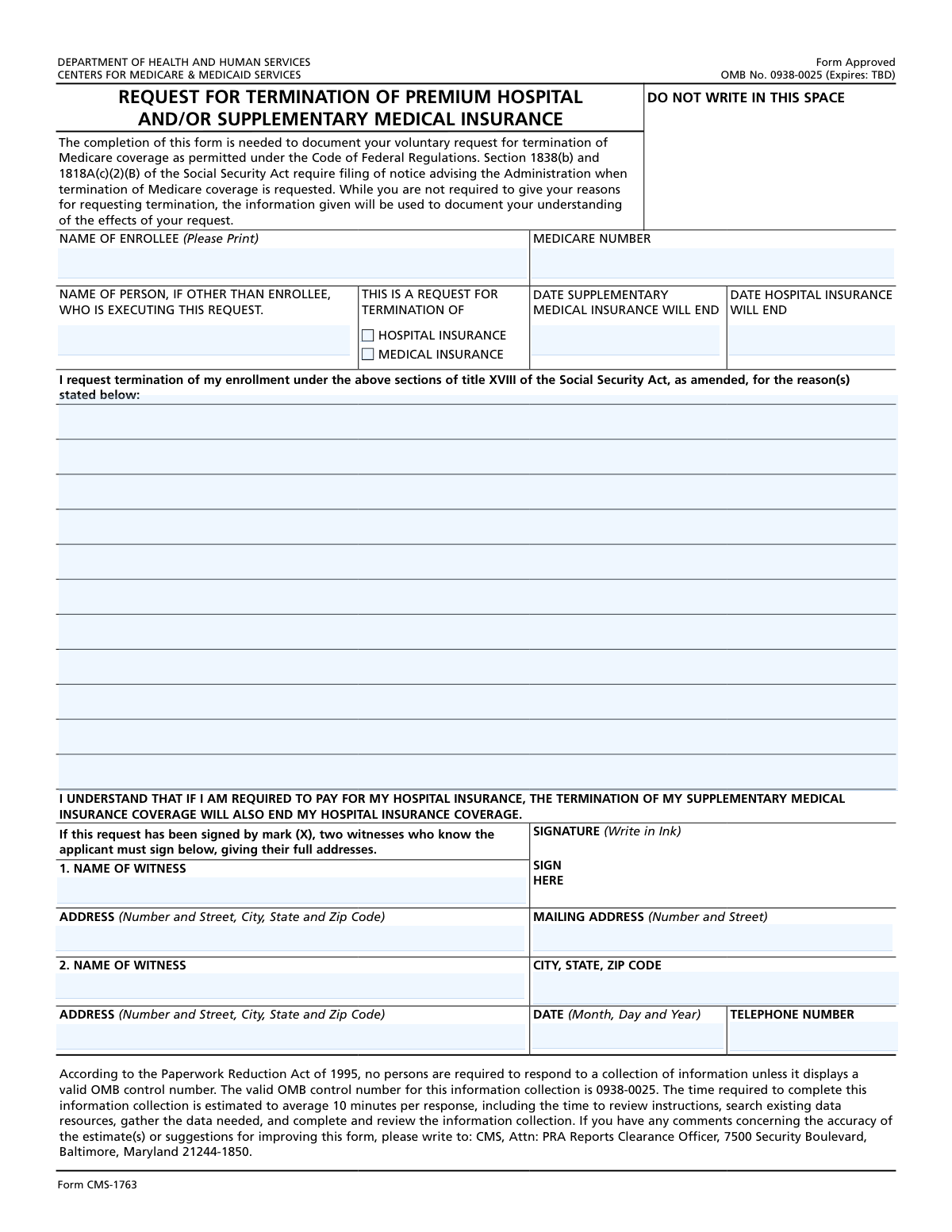
Form CMS-1763 is a document from the Centers for Medicare & Medicaid Services (CMS) that allows a beneficiary to formally request an end to their Premium Hospital Insurance (Medicare Part A) and/or Supplementary Medical Insurance (Medicare Part B). This form documents your voluntary decision as required by the Social Security Act, ensuring you understand the implications of terminating your coverage. Today, this form can be filled out quickly and accurately using AI-powered services like Instafill.ai, which can also convert non-fillable PDF versions into interactive fillable forms.
CMS-1763 is part of the
CMS forms, ERM forms, hospital forms, insurance forms, insurance request forms, Medi-Cal forms, medical forms, medical insurance forms, medical request forms and VA medical forms categories on Instafill.
Our AI automatically handles information lookup, data retrieval, formatting, and form filling.
It takes less than a minute to fill out CMS-1763 using our AI form filling.
Securely upload your data. Information is encrypted in transit and deleted immediately after the form is filled out.
Form specifications
| Form name: | Form CMS-1763, Request for Termination of Premium Hospital and/or Supplementary Medical Insurance |
| Number of fields: | 16 |
| Number of pages: | 1 |
| Language: | English |
More forms in CMS forms
Instafill Demo: How to fill out PDF forms in seconds with AI
How to Fill Out CMS-1763 Online for Free in 2026
Are you looking to fill out a CMS-1763 form online quickly and accurately? Instafill.ai offers the #1 AI-powered PDF filling software of 2026, allowing you to complete your CMS-1763 form in just 37 seconds or less.
Follow these steps to fill out your CMS-1763 form online using Instafill.ai:
- 1 Navigate to Instafill.ai and upload your version of Form CMS-1763, or search for it in the platform's form library.
- 2 Provide your personal information, including your full name and Medicare Number, as prompted by the AI assistant.
- 3 Indicate which coverage you wish to terminate by checking the box for Hospital Insurance and/or Medical Insurance, and enter the desired termination dates.
- 4 Optionally, type in your reason(s) for requesting the termination of your Medicare coverage.
- 5 Review all the information auto-filled by the AI to ensure it is correct and complete.
- 6 Electronically sign and date the form. If witnesses are required because you are signing with a mark (X), the system will guide you through entering their details.
- 7 Download the completed, signed Form CMS-1763 to your device for submission to the appropriate agency.
Our AI-powered system ensures each field is filled out correctly, reducing errors and saving you time.
Why Choose Instafill.ai for Your Fillable CMS-1763 Form?
Speed
Complete your CMS-1763 in as little as 37 seconds.
Up-to-Date
Always use the latest 2026 CMS-1763 form version.
Cost-effective
No need to hire expensive lawyers.
Accuracy
Our AI performs 10 compliance checks to ensure your form is error-free.
Security
Your personal information is protected with bank-level encryption.
Frequently Asked Questions About Form CMS-1763
This form is used to officially document your voluntary request to terminate your Medicare Premium Hospital Insurance (Part A) and/or Supplementary Medical Insurance (Part B).
Any Medicare enrollee who wishes to voluntarily end their Part A or Part B coverage must complete this form. It can be filled out by the enrollee or an authorized person acting on their behalf.
No, providing a reason for termination is optional. However, the form includes a space for you to state your reasons, which helps document your understanding of the effects of your request.
You will need the enrollee's full name and Medicare Number exactly as they appear on the Medicare card. You will also need to provide your current mailing address and the date you wish for coverage to end.
Be aware that if you pay a premium for your Hospital Insurance (Part A), terminating your Medical Insurance (Part B) will automatically cause your Part A coverage to end as well.
Enter the enrollee's information in the 'NAME OF ENROLLEE' and 'MEDICARE NUMBER' fields, and then enter your own name in the 'NAME OF PERSON, IF OTHER THAN ENROLLEE' field.
If the request is signed with a mark (X) instead of a full signature, two witnesses who know the applicant must also sign the form and provide their full names and addresses.
The form does not specify a submission address. You should contact the Social Security Administration (SSA) for instructions on where to mail or deliver your completed form.
Terminating coverage can lead to gaps in your health insurance and you may face late enrollment penalties if you decide to re-enroll in Medicare later. It is strongly advised to discuss this decision with a Social Security representative first.
Yes, services like Instafill.ai use AI to help you accurately auto-fill form fields, which saves time and reduces the chance of errors.
You can use a service like Instafill.ai by uploading the form to their platform. The AI will make the document interactive, allowing you to easily fill in your information before printing for signature.
You can upload the non-fillable PDF to a service like Instafill.ai. It can convert flat PDFs into interactive, fillable forms that you can complete on your device.
To terminate coverage, check the box next to 'HOSPITAL INSURANCE' for Part A or 'MEDICAL INSURANCE' for Part B. Then, write the date you want coverage to end in the corresponding date field.
Compliance CMS-1763
Validation Checks by Instafill.ai
1
Medicare Number Format and Presence
This check verifies that the Medicare Number field is not empty and conforms to the official format, including all letters, numbers, and special characters as shown on the Medicare card. This is a critical identifier for processing the request against the correct enrollee record. A failure would prevent the system from locating the beneficiary's account and halt the termination process.
2
Enrollee Name Completeness
Validates that the 'Enrollee Full Legal Name' field is populated. This field is mandatory for identifying the individual requesting termination. If this field is left blank, the form cannot be processed as the primary subject of the request is unknown, leading to immediate rejection of the submission.
3
Termination Coverage Selection
Ensures that at least one of the termination checkboxes, 'HOSPITAL INSURANCE' or 'MEDICAL INSURANCE', has been selected. The form's purpose is to terminate coverage, so a selection is required to specify which coverage is being terminated. If neither box is checked, the request is ambiguous and cannot be acted upon.
4
Conditional Requirement for Medical Insurance End Date
This validation confirms that if the 'MEDICAL INSURANCE' checkbox is selected, the 'DATE SUPPLEMENTARY MEDICAL INSURANCE WILL END' field is populated with a valid date. This date is essential for defining the exact end of coverage. A missing date for a selected termination type would make the request incomplete and require clarification from the applicant.
5
Conditional Requirement for Hospital Insurance End Date
This check ensures that if the 'HOSPITAL INSURANCE' checkbox is selected, the 'DATE HOSPITAL INSURANCE WILL END' field is filled with a valid date. The termination cannot be processed without a specified end date for the selected coverage. Failure to provide this date will result in the form being returned as incomplete.
6
Date Field Format Validation
Verifies that all date fields ('Supplementary Medical Insurance End Date', 'Hospital Insurance Termination Date', 'Date of Signature') are entered in the specified MM/DD/YYYY format. Consistent date formatting is crucial for accurate data processing and preventing errors in coverage termination dates. Submissions with incorrectly formatted dates will be flagged for correction.
7
Logical Signature Date
Checks that the 'Date of Signature' is a valid, non-future date. A signature date in the future is logically impossible and indicates a data entry error. This validation ensures the legal validity of the document, as the signature date must accurately reflect when the request was signed.
8
Witness Information for Signature by Mark
This rule validates that if the enrollee signed with a mark (X), the name and address fields for two witnesses are fully completed. This is a legal requirement to attest to the identity and intent of the person making the mark. If the signature is a mark and witness information is missing or incomplete, the form is legally invalid.
9
Prohibition of Unnecessary Witness Information
Ensures that if the form is signed with a standard written signature (not a mark), all witness information fields are left blank. Witness information is only required when a signature is made by mark. Including this data unnecessarily can create confusion and may trigger unnecessary review cycles, so the system should flag it for removal.
10
Exclusion of Unnecessary Termination Dates
This check verifies that if a termination checkbox (e.g., 'HOSPITAL INSURANCE') is NOT checked, its corresponding date field ('Hospital Insurance Termination Date') is empty. Populating a date field for a non-selected termination type creates a logical conflict and ambiguity in the request. The system should reject submissions with such conflicting information.
11
Applicant Address Completeness
Validates that if either the 'Mailing Address (Number and Street)' or 'CITY, STATE, ZIP CODE' field is filled, the other corresponding field is also filled. A partial address is unusable for mailing correspondence regarding the termination. This check ensures a complete mailing address is on file for future communication.
12
Signature and Date Correlation
This validation ensures that if the 'SIGNATURE' field is completed (i.e., signed), the 'DATE (Month, Day and Year)' field is also populated. A signature without a date is considered incomplete for legal and administrative purposes. The date establishes the official time of the request, and its absence would render the signature invalid for processing.
Common Mistakes in Completing CMS-1763
Applicants often mistype their Medicare Number by transposing digits, omitting letters, or failing to include hyphens as they appear on the card. This error occurs due to haste or not double-checking against the official card. An incorrect Medicare Number will result in an immediate failure to locate the enrollee's record, causing the form to be rejected and returned, delaying the termination process significantly. To avoid this, carefully copy the number exactly as it appears on your Medicare card, or use an AI-powered form-filling tool like Instafill.ai, which can store and accurately populate this information every time.
This mistake involves entering a nickname, a shortened version of a name, or a name that otherwise differs from the full legal name printed on the Medicare card. This discrepancy leads to a data mismatch in the system, which can cause processing delays or rejection of the form while the agency attempts to verify the applicant's identity. Always print your full legal name—first name, middle initial, and last name—exactly as it is shown on your Medicare card to ensure a smooth process.
Enrollees who are filling out the form for themselves sometimes mistakenly enter their own name again in the field 'NAME OF PERSON, IF OTHER THAN ENROLLEE'. This field should only be completed by a legal representative or authorized individual acting on the enrollee's behalf. This error creates confusion for the processor, who may question the validity of the signature and request, leading to unnecessary delays. If you are the enrollee and are signing the form yourself, you must leave this field blank.
A critical error is failing to check either the 'HOSPITAL INSURANCE' or 'MEDICAL INSURANCE' box, making the entire request invalid. Conversely, some may check a box by mistake, not realizing the serious consequences of losing coverage. This can lead to the form being returned as incomplete or, worse, the unintended termination of essential health insurance. Carefully read each option and check only the box for the coverage you wish to end, understanding that terminating Part B may also terminate your premium Part A.
Applicants may enter a termination date in a date field (e.g., 'DATE HOSPITAL INSURANCE WILL END') without having checked the corresponding box ('HOSPITAL INSURANCE'). This creates a conflicting and ambiguous request. Processors cannot act on such a form, as the applicant's intent is unclear, which will result in the form being sent back for correction. Ensure you only fill in the date field that directly corresponds to the insurance type you have selected for termination by checking its box.
Submitting an unsigned form is a common oversight that renders the request legally invalid and guarantees its rejection. The instruction 'SIGNATURE (Write in Ink)' explicitly requires a physical, handwritten signature. Using a digital signature, a stamped signature, or simply forgetting to sign will cause the form to be returned, forcing you to restart the submission process. Always perform a final review to ensure you have signed the form by hand in the designated 'SIGN HERE' box.
If an enrollee is unable to sign their name and instead uses a mark (X), the form requires two witnesses to sign and provide their full addresses. A frequent mistake is providing only one witness, or having witnesses who fail to enter their complete address information. This invalidates the signature, and the form will be rejected. If signing with a mark, ensure two individuals witness the act and that they both print their full name and complete address clearly in the specified sections.
The form specifically separates the mailing address into two fields: 'MAILING ADDRESS (Number and Street)' and 'CITY, STATE, ZIP CODE'. A common error is to write the entire address in the first field or split it incorrectly. This can lead to data entry errors by the processing agent and may cause important future correspondence to be delayed or misdelivered. To prevent this, enter only your street number, street name, and apartment/suite number in the first field, and save the city, state, and ZIP code for the second.
The instructions specify entering dates in MM/DD/YYYY format, but applicants often use other conventions like DD/MM/YYYY or write out the month's name. This non-standard formatting can be misread by data entry systems or personnel, potentially leading to the wrong termination date being recorded. This can have serious implications for coverage and billing. Always use the two-digit month, two-digit day, and four-digit year format (e.g., 07/04/2024) to avoid ambiguity and ensure your request is processed correctly.
When submitting a printed form electronically, applicants may provide a blurry, poorly lit, or cropped image that makes information illegible. This form is only available as a non-fillable PDF, requiring it to be printed and filled out by hand. A low-quality submission will be rejected if the processor cannot clearly read the name, Medicare number, or signature. To avoid this, use a scanner or a well-lit, steady photo, and consider using a service like Instafill.ai which can convert flat PDFs into fillable forms, allowing you to type directly and ensure perfect legibility before printing for signature.
Saved over 80 hours a year
“I was never sure if my IRS forms like W-9 were filled correctly. Now, I can complete the forms accurately without any external help.”
Kevin Martin Green
Your data stays secure with advanced protection from Instafill and our subprocessors

Robust compliance program
Transparent business model
You’re not the product. You always know where your data is and what it is processed for.
ISO 27001, HIPAA, and GDPR
Our subprocesses adhere to multiple compliance standards, including but not limited to ISO 27001, HIPAA, and GDPR.
Security & privacy by design
We consider security and privacy from the initial design phase of any new service or functionality. It’s not an afterthought, it’s built-in, including support for two-factor authentication (2FA) to further protect your account.
Fill out CMS-1763 with Instafill.ai
Worried about filling PDFs wrong? Instafill securely fills form-cms-1763-request-for-termination-of-premium-hospital-andor-supplementary-medical-insurance forms, ensuring each field is accurate.