Yes! You can use AI to fill out Request to Resolve a Medical Fee Dispute
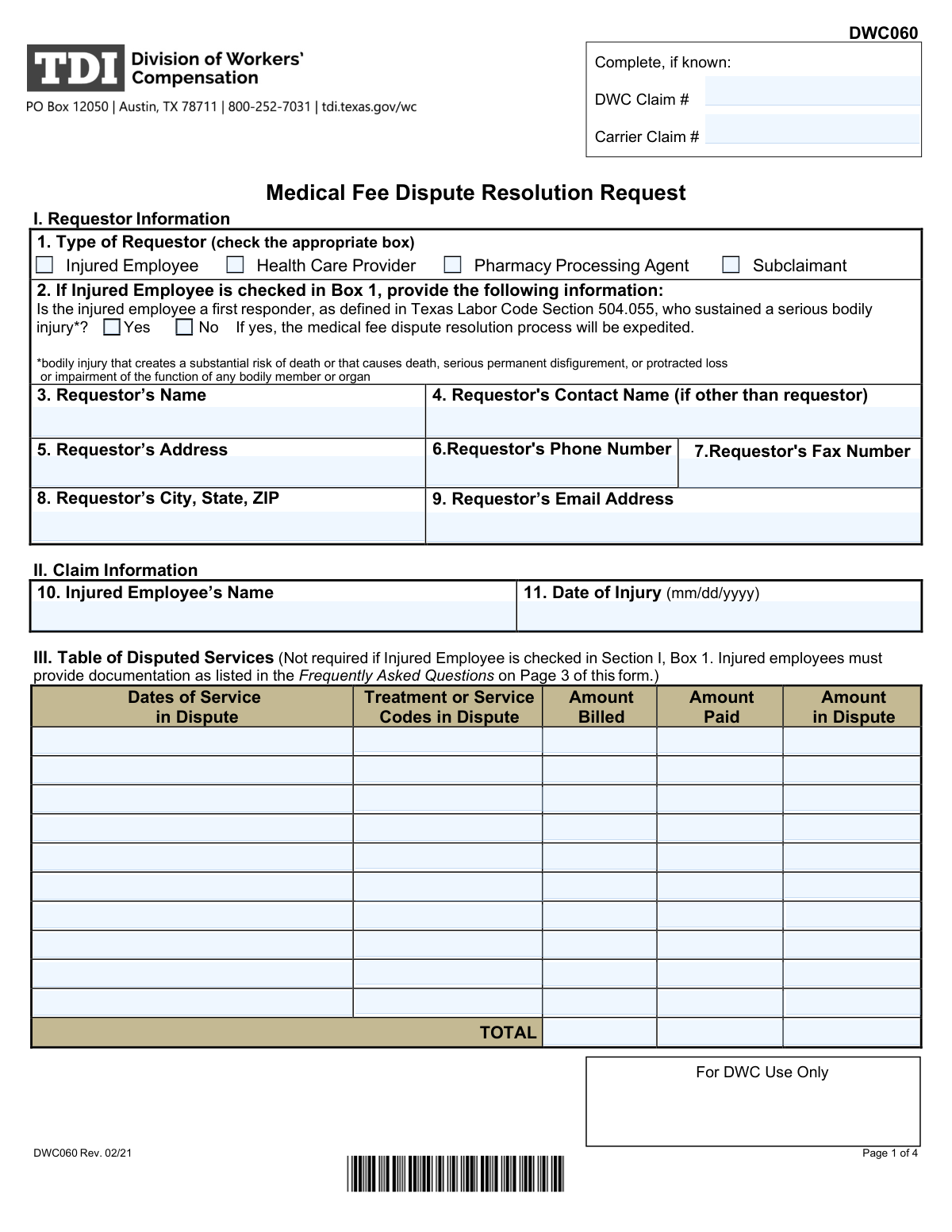
The Request to Resolve a Medical Fee Dispute is a crucial document for any party involved in a workers' compensation claim who disagrees with how a medical bill was handled. It is used to formally petition the Division of Workers' Compensation (DWC) to review and resolve disputes over payments, denials, or billing codes for medical services, initiating the official administrative resolution process. Today this form can be filled out quickly and accurately using AI-powered services like Instafill.ai, which can also convert non-fillable PDF versions into interactive fillable forms.
DWC Medical Fee Dispute Request is part of the
Medi-Cal forms, medical forms, medical request forms and VA medical forms categories on Instafill.
Our AI automatically handles information lookup, data retrieval, formatting, and form filling.
It takes less than a minute to fill out DWC Medical Fee Dispute Request using our AI form filling.
Securely upload your data. Information is encrypted in transit and deleted immediately after the form is filled out.
Form specifications
| Form name: | Request to Resolve a Medical Fee Dispute |
| Number of fields: | 203 |
| Number of pages: | 4 |
| Filled form examples: | Form DWC Medical Fee Dispute Request Examples |
| Language: | English |
More forms in Medi-Cal forms
Instafill Demo: How to fill out PDF forms in seconds with AI
How to Fill Out DWC Medical Fee Dispute Request Online for Free in 2026
Are you looking to fill out a DWC MEDICAL FEE DISPUTE REQUEST form online quickly and accurately? Instafill.ai offers the #1 AI-powered PDF filling software of 2026, allowing you to complete your DWC MEDICAL FEE DISPUTE REQUEST form in just 37 seconds or less.
Follow these steps to fill out your DWC MEDICAL FEE DISPUTE REQUEST form online using Instafill.ai:
- 1 Navigate to Instafill.ai and upload your Request to Resolve a Medical Fee Dispute form, or select it from our template library.
- 2 Provide the primary claim information, including the DWC and carrier claim numbers, the injured employee's name, and the date of injury.
- 3 Identify yourself by filling out the 'Requestor Information' section. Instafill's AI can help pre-fill your details if you're a returning user.
- 4 Systematically list each disputed medical service. For each item, enter the date of service, treatment codes, amount billed, amount paid, and the amount you are disputing in the provided fields.
- 5 Allow the AI to automatically calculate the total amounts billed, paid, and in dispute across all listed services to ensure accuracy and avoid manual math errors.
- 6 Review all the information entered on the form for completeness and accuracy, then electronically sign and date the document to certify your request.
- 7 Download the completed, signed form, ready for submission to the appropriate Division of Workers' Compensation office.
Our AI-powered system ensures each field is filled out correctly, reducing errors and saving you time.
Why Choose Instafill.ai for Your Fillable DWC Medical Fee Dispute Request Form?
Speed
Complete your DWC Medical Fee Dispute Request in as little as 37 seconds.
Up-to-Date
Always use the latest 2026 DWC Medical Fee Dispute Request form version.
Cost-effective
No need to hire expensive lawyers.
Accuracy
Our AI performs 10 compliance checks to ensure your form is error-free.
Security
Your personal information is protected with bank-level encryption.
Frequently Asked Questions About Form DWC Medical Fee Dispute Request
This form is used to request a review of a workers' compensation (DWC) claim, specifically to dispute payments or denials for medical services related to a work injury.
This form should be completed by an injured employee, health care provider, pharmacy processing agent, or a subclaimant who is involved in a dispute over a workers' compensation claim.
These numbers are essential for identifying your case and can be found on official correspondence you have received from the Division of Workers' Compensation (DWC) and the insurance carrier.
No, if you check the box for 'Injured Employee,' you are not required to fill out the detailed sections for specific disputed services. Those sections are intended for health care providers and other agents disputing billing amounts.
The 'Amount in Dispute' is the portion of the bill that you believe is still owed. It is typically calculated by subtracting the amount the carrier has already paid from the total amount you billed for the service.
This form has space to list numerous disputed services. If you exceed the available space, you should attach a separate addendum with the information formatted in the same way, and be sure to reference the attachment on the main form.
The 'Requestor's Name' is the official name of the entity filing the form, such as a medical clinic. The 'Requestor's Contact Name' is the specific person at that entity who should be contacted regarding the dispute.
Yes, you must sum the 'Amount Billed,' 'Amount Paid,' and 'Amount in Dispute' for all services listed and enter them in the total fields. Accurate totals are crucial for the proper processing of your dispute.
Yes, services like Instafill.ai use AI to help you accurately auto-fill form fields with your saved information. This can save significant time and help reduce errors on complex forms with many repeating fields.
You can use a service like Instafill.ai to upload the PDF and fill it out directly on your computer. This allows you to easily type your information, save your progress, and ensure the final document is clean and legible.
If you have a non-fillable or 'flat' PDF, you can use a tool like Instafill.ai to automatically convert it into an interactive, fillable form. This allows you to type your information directly into the fields instead of printing and handwriting.
You will need the DWC and carrier claim numbers, the injured employee's name and date of injury, and a complete list of all disputed services. For each service, you'll need the dates, service codes, amount billed, and amount paid.
Compliance DWC Medical Fee Dispute Request
Validation Checks by Instafill.ai
1
Exclusive Requestor Type Selection
This check ensures that exactly one checkbox from the 'Type of Requestor' section is selected. The form requires the user to identify as either an 'Injured Employee', 'Health Care Provider', 'Pharmacy Processing Agent', or 'Subclaimant', but not multiple types. If more than one or none are selected, the submission should be rejected to ensure clear identification of the filing party.
2
Conditional First Responder Status
This validation verifies that the 'First Responder' status (Yes/No) is answered if and only if the 'Injured Employee' checkbox is selected as the requestor type. This information is only relevant for injured employees, so collecting it for other requestor types would be erroneous. The form should prevent or flag submissions where this condition is not met.
3
Conditional Disputed Service Entry
This check ensures that the detailed 'Disputed Service' sections are only filled out when the requestor is not an 'Injured Employee'. The form explicitly states these sections are for non-employee requestors. If 'Injured Employee' is checked, these fields should be disabled or cleared to prevent irrelevant data entry and processing errors.
4
Date of Service vs. Date of Injury Chronology
This validation confirms that any 'Date of Service' entered for a disputed item occurs on or after the specified 'Date of Injury'. A service cannot be rendered before the injury that necessitates it has occurred. This logical check prevents data entry errors and ensures the timeline of the claim is coherent, rejecting any entries where the service date precedes the injury date.
5
Disputed Amount Calculation Consistency
For each individual disputed service line, this check verifies the mathematical accuracy of the amounts, ensuring that 'Amount Billed' minus 'Amount Paid' equals the 'Amount in Dispute'. This maintains the financial integrity of the claim data and prevents simple arithmetic errors from being submitted. If the calculation is incorrect, the user should be prompted to review and correct the values.
6
Grand Total Amounts Calculation
This validation cross-references the sum of all individual 'Amount in Dispute' fields with the value entered in the 'Grand Total Amount in Dispute' field. The check ensures that the summary total accurately reflects the sum of the line items. An incorrect total can lead to significant processing delays and incorrect claim assessments, so the form should automatically calculate this or flag a mismatch.
7
Presence of a Claim Identifier
This check ensures that at least one of the two claim number fields, 'DWC Claim Number' or 'Carrier Claim Number', is filled out. A unique claim identifier is essential for routing the form to the correct case file for processing. Submissions lacking any claim number are un-routable and should be rejected with an error message indicating a claim number is required.
8
Valid Date Format
This validation ensures that all date fields, including 'Date of Injury' and all 'Dates of Service', are entered in a valid and consistent format (e.g., MM/DD/YYYY). It also checks that the dates are real (e.g., not 02/30/2023). This is crucial for accurate record-keeping and preventing data corruption or processing failures downstream.
9
Requestor Contact Information Format
This check validates the format of the 'Requestor's Phone Number' and 'Requestor's Email Address' fields. The phone number should match a standard format (e.g., (###) ###-####), and the email address must conform to the '[email protected]' structure. Correct contact information is critical for communication regarding the dispute, and invalid formats should be flagged for correction.
10
Completeness of Core Claim Information
This validation ensures that essential fields like 'Requestor's Name', 'Injured Employee's Name', and 'Date of Injury' are not left blank. This information is the minimum required to identify the parties and the context of the dispute. A form missing any of this core data is incomplete and cannot be processed effectively.
11
Completeness of Disputed Service Line Items
This check ensures that if any part of a disputed service line is filled out (e.g., the date), then all other fields in that same line (service codes, amount billed, amount paid, amount in dispute) are also completed. A partial line item provides incomplete information and is not actionable. The system should require the user to either complete the line or clear it entirely before submission.
12
Minimum Disputed Service Requirement
This validation verifies that if the requestor is not an 'Injured Employee', at least one complete disputed service line item has been entered. The purpose of the form for these requestor types is to dispute specific services. A submission with no disputed services listed would be empty and serve no purpose, so it should be prevented.
13
Numeric Format for Monetary Fields
This check ensures that all fields representing a monetary value, such as 'Amount Billed', 'Amount Paid', and 'Amount in Dispute', contain only valid numeric characters and at most one decimal point. Allowing non-numeric characters (e.g., letters, symbols like '$') can cause calculation errors and data import failures. The input should be restricted to numbers to ensure data quality.
14
Valid ZIP Code Format
This validation checks that the 'ZIP' code provided in the 'Requestor's City, State, ZIP' field is in a valid 5-digit or 9-digit (ZIP+4) format. A correct ZIP code is essential for mail correspondence and for verifying the address. An invalid format should trigger an error message prompting the user to enter a valid US ZIP code.
Common Mistakes in Completing DWC Medical Fee Dispute Request
This form contains many sections, such as the detailed service dispute tables, that are only meant to be completed by specific requestors (e.g., 'Fill only if 'Injured Employee' is 'No''). A common mistake is for injured employees to fill out these sections, or for healthcare providers to skip them. This leads to an incomplete or improperly filed form, causing significant processing delays or outright rejection. To avoid this, carefully read all field instructions and only complete the sections relevant to your requestor type.
The form requires filers to manually sum up to 24 line items for 'Amount Billed', 'Amount Paid', and 'Amount in Dispute' to calculate page totals and grand totals. Manual calculation is highly prone to error, and any discrepancy between the line items and the totals will flag the form for rejection. This forces a time-consuming correction and resubmission process. To prevent this, use a calculator or spreadsheet to verify all totals before entering them on the form.
The form requires both a 'DWC Claim Number' and a 'Carrier Claim Number'. These numbers are the primary identifiers used to locate the case file. Filers often transpose digits, enter an internal account number by mistake, or omit one of the required numbers. An incorrect claim number can cause the dispute to be misfiled or rejected, effectively halting the entire process until the correct information is provided. Always double-check these numbers against official claim documents.
For each service line, the 'Amount in Dispute' must equal the 'Amount Billed' minus the 'Amount Paid'. People frequently make mistakes by re-entering the full billed amount, miscalculating the difference, or leaving the field blank. This misrepresents the financial facts of the dispute and will likely cause the claim to be returned for correction. Always verify that for each line, the equation (Amount Billed - Amount Paid = Amount in Dispute) is correct.
At the top of the form, the filer must check a box to identify their role (e.g., 'Injured Employee', 'Health Care Provider'). Overlooking this simple step is a frequent error that makes it impossible for the agency to process the form correctly, as the requestor's role dictates which rules and sections apply. An omission here is a critical failure that guarantees the form will be returned, causing unnecessary delays. Ensure you select one of these checkboxes before proceeding.
After an 'Injured Employee' checks their requestor type, they are required to answer a 'Yes/No' question regarding their status as a first responder. Injured employees often miss this subsequent question because it is conditional. Failing to answer it renders the submission incomplete and requires follow-up from the processing agency, delaying the claim. If you are the injured employee, you must answer this specific question.
Healthcare providers must enter the correct, standardized 'Treatment/Service Codes' (e.g., CPT codes) for each disputed service. Common errors include using internal billing codes, outdated codes, or omitting them entirely, which makes it impossible to identify the service in question. This typically results in an automatic rejection of the dispute. Verify all codes against current industry standards before submission to ensure accuracy.
The form distinguishes between the official 'Requestor's Name' (e.g., the medical practice or injured individual) and the 'Requestor's Contact Name' (the person handling the paperwork). People often enter the same name in both fields, even when a specific billing clerk or representative should be the point of contact. This can lead to communications being misdirected, causing delays and confusion. Clearly identify the official filer and the best person to contact about the submission.
The form contains multiple sections for totals, including page totals and grand totals. A frequent error is a mismatch where the sum of the individual line items does not equal the figure entered in the 'Grand Total Amount in Dispute' field. This mathematical inconsistency immediately signals an error and leads to rejection. AI-powered tools like Instafill.ai can prevent this by performing calculations automatically, ensuring all totals perfectly match the sum of the itemized entries.
This form has a highly repetitive structure for listing up to 24 disputed services, with similar field names for each entry. It is easy to lose track and enter information for one service into the wrong line, or to enter inconsistent date formats or monetary values across the document. Such inconsistencies can invalidate the entire submission. If the form is a non-fillable PDF, a tool like Instafill.ai can convert it into a structured, fillable version, making it easier to navigate and fill the numerous repetitive fields accurately.
Saved over 80 hours a year
“I was never sure if my IRS forms like W-9 were filled correctly. Now, I can complete the forms accurately without any external help.”
Kevin Martin Green
Your data stays secure with advanced protection from Instafill and our subprocessors

Robust compliance program
Transparent business model
You’re not the product. You always know where your data is and what it is processed for.
ISO 27001, HIPAA, and GDPR
Our subprocesses adhere to multiple compliance standards, including but not limited to ISO 27001, HIPAA, and GDPR.
Security & privacy by design
We consider security and privacy from the initial design phase of any new service or functionality. It’s not an afterthought, it’s built-in, including support for two-factor authentication (2FA) to further protect your account.
Fill out DWC Medical Fee Dispute Request with Instafill.ai
Worried about filling PDFs wrong? Instafill securely fills request-to-resolve-a-medical-fee-dispute forms, ensuring each field is accurate.



