Yes! You can use AI to fill out Blue Shield Promise Durable Medical Equipment (DME) Treatment Authorization Request Form
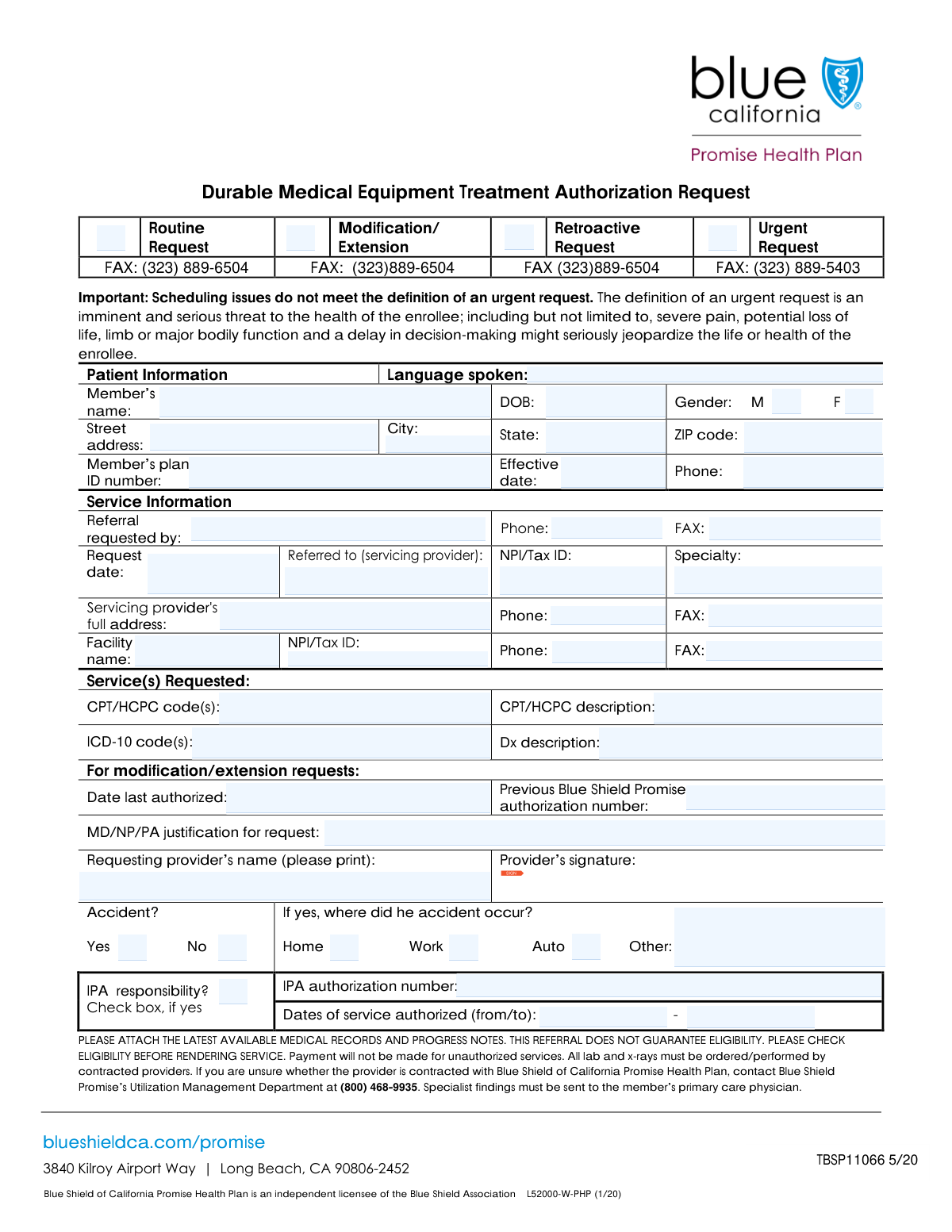
The Durable Medical Equipment (DME) Treatment Authorization Request Form is a critical document used by medical providers to request pre-approval from Blue Shield Promise for medical equipment like wheelchairs, hospital beds, or oxygen supplies. Submitting this form is essential to verify medical necessity and secure insurance coverage for the patient, preventing future billing issues and claim denials. Today, this form can be filled out quickly and accurately using AI-powered services like Instafill.ai, which can also convert non-fillable PDF versions into interactive fillable forms for maximum convenience.
Our AI automatically handles information lookup, data retrieval, formatting, and form filling.
It takes less than a minute to fill out DME Treatment Authorization Request Form using our AI form filling.
Securely upload your data. Information is encrypted in transit and deleted immediately after the form is filled out.
Form specifications
| Form name: | Blue Shield Promise Durable Medical Equipment (DME) Treatment Authorization Request Form |
| Number of fields: | 49 |
| Number of pages: | 1 |
| Language: | English |
| Categories: | authorization forms, equipment authorization forms, Medi-Cal forms, medical authorization forms, medical forms, medical request forms, VA medical forms |
Instafill Demo: How to fill out PDF forms in seconds with AI
How to Fill Out DME Treatment Authorization Request Form Online for Free in 2026
Are you looking to fill out a DME TREATMENT AUTHORIZATION REQUEST FORM form online quickly and accurately? Instafill.ai offers the #1 AI-powered PDF filling software of 2026, allowing you to complete your DME TREATMENT AUTHORIZATION REQUEST FORM form in just 37 seconds or less.
Follow these steps to fill out your DME TREATMENT AUTHORIZATION REQUEST FORM form online using Instafill.ai:
- 1 Navigate to Instafill.ai and upload or select the DME Treatment Authorization Request Form.
- 2 Use the AI assistant to automatically fill in patient details, such as name, date of birth, and plan ID number.
- 3 Enter the requesting and servicing provider's information, including NPI/Tax ID and contact details.
- 4 Input the specific medical codes (CPT/HCPC, ICD-10) and provide a clear diagnosis description for the requested equipment.
- 5 Indicate the type of request (e.g., Routine, Urgent, Modification) and provide any required justification or previous authorization numbers.
- 6 Review all the information populated by the AI for accuracy and completeness, making any necessary edits.
- 7 Electronically sign and submit the completed form directly to the appropriate department or download it for your records.
Our AI-powered system ensures each field is filled out correctly, reducing errors and saving you time.
Why Choose Instafill.ai for Your Fillable DME Treatment Authorization Request Form Form?
Speed
Complete your DME Treatment Authorization Request Form in as little as 37 seconds.
Up-to-Date
Always use the latest 2026 DME Treatment Authorization Request Form form version.
Cost-effective
No need to hire expensive lawyers.
Accuracy
Our AI performs 10 compliance checks to ensure your form is error-free.
Security
Your personal information is protected with bank-level encryption.
Frequently Asked Questions About Form DME Treatment Authorization Request Form
This is a Durable Medical Equipment (DME) Treatment Authorization Request form. It is used by healthcare providers to request prior approval from a patient's health plan for necessary medical equipment.
The requesting healthcare provider's office or the facility providing the service is responsible for completing and submitting this form on behalf of the patient.
You will need the patient's full name, date of birth, and plan ID number, as well as the specific CPT/HCPC and ICD-10 codes for the requested equipment and diagnosis.
A 'Routine' request is a standard, non-emergency request. An 'Urgent' request should only be selected if a delay poses an imminent and serious threat to the patient's life or health.
You should check the 'Modification/Extension' box and provide the previous authorization number if you are requesting a change or an extension to a previously approved authorization.
CPT/HCPC codes are used to identify the specific medical equipment being requested. ICD-10 codes represent the patient's diagnosis that medically justifies the need for the equipment.
This indicates if an Independent Practice Association (IPA) is responsible for authorizing the request. If you check 'Yes' for this field, you must also provide the IPA authorization number.
A 'Retroactive Request' is for equipment or services that have already been provided to the patient. This is used to seek authorization after the fact, typically in exceptional circumstances.
This section requires a clinical note from the medical doctor, nurse practitioner, or physician assistant. It should explain why the requested durable medical equipment is medically necessary for the patient.
The form includes fields for provider and facility FAX numbers, which indicates that it is typically submitted via fax to the patient's health plan for processing.
Yes, services like Instafill.ai use AI to accurately auto-fill form fields from your existing data, which can save significant time and help reduce errors.
Simply upload the form to Instafill.ai, and its AI will identify the fields. You can then connect your data sources to automatically populate patient, provider, and request information.
You can use a service like Instafill.ai, which can convert flat, non-fillable PDFs into interactive, fillable forms that you can complete and save online.
Compliance DME Treatment Authorization Request Form
Validation Checks by Instafill.ai
1
Date of Birth Format and Plausibility
This check validates that the 'Date of Birth' field is in a valid format, such as MM/DD/YYYY, and represents a date in the past. It also ensures the date is plausible, for example, not more than 120 years ago, to catch significant data entry errors. Correct patient age is critical for determining eligibility and clinical appropriateness, and failure to provide a valid date will prevent form submission.
2
Member's Plan ID Number Completeness
This validation ensures that the 'Member's Plan ID Number' field is not empty and contains a value. This ID is the primary key for identifying the patient within the health plan's system, making it essential for processing any request. If this field is left blank, the system cannot link the request to a specific member's coverage, and the form submission will be rejected.
3
NPI/Tax ID Format Validation
This check verifies that the 'NPI/Tax ID' field conforms to the standard format for a National Provider Identifier (10 digits) or a Tax ID (9 digits). Correct provider identification is mandatory for regulatory compliance, billing, and communication. An invalid ID format will trigger an error, requiring the user to correct the entry before the form can be processed.
4
Conditional Requirement for 'Date Last Authorized'
This validation enforces a conditional logic rule: the 'Date Last Authorized' field must be filled out if the 'Modification/ Extension' checkbox is selected. This date is crucial for establishing the context and history of an ongoing treatment authorization. If the request is a modification but the date is missing, the form will be flagged as incomplete, preventing submission until the required date is provided.
5
Conditional Requirement for 'IPA Authorization Number'
This check ensures that the 'IPA Authorization Number' field is populated if the 'IPA responsibility' checkbox is marked as 'Yes'. This number is necessary for routing the request to the correct Independent Physician Association (IPA) for review and approval. Failure to provide this number when required will result in a validation error, as the request cannot be processed by the designated entity.
6
Mutually Exclusive Request Type Selection
This validation ensures that mutually exclusive request types, such as 'Routine Request' and 'Urgent Request', are not selected at the same time. A single request cannot have conflicting levels of priority, as this determines the processing timeline and handling procedures. If conflicting options are checked, the user will be prompted to select only one to ensure the request is processed correctly.
7
CPT/HCPC Code Format Validation
This check verifies that all entries in the 'CPT/HCPC Codes' field adhere to the standard medical coding format (e.g., 5-digit numeric for CPT, or a letter followed by 4 digits for HCPCS). Using valid codes is essential for accurate service identification, billing, and determining medical necessity. The system will reject any codes that do not match the standard format, preventing downstream processing errors.
8
ICD-10 Code Format Validation
This validation confirms that the 'ICD-10 Codes' provided match the standard format for international classification of diseases codes (e.g., a letter followed by two digits, with optional decimals and further digits). Accurate diagnosis codes are fundamental for justifying the medical necessity of a requested service. An incorrectly formatted code will cause a validation failure, requiring correction before submission.
9
Phone and Fax Number Formatting
This check ensures that all phone and fax number fields ('Phone', 'Servicing Provider Phone', 'Facility Phone Number', etc.) follow a consistent, valid format, such as a 10-digit number. Proper formatting is crucial for ensuring successful communication with the patient, provider, and facility. An invalid number will prevent submission until it is corrected to a recognizable format.
10
Logical Date Consistency
This validation compares multiple date fields to ensure they are logically consistent. For example, it checks that the 'Date of Birth' is before the 'Request date' and that the plan 'Effective Date' is not after the 'Request date'. This prevents nonsensical data entry that could cause significant issues in eligibility and authorization processing, and a failure will require the user to correct the conflicting dates.
11
Paired Code and Description Completeness
This check ensures that if a code field ('CPT/HCPC Codes' or 'ICD-10 Codes') is filled, its corresponding description field ('CPT/HCPC Description' or 'Diagnosis Description') is also filled. While systems can often look up descriptions, providing them on the form prevents ambiguity and aids human reviewers. A missing description for a provided code will trigger an error, prompting the user to complete the information.
12
Conditional Requirement for 'Previous Authorization Number'
This validation rule mandates that the 'Previous Authorization Number' field must be completed if the request is a 'Modification/ Extension'. This number is the primary identifier for the original authorization and is essential for locating and amending it. If this field is empty on a modification request, the form will be rejected until the number is supplied.
13
State Abbreviation Validation
This check verifies that the 'State' field contains a valid, two-letter US state or territory abbreviation from a predefined list. Using standardized abbreviations is critical for address validation, mail delivery, and data consistency across systems. An entry that is not a recognized two-letter code will result in a validation error.
14
ZIP Code Format Validation
This validation ensures the patient's 'ZIP Code' is entered in a valid 5-digit or 9-digit (ZIP+4) format. A correct ZIP code is essential for verifying the patient's address and determining service area eligibility. The form will not be accepted if the ZIP code does not adhere to the standard United States Postal Service format.
Common Mistakes in Completing DME Treatment Authorization Request Form
Users often enter a CPT/HCPC code but provide a description in the 'CPT/HCPC Description' field that does not match, or they pair ICD-10 diagnosis codes that do not medically justify the requested procedure code. This frequently happens due to manual entry errors or using outdated code lists. Such mismatches are a primary cause for immediate denial or delays as they require manual review and clarification from the provider.
Entering the 'Member's Plan ID Number' with typos, transposed digits, or missing characters is a frequent error that prevents the system from identifying the patient. This often occurs from misreading the member's card or rushing through data entry. An incorrect ID will lead to a failed eligibility check and rejection of the entire request, requiring the form to be resubmitted correctly.
The form has fields that are only required if a specific checkbox is selected, such as filling in 'Previous Authorization Number' and 'Date Last Authorized' only when 'Modification/Extension' is checked. People often either miss filling these required fields after checking the box, or they fill them in unnecessarily. This leads to processing errors and delays, as the submission is considered incomplete or contains conflicting information.
The 'MD/NP/PA justification' field is frequently filled with vague or generic statements that lack the specific clinical details needed to prove medical necessity. This is a critical failure that almost always results in the request being pended for more information, significantly delaying patient care. To avoid this, provide a detailed narrative including patient history, failed alternative treatments, and specific reasons why the requested service is medically necessary.
Users may enter an individual provider's NPI instead of the required group or facility NPI, or simply make a typo in the number. The form's confusing layout, placing 'NPI/Tax ID' under a 'Patient Address' heading, increases the likelihood of error. An incorrect NPI/Tax ID can lead to claim rejection, misdirected communication, and significant payment delays.
Across fields like 'Date of Birth', 'Effective Date', and 'Request date', users enter dates in various non-standard formats (e.g., 'Jan 5, 2024', '01-05-24'). This can cause data import errors and processing delays. Always use the specified MM/DD/YYYY format consistently across all date fields to ensure the information is processed correctly and without manual intervention.
A common mistake is checking conflicting request types, such as selecting both 'Routine Request' and 'Urgent Request' simultaneously. This creates ambiguity for the processor, who cannot determine the correct handling priority for the authorization. This forces the processor to contact the requestor for clarification, thereby delaying the review of an otherwise valid request.
Key fields like 'Servicing Provider's Full Address' and 'Servicing Provider Phone' are sometimes left blank. This happens when the person filling the form doesn't have the information readily available and forgets to add it later. Without this data, the payer cannot contact the provider for clarifications or send correspondence, which can halt the authorization process entirely.
The 'Signature6' field is a legal attestation of the information provided and is absolutely mandatory for processing. Digital or paper forms are often submitted without the required signature from the requesting provider. An unsigned request is legally invalid and will be immediately rejected, forcing the entire submission process to start over from the beginning.
When entering the patient's 'Street Address', users often omit crucial details like an apartment, suite, or unit number. This can lead to returned mail and communication failures with the patient regarding their authorization status. To prevent this, always include the full, unabbreviated address as it appears on official records. AI-powered tools like Instafill.ai can help validate addresses to ensure they are complete and properly formatted.
Saved over 80 hours a year
“I was never sure if my IRS forms like W-9 were filled correctly. Now, I can complete the forms accurately without any external help.”
Kevin Martin Green
Your data stays secure with advanced protection from Instafill and our subprocessors

Robust compliance program
Transparent business model
You’re not the product. You always know where your data is and what it is processed for.
ISO 27001, HIPAA, and GDPR
Our subprocesses adhere to multiple compliance standards, including but not limited to ISO 27001, HIPAA, and GDPR.
Security & privacy by design
We consider security and privacy from the initial design phase of any new service or functionality. It’s not an afterthought, it’s built-in, including support for two-factor authentication (2FA) to further protect your account.
Fill out DME Treatment Authorization Request Form with Instafill.ai
Worried about filling PDFs wrong? Instafill securely fills blue-shield-promise-durable-medical-equipment-dme-treatment-authorization-request-form forms, ensuring each field is accurate.