
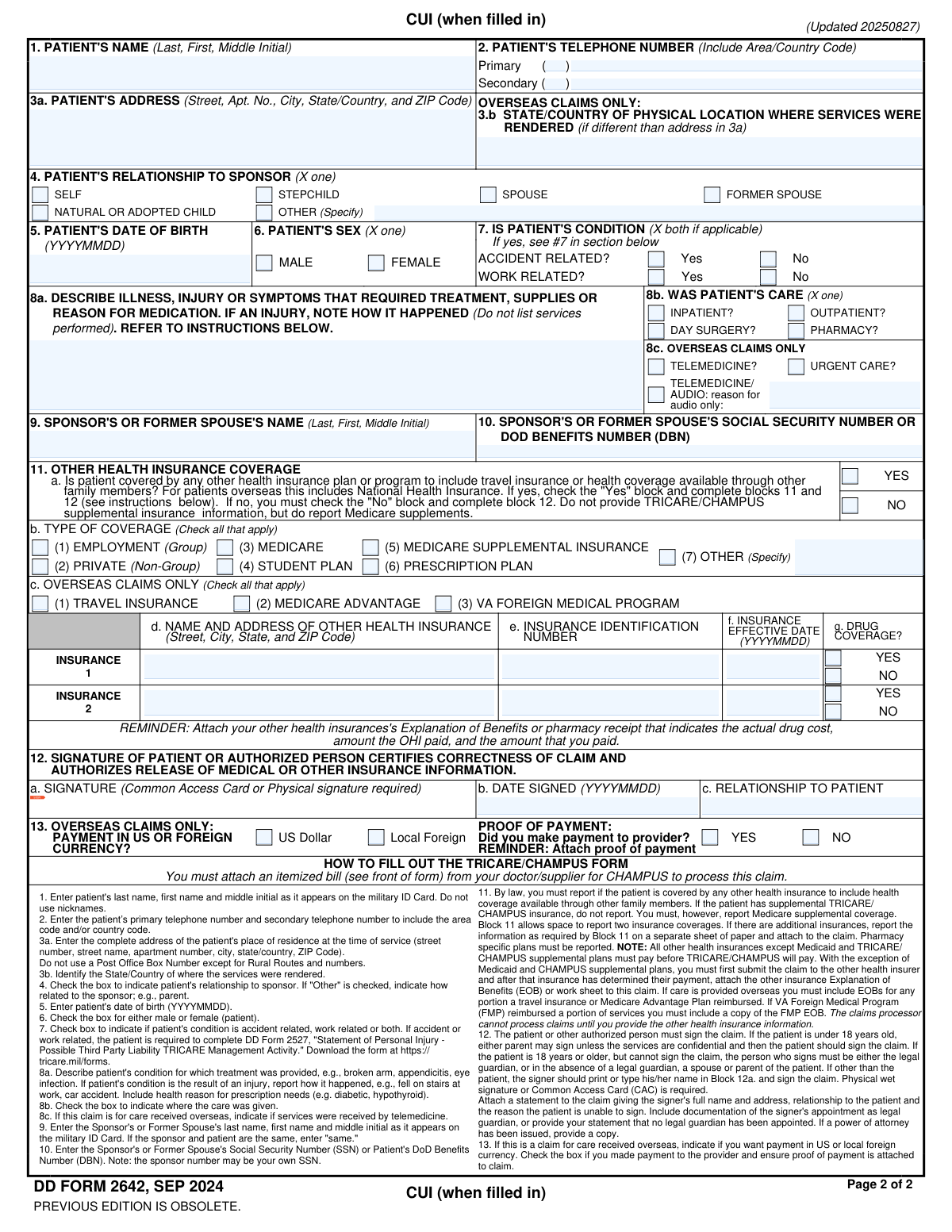
Yes! You can use AI to fill out DD Form 2642, TRICARE DoD/CHAMPUS Medical Claim Patient's Request for Medical Payment
Don't type 62 fields by hand. Tell our AI about yourself, or upload your insurance card, and it fills every field in seconds. You check it, then download, print or sign.
The AI does the filling. You just check it.
No typing into boxes, nothing to install.
What this form asks for
The AI fills all of it, from your answers or your documents.
The AI checks your answers before you download
12 checks built for this form, so a wrong date or a missing answer is caught before anyone else sees it.
Validates that the Sponsor's Social Security Number or DoD Benefits Number in Block 10 is present and correctly formatted. The SSN must be 9 digits, and the DBN must be 11 digits. This number is the primary key for identifying the sponsor in the TRICARE system, and an incorrect or missing number will prevent claim processing and result in denial or delay.
Checks that the Patient's Date of Birth in Block 5 is a complete and valid date in YYYYMMDD format. The validation also ensures the date is not in the future and is a reasonable past date, for example, not more than 150 years ago. An invalid date of birth prevents eligibility verification and can lead to claim rejection.
Verifies that a signature is present in Block 12a and a date is entered in Block 12b. The form instructions explicitly state that an unsigned claim will be returned. This check is critical because the signature legally certifies the claim's correctness and authorizes the release of information, making it a non-negotiable requirement for processing.
Ensures logical consistency for the Other Health Insurance section (Block 11). If 'Yes' is selected in 11a, the validation confirms that at least one insurance type in 11b is checked and that the insurer's details (11d, 11e, 11f) are provided. Failure to provide these details when OHI is present violates coordination of benefits rules and will cause the claim to be returned for the missing information.
This check flags a requirement for an additional form if the condition is marked as accident or work-related. If 'Yes' is checked in Block 7, the system should confirm that DD Form 2527 is attached or its submission is acknowledged. This is crucial for determining third-party liability, and without this form, the claim cannot be processed and will be delayed or denied.
Validates the relationship between the patient and sponsor. If 'Self' is checked in Block 4, this check verifies that the Sponsor's Name in Block 9 is either 'same' or matches the Patient's Name in Block 1. This prevents data entry errors and ensures the correct beneficiary and sponsor records are linked for eligibility and payment processing.
And 6 more checks
- Timely Filing Deadline Verification
- Required Attachment: OHI Explanation of Benefits
- Date Signed vs. Date of Service Logic
- Overseas Claim Field Validation
- Itemized Bill Attachment Confirmation
- Insurance Effective Date Logic
Let AI fill out your DD Form 2642
No typing. Every field filled in seconds, checked, ready to sign.
How to Fill Out DD Form 2642 Online for Free in 2026
What the AI walks you through.
- Navigate to Instafill.ai and upload or select the DD Form 2642.
- Provide the patient's personal details, including name, address, date of birth, and relationship to the sponsor.
- Enter the sponsor's information, such as their full name and Social Security Number (SSN) or DoD Benefits Number (DBN).
- Describe the illness or injury, indicate if it was accident or work-related, and specify the type of care received (e.g., inpatient, outpatient, pharmacy).
- Disclose any other health insurance coverage and provide details of the plan. If other insurance was used, you must attach the Explanation of Benefits (EOB).
- Attach all necessary supporting documents, such as the provider's itemized bill, proof of payment for overseas claims, and DD Form 2527 if the injury was accident-related.
- Review the completed form for accuracy, then sign and date it before submitting it to the appropriate TRICARE claims processor as instructed on the form.
Common Mistakes in Completing DD Form 2642
The ones the AI is built to catch.
Using an Incorrect Date Format
Failing to Disclose Other Health Insurance (OHI)
Attaching a Non-Itemized Bill
Forgetting DD Form 2527 for Accident-Related Claims
Missing or Incorrect Sponsor's SSN or DBN
Submitting an Unsigned or Improperly Signed Claim
Providing a Vague Description of Illness or Injury
Forgetting to Attach Proof of Payment for Overseas Claims
Failing to Attach the Explanation of Benefits (EOB) from Other Insurance
Using a P.O. Box for the Patient's Residence
Frequently Asked Questions About DD Form 2642
Is it really free for 7 days?
Can I fill other forms too?
How do I cancel?
How does the AI fill out DD Form 2642?
What happens to my information?
How complex is DD Form 2642 to fill out?
What is the DD Form 2642 used for?
When should I use this form instead of having my doctor file the claim?
What documents must I attach to my claim?
Is there a deadline for submitting a claim with Form 2642?
Where do I send the completed form?
My injury was from an accident. Do I need to provide extra information?
I have another health insurance plan. How does that affect my claim?
What information is required for a prescription drug claim?
Are there special requirements for claims for medical care received overseas?
What do I enter in Block 10 for the Sponsor's SSN or DBN?
Who is authorized to sign the claim form in Block 12?
Can I use an AI tool to help me fill out this form?
How can I fill out the DD Form 2642 online?
The PDF version of the form I downloaded isn't fillable. What should I do?
Get your DD Form 2642 filled out by AI
$0 today. Cancel before Nov 11 and you pay nothing.
Other forms like this one
medical forms: Form OWCP-915, Claim for Medical Reimbursement, Form 8994, Employer Credit for Paid Family and Medical Leave, Form OF-178, Certificate of Medical Examination, Form N-648, Medical Certification for Disability Exceptions, U.S. Coast Guard Form CG-719K, Application for Medical Certificate, The Department of Medical Assistance Services Applied Behavior Analysis Preservice Service Authorization Request Form (Effective Dates of Service 09/01/2025 and after), State of Illinois Department of Children and Family Services Medical Report on an Adult in a Child Care Facility (CFS 602), Carer Payment and Carer Allowance – Medical Report (SA431) for a child under 16 years, Medically Prescribed Treatment (Non-Medication) Form — Provider Treatment Order Form | Office of School Health | School Year 2025–2026, VA Form 10-7959f-2, Foreign Medical Program (FMP) Claim Cover Sheet, Department of Medical Assistance Services Applied Behavior Analysis (97155, Et al.) Initial Service Authorization Request Form, Applied Behavior Analysis Concurrent Service Authorization Request Form (CPT Codes 97153, 97154, 97155, 97156, 97157, 97158, 0373T) – Virginia Department of Medical Assistance Services, Department of Medical Assistance Services Enhanced Services Individual Service Plan (ISP) Template, Form DS-1843, Medical History and Examination for Individuals Age 12 and Older, Scheduled Medical Leave of Absence (MLOA) - BLET 13, Admissions Application, School of Diagnostic Imaging, Mills-Peninsula Medical Center, Albany Medical Center 2024 Benefits Guide, Form BWC-1141, Request for Medical Information, VA Form 21P-8416, Medical Expense Report, Medicare Enrollment Application for Durable Medical Equipment, Prosthetics, Orthotics, and Supplies (DMEPOS) Suppliers, CMS-855S
CAR forms: Form SSA-44, Medicare Income-Related Monthly Adjustment Amount - Life-Changing Event, Form I-90, Application to Replace Permanent Resident Card, Form 2441, Child and Dependent Care Expenses, Form WH-380-E, Certification of Health Care Provider, Form 4137, Social Security and Medicare Tax on Unreported Tip Income, Form 8959, Additional Medicare Tax, Form 8919, Uncollected Social Security and Medicare Tax, Form CMS-1763, Request for Termination of Medicare Coverage, Form CMS-855O, Medicare Enrollment Application, Form CMS-460, Medicare Participation Agreement, Form CMS-4040, Request for Enrollment in Medicare Part B, Form WH-380-F, Certification of Health Care Provider, Form W-10, Dependent Care Provider’s Identification, Form 1099-K, Payment Card and Third Party Network Transactions, Form CMS-40B, Application for Enrollment in Medicare Part B, Form SS-5-FS, Application for a Social Security Card, Form REG 195, Disabled Person Placard, Form AR-11, Alien's Change of Address Card, Form I-905, Application for Authorization to Issue Certification for Health Care Workers, Form I-131A, Application for Carrier Documentation
medical claim forms: Form OWCP-915, Claim for Medical Reimbursement, VA Form 10-7959f-2, Foreign Medical Program (FMP) Claim Cover Sheet, Standard Health Insurance Claim Form - Part B, Cigna Medical Claim Form, Medical Benefits – Claim Instructions and Request
patient forms: Form BHVH, Outpatient Behavioral Health – ABA Treatment Request, Center for Infertility & Reproductive Surgery – New Patient Questionnaire and Patient/Guarantor Statement (Brigham and Women’s Hospital, Department of Obstetrics and Gynecology), New Patient Information (Initial Contact) Form, ACT Interstate Patient Travel Assistance Scheme (ACT IPTAS) Claim Form (Reviewed: July 2023), Outpatient Behavioral Health (BH) – ABA Treatment Request: Required Information for Precertification (GR-69017-4), Patient Encounter and Authorization Tracking Form, Outpatient Imaging Prior Authorization Request Form, Kaiser Permanente Authorization for Use or Disclosure of Patient Health Information, Inpatient Rehabilitation Facility Patient Assessment Instrument (IRF-PAI), Form CMS-1490S, Patient's Request for Medical Payment
VA medical forms: Form OWCP-915, Claim for Medical Reimbursement, Form 8994, Employer Credit for Paid Family and Medical Leave, Form OF-178, Certificate of Medical Examination, Form N-648, Medical Certification for Disability Exceptions, U.S. Coast Guard Form CG-719K, Application for Medical Certificate, The Department of Medical Assistance Services Applied Behavior Analysis Preservice Service Authorization Request Form (Effective Dates of Service 09/01/2025 and after), State of Illinois Department of Children and Family Services Medical Report on an Adult in a Child Care Facility (CFS 602), Carer Payment and Carer Allowance – Medical Report (SA431) for a child under 16 years, Medically Prescribed Treatment (Non-Medication) Form — Provider Treatment Order Form | Office of School Health | School Year 2025–2026, VA Form 10-7959f-2, Foreign Medical Program (FMP) Claim Cover Sheet, Department of Medical Assistance Services Applied Behavior Analysis (97155, Et al.) Initial Service Authorization Request Form, Applied Behavior Analysis Concurrent Service Authorization Request Form (CPT Codes 97153, 97154, 97155, 97156, 97157, 97158, 0373T) – Virginia Department of Medical Assistance Services, Department of Medical Assistance Services Enhanced Services Individual Service Plan (ISP) Template, Form DS-1843, Medical History and Examination for Individuals Age 12 and Older, Scheduled Medical Leave of Absence (MLOA) - BLET 13, Admissions Application, School of Diagnostic Imaging, Mills-Peninsula Medical Center, Albany Medical Center 2024 Benefits Guide, Form BWC-1141, Request for Medical Information, VA Form 21P-8416, Medical Expense Report, Medicare Enrollment Application for Durable Medical Equipment, Prosthetics, Orthotics, and Supplies (DMEPOS) Suppliers, CMS-855S
VA claim forms: Form OWCP-915, Claim for Medical Reimbursement, Form 8862, Information To Claim Certain Credits, Form CA-7, Claim for Compensation, Form CA-5, Claim for Compensation, Form SC-100, Plaintiff's Claim and ORDER to Go to Small Claims Court, Form 20-0995, Decision Review Request: Supplemental Claim, Form 104, List of Creditors 20 Largest Unsecured Claims, Form 941-X (Rev. April 2023), Adjusted Employer’s QUARTERLY Federal Tax Return or Claim for Refund, Judicial Council of California Form SC-104, Proof of Service (Small Claims), Immigration and Refugee Board of Canada (IRB) – Refugee Protection Division (RPD) Basis of Claim Form (for persons claiming refugee protection in Canada) (RPD.02.01), SC-108, Request to Correct or Cancel Judgment and Answer (Small Claims), Judicial Council of California Form SC-105, Request for Court Order and Answer (Small Claims), SC-120, Defendant’s Claim and ORDER to Go to Small Claims Court (Small Claims), Judicial Council of California Form SC-104, Proof of Service (Small Claims), Continental American Insurance Company (CAIC) / Aflac Group Critical Illness Claim Form (with Attending Physician’s Statement, HIPAA Authorization to Obtain Information, and Electronic Funds Transaction Authorization), Judicial Council of California Form SC-108, Request to Correct or Cancel Judgment and Answer (Small Claims), SC-105, Request for Court Order and Answer (Small Claims), Judicial Council of California Form SC-120, Defendant’s Claim and ORDER to Go to Small Claims Court (Small Claims), Small Claim and Notice of Small Claim (ORS 46.425) (OJD Official) (Jan 2026), VA Form 21-4138, Statement in Support of Claim
Medi-Cal forms: Form OWCP-915, Claim for Medical Reimbursement, Form 8994, Employer Credit for Paid Family and Medical Leave, Form OF-178, Certificate of Medical Examination, Form N-648, Medical Certification for Disability Exceptions, U.S. Coast Guard Form CG-719K, Application for Medical Certificate, The Department of Medical Assistance Services Applied Behavior Analysis Preservice Service Authorization Request Form (Effective Dates of Service 09/01/2025 and after), State of Illinois Department of Children and Family Services Medical Report on an Adult in a Child Care Facility (CFS 602), Carer Payment and Carer Allowance – Medical Report (SA431) for a child under 16 years, Medically Prescribed Treatment (Non-Medication) Form — Provider Treatment Order Form | Office of School Health | School Year 2025–2026, VA Form 10-7959f-2, Foreign Medical Program (FMP) Claim Cover Sheet, ABA Authorization Request (Medi-Cal) – Initial and Concurrent Requests, Department of Medical Assistance Services Applied Behavior Analysis (97155, Et al.) Initial Service Authorization Request Form, Applied Behavior Analysis Concurrent Service Authorization Request Form (CPT Codes 97153, 97154, 97155, 97156, 97157, 97158, 0373T) – Virginia Department of Medical Assistance Services, Department of Medical Assistance Services Enhanced Services Individual Service Plan (ISP) Template, Form DS-1843, Medical History and Examination for Individuals Age 12 and Older, Scheduled Medical Leave of Absence (MLOA) - BLET 13, Admissions Application, School of Diagnostic Imaging, Mills-Peninsula Medical Center, Albany Medical Center 2024 Benefits Guide, Form BWC-1141, Request for Medical Information, VA Form 21P-8416, Medical Expense Report
medical request forms: The Department of Medical Assistance Services Applied Behavior Analysis Preservice Service Authorization Request Form (Effective Dates of Service 09/01/2025 and after), Department of Medical Assistance Services Applied Behavior Analysis (97155, Et al.) Initial Service Authorization Request Form, Applied Behavior Analysis Concurrent Service Authorization Request Form (CPT Codes 97153, 97154, 97155, 97156, 97157, 97158, 0373T) – Virginia Department of Medical Assistance Services, Form BWC-1141, Request for Medical Information, Molina Healthcare Prior Authorization Request Form, Provider Pre-Service Organization Determination Request Form, Radiological Services Request (RSR), Radiology Prior Authorization Request Form, Texas Standard Prior Authorization Request Form for Health Care Services, Form CMS-40B, Request for Enrollment in Medicare Part B (Medical Insurance), Form CMS-1490S, Patient's Request for Medical Payment, Blue Shield Promise Durable Medical Equipment (DME) Treatment Authorization Request Form, State of California Form SOC 321, Request for Order and Consent - Paramedical Services, Form CMS-1763, Request for Termination of Premium Hospital and/or Supplementary Medical Insurance, Request to Resolve a Medical Fee Dispute, Physician Certification In Support of Medical Excuse Request (Jury), Aetna Form GC-7 (4-22) R, Medical Benefits Request, VA Form 0857e, Request for Medical Documentation, SOC 821, Request for Order and Consent for Paramedical Services, Medical Benefits – Claim Instructions and Request
L.A. Care forms: Form SSA-44, Medicare Income-Related Monthly Adjustment Amount - Life-Changing Event, Form 2441, Child and Dependent Care Expenses, Form WH-380-E, Certification of Health Care Provider, Form 4137, Social Security and Medicare Tax on Unreported Tip Income, Form 8959, Additional Medicare Tax, Form 8919, Uncollected Social Security and Medicare Tax, Form CMS-1763, Request for Termination of Medicare Coverage, Form CMS-855O, Medicare Enrollment Application, Form CMS-460, Medicare Participation Agreement, Form CMS-4040, Request for Enrollment in Medicare Part B, Form WH-380-F, Certification of Health Care Provider, Form W-10, Dependent Care Provider’s Identification, Form CMS-40B, Application for Enrollment in Medicare Part B, Form I-905, Application for Authorization to Issue Certification for Health Care Workers, DHS-6696-ENG, Minnesota Health Care Programs Application (MNsure/DHS), California Department of Social Services (CDSS) Community Care Licensing Child Care Forms Packet (LIC 9150, LIC 282, LIC 627, LIC 700, LIC 995A, CDPH 286, LIC 9227), State of Illinois Department of Human Services (IDHS) – Bureau of Child Care and Development Child Care Application (Form IL444-3455), Form CH-006: PA-BH-Res-PCS, Oregon Behavioral Health Support Program Plan of Care Authorization (Plan of Care Request for Behavioral Health Residential or Personal Care Services), State of Illinois Department of Children and Family Services Medical Report on an Adult in a Child Care Facility (CFS 602), Carer Payment and Carer Allowance – Medical Report (SA431) for a child under 16 years
payment forms: Form 5405, Repayment of First-Time Homebuyer Credit, Form 1127, Application for Extension of Time for Payment of Tax Due to Undue Hardship, Form 1099-G, Certain Government Payments, Form 1099-K, Payment Card and Third Party Network Transactions, Form 1099-Q, Payments From Qualified Education Programs, Form SSA-8, Application for Lump-Sum Death Payment, Form 1845-0163, Borrower Defense to Repayment Application, application-and-contract-for-electric-facilities-w, Carer Payment and Carer Allowance – Medical Report (SA431) for a child under 16 years, Income-Driven Repayment (IDR) Plan Request (PAYE, IBR, and ICR) — William D. Ford Federal Direct Loan (Direct Loan) Program and Federal Family Education Loan (FFEL) Programs (OMB No. 1845-0102), Fidelity NetBenefits Distribution - Recurring Payments, Electronic Dividend and Interest Payment Authorization Form, Vanguard Super Apply for a financial hardship payment, Special Tax Notice Regarding Plan Payments, Empower Loan Payment Change Request Form, Empower Retirement Payment Request Form, Empower 401(k) Loan Prepayment Request Form, Special Tax Notice Regarding Plan Payments, Transamerica Automatic Payment Authorization, Excess Withdrawal Request and Form W-4R, Withholding Certificate for Nonperiodic Payments and Eligible Rollover Distributions
AMP forms: AMP Know Your Client Individual, Joint Investors and Sole Trader, Applied Behavioral Analysis (ABA) Prior Authorization Form (New Hampshire), Sample IRA Distribution Letter for a Qualified Charitable Distribution (QCD), St. Jude Children’s Research Hospital IRA Sample Letter of Instruction, Equestrian Day Camp Supplemental Application
Let AI fill out your DD Form 2642
Your trial starts once a card is added. You pay nothing before Nov 11.
Our AI already knows this form, all 62 fields of it. Skip the typing: tell it about yourself, or upload what you have, and it fills the whole form in seconds.
- AI fills every field on both pages, tables and checkboxes included
- No typing into boxes: answer a few questions, or upload your insurance card, an old copy of this form, a photo of a document
- The AI checks the answers; you review and change anything before you download
- Download the finished PDF, print it, or sign it online
- Encrypted, and never used to train AI
Cancel before Nov 11 and you pay nothing.
A card is needed to start the trial. Cancel in two clicks from your account.
Terms · Privacy