Yes! You can use AI to fill out Excess Withdrawal Request and Form W-4R, Withholding Certificate for Nonperiodic Payments and Eligible Rollover Distributions
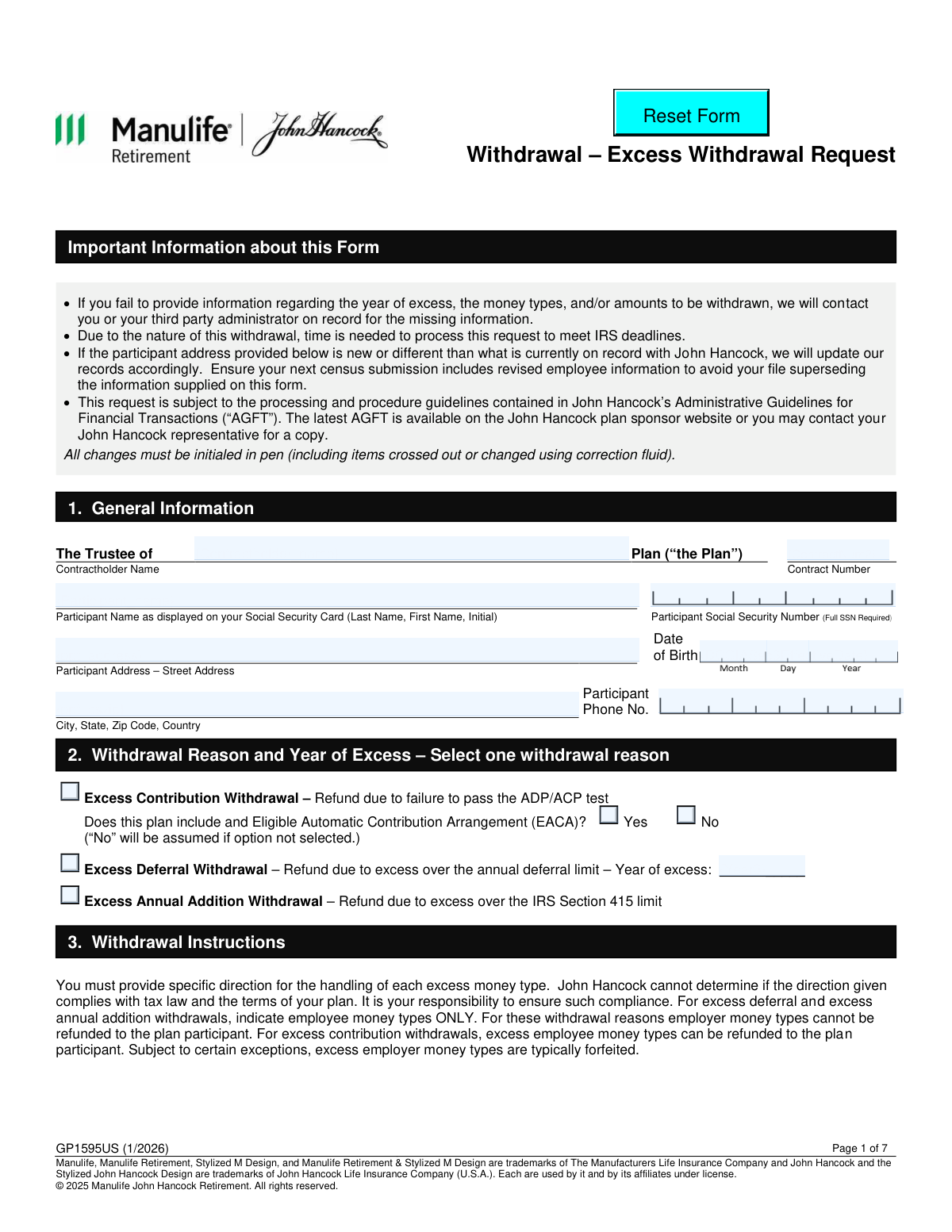
This form package is used by a retirement plan participant to request a withdrawal of excess contributions, deferrals, or annual additions to comply with IRS limits. It is crucial for correcting over-contributions and managing the tax implications of the distribution, which is why it includes IRS Form W-4R to specify the federal income tax withholding rate. Today, this form can be filled out quickly and accurately using AI-powered services like Instafill.ai, which can also convert non-fillable PDF versions into interactive fillable forms.
GP1595US / W-4R is part of the
payment forms, withdrawal forms, withholding forms, distribution forms, distribution request forms and withdrawal request forms categories on Instafill.
Rather not fill this in by hand? Instafill is an online form filler that completes PDF forms automatically — upload the blank form, answer a few questions, and the AI fills every field.
Form specifications
| Form name: | Excess Withdrawal Request and Form W-4R, Withholding Certificate for Nonperiodic Payments and Eligible Rollover Distributions |
| Number of pages: | 1 |
| Language: | English |
Our AI automatically handles information lookup, data retrieval, formatting, and form filling.
It takes less than a minute to fill out GP1595US / W-4R using our AI form filling.
Securely upload your data. Information is encrypted in transit and deleted immediately after the form is filled out.
Instafill Demo: How to fill out PDF forms in seconds with AI
How to Fill Out GP1595US / W-4R Online for Free in 2026
Are you looking to fill out a GP1595US / W-4R form online quickly and accurately? Instafill.ai offers the #1 AI-powered PDF filling software of 2026, allowing you to complete your GP1595US / W-4R form in just 37 seconds or less.
Follow these steps to fill out your GP1595US / W-4R form online using Instafill.ai:
- 1 Navigate to Instafill.ai and upload or select the Excess Withdrawal Request form (GP1595US / W-4R).
- 2 Provide the participant's personal information, including full name, Social Security Number, address, and date of birth.
- 3 Select the reason for the withdrawal, such as excess contribution, excess deferral, or excess annual addition.
- 4 Enter the withdrawal instructions, specifying the money types and the exact amounts to be withdrawn, including any earnings.
- 5 Complete the tax withholding section, which includes filling out the integrated Form W-4R to set your federal tax withholding rate and making any necessary state tax elections.
- 6 Choose the method of payment (Direct Deposit or Wire) and provide the required banking information, such as bank name, routing number, and account number.
- 7 Review all the information you've entered for accuracy before the authorized Trustee signs and dates the form to finalize the request.
Our AI-powered system ensures each field is filled out correctly, reducing errors and saving you time.
Why Choose Instafill.ai for Your Fillable GP1595US / W-4R Form?
Speed
Complete your GP1595US / W-4R in as little as 37 seconds.
Up-to-Date
Always use the latest 2026 GP1595US / W-4R form version.
Cost-effective
No need to hire expensive lawyers.
Accuracy
Our AI performs 10 compliance checks to ensure your form is error-free.
Security
Your personal information is protected with bank-level encryption.
Frequently Asked Questions About GP1595US / W-4R
This form is used to request a refund of excess contributions or deferrals from your John Hancock retirement plan. This typically happens when you've contributed more than the IRS limits allow or if your plan fails certain compliance tests.
This form is completed by the Plan Trustee or an Authorized Signer on behalf of a plan participant who has made excess contributions. The participant's personal information is required, but the Trustee authorizes and signs the request.
In Section 3, you must specify the money types, the exact excess contribution/deferral amount, and any associated earnings to be withdrawn. If you are unsure, consult your third-party administrator (TPA) or plan records.
The default federal tax withholding is typically 10% for excess contributions, but can vary. You can choose a different rate by completing and attaching the included Form W-4R.
Yes, your withdrawal is subject to your state's tax laws, which are detailed in Section 5. Some states require mandatory withholding, while others allow you to opt out or specify an amount.
Form W-4R is an IRS form to set your federal tax withholding rate for this payment. You only need to complete it if you want to choose a rate different from the default or if it's required for your specific withdrawal type.
Funds are sent via electronic fund transfer (Direct Deposit or Wire). After processing, direct deposits typically take 2-3 business days, while wires take 1-2 business days.
Missing information will delay the processing of your request, as John Hancock will need to contact you for the correct details. All handwritten changes or corrections on the form must be initialed in pen.
You must indicate you are not a U.S. person in Section 5, which results in a default 30% federal tax withholding. You may be able to claim a lower rate if a tax treaty exists and you attach a valid IRS Form W-8BEN.
Section 4 is used to direct John Hancock to forfeit employer money types associated with the excess contribution. This is often required when excess employer contributions must be returned to the plan.
The form must be signed by the Plan Trustee or another designated Authorized Signer. Their signature certifies that the request is accurate and permitted under the plan's rules and applicable laws.
Yes, services like Instafill.ai use AI to help you accurately auto-fill form fields with your saved information. This can save time and help prevent common errors.
You can use a service like Instafill.ai to complete the form digitally. Simply upload the PDF, and the tool will allow you to type directly into the fields, add signatures, and then download the completed document.
If you have a non-fillable or 'flat' PDF, you can upload it to Instafill.ai. The platform's AI can convert it into an interactive, fillable form that you can easily complete on your computer.
Compliance GP1595US / W-4R
Validation Checks by Instafill.ai
1
Ensures Participant SSN is Complete and Valid
This check verifies that the 'Participant Social Security Number' field ({SSN}) is not empty and contains a valid 9-digit number. The format can be with or without hyphens (XXXXXXXXX or XXX-XX-XXXX). This is critical for correct tax reporting to the IRS and for uniquely identifying the participant's account. A failure would prevent processing due to the inability to verify the participant's identity and meet regulatory requirements.
2
Exclusive Withdrawal Reason Selection
Validates that exactly one withdrawal reason is selected in Section 2 from the available options: 'Excess Contribution Withdrawal' ({EW 1}), 'Excess Deferral Withdrawal' ({EW 2}), or 'Excess Annual Addition Withdrawal' ({EW 3}). The type of withdrawal determines the tax implications and processing rules. If zero or more than one option is selected, the form is ambiguous and cannot be processed, requiring clarification from the submitter.
3
Conditional Requirement for 'Year of Excess'
This check ensures that if 'Excess Deferral Withdrawal' ({EW 2}) is selected, the 'Year of excess' field ({Year3}) is filled with a valid, 4-digit year. The specified year must not be in the future. This information is essential for calculating the correct refund amount and for accurate tax reporting for the specific year the excess occurred.
4
Conditional Requirement for EACA Status
Verifies that if 'Excess Contribution Withdrawal' ({EW 1}) is selected, the user must also answer the question 'Does this plan include an Eligible Automatic Contribution Arrangement (EACA)?' by selecting either 'Yes' ({EW4}) or 'No' ({EW5}). The EACA status affects the deadlines and rules for correcting the excess contribution. Failure to provide this information will halt the request until the plan's status is clarified.
5
Valid Withdrawal Instruction Amounts
This validation ensures that for each row completed in the 'Withdrawal Instructions' table (Section 3), the 'Excess Contribution/Deferral Amount' and 'Earnings Amount' are valid, non-negative numeric values. While $0 is an acceptable entry for earnings, blank or non-numeric characters are not. This is crucial for processing the correct financial transaction from the participant's account.
6
Mandatory Payment Method and Bank Details
This check confirms that a 'Method of Payment' (Section 6) is selected, either 'Direct Deposit' ({F104}) or 'Wire' ({F107}). Upon selection, it also validates that all associated bank details ('Bank Name', 'Bank ABA/Routing', 'Bank Account No.') are completed. Without this information, the funds cannot be disbursed to the participant, making it a critical and required section.
7
Bank ABA/Routing Number Format
Validates that the 'Bank ABA/Routing' number ({BankABA4}) provided in Section 6 consists of exactly 9 digits. This specific format is required by the Automated Clearing House (ACH) network for correctly routing electronic fund transfers. An incorrect routing number will cause the transaction to fail, delaying the participant's receipt of funds.
8
Conditional Bank Account Type Selection
Ensures that if 'Direct Deposit' ({F104}) is selected as the payment method, the user must also specify the account type by selecting either 'Checking' ({F105}) or 'Savings' ({F106}). This information is necessary for the financial institution to correctly process the deposit. Omitting the account type can lead to transaction rejection by the receiving bank.
9
Conditional Country of Residence for Non-U.S. Persons
This check makes the 'Country of residence' field ({CountryRes}) mandatory if the user has checked the box '{EW 8}' indicating they are not a U.S. person or resident alien. This country information is required to determine the correct tax withholding rate, which may be affected by international tax treaties. Failure to provide the country prevents the correct application of tax law.
10
Mutually Exclusive TPA Fee Specification
In the 'Third Party Administrator (TPA) Withdrawal Fee' section (Section 7), this check ensures that if a fee is being charged, either the 'Flat Fee Amount' ({TaxDollar5}) or the 'Percentage' ({TaxPercent4}) is entered, but not both. Allowing both would create ambiguity in how to calculate the fee. The system should enforce this exclusivity to ensure accurate fee deduction.
11
Mandatory Trustee Signature and Date
Verifies that the 'Signature of Trustee/Authorized Signer', 'Name - please print' ({FNamePrint}), and 'Date' ({FSigDate}) fields in Section 8 are all completed. This signature legally authorizes John Hancock to act on the instructions provided in the form. An unsigned or incomplete authorization section renders the entire request invalid and unprocessed.
12
Valid and Current Signature Date
This check validates that the 'Date' ({FSigDate}) in the signature block is a real, correctly formatted date and is not a date in the future. A valid signature date is required for legal and audit trail purposes to establish when the authorization was given. A future date would invalidate the authorization, as it cannot be provided in advance.
13
Mutually Exclusive State Tax Withholding Input
For states that allow voluntary withholding (e.g., AL, CO, GA), this check ensures that the user provides either a percentage ({TaxPercent2}) or a whole dollar amount ({TaxDollar3}), but not both. Similarly, for states like Minnesota, either a percentage ({TaxPercentMN}) or a dollar amount ({TaxDollarMN}) can be entered. This prevents conflicting instructions for calculating state tax withholding.
14
Oklahoma Minimum Tax Withholding Rate
This validation is specific to Oklahoma state tax withholding. If the user selects to withhold a specific percentage ({OKTax2}), this check ensures the value entered in the {TaxPercentOK} field is a number that is greater than or equal to the state-mandated minimum of 4.75%. This rule prevents the submission of a non-compliant tax withholding request.
Common Mistakes in Completing GP1595US / W-4R
In Section 3, users must enter the 'customized short names' for money types as found on the plan sponsor website. People often guess, use generic terms, or leave this field blank, which halts the withdrawal process. This requires the processor to contact the plan administrator for clarification, causing significant delays. To avoid this, log in to your plan sponsor portal to find the exact money type names before filling out the form.
Section 5 details different tax withholding rules for over 20 states, which is highly confusing. A common error is attempting to opt-out of withholding in a state where it is mandatory (e.g., MA, VA) or failing to check the opt-out box in states where it's an option (e.g., CA, OR), leading to unwanted tax withholding. Carefully read the rules for your specific state of residence to ensure your selection is valid and reflects your preference.
When selecting 'Excess Deferral Withdrawal' in Section 2, the form requires the user to specify the year the excess deferral occurred. This small field is frequently overlooked, but it is critical for correct tax reporting and processing. Leaving it blank will result in the form being considered incomplete and will require follow-up, delaying the refund. Always double-check that the year is filled in for this specific withdrawal reason.
In Section 6, simple typos in the 9-digit ABA/Routing number or the bank account number are frequent and have severe consequences. An incorrect number can cause the electronic fund transfer to be rejected or, in a worst-case scenario, sent to the wrong account. To prevent this, copy the numbers directly from a check or your online banking portal and double-check each digit. AI-powered tools like Instafill.ai can help validate routing numbers to ensure they correspond to the correct bank.
The table in Section 3 requires filers to list the 'Excess Contribution/Deferral Amount' and the 'Earnings Amount' in separate columns. People often combine them into one field or forget to enter '$0' in the earnings column if there are no earnings, as instructed. This leads to incorrect processing and potential tax reporting errors. You must calculate and specify the earnings associated with the excess amount separately to ensure compliance.
The form defaults to a specific federal withholding rate, and changing it requires submitting a completed Form W-4R. Users often forget to attach the W-4R, fail to sign it, or enter a withholding rate that is not permitted for their withdrawal type. An incomplete or missing W-4R means the default withholding rate will be applied, which may not align with your financial needs. Ensure the W-4R is fully completed, signed, and attached if you wish to specify a custom federal withholding rate.
The signature in Section 8 is for the Plan Trustee or Authorized Signer, not the participant, a distinction many miss. An unsigned, undated, or incorrectly signed form is invalid and will be immediately rejected, stopping the entire process. This mistake requires the form to be sent back for a proper signature, causing unnecessary delays. Always ensure the correct authorized individual signs, prints their name, and dates the form.
When requesting a Direct Deposit in Section 6, the form requires selecting either 'Checking' or 'Savings'. It is a simple checkbox that is easily missed when focusing on the account and routing numbers. Failing to specify the account type can cause the electronic transfer to fail. To avoid this, make a final check of the entire payment section to ensure all required boxes are checked.
The form's instructions clearly state that for excess deferral and annual addition withdrawals, only employee money types can be refunded to the participant. However, plan administrators sometimes mistakenly list employer money types in Section 3 for these withdrawal reasons. This is a compliance error that will be caught during processing, requiring the form to be corrected and resubmitted. Carefully review plan rules and form instructions to ensure you are only requesting distributable funds.
The form explicitly asks for the 'Participant Name as displayed on your Social Security Card'. Users may enter a nickname, a married name that hasn't been updated with the SSA, or transpose their first and last names. This mismatch can cause tax reporting issues with the IRS and lead to processing delays while the identity is verified. To avoid this, refer directly to your Social Security card when entering your name. If the form is a non-fillable PDF, a tool like Instafill.ai can convert it to a fillable version to make data entry cleaner and more accurate.
Saved over 80 hours a year
“I was never sure if my IRS forms like W-9 were filled correctly. Now, I can complete the forms accurately without any external help.”
Kevin Martin Green
Your data stays secure with advanced protection from Instafill and our subprocessors




Robust compliance program
Transparent business model
You’re not the product. You always know where your data is and what it is processed for.
ISO 27001, HIPAA, and GDPR
Our subprocesses adhere to multiple compliance standards, including but not limited to ISO 27001, HIPAA, and GDPR.
Security & privacy by design
We consider security and privacy from the initial design phase of any new service or functionality. It’s not an afterthought, it’s built-in, including support for two-factor authentication (2FA) to further protect your account.
Fill out GP1595US / W-4R with Instafill.ai
Worried about filling PDFs wrong? Instafill securely fills excess-withdrawal-request-and-form-w-4r-withholding-certificate-for-nonperiodic-payments-and-eligible-rollover forms, ensuring each field is accurate.
