Yes! You can use AI to fill out New Patient Information (Initial Contact) Form
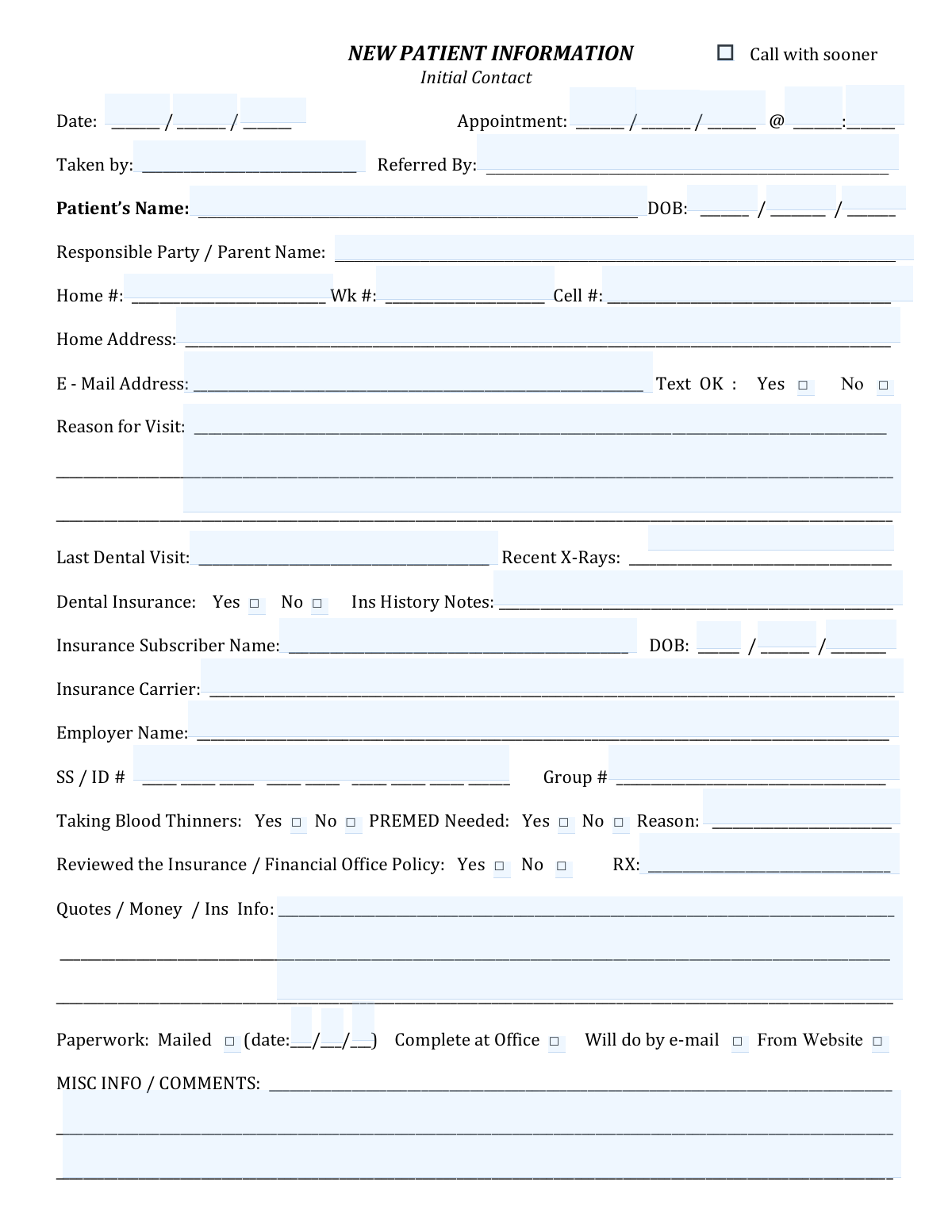
The New Patient Information (Initial Contact) Form is an intake document used by dental practices to capture essential patient demographics, contact preferences (email/text), appointment details, and the reason for the visit. It also gathers insurance subscriber and carrier information, prior dental visit/X-ray history, and key medical/medication flags (e.g., blood thinners, premed needs) to support safe treatment planning and billing. Accurate completion helps the office schedule appropriately, verify coverage, and reduce delays at check-in. Today, this form can be filled out quickly and accurately using AI-powered services like Instafill.ai, which can also convert non-fillable PDF versions into interactive fillable forms.
New Patient Information is part of the
patient forms category on Instafill.
Rather not fill this in by hand? Instafill is an online form filler that completes PDF forms automatically — upload the blank form, answer a few questions, and the AI fills every field.
Form specifications
| Form name: | New Patient Information (Initial Contact) Form |
| Number of pages: | 1 |
| Filled form examples: | New Patient Information Examples |
| Language: | English |
Our AI automatically handles information lookup, data retrieval, formatting, and form filling.
It takes less than a minute to fill out New Patient Information using our AI form filling.
Securely upload your data. Information is encrypted in transit and deleted immediately after the form is filled out.
Instafill Demo: How to fill out PDF forms in seconds with AI
How to Fill Out New Patient Information Online for Free in 2026
Are you looking to fill out a NEW PATIENT INFORMATION form online quickly and accurately? Instafill.ai offers the #1 AI-powered PDF filling software of 2026, allowing you to complete your NEW PATIENT INFORMATION form in just 37 seconds or less.
Follow these steps to fill out your NEW PATIENT INFORMATION form online using Instafill.ai:
- 1 Go to Instafill.ai and upload the New Patient Information (Initial Contact) form (or select it from the form library).
- 2 Enter or import the patient’s basic details: name, date of birth, responsible party/parent name, and contact numbers.
- 3 Fill in address, email, and communication preferences (e.g., whether texting is OK).
- 4 Add appointment and intake details: initial contact date, appointment date/time, taken-by staff name, referral source, and reason for visit.
- 5 Complete dental history fields such as last dental visit date and whether recent X-rays are available.
- 6 Provide insurance information (coverage yes/no, subscriber name/DOB, carrier, employer, SS/ID number, group number) and note any insurance history comments.
- 7 Review medical/financial policy acknowledgments and additional notes (blood thinners, premed needed and reason, RX, quotes/money/insurance info, paperwork delivery method), then validate and export/sign the completed form for submission.
Our AI-powered system ensures each field is filled out correctly, reducing errors and saving you time.
Why Choose Instafill.ai for Your Fillable New Patient Information Form?
Speed
Complete your New Patient Information in as little as 37 seconds.
Up-to-Date
Always use the latest 2026 New Patient Information form version.
Cost-effective
No need to hire expensive lawyers.
Accuracy
Our AI performs 10 compliance checks to ensure your form is error-free.
Security
Your personal information is protected with bank-level encryption.
Frequently Asked Questions About New Patient Information
This form collects your contact details, appointment information, dental history, and insurance information so the office can schedule you correctly and prepare for your visit.
Adult patients should complete it for themselves. For minors, a parent or legal guardian should complete the form and list themselves as the Responsible Party/Parent Name.
Have your personal details (DOB, address, phone, email), your last dental visit date, any recent X-ray info, and your dental insurance details (subscriber name, carrier, employer, SS/ID number, and group number) if applicable.
“Initial Contact” is the date you first contacted the office. “Taken by” is typically filled out by the staff member who took your call or scheduled your appointment.
Briefly describe why you’re coming in (e.g., cleaning/new patient exam, tooth pain, broken filling, consultation). Include symptoms and how long you’ve had them if relevant.
This indicates whether the office has permission to text you appointment reminders or updates. Choose “Yes” if you want texts, or “No” if you prefer calls/emails only.
Provide your best estimate (month/year) or write “unknown.” If you know the previous dental office name, include it in the notes to help the new office request records.
No—check “Dental Insurance: No” and leave the insurance subscriber/carrier fields blank. You can still complete the rest of the form to be seen as a self-pay patient.
Enter the person who holds the insurance policy (often a parent or spouse), not necessarily the patient. Use the subscriber’s date of birth as requested.
This is the insurance subscriber’s Social Security Number or member ID used to verify benefits. If you’re uncomfortable providing SSN, ask the office if the member ID alone is acceptable.
Blood thinners are medications that affect bleeding (e.g., warfarin, Eliquis, Xarelto). “PREMED needed” refers to whether you require antibiotics before dental treatment due to certain medical conditions—if unsure, check with your physician or the dental office.
This confirms you understand the office’s payment and insurance procedures (such as copays, deductibles, and what happens if insurance doesn’t pay). Check “Yes” once the policy has been explained to you or you’ve read it.
Check the option that matches your plan: “Mailed” (include the date sent), “Will do by e-mail,” “From Website,” or “Complete at Office.” If you choose “Complete at Office,” arrive early to allow time.
Yes—AI form-filling tools can help you enter your information consistently and reduce mistakes. Services like Instafill.ai use AI to auto-fill form fields accurately and save time.
Upload the PDF to Instafill.ai, answer the guided prompts (or import your details), and let the AI map your information into the correct fields. Then review, edit if needed, and download or share the completed form.
If the PDF isn’t fillable, Instafill.ai can convert flat non-fillable PDFs into interactive fillable forms. After conversion, you can auto-fill and complete it like a standard fillable PDF.
Compliance New Patient Information
Validation Checks by Instafill.ai
1
Initial Contact Date is present and in valid date format
Validates that the Initial Contact Date field is completed and follows an accepted date format (e.g., MM/DD/YYYY) and represents a real calendar date. This is important for tracking intake timelines, follow-up obligations, and auditability of patient communications. If the date is missing, malformed, or impossible (e.g., 02/30/2026), the submission should be rejected or flagged for correction before scheduling proceeds.
2
Appointment date/time is complete, valid, and not in the past (unless explicitly allowed)
Checks that the appointment date and time are both provided, the time is in a valid format (e.g., HH:MM with AM/PM if required), and the combined datetime is a real point in time. This prevents scheduling errors, double-booking workflows, and downstream reminders from failing. If invalid or incomplete, the system should block confirmation and prompt for a corrected appointment datetime; if in the past, it should require an override or rescheduling.
3
Taken by (staff) field is present and meets minimum identity requirements
Ensures the 'Taken by' field is filled in with a recognizable staff identifier (full name or approved initials/ID) and is not just whitespace or placeholder characters. This is important for accountability, follow-up questions, and internal auditing. If missing or invalid, the record should be flagged and prevented from final submission until a valid staff identifier is entered.
4
Patient full name is present and contains at least first and last name
Validates that the Patient’s Name field is completed and includes at least two name components (e.g., first and last), not only a single word or symbols. Accurate patient identification is critical to avoid duplicate charts, billing errors, and clinical safety issues. If the name is incomplete or contains invalid characters, the system should require correction and optionally run a duplicate-check warning.
5
Patient DOB is present, valid, and within a plausible range
Checks that the patient’s date of birth is provided, is a valid calendar date, and falls within a plausible range (e.g., not in the future and not unreasonably old such as >120 years unless explicitly allowed). DOB is essential for patient identification, insurance eligibility, and clinical decision-making. If DOB fails validation, the submission should be blocked or flagged for manual review before creating/merging a patient record.
6
Responsible Party/Parent required when patient is a minor
Compares patient DOB to the current date to determine if the patient is under the age of majority (commonly 18). If the patient is a minor, the Responsible Party/Parent Name must be completed to support consent, billing responsibility, and communication. If missing for a minor, the system should prevent completion and prompt for responsible party details.
7
Phone numbers (Home/Wk/Cell) follow valid phone format and at least one is provided
Validates that any provided phone numbers contain the correct number of digits (e.g., 10 digits for US numbers) and allowable characters (digits, spaces, parentheses, hyphens), and that at least one contact number is present. Reliable phone contact is necessary for appointment reminders, urgent follow-ups, and billing communications. If all phone fields are empty or formats are invalid, the system should require correction or capture an alternate contact method.
8
Email address format validation and required when 'Will do by e-mail' is selected
Checks that the email address, if provided, matches a standard email pattern ([email protected]) and does not contain spaces or invalid characters. Additionally, if the paperwork option indicates 'Will do by e-mail,' an email address must be present to deliver forms and instructions. If the email is invalid or missing when required, the system should block submission or force selection of a different paperwork delivery method.
9
Text OK selection is explicitly chosen and consistent with presence of a cell number
Ensures that exactly one of 'Text OK: Yes/No' is selected (not both, not neither). If 'Yes' is selected, a valid cell phone number should be present to support SMS reminders and comply with consent requirements. If the selection is missing/ambiguous or 'Yes' is chosen without a valid cell number, the system should prompt for correction and treat texting as not permitted until resolved.
10
Reason for Visit is present and meets minimum content requirements
Validates that the Reason for Visit field is not blank and contains meaningful text beyond a minimal length (e.g., at least 5 characters) to support triage and scheduling. This helps ensure the correct appointment type, provider, and time allocation. If missing or too vague (e.g., only punctuation), the system should require additional detail before confirming the appointment.
11
Last Dental Visit and Recent X-Rays fields are logically formatted and consistent
Checks that 'Last Dental Visit' and 'Recent X-Rays' entries are in an expected format (date, month/year, or clearly stated 'Unknown/Never') and not random text. If a recent X-ray date is provided, it should not be after today and should be reasonably close to the last dental visit if both are dates. If inconsistent or invalid, the system should flag for clarification to avoid unnecessary repeat imaging or missing diagnostic records.
12
Dental Insurance Yes/No is selected and drives required insurance fields
Ensures exactly one option is selected for Dental Insurance (Yes or No). If 'Yes' is selected, key insurance fields (Subscriber Name, Subscriber DOB, Carrier, and SS/ID # and/or Group # as required by the practice) must be completed to support eligibility checks and claims. If 'No' is selected, insurance fields should be optional and the system may warn if partial insurance data is entered to prevent confusion.
13
Insurance Subscriber DOB is valid and not in the future
Validates that the insurance subscriber’s DOB is a real date and not in the future, and optionally checks plausibility (e.g., subscriber age not negative or extremely high). Correct subscriber DOB is commonly required for eligibility verification and claim submission. If invalid, the system should block insurance verification steps and request corrected subscriber information.
14
SS/ID number format validation and completeness
Checks that the SS/ID # field contains the expected number of digits/characters for the practice’s intended identifier (commonly 9 digits for SSN, or a carrier-specific member ID pattern) and is fully populated (no missing digit groups). This prevents claim rejections and misidentification of the insured member. If the value is incomplete or contains invalid characters, the system should reject the insurance section and prompt for a corrected ID.
15
Blood thinners and premed selections are explicit and require a reason when indicated
Ensures that 'Taking Blood Thinners' and 'PREMED Needed' each have exactly one selection (Yes/No). If either is marked 'Yes,' the 'Reason' field must be completed with sufficient detail to support clinical safety and pre-appointment planning. If the reason is missing when required or selections are ambiguous, the system should flag the submission for clinical follow-up before treatment.
16
Paperwork delivery method selection is consistent and mailed date required when 'Mailed' is checked
Validates that at least one paperwork option is selected (Mailed, Complete at Office, Will do by e-mail, From Website) and that mutually exclusive options are handled according to business rules (e.g., if only one is allowed, enforce exactly one). If 'Mailed' is selected, the mailed date must be present and a valid date not in the future. If these conditions fail, the system should prompt for a valid selection and date to ensure the patient receives and completes required forms.
Common Mistakes in Completing New Patient Information
People often mix date formats (MM/DD/YYYY vs DD/MM/YYYY), leave out the year, or enter different dates across related fields (e.g., patient DOB vs insurance subscriber DOB). This can cause scheduling errors, insurance eligibility mismatches, and delays at check-in. Always use one consistent format (typically MM/DD/YYYY in the U.S.) and double-check that each date matches the correct person and purpose; AI-powered tools like Instafill.ai can validate date formats and flag inconsistencies before submission.
A common error is writing only an hour (e.g., “10”) without minutes, omitting AM/PM when the office expects it, or leaving the time blank while filling the appointment date. This can lead to incorrect scheduling or extra back-and-forth calls to confirm. Enter the full time exactly as requested (HH:MM) and add AM/PM if your office uses it; Instafill.ai can format times correctly and ensure required time components are present.
Patients frequently skip the “Responsible Party / Parent Name” field or put the patient’s name again, especially for minors or dependents. This creates billing and consent issues, and can prevent the office from collecting payment or obtaining proper authorization. If the patient is a minor or someone else is financially responsible, enter that person’s full legal name and ensure it matches insurance/billing records; Instafill.ai can help map the right person to the right field.
People often put a cell number in the home/work field, omit area codes, or include extensions without labeling them, making it hard for the office to reach them. The consequence is missed reminders, delayed follow-ups, and difficulty confirming appointments. Provide complete 10-digit numbers, place each number in the correct field (Home/Wk/Cell), and include work extensions clearly; Instafill.ai can standardize phone formatting and detect missing digits.
Common mistakes include misspelled email domains (e.g., “gmal.com”), illegible handwriting, or forgetting to check either “Text OK: Yes/No.” This can prevent delivery of forms, reminders, and pre-visit instructions, and may create compliance issues around communication preferences. Print clearly, verify the email by re-reading it, and always select exactly one texting option; Instafill.ai can validate email formats and ensure a consent choice is made.
Many patients write broad entries like “checkup” or “pain” without location, duration, or urgency, or they leave the section blank. This can result in the wrong appointment type, insufficient time scheduled, or lack of preparation (e.g., needing X-rays). Include specifics (tooth/area, symptoms, how long, severity, and any triggers) so the office can triage correctly; Instafill.ai can prompt for missing details and keep the entry structured.
Patients often guess dates, leave these fields blank, or write “yes” without indicating when/where X-rays were taken. This can lead to duplicate imaging, delays requesting records, or incomplete clinical history. Provide the approximate month/year and the prior office name if known, and specify whether X-rays exist and how recent they are; Instafill.ai can help standardize the response and remind you to include timeframe and source.
A frequent issue is checking “Dental Insurance: Yes” but leaving subscriber/carrier/employer fields blank, or checking “No” while still filling in insurance details. This causes eligibility verification delays and can lead to incorrect estimates or billing problems. If insured, complete all related fields (subscriber name, DOB, carrier, employer, ID/SS, group #) exactly as on the insurance card; Instafill.ai can guide completion and flag contradictions.
People commonly put the patient’s name and DOB in the subscriber fields even when the subscriber is a parent/spouse, or they omit the subscriber DOB entirely. This can cause claim rejections and inability to verify benefits. Confirm who the policyholder is and enter the subscriber’s legal name and DOB exactly as the insurer has it; Instafill.ai can help distinguish patient vs subscriber and reduce mismatches.
Patients may enter too few digits, add spaces in the wrong places, use the wrong identifier (member ID vs SSN), or leave the group number blank. These errors often prevent successful insurance verification and can delay treatment authorization or accurate quotes. Copy the member ID exactly from the insurance card (and only provide SSN if explicitly required), and include the group number when present; Instafill.ai can enforce correct length/format and highlight missing group numbers.
It’s common to leave “Taking Blood Thinners” and “PREMED Needed” unchecked, or to check “Yes” without explaining the reason. This can create safety risks, require last-minute medical clearance, or force rescheduling. Always select Yes/No for each item and, if Yes, specify the medication/condition and the reason for premed; Instafill.ai can require completion of dependent fields when “Yes” is selected.
Patients often forget to check whether they reviewed the insurance/financial policy or fail to select a paperwork option (mailed/date, complete at office, email, website). This leads to delays, missing forms at check-in, and confusion about what the patient is expected to do before the visit. Check the appropriate acknowledgment and choose exactly one paperwork method, including the mailed date if applicable; if this form is a flat non-fillable PDF, Instafill.ai can convert it into a fillable version and ensure all required checkboxes are completed.
Saved over 80 hours a year
“I was never sure if my IRS forms like W-9 were filled correctly. Now, I can complete the forms accurately without any external help.”
Kevin Martin Green
Your data stays secure with advanced protection from Instafill and our subprocessors




Robust compliance program
Transparent business model
You’re not the product. You always know where your data is and what it is processed for.
ISO 27001, HIPAA, and GDPR
Our subprocesses adhere to multiple compliance standards, including but not limited to ISO 27001, HIPAA, and GDPR.
Security & privacy by design
We consider security and privacy from the initial design phase of any new service or functionality. It’s not an afterthought, it’s built-in, including support for two-factor authentication (2FA) to further protect your account.
Fill out New Patient Information with Instafill.ai
Worried about filling PDFs wrong? Instafill securely fills new-patient-information-initial-contact-form forms, ensuring each field is accurate.
