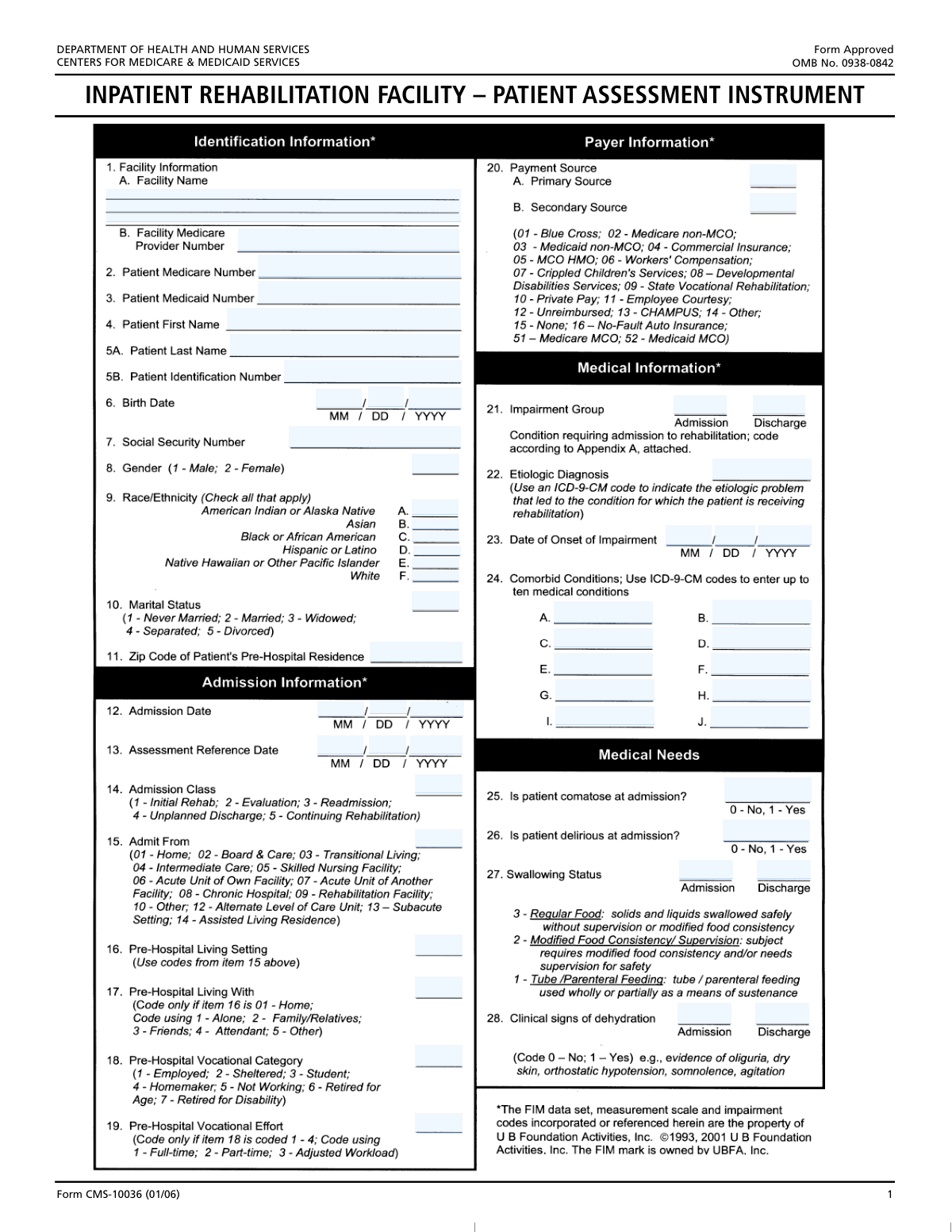
Yes! You can use AI to fill out Inpatient Rehabilitation Facility Patient Assessment Instrument (IRF-PAI)
The Inpatient Rehabilitation Facility Patient Assessment Instrument (IRF-PAI) is a detailed assessment tool mandated by the Centers for Medicare & Medicaid Services (CMS) for all patients in an Inpatient Rehabilitation Facility (IRF). It collects extensive data on a patient's physical, cognitive, and functional status at admission and discharge to determine the appropriate Medicare payment level and to measure quality of care. Today, this complex form can be filled out quickly and accurately using AI-powered services like Instafill.ai, which can also convert non-fillable PDF versions into interactive fillable forms.
Our AI automatically handles information lookup, data retrieval, formatting, and form filling.
It takes less than a minute to fill out IRF-PAI using our AI form filling.
Securely upload your data. Information is encrypted in transit and deleted immediately after the form is filled out.
Form specifications
| Form name: | Inpatient Rehabilitation Facility Patient Assessment Instrument (IRF-PAI) |
| Number of fields: | 179 |
| Number of pages: | 3 |
| Language: | English |
| Categories: | patient forms |
Instafill Demo: How to fill out PDF forms in seconds with AI
How to Fill Out IRF-PAI Online for Free in 2026
Are you looking to fill out a IRF-PAI form online quickly and accurately? Instafill.ai offers the #1 AI-powered PDF filling software of 2026, allowing you to complete your IRF-PAI form in just 37 seconds or less.
Follow these steps to fill out your IRF-PAI form online using Instafill.ai:
- 1 Navigate to Instafill.ai and upload or select the IRF-PAI form.
- 2 Allow the AI to scan the document and identify all data fields, including patient information, assessment scores, and diagnostic codes.
- 3 Provide patient demographic and insurance details, such as name, date of birth, and Medicare/Medicaid numbers, by answering simple questions.
- 4 Enter clinical information, including admission/discharge dates, impairment group codes, and relevant ICD-9-CM or ICD-10-CM codes for diagnoses and comorbidities.
- 5 Complete the functional assessment sections by inputting the patient's scores for motor and cognitive functions at admission, discharge, and for goal setting.
- 6 Review all the information populated by the AI and entered manually for completeness and accuracy, making any necessary corrections.
- 7 Securely download, print, or electronically submit the completed IRF-PAI form for facility records and submission to CMS.
Our AI-powered system ensures each field is filled out correctly, reducing errors and saving you time.
Why Choose Instafill.ai for Your Fillable IRF-PAI Form?
Speed
Complete your IRF-PAI in as little as 37 seconds.
Up-to-Date
Always use the latest 2026 IRF-PAI form version.
Cost-effective
No need to hire expensive lawyers.
Accuracy
Our AI performs 10 compliance checks to ensure your form is error-free.
Security
Your personal information is protected with bank-level encryption.
Frequently Asked Questions About Form IRF-PAI
This form is a comprehensive patient assessment for rehabilitation facilities, used to document a patient's functional status, medical history, and progress from admission to discharge. It is essential for care planning, quality reporting, and billing, particularly for Medicare and Medicaid services.
This form should be completed by qualified healthcare professionals at the rehabilitation facility, such as therapists, nurses, and physicians. The information required is clinical in nature and should be sourced from the patient's official medical records.
These specific codes are typically found in an accompanying instruction manual or appendix for the form. For example, the form notes that Impairment Group codes are listed in 'Appendix A', which you must refer to for the correct entry.
Comorbid conditions are additional medical issues the patient has alongside the primary reason for rehabilitation. You should enter the ICD-9-CM codes for these conditions to provide a complete clinical picture, as they can affect the patient's treatment plan and recovery.
These scores are based on a standardized functional assessment that measures a patient's level of independence. You must use the specific scoring criteria provided by the assessment tool to rate the patient's ability at admission, set goals, and measure their status at discharge.
Collecting data at both admission and discharge is crucial for measuring the patient's progress and the effectiveness of the rehabilitation program. This demonstrates functional improvement, which is often required for reimbursement and quality assurance.
These are conditional fields that should only be completed if a specific criterion in a previous field is met. For example, 'Pre-Hospital Vocational Effort' should only be filled if a specific code was entered for 'Pre-Hospital Vocational Category'; otherwise, it should be left blank.
A program interruption occurs when a patient temporarily leaves the rehabilitation facility (e.g., for an acute hospital stay) and then returns. You should only fill in the interruption and return dates if the patient experienced such a break during their rehabilitation.
Yes, you should provide all requested identification numbers, including the Social Security Number, Medicare Number, and Medicaid Number if available. This ensures accurate patient identification and is essential for billing and linking records correctly.
Yes, services like Instafill.ai use AI to help you complete forms more efficiently. These tools can accurately auto-fill patient information, dates, and other data from your records, reducing manual entry and saving valuable time.
To fill this form online, you can upload it to the Instafill.ai platform. The service will make the form interactive, allowing you to click on fields and type in your information or use its AI capabilities to auto-fill the data for you.
If you have a non-fillable or 'flat' PDF, you can use a service like Instafill.ai to convert it into a smart, fillable form. Simply upload the document, and the platform's AI will automatically detect the fields and make them interactive for easy completion.
The 'Etiologic Diagnosis' is the specific medical diagnosis (using an ICD-9-CM code) that caused the impairment. The 'Impairment Group Code' is a broader category that classifies the primary functional deficit requiring rehabilitation (e.g., stroke, brain injury).
You should select the locomotion goal that is most appropriate for the patient's rehabilitation plan. Check 'Walk' if the goal is for the patient to walk, 'Wheelchair' if the goal is independent wheelchair mobility, or 'Both' if the plan includes proficiency in both methods.
Compliance IRF-PAI
Validation Checks by Instafill.ai
1
Validate Social Security Number Format
This check ensures the Social Security Number is entered in a valid format, typically as nine digits (e.g., 999-99-9999 or 999999999). It is crucial for patient identification and linking records across systems. If the format is incorrect, the system should reject the entry and prompt the user to re-enter the number correctly to prevent data corruption and identity mismatches.
2
Ensure Discharge Date is After Admission Date
This validation compares the 'Admission Date' and 'Discharge Date' to ensure the discharge date is on or after the admission date. This maintains logical and chronological integrity of the patient's stay. A validation failure would indicate a data entry error and should prevent form submission until the dates are corrected.
3
Ensure Admission Date is After Birth Date
This check verifies that the patient's 'Admission Date' is not before their 'Birth Date'. This is a fundamental logical check to ensure the dates are plausible and the patient's age is a positive value. An error would block submission and require the user to correct either the birth date or the admission date.
4
Validate ICD-9-CM Code Structure
This check validates that all fields requiring an ICD-9-CM code (e.g., 'Etiologic Diagnosis', 'Comorbid Conditions') follow the correct format. ICD-9-CM codes have a specific structure of 3 to 5 characters with a potential decimal, and validating this ensures the codes are syntactically correct for billing and statistical analysis. Invalid codes would be flagged for correction to ensure data accuracy and interoperability.
5
Verify Patient Gender Code
This validation ensures that the 'Patient Gender' field contains only one of the specified codes, '1' for Male or '2' for Female. Using a strict code list prevents invalid data entry and ensures consistency for reporting and demographic analysis. Any other value would trigger an error, forcing the user to select a valid option.
6
Conditional Requirement for Vocational Effort
This check enforces the rule that 'Pre-Hospital Vocational Effort' can only be filled if 'Pre-Hospital Vocational Category' is coded as 1, 2, 3, or 4. This prevents irrelevant data from being collected and maintains the logical relationship between the two fields. If the condition is not met, the 'Vocational Effort' field should be disabled or its entry flagged as an error.
7
Conditional Requirement for Home Health Services
This validation ensures the 'Discharged with Home Health Services' field is only filled if the 'Living Setting Code' is '01', '02', '03', or '14'. This rule is based on the logical premise that home health services are only relevant for specific living situations. An attempt to submit data that violates this rule should result in an error message explaining the dependency.
8
Prevent Duplicate Payment Sources
This check verifies that the 'Primary Payment Source' code is not the same as the 'Secondary Payment Source' code. A patient cannot have the same payer listed as both primary and secondary, and this check prevents a common data entry mistake. If the codes are identical, the system should display an error and require the user to correct one of the fields.
9
Ensure Sequential Entry of Comorbid Conditions
This validation checks that the comorbid condition fields are filled in sequentially (e.g., 'Comorbid Condition 2' cannot be filled if 'Comorbid Condition 1' is empty). This promotes clean, organized data entry and prevents gaps in the list of conditions. If a user skips a field in the sequence, the system should prompt them to fill the preceding empty field first.
10
Validate Pressure Ulcer Data Consistency
This check ensures that if the 'Admission Number of Pressure Ulcers' is greater than zero, the 'Highest Pressure Ulcer Stage at Admission' field is also filled with a valid stage. This maintains logical consistency, as having ulcers necessitates having a stage. A failure would prompt the user to provide the ulcer stage, preventing incomplete clinical records.
11
Validate Date of Onset Chronology
This check ensures the 'Date of Onset of Impairment' occurs on or before the 'Admission Date'. It is clinically illogical for an impairment requiring admission to begin after the patient has already been admitted. If the onset date is after the admission date, the form should be rejected until the dates are corrected.
12
Validate Program Interruption Date Sequence
This validation ensures that for any program interruption, the 'Return Date' is on or after the 'Interruption Date'. This maintains the chronological flow of events during the patient's stay. An invalid sequence would be flagged, requiring the user to correct the dates to accurately reflect the interruption period.
13
Cross-Validate Payer Source and Patient ID
This check verifies that if a payment source is listed as Medicare or Medicaid, the corresponding 'Patient Medicare Number' or 'Patient Medicaid Number' field is not empty. This is critical for ensuring that claims can be processed correctly. If the payer is selected but the ID is missing, the system should flag it as a required field.
14
Ensure Patient Name Completeness
This validation confirms that both 'Patient First Name' and 'Patient Last Name' fields are populated. A full name is a minimum requirement for patient identification and record creation. Submitting a form with a missing first or last name should be blocked to ensure every record has a primary identifier.
Common Mistakes in Completing IRF-PAI
Many fields, such as 'Gender', 'Marital Status', and 'Admission Class', require a specific numeric code (e.g., '1' for Male, '2' for Married). A frequent error is entering text like 'Male' or 'M' instead of the number. This causes data validation failures and requires manual correction, delaying processing. To avoid this, carefully read the field instructions and enter only the specified numeric code. AI-powered tools can automatically format this data correctly.
The form requires specific ICD-9-CM codes for diagnoses, comorbidities, and complications. Users often enter codes from the newer ICD-10-CM system, use invalid or incomplete codes, or make typos. These errors lead to claim rejections, incorrect patient records, and flawed clinical data analysis. Always verify codes against the correct ICD-9-CM codebook; using a tool with built-in medical code validation can prevent these mistakes.
Several fields, like 'Discharged with Home Health Services' or 'Pre-Hospital Vocational Effort', are conditional and should only be filled out if another field has a specific value. People often miss these instructions, either filling in fields unnecessarily or leaving required fields blank. This creates an incomplete or contradictory record. Carefully following the 'Fill only if...' instructions is crucial for accuracy.
Date fields are separated into 'Day', 'Month', and 'Year'. Common mistakes include entering a two-digit year instead of the required four-digit year for fields like 'Birth Date Year', or transposing the month and day. Such errors can result in invalid dates and incorrect patient age calculations. Always use the DD, MM, and YYYY format as specified for each part of the date.
A critical but common error is entering a 'Discharge Date' that occurs before the 'Admission Date'. This logical impossibility invalidates the entire patient stay record and will be rejected by any data processing system. Double-checking that all dates are chronologically correct before submission is essential to ensure the record is valid.
The 'Primary Payment Source' and 'Secondary Payment Source' fields require a specific two-digit code, not the name of the insurance provider. Users often write out 'Medicare' or 'Aetna' instead of looking up and entering the corresponding code. This mistake prevents automated processing and can lead to billing delays or denials. Refer to the provided code list for the correct two-digit identifier.
Fields for 'Social Security Number', 'Patient Medicare Number', and 'Patient Medicaid Number' are prone to data entry errors like transposing digits or entering the wrong type of number in a field. An incorrect identifier is a critical error that leads to patient misidentification and immediate rejection of billing claims. Carefully proofread these numbers digit by digit to ensure accuracy. AI form-fillers like Instafill.ai can help validate the format of these numbers to reduce errors.
Fields such as 'Bladder Control Score' and 'Bowel Control Score' have complex conditional rules, requiring the user to compare scores from other items before filling them out. These instructions are often overlooked, leading to incorrect clinical scoring and inaccurate tracking of patient progress. To avoid this, the user must carefully perform the required comparison or use software that can automate these logical checks.
The 'Admission Impairment Group Code' is a critical data point that must be selected from 'Appendix A'. Users may not have access to the appendix, use an outdated version, or guess the code. An incorrect code misclassifies the patient's reason for rehabilitation, impacting reporting, reimbursement, and statistical analysis. Always use the most current version of the required appendix to find the correct code.
Many fields, such as 'Eating Score - Admission' or 'Grooming Admission Score', are presented as checkboxes but are meant to capture a numerical score. This ambiguity leads to users simply checking the box without providing a value, resulting in missing data. If the form is a non-fillable PDF, this is especially problematic. Tools like Instafill.ai can convert such PDFs into smart, fillable forms with clear fields for entering the actual score, eliminating confusion.
Saved over 80 hours a year
“I was never sure if my IRS forms like W-9 were filled correctly. Now, I can complete the forms accurately without any external help.”
Kevin Martin Green
Your data stays secure with advanced protection from Instafill and our subprocessors

Robust compliance program
Transparent business model
You’re not the product. You always know where your data is and what it is processed for.
ISO 27001, HIPAA, and GDPR
Our subprocesses adhere to multiple compliance standards, including but not limited to ISO 27001, HIPAA, and GDPR.
Security & privacy by design
We consider security and privacy from the initial design phase of any new service or functionality. It’s not an afterthought, it’s built-in, including support for two-factor authentication (2FA) to further protect your account.
Fill out IRF-PAI with Instafill.ai
Worried about filling PDFs wrong? Instafill securely fills inpatient-rehabilitation-facility-patient-assessment-instrument-irf-pai forms, ensuring each field is accurate.