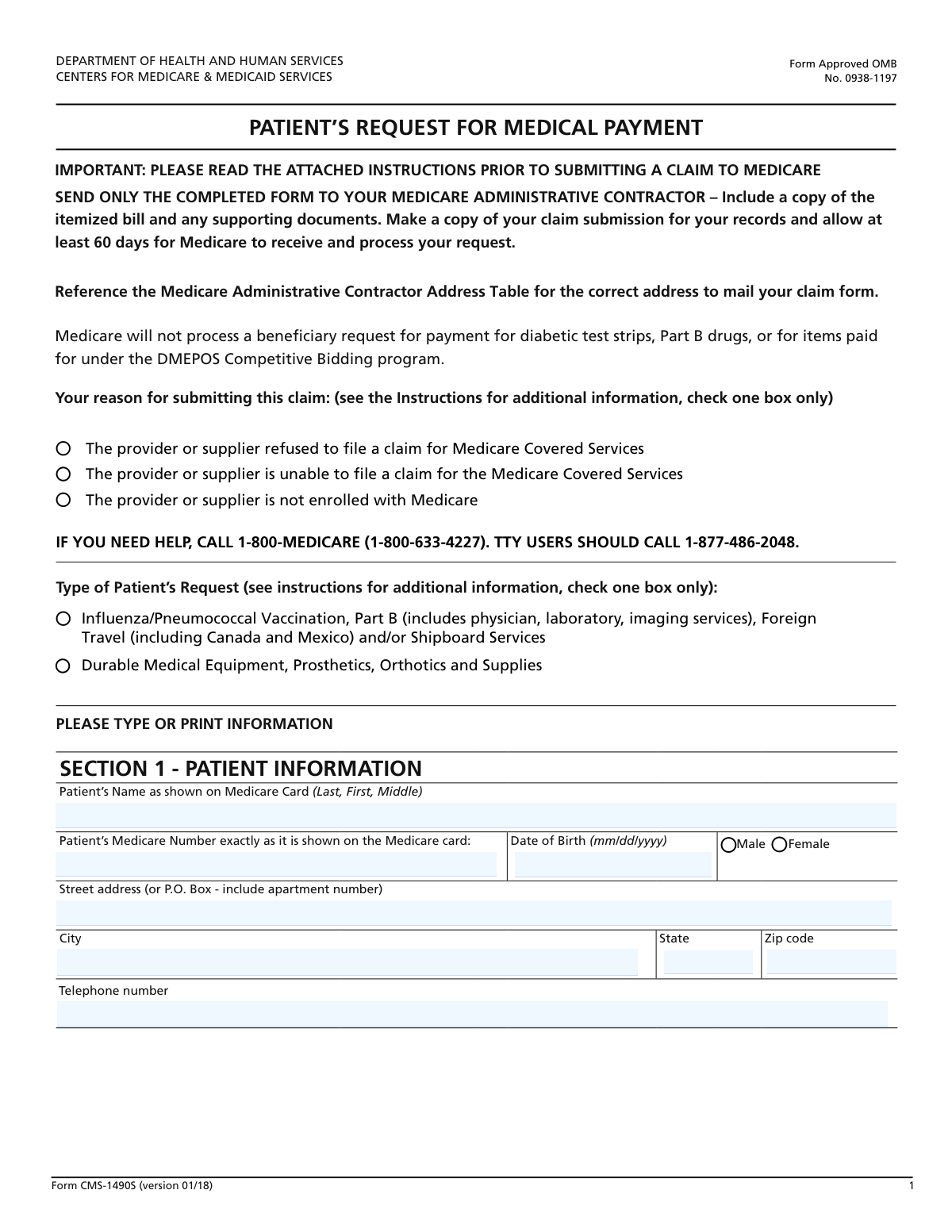
Yes! You can use AI to fill out Form CMS-1490S, Patient's Request for Medical Payment
Form CMS-1490S, the Patient's Request for Medical Payment, is the official document used by Medicare beneficiaries to personally submit a claim for payment for medical services and supplies. This form is essential when a healthcare provider is unable or unwilling to file a claim with Medicare, allowing the patient to seek direct reimbursement for covered expenses. Today, this form can be filled out quickly and accurately using AI-powered services like Instafill.ai, which can also convert non-fillable PDF versions into interactive fillable forms.
Our AI automatically handles information lookup, data retrieval, formatting, and form filling.
It takes less than a minute to fill out CMS-1490S using our AI form filling.
Securely upload your data. Information is encrypted in transit and deleted immediately after the form is filled out.
Form specifications
| Form name: | Form CMS-1490S, Patient's Request for Medical Payment |
| Number of fields: | 49 |
| Number of pages: | 18 |
| Language: | English |
| Categories: | CMS forms, Medi-Cal forms, medical forms, medical request forms, patient forms, payment forms, VA medical forms |
Instafill Demo: How to fill out PDF forms in seconds with AI
How to Fill Out CMS-1490S Online for Free in 2026
Are you looking to fill out a CMS-1490S form online quickly and accurately? Instafill.ai offers the #1 AI-powered PDF filling software of 2026, allowing you to complete your CMS-1490S form in just 37 seconds or less.
Follow these steps to fill out your CMS-1490S form online using Instafill.ai:
- 1 Navigate to Instafill.ai and upload your CMS-1490S form or select it from the template library.
- 2 Provide your personal information, including your full name, Medicare number, and contact details, letting the AI pre-fill known information.
- 3 Indicate the reason for submitting the claim and the type of medical service or supply for which you are requesting payment.
- 4 Describe your illness or injury and answer the questions about your condition and any other health insurance coverage you may have.
- 5 Review all entered information for accuracy, ensuring it matches your Medicare card and the provider's itemized bill.
- 6 Electronically sign and date the form. If you are unable to sign, provide witness information as required.
- 7 Download the completed form and submit it along with the itemized bill to your Medicare administrative contractor.
Our AI-powered system ensures each field is filled out correctly, reducing errors and saving you time.
Why Choose Instafill.ai for Your Fillable CMS-1490S Form?
Speed
Complete your CMS-1490S in as little as 37 seconds.
Up-to-Date
Always use the latest 2026 CMS-1490S form version.
Cost-effective
No need to hire expensive lawyers.
Accuracy
Our AI performs 10 compliance checks to ensure your form is error-free.
Security
Your personal information is protected with bank-level encryption.
Frequently Asked Questions About Form CMS-1490S
This is a Patient's Request for Medical Payment form. You should use it to ask Medicare for reimbursement when your provider or supplier is unable or unwilling to file a claim on your behalf for covered services.
You will need your Medicare card, details about your illness or injury, and information about any other health insurance plans you have. You must also attach an itemized bill from the provider for the services you are claiming.
Check the box for 'Provider refused to file claim' in the 'Reason for Submitting Claim' section. Then, complete the rest of the form and submit it with the provider's itemized bill to have Medicare process your claim directly.
Select the first option for Part B services like doctor visits, lab work, or foreign travel claims. Choose the 'Durable Medical Equipment, Prosthetics, Orthotics and Supplies' option if your claim is for items like walkers, braces, or medical supplies.
The NPI is only specifically requested if your claim is for Durable Medical Equipment. If you know the NPI, you should include it, but you can still submit the form if you do not have this information.
This information helps Medicare determine if another party, like an auto insurer or workers' compensation, should be the primary payer for your medical bills. Answering accurately ensures your claim is processed correctly.
This includes any health insurance other than Medicare, such as a private plan, MEDIGAP, employer-related insurance, Medicaid, or coverage from the Veterans Administration (VA). If you have any of these, you must provide the policy details.
If the patient cannot sign, they can make an 'X' on the signature line. A witness must then sign next to the 'X', complete the witness information section, and explain why the patient could not sign.
You should mail the signed form and all supporting documents, like the itemized bill, to the Medicare administrative contractor for your state. This address can be found on your Medicare Summary Notice or on Medicare.gov.
Processing times can vary, but you should generally receive a Medicare Summary Notice (MSN) that explains the decision on your claim within approximately 60 days of submission.
Yes, services like Instafill.ai use AI to help you accurately auto-fill form fields with your saved information, which can save time and reduce the chance of errors.
To fill this form online, upload it to Instafill.ai. The platform will make the document interactive, allowing you to type your answers directly into the fields or use the AI auto-fill feature for faster completion.
You can use a service like Instafill.ai to convert the non-fillable PDF into an interactive, fillable form. This allows you to easily type your information before printing the completed form for signature.
Compliance CMS-1490S
Validation Checks by Instafill.ai
1
Validates Medicare Number Format and Presence
This check ensures the 'Medicare Number' field is not empty and conforms to the Medicare Beneficiary Identifier (MBI) format. The MBI is an 11-character, non-intelligent, unique identifier composed of numbers and uppercase letters, excluding S, L, O, I, B, and Z. This validation is critical for correctly identifying the patient and processing the claim; failure to provide a valid number will result in immediate claim rejection.
2
Ensures a Single 'Reason for Submitting Claim' is Selected
This validation verifies that exactly one reason for submitting the claim has been selected from the available options ('Provider refused', 'Provider unable', 'Provider not enrolled'). The form requires a clear justification for why the patient is submitting the claim directly instead of the provider. Selecting zero or multiple reasons creates ambiguity and can cause processing delays or rejection of the claim.
3
Ensures a Single 'Type of Patient's Request' is Selected
This check confirms that the user has selected exactly one 'Type of Patient's Request' (either for 'Influenza/Part B...' or 'Durable Medical Equipment...'). This selection is fundamental as it directs how the claim is routed and evaluated, with different rules and requirements applying to each type. An invalid selection prevents the system from correctly categorizing the claim.
4
Validates Patient's Date of Birth Format and Logic
This check verifies that the 'Date of Birth' is a complete and valid date in a recognized format (e.g., MM/DD/YYYY). It also ensures the date is in the past and represents a plausible age for a Medicare beneficiary. An invalid or future date of birth would fail patient identity verification and lead to the claim being rejected.
5
Enforces Exclusive Gender Selection
This validation ensures that either 'Male' or 'Female' is selected for the patient's gender, but not both. This is a basic data integrity check to ensure the demographic information is recorded accurately and without contradiction. If neither or both options are selected, the form is considered incomplete or invalid, requiring correction before submission.
6
Conditional Requirement for National Provider Identifier (NPI)
This check enforces a conditional rule where the 'National Provider Identifier (NPI)' field must be filled if the 'Type of Patient's Request' is for 'Durable Medical Equipment, Prosthetics, Orthotics and Supplies'. For these types of claims, the NPI is essential for identifying the supplier and verifying their credentials. If the claim type is different, this field may be optional, but for DMEPOS claims, its absence will halt processing.
7
Ensures Exclusive Answer for Condition-Related Questions
This validation checks that for each condition-related question (e.g., 'Condition Related to Auto Accident'), exactly one option ('Yes' or 'No') is selected. These questions are crucial for determining primary payer responsibility under Medicare Secondary Payer (MSP) rules. Providing conflicting or missing answers prevents proper coordination of benefits and will cause the claim to be investigated or denied.
8
Conditional Requirement for Other Medical Insurance Information
This validation ensures that if the user checks 'Yes' for 'Other Medical Coverage Status', then all related fields ('Name of Medical Insurance', 'Policy Number', 'Policyholder's Name', and the insurer's address) must be completed. This information is mandatory for the coordination of benefits between Medicare and other insurers. If 'No' is selected, these fields should be empty to avoid confusion.
9
Validates Patient Signature against Witness Information
This check implements the logic for form signatures. If the 'Signature of Patient' field is signed, then the witness information section must be empty. Conversely, if the patient is unable to sign (indicated by an 'X' or empty signature) and the 'Patient Inability Explanation' is filled out, then the witness signature, name, address, and relationship fields become mandatory. This ensures the form is legally binding and properly attested.
10
Validates Patient Signature Date
This check ensures the 'Patient Signature Date' is a valid date and is not in the future. The signature date attests to the accuracy of the information at the time of signing and is a legal requirement for claim submission. A future or invalid date would render the signature, and therefore the entire claim submission, invalid.
11
Validates Completeness of Patient's Address
This validation verifies that if any part of the patient's address is entered (e.g., Street Address), then the 'City', 'State', and 'Zip Code' fields must also be completed. A complete and accurate address is necessary for communication with the patient and for identity verification. An incomplete address can lead to returned mail and delays in processing the claim.
12
Validates Zip Code Format
This check ensures that all zip code fields ('Patient's Zip Code', 'Witness Zip Code', 'Other Insurance Zip Code') adhere to a valid 5-digit or 9-digit (ZIP+4) format. Correctly formatted zip codes are essential for mail delivery and data validation against address databases. An incorrectly formatted zip code can cause processing errors and communication failures.
13
Ensures Patient's Full Name is Provided
This validation confirms that the 'Patient's Full Name' field is not empty and contains at least a first and last name. The patient's name is the primary identifier on the form, used to match the claim to the correct Medicare record. Submitting a claim without the patient's name would make it impossible to process.
14
Validates State Abbreviation Format
This check verifies that the 'State' fields for the patient, witness, and other insurance provider contain a valid two-letter state or territory abbreviation. Using a standardized format ensures data consistency and compatibility with address verification systems. An invalid entry, such as spelling out the full state name, could cause data entry errors and processing delays.
Common Mistakes in Completing CMS-1490S
This error occurs when the patient's name or Medicare number is entered differently than how it appears on their official Medicare card. Even small deviations, like using a nickname or transposing digits, will cause an immediate mismatch in the system. This is one of the most common reasons for claim rejection, as the patient cannot be correctly identified. To avoid this, carefully copy the full name and number directly from the Medicare card before submitting the form.
Applicants often write overly brief descriptions like 'felt sick' or 'check-up' in the 'Illness or Injury Description' field. This vague information is insufficient for processors to assign the correct medical codes and determine if the service was medically necessary. Consequently, the claim processing is delayed while the office requests more specific details. To prevent this, provide a simple but clear description of the primary symptoms, injury, or reason for the visit (e.g., 'Sharp pain in left knee after a fall').
Many people check 'Yes' to having other medical coverage but then fail to fill out the policyholder's name, policy number, and insurance company information. This information is critical for the coordination of benefits to determine the primary payer. Leaving this section incomplete guarantees a delay or denial, as Medicare cannot process the claim until other potential payers are ruled out. Always have all insurance cards (including Medigap) available and fill out this section completely if applicable.
The series of 'Yes/No' questions regarding employment, auto accidents, or other accidents are frequently skipped. These questions are essential for determining if another entity, such as an auto insurer or workers' compensation, is the primary payer. Failure to answer these questions forces the processor to halt the claim and seek clarification, significantly delaying reimbursement. To avoid this, carefully read and answer each 'Yes/No' question related to the condition.
Forgetting to sign or date the form is a simple but critical mistake that renders the entire submission invalid. An unsigned claim cannot be legally processed and will be immediately returned to the sender. This oversight forces the applicant to restart the submission process, delaying payment. Always perform a final review of the form, paying special attention to the signature and date fields before sending it.
This section is often misunderstood and filled out incorrectly. It should only be completed if the patient is physically unable to sign their name, and a reason must be provided in the 'Explanation for Patient's Inability to Sign' field. Common errors include having a witness sign even when the patient can, or the witness signing but failing to provide the required explanation. An improperly witnessed signature invalidates the claim. Ensure this section is used only when necessary and that all its fields are completed correctly.
Omitting an apartment number, suite, or P.O. Box from the street address is a frequent data entry error. An incomplete address can cause crucial correspondence, such as requests for additional information or the explanation of benefits, to be returned as undeliverable. This can lead to significant delays in claim resolution or missed deadlines for appeals. To avoid this, double-check that the full, current mailing address is entered exactly as it should appear on an envelope.
Patients are often unsure why a provider did not file their claim and may guess which box to check. For example, they might select 'Provider not enrolled with Medicare' when the provider simply 'Refused to file claim' for administrative reasons. This can route the claim down the wrong processing path, causing delays while the situation is investigated. The best way to avoid this is to ask the provider's billing office for the specific reason they are not filing the claim on your behalf.
The form specifies that the National Provider Identifier (NPI) is required for claims involving Durable Medical Equipment (DME), but this conditional instruction is often missed. When the NPI is missing on a DME claim, the processor must manually look up the provider, which slows down the review process. To ensure timely processing for DME, Prosthetics, Orthotics, and Supplies, always ask the supplier for their NPI number and enter it in the correct field. AI-powered tools like Instafill.ai can help by highlighting such conditional fields to prevent omissions.
The questions about employment and spouse's health plan coverage can be confusing, leading to incorrect 'Yes' or 'No' answers. For instance, a person might answer 'No' to being covered by an employee health plan, forgetting they are covered under their still-employed spouse's plan. These errors can cause incorrect primary payer determinations and claim denials. To avoid this, carefully read each question and consider all sources of health coverage for both yourself and your spouse. If the form is a non-fillable PDF, a tool like Instafill.ai can convert it into an interactive version, making it easier to navigate and answer each question accurately.
Saved over 80 hours a year
“I was never sure if my IRS forms like W-9 were filled correctly. Now, I can complete the forms accurately without any external help.”
Kevin Martin Green
Your data stays secure with advanced protection from Instafill and our subprocessors

Robust compliance program
Transparent business model
You’re not the product. You always know where your data is and what it is processed for.
ISO 27001, HIPAA, and GDPR
Our subprocesses adhere to multiple compliance standards, including but not limited to ISO 27001, HIPAA, and GDPR.
Security & privacy by design
We consider security and privacy from the initial design phase of any new service or functionality. It’s not an afterthought, it’s built-in, including support for two-factor authentication (2FA) to further protect your account.
Fill out CMS-1490S with Instafill.ai
Worried about filling PDFs wrong? Instafill securely fills form-cms-1490s-patients-request-for-medical-payment forms, ensuring each field is accurate.