Yes! You can use AI to fill out Department of Medical Assistance Services Applied Behavior Analysis (97155, Et al.) Initial Service Authorization Request Form
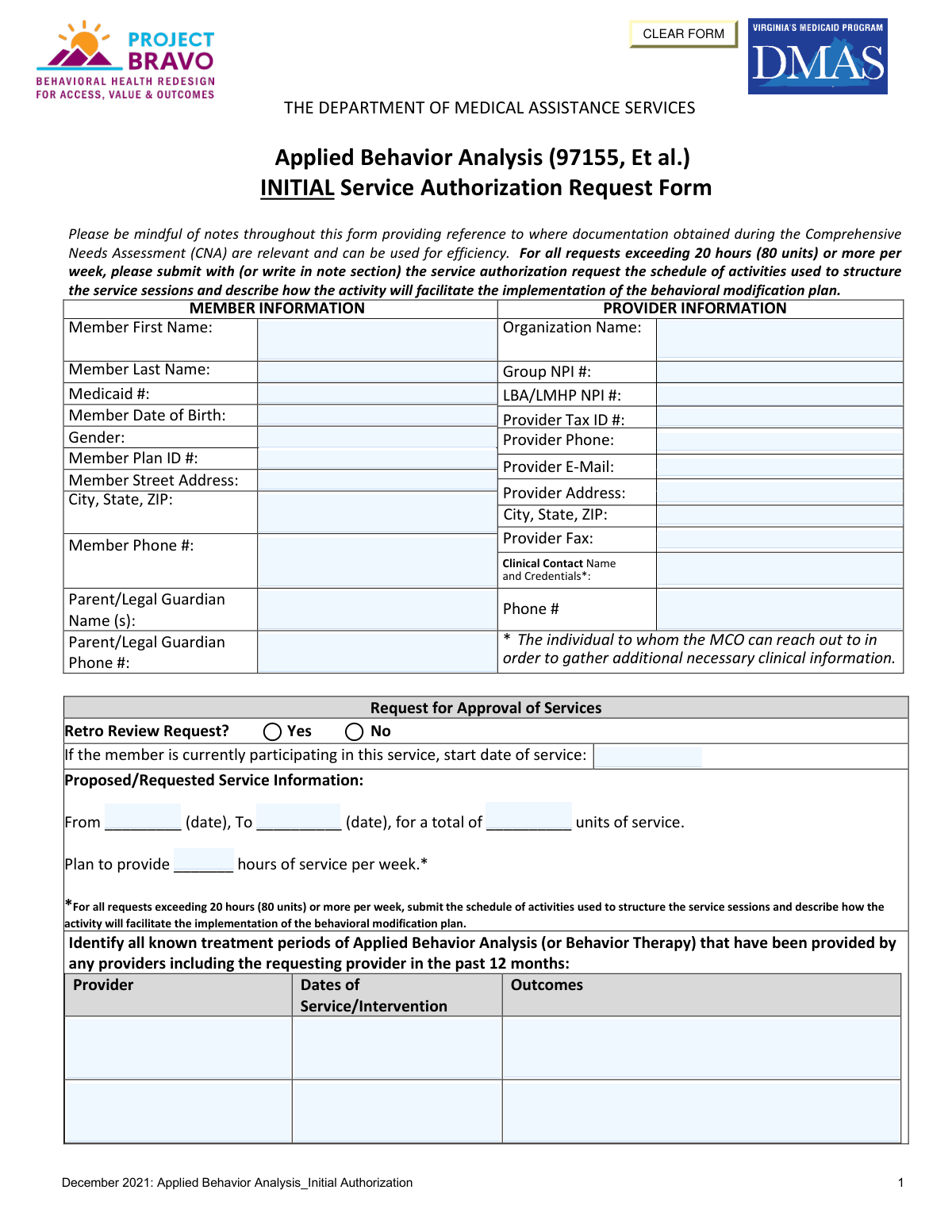
The Department of Medical Assistance Services (DMAS) Applied Behavior Analysis Initial Service Authorization Request Form is a Virginia Medicaid document required to obtain prior authorization for ABA therapy services (CPT code 97155 and related codes) for eligible youth members. The form captures member and provider information, DSM/ICD-10 diagnoses, admission criteria including communication, social, behavioral, and sensory challenges, preliminary treatment goals, and discharge planning details. It must be reviewed and signed by a Licensed Mental Health Professional (LMHP) or Licensed Applied Behavior Analyst (LABA) attesting that the member meets medical necessity criteria. Today, this form can be filled out quickly and accurately using AI-powered services like Instafill.ai, which can also convert non-fillable PDF versions into interactive fillable forms.
Our AI automatically handles information lookup, data retrieval, formatting, and form filling.
It takes less than a minute to fill out DMAS ABA Initial Authorization using our AI form filling.
Securely upload your data. Information is encrypted in transit and deleted immediately after the form is filled out.
Form specifications
| Form name: | Department of Medical Assistance Services Applied Behavior Analysis (97155, Et al.) Initial Service Authorization Request Form |
| Number of pages: | 7 |
| Language: | English |
Instafill Demo: filling out a legal form in seconds
How to Fill Out DMAS ABA Initial Authorization Online for Free in 2026
Are you looking to fill out a DMAS ABA INITIAL AUTHORIZATION form online quickly and accurately? Instafill.ai offers the #1 AI-powered PDF filling software of 2026, allowing you to complete your DMAS ABA INITIAL AUTHORIZATION form in just 37 seconds or less.
Follow these steps to fill out your DMAS ABA INITIAL AUTHORIZATION form online using Instafill.ai:
- 1 Navigate to Instafill.ai and upload the DMAS ABA Initial Service Authorization Request Form PDF or select it from the available form library to begin filling it out online.
- 2 Enter all required Member Information, including the member's full name, Medicaid ID, date of birth, gender, plan ID, address, phone number, and parent/legal guardian details.
- 3 Complete the Provider Information section with the organization name, Group NPI, LBA/LMHP NPI, Tax ID, phone, email, fax, address, and clinical contact name and credentials.
- 4 Fill in the Request for Approval of Services section, including whether it is a retro review, the proposed service dates, total units, weekly hours, and any prior ABA treatment history from the past 12 months.
- 5 Complete Section I: Admission Criteria by entering the primary and secondary ICD-10 diagnoses, describing current symptoms and functional impairments, and addressing each sub-criterion (A through E) regarding communication, social interaction, behavioral outbursts, repetitive behaviors, and sensory integration, along with corresponding preliminary treatment goals.
- 6 Provide family/caregiver participation information and complete Section V: Recovery & Discharge Planning, including the vision for recovery, identified barriers, necessary supports, anticipated level of care at discharge, and estimated discharge date.
- 7 Review all entered information for accuracy, then have the licensed LMHP or LABA sign and date the attestation section, enter the assessment completion date and credentials, add any relevant notes, and submit the completed form to the appropriate Managed Care Organization (MCO).
Our AI-powered system ensures each field is filled out correctly, reducing errors and saving you time.
Why Choose Instafill.ai for Your Fillable DMAS ABA Initial Authorization Form?
Speed
Complete your DMAS ABA Initial Authorization in as little as 37 seconds.
Up-to-Date
Always use the latest 2026 DMAS ABA Initial Authorization form version.
Cost-effective
No need to hire expensive lawyers.
Accuracy
Our AI performs 10 compliance checks to ensure your form is error-free.
Security
Your personal information is protected with bank-level encryption.
Frequently Asked Questions About Form DMAS ABA Initial Authorization
This form is used to request initial Medicaid service authorization for Applied Behavior Analysis (ABA) services (CPT code 97155 and related codes) through Virginia's Department of Medical Assistance Services (DMAS). It documents that a youth meets the medical necessity criteria for ABA services and outlines proposed treatment goals and discharge planning.
The form must be completed by the ABA provider organization and signed by a Licensed Mental Health Professional (LMHP), LMHP-R, LMHP-S, LMHP-RP, or a Licensed Applied Behavior Analyst (LABA/LABA). The signing clinician attests that they have reviewed the individual's psychiatric history and that the individual meets medical necessity criteria for ABA services.
You will need the member's Medicaid ID, date of birth, plan ID, and contact information; parent/legal guardian details; provider organization name, Group NPI, LBA/LMHP NPI, Tax ID, and contact information; ICD-10 and DSM diagnoses; a Comprehensive Needs Assessment (CNA); and records of any ABA or behavior therapy services provided in the past 12 months. You will also need to document the member's current symptoms, treatment goals, and discharge planning information.
The youth must meet ALL three criteria: (1) a DSM/ICD-10 diagnosis with documented current symptoms and functional impairment; (2) at least two of five specific behavioral indicators within the past 30 days — including communication difficulties, social impairment, behavioral outbursts, disruptive/repetitive behaviors, or sensory integration difficulties; and (3) identification of family members or caregivers available to participate in ABA services.
A Retro Review Request is when you are seeking authorization for ABA services that have already been provided (retrospectively) rather than requesting approval before services begin. You should check 'Yes' for a Retro Review if services have already started and you are submitting the authorization after the fact, and you must also enter the date services began.
For requests exceeding 20 hours (80 units) per week, you must submit a schedule of activities used to structure the service sessions along with a description of how each activity will facilitate the implementation of the behavioral modification plan. This can be submitted as a separate document or written in the notes section of the service authorization request.
In the treatment history section, you must identify all known treatment periods of Applied Behavior Analysis or Behavior Therapy provided by any provider (including the requesting provider) within the past 12 months. For each period, list the provider name, dates of service/intervention, and outcomes achieved.
The CNA is a comprehensive evaluation completed prior to submitting this form, and its findings are directly referenced throughout the form to support efficiency. Specific CNA elements (1, 6, 7, and 12) are noted as relevant to describing the individual's current symptoms, functional impairment, and diagnosis, so providers should have the completed CNA on hand when filling out this form.
The discharge and recovery planning section (Section V) should describe what progress or recovery looks like for the individual, identify barriers to recovery, outline necessary outreach or additional supports, specify the anticipated level of care at discharge, and provide a best estimate of the discharge date. Discharge planning should begin at the first contact with the individual.
Yes, AI-powered services like Instafill.ai can help you accurately auto-fill form fields, saving significant time when completing complex forms like this ABA Initial Authorization Request. Instafill.ai can pre-populate member information, provider details, and other structured fields, reducing manual data entry errors.
To fill out this form online, visit Instafill.ai and upload the ABA Initial Authorization Request PDF. The AI will guide you through each field, auto-fill information where possible, and allow you to review and complete all sections digitally before downloading or submitting the completed form.
If you have a flat, non-fillable PDF version of this form, Instafill.ai can convert it into an interactive fillable form, allowing you to type directly into all fields digitally. This eliminates the need to print and handwrite the form, making the process faster and more accurate.
You must provide a primary ICD-10 diagnosis and any secondary diagnoses, as well as the corresponding DSM diagnosis or provisional diagnosis in Section I. If there are other medical or behavioral health concerns (such as substance use issues, personality disorders, dementia, or cognitive impairments) that could impact services, you must check 'Yes' and provide a detailed explanation.
You must create at least one preliminary treatment goal tied to the symptoms described in Criterion 1, plus individual goals for each of the Criterion 2 sub-criteria that apply (2A through 2E), covering areas such as communication, social interaction, behavioral outbursts, disruptive/repetitive behaviors, and sensory integration. Each goal should directly connect to the documented difficulties for that individual.
The completed form should be submitted to the member's Managed Care Organization (MCO), as indicated by the provider's contract and the MCO's submission instructions. Processing timelines vary by MCO, so providers should contact the relevant MCO directly for specific submission methods (fax, portal, or mail) and expected authorization turnaround times.
Compliance DMAS ABA Initial Authorization
Validation Checks by Instafill.ai
1
Ensures Member Date of Birth is a Valid Date in the Past
This check verifies that the Member Date of Birth is entered in a recognized date format (e.g., MM/DD/YYYY) and represents a date that has already occurred. Since this form is for Applied Behavior Analysis services typically provided to youth, the date should also be consistent with a pediatric or young adult patient. If the date of birth is missing, formatted incorrectly, or falls in the future, the form cannot be processed and the authorization request will be rejected.
2
Ensures Medicaid ID Matches Expected Format and Is Not Blank
This check confirms that the Medicaid ID field is populated and conforms to the Virginia Medicaid identification number format, which is typically a numeric string of a defined length. The Medicaid ID is the primary identifier used to look up the member in the DMAS system and link the authorization to the correct beneficiary. An absent or incorrectly formatted Medicaid ID will prevent the MCO from locating the member record and will result in the request being returned or denied.
3
Ensures Provider Group NPI and LBA/LMHP NPI Are Valid 10-Digit Numbers
This check validates that both the Provider Group NPI and the LBA/LMHP NPI fields contain exactly 10 numeric digits, consistent with the National Provider Identifier standard established by CMS. Both NPIs are required to verify that the requesting organization and the supervising clinician are enrolled and credentialed providers. If either NPI is missing, contains non-numeric characters, or is not 10 digits, the authorization cannot be linked to a valid provider and will be rejected.
4
Ensures Provider Tax ID Is Present and Correctly Formatted
This check verifies that the Provider Tax Identification Number (TIN) is entered and follows the standard 9-digit Employer Identification Number (EIN) format (e.g., XX-XXXXXXX). The Tax ID is required for billing and reimbursement purposes and must match the provider's enrollment record with DMAS. A missing or malformed Tax ID will prevent proper claims processing and may result in payment delays or denial of the authorization request.
5
Ensures Proposed Service Start Date Precedes Proposed Service End Date
This check confirms that the proposed service start date is chronologically earlier than the proposed service end date, and that both dates are present and validly formatted. A service period where the end date equals or precedes the start date is logically invalid and would result in a zero or negative service duration. If this logical inconsistency is detected, the form must be corrected before the authorization request can be evaluated.
6
Ensures Total Proposed Service Units Are Consistent with Weekly Hours and Service Duration
This check cross-validates the total number of requested service units against the planned weekly service hours and the length of the proposed service period (from start date to end date). Since one unit equals 15 minutes, the total units should approximately equal the weekly hours multiplied by 4 units per hour multiplied by the number of weeks in the service period. A significant discrepancy between these values suggests a data entry error that could result in over- or under-authorization of services.
7
Ensures Schedule of Activities Is Submitted When Weekly Hours Exceed 20 Hours (80 Units)
This check verifies that when the planned weekly service hours field contains a value greater than 20 hours (or 80 units), the submitter has either attached a schedule of activities or documented it in the notes section as required by the form instructions. Requests exceeding 20 hours per week require additional justification to demonstrate medical necessity for the higher intensity of service. Failure to include this documentation when required will result in the request being returned as incomplete.
8
Ensures Primary ICD-10 Diagnosis Code Is Present and Properly Formatted
This check validates that the Primary ICD-10 Diagnosis field is not blank and that the entered code follows the standard ICD-10-CM format (e.g., a letter followed by two digits, a decimal point, and up to four additional characters). Applied Behavior Analysis services under DMAS require a qualifying diagnosis, and the ICD-10 code must correspond to the DSM diagnosis described in Section I, Criterion 1. An absent or improperly formatted diagnosis code will prevent clinical review and result in denial of the authorization.
9
Ensures DSM Diagnosis in Section I Corresponds to the ICD-10 Diagnosis Code
This check verifies that the DSM diagnosis or provisional diagnosis specified in Section I, Criterion 1 is clinically consistent with and maps to the ICD-10 code entered in the Diagnosis Information section. Since ABA services are typically authorized for Autism Spectrum Disorder and related conditions, the DSM and ICD-10 entries should align with recognized diagnostic crosswalks. A mismatch between the DSM description and the ICD-10 code raises a clinical inconsistency flag that will require clarification before the request can be approved.
10
Ensures At Least Two of the Five Admission Criteria Sub-Criteria (2A–2E) Are Marked 'Yes'
This check confirms that at least two of the five behavioral sub-criteria under Criterion 2 (communication difficulties, social impairment, behavioral outbursts, disruptive/repetitive behaviors, and sensory integration difficulties) are marked 'Yes,' as required by the admission criteria stating the youth must have demonstrated at least two within the past 30 calendar days. Marking fewer than two as 'Yes' indicates the member does not meet the minimum threshold for admission to ABA services. If this requirement is not met, the authorization request will be denied for failure to satisfy medical necessity criteria.
11
Ensures Each 'Yes' Sub-Criterion in Section I Has a Corresponding Description and Preliminary Treatment Goal
This check verifies that for every sub-criterion (2A through 2E) marked 'Yes,' the associated description field and preliminary treatment goal field are both populated with substantive text. The description must connect the identified difficulty to the symptoms in Criterion 1, and the treatment goal must be directly related to the identified difficulty. Leaving these fields blank when the corresponding criterion is marked 'Yes' results in an incomplete clinical justification that will cause the request to be returned for additional information.
12
Ensures Retro Review Selection Is Made and Current Service Start Date Is Provided If Applicable
This check confirms that the Retro Review Request field has a selection of either 'Yes' or 'No,' and that if 'Yes' is selected, the current service start date field is populated with a valid past date. A retro review request without a documented service start date cannot be evaluated for the appropriate retroactive period. If the retro review box is checked but no start date is provided, the request will be flagged as incomplete and returned to the submitter.
13
Ensures Assessment Completion Date Is on or Before the Signature Date
This check validates that the date the assessment or applicable addendum was completed is the same as or earlier than the date of the LMHP's signature on the attestation. An assessment completion date that falls after the signature date is logically inconsistent, as the clinician cannot attest to a completed assessment before it was finished. This discrepancy would raise a compliance concern and require correction before the authorization request can be processed.
14
Ensures LMHP Printed Name, Credentials, and Signature Date Are All Present
This check verifies that the Printed Name of LMHP, the Credentials field, and the Signature Date are all populated in the Attestation and Signature section. The attestation by a qualified LMHP, LMHP-R, LMHP-S, LMHP-RP, or LABA is a mandatory requirement for the authorization request to be considered valid under DMAS policy. If any of these three fields are missing, the form lacks a legally sufficient attestation and the request will be rejected outright.
15
Ensures Estimated Discharge Date Is After the Proposed Service End Date
This check confirms that the estimated discharge date entered in the Recovery and Discharge Planning section is not earlier than the proposed service end date, as a discharge date preceding the end of the authorized service period would be logically inconsistent with the treatment plan. The discharge date represents the anticipated point at which the member will no longer need this level of care, which should logically occur at or after the conclusion of the requested service period. A discharge date that precedes the service end date will be flagged for clinical review and clarification.
16
Ensures Member Phone Number and Parent/Legal Guardian Phone Number Are Validly Formatted
This check validates that the Member Phone Number and the Parent/Legal Guardian Phone Number fields, when populated, contain a 10-digit U.S. phone number in a recognizable format (e.g., (XXX) XXX-XXXX or XXX-XXX-XXXX). Since ABA services are typically provided to minors, the Parent/Legal Guardian Phone Number is particularly critical as it serves as the primary contact for clinical follow-up by the MCO. Phone numbers containing letters, fewer than 10 digits, or invalid area codes will be flagged so that the MCO can reach the appropriate parties for any needed clarification.
Common Mistakes in Completing DMAS ABA Initial Authorization
Many submitters enter the same NPI number in both the Group NPI and the LBA/LMHP NPI fields, or swap them entirely. These are two distinct identifiers — the Group NPI belongs to the provider organization, while the LBA/LMHP NPI belongs to the individual licensed clinician. Entering incorrect or mismatched NPIs can cause claim denials or authorization delays. Always verify both NPIs separately before submission; tools like Instafill.ai can help validate NPI formats and flag when the same number is entered in both fields.
A very common oversight is requesting more than 20 hours (80 units) per week without attaching or noting the required schedule of activities that structures the service sessions. The form explicitly requires this documentation for high-intensity requests, and omitting it will likely result in a denial or request for additional information. Reviewers should double-check the weekly hours field and, if it exceeds 20, ensure the schedule is either attached or described in the notes section. AI-assisted form tools like Instafill.ai can trigger conditional reminders when the weekly hours value exceeds the threshold.
Section I requires that symptom descriptions include frequency, intensity, and duration of the individual's difficulties, yet many submitters provide only general statements such as 'the child has communication delays.' This lack of specificity fails to demonstrate medical necessity and can result in denial. Each symptom narrative should quantify how often behaviors occur, how severe they are, and how long they have been present. Referencing the Comprehensive Needs Assessment (CNA) elements 1, 6, 7, and 12 as noted on the form can help ensure completeness.
For criteria 2A through 2E, submitters often check 'Yes' to indicate the youth meets a criterion but then leave the description field blank or provide only a one-sentence response. The form requires a detailed narrative connecting the specific difficulty to the symptoms described in criteria 1, and omitting this connection weakens the clinical justification. Each 'Yes' response must be accompanied by a thorough, individualized description. Reviewers should treat the checkbox and the description field as a paired requirement, not optional components.
Treatment goals (2A through 2E and Goal #1) are frequently written in vague terms such as 'improve communication' or 'reduce behaviors,' which do not meet clinical standards for measurable, individualized goals. Effective ABA treatment goals should specify the target behavior, the desired outcome, and ideally a measurable criterion. Poorly written goals can signal to reviewers that the plan lacks clinical rigor and may result in a request for additional information or denial. Goals should be directly tied to the specific symptoms and difficulties described in the corresponding criteria sections.
The form requires identification of all known ABA or Behavior Therapy treatment periods from any provider in the past 12 months, but submitters frequently leave this table empty or only partially complete it. Omitting prior treatment history prevents reviewers from understanding the member's treatment trajectory and may raise questions about continuity of care. Even if no prior treatment was received, this should be explicitly noted. Submitters should gather records from all known providers before completing this section.
Submitters sometimes leave the Retro Review Request checkbox blank or check the wrong option, particularly when services have already begun. If services are currently being provided and authorization is being sought retroactively, the 'Yes' box must be checked and the current service start date must be filled in. Failing to correctly indicate a retro review can cause the request to be processed incorrectly, leading to claim denials for dates of service already rendered. Always confirm whether services have started before completing this section.
Section I requires both an ICD-10 diagnosis code in the diagnosis fields and a corresponding DSM diagnosis or provisional diagnosis in the narrative. A common mistake is entering an ICD-10 code that does not align with the DSM diagnosis described, or providing a DSM label without a corresponding ICD-10 code. This inconsistency can trigger a medical necessity review or denial. Submitters should ensure the ICD-10 code and DSM diagnosis are clinically equivalent and cross-referenced accurately. Instafill.ai can help flag mismatches between diagnosis code fields and narrative descriptions.
Section V on Recovery and Discharge Planning is frequently left incomplete, with submitters either skipping fields or providing boilerplate language that does not reflect the individual's specific circumstances. The form requires a vision for the level of care at discharge, an estimated discharge date, identified barriers to recovery, and necessary outreach or supports — all of which must be individualized. Discharge planning is a required component of the authorization, and incomplete responses can result in the request being returned. Planning for discharge should begin at the first contact, as the form instructs.
The attestation section requires the signature of a specific licensed professional — LMHP, LMHP-R, LMHP-S, LMHP-RP, or LABA — and submitters sometimes have the form signed by staff who do not hold one of these designations. Additionally, credentials are sometimes left blank or listed incorrectly, making it impossible to verify the signer's eligibility. An improperly credentialed signature invalidates the attestation and will result in denial. Always confirm the signer's licensure type matches one of the accepted designations before submission.
The proposed service section requires a start date, end date, total units, and weekly hours — and these four values must be mathematically consistent with each other. A common error is entering a date range and total units that do not correspond to the stated weekly hours, or using incorrect unit-to-hour conversions (e.g., forgetting that 1 hour = 4 units for 15-minute billing increments). These inconsistencies raise red flags during review and can delay authorization. Submitters should calculate and cross-check all four values before finalizing the form; Instafill.ai can automatically validate these calculations.
The attestation section requires two distinct dates: the date the assessment or addendum was completed, and the date of the signature. Many submitters enter the same date for both or leave the assessment completion date blank, assuming the signature date is sufficient. These are legally distinct attestations — the assessment date confirms when the clinical evaluation occurred, while the signature date confirms when the form was attested. Entering only one date or using the same date for both can raise compliance concerns and may require clarification before the authorization is processed.
Saved over 80 hours a year
“I was never sure if my IRS forms like W-9 were filled correctly. Now, I can complete the forms accurately without any external help.”
Kevin Martin Green
Your data stays secure with advanced protection from Instafill and our subprocessors

Robust compliance program
Transparent business model
You’re not the product. You always know where your data is and what it is processed for.
ISO 27001, HIPAA, and GDPR
Our subprocesses adhere to multiple compliance standards, including but not limited to ISO 27001, HIPAA, and GDPR.
Security & privacy by design
We consider security and privacy from the initial design phase of any new service or functionality. It’s not an afterthought, it’s built-in, including support for two-factor authentication (2FA) to further protect your account.
Fill out DMAS ABA Initial Authorization with Instafill.ai
Worried about filling PDFs wrong? Instafill securely fills department-of-medical-assistance-services-applied-behavior-analysis-97155-et-al-initial-service-authorization-request forms, ensuring each field is accurate.