Yes! You can use AI to fill out SOC 821, Request for Order and Consent for Paramedical Services

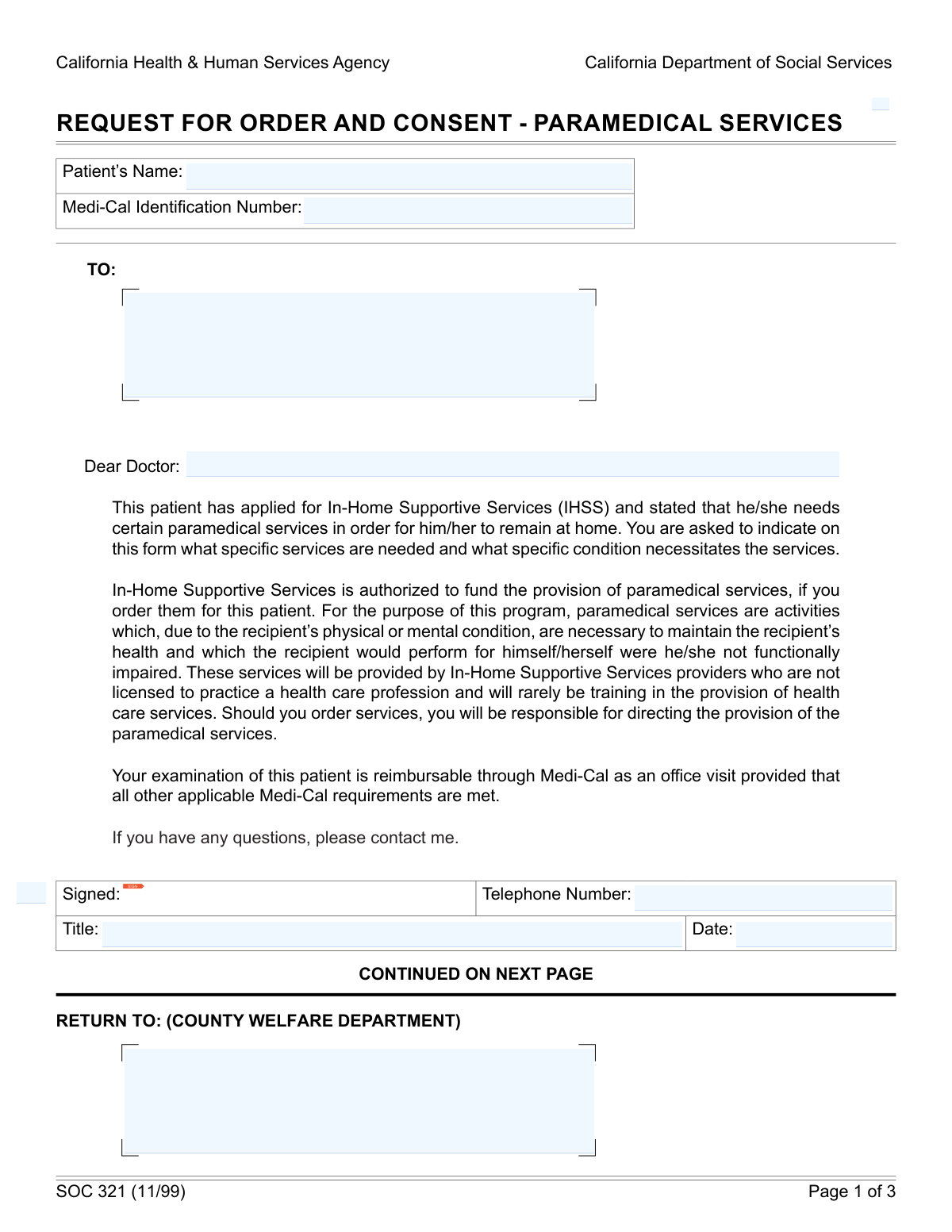
Form SOC 821, the Request for Order and Consent for Paramedical Services, is a California state document used by licensed health care professionals to order specific medical services for an In-Home Supportive Services (IHSS) recipient. It's essential for documenting the medical necessity of services like injections, wound care, or catheter maintenance, and serves as both a doctor's order and the patient's consent. Today, this form can be filled out quickly and accurately using AI-powered services like Instafill.ai, which can also convert non-fillable PDF versions into interactive fillable forms.
SOC 821 is part of the Medi-Cal forms, medical consent forms and medical request forms categories on Instafill.
SOC 821 has a moderate Form Complexity Index of 51/100 — 53 fillable fields across 3 pages. Instafill’s AI completes it accurately in under a minute.

Form specifications

Form name: SOC 821, Request for Order and Consent for Paramedical Services
Number of fields: 53
Number of pages: 3
FCI: Moderate (51/100)
Language: English
Our AI automatically handles information lookup, data retrieval, formatting, and form filling.
It takes less than a minute to fill out SOC 821 using our AI form filling.
Securely upload your data. Information is encrypted in transit and deleted immediately after the form is filled out.
Preview of SOC 821, Request for Order and Consent for Paramedical Services

Instafill Demo: How to fill out PDF forms in seconds with AI

How to Fill Out SOC 821 Online for Free in 2026

Are you looking to fill out a SOC 821 form online quickly and accurately? Instafill.ai offers the #1 AI-powered PDF filling software of 2026, allowing you to complete your SOC 821 form in just 37 seconds or less.
Follow these steps to fill out your SOC 821 form online using Instafill.ai:
  1. 1 Navigate to Instafill.ai and upload your SOC 821 form or select the 'Request for Order and Consent for Paramedical Services' template.
  2. 2 Use the AI assistant to automatically fill in patient details, such as their full name and Medi-Cal Identification Number.
  3. 3 Enter the licensed professional's information, including their name, specialty, and office contact details.
  4. 4 Clearly describe the patient's medical condition(s) and detail each required paramedical service, specifying the time, frequency, and duration needed for each.
  5. 5 Review all auto-filled information for accuracy, ensuring all provider, patient, and service details are correct before proceeding.
  6. 6 The licensed professional and the patient (or their representative) can then securely e-sign and date the form in the designated signature blocks to complete the authorization.

Our AI-powered system ensures each field is filled out correctly, reducing errors and saving you time.

Why Choose Instafill.ai for Your Fillable SOC 821 Form?

Speed

Complete your SOC 821 in as little as 37 seconds.

Up-to-Date

Always use the latest 2026 SOC 821 form version.

Cost-effective

No need to hire expensive lawyers.

Accuracy

Our AI performs 10 compliance checks to ensure your form is error-free.

Security

Your personal information is protected with bank-level encryption.

Frequently Asked Questions About SOC 821

SOC 821 has a Form Complexity Index of 51 out of 100, placing it in the moderate complexity tier. This score is calculated deterministically from the form’s own structure using Instafill’s published Form Complexity Index methodology, so it can be reproduced and independently verified — it is not a subjective estimate.

For SOC 821 specifically, the score reflects 53 fillable fields across 3 pages, grouped into 16 sections, and 3 conditional fields that only apply depending on earlier answers, 1 table or repeating lists. The number of fields is the largest factor in the base score (weighted 36%), followed by how difficult those fields are to complete based on their type, where free-text and signature fields count for more than simple checkboxes (26%). The number of pages that actually contain fields (15%), the amount of conditional “fill-only-if” logic (16%), and how many sections the form is divided into (7%) account for the rest of the base. On top of that base, the index adds points for tables and repeating lists, bundled instruction pages, and dense page layouts — capturing difficulty the base alone can miss.

In practical terms, a moderate score means the form takes real effort: there are enough fields, pages and rules that errors are easy to make by hand. Instafill removes that effort entirely: our AI reads your information, maps each value to the correct field — including the conditional ones — and completes SOC 821 accurately in under a minute, with every field available for you to review before you download. See exactly how the Form Complexity Index is calculated.

This form is used by a licensed medical professional to request and justify specific paramedical services for a Medi-Cal patient under the In-Home Supportive Services (IHSS) program. It serves as a doctor's order and a patient's consent for these services.

A licensed professional, such as a physician, surgeon, podiatrist, or dentist, must complete the medical sections of this form. The patient or their representative also needs to sign to provide consent for the services.

You will need the patient's full name and Medi-Cal ID number, the specific medical conditions requiring services, and details for each service like type, frequency, and duration. You'll also need the contact information for the licensed professional and the County Welfare Department.

For 'Frequency,' specify how many times and in what period the service is needed, such as '2 times per day'. For 'Duration,' state how long the service should continue overall, for example, '6 weeks,' 'ongoing,' or 'until healed'.

The completed form should be returned to the County Welfare Department. The correct mailing address should be entered in the 'Return To (County Welfare Department address)' field on the form.

If a patient requires more than five distinct paramedical services, you should use an additional copy of the form to document the extra services. Be sure to clearly label it as a continuation page, such as 'Page 2 of 2'.

Yes, the patient or their legal representative must sign and date the form in the designated section. This signature confirms their informed consent for the requested paramedical services.

You should clearly list the specific medical diagnoses or conditions that make the paramedical services medically necessary. Being precise helps the reviewer understand the patient's needs and approve the services.

Yes, services like Instafill.ai use AI to accurately auto-fill form fields from your records, which can save significant time and reduce errors. This is especially helpful for repetitive information like patient and provider details.

You can use a service like Instafill.ai, which can convert flat, non-fillable PDFs into interactive, fillable forms. This allows you to type your information directly into the fields online instead of printing and handwriting.

Simply upload your form to the Instafill.ai platform, and its AI will make the document interactive. You can then fill out the fields online, save your progress, and download the completed, signed document.

The licensed professional who is ordering the services, such as the physician, podiatrist, or dentist, signs in this block. They must also include their professional title, telephone number, and the date of signature.

This is an internal number used by the California Health & Human Services Agency or the county department to track the request. If you have been provided with a tracking number, enter it here; otherwise, you can likely leave it blank for the agency to complete.

Compliance SOC 821
Validation Checks by Instafill.ai

1
Medi-Cal ID Number Format Validation
Checks if the 'Medi‑Cal Identification Number' conforms to the expected format, including any required letters or leading zeros. This is critical for correctly identifying the patient and processing billing and services under Medi-Cal. A failed validation prevents the form from being linked to the correct patient record, leading to delays or denial of services.
2
Conditional Provider Signature Block Fields
Verifies that the provider's 'Telephone Number', 'Title', and 'Date Signed' are filled out if and only if the 'Signature follows, enter forms mode' checkbox is marked 'Yes'. This rule ensures that signature-related data is only collected when a signature is actually being provided in that section. Incomplete or extraneous data can cause processing errors or require manual correction.
3
Mutually Exclusive IHSS Service Need Selection
Ensures that either the 'Yes' or the 'No' checkbox for 'Patient requires IHSS paramedical services' is selected, but not both. This check prevents ambiguity regarding the patient's eligibility for the requested services. A form with conflicting selections cannot be processed and would be returned for clarification.
4
Required Medical Condition for IHSS Services
This validation confirms that if the 'Yes' box for requiring IHSS services is checked, the 'Medical condition(s)' text field is not empty. This is essential for justifying the medical necessity of the requested services. Without a documented condition, the request lacks the required support and will be rejected.
5
Standard US Phone Number Format
Validates that all telephone number fields, such as the provider's 'Telephone Number' and the 'Office Telephone', follow a standard 10-digit format including the area code. Correctly formatted phone numbers are crucial for ensuring staff can contact the provider if questions arise. An invalid format would hinder communication and delay the approval process.
6
Provider Signature Date Validity
Checks that the 'Date Signed' by the provider is a valid calendar date and is not a future date. This ensures the form reflects an action that has already occurred and maintains the chronological integrity of the record. A future date would invalidate the signature and the order itself, requiring correction.
7
Patient Full Name Completeness
Ensures the 'Patient Name' field is not empty and contains at least two distinct parts, representing a first and last name. This is a basic but critical check to ensure the patient is clearly identified on the form. An incomplete name could lead to misidentification or an inability to match the request to the correct patient file.
8
Paramedical Service Row Integrity
For each of the five paramedical service rows, this check verifies that if a 'Service Type' is entered, all other fields in that same row (Time Required, Frequency, and Duration) are also completed. This ensures that every requested service is fully defined for proper evaluation and authorization. Incomplete service lines are ambiguous and cannot be approved, requiring the form to be sent back.
9
Exclusive Licensed Professional Type
Validates that only one of the professional type checkboxes ('Physician/Surgeon', 'Podiatrist', 'Dentist') is selected. This is important for correctly identifying the credentials and scope of practice of the professional ordering the services. Selecting multiple or no types creates ambiguity and may lead to rejection if the ordering provider type is not appropriate for the service.
10
Complete Mailing Address Structure
This check verifies that all address fields ('Recipient name and address', 'County Welfare Department Return Address', 'Office Address') contain the necessary components: street, city, state, and ZIP code. A complete and valid address is essential for routing the form correctly and for any subsequent mail correspondence. Incomplete addresses will cause delivery failures and significant processing delays.
11
Service Frequency Is a Positive Integer
Validates that the 'Frequency — Number of Times' field in each service row contains a positive whole number. This field quantifies how often a service is needed, which is fundamental for calculating total service hours and cost. Non-numeric or zero/negative values would make the frequency calculation impossible and invalidate the service request.
12
Logical Consent and Signature Date Sequence
This check ensures the 'Date of Patient's Informed Consent Signature' is on or before the provider's 'Date Signed'. This is a critical logical validation to confirm that the patient provided consent before the provider officially ordered the services, which is a legal and ethical requirement. A reversed date sequence would indicate a procedural error and could invalidate the entire request.
13
Required Licensed Professional Identification
Verifies that the 'Licensed Professional Name', 'Office Telephone', and 'Type of Practice / Specialty' fields are all filled out. This information is mandatory for authenticating the source of the request and for any necessary follow-up communication. Missing information about the licensed professional would prevent verification and lead to the rejection of the form.
14
Structured Time Required Format
This validation checks that the 'Time Required Each Time' fields contain both a number and a unit of time (e.g., '15 minutes', '1 hour'). This structured format is necessary for automated processing and accurate calculation of the total authorized service time. An unstructured or ambiguous entry would require manual interpretation and could lead to errors in service authorization.

Common Mistakes in Completing SOC 821

Incorrect or Incomplete Medi-Cal ID Number

Users often make typos or omit required letters or leading zeros when entering the Medi-Cal ID. This happens due to manual data entry errors or not referring directly to the patient's card. An incorrect ID is a critical error that will lead to immediate rejection of the form, as the patient cannot be identified in the system, causing significant delays in service authorization. To avoid this, carefully transcribe the number exactly as it appears on the Medi-Cal card and double-check it before submission. AI-powered form filling tools like Instafill.ai can help prevent these errors by validating number formats.

Using Vague or Non-Specific Medical Condition Descriptions

Licensed professionals may write general terms like 'pain' or 'weakness' instead of specific medical diagnoses that justify the need for services. This ambiguity makes it difficult for the reviewer to establish medical necessity, which can lead to the request being denied or returned for more information. To prevent this, always list the specific, diagnosed medical condition(s) that directly necessitate the paramedical care being requested, clearly linking the diagnosis to the service.

Inconsistent or Ambiguous Service Details

The section for detailing services is often filled out inconsistently, with vague terms like 'as needed' for frequency or a wide range for time required. This lack of clarity prevents the agency from accurately calculating service hours and authorizing care, causing delays until the provider clarifies the exact frequency, time, and duration. Be precise and use standardized units of time across all service rows. If the form is a non-fillable PDF, tools like Instafill.ai can convert it into an interactive version, making it easier to enter data consistently.

Omitting Provider Title, Phone Number, or Signature Date

Even when a provider signs the form, they frequently forget to fill in their professional title, a direct telephone number, and the date of signature. This information is required to verify the provider's credentials and to contact them with any questions about the request. Missing these details can invalidate the order and will require the form to be sent back to the provider, delaying the patient's care. Ensure every field in the provider signature block is completed.

Entering an Incorrect or Incomplete County Return Address

Senders may leave the 'Return To' address for the County Welfare Department blank or enter an incorrect address, assuming the recipient knows where to send it. This is a critical error, as the completed form may be lost or sent to the wrong department, halting the entire process. Always verify and enter the complete, correct mailing address for the specific County Welfare Department office that handles these requests. AI form fillers like Instafill.ai can often auto-populate correct addresses, reducing the risk of manual entry errors.

Patient Name Mismatch with Official Records

People sometimes enter a nickname or a shortened version of the patient's name instead of their full legal name as it appears on their Medi-Cal card. A name mismatch can cause identification failures in the system, leading to processing delays or rejection of the entire request. Always use the patient's full first name, middle initial, and last name as shown on official documents. Advanced form fillers can store and recall patient data to ensure consistency.

Contradictory Information Regarding the Need for Services

A common mistake is checking the 'No — Patient does not require IHSS paramedical services' box while also filling out the detailed service request section, or vice-versa. This contradiction confuses the reviewer and makes the form's intent unclear, leading to automatic rejection or a request for clarification. Carefully review the form to ensure that the checkbox selection accurately reflects the detailed information provided about the patient's needs.

Missing Required Signatures or Dates

This form requires signatures from multiple parties, including the licensed professional and the patient, to serve as a valid order and consent. It is easy to overlook one of the signature lines, especially on a multi-page document. An unsigned or undated form is legally incomplete and cannot be processed, stopping the authorization of care until all required signatures are obtained. Before submitting, perform a final check for all signature and date fields.

Unclear Duration for Service Provision

Providers often write ambiguous terms like 'ongoing' or 'until healed' in the duration field without specifying a review date. While medically appropriate, this can be problematic for agencies that authorize services for specific time periods. This ambiguity can cause the request to be returned for clarification on a specific end date or a date for re-evaluation. To avoid delays, specify a concrete duration (e.g., '6 weeks') or add a review period (e.g., 'Ongoing, re-evaluate in 6 months').

Leaving the Agency Form or Tracking Number Blank

The 'Agency Form / Tracking Number' field is often left blank because the person filling out the form is unsure what it is or assumes it's for internal use only. However, this number is often essential for the agency to log, track, and process the request efficiently within their system. Submitting a form without this number can lead to processing delays as staff must manually identify and associate the document. If a tracking number has been assigned or is known, it must be included.
Saved over 80 hours a year

“I was never sure if my IRS forms like W-9 were filled correctly. Now, I can complete the forms accurately without any external help.”

Kevin Martin Green

Your data stays secure with advanced protection from Instafill and our subprocessors

Robust compliance program

Transparent business model

You’re not the product. You always know where your data is and what it is processed for.

ISO 27001, HIPAA, and GDPR

Our subprocesses adhere to multiple compliance standards, including but not limited to ISO 27001, HIPAA, and GDPR.

Security & privacy by design

We consider security and privacy from the initial design phase of any new service or functionality. It’s not an afterthought, it’s built-in, including support for two-factor authentication (2FA) to further protect your account.

Fill out SOC 821 with Instafill.ai

Worried about filling PDFs wrong? Instafill securely fills soc-821-request-for-order-and-consent-for-paramedical-services forms, ensuring each field is accurate.

Related forms by category

Medi-Cal forms Form OWCP-915, Claim for Medical Reimbursement, Form 8994, Employer Credit for Paid Family and Medical Leave, Form OF-178, Certificate of Medical Examination, Form N-648, Medical Certification for Disability Exceptions, U.S. Coast Guard Form CG-719K, Application for Medical Certificate, The Department of Medical Assistance Services Applied Behavior Analysis Preservice Service Authorization Request Form (Effective Dates of Service 09/01/2025 and after), State of Illinois Department of Children and Family Services Medical Report on an Adult in a Child Care Facility (CFS 602), Carer Payment and Carer Allowance – Medical Report (SA431) for a child under 16 years, Medically Prescribed Treatment (Non-Medication) Form — Provider Treatment Order Form | Office of School Health | School Year 2025–2026, VA Form 10-7959f-2, Foreign Medical Program (FMP) Claim Cover Sheet, ABA Authorization Request (Medi-Cal) – Initial and Concurrent Requests, Department of Medical Assistance Services Applied Behavior Analysis (97155, Et al.) Initial Service Authorization Request Form, Applied Behavior Analysis Concurrent Service Authorization Request Form (CPT Codes 97153, 97154, 97155, 97156, 97157, 97158, 0373T) – Virginia Department of Medical Assistance Services, Department of Medical Assistance Services Enhanced Services Individual Service Plan (ISP) Template, Form DS-1843, Medical History and Examination for Individuals Age 12 and Older, Scheduled Medical Leave of Absence (MLOA) - BLET 13, Admissions Application, School of Diagnostic Imaging, Mills-Peninsula Medical Center, Albany Medical Center 2024 Benefits Guide, Form BWC-1141, Request for Medical Information, VA Form 21P-8416, Medical Expense Report · + 40 more →
medical consent forms Minnesota Standard Consent Form to Release Health Information, State of California Form SOC 321, Request for Order and Consent - Paramedical Services
medical request forms The Department of Medical Assistance Services Applied Behavior Analysis Preservice Service Authorization Request Form (Effective Dates of Service 09/01/2025 and after), Department of Medical Assistance Services Applied Behavior Analysis (97155, Et al.) Initial Service Authorization Request Form, Applied Behavior Analysis Concurrent Service Authorization Request Form (CPT Codes 97153, 97154, 97155, 97156, 97157, 97158, 0373T) – Virginia Department of Medical Assistance Services, Form BWC-1141, Request for Medical Information, Molina Healthcare Prior Authorization Request Form, Provider Pre-Service Organization Determination Request Form, Radiological Services Request (RSR), Radiology Prior Authorization Request Form, Texas Standard Prior Authorization Request Form for Health Care Services, Form CMS-40B, Request for Enrollment in Medicare Part B (Medical Insurance), Form CMS-1490S, Patient's Request for Medical Payment, Blue Shield Promise Durable Medical Equipment (DME) Treatment Authorization Request Form, State of California Form SOC 321, Request for Order and Consent - Paramedical Services, Form CMS-1763, Request for Termination of Premium Hospital and/or Supplementary Medical Insurance, Request to Resolve a Medical Fee Dispute, DD Form 2642, TRICARE DoD/CHAMPUS Medical Claim Patient's Request for Medical Payment, Physician Certification In Support of Medical Excuse Request (Jury), Aetna Form GC-7 (4-22) R, Medical Benefits Request, VA Form 0857e, Request for Medical Documentation