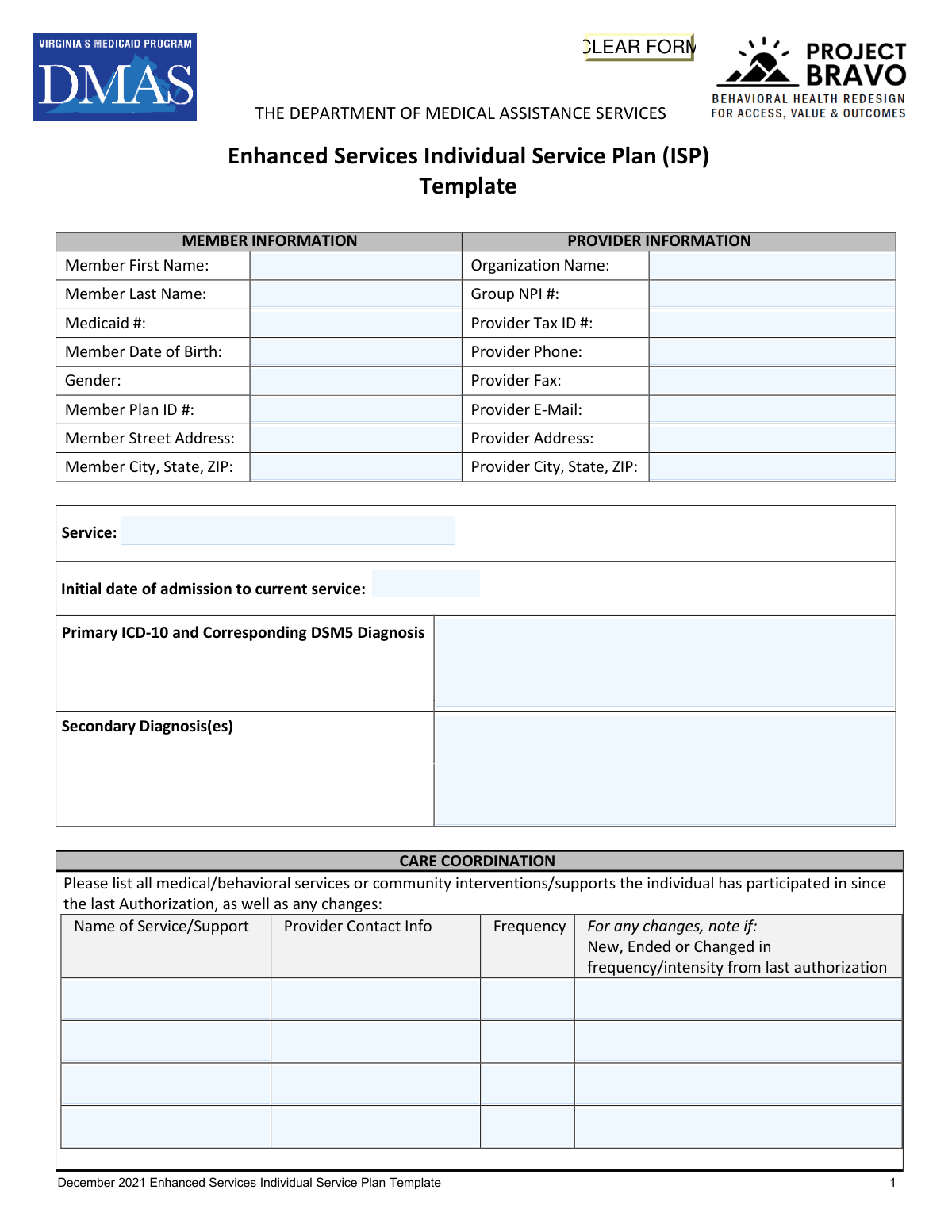
Yes! You can use AI to fill out Department of Medical Assistance Services Enhanced Services Individual Service Plan (ISP) Template
The Department of Medical Assistance Services (DMAS) Enhanced Services Individual Service Plan (ISP) Template is an official Virginia Medicaid document used by licensed mental health providers to create individualized, structured treatment plans for members enrolled in enhanced behavioral health services. It captures member and provider information, care coordination activities, treatment goals with measurable objectives and interventions, and a recovery/discharge plan to guide the member's path toward improved mental health outcomes. The form is critical for Medicaid authorization and ensures accountability, continuity of care, and person-centered planning across all participating service providers. Today, this complex multi-page form can be filled out quickly and accurately using AI-powered services like Instafill.ai, which can also convert non-fillable PDF versions into interactive fillable forms.
Our AI automatically handles information lookup, data retrieval, formatting, and form filling.
It takes less than a minute to fill out DMAS Enhanced Services ISP using our AI form filling.
Securely upload your data. Information is encrypted in transit and deleted immediately after the form is filled out.
Form specifications
| Form name: | Department of Medical Assistance Services Enhanced Services Individual Service Plan (ISP) Template |
| Number of pages: | 6 |
| Language: | English |
Instafill Demo: filling out a legal form in seconds
How to Fill Out DMAS Enhanced Services ISP Online for Free in 2026
Are you looking to fill out a DMAS ENHANCED SERVICES ISP form online quickly and accurately? Instafill.ai offers the #1 AI-powered PDF filling software of 2026, allowing you to complete your DMAS ENHANCED SERVICES ISP form in just 37 seconds or less.
Follow these steps to fill out your DMAS ENHANCED SERVICES ISP form online using Instafill.ai:
- 1 Navigate to Instafill.ai and upload the DMAS Enhanced Services ISP Template PDF or select it from the available form library to begin filling it out online.
- 2 Enter all required Member Information fields, including the member's first and last name, Medicaid number, date of birth, gender, plan ID number, and address, as well as all Provider Information fields such as organization name, NPI, tax ID, and contact details.
- 3 Complete the Care Coordination section by listing all medical, behavioral, and community services or supports the member has participated in since the last authorization, including provider contact info, frequency, and any changes, then describe care coordination activities with those services.
- 4 Fill in the Service Plan section by documenting the member's resources and strengths, identifying barriers to participation along with corresponding plans of support, and entering up to five treatment goals with objective measures, raters, measurement methods, intervention details by provider type, and treatment progress notes.
- 5 Complete the Recovery Plan section by describing what progress and recovery would look like for the individual, identifying barriers to recovery, outlining necessary outreach and resources, and providing the vision for the level of care at discharge along with an estimated discharge date.
- 6 Review all entered information for accuracy and completeness, ensuring that all required fields across member information, care coordination, treatment goals, and the recovery plan are properly filled in.
- 7 Obtain the electronic or actual signature of the Licensed Mental Health Professional (LMHP) or R/S/RP, enter their printed name, credentials, and the date signed, add any additional notes in the Notes Section, and then submit or save the completed ISP form.
Our AI-powered system ensures each field is filled out correctly, reducing errors and saving you time.
Why Choose Instafill.ai for Your Fillable DMAS Enhanced Services ISP Form?
Speed
Complete your DMAS Enhanced Services ISP in as little as 37 seconds.
Up-to-Date
Always use the latest 2026 DMAS Enhanced Services ISP form version.
Cost-effective
No need to hire expensive lawyers.
Accuracy
Our AI performs 10 compliance checks to ensure your form is error-free.
Security
Your personal information is protected with bank-level encryption.
Frequently Asked Questions About Form DMAS Enhanced Services ISP
The Enhanced Services ISP is a form issued by the Virginia Department of Medical Assistance Services (DMAS) used to document a Medicaid member's treatment goals, care coordination, interventions, and recovery plan for enhanced behavioral health services. It must be completed by a Licensed Mental Health Professional (LMHP) or qualified designee for each member receiving enhanced behavioral health services under Medicaid.
You will need to provide the member's first and last name, Medicaid ID number, date of birth, gender, plan ID number, and full street address including city, state, and ZIP code. This information is used to identify the member and link the plan to their Medicaid record.
The provider section requires the organization name, Group NPI number, Tax ID number, phone number, fax number, email address, and full mailing address. This information identifies the provider organization responsible for delivering and documenting the enhanced services.
The form requires a primary diagnosis listed using both the ICD-10 code and the corresponding DSM-5 diagnosis. You may also list any secondary diagnoses. Both coding systems must be referenced for the primary diagnosis to ensure clinical and billing accuracy.
The Care Coordination section requires you to list all medical, behavioral, and community services or supports the individual has participated in since the last authorization, including the provider contact information, frequency of each service, and whether each service is new, ended, or changed in frequency or intensity. You should also describe how care coordination activities are being conducted across these services.
The form supports up to five treatment goals. For each goal, you must provide the goal description, an objective measure (including who rates/reports it and how it will be tracked), up to four intervention rows (with provider type, specific intervention, and frequency), and treatment progress notes.
The form accepts the following provider types in the interventions section: LMHP (Licensed Mental Health Professional), QMHP (Qualified Mental Health Professional), Peer (Peer Support Specialist), and CSAC (Certified Substance Abuse Counselor). For Applied Behavior Analysis services, the provider must be an LBA, fully licensed LMHP, or LABA.
The Recovery Plan section documents the discharge and recovery planning process, which should begin at the first contact with the individual. It requires you to describe what progress and recovery would look like, identify barriers to recovery, outline necessary outreach and supports, provide a vision for the level of care at discharge, and estimate a discharge date.
The ISP must be signed by a Licensed Mental Health Professional (LMHP) or R/S/RP, along with their printed name, credentials, and the date of signature. Both actual (wet) and electronic signatures are accepted. For Applied Behavior Analysis services, the signer must be an LBA, fully licensed LMHP, or LABA.
Barriers to Participation are ongoing or evolving obstacles that prevent the individual from fully engaging in treatment. For each barrier identified, you must also document a corresponding Plan of Support that describes how the barrier will be addressed and what additional resources may help the individual overcome it.
Yes, AI-powered services like Instafill.ai can help auto-fill form fields accurately, saving significant time for providers completing this detailed form. These tools can pre-populate member and provider information, reducing manual data entry errors and streamlining the documentation process.
To fill out the Enhanced Services ISP online, visit Instafill.ai, upload the PDF form, and the AI will guide you through each field—from member and provider information to treatment goals and recovery planning. Once completed, you can review, save, and print or submit the filled form electronically.
If you have a flat, non-fillable version of the ISP PDF, Instafill.ai can convert it into an interactive fillable form. This allows you to type directly into all fields, including member information, treatment goals, and intervention details, without needing to print and handwrite the form.
The Resources and Strengths section asks providers to describe the individual's unique strengths, preferences, and personal resources that are relevant to their recovery. This person-centered approach ensures the treatment plan builds on what the individual already has going for them, rather than focusing solely on deficits or challenges.
The ISP is tied to the authorization period for enhanced services, and updates are required at each new authorization. The Care Coordination section specifically asks providers to note any changes since the last authorization, indicating the form should be reviewed and updated at each authorization renewal to reflect the member's current status and progress.
Compliance DMAS Enhanced Services ISP
Validation Checks by Instafill.ai
1
Ensures Member Date of Birth is a Valid Date in Correct Format
This check verifies that the Member Date of Birth is entered in a recognized date format (MM/DD/YYYY) and represents a logically valid date (e.g., not a future date, not an implausibly distant past date). It also confirms the member's age is consistent with eligibility for Medicaid Enhanced Services. If this field is missing or invalid, the form cannot be properly linked to the correct member record, risking misidentification or claim denial.
2
Ensures Medicaid Number Matches Expected Format and Is Present
This check confirms that the Medicaid identification number is populated and conforms to the Virginia Medicaid ID format (typically a numeric string of a specific length). The Medicaid number is the primary identifier used to match the ISP to the correct member in the Medicaid system. An absent or incorrectly formatted Medicaid number will prevent authorization processing and may result in claim rejection.
3
Ensures Provider Group NPI Number is a Valid 10-Digit Number
This validation verifies that the Group NPI number is exactly 10 digits, all numeric, and passes the Luhn algorithm check used to validate NPI numbers. The NPI is required for billing and provider identification within the Medicaid system. An invalid or missing NPI will cause the service plan to be rejected during authorization review and may delay or prevent reimbursement.
4
Ensures Primary ICD-10 and DSM-5 Diagnosis Codes Are Present and Properly Formatted
This check verifies that the Primary Diagnosis field contains at least one valid ICD-10 code (formatted as a letter followed by alphanumeric characters, e.g., F31.1) and a corresponding DSM-5 diagnosis label. The primary diagnosis is a clinical and billing requirement that justifies the medical necessity of Enhanced Services. If this field is absent or improperly formatted, the ISP will fail medical necessity review and authorization cannot be granted.
5
Ensures Initial Date of Admission Is a Valid Date and Not in the Future
This check confirms that the Initial Date of Admission to the current service is a properly formatted date (MM/DD/YYYY) and does not fall after the date the form is submitted. The admission date establishes the timeline of service delivery and is used to verify continuity of care across authorizations. A missing or future-dated admission date creates a logical inconsistency that may trigger a compliance flag during audit review.
6
Ensures At Least One Treatment Goal with Corresponding Objective Measure Is Completed
This validation checks that Treatment Goal 1 is populated with a description, and that its associated Objective Measure, Rater/Reporter, and Method of Measurement fields are all completed. Treatment goals with measurable outcomes are a core requirement of the ISP and demonstrate clinical accountability. If no treatment goal or objective measure is provided, the plan is clinically incomplete and will not meet DMAS authorization standards.
7
Ensures Each Completed Treatment Goal Has at Least One Corresponding Intervention
For every treatment goal that is populated (Goals 1–5), this check verifies that at least one intervention row is completed with a Provider Type, Specific Intervention, and Dose/Frequency. Interventions are the actionable steps that link clinical goals to service delivery, and their absence renders a goal clinically unsupported. A treatment goal without any associated intervention will be flagged as incomplete during clinical review and may result in partial or full denial of authorization.
8
Ensures Provider Type for Each Intervention Is a Valid Credential Category
This check verifies that each populated Provider Type field contains only accepted values: LMHP, QMHP, Peer, or CSAC, as specified by DMAS credentialing requirements. The provider type determines the scope of practice and billing eligibility for each intervention listed in the plan. An invalid or unrecognized provider type may result in the intervention being deemed non-billable or the entire authorization being flagged for compliance review.
9
Ensures LMHP Printed Name, Credentials, and Signature Date Are All Completed
This validation confirms that the Printed Name of the LMHP (or R/S/RP), their credentials, and the Date Signed fields on the signature page are all populated. The LMHP signature is a legal and regulatory requirement that certifies the clinical accuracy and appropriateness of the ISP. If any of these three fields are missing, the document is considered unsigned and legally invalid, and DMAS will not process the authorization request.
10
Ensures LMHP Credentials Are Consistent with Service Type Requirements
This check verifies that the credentials entered for the signing LMHP are appropriate for the service listed on the form, and specifically that for Applied Behavior Analysis services, the credential is LBA, fully licensed LMHP, or LABA as required by DMAS policy. Mismatched credentials indicate that the plan may have been authorized by an individual not qualified to do so under state regulations. Failure of this check may result in recoupment of payments or a compliance violation.
11
Ensures Provider Phone Number Is in a Valid Format
This check validates that the Provider Phone field contains a properly formatted U.S. phone number (e.g., (XXX) XXX-XXXX or XXX-XXX-XXXX) with exactly 10 digits, excluding formatting characters. A valid phone number is necessary for DMAS staff and care coordinators to contact the provider for clarification or follow-up during the authorization process. An improperly formatted or missing phone number may delay communication and slow the authorization timeline.
12
Ensures Provider Email Address Is in a Valid Format
This validation checks that the Provider E-Mail field, if populated, contains a properly structured email address with a local part, an '@' symbol, and a valid domain (e.g., [email protected]). A valid email address ensures that electronic correspondence regarding the authorization can be delivered successfully. An improperly formatted email address may result in failed notifications and missed communications regarding the status of the ISP.
13
Ensures Member City, State, and ZIP Code Are Consistently Formatted and Complete
This check verifies that the Member City, State, ZIP field contains a recognizable city name, a valid two-letter U.S. state abbreviation, and a 5-digit (or 5+4 digit) ZIP code. Accurate member address information is required for geographic eligibility verification and for routing care coordination resources appropriately. An incomplete or malformed address may cause delays in eligibility verification or result in the member being assigned to incorrect regional resources.
14
Ensures Each Barrier to Participation Has a Corresponding Plan of Support
This validation checks that for every Barrier to Participation field that is populated, the corresponding Plan of Support field is also completed. DMAS requires that identified barriers be paired with actionable support plans to demonstrate that the provider is actively addressing obstacles to treatment engagement. A barrier listed without a corresponding plan of support indicates an incomplete treatment plan and may result in a request for additional documentation before authorization is approved.
15
Ensures Recovery Plan Fields Are Completed Including Estimated Discharge Date
This check confirms that all four Recovery Plan narrative fields are populated (progress/recovery outlook, barriers to recovery, necessary outreach and resources, and vision for level of care at discharge), and that the Estimated Discharge Date is a valid future or present date in MM/DD/YYYY format. The Recovery Plan is a mandatory component of the Enhanced Services ISP that demonstrates person-centered planning and discharge readiness. Incomplete recovery planning fields will result in the ISP being returned for revision prior to authorization.
16
Ensures Member Full Name on Continuation Pages Matches Member Information Section
This check verifies that the Member Full Name and Medicaid Number fields appearing in the header of pages 2 through 6 are consistent with the Member First Name, Member Last Name, and Medicaid Number entered in the Member Information section on page 1. These repeated identifiers serve as a safeguard against page-level document mix-ups in multi-member processing environments. A mismatch between pages suggests a data entry error or document assembly issue that could result in the wrong plan being associated with the wrong member record.
Common Mistakes in Completing DMAS Enhanced Services ISP
Providers often confuse the Medicaid ID number with the Member Plan ID number, entering the same number in both fields or transposing digits. This mismatch can cause claim denials or authorization delays because DMAS uses these distinct identifiers to verify eligibility. Always double-check both numbers against the member's Medicaid card or eligibility verification system before submitting. AI-powered form filling tools like Instafill.ai can automatically validate these identifiers against known formats to reduce transcription errors.
A very common mistake is entering only the ICD-10 code without the corresponding DSM-5 diagnosis, or vice versa, since the form explicitly requires both. Providers also sometimes enter outdated codes or use non-specific codes (e.g., F99 instead of a more precise diagnosis) that may not justify the level of Enhanced Services being requested. Incomplete or mismatched diagnosis codes can result in authorization denial. Always verify that the ICD-10 code and DSM-5 diagnosis are current, specific, and clinically consistent with each other.
The care coordination table requires providers to note whether each listed service is 'New, Ended, or Changed in frequency/intensity from last authorization,' but this column is frequently left blank or filled with generic terms like 'same.' Reviewers rely on this information to understand the member's evolving service landscape, and omitting it can trigger requests for additional information or delay authorization. For each service listed, explicitly state whether it is new, ended, or changed, and if changed, describe the nature of the change in detail.
Treatment goals are often written in broad, non-specific language such as 'improve coping skills' without defining what measurable improvement looks like, who will measure it, or how it will be tracked. The form requires an Objective Measure, a Rater/Reporter, and a Method of Measurement for each goal, and leaving these fields incomplete or generic undermines the clinical validity of the plan. Goals should follow SMART criteria (Specific, Measurable, Achievable, Relevant, Time-bound) and each objective measure field must be fully completed. Instafill.ai can prompt users to complete all required sub-fields for each treatment goal before submission.
The intervention tables require specifying the provider type as LMHP, QMHP, Peer, or CSAC, but providers frequently leave this blank, enter a staff member's name instead of their credential type, or use an unlisted abbreviation. This is critical because DMAS uses provider type to determine billing eligibility and service authorization. Ensure that the correct credential abbreviation is used for each intervention row, and verify that the listed provider type is authorized to deliver the specified intervention under Virginia Medicaid regulations.
The 'Dose of Intervention (Frequency)' field is often left blank or filled with vague entries like 'as needed' or 'weekly,' without specifying the duration or number of units per session. DMAS requires this information to authorize the appropriate number of service units, and insufficient detail can result in under-authorization or denial. Each intervention row should specify the frequency (e.g., '2x per week'), duration per session (e.g., '60 minutes'), and any relevant intensity details to ensure accurate authorization.
The Recovery Plan section, which includes discharge planning, estimated discharge date, and vision for level of care at discharge, is frequently left incomplete or filled with placeholder text such as 'TBD.' DMAS requires this section to demonstrate that discharge planning began at first contact and that there is a concrete recovery trajectory. Providers should provide a realistic estimated discharge date and a specific description of what recovery looks like for the individual, even if the timeline is approximate, to demonstrate compliance with Enhanced Services requirements.
The signature page is sometimes submitted without the LMHP's printed name, credentials, or date, or the credentials field is left blank or filled with only a first name. For Applied Behavior Analysis services, the form specifically requires an LBA, fully licensed LMHP, or LABA signature, and submitting with the wrong credential type can invalidate the entire ISP. Always ensure the printed name matches the signature, the correct credential abbreviation is listed (e.g., LCSW, LPC, LBA), and the date reflects when the plan was actually signed.
Fields such as Group NPI number, Provider Tax ID, and Provider E-Mail are frequently left blank or contain errors, particularly when multiple staff members contribute to completing the form. An incorrect or missing Group NPI or Tax ID will cause the authorization to fail to link to the correct billing entity, resulting in payment delays or denials. Verify all provider information against the organization's credentialing records before submission, and ensure the Group NPI (not the individual NPI) is used in the designated field. Tools like Instafill.ai can pre-populate verified provider information to prevent these errors.
Providers often list barriers to participation without completing the corresponding 'Plan of Support' column, or they list only one barrier when the member has multiple ongoing challenges. The form requires both a barrier and a specific plan of support for each identified barrier, and an incomplete table suggests inadequate treatment planning. Each barrier entered must have a corresponding, individualized plan of support that describes concrete steps the provider and member will take to address that barrier.
Providers sometimes enter the date of the current authorization period or the date the ISP was written instead of the actual initial date of admission to the current service, which are often different dates. Using the wrong date can misrepresent the length of service and affect authorization decisions or continuity-of-care determinations. The initial date of admission should reflect when the member first began receiving the current Enhanced Service, which can be verified in the member's clinical record or intake documentation.
The 'Describe Care Coordination activities with these other services/supports' field is often completed with a single generic sentence such as 'Provider coordinates with all listed services,' which does not demonstrate active coordination. DMAS reviewers look for evidence of specific communication, collaboration, and integration of services, such as case conferences, shared treatment planning, or referral follow-up. Providers should describe actual coordination activities that occurred during the authorization period, including who was contacted, when, and what was discussed or decided.
Saved over 80 hours a year
“I was never sure if my IRS forms like W-9 were filled correctly. Now, I can complete the forms accurately without any external help.”
Kevin Martin Green
Your data stays secure with advanced protection from Instafill and our subprocessors

Robust compliance program
Transparent business model
You’re not the product. You always know where your data is and what it is processed for.
ISO 27001, HIPAA, and GDPR
Our subprocesses adhere to multiple compliance standards, including but not limited to ISO 27001, HIPAA, and GDPR.
Security & privacy by design
We consider security and privacy from the initial design phase of any new service or functionality. It’s not an afterthought, it’s built-in, including support for two-factor authentication (2FA) to further protect your account.
Fill out DMAS Enhanced Services ISP with Instafill.ai
Worried about filling PDFs wrong? Instafill securely fills department-of-medical-assistance-services-enhanced-services-individual-service-plan-isp-template forms, ensuring each field is accurate.