Yes! You can use AI to fill out Texas Standard Prior Authorization Request Form for Health Care Services

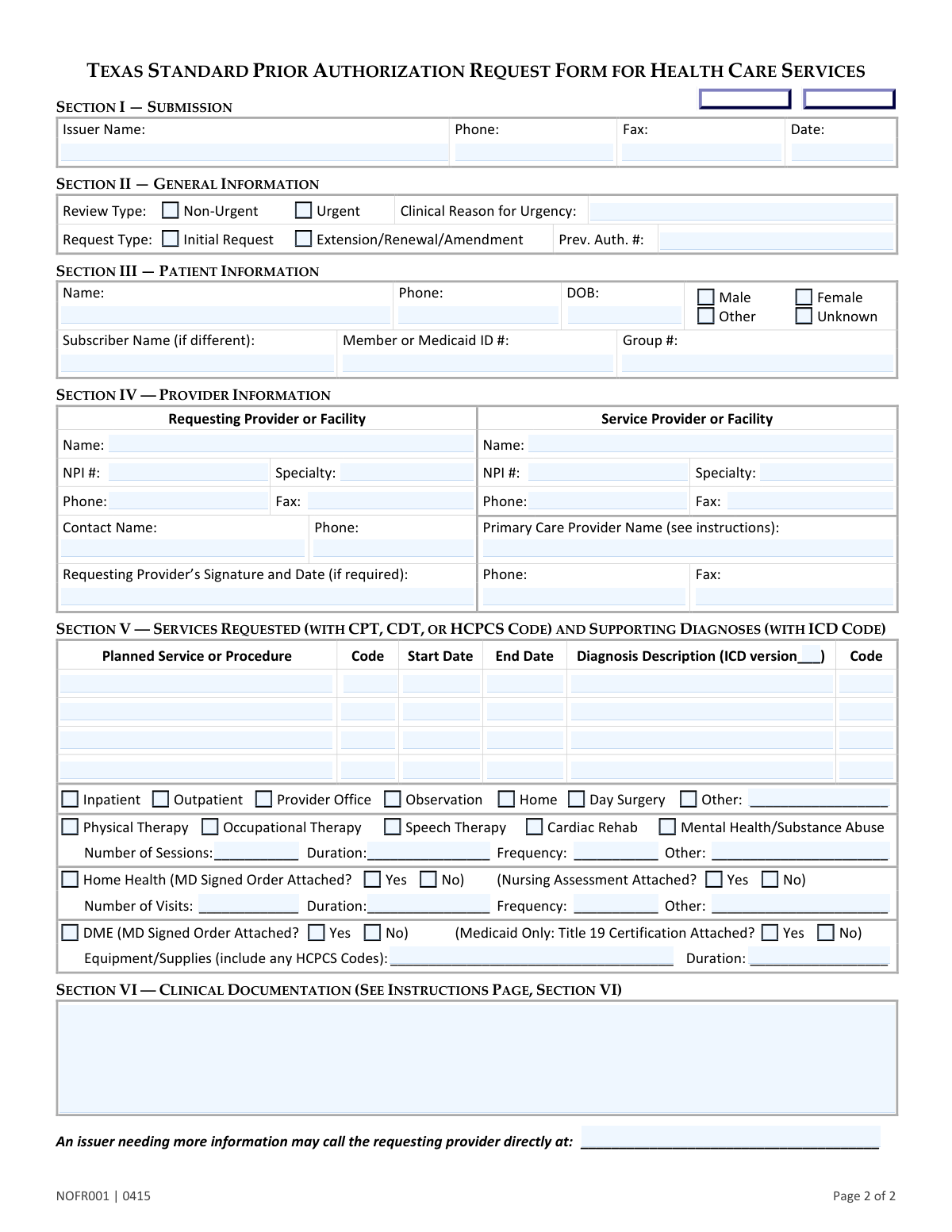
This is the official Texas Department of Insurance form used by healthcare providers to request prior authorization for medical services from a patient's health benefit plan issuer. It standardizes the request process for various plans, including commercial insurance, Medicaid, and CHIP, ensuring that services are reviewed for medical necessity and coverage before being rendered. Today, this form can be filled out quickly and accurately using AI-powered services like Instafill.ai, which can also convert non-fillable PDF versions into interactive fillable forms.
Our AI automatically handles information lookup, data retrieval, formatting, and form filling.
It takes less than a minute to fill out NOFR001 using our AI form filling.
Securely upload your data. Information is encrypted in transit and deleted immediately after the form is filled out.

Form specifications

Form name: Texas Standard Prior Authorization Request Form for Health Care Services
Number of pages: 2
Language: English
Categories: prior authorization forms, CAR forms, health care forms, authorization forms, service authorization forms, L.A. Care forms, health services forms, health forms
main-image

Instafill Demo: How to fill out PDF forms in seconds with AI

How to Fill Out NOFR001 Online for Free in 2026

Are you looking to fill out a NOFR001 form online quickly and accurately? Instafill.ai offers the #1 AI-powered PDF filling software of 2026, allowing you to complete your NOFR001 form in just 37 seconds or less.
Follow these steps to fill out your NOFR001 form online using Instafill.ai:
  1. 1 Navigate to Instafill.ai and upload or select the Texas Standard Prior Authorization Request Form.
  2. 2 Use the AI assistant to automatically populate patient, subscriber, and provider information from your existing records.
  3. 3 Specify the review type (Urgent or Non-Urgent) and request type (Initial or Extension).
  4. 4 Enter the details of the services requested, including CPT/HCPCS codes, service dates, and the corresponding ICD diagnosis codes.
  5. 5 Provide a narrative of medical necessity and attach all required clinical documentation, such as progress notes, lab reports, or signed orders.
  6. 6 Review all sections for accuracy, obtain the requesting provider's signature if required, and submit the completed form to the appropriate health plan issuer.

Our AI-powered system ensures each field is filled out correctly, reducing errors and saving you time.

Why Choose Instafill.ai for Your Fillable NOFR001 Form?

Speed

Complete your NOFR001 in as little as 37 seconds.

Up-to-Date

Always use the latest 2026 NOFR001 form version.

Cost-effective

No need to hire expensive lawyers.

Accuracy

Our AI performs 10 compliance checks to ensure your form is error-free.

Security

Your personal information is protected with bank-level encryption.

Frequently Asked Questions About Form NOFR001

This form is used by healthcare providers to request prior authorization from a patient's health insurance plan for specific medical services, procedures, or equipment. It is a standardized form that must be accepted by most health plans in Texas, including Medicaid and CHIP.

The patient's healthcare provider or facility, such as a doctor's office or hospital, is responsible for completing and submitting this form on the patient's behalf.

Send the completed form directly to the health insurance issuer from whom you are seeking authorization. Do not send this form to the Texas Department of Insurance, the Texas Health and Human Services Commission, or the patient's employer.

Request an urgent review for a patient with a life-threatening condition, who is currently hospitalized, or whose health could seriously deteriorate without expedited treatment. You must provide a clinical reason for the urgency in Section II.

No, this form is only for requesting prior authorization for health care services. It cannot be used for appeals, prescription drug authorizations, verifying eligibility, or requesting out-of-network referrals.

You must provide a brief narrative of medical necessity in Section VI and attach supporting clinical documentation like medical records, progress notes, or lab reports. For services like Home Health or DME, a physician's signed order may also be required.

If the requesting provider or facility is the same one that will be performing the service, you can simply write 'Same' in the Service Provider or Facility information fields.

To request an extension or renewal, check the 'Extension/Renewal/Amendment' box in Section II. Be sure to also enter the previous authorization number in the space provided.

In Section V, you must list each planned service or procedure with its specific CPT, CDT, or HCPCS code, the planned start and end dates, and the supporting diagnosis with its corresponding ICD code.

No, the form instructions specify that if the requesting provider's signature is required, you may not use a signature stamp. An actual signature is necessary.

Yes, services like Instafill.ai use AI to accurately auto-fill form fields from your records, which can save significant time and help reduce clerical errors.

Simply upload the Texas Standard Prior Authorization form to the Instafill.ai platform. The AI will make the document interactive, allowing you to quickly fill in the fields online, save your progress, and download the completed PDF.

You can use a service like Instafill.ai, which can convert flat, non-fillable PDFs into interactive, fillable forms. This allows you to easily type your information directly into the fields instead of printing and filling by hand.

Compliance NOFR001
Validation Checks by Instafill.ai

1
Ensures Clinical Reason for Urgency is Provided for Urgent Requests
This check verifies that if the 'Urgent' review type is selected, the 'Clinical Reason for Urgency' field is not empty. This is critical for the issuer to properly triage and expedite the review process according to established criteria for life-threatening or severe conditions. A missing justification will likely cause the request to be downgraded to non-urgent or rejected for being incomplete.
2
Validates Previous Authorization Number for Extensions/Renewals
This validation ensures that if the 'Extension/Renewal/Amendment' request type is selected, the 'Prev. Auth. #' field is populated with a valid number. This number is essential for the issuer to locate the original authorization and review the request in the correct context of ongoing care. Failure to provide this number will result in the inability to process the extension and a likely rejection of the request.
3
Verifies Patient Date of Birth is a Valid Past Date
This check confirms that the 'Patient Date of Birth' is entered in a valid date format (e.g., MM/DD/YYYY) and represents a date that is in the past. An accurate DOB is fundamental for patient identification and eligibility verification. An invalid or future date will cause a hard failure, preventing submission until corrected, as it indicates a critical data entry error.
4
Validates NPI Number Format for All Providers
This validation checks that both the 'Requesting Provider or Facility NPI #' and 'Service Provider or Facility NPI #' fields contain a valid 10-digit numeric National Provider Identifier. The NPI is a standard, unique identifier for health care providers and is crucial for processing claims and authorizations. An incorrectly formatted NPI will lead to provider identification failure and rejection of the form.
5
Ensures Service End Date is On or After Start Date
For each service line item, this validation verifies that the 'End Date' is not earlier than the 'Start Date'. This maintains logical consistency for the requested service period and prevents nonsensical date ranges. A request with an end date before the start date would be considered a data entry error and would be rejected until corrected.
6
Confirms Presence of Both Procedure and Diagnosis Codes for Each Service
This check ensures that for every 'Planned Service or Procedure' listed, both a corresponding procedure code (CPT, CDT, or HCPCS) and a diagnosis code (ICD) are provided. These codes are the universal language for medical billing and are non-negotiable for determining medical necessity. A missing code for a requested service will render that line item incomplete and will halt the review process.
7
Requires Specification When 'Other' Place of Service is Selected
This validation ensures that if the 'Other' checkbox is selected in the 'Place of Service' section, the adjacent text field for specifying the location is filled out. This information is necessary for the issuer to understand the context of care and determine if the location is appropriate for the requested service. Failure to specify the 'Other' location will result in an incomplete request and potential delays or denial.
8
Ensures Member or Medicaid ID is Provided
This check validates that the 'Member or Medicaid ID #' field is not empty. This ID is the primary key used by the issuer to identify the patient within their system and verify their coverage and benefits. Without a valid ID, the issuer cannot locate the patient's policy, and the prior authorization request cannot be processed at all.
9
Validates Standard 10-Digit Format for All Phone and Fax Numbers
This check verifies that all phone and fax number fields throughout the form adhere to a standard 10-digit format, potentially allowing for common separators. Consistent formatting is essential for reliable communication and follow-up regarding the request. An invalid format could prevent the issuer from contacting the provider for more information, leading to delays or denials.
10
Verifies Attachment Status for Home Health MD Signed Order
This validation ensures that if the 'Home Health' service type is checked, one of the two 'MD Signed Order Attached?' radio buttons (Yes or No) is selected. This confirmation is a critical prerequisite for authorizing home health services, as the signed order is the legal basis for the care. Not answering this question leaves the request ambiguous and will likely cause it to be rejected for missing information.
11
Verifies Attachment Status for DME MD Signed Order
This validation ensures that if the 'DME' service type is checked, one of the two 'MD Signed Order Attached?' radio buttons (Yes or No) is selected. A physician's order is required to justify the medical necessity of Durable Medical Equipment. Failing to indicate the status of this required document will result in an incomplete submission and prevent the request from being reviewed.
12
Ensures Therapy Details are Provided When a Therapy Type is Selected
This check verifies that if any therapy type (Physical, Occupational, Speech, etc.) is selected, at least one of the detail fields ('Number of Sessions', 'Duration', 'Frequency') is filled out. These details are essential for the issuer to understand the scope and intensity of the requested treatment plan. A request for therapy without these specifics is too vague to be reviewed for medical necessity and will be returned for clarification.
13
Validates that the ICD Version is Specified
This check ensures that the 'ICD version' field is populated, typically with '9' or '10'. Knowing the version of the International Classification of Diseases (ICD) code is critical for correct interpretation, as codes can differ between versions. Ambiguity in the ICD version can lead to processing errors or incorrect application of medical policy, potentially causing a denial.
14
Validates Service Provider Information if Not 'Same' as Requesting Provider
This check ensures that if the 'Service Provider or Facility Name' field is not filled with the word 'Same', then the associated NPI, Specialty, and contact fields for the service provider are populated. This is important when the provider ordering the service is different from the one performing it. Missing information for the servicing provider prevents the issuer from verifying their network status and credentials, which is a critical part of the authorization process.

Common Mistakes in Completing NOFR001

Submitting the Form to the Wrong Agency

The form explicitly warns against sending it to the Texas Department of Insurance (TDI) or other state agencies. However, staff may see the TDI logo and address and mistakenly send the request there instead of to the patient's health plan issuer. This error guarantees the request will not be processed, as the TDI does not handle prior authorizations, leading to major delays until the mistake is discovered and the form is resubmitted correctly.

Improperly Justifying an Urgent Review Request

A provider may check the 'Urgent' box without providing a clear clinical reason that meets the form's specific criteria, such as a life-threatening condition or severe pain that could lead to serious deterioration. This is often done to try and speed up the process. As a result, the request is typically downgraded to non-urgent, which eliminates any time savings and can delay the final decision.

Omitting the Previous Authorization Number for Renewals

When submitting a request for an 'Extension/Renewal/Amendment,' staff frequently forget to enter the 'Prev. Auth. #' in Section II. This number is the primary identifier linking the new request to the existing authorization. Without it, the issuer's system cannot process the request as a renewal and may treat it as a duplicate or a new request, leading to processing errors, delays, or denial.

Confusing Patient and Subscriber Information

A very common error is failing to differentiate between the patient and the subscriber in Section III, especially when the patient is a dependent like a child or spouse. Submitting the form with the patient's name in the subscriber field or omitting the subscriber's information prevents the issuer from locating the correct policy. This results in an inability to verify coverage and an immediate rejection or delay until the information is corrected.

Using an Invalid Signature or Forgetting to Sign

The instructions in Section IV explicitly prohibit the use of a signature stamp. Busy offices may use a stamp for convenience or forget to provide a signature altogether, especially on a non-fillable PDF. Using a stamp or omitting the signature can invalidate the entire request, leading to an automatic rejection and requiring a complete resubmission. Tools like Instafill.ai can convert flat PDFs into fillable forms and manage digital signatures to prevent this.

Mismatching Procedure Codes and Descriptions

In Section V, data entry errors often lead to a mismatch between the CPT/HCPCS code and the written 'Planned Service or Procedure' description, or between the ICD code and the diagnosis. Such inconsistencies create confusion about the requested service's medical necessity, often resulting in a denial or a request for more information. AI-powered form filling tools like Instafill.ai can help prevent these errors by automatically validating codes against their descriptions.

Providing Vague Details for Therapy or DME Services

When requesting services like physical therapy or DME in Section V, fields for 'Number of Sessions,' 'Duration,' and 'Frequency' are often left blank or filled with ambiguous terms like 'as needed.' Issuers require specific, quantifiable details to assess medical necessity. Vague information almost always leads to a follow-up request for clarification, significantly delaying the start of patient care.

Forgetting to Attach Required Clinical Documents

The form requires attaching supporting clinical documentation, and Section V specifically asks if an 'MD Signed Order' is attached for Home Health or DME. A frequent mistake is checking 'Yes' but forgetting to include the actual document with the submission. This omission results in an incomplete request that cannot be processed, leading to delays until the missing documentation is received and matched to the original request.

Submitting an Insufficient Clinical Narrative

In Section VI, the space for 'Clinical Documentation' is often underutilized, with providers submitting a very brief justification or leaving it blank, assuming the attached records are sufficient. However, a concise narrative summarizing the medical necessity helps guide the reviewer and can expedite the decision. A weak or missing narrative forces the reviewer to search through all attachments for the justification, slowing down the process and increasing the chance of a denial.

Incorrectly Identifying the Service Provider

In Section IV, if the requesting provider is also the one performing the service, staff often leave the 'Service Provider or Facility' fields blank instead of following the instruction to write 'Same.' This ambiguity forces the reviewer to assume information is missing and may trigger a request for clarification, delaying the authorization. To prevent this, one should explicitly write 'Same' in the Service Provider name field when applicable to make the form clear and complete.
Saved over 80 hours a year

“I was never sure if my IRS forms like W-9 were filled correctly. Now, I can complete the forms accurately without any external help.”

Kevin Martin Green

Your data stays secure with advanced protection from Instafill and our subprocessors

Robust compliance program

Transparent business model

You’re not the product. You always know where your data is and what it is processed for.

ISO 27001, HIPAA, and GDPR

Our subprocesses adhere to multiple compliance standards, including but not limited to ISO 27001, HIPAA, and GDPR.

Security & privacy by design

We consider security and privacy from the initial design phase of any new service or functionality. It’s not an afterthought, it’s built-in, including support for two-factor authentication (2FA) to further protect your account.

Fill out NOFR001 with Instafill.ai

Worried about filling PDFs wrong? Instafill securely fills texas-standard-prior-authorization-request-form-for-health-care-services forms, ensuring each field is accurate.