Yes! You can use AI to fill out Minnesota Standard Consent Form to Release Health Information

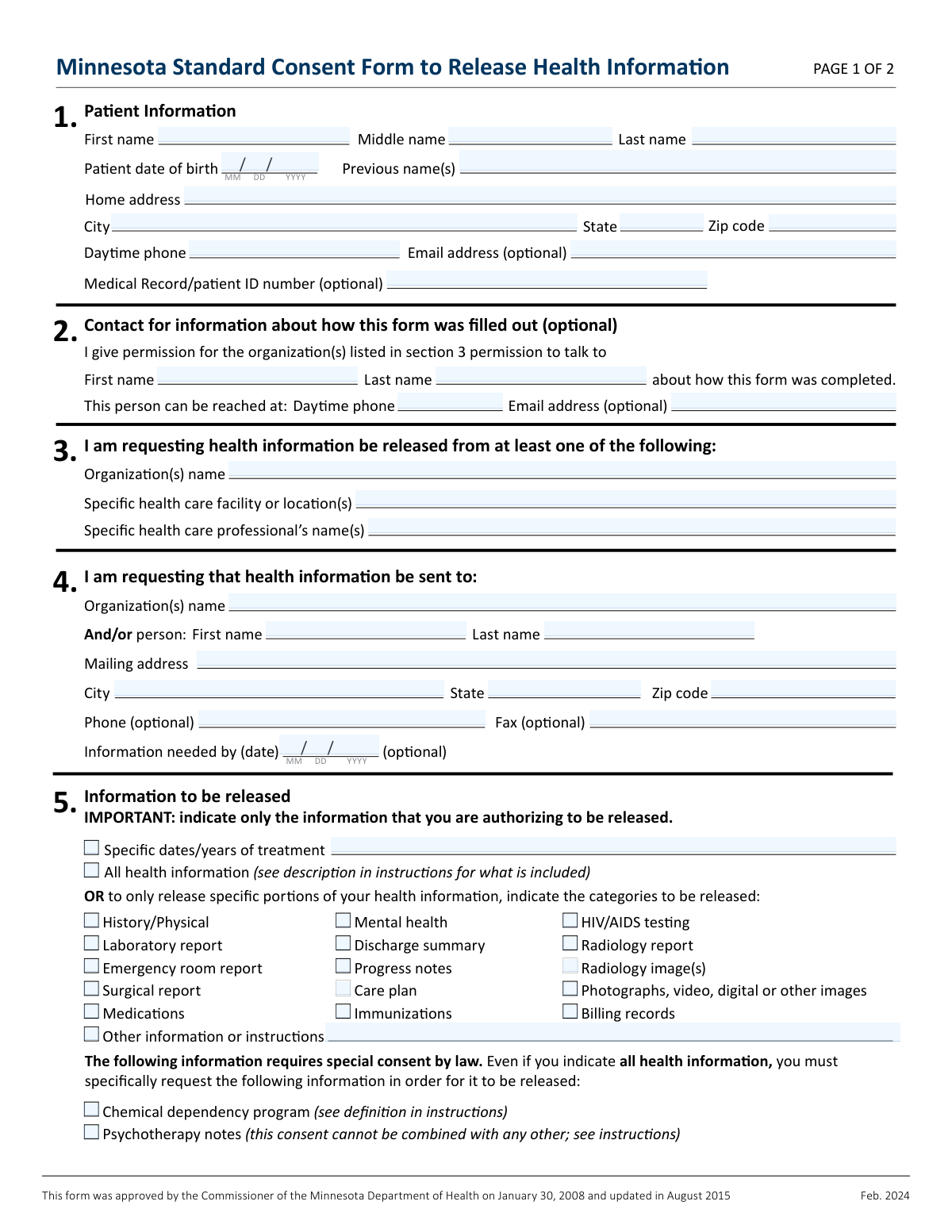
This is an official form approved by the Minnesota Department of Health, legally required under the Minnesota Health Records Act. It allows a patient to grant permission for a specific healthcare provider or organization to release their protected health information to a designated third party. Completing this form accurately is crucial for insurance, legal matters, or continuity of care. Today, this form can be filled out quickly and accurately using AI-powered services like Instafill.ai, which can also convert non-fillable PDF versions into interactive fillable forms.
Our AI automatically handles information lookup, data retrieval, formatting, and form filling.
It takes less than a minute to fill out Minnesota Health Information Release Form using our AI form filling.
Securely upload your data. Information is encrypted in transit and deleted immediately after the form is filled out.

Form specifications

Form name: Minnesota Standard Consent Form to Release Health Information
Number of pages: 1
Language: English
Categories: health forms
main-image

Instafill Demo: How to fill out PDF forms in seconds with AI

How to Fill Out Minnesota Health Information Release Form Online for Free in 2026

Are you looking to fill out a MINNESOTA HEALTH INFORMATION RELEASE FORM form online quickly and accurately? Instafill.ai offers the #1 AI-powered PDF filling software of 2026, allowing you to complete your MINNESOTA HEALTH INFORMATION RELEASE FORM form in just 37 seconds or less.
Follow these steps to fill out your MINNESOTA HEALTH INFORMATION RELEASE FORM form online using Instafill.ai:
  1. 1 Navigate to Instafill.ai and upload or select the Minnesota Standard Consent Form to Release Health Information.
  2. 2 Use the AI assistant to automatically fill in your personal details in Section 1, including your name, date of birth, and contact information.
  3. 3 Specify the healthcare provider, facility, or professional authorized to release your records in Section 3.
  4. 4 Enter the name and address of the person or organization who will receive your health information in Section 4.
  5. 5 In Section 5, carefully select or initial the specific types of health information you authorize for release, noting special categories like chemical dependency or psychotherapy notes.
  6. 6 Indicate the reason for the release, set the consent expiration date, and review all sections for accuracy.
  7. 7 Provide your digital signature and the date in Section 9 to finalize the consent form before downloading or sharing it.

Our AI-powered system ensures each field is filled out correctly, reducing errors and saving you time.

Why Choose Instafill.ai for Your Fillable Minnesota Health Information Release Form Form?

Speed

Complete your Minnesota Health Information Release Form in as little as 37 seconds.

Up-to-Date

Always use the latest 2026 Minnesota Health Information Release Form form version.

Cost-effective

No need to hire expensive lawyers.

Accuracy

Our AI performs 10 compliance checks to ensure your form is error-free.

Security

Your personal information is protected with bank-level encryption.

Frequently Asked Questions About Form Minnesota Health Information Release Form

This form is a legal document that gives a Minnesota healthcare provider your permission to release your protected health information to another person, provider, or organization you specify.

Anyone who needs to have their medical records sent from a Minnesota healthcare provider to another party must complete this form. This is common when changing doctors, for insurance purposes, or for legal reasons.

Possibly. The healthcare organization releasing your information is permitted to charge a fee for this service. You should contact the provider listed in Section 3 to ask about any potential costs.

To release this information, you must initial the specific categories in Section 5. Simply checking the 'All health information' box is not sufficient for certain protected records like those from a chemical dependency program.

The release of psychotherapy notes requires a separate, specific consent form due to special legal protections. You cannot use this standard form to request psychotherapy notes; you must obtain the correct form from your provider.

This consent form automatically expires one year from the date you sign it. If you need it to be valid for a different period, you can specify a different date or a particular event in Section 8.

An incomplete or improperly filled-out form may be rejected by the healthcare provider, causing delays. It is crucial to follow all instructions and fill in the information clearly and completely.

Yes, you can revoke your consent at any time by sending a written request to the provider listed in Section 3. However, the revocation will not apply to any information that has already been released.

In Section 3, you can write 'All my health care providers' on the 'Organization(s) name' line. This will authorize the release of information from all providers who have your records.

A legally authorized representative, such as a parent, legal guardian, or person with power of attorney for healthcare, can sign the form. They must specify their relationship to the patient and may be asked to provide proof of their legal authority.

Yes, you can use services like Instafill.ai, which leverage AI to help you accurately auto-fill form fields. This can save time and help you avoid common errors.

To fill out this form online, you can use a service like Instafill.ai. Simply upload the PDF, and the platform will make it fillable so you can type your information directly into the fields before printing to sign.

If you have a non-fillable or 'flat' PDF, you can use a tool like Instafill.ai to instantly convert it into an interactive, fillable form. This allows you to easily type your information instead of having to print and complete it by hand.

Compliance Minnesota Health Information Release Form
Validation Checks by Instafill.ai

1
Patient Identification Completeness
This check ensures that the patient's full first name, last name, and date of birth in Section 1 are all provided. This information is the minimum required to accurately identify the correct patient and their medical records. A failure to provide this core information would make the consent form ambiguous and legally unenforceable, leading to rejection of the request.
2
Valid Patient Date of Birth
This validation verifies that the patient's date of birth in Section 1 is a valid calendar date and that the date is in the past. An invalid or future date indicates a data entry error and would prevent correct patient identification. This check is crucial for preventing record mismatches and ensuring the request pertains to a real individual.
3
Source of Information Specified
This check confirms that at least one field in Section 3 ('Organization(s) name', 'Specific health care facility...', or 'Specific health care professional’s name(s)') is completed. It is mandatory to specify who is being authorized to release the health information. If this section is blank, the form is invalid as there is no clear source from which to request the records.
4
Recipient Information and Address Completeness
This validation ensures that Section 4 contains either an organization name or a person's name, along with a complete mailing address (address, city, state, zip code). Health information cannot be sent without a clearly defined recipient and destination. An incomplete address would result in the request being unfulfillable and rejected.
5
Information to Release Selection
This check verifies that the user has selected at least one category of information to be released in Section 5. The user must either check 'All health information' or one or more of the specific categories. A form with no selection in this section provides no instruction on what information to send, making the consent void.
6
Exclusive Psychotherapy Notes Validation
This is a critical logical check based on the form's instructions for Section 5. If 'Psychotherapy notes' is selected, this validation ensures that no other information categories are selected on the same form. The instructions explicitly state that releasing psychotherapy notes requires a separate, dedicated form, so combining it with other requests makes the entire consent invalid.
7
Reason for Release Specified
This check ensures that at least one reason for the release of information has been selected in Section 7. Understanding the purpose of the release is a key component of informed consent. A failure to specify a reason may lead to the form being rejected for being incomplete or for not meeting legal requirements for consent.
8
Conditional 'Other' Reason Explanation
This validation is triggered if the 'Other' checkbox is selected in Section 7. It verifies that the corresponding text field ('please explain') is not empty. If a user specifies 'Other' as the reason, they must provide a description to clarify the purpose; otherwise, the reason is ambiguous and the form is considered incomplete.
9
Valid Expiration Logic
This check validates the expiration criteria in Section 8. The form expires one year from the signature date by default. If the user provides a specific expiration date, it must be a valid date in the future. If they provide a specific event, the date field should be blank to avoid conflicting instructions.
10
Signature and Date Presence
This validation confirms that the form has been signed and dated in Section 9 by either the patient or a legally authorized representative. A signature and date are fundamental requirements for a legal consent document, as they indicate who gave consent and when. An unsigned or undated form is invalid and will be rejected immediately.
11
Valid Signature Date
This check ensures the date provided in the signature block (Section 9) is a valid calendar date and is not in the future. A future date would invalidate the signature, as consent cannot be given in advance of the signature date. This check is essential for establishing the legal timeline and validity of the consent.
12
Authorized Representative Details Required
If the form is signed by a 'legally authorized representative' in Section 9, this check ensures the 'Representative’s relationship to patient' field is also completed. It is legally necessary to document the authority of the person signing on the patient's behalf (e.g., parent, legal guardian). Without this relationship specified, the representative's authority cannot be verified, and the consent is invalid.

Common Mistakes in Completing Minnesota Health Information Release Form

Failing to Separately Authorize Chemical Dependency Records

A critical error is assuming that selecting 'All health information' in Section 5 automatically includes records from a federally-funded chemical dependency program. Due to special legal protections, these records require a separate, explicit authorization by initialing the specific line item. Failure to do so will result in these specific records being withheld, which can derail legal cases, insurance applications, or continuity of care.

Improperly Requesting Psychotherapy Notes

Users often miss the instruction that psychotherapy notes cannot be released using this form if other records are also being requested. The law requires a completely separate consent form dedicated solely to the release of psychotherapy notes. Checking the box on this form alongside other requests will result in the psychotherapy notes request being denied, delaying access to this critical information.

Providing Vague Releasing Provider Information

In Section 3, users often list a large hospital system without specifying the exact clinic, department, or doctor's name. This ambiguity forces the organization to search multiple departments, causing significant delays or an outright rejection of the request for being too broad. To avoid this, be as specific as possible by providing the full clinic name and address or the specific healthcare professional's full name.

Authorized Representative Forgetting to State Relationship

When a parent, guardian, or legal representative signs on behalf of a patient in Section 9, they frequently forget to write their relationship (e.g., 'Parent,' 'Power of Attorney'). This omission makes the signature invalid, as the provider cannot verify the signer's legal authority to request the records. The form will be rejected, and proof of legal authority will be required upon resubmission, causing delays.

Forgetting to Sign or Date the Form

An unsigned or undated form is legally invalid and is one of the most common reasons for immediate rejection. People often focus on the details in the main sections and simply overlook the signature line in Section 9. This simple mistake halts the entire process, requiring the form to be returned and resubmitted. AI-powered form filling tools like Instafill.ai can prevent this by flagging mandatory signature and date fields before submission.

Misunderstanding the 'All Health Information' Scope

Patients frequently select 'All health information' in Section 5 for convenience, not realizing this authorizes the release of highly sensitive data, including mental health records, substance use history, and HIV/AIDS status. This can lead to over-sharing of private information that was not intended. Before selecting this option, carefully read the instructions and consider if you only need specific records, such as 'Lab reports' or 'Surgical reports,' to limit the scope of the release.

Omitting Previous or Maiden Names

Patients who have changed their name often forget to include previous names in Section 1. Health records may be filed under different names over the years, and omitting this information can lead to an incomplete record release because the provider cannot locate all relevant files. To ensure a complete transfer of information, always list any and all previous names under which you have received medical care.

Setting an Ambiguous Expiration Event

In Section 8, users may write a vague event for expiration, such as 'when my case is settled' instead of a specific date. Providers cannot interpret these subjective events, leading them to either reject the form or default to the standard one-year expiration, which may not be the user's intent. To avoid this, specify a concrete date (MM/DD/YYYY) or a clear, verifiable event like '60 days after hospital discharge.'

Providing an Incomplete Recipient Address

Users sometimes provide only a name or organization in Section 4 without a full, accurate mailing address, assuming a fax number is sufficient. However, many providers will not fax records for security reasons, making delivery impossible without a complete address. This will cause the request to be put on hold. Always provide a complete street address, city, state, and zip code to ensure timely delivery.

Not Specifying Dates of Treatment for Partial Records

When requesting specific categories of information in Section 5 (e.g., 'Laboratory reports'), users often forget to also specify the relevant date range. This forces the provider to either guess or send all lab reports ever created, which may be more information than desired and take longer to compile. If you only need records from a specific time period, be sure to fill in the 'Specific dates/years of treatment' line. Since many government forms are flat PDFs, tools like Instafill.ai can convert them into fillable versions and help ensure fields like this are not missed.
Saved over 80 hours a year

“I was never sure if my IRS forms like W-9 were filled correctly. Now, I can complete the forms accurately without any external help.”

Kevin Martin Green

Your data stays secure with advanced protection from Instafill and our subprocessors

Robust compliance program

Transparent business model

You’re not the product. You always know where your data is and what it is processed for.

ISO 27001, HIPAA, and GDPR

Our subprocesses adhere to multiple compliance standards, including but not limited to ISO 27001, HIPAA, and GDPR.

Security & privacy by design

We consider security and privacy from the initial design phase of any new service or functionality. It’s not an afterthought, it’s built-in, including support for two-factor authentication (2FA) to further protect your account.

Fill out Minnesota Health Information Release Form with Instafill.ai

Worried about filling PDFs wrong? Instafill securely fills minnesota-standard-consent-form-to-release-health-information forms, ensuring each field is accurate.