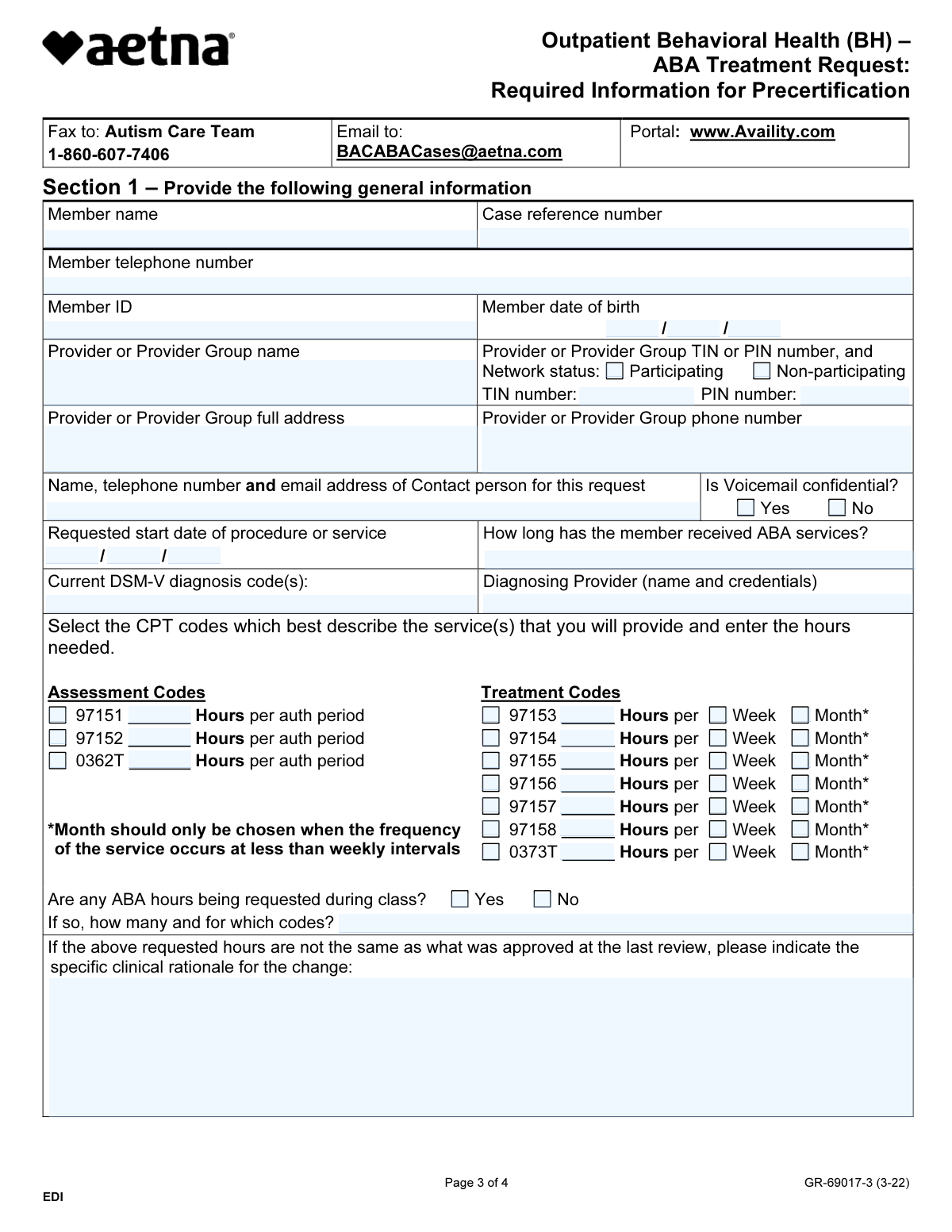
Yes! You can use AI to fill out Outpatient Behavioral Health (BH) – ABA Treatment Request: Required Information for Precertification
This form, officially titled 'Outpatient Behavioral Health (BH) ā ABA Treatment Request: Required Information for Precertification', is used by healthcare providers to supply Aetna and its affiliates with the necessary clinical information to support a precertification request for Applied Behavior Analysis (ABA) treatment. It details the member's diagnosis, treatment plan, requested services, and justification for medical necessity. Today, this form can be filled out quickly and accurately using AI-powered services like Instafill.ai, which can also convert non-fillable PDF versions into interactive fillable forms.
GR-69017-3 is part of the
ABA treatment forms, behavioral health forms, health information forms, health treatment forms and patient health forms categories on Instafill.
Our AI automatically handles information lookup, data retrieval, formatting, and form filling.
It takes less than a minute to fill out GR-69017-3 using our AI form filling.
Securely upload your data. Information is encrypted in transit and deleted immediately after the form is filled out.
Form specifications
| Form name: | Outpatient Behavioral Health (BH) – ABA Treatment Request: Required Information for Precertification |
| Number of fields: | 92 |
| Number of pages: | 4 |
| Language: | English |
Instafill Demo: How to fill out PDF forms in seconds with AI
How to Fill Out GR-69017-3 Online for Free in 2026
Are you looking to fill out a GR-69017-3 form online quickly and accurately? Instafill.ai offers the #1 AI-powered PDF filling software of 2026, allowing you to complete your GR-69017-3 form in just 37 seconds or less.
Follow these steps to fill out your GR-69017-3 form online using Instafill.ai:
- 1 Navigate to Instafill.ai and upload or select the ABA Treatment Request form.
- 2 Use the AI assistant to automatically populate member information, including name, ID number, and date of birth.
- 3 Enter the provider or provider group's information, such as name, address, TIN/PIN, and contact details.
- 4 Specify the requested assessment and treatment CPT codes, along with the number of hours needed per week or month.
- 5 Provide member-specific clinical information, including diagnosis, supervising provider, current impairments, and any additional services being received.
- 6 Attach all required supporting documentation, such as standardized assessments, treatment plans, and functional behavior assessments.
- 7 Review all the information for accuracy, sign the form electronically, and submit it to the Aetna Autism Care Team via fax, email, or the provider portal.
Our AI-powered system ensures each field is filled out correctly, reducing errors and saving you time.
Why Choose Instafill.ai for Your Fillable GR-69017-3 Form?
Speed
Complete your GR-69017-3 in as little as 37 seconds.
Up-to-Date
Always use the latest 2026 GR-69017-3 form version.
Cost-effective
No need to hire expensive lawyers.
Accuracy
Our AI performs 10 compliance checks to ensure your form is error-free.
Security
Your personal information is protected with bank-level encryption.
Frequently Asked Questions About Form GR-69017-3
This form is used to supply the required clinical information for an Applied Behavior Analysis (ABA) treatment precertification request. While not mandatory, using it helps Aetna process your request more quickly.
The patient's attending physician or provider must complete all sections of the form to request precertification for ABA services.
No, this form cannot be used to initiate a precertification request. You must first initiate the request by calling the number on the member's ID card or by submitting it electronically via the Availity portal.
The case reference number is assigned to you when you initiate the precertification request by phone or electronically. You must complete that initial step before you can fill out this form.
You must submit supporting documentation, including results of a standardized assessment from the last 12 months, an individualized treatment plan, and data demonstrating the severity of impairment. A full list is detailed in Section 5 of the form.
You can submit the form and all supporting documents by fax to 1-860-607-7406, by email to [email protected], or by uploading them electronically on the Availity provider portal.
Once received, Aetna's Autism Care Team will perform a clinical review of the documentation. They will then make a coverage determination and notify you of their decision.
Yes, this form cannot be used for members in Maryland and Massachusetts. It is also not applicable for Aetna's Medicare Advantage plans or Traditional Choice/Indemnity plans.
If the requested hours differ from the last approval, you must provide a specific clinical rationale for the change in the designated field in Section 1.
For each impairment area you select in Section 4, you must attach supporting data that demonstrates the member's current severity level for that specific impairment.
Yes, services like Instafill.ai use AI to accurately auto-fill form fields from your records, which helps save time and reduce errors.
You can use Instafill.ai to fill out this form online. Simply upload the PDF, and the platform will make it fillable, allowing you to type in your answers and securely complete the document.
If you have a non-fillable or 'flat' PDF, you can use a service like Instafill.ai. It can convert the non-fillable PDF into an interactive, fillable form that you can complete on your computer.
Compliance GR-69017-3
Validation Checks by Instafill.ai
1
Valid Member Date of Birth
This check ensures that the Member Date of Birth is a complete and valid date in the past. It verifies that the provided month, day, and year form a real calendar date and that the date is not in the future. This is crucial for verifying member eligibility and age-appropriateness of services, and failure to provide a valid past date will prevent form submission.
2
Provider Identification Number Requirement
This validation confirms that either a Provider TIN or a Provider PIN has been entered. Since these numbers are essential for identifying the provider for billing and network status verification, at least one must be present. If both the TIN and PIN fields are left empty, the form submission will be rejected until one is provided.
3
Valid and Relevant DSM-V Diagnosis Code
This check verifies that the 'Current DSM-V diagnosis code(s)' field contains a valid code corresponding to Autism Spectrum Disorder (e.g., F84.0). Since this form is specifically for ABA treatment requests, a qualifying diagnosis is a primary requirement for medical necessity. An invalid or non-qualifying code will result in a validation error, prompting the user to enter a correct diagnosis code.
4
CPT Code Hours and Frequency Consistency
For each treatment CPT code (97153-97158, 0373T), this check ensures that if the 'Hours' field is filled, one and only one frequency ('Week' or 'Month') is selected. This prevents ambiguity in the service request and ensures the authorization is processed for the correct duration and frequency. A submission will fail if hours are entered without a frequency, or if both frequencies are selected for a single code.
5
Conditional Requirement for Class Hours Details
This validation is triggered if the user selects 'Yes' for 'Are any ABA hours being requested during class?'. It ensures that the subsequent text field explaining the number of hours and corresponding codes is not left empty. This detail is critical for the clinical review team to assess the appropriateness of services in a school setting, and the form cannot be submitted without this explanation if 'Yes' is checked.
6
Conditional Requirement for Non-Collaboration Explanation
If the user indicates 'No' to 'Do you collaborate with all the providers above?', this check makes the 'Explanation for non-collaboration' field mandatory. Care coordination is a key component of treatment, so any lack of collaboration must be justified for the review. The form will be considered incomplete and rejected if this explanation is missing when 'No' is selected.
7
Conditional Requirement for Additional Services Specification
When 'Yes' is checked for 'Is the member receiving any additional services?', this validation ensures at least one of the subsequent checkboxes (e.g., Physical Therapy, Speech Therapy) is selected. This confirms that the 'Yes' response is not accidental and provides necessary context about the member's comprehensive care plan. The submission will be blocked if 'Yes' is selected but no specific service is identified.
8
Essential Elements Attestation Requirement
This check verifies that the checkbox in Section 2, question 3, confirming that all 'essential elements are met', has been selected. This is a critical attestation by the provider that foundational requirements for ABA therapy are in place. Failure to check this box indicates the request may not meet the criteria for approval and will prevent the form from being submitted.
9
Minimum One Impairment Selection
This validation ensures that at least one checkbox is selected from the list of impairments in Section 2, question 4 (e.g., Self-injurious behavior, Aggressive behavior). Selecting an impairment is necessary to justify the medical necessity of the requested ABA services by identifying the specific target areas for treatment. The form will be rejected if no impairments are selected, as there would be no documented justification for the request.
10
Completeness of Supervising Provider Information
This check ensures the 'Who is supervising/directing the ABA services?' field is not empty and contains a name, credentials, and a phone number. This information is vital for verifying that services are being overseen by a qualified professional as required by clinical policy. An incomplete entry will result in a validation error, as the supervising provider's identity and qualifications are non-negotiable.
11
Completeness of Form Signatory
This validation confirms that both the 'Form completed by' and 'Title' fields at the end of the form are filled out. These fields identify the individual responsible for the information provided, which is essential for accountability and contact purposes. The form submission will be blocked if either of these fields is left blank.
12
Valid Contact Person Email Format
This check verifies that the email address provided in the 'Name, telephone number and email address of Contact person' field follows a standard email format (e.g., [email protected]). A valid email is crucial for communication regarding the status of the precertification request. If the format is invalid, the user will be prompted to correct it before the form can be submitted.
13
Logical Requested Start Date
This validation ensures the 'Requested start date of procedure or service' is a valid date that is not unreasonably far in the past. While a recent past date might be acceptable, a date from months or years ago would be illogical for a precertification request. This prevents data entry errors and ensures the request is for current or upcoming services, and an illogical date will trigger an error.
14
Exclusive Network Status Selection
This check ensures that exactly one of the 'Network status' options ('Participating' or 'Non-participating') is selected. The provider's network status directly impacts member benefits and claim processing, so this information must be clear and unambiguous. The form will fail validation if neither option or both options are selected.
Common Mistakes in Completing GR-69017-3
The form's instructions explicitly state it cannot be used to initiate a precertification request, which must be done by phone or electronically. This mistake happens when providers miss or ignore this crucial instruction, believing the form is the first step. Submitting this form to start a request will result in it being unprocessed, causing significant delays in obtaining authorization and starting patient care. To avoid this, always initiate the request first to get a case reference number, then submit this form as supporting documentation.
The 'Case reference number' is the unique identifier that links this form and its documentation to the initial request. This field is often left blank or filled incorrectly if the provider forgets to record the number during the initial call or electronic submission. An absent or incorrect number means the reviewer cannot match the paperwork to the patient's case, leading to processing halts, requests for resubmission, and delays in treatment approval. Always double-check that the correct reference number is clearly entered before submission.
The form requires providers to select 'Week' or 'Month' for requested treatment hours, noting 'Month' is only for services occurring less than weekly. A common error is checking the wrong box, which drastically alters the requested service intensity (e.g., requesting 10 hours/week instead of 10 hours/month). This misrepresentation can lead to an immediate denial for excessive hours or an authorization that is far too low, disrupting care. Providers must carefully review the intended frequency for each CPT code and select the corresponding time frame.
This form acts as a cover sheet for a large volume of required clinical data listed in Section 5, such as standardized assessments, treatment plans, and progress data. Providers, pressed for time, may submit the form alone, assuming it is sufficient. This will result in an automatic denial for lack of medical necessity information, forcing the provider to gather and resubmit everything, significantly delaying the start of critical ABA services. Always compile all listed documentation before submitting the request.
When requested hours differ from a previous authorization, the form requires a 'specific clinical rationale'. A frequent mistake is providing a generic or non-clinical reason like 'patient needs more hours' or leaving the field blank. Payers require a detailed justification tied to specific clinical data (e.g., new target behaviors, lack of progress on a goal) to approve an increase. A weak rationale will likely result in a denial of the additional hours or a request for more information, delaying appropriate treatment adjustments.
The form explicitly requests the number of 'Hours' for each CPT code, but clinical and billing staff often think in terms of 15-minute 'units'. A provider might enter '4' for a one-hour service, intending to represent four units, but the payer will interpret this as a request for four full hours. This error leads to a grossly inflated request that will be flagged and likely denied, requiring clarification and resubmission. To prevent this, all service times must be converted to total hours before entry.
The instructions clearly state the form is invalid for members in Maryland and Massachusetts, as well as for Aetna Medicare Advantage and certain other plans. This error occurs when administrative staff overlook these details and use a familiar form for all Aetna members. Submitting the form for an ineligible plan results in a rejected request after a lengthy processing delay, wasting valuable time. It is essential to verify the member's specific plan and state against the form's guidelines before starting.
The form specifically asks if ABA hours are requested during school time and requires justification. A common mistake is to check 'Yes' but fail to provide a compelling rationale explaining why the services are medically necessary in that specific setting and not duplicative of educational services. Payers scrutinize these requests heavily, and a lack of detailed justification will almost certainly lead to the denial of those hours. The rationale must clearly outline behaviors or goals that can only be addressed in the school environment.
The form asks for both the provider's Tax ID Number (TIN) and Provider ID Number (PIN). Staff may be unsure of the difference or only have one number readily available, leading them to leave one field blank. This omission can cause delays as the payer's system may be unable to automatically verify the provider's identity, network status, and eligibility to perform the services. Ensuring both the correct TIN and the Aetna-specific PIN are entered is crucial for smooth processing.
This form is a non-fillable PDF, often leading providers to print, handwrite, and scan it for submission. Poor handwriting, combined with low-quality scanning, can render critical information like Member ID, dates, and requested hours unreadable. An illegible form cannot be processed and will be rejected, forcing the provider to complete and resend it. To avoid this, providers should use tools like Instafill.ai that can convert flat PDFs into fillable versions, ensuring all data is entered clearly and legibly.
Saved over 80 hours a year
āI was never sure if my IRS forms like W-9 were filled correctly. Now, I can complete the forms accurately without any external help.ā
Kevin Martin Green
Your data stays secure with advanced protection from Instafill and our subprocessors

Robust compliance program
Transparent business model
Youāre not the product. You always know where your data is and what it is processed for.
ISO 27001, HIPAA, and GDPR
Our subprocesses adhere to multiple compliance standards, including but not limited to ISO 27001, HIPAA, and GDPR.
Security & privacy by design
We consider security and privacy from the initial design phase of any new service or functionality. Itās not an afterthought, itās built-in, including support for two-factor authentication (2FA) to further protect your account.
Fill out GR-69017-3 with Instafill.ai
Worried about filling PDFs wrong? Instafill securely fills outpatient-behavioral-health-bh-aba-treatment-request-required-information-for-precertification forms, ensuring each field is accurate.