Yes! You can use AI to fill out Colorado OBH Critical Incident Report
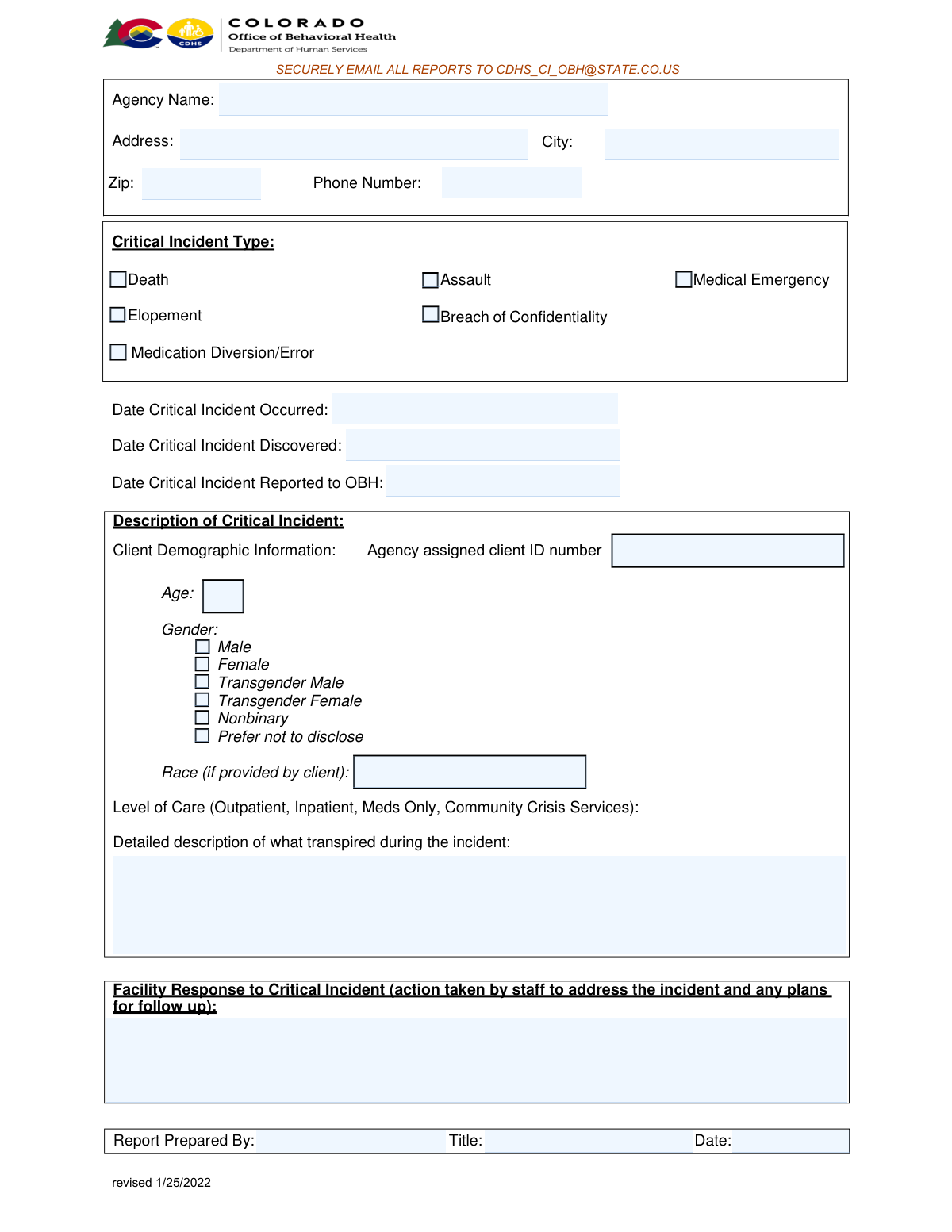
This form is a mandatory reporting document for behavioral health agencies in Colorado to inform the Office of Behavioral Health (OBH) about critical incidents involving clients. It ensures proper oversight and response by detailing the incident, the facility's actions, and client information. Today, this form can be filled out quickly and accurately using AI-powered services like Instafill.ai, which can also convert non-fillable PDF versions into interactive fillable forms.
Our AI automatically handles information lookup, data retrieval, formatting, and form filling.
It takes less than a minute to fill out OBH Critical Incident Report using our AI form filling.
Securely upload your data. Information is encrypted in transit and deleted immediately after the form is filled out.
Form specifications
| Form name: | Colorado OBH Critical Incident Report |
| Number of pages: | 1 |
| Language: | English |
Instafill Demo: How to fill out PDF forms in seconds with AI
How to Fill Out OBH Critical Incident Report Online for Free in 2026
Are you looking to fill out a OBH CRITICAL INCIDENT REPORT form online quickly and accurately? Instafill.ai offers the #1 AI-powered PDF filling software of 2026, allowing you to complete your OBH CRITICAL INCIDENT REPORT form in just 37 seconds or less.
Follow these steps to fill out your OBH CRITICAL INCIDENT REPORT form online using Instafill.ai:
- 1 Navigate to Instafill.ai and upload or select the Colorado OBH Critical Incident Report form.
- 2 Use the AI assistant to automatically fill in your agency's information, including name, address, and phone number.
- 3 Select the type of critical incident from the checklist and enter the dates the incident occurred, was discovered, and was reported.
- 4 Provide the client's demographic information, such as age, gender, race, and agency-assigned ID number.
- 5 Write a detailed description of the incident and the facility's response, including actions taken by staff and follow-up plans.
- 6 Enter the name, title, and date for the person preparing the report.
- 7 Review all the information for accuracy, then download the completed form to be securely emailed to the OBH.
Our AI-powered system ensures each field is filled out correctly, reducing errors and saving you time.
Why Choose Instafill.ai for Your Fillable OBH Critical Incident Report Form?
Speed
Complete your OBH Critical Incident Report in as little as 37 seconds.
Up-to-Date
Always use the latest 2026 OBH Critical Incident Report form version.
Cost-effective
No need to hire expensive lawyers.
Accuracy
Our AI performs 10 compliance checks to ensure your form is error-free.
Security
Your personal information is protected with bank-level encryption.
Frequently Asked Questions About Form OBH Critical Incident Report
This form is used by agencies to report serious incidents involving clients, such as deaths, assaults, or medical emergencies, to the Office of Behavioral Health (OBH).
Agency staff who are aware of or involved in a critical incident are responsible for preparing and submitting this report. The 'Report Prepared By' section should identify the specific individual completing the form.
A critical incident includes events like death, elopement, medication diversion or error, assault, medical emergencies, and breaches of confidentiality, as listed in the 'Critical Incident Type' section.
'Date Occurred' is the actual date the incident happened. 'Date Discovered' is when the agency became aware of it, and 'Date Reported to OBH' is the date you submitted this report to the OBH.
This is the unique identification number your agency uses internally for the client involved in the incident. It helps maintain confidentiality while allowing for accurate record-keeping.
You should provide the client's gender identity as selected by them, noting there is an option to 'Prefer not to disclose'. The race field should only be completed if the client has voluntarily provided this information.
Provide a clear, factual, and chronological account of the incident. Include who was involved, what happened, where it occurred, and when it took place to give a complete picture of the event.
This section should describe the immediate actions your staff took to address the incident and ensure safety. It should also outline any future plans for follow-up, prevention, or review.
The form instructs you to securely email all completed reports to [email protected]. Ensure you follow your agency's protocols for sending sensitive information securely.
You should complete a separate Critical Incident Report for each client involved. This ensures that the specific impact and details for each individual are documented accurately.
Yes, services like Instafill.ai use AI to accurately auto-fill form fields from your records, which can save time and reduce errors when completing this report.
You can use a service like Instafill.ai to upload a scan or PDF of the form. The platform can convert it into a fillable version that you can complete, save, and share digitally.
If you have a non-fillable PDF, you can use a tool like Instafill.ai to convert it into an interactive, fillable form. This makes it easy to complete the report on your computer without needing to print it.
Compliance OBH Critical Incident Report
Validation Checks by Instafill.ai
1
Ensures at least one Critical Incident Type is selected
This validation checks that at least one checkbox under 'Critical Incident Type' (e.g., Death, Elopement, Assault) has been selected. It is crucial for classifying the report correctly for triage, routing, and statistical analysis. If no type is selected, the form submission will be rejected with a message prompting the user to choose the most appropriate incident type.
2
Validates the logical sequence of incident dates
This check ensures the dates follow a logical chronological order: the 'Date Critical Incident Discovered' must be on or after the 'Date Critical Incident Occurred', and the 'Date Critical Incident Reported to OBH' must be on or after the 'Date Critical Incident Discovered'. This prevents illogical data entry that would compromise the incident timeline. A failure would trigger an error explaining the required date sequence.
3
Prevents future dates for all date fields
This validation verifies that all entered dates ('Date Occurred', 'Date Discovered', 'Date Reported to OBH', and 'Report Date') are not in the future. Incidents and reporting must happen in the past or on the current day. This check maintains data integrity and prevents clerical errors, and an error message will prompt the user to enter a valid, non-future date.
4
Validates US Phone Number format
This check ensures the 'Phone Number' field for the agency is entered in a valid 10-digit US format, with or without common separators like parentheses, hyphens, or spaces. Proper formatting is essential for ensuring the agency can be contacted reliably for follow-up. If the format is invalid, the user will be prompted to correct the phone number.
5
Validates US ZIP Code format
This validation confirms that the 'Zip Code' field contains a valid 5-digit or 9-digit (ZIP+4) numeric format. Correct ZIP codes are necessary for accurate location data, mail correspondence, and regional analysis. An invalid entry will result in an error message asking the user to provide a standard US ZIP code.
6
Ensures all required Agency Information fields are complete
This check verifies that 'Agency Name', 'Address', 'City', 'Zip', and 'Phone Number' are all filled out. Complete agency information is mandatory for identifying the reporting entity and for any necessary communication or on-site follow-up. A failed validation will highlight the missing fields and prevent form submission until they are completed.
7
Validates Client Age is a reasonable integer
This validation ensures the 'Age' field contains a positive integer, typically within a realistic range such as 0 to 120. This prevents non-numeric or nonsensical entries (e.g., negative numbers, text) and ensures the demographic data is accurate for analysis and context. An invalid entry will trigger an error asking for a valid numerical age.
8
Ensures exclusive Gender selection
This check verifies that exactly one option from the 'Gender' list is selected. Allowing multiple or no selections can lead to ambiguous or incomplete demographic data. This rule ensures data clarity and consistency for client records and reporting, and a failure will prompt the user to select a single option.
9
Requires completion of detailed description fields
This validation ensures that both the 'Detailed description of what transpired during the incident' and 'Facility Response to Critical Incident' text areas are not empty. These narrative fields are critical for understanding the context, severity, and response to the incident. The check might also enforce a minimum character count to encourage detailed reporting, and failure would prevent submission until sufficient detail is provided.
10
Ensures all Report Preparer fields are complete
This check verifies that the 'Report Prepared By', 'Title', and 'Date' fields are all filled in. This information is essential for accountability and to identify a point of contact for any questions about the report's contents. If any of these fields are missing, the form will not be submitted and the user will be prompted to complete them.
11
Validates the Report Date against the Incident Discovery Date
This logical check ensures the 'Report Date' is on or after the 'Date Critical Incident Discovered'. A report cannot be prepared before the incident it describes was even known to have occurred. This validation maintains the integrity of the event timeline and prevents clerical errors, flagging any inconsistencies for correction.
12
Requires Agency Assigned Client ID Number
This validation ensures that the 'Agency assigned client ID number' field is not empty. This ID is the primary key for linking the incident report to a specific client within the agency's system, which is crucial for tracking client history and ensuring continuity of care. A missing ID would make the report difficult to associate with the correct individual, so submission is blocked until it's provided.
Common Mistakes in Completing OBH Critical Incident Report
This error occurs when the dates entered are not in chronological order, such as listing the 'Date Reported to OBH' before the 'Date Critical Incident Discovered'. This often happens due to haste or misreading the fields, leading to confusion and questions about the report's accuracy and the agency's response time. To avoid this, carefully review the timeline of events and ensure the 'Occurred,' 'Discovered,' and 'Reported' dates follow a logical progression.
Fillers often write brief, unspecific narratives like 'client was agitated' instead of providing an objective, detailed account of what transpired. This lack of detail, including specific actions, quotes, times, and locations, makes it impossible for reviewers to understand the severity and context of the incident. Always describe the event factually and chronologically, focusing on observable behaviors and actions rather than personal interpretations.
The 'Facility Response' field requires both the immediate actions taken and the 'plans for follow up,' but people frequently only describe the former. This omission suggests a reactive rather than proactive approach and can lead to follow-up inquiries from the oversight body. To prevent this, ensure the response section explicitly outlines future steps, such as staff retraining, policy review, or client monitoring plans.
Typos, transposed numbers, or leaving the 'Agency assigned client ID number' blank are critical errors that prevent the report from being linked to the correct client file. This can cause significant delays in processing and potentially lead to serious record-keeping mistakes. Always double-check the client ID against the official agency record before submission. AI-powered form fillers like Instafill.ai can help by auto-populating this information from a database, reducing the risk of manual entry errors.
A common oversight is to write a detailed description of an incident, such as an assault, without checking the corresponding 'Assault' box. This forces reviewers to read the entire narrative just to categorize the report, slowing down triage and data aggregation. Always ensure that at least one checkbox that best describes the incident is selected at the top of the form.
The form explicitly states to enter race 'if provided by client,' yet reporters sometimes fill this field based on their own perception. This is a violation of protocol and client self-determination, leading to inaccurate demographic data and ethical concerns. This field should only be completed if the client has self-disclosed this information; otherwise, it must be left blank.
Providing the name of the person who prepared the report but omitting their job title is a frequent mistake. The title provides essential context about the reporter's role and perspective (e.g., Clinical Director vs. Direct Care Staff), which is vital for the reviewing body to assess the report. Always include the full, formal job title of the person preparing the document.
The form contains highly sensitive Protected Health Information (PHI), and the instructions explicitly state to 'SECURELY EMAIL' the report. A critical mistake is sending it from a standard, unencrypted email account, which constitutes a data breach and violates HIPAA. Always use a designated, encrypted email service as required by your agency's policy to transmit this form and protect client confidentiality.
Fillers sometimes provide a partial address (e.g., no zip code) or an incorrect phone number, which can hinder or delay communication if the reviewing body has questions. This simple oversight can turn a minor clarification into a prolonged issue. To avoid this, verify that the agency's full name, complete address, and a direct, working phone number are all entered correctly. AI tools like Instafill.ai can store and accurately populate this recurring information to prevent errors.
If the form is only available as a flat PDF, staff may print it, handwrite the information, and then scan it, often resulting in illegible text. This makes data entry difficult and prone to errors on the receiving end, potentially delaying the report's processing. To avoid this, use a tool like Instafill.ai, which can convert non-fillable PDFs into interactive, fillable forms, ensuring all entries are clear, legible, and professional.
Saved over 80 hours a year
“I was never sure if my IRS forms like W-9 were filled correctly. Now, I can complete the forms accurately without any external help.”
Kevin Martin Green
Your data stays secure with advanced protection from Instafill and our subprocessors

Robust compliance program
Transparent business model
You’re not the product. You always know where your data is and what it is processed for.
ISO 27001, HIPAA, and GDPR
Our subprocesses adhere to multiple compliance standards, including but not limited to ISO 27001, HIPAA, and GDPR.
Security & privacy by design
We consider security and privacy from the initial design phase of any new service or functionality. It’s not an afterthought, it’s built-in, including support for two-factor authentication (2FA) to further protect your account.
Fill out OBH Critical Incident Report with Instafill.ai
Worried about filling PDFs wrong? Instafill securely fills colorado-obh-critical-incident-report forms, ensuring each field is accurate.