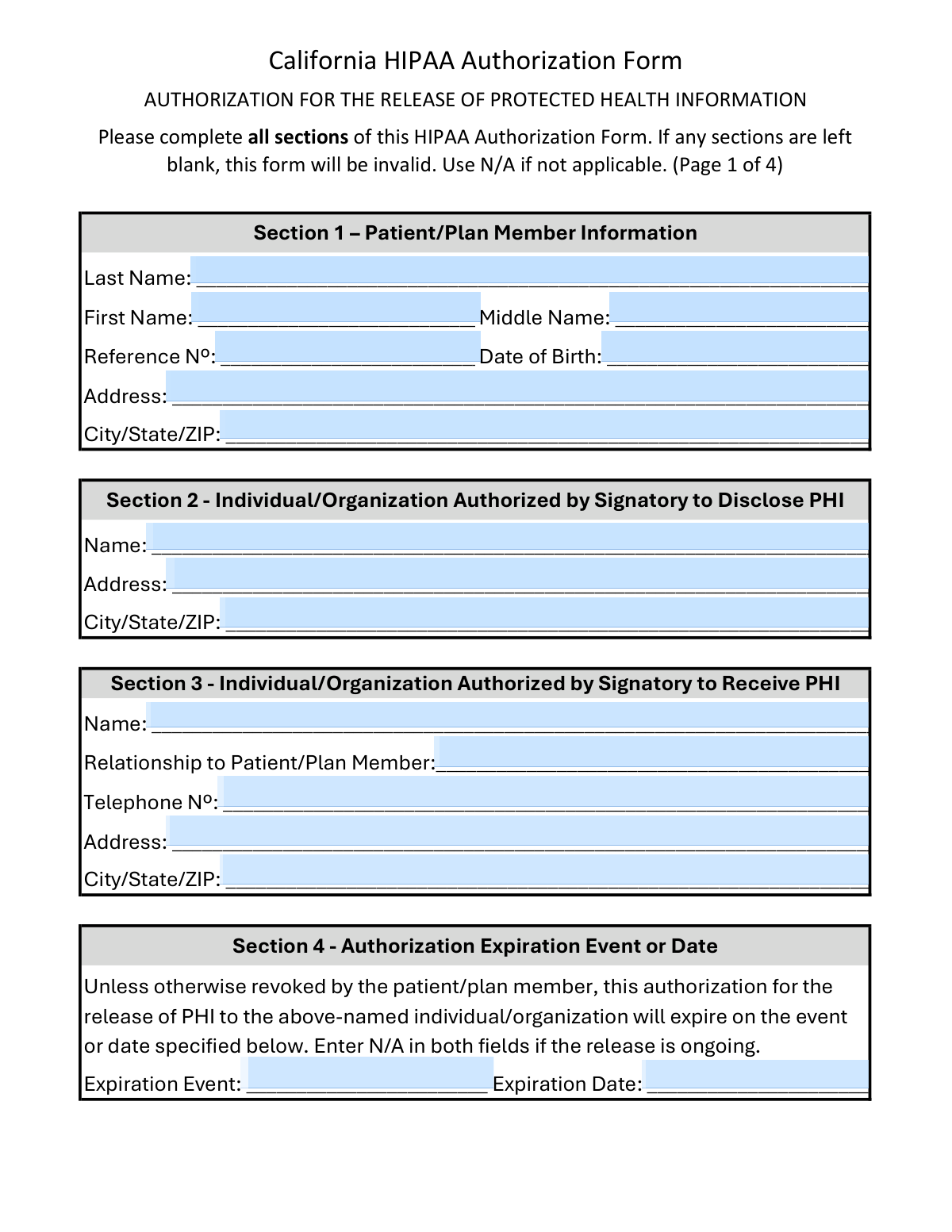
Yes! You can use AI to fill out California HIPAA Authorization Form, Authorization for the Release of Protected Health Information

This form is a legally binding document that allows a patient or plan member in California to grant specific permission for a healthcare provider or other entity to release their sensitive health information to another individual or organization. It is crucial for ensuring that disclosures of Protected Health Information (PHI) comply with both federal HIPAA regulations and California's specific privacy laws, such as the Confidentiality of Medical Information Act (CMIA). Today, this form can be filled out quickly and accurately using AI-powered services like Instafill.ai, which can also convert non-fillable PDF versions into interactive fillable forms.
Our AI automatically handles information lookup, data retrieval, formatting, and form filling.
It takes less than a minute to fill out California HIPAA Authorization Form using our AI form filling.
Securely upload your data. Information is encrypted in transit and deleted immediately after the form is filled out.

Form specifications

Form name: California HIPAA Authorization Form, Authorization for the Release of Protected Health Information
Number of pages: 4
Language: English
Categories: authorization forms, health forms, HIPAA forms
main-image

Instafill Demo: How to fill out PDF forms in seconds with AI

How to Fill Out California HIPAA Authorization Form Online for Free in 2026

Are you looking to fill out a CALIFORNIA HIPAA AUTHORIZATION FORM form online quickly and accurately? Instafill.ai offers the #1 AI-powered PDF filling software of 2026, allowing you to complete your CALIFORNIA HIPAA AUTHORIZATION FORM form in just 37 seconds or less.
Follow these steps to fill out your CALIFORNIA HIPAA AUTHORIZATION FORM form online using Instafill.ai:
  1. 1 Navigate to Instafill.ai and upload your California HIPAA Authorization Form or select it from our template library.
  2. 2 Use the AI assistant to accurately fill in the patient's personal details in Section 1.
  3. 3 Identify the individual or organization authorized to disclose the PHI (Section 2) and the party who will receive it (Section 3).
  4. 4 Specify the exact health information to be disclosed (Sections 5 & 6) and the purpose for the release (Section 7).
  5. 5 Define the authorization's expiration date or event in Section 4.
  6. 6 Carefully review all the information you've entered, read the authorization statements in Section 8, and make any necessary corrections.
  7. 7 Electronically sign and date the form in Section 10 to finalize the authorization process.

Our AI-powered system ensures each field is filled out correctly, reducing errors and saving you time.

Why Choose Instafill.ai for Your Fillable California HIPAA Authorization Form Form?

Speed

Complete your California HIPAA Authorization Form in as little as 37 seconds.

Up-to-Date

Always use the latest 2026 California HIPAA Authorization Form form version.

Cost-effective

No need to hire expensive lawyers.

Accuracy

Our AI performs 10 compliance checks to ensure your form is error-free.

Security

Your personal information is protected with bank-level encryption.

Frequently Asked Questions About Form California HIPAA Authorization Form

This form allows you, the patient, to give permission to a specific person or organization, like a doctor's office, to release your Protected Health Information (PHI) to another person or organization that you designate.

The patient or their legally authorized representative must complete and sign this form. It is required whenever you need to authorize the sharing of your health records with a third party not otherwise permitted by law.

In Section 2, you identify the organization or person who currently has your health information and is being authorized to release it. In Section 3, you name the organization or person you want to receive your health information.

You must complete all sections for the form to be valid. If a particular section does not apply to your situation, you should write 'N/A' to show that it has been considered.

You can specify a fixed expiration date or an event, such as 'end of legal proceedings'. If you want the authorization to remain active indefinitely until you revoke it, you can enter 'N/A' in both fields.

A separate signature is required for releasing highly sensitive information like mental health records or HIV results to ensure you provide explicit, informed consent for each specific type of data being disclosed.

Yes, you can revoke this authorization at any time by sending a written notice to the disclosing party listed in Section 2. The revocation will stop future disclosures but does not apply to information already released.

If the recipient is not a HIPAA-covered entity, your health information may no longer be protected by federal privacy regulations. This means they could potentially re-disclose your information without your permission.

Psychotherapy notes are given special protection under HIPAA due to their highly sensitive nature. Their release requires a separate, specific authorization and cannot be combined with requests for other medical records on this form.

Yes, services like Instafill.ai use AI to accurately auto-fill form fields with your information. This can help you complete the form more quickly and with fewer errors.

You can upload the PDF of the form to the Instafill.ai platform. It will convert the document into a fillable version, allowing you to type your answers directly into the fields and then download the completed form for printing and signing.

If you have a flat, non-fillable PDF, you can use a service like Instafill.ai. It can convert the document into an interactive, fillable form online, so you can easily type in your information.

A legally authorized representative, such as a parent, legal guardian, or person with a power of attorney for healthcare, can sign on the patient's behalf. They must print their name and state their legal authority to sign in Section 10.

Compliance California HIPAA Authorization Form
Validation Checks by Instafill.ai

1
Patient Date of Birth Validity
This check ensures the 'Date of Birth' in Section 1 is a valid, properly formatted date that occurs in the past. It prevents the entry of future dates or nonsensical values (e.g., February 30th). This is critical for correctly identifying the patient and ensuring the record's integrity; an invalid date will cause the form to be rejected.
2
Authorization Expiration Logic
This validation verifies the logic in Section 4. If an 'Expiration Date' is provided, it must be a date in the future. It also ensures that the 'Expiration Event' and 'Expiration Date' fields are not both left blank; if the authorization is ongoing, both fields must contain 'N/A'. This prevents ambiguity about when the authorization ends, which is a key HIPAA requirement.
3
Psychotherapy Notes Exclusivity
This check enforces the rule that 'Psychotherapy Notes' cannot be requested on the same form as any other type of health information. If the 'Psychotherapy Notes' checkbox in Section 6 is selected, this validation ensures no other checkboxes in Section 5 or Section 6 are also selected. Failure to enforce this rule makes the entire authorization invalid per the form's explicit instructions.
4
Conditional Requirement for 'Other Non-Specific' Details
This validation ensures that if the 'Other Non-Specific' checkbox is selected in Section 5, the corresponding details field ('If Other Non-Specific, provide details') is not empty. This is important for clarity, as releasing unspecified information is not permissible under HIPAA. An incomplete description would render the authorization for that data type void.
5
Conditional Requirement for 'Other' Purpose Details
This check verifies that if the 'Other' checkbox is selected in Section 7 (Purpose of the Release), the accompanying text field specifying the purpose is filled out. A vague or missing purpose invalidates the authorization, as the patient must be clearly informed about why their information is being disclosed. The form will be considered incomplete if this rule is violated.
6
Specific Authorization Completeness
This validation applies to all sensitive information types listed in Section 6 (e.g., HIV Test Results, Mental Health Records). It confirms that if a checkbox for a specific data type is selected, the corresponding 'Signature' and 'Date' fields for that item are also filled. This separate attestation is legally required for releasing highly sensitive information, and its absence invalidates the request for that specific data.
7
Purpose of Release Mandate
This check ensures that at least one purpose for the information release has been selected in Section 7. A HIPAA authorization is invalid without a specified purpose for the disclosure. If no checkbox in Section 7 is selected, the form cannot be processed as the intent of the release is unknown.
8
Primary Signature and Date Requirement
This validation confirms that the primary 'Signature' and 'Date' fields in Section 10 are completed by or on behalf of the patient. The signature is the fundamental component that makes the authorization legally binding. A missing signature or date renders the entire form invalid and unenforceable.
9
Proxy Signer Authority Verification
This check is triggered if the 'Name of signatory if not patient/plan member' field in Section 10 is filled. It ensures that the 'Authority to sign on behalf of patient/plan member' field is also completed, explaining the legal basis for the proxy signature (e.g., parent, legal guardian, power of attorney). Without this justification, the signature is not valid, and the authorization cannot be accepted.
10
Patient Name Consistency
This validation cross-references the patient's name across the document. It ensures the printed name in Section 10 ('Name of Patient/Plan Member (Print)') matches the first and last name provided in Section 1. This check prevents clerical errors and confirms the identity of the person whose information is being released, which is crucial for preventing wrongful disclosures.
11
Core Entity Information Completeness
This check ensures that the core identifying information for all three parties—the patient (Section 1), the disclosing entity (Section 2), and the receiving entity (Section 3)—is fully completed. This includes names and addresses. An incomplete section would make it impossible to determine who the information belongs to, who is releasing it, or who is receiving it, making the form invalid.
12
Signature Date Chronology
This validation ensures that the main 'Signature Date' in Section 10 is on or after any of the specific authorization dates provided in Section 6. A patient cannot pre-date a specific authorization before the date they sign the overall form. This logical check maintains the chronological integrity of the authorization process.
13
Telephone Number Format
This check validates that the 'Telephone Nº' for the receiving party in Section 3 follows a standard format (e.g., 10 digits, optional country code, or common formats like (XXX) XXX-XXXX). This ensures the contact information is usable and accurate for any necessary follow-up communication. An invalid number could hinder communication if questions about the release arise.

Common Mistakes in Completing California HIPAA Authorization Form

Leaving Fields Blank Instead of Using 'N/A'

The form explicitly states that it will be considered invalid if any sections are left blank. People often skip fields they believe are not relevant, but this leads to automatic rejection. To avoid this, carefully review every field and write 'N/A' (Not Applicable) in any that do not apply to your situation, such as the expiration date if the release is ongoing.

Confusing the Disclosing and Receiving Parties

Users frequently mix up Section 2 (who is disclosing the PHI) and Section 3 (who is receiving it). For example, they might list the patient in Section 2 instead of the hospital or clinic that holds the records. This error can send the request to the wrong entity or make it nonsensical, causing significant delays. Always list the current holder of the records (e.g., 'City General Hospital') in Section 2 and the person/organization you want to send them to in Section 3.

Missing Signatures for Sensitive Information Releases

Section 6 requires a separate signature and date for each category of sensitive information being released, such as Mental Health or HIV Test Results. Many people check the box but forget to provide the adjacent signature, assuming one signature at the end of the form is sufficient. This failure invalidates the authorization for that specific record type. Ensure you sign and date next to every sensitive record type you authorize for release.

Improperly Requesting Psychotherapy Notes

A footnote in Section 6 clearly states that releasing psychotherapy notes requires a completely separate authorization form. Users often miss this detail and check the 'Psychotherapy Notes' box, which is incorrect and will be denied. To request these specific notes, you must obtain and fill out a different, dedicated form from the provider.

Incorrectly Completing the Expiration Section

In Section 4, users must specify either an expiration event or a date, but not both, or write 'N/A' in both fields for an ongoing release. Common mistakes include leaving the section blank, filling in both a date and an event, or misunderstanding what constitutes an 'event' (e.g., 'end of legal case'). This ambiguity can invalidate the form or lead to premature/late expiration of the authorization.

Failing to Provide Details for 'Other' Selections

In Sections 5 (Health Information) and 7 (Purpose of Release), checking the 'Other' box requires providing a specific description in the space provided. People frequently check the box but neglect to write in the details. This makes the authorization too vague to be acted upon, as the disclosing entity does not know what specific information or purpose is being authorized.

Incorrect Signature by a Patient Representative

When someone other than the patient signs the form (e.g., a parent or legal guardian), they often fill out Section 10 incorrectly. They might sign on the patient's signature line or fail to state their name and legal authority to sign on the designated lines. This invalidates the authorization, as the provider cannot verify the signer's legal standing. The representative must sign on the correct line and clearly state their relationship and authority (e.g., 'Parent of minor', 'Power of Attorney').

Omitting the Patient Reference Number

While name and date of birth are essential, the 'Reference Nº' in Section 1 is often a critical identifier like a Medical Record Number (MRN) or plan ID. People may not know this number or assume it's optional, so they leave it blank. Its absence can make it difficult and time-consuming for a large healthcare system to locate the correct patient file, leading to processing delays.

Failing to Specify the Recipient's Relationship to the Patient

In Section 3, the 'Relationship to Patient/Plan Member' field is often left blank. This information is important context for the disclosing entity to understand why the information is being sent to a third party (e.g., 'Spouse', 'Attorney', 'Insurance Provider'). Leaving this blank can raise red flags or cause the provider to seek further clarification before releasing sensitive records.

Using Inconsistent or Invalid Date Formats

With multiple date fields throughout the form (DOB, expiration, and multiple signature dates in Section 6), users may enter dates incorrectly or inconsistently (e.g., MM/DD/YY vs. MM-DD-YYYY). An invalid date, like one in the future for a signature, can invalidate that section or the entire form. AI-powered tools like Instafill.ai can help prevent this by standardizing date formats and flagging impossible entries, ensuring accuracy across the document.
Saved over 80 hours a year

“I was never sure if my IRS forms like W-9 were filled correctly. Now, I can complete the forms accurately without any external help.”

Kevin Martin Green

Your data stays secure with advanced protection from Instafill and our subprocessors

Robust compliance program

Transparent business model

You’re not the product. You always know where your data is and what it is processed for.

ISO 27001, HIPAA, and GDPR

Our subprocesses adhere to multiple compliance standards, including but not limited to ISO 27001, HIPAA, and GDPR.

Security & privacy by design

We consider security and privacy from the initial design phase of any new service or functionality. It’s not an afterthought, it’s built-in, including support for two-factor authentication (2FA) to further protect your account.

Fill out California HIPAA Authorization Form with Instafill.ai

Worried about filling PDFs wrong? Instafill securely fills california-hipaa-authorization-form-authorization-for-the-release-of-protected-health-information forms, ensuring each field is accurate.