Yes! You can use AI to fill out Applied Behavioral Analysis (ABA) Authorization Form, Louisiana Health Connect (BRO-DP-ABA FORM-0822)
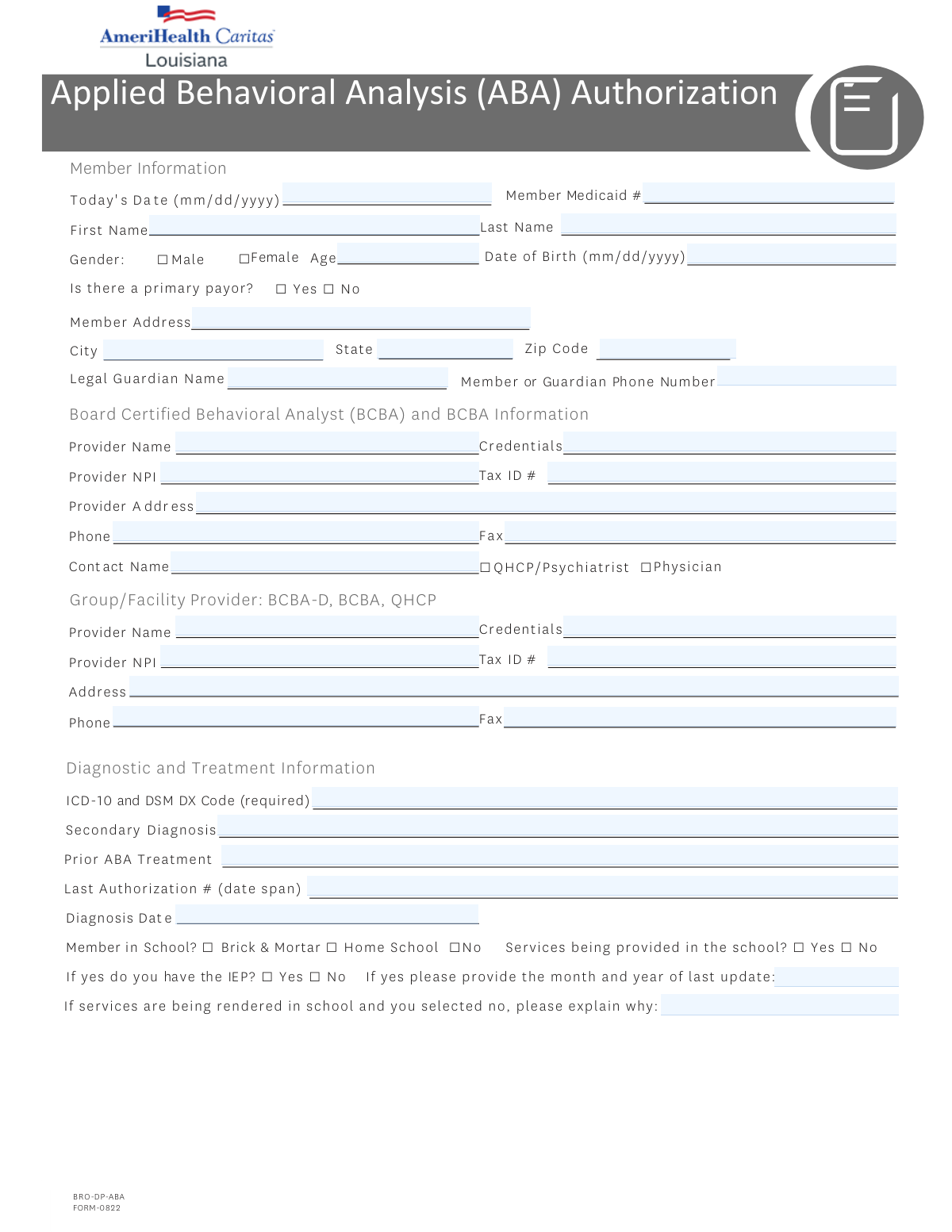
The Applied Behavioral Analysis (ABA) Authorization Form (BRO-DP-ABA FORM-0822) is an official Louisiana Health Connect document required for providers to obtain prior authorization for ABA therapy services for Medicaid members, typically those diagnosed with autism spectrum disorder or related behavioral conditions. The form collects member demographics, provider credentials, diagnostic information, school status, symptom severity, billing codes, and supporting clinical documentation to ensure medically necessary ABA services are appropriately reviewed and approved. Authorization periods are limited to a maximum of 180 days per request. Today, providers can fill out this complex multi-page form quickly and accurately using AI-powered services like Instafill.ai, which can also convert non-fillable PDF versions into interactive fillable forms.
Our AI automatically handles information lookup, data retrieval, formatting, and form filling.
It takes less than a minute to fill out ABA Authorization Form (BRO-DP-ABA FORM-0822) using our AI form filling.
Securely upload your data. Information is encrypted in transit and deleted immediately after the form is filled out.
Form specifications
| Form name: | Applied Behavioral Analysis (ABA) Authorization Form, Louisiana Health Connect (BRO-DP-ABA FORM-0822) |
| Number of pages: | 4 |
| Language: | English |
Instafill Demo: filling out a legal form in seconds
How to Fill Out ABA Authorization Form (BRO-DP-ABA FORM-0822) Online for Free in 2026
Are you looking to fill out a ABA AUTHORIZATION FORM (BRO-DP-ABA FORM-0822) form online quickly and accurately? Instafill.ai offers the #1 AI-powered PDF filling software of 2026, allowing you to complete your ABA AUTHORIZATION FORM (BRO-DP-ABA FORM-0822) form in just 37 seconds or less.
Follow these steps to fill out your ABA AUTHORIZATION FORM (BRO-DP-ABA FORM-0822) form online using Instafill.ai:
- 1 Navigate to Instafill.ai, search for or upload the ABA Authorization Form (BRO-DP-ABA FORM-0822), and open it in the AI-powered form filling interface.
- 2 Complete the Member Information section by entering today's date, the member's Medicaid number, first and last name, date of birth, age, gender, address, and primary payor status, as well as the legal guardian's name and phone number if applicable.
- 3 Fill in the BCBA Provider and Group/Facility Provider sections with each provider's name, credentials, NPI, Tax ID, address, phone, fax, and contact person information, and indicate whether the contact is a QHCP/Psychiatrist or Physician.
- 4 Enter the Diagnostic and Treatment Information, including the required ICD-10/DSM diagnosis code, secondary diagnosis, prior ABA treatment history, last authorization number and date span, diagnosis date, school enrollment status, IEP/504 plan details, and descriptions of other services being received.
- 5 Complete the Current Presentation/Symptoms section by rating the severity (mild, moderate, or severe) of safety risks, aggression, disruptive behavior, destruction of property, mood issues, and any other symptoms, and specify the type of request (assessment only, initial treatment, or continuation of treatment).
- 6 Check all applicable boxes in the initial or subsequent treatment request submission checklists, enter the date of the most recent assessment, and fill in the billing codes table with the weekly and total units requested for each applicable ABA service code (97151–97158, 0362T, 0373T).
- 7 Enter the authorization start and end dates, review all information for accuracy, provide the rendering provider's signature and date, and submit the completed form to Louisiana Health Connect via fax at 1-888-725-0101 or through the appropriate submission channel.
Our AI-powered system ensures each field is filled out correctly, reducing errors and saving you time.
Why Choose Instafill.ai for Your Fillable ABA Authorization Form (BRO-DP-ABA FORM-0822) Form?
Speed
Complete your ABA Authorization Form (BRO-DP-ABA FORM-0822) in as little as 37 seconds.
Up-to-Date
Always use the latest 2026 ABA Authorization Form (BRO-DP-ABA FORM-0822) form version.
Cost-effective
No need to hire expensive lawyers.
Accuracy
Our AI performs 10 compliance checks to ensure your form is error-free.
Security
Your personal information is protected with bank-level encryption.
Frequently Asked Questions About Form ABA Authorization Form (BRO-DP-ABA FORM-0822)
The Applied Behavioral Analysis (ABA) Authorization form is used to request prior authorization for ABA therapy services through Louisiana Health Connect (Medicaid). It must be completed by a Board Certified Behavioral Analyst (BCBA) or a qualified healthcare provider (QHCP) on behalf of a Medicaid member who requires ABA services, typically for individuals diagnosed with autism spectrum disorder or related behavioral conditions.
You will need to provide the member's full name, date of birth, age, gender, Medicaid ID number, home address, and phone number. If the member is a minor, the legal guardian's name and contact number must also be included.
The form requires information for both the BCBA provider and the Group/Facility provider, including provider name, credentials, National Provider Identifier (NPI), Tax ID number, address, phone number, fax number, and a contact person name. The BCBA contact person must be identified as either a QHCP/Psychiatrist or a Physician.
You must provide the ICD-10 and DSM diagnostic code (required), any secondary diagnosis, the diagnosis date, and information about prior ABA treatment including the last authorization number and date span. A comprehensive diagnostic evaluation (CDE) and referral from the diagnosing provider are also required for initial assessment requests.
For an initial treatment request, you must submit a CDE, a behavioral treatment plan with measurable goals and parent training, a proposed treatment schedule, functional and measurable treatment goals with timeframes, objective testing showing significant behavioral deficits, a coordination of services description, any relevant medical conditions, an individualized titration plan, a discharge plan, a Functional Behavioral Assessment (FBA), and a dated copy of the IEP or IFSP if applicable.
For continuation requests, you must submit objective measures of clinically significant progress toward each treatment goal, an updated treatment plan with updated goals and timelines, any necessary changes to the treatment plan, coordination of care documentation, progress notes on previous interventions, an updated titration plan, a discharge plan, a dated IEP or IFSP if applicable, and an updated Functional Behavioral Assessment.
A service authorization period for ABA services shall not exceed 180 days. You must enter both a start date and an end date within this limit in the Authorization Information section of the form.
The form includes ABA billing codes 97151 through 97158, as well as codes 0362T and 0373T, all measured in 15-minute units. For each applicable code, you must enter both the weekly number of units requested and the total number of units requested for the authorization period.
Yes, the form asks whether the member attends a brick-and-mortar school, is homeschooled, or is not in school, and whether ABA services are being provided in the school setting. It also asks whether the member has an IEP or 504 plan, and if so, the month and year of the last update. If services are being rendered in school without an IEP, an explanation must be provided.
The form requires you to rate the severity (Mild, Moderate, or Severe) of the following current symptoms: safety risk to self/others, aggression, disruptive behavior, destruction of property, mood issues, and any other relevant symptoms. This information helps support the medical necessity of the requested ABA services.
The rendering provider must sign the form and include the date of signature. By signing, the provider attests that all professionals and paraprofessionals delivering services under the proposed treatment plan have the appropriate training and education required to render those services.
The completed form should be faxed to Louisiana Health Connect at 1-888-725-0101. You can also contact them by phone at 1-866-595-8133 (TTY: 711), Monday through Friday, 7 a.m. to 7 p.m., or visit LouisianaHealthConnect.com for additional information.
Yes, AI-powered services like Instafill.ai can help you accurately auto-fill the form fields, saving time and reducing errors. These tools are especially helpful for complex forms like this one that require detailed provider, member, and clinical information.
You can upload the ABA Authorization form to Instafill.ai, where the AI will guide you through each field and auto-fill information accurately based on the data you provide. This allows you to complete the form digitally without needing to print and manually fill it out, and you can then download or fax the completed form directly.
If you have a flat, non-fillable version of the ABA Authorization PDF, Instafill.ai can convert it into an interactive fillable form. This means you can type directly into the form fields digitally rather than printing and handwriting the information, making the process faster and more accurate.
Compliance ABA Authorization Form (BRO-DP-ABA FORM-0822)
Validation Checks by Instafill.ai
1
Validates Date Fields Are in Correct MM/DD/YYYY Format
Checks that all date fields — including Today's Date, Member Date of Birth, Diagnosis Date, Most Recent Assessment Date, Authorization Period Start Date, Authorization Period End Date, and Signature Date — are entered in the required MM/DD/YYYY format. Dates entered in incorrect formats (e.g., YYYY-MM-DD or MM/YYYY) cannot be reliably processed or compared. If validation fails, the form should be rejected and the submitter notified to correct the date format before resubmission.
2
Validates Member Date of Birth Is Consistent with Member Age
Cross-checks the Member Date of Birth against the Member Age field to ensure the two values are logically consistent with the Today's Date field. For example, if the date of birth indicates the member is 8 years old but the age field states 12, this is a data integrity error that could affect authorization decisions. If a discrepancy is found, the form should be flagged for manual review or returned to the submitter for correction.
3
Validates Member Medicaid Number Format and Completeness
Ensures the Member Medicaid Number is present and conforms to the expected Louisiana Medicaid ID format, which is typically a numeric string of a defined length (e.g., 13 digits). An incorrectly formatted or missing Medicaid number will prevent the authorization request from being linked to the correct member record. If validation fails, the form must be returned to the submitter, as the Medicaid number is a required identifier for processing.
4
Validates Provider NPI Is a Valid 10-Digit Number
Checks that both the BCBA Provider NPI and the Group/Facility Provider NPI fields contain exactly 10 numeric digits, consistent with the National Provider Identifier standard established by CMS. NPIs that are missing, contain non-numeric characters, or are fewer or greater than 10 digits cannot be used to verify provider enrollment or process claims. If validation fails, the form should be flagged and returned to the submitter for correction of the NPI field(s).
5
Validates Tax ID Number Format for Both Providers
Ensures that the Tax ID fields for both the BCBA Provider and the Group/Facility Provider are populated and follow the standard EIN format of XX-XXXXXXX (9 digits, typically formatted with a hyphen after the second digit). An invalid or missing Tax ID prevents proper billing and provider verification. If validation fails, the form should be rejected and the submitter instructed to provide a correctly formatted Tax ID.
6
Validates Phone and Fax Numbers Are in a Valid Format
Checks that all phone and fax number fields — including Guardian Phone Number, BCBA Provider Phone, BCBA Provider Fax, Group/Facility Provider Phone, and Group/Facility Provider Fax — contain exactly 10 digits and conform to a standard North American phone number format (e.g., (XXX) XXX-XXXX or XXX-XXX-XXXX). Invalid phone numbers prevent follow-up communication with providers or guardians. If validation fails, the affected fields should be flagged and the submitter asked to provide valid contact numbers.
7
Validates That Exactly One Gender Checkbox Is Selected
Ensures that one and only one of the Gender checkboxes — Male or Female — is selected for the member. Leaving both unchecked or selecting both simultaneously creates an ambiguous or invalid record that may affect clinical and administrative processing. If validation fails, the form should be returned to the submitter with a prompt to select exactly one gender option.
8
Validates ICD-10 and DSM DX Code Is Present and Properly Formatted
Confirms that the ICD-10 and DSM DX Code field is not left blank and that the entered code matches the expected ICD-10 format (e.g., a letter followed by two digits, optionally followed by a decimal and additional characters, such as F84.0). This field is explicitly marked as required on the form, and an absent or malformed diagnosis code will prevent clinical review of the authorization request. If validation fails, the form must be returned to the submitter, as this is a mandatory field.
9
Validates Authorization Period Does Not Exceed 180 Days
Calculates the difference between the Authorization Period Start Date and End Date and confirms it does not exceed 180 calendar days, as explicitly stated in the form's policy note. ABA service authorization periods are capped at 180 days per regulatory requirements, and any request exceeding this limit must be flagged for correction. If validation fails, the submitter should be notified that the requested authorization period must be reduced to comply with the 180-day maximum.
10
Validates Authorization Period End Date Is After Start Date
Checks that the Authorization Period End Date is chronologically later than the Authorization Period Start Date, ensuring the authorization window is logically valid. An end date that precedes or equals the start date would result in a nonsensical or zero-length authorization period that cannot be processed. If validation fails, the form should be returned to the submitter with a request to correct the authorization dates.
11
Validates School-Related Fields Are Logically Consistent
Ensures that if 'Services being provided in the school' is marked 'Yes,' the member's school status must be either 'Brick & Mortar' or 'Home School' (not 'No School'), and that the IEP question is answered. Additionally, if school services are marked 'Yes' but the IEP is marked 'No,' the explanation field for why services are not being rendered in school must be completed. Inconsistent responses in this section could indicate data entry errors that affect clinical appropriateness review. If validation fails, the form should be flagged and returned for clarification.
12
Validates That Type of Request Is Selected and Supporting Documentation Checklist Is Consistent
Confirms that exactly one Type of Request option is selected (Assessment Only, Initial Treatment, or Continuation of Treatment) and that the corresponding documentation checklist items are addressed. For example, if 'Initial Treatment' is selected, the initial treatment checklist items should be reviewed, and if 'Continuation of Treatment' is selected, the subsequent treatment checklist items on Page 3 should be addressed. Mismatches between the request type and submitted documentation may result in delays or denial of the authorization. If validation fails, the form should be returned to the submitter for clarification.
13
Validates That at Least One Billing Code Has Units Requested
Checks that at least one of the billing code rows (97151 through 0373T) has a non-zero value entered in either the Weekly Units Requested or Total Units Requested fields. Submitting an authorization request without any billing code units makes the request incomplete and unprocessable for claims purposes. If validation fails, the form should be returned to the submitter with a prompt to enter the appropriate units for the services being requested.
14
Validates Total Units Are Consistent with Weekly Units and Authorization Period Length
For each billing code row where both Weekly Units and Total Units are entered, cross-validates that the Total Units Requested is approximately equal to the Weekly Units multiplied by the number of weeks in the authorization period (derived from Start and End Dates). Significant discrepancies between these values may indicate data entry errors that could lead to overbilling or underbilling. If validation fails, the affected billing code rows should be flagged for review and the submitter asked to reconcile the unit counts.
15
Validates Rendering Provider Signature and Signature Date Are Both Present
Ensures that both the Rendering Provider Signature field and the Signature Date field are completed before the form is submitted. An unsigned form or a form with a signature but no date (or vice versa) is legally and administratively incomplete and cannot be accepted as a valid authorization request. If validation fails, the form must be returned to the rendering provider to complete the attestation section in full.
16
Validates BCBA Provider Credentials Match Allowed Values
Checks that the credentials entered for the BCBA Provider are among the accepted credential types for this form, which include BCBA-D, BCBA, and QHCP, as specified in the Group/Facility Provider section of the form. Providers with credentials outside these accepted types may not be eligible to render ABA services under this authorization. If validation fails, the form should be flagged for manual review to confirm provider eligibility before processing the authorization request.
Common Mistakes in Completing ABA Authorization Form (BRO-DP-ABA FORM-0822)
The Member Medicaid ID is a critical identifier and must be entered exactly as it appears on the member's Medicaid card. People often transpose digits, omit leading zeros, or confuse it with other ID numbers such as a Social Security Number or insurance policy number. An incorrect Medicaid number will cause the authorization request to be rejected or delayed, potentially interrupting the member's ABA services. Always double-check the number against the official Medicaid card before submitting, and tools like Instafill.ai can help validate the format automatically.
The form explicitly requires dates in mm/dd/yyyy format for fields such as Today's Date, Date of Birth, Diagnosis Date, and Signature Date. Submitters frequently enter dates in formats like mm/dd/yy, yyyy-mm-dd, or write out the month name (e.g., 'January 5, 2024'), which can cause processing errors or rejection. Inconsistent date formats across multiple fields on the same form also raise red flags during review. Always use the two-digit month, two-digit day, and four-digit year format as specified, and consider using Instafill.ai to auto-format dates correctly.
The ICD-10 and DSM diagnostic code is marked as required on this form, yet submitters frequently leave it blank, enter an outdated code, or provide only a general description instead of the specific alphanumeric code. This is one of the most common reasons ABA authorization requests are denied or returned for additional information. Providers should verify the exact current ICD-10 code (e.g., F84.0 for Autism Spectrum Disorder) with the diagnosing clinician before submission, and AI-powered tools like Instafill.ai can help ensure the correct code format is used.
The form has distinct checklists for initial treatment requests versus subsequent/continuation requests, each requiring different supporting documents such as the CDE, behavioral treatment plan, FBA, titration plan, and discharge plan. Submitters often check the wrong request type or fail to attach all the documents listed in the corresponding checklist, resulting in the request being reviewed on incomplete information or outright denied. Carefully read the checklist for the specific request type selected and ensure every checked item has a corresponding document attached before faxing or submitting the form.
Both the BCBA provider and the Group/Facility provider sections require a valid 10-digit NPI number. Submitters commonly enter fewer than 10 digits, use a state license number instead of the NPI, or leave the field blank when the provider is a group rather than an individual. An incorrect NPI will prevent proper claims processing and may result in authorization denial. Verify the NPI through the NPPES NPI Registry at npiregistry.cms.hhs.gov before submitting, and Instafill.ai can validate that the NPI field contains exactly 10 digits.
The school-related section contains multiple conditional questions: whether the member is in school, whether services are provided in school, whether an IEP exists, and the last IEP update date. Submitters frequently check 'Yes' for school enrollment but then fail to answer the follow-up questions about IEP status or school-based services, or they check 'No' for school-based services without providing the required written explanation. Incomplete or contradictory answers in this section can delay authorization. Read each conditional question carefully and ensure every follow-up question triggered by a 'Yes' or 'No' answer is fully completed.
Each billing code (97151–97158, 0362T, 0373T) requires both a weekly number of units and a total number of units requested, where each unit equals 15 minutes of service. Providers frequently confuse hours with units (e.g., entering '10' hours instead of '40' units for 10 hours of weekly service), or they fail to ensure the total units are mathematically consistent with the weekly units multiplied by the number of weeks in the authorization period. Errors in unit calculations can result in underpayment or claim denials. Always convert service hours to 15-minute units and verify that total units = weekly units × number of weeks requested.
The form explicitly states that a service authorization period shall not exceed 180 days for ABA services, yet providers frequently request authorization periods longer than 180 days or leave the start and end dates blank. Requesting a period beyond 180 days will result in automatic rejection or modification of the authorization. Calculate the end date carefully to ensure it does not exceed 180 days from the start date, and enter both dates in the Authorization Information section before submitting.
The form requires credentials for both the BCBA provider and the Group/Facility provider, and the contact person must be identified as either a QHCP/Psychiatrist or Physician. Submitters often leave the credentials field blank, use informal abbreviations, or fail to check the appropriate credential checkbox for the contact person. Since billing modifiers must reflect the credentials of the staff delivering services for proper claims payment (as noted in the form), incorrect or missing credentials can lead to claim denials. Ensure all credential fields are completed accurately and that the correct checkbox is selected for the contact person's role.
The form requires providers to rate the severity (Mild, Moderate, or Severe) for multiple behavioral categories including safety risk, aggression, disruptive behavior, destruction of property, mood issues, and other symptoms. Providers frequently leave some or all of these checkboxes blank, or they check multiple severity levels for a single category. Missing severity ratings make it difficult for reviewers to assess medical necessity, which can delay or result in denial of the authorization. Ensure exactly one severity level is checked for each applicable behavioral category, and leave categories blank only if they are truly not applicable.
The form requires the rendering provider's signature along with the date of signing to attest that all professionals rendering services have appropriate training and education. Submitters frequently forget to sign the form entirely, have the wrong person sign (e.g., an administrative staff member instead of the rendering provider), or sign without entering the corresponding date. An unsigned or undated form is considered incomplete and will not be processed. The rendering provider must personally sign and date the form before submission, as this is a legal attestation.
The form contains two separate provider sections: one for the individual BCBA provider and one for the Group/Facility provider, each requiring its own name, NPI, Tax ID, address, phone, and fax. Submitters often enter the same information in both sections, leave one section blank, or mix up which provider's details belong in which section. This confusion can cause claims to be processed under the wrong provider or result in requests for additional information. Carefully distinguish between the individual BCBA rendering the service and the group or facility billing for the service, and complete each section with the appropriate provider's unique information.
Saved over 80 hours a year
“I was never sure if my IRS forms like W-9 were filled correctly. Now, I can complete the forms accurately without any external help.”
Kevin Martin Green
Your data stays secure with advanced protection from Instafill and our subprocessors

Robust compliance program
Transparent business model
You’re not the product. You always know where your data is and what it is processed for.
ISO 27001, HIPAA, and GDPR
Our subprocesses adhere to multiple compliance standards, including but not limited to ISO 27001, HIPAA, and GDPR.
Security & privacy by design
We consider security and privacy from the initial design phase of any new service or functionality. It’s not an afterthought, it’s built-in, including support for two-factor authentication (2FA) to further protect your account.
Fill out ABA Authorization Form (BRO-DP-ABA FORM-0822) with Instafill.ai
Worried about filling PDFs wrong? Instafill securely fills applied-behavioral-analysis-aba-authorization-form-louisiana-health-connect-bro-dp-aba-form-0822 forms, ensuring each field is accurate.