Yes! You can use AI to fill out Allied Health Treatment Request Form

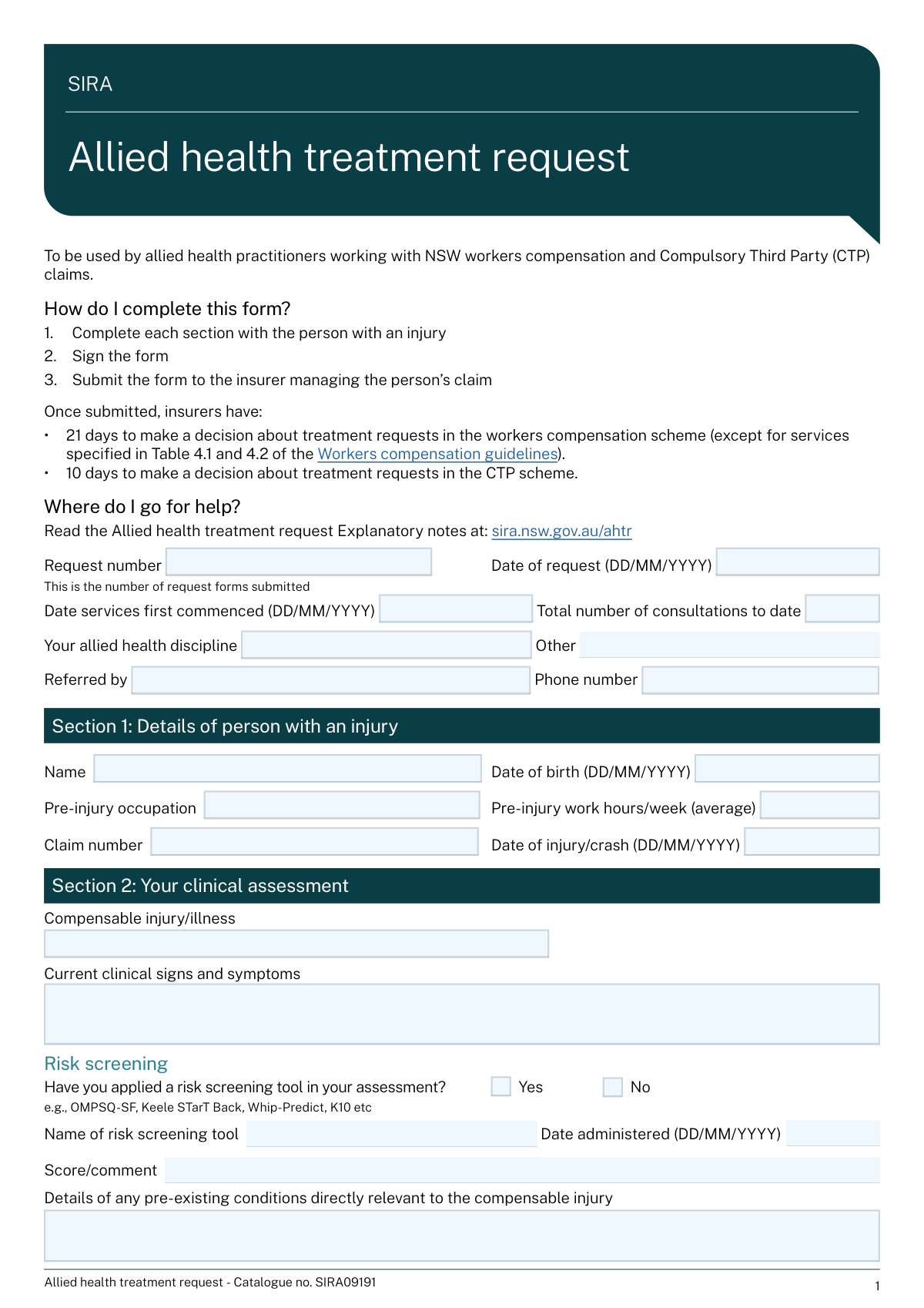
The Allied Health Treatment Request (AHTR) form is a crucial document for allied health professionals seeking approval from an insurer to provide services to an injured person. It standardizes the communication of clinical assessments, treatment plans, recovery goals, and associated costs, ensuring the insurer has all necessary information to process the request for a workers' compensation or CTP claim. This detailed justification is vital for securing funding and ensuring continuity of care for the patient. Today, this form can be filled out quickly and accurately using AI-powered services like Instafill.ai, which can also convert non-fillable PDF versions into interactive fillable forms.
AHTR is part of the allied health forms, health forms and health treatment forms categories on Instafill.
Our AI automatically handles information lookup, data retrieval, formatting, and form filling.
It takes less than a minute to fill out AHTR using our AI form filling.
Securely upload your data. Information is encrypted in transit and deleted immediately after the form is filled out.

Form specifications

Form name: Allied Health Treatment Request Form
Number of fields: 123
Number of pages: 4
Filled form examples: Form AHTR Examples
Language: English
main-image

Instafill Demo: How to fill out PDF forms in seconds with AI

How to Fill Out AHTR Online for Free in 2026

Are you looking to fill out a AHTR form online quickly and accurately? Instafill.ai offers the #1 AI-powered PDF filling software of 2026, allowing you to complete your AHTR form in just 37 seconds or less.
Follow these steps to fill out your AHTR form online using Instafill.ai:
  1. 1 Navigate to Instafill.ai and upload or select the Allied Health Treatment Request (AHTR) form.
  2. 2 Use the AI assistant to populate the initial sections, including injured person identification, claim details, and referrer information.
  3. 3 Complete the clinical assessment, detailing the injury, symptoms, and results from any risk screening or standardized outcome measures (SOMs).
  4. 4 Define the person's SMART recovery goals and outline the proposed treatment plan, including intervention strategies and barriers to recovery.
  5. 5 Itemize all requested services in the treatment plan, specifying the service type, number of sessions, frequency, service codes, and costs for each.
  6. 6 Enter your treating practitioner and practice details, review the entire form for accuracy, and then download or submit the completed AHTR to the relevant insurer.

Our AI-powered system ensures each field is filled out correctly, reducing errors and saving you time.

Why Choose Instafill.ai for Your Fillable AHTR Form?

Speed

Complete your AHTR in as little as 37 seconds.

Up-to-Date

Always use the latest 2026 AHTR form version.

Cost-effective

No need to hire expensive lawyers.

Accuracy

Our AI performs 10 compliance checks to ensure your form is error-free.

Security

Your personal information is protected with bank-level encryption.

Frequently Asked Questions About Form AHTR

This form is used by allied health practitioners to request approval and funding from an insurer for treatment services for a person with a compensable injury or illness.

The treating allied health practitioner, such as a physiotherapist, occupational therapist, or psychologist, is responsible for completing and submitting this form to the relevant insurer.

You must provide the name of the clinical measure used (e.g., DASS, Neck Disability Index) and report the patient's scores from their initial assessment, the previous report, and the current assessment to demonstrate progress.

A 'Work goal' is a SMART objective related to the person's return to work duties. An 'Activity/participation goal' is a SMART objective for daily living, transport, or leisure activities, often used when the person is not currently working.

In this section, you should describe any biological, psychological, or social factors identified during your assessment that may be hindering the patient's recovery progress.

Check 'Yes' for 'risk screening tool applied' and then enter the tool's name, the date it was administered, and the resulting score or your clinical interpretation in the 'Risk Screening Details' section.

You must check 'No' for the question about collaborative development and then use the 'Reason treatment plan not developed collaboratively' field to explain why this was not possible.

The insurer will review your request and make a decision. They will indicate whether the services are approved, partially approved, declined, or if more information is required to proceed.

In the 'Requested assistance' section, check the box for 'Case conference' and list the names of the people you wish to be included, such as the referrer or employer.

The SIRA (State Insurance Regulatory Authority) Approval Number is required for practitioners treating patients under the NSW workers' compensation scheme. You only need to complete this field if the claim falls under that specific jurisdiction.

Yes, services like Instafill.ai use AI to accurately auto-fill form fields from your existing records, which can save you significant time and reduce manual data entry errors.

You can use a service like Instafill.ai to upload the form. The platform will make it an interactive, fillable document that you can complete easily online, save, and share.

You can upload the non-fillable PDF to a platform like Instafill.ai. It will automatically convert the flat PDF into an interactive, fillable form that you can complete on your computer.

For each service, you must specify the service type, the number of sessions, the frequency, the applicable service code, the cost per session, and the total cost for that service.

For 'Pre-injury Work Capacity', describe the person's job tasks and hours before the injury. For 'Current Work Capacity', describe what duties and hours the person is capable of performing now, including any limitations.

Compliance AHTR
Validation Checks by Instafill.ai

1
Ensures Chronological Integrity of Key Dates
This validation checks that the key dates on the form are in a logical chronological order: Date of Birth < Date of Injury/Crash <= Date Services First Commenced <= Date of request. This is critical for establishing a valid timeline of events for the claim. If the dates are out of sequence, the form submission will be rejected, and the user will be prompted to correct the date entries to reflect an accurate history.
2
Conditional Requirement for 'Other Allied Health Discipline'
This check validates that the 'Other allied health discipline' text field is filled out if and only if the 'Allied health discipline' dropdown selection is 'Other'. This ensures that specific discipline information is captured when a standard category is not chosen, and prevents extraneous data entry otherwise. A failure will trigger a message requiring the user to either specify the discipline or choose a standard one from the list.
3
Conditional Requirement for Risk Screening Details
This validation ensures that the 'Risk screening tool name', 'Date administered', and 'Risk screening score/comment' fields are only populated if the 'Yes (risk screening tool applied)' checkbox is checked. This maintains data integrity by linking the details directly to the confirmation of the action. If the 'Yes' box is checked but details are missing, or if details are present without the box being checked, an error will be displayed to enforce consistency.
4
Validates Chronological Order of SOM Dates
For each Standardised Outcome Measure (SOM) row, this check verifies that the dates are in correct chronological order: Initial SOM date ≤ Previous SOM date ≤ Current SOM date. This logic is essential for accurately tracking a patient's progress over time. If the dates are not sequential, it suggests a data entry error, and the system will flag the specific SOM row for correction.
5
Verifies Service Line Item Cost Calculation
This validation performs a calculation check on each requested service line, ensuring that the 'Total Cost' field correctly equals the 'Number of Sessions/Hours' multiplied by the 'Cost per Session/Item'. This prevents mathematical errors and ensures accurate financial reporting for billing and approval. If the calculation is incorrect, the system will highlight the discrepancy and may auto-calculate the correct total or prompt the user to review the figures.
6
Verifies Overall Total Cost Summation
This check confirms that the 'Overall total cost' field is the correct sum of all individual 'Total Cost' fields from the requested services section. This serves as a final financial cross-check to ensure the total amount requested is accurate. If the sum does not match, an error message will indicate the discrepancy, preventing submission until the financial details are reconciled.
7
Conditional Requirement for Case Conference Participants
This validation ensures that the 'Case conference participants' field is filled only when the 'Case conference — Yes' checkbox is selected. This prevents orphaned data and ensures that when a conference is requested, the necessary participants are identified. If the box is checked and the field is empty, the user will be prompted to list the participants before they can proceed.
8
Conditional Requirement for Non-Collaborative Plan Explanation
This check mandates that the 'Reason treatment plan not developed collaboratively' field must be completed if the 'No' checkbox is selected for that question. This is important for compliance and understanding the context of the treatment plan's development. If the 'No' box is checked and the explanation is missing, the form will be considered incomplete and submission will be blocked.
9
Validates Format of All Email Address Fields
This validation checks that any field intended for an email address (e.g., 'Practice email', 'Treating practitioner email') conforms to a standard email format (e.g., [email protected]). This is crucial for ensuring that communication channels are valid and messages can be successfully delivered. An invalid format will trigger an error message prompting the user to enter a correctly formatted email address.
10
Validates Format of Phone Number Fields
This check ensures that all phone number fields, such as 'Referrer phone number' and 'Practice phone number', adhere to a recognized format and contain the expected number of digits. This validation is essential for ensuring that contact numbers are usable and correctly formatted for communication. If a number is invalid, the user will be notified to correct the entry to match a standard phone number pattern.
11
Conditional Requirement for Insurer Decision Explanation
This validation rule requires the 'Decision explanation' field to be filled out if the insurer's decision is 'Approval of some services only', 'Declined', or 'More information required'. This ensures that the practitioner receives a clear rationale for any decision that is not a full approval. Failure to provide an explanation under these conditions will prevent the insurer from finalizing their response on the form.
12
Ensures Request Number is a Positive Integer
This check validates that the 'Request number' is a positive integer (e.g., 1, 2, 3). The field is described as a sequential number, so it cannot be zero, negative, or a decimal. This ensures proper tracking and sequencing of a person's treatment requests. If the entry is not a positive integer, an error will be shown.
13
Validates Date of Birth is in the Past
This validation ensures the 'Date of birth' provided for the injured person is a valid date that occurred in the past and is not a future date. This is a fundamental check to ensure the data is logical and plausible for identifying a real person. If a future date or an invalid date is entered, the system will reject the entry and require a valid past date.
14
Verifies Consistency between Postcode and State
This validation checks that the entered 'Postcode' is valid for the selected 'State'. This helps ensure the accuracy of the practice's address details, which is important for mail, location services, and regional compliance. If the postcode does not align with the state's known postcode ranges, the user will be prompted to review and correct the address information.

Common Mistakes in Completing AHTR

Inconsistent or Incomplete Standardised Outcome Measure (SOM) Data

This complex section requires tracking initial, previous, and current scores and dates for up to three different measures. Practitioners often confuse the 'Previous' and 'Initial' columns, leave dates or scores blank, or fail to provide a score interpretation. These inconsistencies can invalidate the clinical progress tracking, leading to requests for clarification and delaying approval of further treatment. To avoid this, carefully map the patient's assessment history to the correct columns, ensuring every score has a corresponding date. AI-powered form fillers like Instafill.ai can help by validating that date and score fields are filled in pairs and flagging empty required fields.

Writing Vague or Non-SMART Goals

The form explicitly asks for SMART (Specific, Measurable, Achievable, Relevant, Time-bound) goals, but users often provide vague statements like 'Improve back pain' or 'Return to work'. This fails to demonstrate a clear, actionable recovery plan, which can lead insurers to question the treatment's direction and effectiveness. A proper goal would be 'Patient will be able to sit for 45 minutes without pain to complete a full workday by October 31st'. Always structure goals with a specific outcome and a target date to meet the SMART criteria.

Calculation Errors in Requested Service Costs

The form requires calculating a 'Total Cost' for each service line (Number of Sessions x Cost per Session) and then summing these into an 'Overall total cost'. Manual calculation errors are extremely common and create a direct mismatch between the services requested and the funding sought. This discrepancy almost always results in the form being returned for correction, delaying both the patient's treatment and the provider's payment. To prevent this, use a calculator and double-check all totals. Advanced tools like Instafill.ai can eliminate this error by performing the calculations automatically as you enter the data.

Ignoring Conditional Field Requirements

Several sections on this form use conditional logic, where checking a box requires filling out subsequent fields. For example, checking 'Yes (risk screening tool applied)' requires providing the tool's name, date, and score. Users frequently check the box but neglect to provide the mandatory details. This incomplete information forces the insurer to either decline the request or send it back for more information, causing significant delays. Always read the field instructions carefully and complete all related fields after making a selection.

Insufficient Rationale for Requested Services

The 'Rationale for requested services' and 'Barriers to recovery identified' fields are critical for justifying the treatment plan, but are often filled with generic, boilerplate text. A weak rationale fails to connect the proposed treatment to the patient's specific goals and clinical findings, making it difficult for the insurer to approve the services. To avoid rejection, provide a detailed, patient-specific justification that clearly links the SOM scores, identified barriers, and patient goals to the requested interventions. Explain *why* these specific services are necessary for *this* patient's recovery.

Confusing Key Dates

The form asks for multiple distinct dates: 'Date of Injury/Crash', 'Date Services First Commenced', and 'Date of request'. Users often mix these up, for instance, by entering the date of injury in the 'Date of request' field. This creates confusion about the timeline of the claim and treatment history, potentially leading to processing delays while the insurer seeks clarification. Carefully read each date field label and enter the correct corresponding date to ensure the claim's timeline is accurate.

Poor Differentiation Between Pre- and Post-Injury Capacity

When describing 'Work Capacity' and 'Usual Activities', practitioners sometimes provide vague descriptions for both the pre-injury and current states, failing to clearly illustrate the functional impact of the injury. For example, writing 'Office work' for pre-injury and 'Limited office work' for current capacity is insufficient. This makes it hard for the reviewer to assess the level of impairment and the need for treatment. Be specific by using numbers and concrete examples, such as 'Pre-injury: Worked 40 hrs/week, including lifting 10kg boxes' versus 'Current: Can only work 15 hrs/week and cannot lift more than 2kg'.

Failing to Explain Non-Collaborative Treatment Plans

The form requires an explanation if the treatment plan was not developed collaboratively with the patient (by checking 'No'). Practitioners sometimes check 'No' but leave the 'Reason treatment plan not developed collaboratively' field blank. This is a red flag for reviewers, as it suggests a lack of patient engagement, and the omission of the mandatory explanation will cause the form to be returned. If a plan cannot be developed collaboratively, you must provide a clear and valid reason (e.g., 'Patient was non-communicative during assessment due to acute pain').

Incorrect 'Request Number' Sequencing

The 'Request number' field asks for a sequential number for *this person's* treatment requests (e.g., 1, 2, 3). A common mistake is for a practitioner to enter '1' for every new form they submit for a patient, rather than incrementing the number from the previous request. This breaks the continuity of the treatment history, making it difficult for the insurer to track progress over time and link new requests to previous ones. Always review the patient's file to find the previous request number and increment it by one for the current form.

Leaving Referrer or Practitioner Details Incomplete

Essential contact and identification fields like 'Referrer phone number', 'AHPRA registration number', or 'Practice email' are sometimes left blank. Omitting this information hinders the insurer's ability to verify the practitioner's credentials or contact the referrer for more information, which can stall the entire approval process. Ensure all contact and identification fields are filled out completely and accurately. If the form is a non-fillable PDF, a tool like Instafill.ai can convert it to a fillable version and save your practice details to prevent this information from being missed on future forms.
Saved over 80 hours a year

“I was never sure if my IRS forms like W-9 were filled correctly. Now, I can complete the forms accurately without any external help.”

Kevin Martin Green

Your data stays secure with advanced protection from Instafill and our subprocessors

Robust compliance program

Transparent business model

You’re not the product. You always know where your data is and what it is processed for.

ISO 27001, HIPAA, and GDPR

Our subprocesses adhere to multiple compliance standards, including but not limited to ISO 27001, HIPAA, and GDPR.

Security & privacy by design

We consider security and privacy from the initial design phase of any new service or functionality. It’s not an afterthought, it’s built-in, including support for two-factor authentication (2FA) to further protect your account.

Fill out AHTR with Instafill.ai

Worried about filling PDFs wrong? Instafill securely fills allied-health-treatment-request-form forms, ensuring each field is accurate.