Yes! You can use AI to fill out Highmark Health Options Applied Behavioral Analysis (ABA) Prior Authorization Request Form
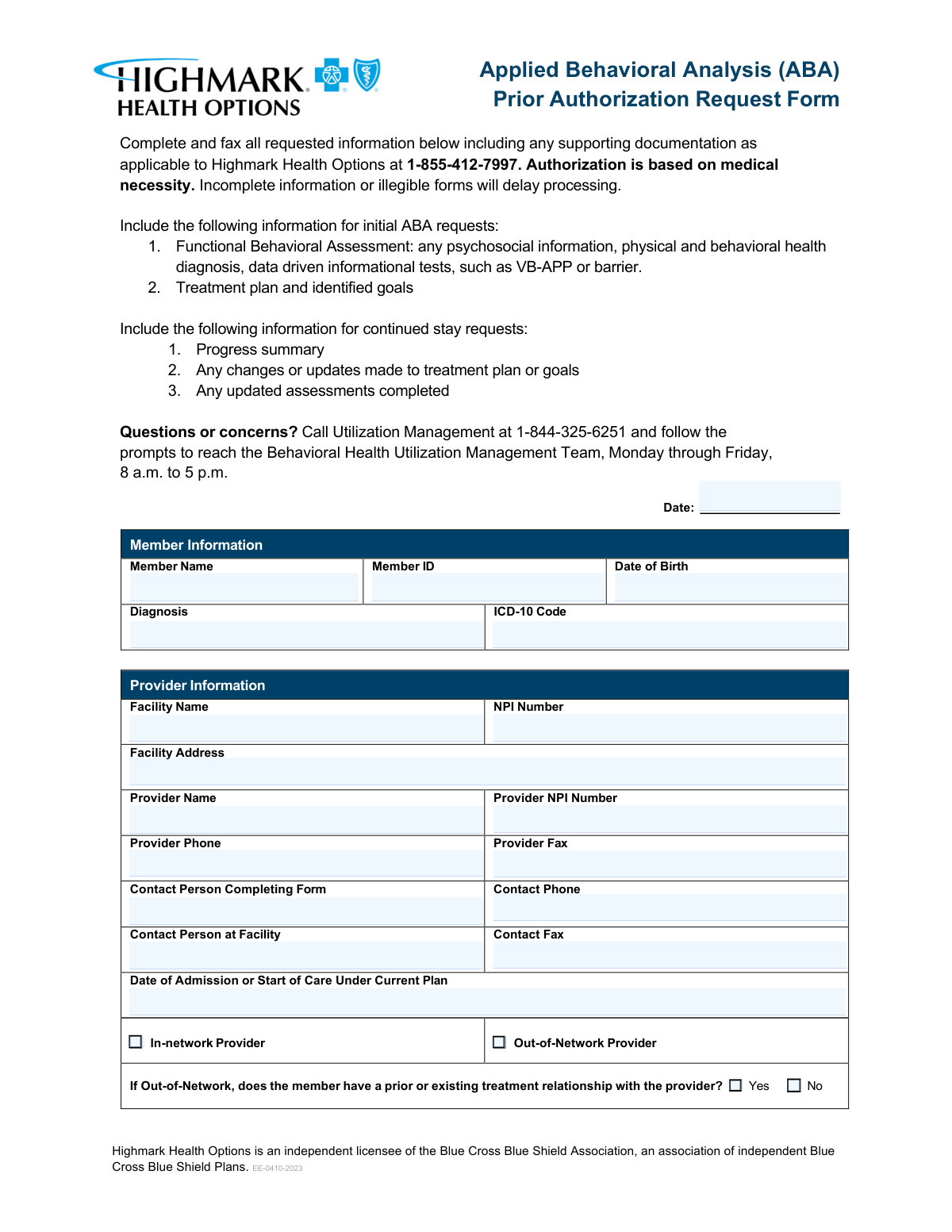
The Highmark Health Options Applied Behavioral Analysis (ABA) Prior Authorization Request Form is an official document required by Highmark Health Options for providers seeking authorization to deliver ABA therapy services to members. The form captures essential member, provider, and clinical informationâincluding diagnoses, treatment plans, service codes, medications, and discharge planningâto allow the Utilization Management team to evaluate medical necessity. Submitting complete and legible information is critical, as incomplete forms can delay processing and potentially interrupt a member's care. Today, this form can be filled out quickly and accurately using AI-powered services like Instafill.ai, which can also convert non-fillable PDF versions into interactive fillable forms.
Our AI automatically handles information lookup, data retrieval, formatting, and form filling.
It takes less than a minute to fill out Highmark ABA Prior Authorization using our AI form filling.
Securely upload your data. Information is encrypted in transit and deleted immediately after the form is filled out.
Form specifications
| Form name: | Highmark Health Options Applied Behavioral Analysis (ABA) Prior Authorization Request Form |
| Number of pages: | 3 |
| Language: | English |
Instafill Demo: filling out a legal form in seconds
How to Fill Out Highmark ABA Prior Authorization Online for Free in 2026
Are you looking to fill out a HIGHMARK ABA PRIOR AUTHORIZATION form online quickly and accurately? Instafill.ai offers the #1 AI-powered PDF filling software of 2026, allowing you to complete your HIGHMARK ABA PRIOR AUTHORIZATION form in just 37 seconds or less.
Follow these steps to fill out your HIGHMARK ABA PRIOR AUTHORIZATION form online using Instafill.ai:
- 1 Navigate to Instafill.ai and upload the Highmark Health Options ABA Prior Authorization Request Form PDF, or search for it in the Instafill.ai form library to open an interactive fillable version.
- 2 Enter the Member Information section, including the member's full name, Member ID, date of birth, diagnosis, and ICD-10 code.
- 3 Complete the Provider Information section by entering the facility name, NPI number, facility address, provider name, provider NPI, phone and fax numbers, and contact person details, and indicate whether the provider is in-network or out-of-network.
- 4 Fill in the Service Request section by entering the number of units requested (in 1-hour increments) for each applicable ABA service code (97151 through 97158).
- 5 Provide the Clinical Information, including a detailed description of presenting symptoms and problems, a comprehensive list of all diagnoses and conditions with ICD-10 codes, and current medications with dosages and frequencies.
- 6 Complete the Case Management Needs and Discharge Planning sections, describing current case management needs, the discharge and transition plan, and justification for whether the member can be managed at a lower level of care.
- 7 Review all entered information for accuracy and completeness, then submit or download the completed form and fax it along with any required supporting documentation to Highmark Health Options at 1-855-412-7997.
Our AI-powered system ensures each field is filled out correctly, reducing errors and saving you time.
Why Choose Instafill.ai for Your Fillable Highmark ABA Prior Authorization Form?
Speed
Complete your Highmark ABA Prior Authorization in as little as 37 seconds.
Up-to-Date
Always use the latest 2026 Highmark ABA Prior Authorization form version.
Cost-effective
No need to hire expensive lawyers.
Accuracy
Our AI performs 10 compliance checks to ensure your form is error-free.
Security
Your personal information is protected with bank-level encryption.
Frequently Asked Questions About Form Highmark ABA Prior Authorization
This form is used to request prior authorization for Applied Behavioral Analysis (ABA) services from Highmark Health Options. Authorization is granted based on medical necessity, and the form must be completed in full before ABA services can be approved and provided to the member.
Healthcare providers, facilities, or their designated contact persons who are requesting ABA services for a Highmark Health Options member must complete and submit this form. The form requires both facility and provider information, so it is typically completed by the treating provider's administrative or clinical staff.
Once completed, the form along with all supporting documentation should be faxed to Highmark Health Options at 1-855-412-7997. Make sure all information is legible and complete, as incomplete or illegible forms will delay processing.
For an initial ABA request, you must include a Functional Behavioral Assessment (including any psychosocial information, physical and behavioral health diagnoses, and data-driven informational tests such as VB-APP or barrier assessments), as well as a treatment plan with identified goals.
For continued stay requests, you must include a progress summary, any changes or updates made to the treatment plan or goals, and any updated assessments that have been completed since the last authorization.
The form includes ABA service codes 97151 through 97158, which represent different types of ABA services such as assessments, direct therapy, and caregiver training. Units should be entered in 1-hour increments, where 1 unit equals 1 hour of service.
If the provider is out-of-network, you must check the 'Out-of-Network Provider' box and indicate whether the member has a prior or existing treatment relationship with the provider. You must also provide a written summary explaining the treatment relationship and why the member's care cannot be met by an in-network provider.
You will need to provide the member's full name, Member ID, date of birth, diagnosis, and the corresponding ICD-10 code. This information is essential for identifying the member and verifying their eligibility for ABA services.
The form requires the facility name, facility NPI number, facility address, provider name, provider NPI number, provider phone and fax numbers, as well as the contact person completing the form and the contact person at the facility, along with their respective phone and fax numbers.
List all current medications in the designated medication section, including the medication name, dosage, and frequency for each. The form accommodates up to seven medications, and if more space is needed, you may attach a supplemental sheet.
The discharge planning section asks you to describe the member's transition plan to a lower level of care and to indicate whether the member can currently be managed at a lower level of care with a written justification. This section must be completed as part of the clinical information required for authorization review.
For questions or concerns, call Utilization Management at 1-844-325-6251 and follow the prompts to reach the Behavioral Health Utilization Management Team. They are available Monday through Friday, 8 a.m. to 5 p.m.
Yes, AI-powered services like Instafill.ai can help you accurately auto-fill form fields, saving time and reducing errors. This is especially helpful for complex forms like the ABA Prior Authorization Request, which requires detailed clinical and provider information across multiple sections.
You can upload the ABA Prior Authorization Request Form to Instafill.ai, where the AI will guide you through each field and auto-fill information based on the details you provide. Once completed, you can download the filled form and fax it to Highmark Health Options at 1-855-412-7997.
If you have a flat, non-fillable PDF version of the ABA Prior Authorization Request Form, Instafill.ai can convert it into an interactive fillable form, allowing you to type directly into the fields digitally rather than printing and handwriting the information.
Compliance Highmark ABA Prior Authorization
Validation Checks by Instafill.ai
1
Ensures Member Date of Birth is a Valid Date in the Past
This check verifies that the Member Date of Birth field contains a properly formatted date (MM/DD/YYYY) and that the date falls in the past, not in the future or on the current date. It also confirms the member's age is reasonable for ABA therapy (typically under 21, though adult cases exist). If this validation fails, the form cannot be processed as the member's identity and eligibility cannot be confirmed.
2
Ensures Form Date is Current and Not a Future Date
This check validates that the Date field at the top of the form is filled in, properly formatted (MM/DD/YYYY), and does not represent a future date. The form date establishes the timeline for the prior authorization request and is used to determine processing deadlines. A missing or future-dated form date may cause the request to be rejected or delayed by Highmark Health Options.
3
Ensures Admission or Start of Care Date is Valid and Not After Form Date
This check confirms that the Date of Admission or Start of Care Under Current Plan is a valid, properly formatted date and that it does not occur after the form submission date. The start of care date must logically precede or equal the form date to establish a valid treatment timeline. If this date is missing or illogical, it may indicate an error in the request that could delay or invalidate the authorization.
4
Ensures NPI Numbers Conform to the 10-Digit Format
This check validates that both the Facility NPI Number and the Provider NPI Number consist of exactly 10 numeric digits, as required by the National Provider Identifier standard. NPI numbers are critical for identifying providers in the healthcare system and must be accurate for claims processing and authorization. If either NPI is missing, incorrectly formatted, or contains non-numeric characters, the request cannot be properly routed or verified.
5
Ensures ICD-10 Code Follows Standard Alphanumeric Format
This check verifies that the ICD-10 Code field contains a properly formatted code consisting of a letter followed by two digits, a decimal point, and up to four additional alphanumeric characters (e.g., F84.0). ICD-10 codes are required for medical necessity determination and must correspond to a recognized diagnosis in the current ICD-10-CM code set. An invalid or missing ICD-10 code will prevent clinical review and delay the authorization decision.
6
Ensures Diagnosis Field Matches the Provided ICD-10 Code
This check cross-references the written Diagnosis field against the ICD-10 Code field to confirm that the diagnosis description is consistent with the code provided. Mismatches between the narrative diagnosis and the ICD-10 code can indicate data entry errors that may lead to incorrect clinical review or denial. Both fields must be present and logically aligned to ensure the authorization request accurately reflects the member's condition.
7
Ensures Exactly One Provider Network Status Checkbox is Selected
This check confirms that one and only one of the two Provider Network Status checkboxes â In-network Provider or Out-of-Network Provider â has been selected. Selecting both or neither creates an ambiguous or incomplete submission that cannot be processed correctly. The network status of the provider directly affects the authorization criteria and any additional documentation requirements.
8
Ensures Out-of-Network Fields are Completed When Out-of-Network is Selected
This check verifies that when the Out-of-Network Provider checkbox is selected, the Prior Treatment Relationship question (Yes or No) is also answered and the Treatment Relationship Summary field is populated with a substantive explanation. Out-of-network requests require additional justification, including why the member's care cannot be met by an in-network provider. Leaving these fields blank when out-of-network is selected will result in an incomplete submission and processing delays.
9
Ensures At Least One ABA Service Code Has Units Requested
This check confirms that at least one of the eight ABA service code fields (97151 through 97158) contains a value greater than zero, ensuring the form includes an actual service request. A prior authorization form with no units requested for any service code is functionally incomplete and cannot be reviewed for medical necessity. The validation also ensures that no service code fields contain negative numbers or non-numeric characters.
10
Ensures Units Requested Are Entered in Whole Number Increments
This check validates that all unit values entered for service codes 97151 through 97158 are positive whole numbers, consistent with the form's instruction that units must be entered in 1-hour increments where 1 unit equals 1 hour. Fractional or decimal unit values are not permitted under this billing structure and would cause claim processing errors. Any non-integer value entered in a units field should trigger a validation error requiring correction before submission.
11
Ensures Provider Phone and Fax Numbers Follow a Valid 10-Digit Format
This check validates that the Provider Phone, Provider Fax, Contact Phone, and Contact Fax fields all contain valid 10-digit U.S. phone numbers, allowing for common formatting variations such as dashes, parentheses, or dots (e.g., (555) 555-5555 or 555-555-5555). Accurate contact information is essential for Highmark Health Options to reach the provider or contact person with questions or authorization decisions. Missing or malformed phone and fax numbers will impede communication and delay processing.
12
Ensures Medication Entries Include All Three Required Components When Partially Filled
This check verifies that for any medication row where at least one field (Name, Dosage, or Frequency) has been populated, all three fields in that row are completed. A medication entry with a name but no dosage or frequency, for example, is clinically incomplete and could affect the medical necessity review. Partial medication entries must be flagged so the submitter can either complete or remove the incomplete row before the form is processed.
13
Ensures Presenting Symptoms and Diagnoses Section Contains Substantive Clinical Information
This check confirms that the Presenting Symptoms and Problems field and the Diagnoses and Conditions field are not left blank and contain more than a minimal number of characters, indicating that meaningful clinical information has been provided. These fields are critical for the clinical reviewer to assess medical necessity for ABA services. Submissions with empty or insufficiently detailed clinical narratives will be considered incomplete and returned for additional information.
14
Ensures Lower Level of Care Checkbox is Selected and Justification is Provided
This check verifies that one of the two checkboxes for 'Can the member be managed at a lower level of care?' (Yes or No) has been selected, and that the Lower Level of Care Justification field contains a substantive written explanation regardless of which option is chosen. Both the selection and the justification are required components of the discharge planning section and inform the authorization decision. A missing checkbox selection or blank justification field will result in an incomplete submission.
15
Ensures Facility Address Contains Street, City, State, and ZIP Code Components
This check validates that the Facility Address field contains a complete physical address including a street address, city, state abbreviation, and a valid 5-digit (or 9-digit ZIP+4) ZIP code. An incomplete or unverifiable facility address can prevent proper provider credentialing verification and routing of authorization correspondence. If any address component is missing or the ZIP code does not match the expected format, the form should be flagged for correction.
16
Ensures Member ID is Present and Follows Expected Format
This check confirms that the Member ID field is not blank and that the entered value conforms to the expected Highmark Health Options member identification format, which typically consists of a defined combination of alphanumeric characters. The Member ID is the primary key used to look up the member's eligibility, benefits, and coverage details in the payer's system. A missing or incorrectly formatted Member ID will prevent the authorization request from being matched to the correct member record, causing significant processing delays.
Common Mistakes in Completing Highmark ABA Prior Authorization
Many submitters enter outdated, incomplete, or incorrect ICD-10 codes that do not match the written diagnosis, or they use ICD-9 codes by mistake. This mismatch can trigger an automatic denial or delay in authorization because the clinical justification won't align with the coded diagnosis. Always verify the exact ICD-10 code against an up-to-date coding reference and ensure it precisely matches the written diagnosis in both the Diagnosis field and the Clinical Information section. Tools like Instafill.ai can help validate ICD-10 code formats and flag inconsistencies before submission.
A very common error is entering the same NPI number in both the Facility NPI and Provider NPI fields, or swapping the two. Facilities and individual providers have separate 10-digit NPI numbers, and using the wrong one can cause the authorization to be rejected or attributed to the wrong entity. Double-check both NPI numbers against the NPPES registry (nppes.cms.hhs.gov) before submitting. Instafill.ai can help by prompting users to enter and verify distinct NPI numbers for each field.
The form explicitly states that units must be entered in 1-hour increments (1 unit = 1 hour), yet many submitters enter units in 15-minute increments (as used in standard billing) or enter fractional values. This causes a significant discrepancy between what is authorized and what is billed, potentially leading to claim denials. Always convert your requested hours directly into whole-number units before entering them, and review each CPT code field (97151â97158) to ensure no fractional or incorrectly scaled values are entered.
Submitters frequently forget to attach the specific documentation required depending on whether the request is initial or a continued stay. For initial requests, a Functional Behavioral Assessment (e.g., VB-MAPP or ABLLS) and treatment plan must be included; for continued stay, a progress summary and updated assessments are required. Sending the wrong set of documentsâor none at allâwill delay or deny the authorization. Carefully review the checklist at the top of the form before faxing to ensure all applicable supporting documents are attached.
When the Out-of-Network provider box is checked, submitters often fail to complete the follow-up question about whether a prior treatment relationship exists and neglect to provide a written summary explaining why the member's care cannot be met by an in-network provider. This omission is a common cause of denial for out-of-network requests, as Highmark Health Options requires clinical and relational justification. Ensure both the Yes/No checkbox and the treatment relationship summary narrative are fully completed whenever an out-of-network provider is indicated.
Submitters frequently list only the medication name without including the dosage and frequency, or they omit medications entirelyâespecially over-the-counter supplements or recently changed prescriptions. Incomplete medication information can raise red flags about the clinical picture and delay the medical necessity review. Fill in all three columns (Medication, Dosage, Frequency) for every current medication, and attach a supplemental sheet if there are more medications than the form accommodates, as the form itself instructs.
Many submitters leave the discharge planning narrative and the lower-level-of-care justification blank, treating them as optional. However, Highmark Health Options uses this information to assess medical necessity and the appropriateness of the requested level of care. Failing to provide a thoughtful justificationâespecially when checking 'No' to whether the member can be managed at a lower levelâcan result in denial. Always provide a detailed clinical rationale that explains the member's current functional status and why a lower level of care is or is not appropriate.
Because this form is faxed, handwritten entries that are unclear or cramped often become illegible after transmission, and the form explicitly warns that illegible forms will delay processing. Facility addresses are frequently entered without suite numbers, zip codes, or state abbreviations, making it impossible to verify the provider's location. Type or print clearly in all fields, and ensure the facility address includes street number, street name, city, state, and zip code. Using a digital form-filling tool like Instafill.ai ensures all entries are typed and formatted correctly before faxing.
The member's date of birth is sometimes left blank, entered in an inconsistent format (e.g., 'Jan 5, 2010' instead of '01/05/2010'), or confused with the form's submission date. An incorrect or missing date of birth can prevent Highmark Health Options from accurately identifying the member in their system, causing processing delays or misattribution of the authorization. Always use the MM/DD/YYYY format and verify the date of birth against the member's insurance card or official records before submitting.
Submitters frequently skip the provider network status checkboxes entirely, assuming this information is already known to the payer. However, leaving both boxes unchecked means the reviewer cannot determine whether out-of-network justification is required, which can stall the entire review process. Always check exactly one of the two boxesâIn-Network or Out-of-Networkâand if Out-of-Network is selected, complete all associated follow-up fields. Instafill.ai can flag unchecked required checkbox fields before submission to prevent this oversight.
The form's submission date field at the top is frequently left blank or filled in with the date of service rather than the date the form is being completed and submitted. An undated form can complicate the timeline for authorization review and may be returned as incomplete. Always enter the current date (the day you are completing and faxing the form) in MM/DD/YYYY format, and distinguish it clearly from the 'Date of Admission or Start of Care' field, which refers to a different date entirely.
The presenting symptoms and problems section is often filled with generic statements like 'patient has autism' without specific behavioral data, frequency of behaviors, severity, or functional impact. Highmark Health Options bases authorization on medical necessity, and a vague clinical narrative is one of the most common reasons for denial or requests for additional information. Include specific, measurable behavioral descriptions (e.g., frequency, duration, intensity of target behaviors), reference assessment results, and connect the clinical picture directly to the ABA services being requested.
Saved over 80 hours a year
âI was never sure if my IRS forms like W-9 were filled correctly. Now, I can complete the forms accurately without any external help.â
Kevin Martin Green
Your data stays secure with advanced protection from Instafill and our subprocessors

Robust compliance program
Transparent business model
Youâre not the product. You always know where your data is and what it is processed for.
ISO 27001, HIPAA, and GDPR
Our subprocesses adhere to multiple compliance standards, including but not limited to ISO 27001, HIPAA, and GDPR.
Security & privacy by design
We consider security and privacy from the initial design phase of any new service or functionality. Itâs not an afterthought, itâs built-in, including support for two-factor authentication (2FA) to further protect your account.
Fill out Highmark ABA Prior Authorization with Instafill.ai
Worried about filling PDFs wrong? Instafill securely fills highmark-health-options-applied-behavioral-analysis-aba-prior-authorization-request-form forms, ensuring each field is accurate.