Yes! You can use AI to fill out HIPAA Authorization for Release of Health-Related Information
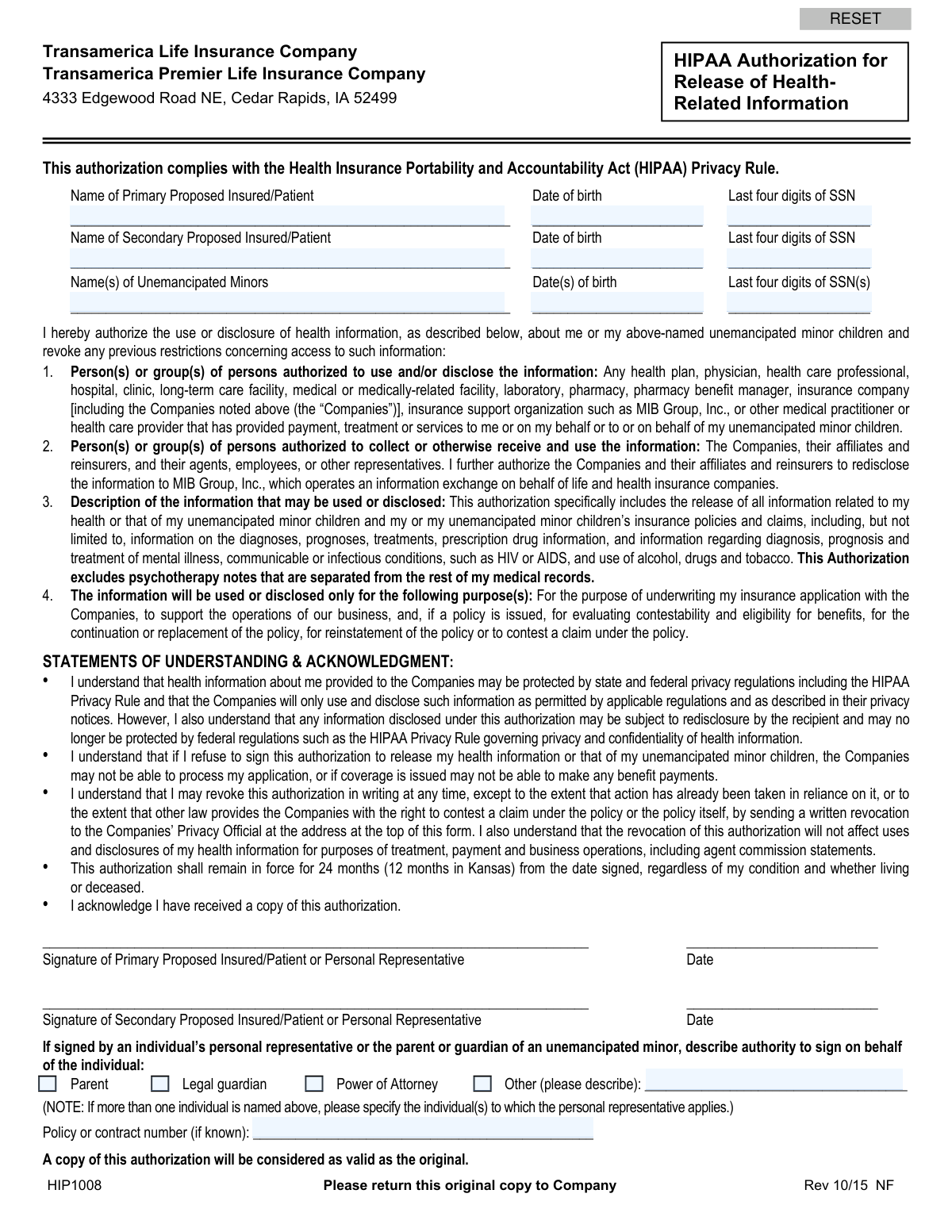
This form is a legal document that complies with the Health Insurance Portability and Accountability Act (HIPAA) Privacy Rule. It authorizes healthcare providers to release an individual's protected health information to an insurance company, in this case, Transamerica, for purposes such as underwriting an application or evaluating a claim. Today, this form can be filled out quickly and accurately using AI-powered services like Instafill.ai, which can also convert non-fillable PDF versions into interactive fillable forms.
Rather not fill this in by hand? Instafill is an online form filler that completes PDF forms automatically — upload the blank form, answer a few questions, and the AI fills every field.
Form specifications
| Form name: | HIPAA Authorization for Release of Health-Related Information |
| Number of pages: | 1 |
| Language: | English |
Our AI automatically handles information lookup, data retrieval, formatting, and form filling.
It takes less than a minute to fill out HIP1008 using our AI form filling.
Securely upload your data. Information is encrypted in transit and deleted immediately after the form is filled out.
Instafill Demo: How to fill out PDF forms in seconds with AI
How to Fill Out HIP1008 Online for Free in 2026
Are you looking to fill out a HIP1008 form online quickly and accurately? Instafill.ai offers the #1 AI-powered PDF filling software of 2026, allowing you to complete your HIP1008 form in just 37 seconds or less.
Follow these steps to fill out your HIP1008 form online using Instafill.ai:
- 1 Navigate to Instafill.ai and upload or select the HIPAA Authorization for Release of Health-Related Information form.
- 2 Use the AI assistant to accurately input the personal details of the primary proposed insured/patient, including name, date of birth, and the last four digits of their SSN.
- 3 If applicable, provide the same information for any secondary proposed insured/patient or unemancipated minors covered by the authorization.
- 4 Carefully review the pre-filled sections detailing the scope of the authorization, including who can disclose information and for what purpose.
- 5 Read the 'Statements of Understanding & Acknowledgment' to understand your rights, the duration of the authorization, and the consequences of refusal.
- 6 Electronically sign and date the form. If you are a personal representative, indicate your authority (e.g., parent, legal guardian).
- 7 Download, print, or securely submit the completed and signed authorization form as required by Transamerica.
Our AI-powered system ensures each field is filled out correctly, reducing errors and saving you time.
Why Choose Instafill.ai for Your Fillable HIP1008 Form?
Speed
Complete your HIP1008 in as little as 37 seconds.
Up-to-Date
Always use the latest 2026 HIP1008 form version.
Cost-effective
No need to hire expensive lawyers.
Accuracy
Our AI performs 10 compliance checks to ensure your form is error-free.
Security
Your personal information is protected with bank-level encryption.
Frequently Asked Questions About HIP1008
This form grants Transamerica permission to access your health information from your healthcare providers. This is necessary for them to underwrite your insurance application, process claims, and manage your policy.
The primary person applying for insurance (Primary Proposed Insured/Patient) must complete and sign this form. If a second person is also applying for coverage, they must also provide their information and signature.
You need to provide the full name, date of birth, and the last four digits of the Social Security Number for each person to be insured. You must also sign and date the form.
If you do not sign the form, Transamerica may not be able to process your insurance application. If a policy is already in force, they may be unable to make benefit payments on a future claim.
This authorization allows the release of all your health records, including diagnoses, treatments, prescription history, and information about mental health or substance use. It specifically excludes psychotherapy notes that are kept separate from your main medical file.
Your information will be collected by Transamerica, its affiliates, reinsurers, and representatives. It may also be disclosed to MIB Group, Inc., which operates an information exchange for life and health insurance companies.
This authorization remains in effect for 24 months from the date you sign it. However, if you are a resident of Kansas, the authorization is only valid for 12 months.
Yes, you can revoke this authorization at any time by sending a written request to the Transamerica Privacy Official. The revocation will not apply to actions the company has already taken based on the original authorization.
Enter your child's information in the 'Unemancipated Minors' section. When you sign as the personal representative, check the 'Parent' box to indicate your authority to sign on their behalf.
You should return the original signed copy to Transamerica at the address listed at the top of the form. The form indicates you should also retain a signed copy for your personal records.
Yes, services like Instafill.ai use AI to accurately auto-fill form fields, which can save you time and help prevent errors. This is especially useful for entering repetitive information across multiple application documents.
You can use a service like Instafill.ai to complete the form digitally. Simply upload the PDF, and the tool will make the fields interactive for you to type in your information and sign electronically.
If you have a non-fillable or 'flat' PDF, you can upload it to a platform like Instafill.ai. The service can convert it into an interactive, fillable form that you can complete and sign on your computer or mobile device.
Compliance HIP1008
Validation Checks by Instafill.ai
1
Ensures at least one insured individual is identified
This check verifies that information for at least one person (Primary, Secondary, or Minor) has been entered on the form. The authorization is void if it does not specify the individual whose information is to be released. A failure would result in the form being rejected as incomplete and legally non-binding.
2
Validates Date of Birth Format and Plausibility
This check ensures that all 'Date of birth' fields are entered in a valid date format (e.g., MM/DD/YYYY) and represent a date in the past. Correct formatting is crucial for data processing and record matching, while ensuring the date is in the past prevents logical impossibilities. An invalid entry would require correction before the form can be processed.
3
Validates Last Four Digits of SSN Format
This validation confirms that the 'Last four digits of SSN' fields contain exactly four numeric digits. This partial identifier is critical for accurately matching the insured person with their medical records. An entry with non-numeric characters or an incorrect number of digits will fail validation and must be corrected to ensure proper identification.
4
Requires Primary Insured Signature and Date
This check verifies that if the Primary Proposed Insured's name is provided, a corresponding signature and signature date are also present. A signature is a legal requirement to execute the authorization. The absence of a signature or date renders the document invalid for the primary insured.
5
Requires Secondary Insured Signature if Details are Provided
If the name of a Secondary Proposed Insured is entered, this validation ensures their corresponding signature and signature date fields are also completed. Each adult individual must provide their own consent. Failure to sign invalidates the authorization for that specific individual, even if their personal details are listed.
6
Validates Signature Date is Not in the Future
This check ensures that the signature date(s) are not later than the current processing date. A future-dated signature is legally invalid and suggests a data entry error or fraudulent activity. The form would be rejected as the authorization cannot be considered effective until it has been properly signed and dated.
7
Requires Full Details for Primary Insured
If the 'Name of Primary Proposed Insured/Patient' field is filled, this check verifies that the corresponding 'Date of birth' and 'Last four digits of SSN' fields are also complete. All three pieces of information are required for unambiguous identification. Missing data would prevent the company from accurately locating the correct medical records, making the authorization unusable.
8
Requires Full Details for Secondary Insured
If the 'Name of Secondary Proposed Insured/Patient' field is filled, this check verifies that the corresponding 'Date of birth' and 'Last four digits of SSN' fields are also complete. Similar to the primary insured, a complete set of identifiers is necessary for accurate record retrieval. Incomplete information for the secondary insured would invalidate the authorization for that person.
9
Ensures Personal Representative Authority is Specified
This check confirms that if a signature is provided by a personal representative, one of the authority checkboxes (Parent, Legal guardian, Power of Attorney, Other) is selected. This is necessary to legally establish the signer's right to act on the patient's behalf. Without this specification, the validity of the signature and the entire authorization is questionable.
10
Requires Authority Description for 'Other' Representative
If the 'Other' checkbox is selected to describe a personal representative's authority, this validation ensures the accompanying text field is filled out with a description. This is a legal requirement to clarify the basis of the representative's authority to sign on behalf of the insured. An empty description would leave the representative's status ambiguous and could invalidate the signature.
11
Validates Minor's Age
This check calculates the age based on the Date of Birth provided for an 'Unemancipated Minor' to ensure they are under the age of majority (e.g., 18). This confirms they are correctly classified as a minor, which is critical for determining who has the legal authority to sign on their behalf. If the calculated age is 18 or over, the form should be flagged for review as they may need to sign for themselves.
12
Checks for Representative Signature for Minor
If information for an Unemancipated Minor is provided, this validation checks for a signature from a personal representative (e.g., Primary or Secondary Insured). Minors cannot legally consent to the release of their health information, so a signature from an authorized adult is mandatory. The absence of a valid representative signature renders the authorization for the minor void.
13
Specifies Individual for Personal Representative
This check ensures that if a personal representative signs and multiple individuals are named on the form, the representative specifies which individual(s) they are signing for, as prompted by the note on the form. This clarity is essential to determine which authorizations are valid. Ambiguity could lead to legal challenges and processing delays.
Common Mistakes in Completing HIP1008
The form explicitly requests only the 'Last four digits of SSN' to minimize security risks. Applicants often instinctively write their full nine-digit SSN out of habit, unnecessarily exposing sensitive personal information and creating a security liability. To avoid this, carefully read each field's label and provide only the requested data to protect your identity.
A signature without a corresponding date can render a legal authorization invalid. People frequently sign the form but forget to fill in the date field, which causes the form to be rejected by the insurance company, leading to processing delays and requiring resubmission. Always make it a habit to date the document immediately after signing it.
When a representative signs for multiple individuals (e.g., a parent for two minors), they often forget to specify which person the signature applies to, as instructed by the note on the form. This ambiguity halts the processing of the application for one or all individuals until clarification is provided. To prevent this, you must clearly indicate the name(s) of the person(s) being represented in the designated area.
If a personal representative's authority is not 'Parent,' 'Legal guardian,' or 'Power of Attorney,' they must check 'Other' and provide a written description. A common mistake is checking the box but leaving the description field blank, which invalidates the signature. This forces the insurance company to follow up for clarification, delaying the entire underwriting process.
For joint insurance applications, it is common for the primary applicant to complete their section but overlook the fields for the secondary applicant. A missing name, date of birth, or signature for the secondary applicant makes the authorization incomplete for that person, preventing their application from moving forward. Both parties must fill out their respective sections and provide signatures.
This form is often provided as a non-fillable PDF, requiring it to be printed and completed by hand, which can result in illegible handwriting. Unclear names, dates, or numbers lead to critical data entry errors, misidentification, and significant processing delays. To avoid this, either write very clearly in block letters or use a service like Instafill.ai, which can convert flat PDFs into easily fillable digital forms.
Applicants often write dates in various international or non-standard formats (e.g., DD-MM-YYYY, YYYY/MM/DD) instead of the expected US format (MM/DD/YYYY). This inconsistency can cause data entry errors, failed identity verification checks, and delays in retrieving medical history. Always use the MM/DD/YYYY format and double-check the numbers for accuracy. AI form-filling tools like Instafill.ai can automatically format dates correctly.
An applicant might print their full legal name in the patient information section but then sign with a nickname, an initial, or a significantly different version of their name. This discrepancy can create identity verification issues and may lead to the form being flagged for review or rejected. Ensure the signature is reasonably consistent with the full legal name printed on the form.
A parent or guardian may sign on the line for an insured person but fail to check the appropriate box (Parent, Legal guardian, etc.) to indicate they are signing as a representative. This makes it unclear whether the signature belongs to the patient or someone acting on their behalf, causing confusion and processing delays. Always check the relevant box to clarify your authority when signing for another person.
When filling out the form quickly, applicants may inadvertently enter the secondary insured's information on the primary applicant's lines, or vice-versa. This mix-up causes confusion during the underwriting process and may require a corrected form to be submitted, delaying the application. Carefully read each line's label before entering information to ensure the correct person's details are in the correct section.
Saved over 80 hours a year
“I was never sure if my IRS forms like W-9 were filled correctly. Now, I can complete the forms accurately without any external help.”
Kevin Martin Green
Your data stays secure with advanced protection from Instafill and our subprocessors




Robust compliance program
Transparent business model
You’re not the product. You always know where your data is and what it is processed for.
ISO 27001, HIPAA, and GDPR
Our subprocesses adhere to multiple compliance standards, including but not limited to ISO 27001, HIPAA, and GDPR.
Security & privacy by design
We consider security and privacy from the initial design phase of any new service or functionality. It’s not an afterthought, it’s built-in, including support for two-factor authentication (2FA) to further protect your account.
Fill out HIP1008 with Instafill.ai
Worried about filling PDFs wrong? Instafill securely fills hipaa-authorization-for-release-of-health-related-information forms, ensuring each field is accurate.
