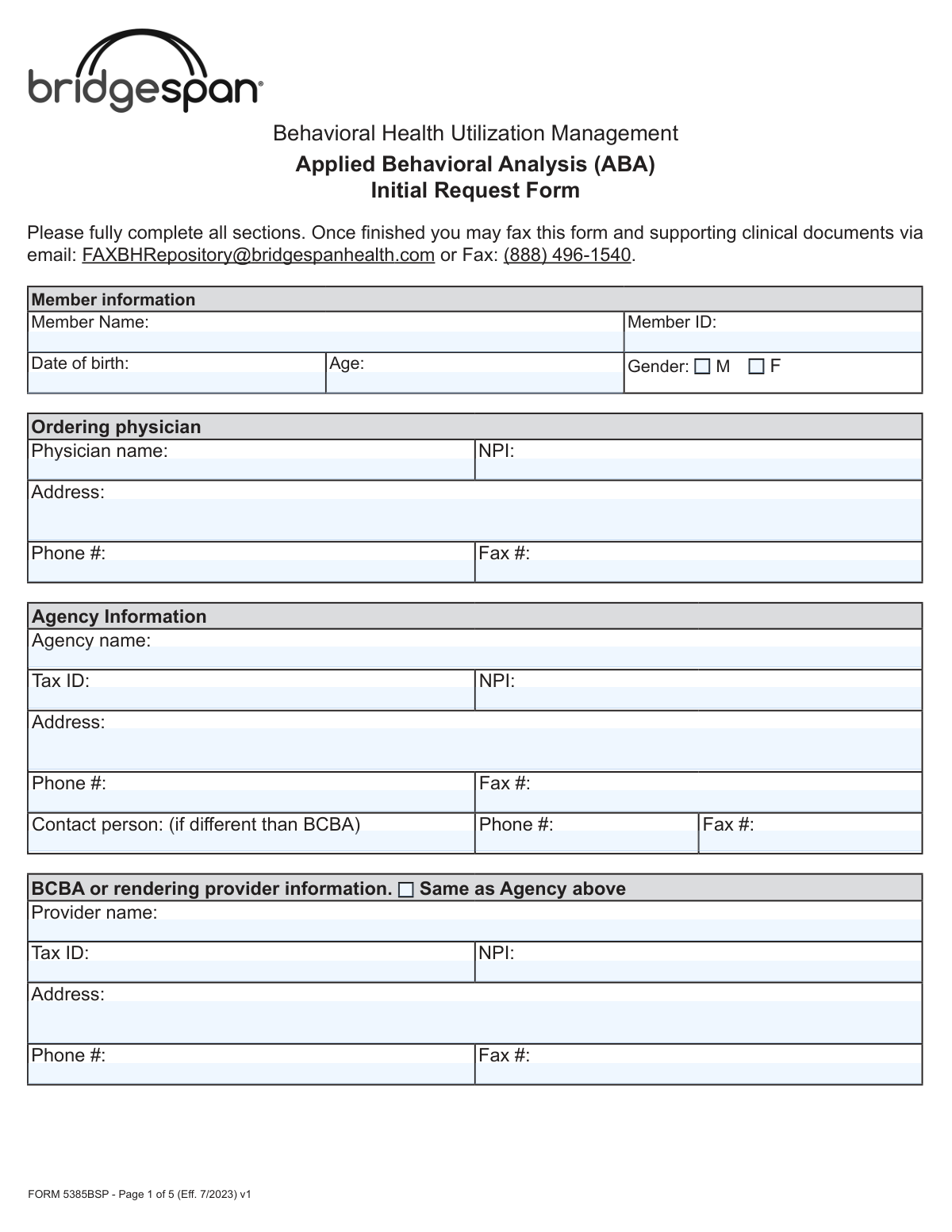
Yes! You can use AI to fill out Form 5385BSP, Behavioral Health Utilization Management Applied Behavioral Analysis (ABA) Initial Request Form
Form 5385BSP is an official Bridgespan Health utilization management document required to request prior authorization for Applied Behavioral Analysis (ABA) therapy services for members with Autism Spectrum Disorder (ASD). The form collects comprehensive information including member demographics, ordering physician details, agency and BCBA provider information, ASD diagnosis documentation, clinical justification, and specific CPT code-based treatment unit requests for a 6-month authorization period. Accurate and complete submission of this form is critical to ensuring timely approval of medically necessary ABA services for eligible members. Today, this form can be filled out quickly and accurately using AI-powered services like Instafill.ai, which can also convert non-fillable PDF versions into interactive fillable forms.
Our AI automatically handles information lookup, data retrieval, formatting, and form filling.
It takes less than a minute to fill out Form 5385BSP using our AI form filling.
Securely upload your data. Information is encrypted in transit and deleted immediately after the form is filled out.
Form specifications
| Form name: | Form 5385BSP, Behavioral Health Utilization Management Applied Behavioral Analysis (ABA) Initial Request Form |
| Number of pages: | 5 |
| Language: | English |
Instafill Demo: filling out a legal form in seconds
How to Fill Out Form 5385BSP Online for Free in 2026
Are you looking to fill out a FORM 5385BSP form online quickly and accurately? Instafill.ai offers the #1 AI-powered PDF filling software of 2026, allowing you to complete your FORM 5385BSP form in just 37 seconds or less.
Follow these steps to fill out your FORM 5385BSP form online using Instafill.ai:
- 1 Navigate to Instafill.ai and upload the Form 5385BSP PDF or select it from the available form library to begin filling it out online.
- 2 Complete the Member Information section by entering the member's full name, Member ID, date of birth, age, and gender.
- 3 Fill in the Ordering Physician and Agency Information sections with the physician's name, NPI, address, and contact details, followed by the agency's name, Tax ID, NPI, address, and contact person information.
- 4 Enter the BCBA or Rendering Provider Information, or check the 'Same as Agency' box if applicable, and specify the type of ABA request (ABA Assessment or Initial Treatment Request) along with expedited request status and explanation if needed.
- 5 Complete the clinical sections by describing the presenting problem and background, confirming the ASD diagnosis details (provider, diagnosis code, assessment tool used, date, and score), and describing the member's communication and behavioral functioning impairments.
- 6 Attach or reference the completed Individualized Treatment Plan (ITP) that includes targeted behaviors, baseline measurements, treatment interventions, family participation, and discharge criteria as required by the documentation checklist.
- 7 Fill in the Adaptive Behavior Treatment table with the requested CPT codes, number of 15-minute units for the 6-month period, and place of service for each service type, then provide the provider's printed name, license information, signature, and date before submitting via fax or email to Bridgespan Health.
Our AI-powered system ensures each field is filled out correctly, reducing errors and saving you time.
Why Choose Instafill.ai for Your Fillable Form 5385BSP Form?
Speed
Complete your Form 5385BSP in as little as 37 seconds.
Up-to-Date
Always use the latest 2026 Form 5385BSP form version.
Cost-effective
No need to hire expensive lawyers.
Accuracy
Our AI performs 10 compliance checks to ensure your form is error-free.
Security
Your personal information is protected with bank-level encryption.
Frequently Asked Questions About Form Form 5385BSP
Form 5385BSP is the Behavioral Health Utilization Management Applied Behavioral Analysis (ABA) Initial Request Form used to request prior authorization for ABA therapy services through Bridgespan Health. It must be completed by the treating agency, BCBA (Board Certified Behavior Analyst), or rendering provider on behalf of a member diagnosed with Autism Spectrum Disorder (ASD).
Once fully completed, you can submit the form along with supporting clinical documents via email to [email protected] or by fax to (888) 496-1540. Make sure all sections are fully completed before submitting to avoid delays.
Pre-authorization for an ABA Assessment is only required for members enrolled in the Federal Employee Program (FEP). For all other members, prior authorization is required only for the Initial Treatment Request, not the assessment itself.
An expedited request applies when the member or their provider believes that waiting for a standard decision could place the member's life, health, or ability to regain maximum function in serious jeopardy. To request expedited review, check 'Yes' on the form and provide a detailed written explanation justifying the urgency.
You must include a completed Individualized Treatment Plan (ITP) that details targeted behaviors, objective baseline measurements, treatment interventions, family participation, clinical justification for service hours, and discharge/transition criteria. For Federal Employee Program (FEP) policies, clinical notes demonstrating medical necessity must also be included.
You must confirm that the member was diagnosed with ASD by a licensed provider using a standardized assessment tool such as ADOS, CARS, STAT, CSBS, ADI-R, or another specified tool. The form requires the diagnosing provider's name and license, the diagnosis code, date of diagnosis, assessment tool used, date of assessment, and the assessment score.
Yes. The form notes that there is very little evidence supporting the efficacy of ABA for individuals 13 years and older. If you are requesting ABA for a member aged 13 or older, you must provide additional clinical justification, such as severe risk of injury to self or others related to ASD or self-injurious stereotypical movement disorder.
Each unit represents 15 minutes of service. Authorizations cover a 6-month (26-week) period, so you must calculate total units for the entire period. For example, if a service is provided for 10 hours per week, that equals 40 units per week and 1,040 units over 6 months.
School is an approved place of service for most members; however, it is not an approved or eligible place of service for members covered under Federal Employee Program (FEP) policies. Make sure to specify the correct place of service (home, school, or other setting) for each CPT code requested.
Bridgespan approves the following CPT codes for ABA services: 97151 (Behavioral Identification Assessment), 97152 (Observational Behavioral Follow-Up Assessment), 97153 (Adaptive Behavior Treatment by Protocol), 97154 (Group Adaptive Behavior Treatment), 97155 (Adaptive Behavior Treatment with Protocol Modification), 97156 (Family Adaptive Behavior Treatment Guidance), 97157 (Multiple-Family Group Adaptive Behavior Treatment Guidance), 97158 (Adaptive Behavior Treatment Social Skills Group), 0362T (Exposure Behavioral Follow-Up Assessment), and 0373T (Exposure Adaptive Behavioral Treatment with Protocol Modification).
The form requires information for three types of providers: the ordering physician (name, NPI, address, phone, fax), the agency (name, Tax ID, NPI, address, phone, fax, and contact person), and the BCBA or rendering provider (name, Tax ID, NPI, address, phone, fax). If the BCBA information is the same as the agency, you can check the 'Same as Agency above' box.
The ITP must include: specific targeted behaviors preventing age-appropriate participation or posing safety risks; objective baseline measurements (frequency, intensity, duration); detailed treatment interventions for each behavior; documentation of prior ABA therapy benefits if applicable; family training and participation descriptions; clinical justification for service frequency and hours; and individualized, measurable discharge and/or transition criteria.
Yes, AI-powered services like Instafill.ai can help you accurately auto-fill form fields, saving time and reducing errors. These tools are especially useful for complex forms like this one that require detailed provider, member, and clinical information across multiple sections.
You can visit Instafill.ai, upload Form 5385BSP, and use the AI-assisted tool to fill in all required fields digitally. Once completed, you can download the filled form and submit it via email or fax to Bridgespan Health as instructed.
If you have a flat, non-fillable PDF version of Form 5385BSP, Instafill.ai can convert it into an interactive fillable form, allowing you to type directly into the fields, check boxes, and complete the form digitally without needing to print and handwrite your responses.
Compliance Form 5385BSP
Validation Checks by Instafill.ai
1
Member Date of Birth and Age Consistency Check
This validation verifies that the Age field is mathematically consistent with the Date of Birth field by calculating the member's current age from the entered date of birth. Since ABA therapy has specific clinical considerations for members aged 13 and older, an age discrepancy could result in incorrect clinical review pathways being applied. If the calculated age does not match the entered age, the form should flag the inconsistency and require correction before submission.
2
Member Age 13 or Older Justification Requirement
This validation checks whether the member's age is 13 years or older, and if so, confirms that additional clinical justification has been provided in the Presenting Problem & Background or relevant narrative fields. The form explicitly notes that there is very little evidence to support ABA efficacy for individuals 13 and older, making this justification a critical clinical requirement. If the member is 13 or older and no additional justification is provided, the form should be flagged as incomplete and submission should be blocked.
3
NPI Format Validation for All Providers
This validation ensures that all National Provider Identifier (NPI) fields — for the Ordering Physician, Agency, and BCBA or Rendering Provider — contain exactly 10 numeric digits, conforming to the standard NPI format established by CMS. An incorrectly formatted NPI can result in claim rejections, authorization delays, or routing errors within the utilization management system. Any NPI field containing non-numeric characters, fewer than 10 digits, or more than 10 digits should trigger an error requiring correction.
4
Tax ID Format Validation for Agency and BCBA Provider
This validation confirms that the Tax Identification Number (TIN) fields for both the Agency and the BCBA or Rendering Provider follow the standard EIN format of nine digits, typically formatted as XX-XXXXXXX. An invalid or missing Tax ID can prevent proper billing, credentialing verification, and payment processing. If the Tax ID does not match the expected numeric format or is left blank, the form should return a validation error.
5
Phone and Fax Number Format Validation
This validation checks that all phone and fax number fields across the Ordering Physician, Agency, Contact Person, and BCBA or Rendering Provider sections contain valid 10-digit U.S. phone numbers, excluding country codes, and follow a standard format such as (XXX) XXX-XXXX or XXX-XXX-XXXX. Invalid phone or fax numbers can prevent the utilization management team from contacting providers for additional information or sending authorization decisions. Any field containing letters, special characters, or fewer than 10 digits should be flagged for correction.
6
Request Type Selection Completeness Check
This validation ensures that at least one of the two request type checkboxes — ABA Assessment or Initial Treatment Request (Prior Authorization) — has been selected in the ABA Request section. Failing to specify the request type prevents the utilization management team from applying the correct review criteria and authorization pathway. If neither option is selected, the form should display an error indicating that a request type must be chosen before submission.
7
Expedited Request Explanation Required When 'Yes' Is Selected
This validation checks that when the Expedited Request 'Yes' checkbox is selected, a detailed explanation has been entered in the Expedited Request Explanation field. An expedited request without clinical justification cannot be properly evaluated under the defined criteria — that waiting for a standard decision would place the member's life, health, or ability to regain maximum function in serious jeopardy. If the 'Yes' box is checked but the explanation field is empty or contains fewer than a minimum character threshold, the form should block submission and prompt the submitter to provide the required narrative.
8
Autism Diagnosis Code Format and Validity Check
This validation verifies that the Diagnosis Code entered in the Autism Diagnosis Information section follows a valid ICD-10-CM format and corresponds to an Autism Spectrum Disorder diagnosis code (e.g., F84.0). ABA therapy authorization is contingent on a confirmed ASD diagnosis, and an invalid or non-ASD diagnosis code would result in automatic denial of the request. If the code does not match the expected ICD-10 format or does not fall within recognized ASD diagnosis codes, the form should flag the entry for review.
9
Date of Diagnosis and Date of Assessment Logical Order Check
This validation confirms that the Date of Assessment is on or before the Date of Diagnosis, ensuring that the standardized assessment tool was administered as part of the diagnostic process and not after the diagnosis was finalized. A date of assessment that occurs after the date of diagnosis would indicate a data entry error or a clinical inconsistency that could undermine the validity of the diagnostic documentation. If the Date of Assessment is later than the Date of Diagnosis, the form should display a warning requiring the submitter to verify and correct the dates.
10
Assessment Tool Selection Requirement
This validation ensures that at least one standardized assessment tool checkbox — ADOS, CARS, STAT, CSBS, ADI-R, or Other — has been selected in the Autism Diagnosis Information section, and that if 'Other' is checked, the name of the tool is specified in the corresponding text field. The use of a standardized assessment tool is a clinical requirement for ASD diagnosis confirmation under this form's criteria. If no tool is selected, or if 'Other' is checked without a specified tool name, the form should return a validation error preventing submission.
11
ABA Therapy Recommendation Date Not Before Date of Diagnosis
This validation checks that the ABA Therapy Recommendation Date is on or after the Date of Diagnosis, since a provider cannot clinically recommend ABA therapy for ASD before the diagnosis has been established. A recommendation date that precedes the diagnosis date represents a logical inconsistency that could indicate a data entry error or documentation issue. If the ABA Therapy Recommendation Date is earlier than the Date of Diagnosis, the form should flag the discrepancy and require the submitter to review and correct the dates.
12
Unit Calculation Consistency Check for CPT Code Services
This validation verifies that the total units entered for each CPT code service over the 6-month period are mathematically consistent with the hours per week entered, using the formula: Total Units = (Hours per Week × 4 units per hour) × 26 weeks. Incorrect unit calculations can result in authorization of an incorrect volume of services, leading to billing discrepancies or underprovision of care. If the total units do not match the calculated value based on hours per week, the form should display a warning with the expected unit count and prompt the submitter to reconcile the figures.
13
FEP Policy School Place of Service Restriction
This validation checks whether the member is enrolled in a Federal Employee Program (FEP) policy and, if so, flags any Place of Service entries that indicate 'school' for any CPT code service. The form explicitly states that school is not an approved or eligible place of service for FEP policies, and submitting a school-based service for an FEP member would result in denial. If an FEP member's form includes 'school' as a place of service for any service line, the form should display an error requiring the submitter to select an eligible place of service.
14
Authorization Start Date Format and Future Date Validation
This validation ensures that the Authorization Start Date is entered in a valid date format (MM/DD/YYYY) and represents a current or future date, not a date in the past. Authorizations cannot be retroactively applied, and a past start date would indicate either a data entry error or an attempt to request retroactive authorization, which is not supported by this form. If the date is improperly formatted or falls before the submission date, the form should return an error requiring the submitter to enter a valid prospective start date.
15
Provider Signature and Date Completeness Check
This validation confirms that both the Provider Signature and the Date fields on the final page of the form have been completed before submission. An unsigned or undated form lacks the attestation required to validate the clinical information provided and cannot be processed by the utilization management team. If either the signature or the date field is missing, the form should block submission and display a message indicating that the provider's signature and date are required to complete the request.
16
BCBA Provider Information Completeness When 'Same as Agency' Is Not Selected
This validation checks that when the 'Same as Agency above' checkbox for the BCBA or Rendering Provider section is not selected, all required fields in that section — including Provider Name, Tax ID, NPI, Address, Phone Number, and Fax Number — are fully completed. Incomplete provider information for the rendering BCBA can prevent proper credentialing verification, claims routing, and authorization assignment. If the checkbox is unchecked and any required BCBA provider field is left blank, the form should flag each missing field and require completion before submission.
Common Mistakes in Completing Form 5385BSP
Many providers confuse hours per week with total 6-month units, failing to convert correctly using the 15-minute unit system. For example, 10 hours per week equals 40 units per week and 1,040 units over 26 weeks — a calculation many submitters get wrong. Submitting incorrect unit totals can lead to authorization denials or underfunding of necessary services. Always multiply weekly hours by 4 (units per hour) and then by 26 (weeks in 6 months) to arrive at the correct total. Tools like Instafill.ai can automatically perform these calculations to prevent errors.
Providers frequently list 'school' as the place of service without realizing that school is explicitly not an approved or eligible place of service for Federal Employee Program (FEP) policies. This oversight can result in outright denial of the authorization request. Before submitting, confirm the member's policy type and ensure the place of service is appropriate — for FEP members, only home or other approved non-school settings should be listed.
The form explicitly notes that there is very little evidence supporting ABA efficacy for individuals 13 years and older, yet many submitters neglect to include the required additional clinical justification for this age group. Without this justification — such as documentation of severe risk of injury to self or others related to ASD — the request is likely to be denied. Always include a detailed, evidence-based rationale when the member is 13 or older, referencing specific behaviors and safety risks.
Providers often check 'Yes' for an expedited request but leave the explanation field blank or provide only a vague statement. The form requires a specific explanation demonstrating that waiting for a standard decision could place the member's life, health, or ability to regain maximum function in serious jeopardy. An incomplete explanation will likely result in the expedited request being denied and the case reverting to standard review timelines, potentially delaying critical care.
The form requires separate NPI numbers for the ordering physician, the agency, and the BCBA or rendering provider, and submitters frequently leave one or more of these blank or enter the same NPI across all fields. Each entity may have a distinct NPI (individual vs. organizational), and mixing them up or omitting them can cause claim processing failures and authorization delays. Verify each NPI independently using the NPPES registry before submission. AI-powered tools like Instafill.ai can validate NPI formats automatically.
When the BCBA or rendering provider information is identical to the agency information, many submitters either forget to check the 'Same as Agency above' box or redundantly re-enter all the information with minor inconsistencies, creating discrepancies that can trigger review delays. Conversely, some check the box but still leave BCBA-specific fields blank when they are actually different from the agency. Carefully verify whether the BCBA and agency information truly match before deciding how to complete this section.
The form lists specific approved assessment tools (ADOS, CARS, STAT, CSBS, ADI-R) and includes an 'Other' option, but providers sometimes check 'Other' without filling in the name of the tool used, or they fail to check any box at all. Leaving the assessment tool unspecified can raise questions about the validity of the ASD diagnosis and lead to a request for additional documentation. Always clearly identify the exact tool used, including its full name if selecting 'Other.'
The form requires a comprehensive ITP that includes seven specific elements — targeted behaviors, baseline measurements, treatment interventions, prior ABA course documentation (if applicable), family training descriptions, clinical justification for service hours, and discharge criteria. Providers frequently submit ITPs that address only some of these elements, particularly omitting objective baseline measurements or discharge criteria. An incomplete ITP is one of the most common reasons for authorization denial; review all seven required elements against a checklist before submission.
Date fields appear throughout the form — date of birth, date of diagnosis, date of assessment, date of ABA therapy recommendation, and authorization start date — and submitters often enter inconsistent or illogical dates (e.g., a date of assessment that predates the date of diagnosis, or an authorization start date in the past). These inconsistencies trigger manual review and can delay or deny the request. Double-check that all dates are accurate, logically consistent with one another, and formatted uniformly (e.g., MM/DD/YYYY). Instafill.ai can flag date inconsistencies automatically.
The form asks for specific descriptions of how symptoms impair the member's functioning in communication and social/behavioral areas, with a focus on safety risk. Many submitters provide generic statements like 'difficulty communicating' without quantifying frequency, intensity, or impact on daily functioning. Vague descriptions fail to demonstrate medical necessity and are a leading cause of prior authorization denials. Use measurable, observable language that directly ties behaviors to safety risks and functional impairments in home or community settings.
Tax ID (TIN) is required separately for both the agency and the BCBA or rendering provider, and submitters frequently omit one or both, or confuse the agency's EIN with the individual provider's SSN-based TIN. Missing or incorrect Tax IDs can prevent proper claims processing and reimbursement even if the authorization is approved. Confirm the correct Tax ID for each entity with your billing department before completing the form.
The form instructs providers to submit supporting clinical documents alongside the completed form, and for FEP policies, clinical notes demonstrating medical necessity are explicitly required. Many submitters send the form alone without the ITP, diagnostic reports, or clinical notes, resulting in an incomplete submission that cannot be processed. Before transmitting via fax or email, compile all required documents — including the completed ITP and any FEP-specific clinical notes — into a single submission package.
Saved over 80 hours a year
“I was never sure if my IRS forms like W-9 were filled correctly. Now, I can complete the forms accurately without any external help.”
Kevin Martin Green
Your data stays secure with advanced protection from Instafill and our subprocessors

Robust compliance program
Transparent business model
You’re not the product. You always know where your data is and what it is processed for.
ISO 27001, HIPAA, and GDPR
Our subprocesses adhere to multiple compliance standards, including but not limited to ISO 27001, HIPAA, and GDPR.
Security & privacy by design
We consider security and privacy from the initial design phase of any new service or functionality. It’s not an afterthought, it’s built-in, including support for two-factor authentication (2FA) to further protect your account.
Fill out Form 5385BSP with Instafill.ai
Worried about filling PDFs wrong? Instafill securely fills form-5385bsp-behavioral-health-utilization-management-applied-behavioral-analysis-aba-initial-request-form forms, ensuring each field is accurate.