Yes! You can use AI to fill out Behavioral Health Treatment/Applied Behavioral Analysis/Autism Services Recommendation Form

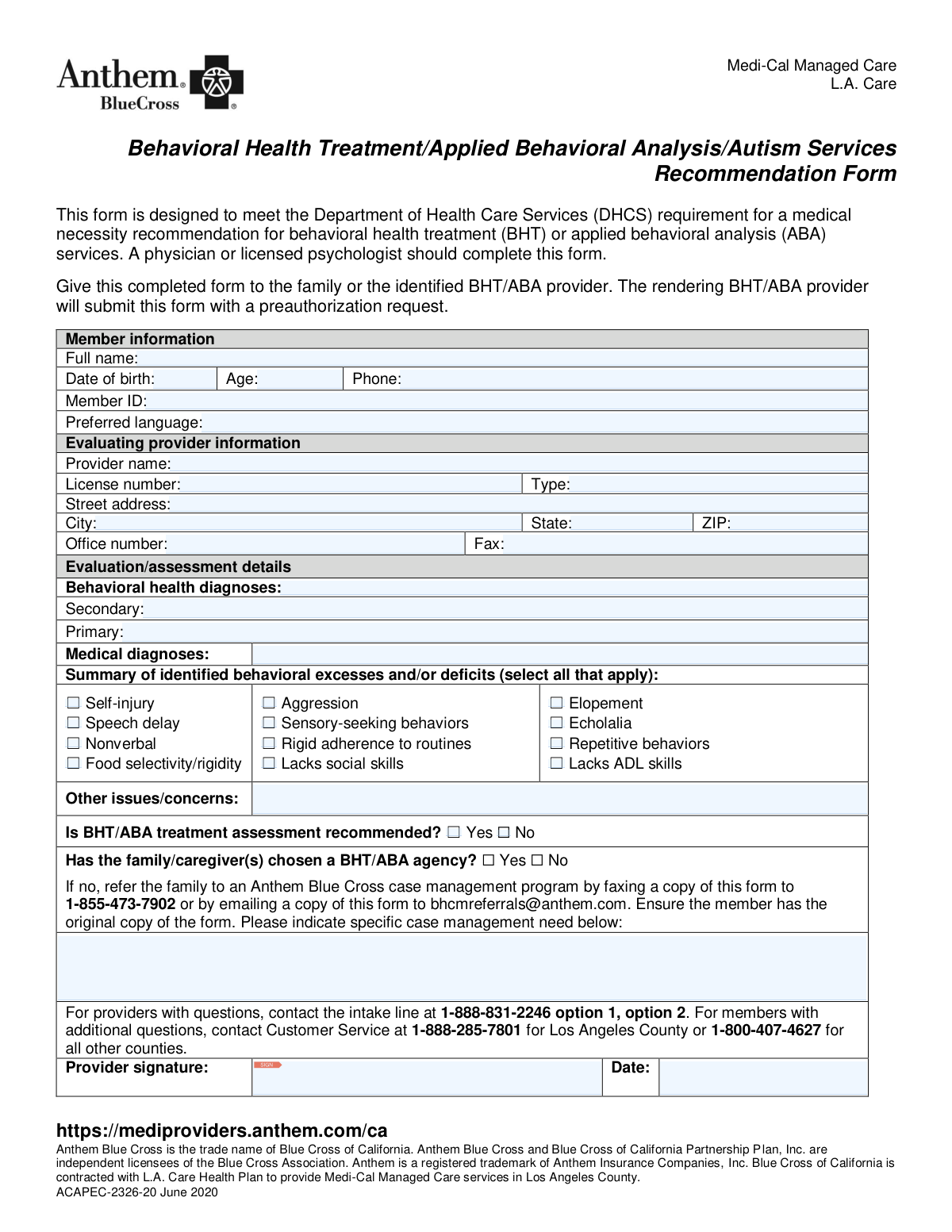
The Behavioral Health Treatment/Applied Behavioral Analysis/Autism Services Recommendation Form (ACAPEC-2326-20) is used by physicians or licensed psychologists to document the medical necessity for BHT or ABA services for a Medi-Cal member. This completed form is submitted by the BHT/ABA provider along with a preauthorization request to Anthem Blue Cross, which is contracted with L.A. Care Health Plan. Today, this form can be filled out quickly and accurately using AI-powered services like Instafill.ai, which can also convert non-fillable PDF versions into interactive fillable forms.
Our AI automatically handles information lookup, data retrieval, formatting, and form filling.
It takes less than a minute to fill out ACAPEC-2326-20 using our AI form filling.
Securely upload your data. Information is encrypted in transit and deleted immediately after the form is filled out.

Form specifications

Form name: Behavioral Health Treatment/Applied Behavioral Analysis/Autism Services Recommendation Form
Number of pages: 1
Language: English
Categories: behavioral health forms, autism forms, health treatment forms, health services forms, health forms
main-image

Instafill Demo: How to fill out PDF forms in seconds with AI

How to Fill Out ACAPEC-2326-20 Online for Free in 2026

Are you looking to fill out a ACAPEC-2326-20 form online quickly and accurately? Instafill.ai offers the #1 AI-powered PDF filling software of 2026, allowing you to complete your ACAPEC-2326-20 form in just 37 seconds or less.
Follow these steps to fill out your ACAPEC-2326-20 form online using Instafill.ai:
  1. 1 Navigate to Instafill.ai and upload or select the Behavioral Health Treatment Recommendation Form.
  2. 2 Provide the member's information, including their full name, date of birth, and Medi-Cal Member ID, allowing the AI to populate the correct fields.
  3. 3 Enter your details as the evaluating provider, such as your name, license number, and office contact information.
  4. 4 Input the evaluation details, including the primary and secondary behavioral health diagnoses and any relevant medical diagnoses.
  5. 5 Check the applicable boxes to summarize the member's identified behavioral excesses and/or deficits.
  6. 6 Indicate whether BHT/ABA treatment is recommended and if the family has chosen a provider agency.
  7. 7 Review all the information populated by the AI for accuracy, then digitally sign and date the form to finalize the recommendation.

Our AI-powered system ensures each field is filled out correctly, reducing errors and saving you time.

Why Choose Instafill.ai for Your Fillable ACAPEC-2326-20 Form?

Speed

Complete your ACAPEC-2326-20 in as little as 37 seconds.

Up-to-Date

Always use the latest 2026 ACAPEC-2326-20 form version.

Cost-effective

No need to hire expensive lawyers.

Accuracy

Our AI performs 10 compliance checks to ensure your form is error-free.

Security

Your personal information is protected with bank-level encryption.

Frequently Asked Questions About Form ACAPEC-2326-20

This form is used to document a medical necessity recommendation for Behavioral Health Treatment (BHT) or Applied Behavioral Analysis (ABA) services for a Medi-Cal member. It is a required step for the BHT/ABA provider to request preauthorization for these services.

A physician or a licensed psychologist who has evaluated the member must complete and sign this form to recommend services.

Give the completed form to the member's family or their chosen BHT/ABA provider. The BHT/ABA provider will then submit this form with a preauthorization request to Anthem Blue Cross.

You must provide the member's full name, date of birth, age, phone number, Member ID, and their preferred language for communication.

If no provider has been chosen, you must refer the family to the Anthem Blue Cross case management program by faxing or emailing this form as instructed. Ensure the member receives the original copy of the form.

Providers with questions can contact the intake line at 1-888-831-2246, selecting option 1 and then option 2 for assistance.

You should list the member's primary and secondary behavioral health diagnoses, as well as any other relevant medical diagnoses that support the need for treatment.

Check all the boxes that apply to the member's condition, such as aggression, speech delay, or lack of social skills. Use the 'Other issues/concerns' field for any behaviors not listed.

Yes, services like Instafill.ai use AI to accurately auto-fill form fields from your saved information, which can save time and help prevent errors.

If your PDF is not fillable, you can use a service like Instafill.ai to convert it into an interactive, fillable form. This allows you to easily type in all the required information online.

To fill this form out online, you can upload it to a platform like Instafill.ai. The tool will make the fields interactive so you can type your answers, save your progress, and easily share the completed document.

The rendering BHT/ABA provider is responsible for submitting the preauthorization request, which must include this completed recommendation form.

This specific form is for Medi-Cal Managed Care members covered by L.A. Care Health Plan who receive services through Anthem Blue Cross in Los Angeles County.

Compliance ACAPEC-2326-20
Validation Checks by Instafill.ai

1
Member Age and Date of Birth Consistency
This check validates that the entered 'Age' is consistent with the 'Date of Birth' provided. It calculates the age from the date of birth and compares it to the value in the age field. This is important for ensuring data accuracy for eligibility and treatment planning. If the values do not match, the form submission will be flagged for manual review to correct the discrepancy.
2
Member ID Format Validation
This check ensures the 'Member ID' conforms to the specific format required by L.A. Care/Anthem Blue Cross. It verifies the length, character type (alphanumeric), and any required prefixes or suffixes. A valid Member ID is critical for correctly identifying the member in the system and processing the request. An invalid format will result in a rejection, requiring the user to correct the ID before resubmission.
3
Evaluating Provider Information Completeness
This validation ensures that all fields in the 'Evaluating provider information' section, including name, license number, type, full address, and office number, are filled out. Complete provider information is required for credentialing verification and to facilitate communication regarding the member's case. An incomplete section will prevent form submission and prompt the user to provide the missing details.
4
Valid Provider License Type
This check verifies that the 'Type' of provider license entered is either 'Physician' or 'Licensed Psychologist', as specified in the form's instructions. This is crucial because only these specific provider types are authorized to make this recommendation. If an invalid provider type is entered, the form will be rejected, as the recommendation would not be considered valid.
5
Phone and Fax Number Formatting
This validation ensures that all phone number fields ('Phone', 'Office number', 'Fax') follow a standard 10-digit format (e.g., XXX-XXX-XXXX or (XXX) XXX-XXXX). Correctly formatted numbers are essential for successful communication with the member and provider. An improperly formatted number will trigger an error, requiring the user to correct the entry before proceeding.
6
Primary Behavioral Health Diagnosis Requirement
This check confirms that the 'Primary' behavioral health diagnosis field is not empty. A primary diagnosis is the fundamental justification for recommending BHT/ABA services and is required for determining medical necessity. Failure to provide a primary diagnosis will result in an error, as the request cannot be evaluated without this critical information.
7
Behavioral Deficits Justification
This validation ensures that at least one checkbox is selected in the 'Summary of identified behavioral excesses and/or deficits' section or that the 'Other issues/concerns' text field is populated. This information provides the clinical evidence and justification for the recommended treatment. If no deficits or concerns are identified, the form submission will fail, as there is no documented reason for the BHT/ABA request.
8
Mandatory BHT/ABA Recommendation Selection
This check verifies that a selection of either 'Yes' or 'No' has been made for the question 'Is BHT/ABA treatment assessment recommended?'. This is the core purpose of the form, and a clear recommendation is mandatory for processing. The form cannot be submitted until a choice is made, as it dictates the next steps in the member's care pathway.
9
Conditional Requirement for Case Management Need
This validation enforces a conditional rule: if the user selects 'No' for 'Has the family/caregiver(s) chosen a BHT/ABA agency?', then the 'Specific Case Management Need' text field must be filled out. This is important because it provides the case management team with the necessary context to assist the family in finding a provider. If the condition is met and the field is empty, the user will be prompted to provide details before submission.
10
Provider Signature Date Validity
This check ensures the 'Date' next to the provider's signature is a valid date and is not set in the future. The signature date documents when the recommendation was officially made and is a key part of the legal record. An invalid or future date will cause a validation error, requiring the provider to enter a correct and current or past date.
11
Provider Signature Presence
This validation confirms that the 'Provider signature' field is not empty, indicating that the form has been signed by the evaluating provider. The provider's signature is a legal attestation to the accuracy of the information and the validity of the recommendation. A missing signature will block the submission, as an unsigned form is considered incomplete and invalid.
12
ZIP Code Format Validation
This check ensures the provider's 'ZIP' code is in a valid 5-digit or 9-digit (ZIP+4) format. A correct ZIP code is essential for accurate mail delivery and for verifying the provider's location and network status. An invalid format will trigger an error message, prompting the user to correct the entry.
13
Logical Dependency for Echolalia
This check enforces the logical rule that if the 'Echolalia' checkbox is selected, the 'Speech delay' checkbox must also be selected. Echolalia is a specific type of speech-related behavior, making this check important for ensuring clinical data consistency. If 'Echolalia' is checked without 'Speech delay', the form will prompt the user to review their selections for accuracy.

Common Mistakes in Completing ACAPEC-2326-20

Entering an Incorrect or Incomplete Member ID

The Member ID is the primary identifier used to link the form to the correct patient file for preauthorization. A simple transcription error, such as swapping digits or omitting a character, can cause the form to be rejected or misfiled, leading to significant delays in processing the request for services. To prevent this, always double-check the ID against the member's insurance card. AI-powered form filling tools like Instafill.ai can help by validating ID formats and cross-referencing saved information to ensure accuracy.

Submitting an Unsigned or Undated Form

A missing provider signature or date is one of the most common and easily avoidable reasons for form rejection. An unsigned form is not legally valid, and a missing date makes it impossible to establish a timeline for the recommendation. This error guarantees the form will be returned to the provider for completion, which can add weeks of delay to a time-sensitive treatment request.

Form Completed by an Unqualified Provider

The form explicitly states it must be completed by a physician or licensed psychologist to be valid. If another type of professional, such as a therapist or case manager, fills it out, the recommendation will be rejected by the insurance plan. This critical error forces the family to schedule a new evaluation with a qualified provider, severely delaying the start of necessary care.

Ignoring Referral Steps When No Agency is Chosen

The form provides clear instructions if a family has not yet chosen a BHT/ABA agency: the provider must fax or email the form to the case management program. Providers sometimes check 'No' but fail to take this required next step, leaving the family in limbo without guidance on how to find a provider. This inaction stalls the entire process and places the burden back on the family to navigate a complex system alone.

Missing Provider License Number or Type

The provider's license number and type are essential for verifying that the recommendation is from a qualified professional as required. Omitting this information prevents the insurance plan from confirming the provider's credentials, leading to an automatic rejection or a request for more information. This stalls the preauthorization process until the provider's credentials can be properly validated.

Failing to Answer the Core Recommendation Question

The entire purpose of the form is to document a formal recommendation for or against BHT/ABA services. Forgetting to check 'Yes' or 'No' for the question 'Is BHT/ABA treatment assessment recommended?' renders the form incomplete and useless. This simple oversight guarantees rejection and forces the provider to resubmit, delaying the member's access to a crucial assessment.

Using Illegible Handwriting on a Printed Form

Since this form is often a non-fillable PDF, providers may print it and fill it out by hand. Illegible handwriting for critical details like the member's name, diagnoses, or provider contact information can make the form impossible to process. This leads to data entry errors or outright rejection, requiring the provider to fill it out again. Tools like Instafill.ai can convert flat PDFs into fillable versions, allowing for clear, typed entries that eliminate legibility issues.

Vague or Incomplete Diagnostic Information

The form asks for primary and secondary behavioral diagnoses, as well as medical diagnoses. Providers may list a diagnosis without specifying if it's primary or secondary, or they might omit relevant medical conditions that influence behavior. This lack of detail can make it difficult for reviewers to assess medical necessity, potentially leading to requests for more information or denial of services.

Underutilizing the 'Other Issues/Concerns' Section

Providers often focus only on the checkboxes and neglect to add crucial context in the 'Other issues/concerns' text field. This section is vital for describing unique behaviors, specific family circumstances, or other factors that don't fit into a category but are essential for justifying the need for treatment. Leaving this blank when important details exist can result in an incomplete clinical picture and weaken the case for medical necessity.

Mismatch Between Date of Birth and Age

Providers sometimes manually enter both the date of birth and the current age, but a miscalculation can create a data conflict. This discrepancy can raise red flags during processing and may require clarification, slowing down the approval. The best practice is to enter only the date of birth and let the system calculate the age, or to be extremely careful if entering both.
Saved over 80 hours a year

“I was never sure if my IRS forms like W-9 were filled correctly. Now, I can complete the forms accurately without any external help.”

Kevin Martin Green

Your data stays secure with advanced protection from Instafill and our subprocessors

Robust compliance program

Transparent business model

You’re not the product. You always know where your data is and what it is processed for.

ISO 27001, HIPAA, and GDPR

Our subprocesses adhere to multiple compliance standards, including but not limited to ISO 27001, HIPAA, and GDPR.

Security & privacy by design

We consider security and privacy from the initial design phase of any new service or functionality. It’s not an afterthought, it’s built-in, including support for two-factor authentication (2FA) to further protect your account.

Fill out ACAPEC-2326-20 with Instafill.ai

Worried about filling PDFs wrong? Instafill securely fills behavioral-health-treatmentapplied-behavioral-analysisautism-services-recommendation-form forms, ensuring each field is accurate.