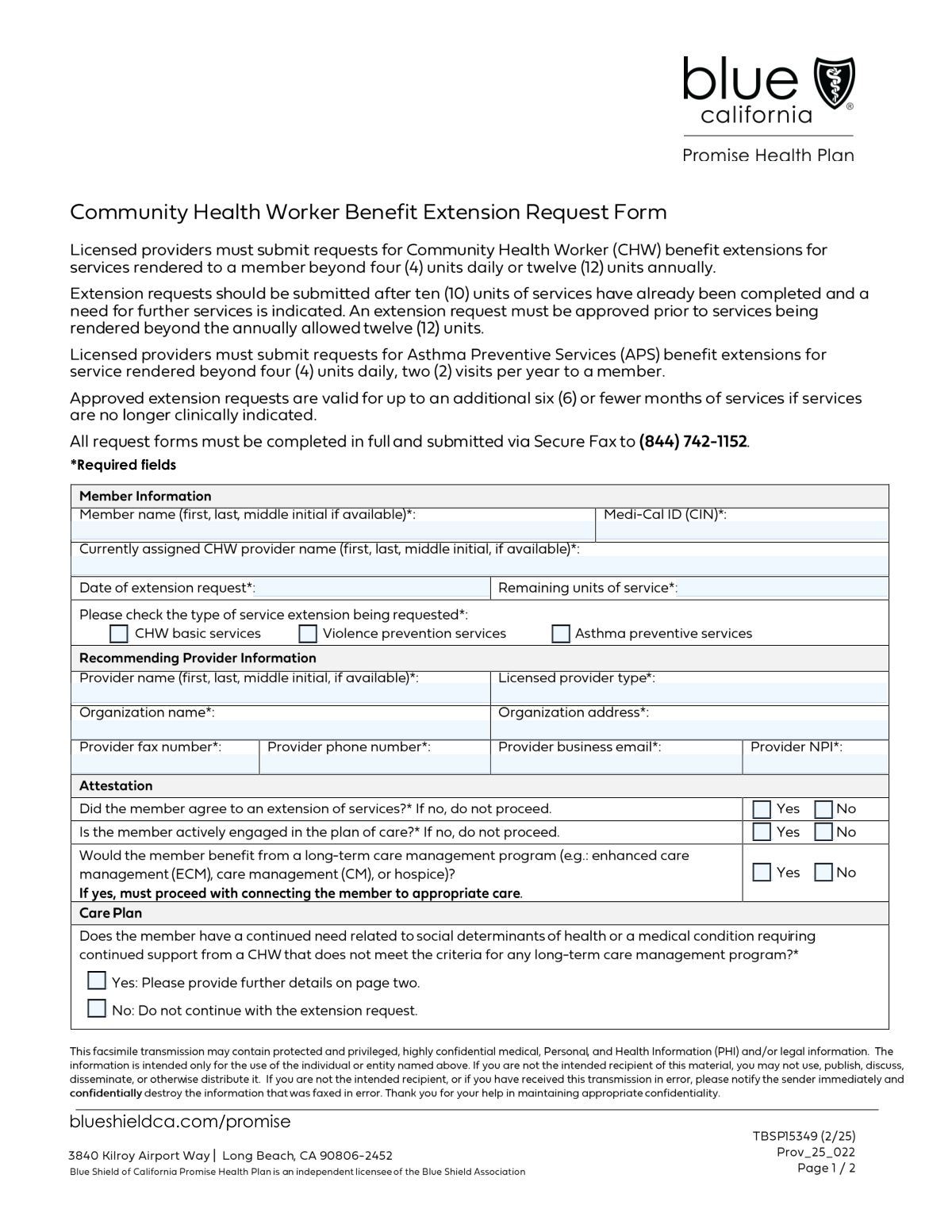
Yes! You can use AI to fill out Community Health Worker (CHW) Services Request for Extension of Services
The Community Health Worker (CHW) Services Request for Extension of Services is a crucial document for healthcare providers to justify the need for continued CHW support for a Medi-Cal member. It requires detailed information about the member's condition, their engagement in the care plan, and a clear rationale for why extending services is medically necessary. This ensures members receive uninterrupted support for social determinants of health, chronic conditions, or other specific needs. Today, this form can be filled out quickly and accurately using AI-powered services like Instafill.ai, which can also convert non-fillable PDF versions into interactive fillable forms.
Our AI automatically handles information lookup, data retrieval, formatting, and form filling.
It takes less than a minute to fill out CHW Services Extension Request using our AI form filling.
Securely upload your data. Information is encrypted in transit and deleted immediately after the form is filled out.
Form specifications
| Form name: | Community Health Worker (CHW) Services Request for Extension of Services |
| Number of fields: | 46 |
| Number of pages: | 2 |
| Language: | English |
| Categories: | health forms, health services forms |
Instafill Demo: How to fill out PDF forms in seconds with AI
How to Fill Out CHW Services Extension Request Online for Free in 2026
Are you looking to fill out a CHW SERVICES EXTENSION REQUEST form online quickly and accurately? Instafill.ai offers the #1 AI-powered PDF filling software of 2026, allowing you to complete your CHW SERVICES EXTENSION REQUEST form in just 37 seconds or less.
Follow these steps to fill out your CHW SERVICES EXTENSION REQUEST form online using Instafill.ai:
- 1 Navigate to Instafill.ai and upload your CHW Services Extension Request form or select it from the template library.
- 2 Use the AI assistant to automatically populate member information, such as their name and Medi-Cal ID (CIN), from your records.
- 3 Enter the recommending provider's details, including name, NPI, and organization information, letting the AI guide you through each required field.
- 4 Complete the Extension Request Details section, specifying the request date, remaining units, and confirming the member's agreement and active engagement.
- 5 Check the appropriate boxes indicating the specific services needed (e.g., asthma preventive, violence prevention) and provide a detailed justification for continued care, outlining goals and objectives.
- 6 Review the entire form for accuracy and completeness, then securely sign and submit it to the appropriate health plan or authority.
Our AI-powered system ensures each field is filled out correctly, reducing errors and saving you time.
Why Choose Instafill.ai for Your Fillable CHW Services Extension Request Form?
Speed
Complete your CHW Services Extension Request in as little as 37 seconds.
Up-to-Date
Always use the latest 2026 CHW Services Extension Request form version.
Cost-effective
No need to hire expensive lawyers.
Accuracy
Our AI performs 10 compliance checks to ensure your form is error-free.
Security
Your personal information is protected with bank-level encryption.
Frequently Asked Questions About Form CHW Services Extension Request
This form is used by a healthcare provider to request an extension of Community Health Worker (CHW) services for a Medi-Cal member whose authorized services are ending.
A licensed recommending provider, such as a doctor or other clinician overseeing the member's care, should complete and submit this form on the member's behalf.
You will need the member's Medi-Cal ID (CIN), the recommending provider's National Provider Identifier (NPI), and details about the member's ongoing health needs and goals.
The form requires the member's agreement to proceed. If the member has not agreed to the extension, the request should not be submitted.
These sections are required only if the member has a continued need for CHW support but does not meet the criteria for a long-term care management program like ECM or hospice.
One unit of service is equal to 30 minutes of the Community Health Worker's time. You must specify the CPT codes and the total number of 30-minute units being requested.
The 'Assigned CHW Provider' is the specific Community Health Worker currently working with the member. The 'Recommending Provider' is the licensed clinician who is formally requesting the extension of those services.
This form is for members who would not benefit from programs like Enhanced Care Management (ECM). If the member qualifies for such a program, you should pursue that referral path instead of this extension request.
The member's Medi-Cal Identification Number should be entered in the 'Medi-Cal ID (CIN)' field within the 'Member Information' section.
The form includes fields for the provider's fax number and email address, suggesting it can be submitted electronically. Please follow the specific submission instructions provided by the health plan.
Yes, AI-powered services like Instafill.ai can accurately auto-fill form fields, such as provider and organization details, to save you time and reduce errors.
You can use a service like Instafill.ai to upload the form and complete it online. This makes it easy to type in your information and ensure all required fields are filled.
Tools like Instafill.ai can convert flat, non-fillable PDFs into interactive forms. This allows you to easily type your information directly into the fields online without needing to print the form.
Yes, you must confirm that the member is actively engaged in their plan of care. The form indicates the request should not proceed if the member is not engaged.
Compliance CHW Services Extension Request
Validation Checks by Instafill.ai
1
Ensures Provider NPI is a valid 10-digit number
This check verifies that the National Provider Identifier (NPI) field contains exactly 10 numeric digits. The NPI is a standard, unique identifier for healthcare providers, and its accuracy is critical for regulatory compliance, provider verification, and billing processes. A submission with an invalid or malformed NPI will be rejected as the recommending provider cannot be correctly identified.
2
Validates the format of the Member's Medi-Cal ID (CIN)
This validation ensures the Medi-Cal ID (Client Identification Number) adheres to the state-mandated format for length and character type. Correctly identifying the member is the most fundamental requirement for processing the request and associating it with the correct health plan record. A malformed ID will result in an immediate rejection or significant processing delay.
3
Ensures Date of Extension Request is not a future date
This validation confirms that the entered date for the extension request is today's date or a date in the past, but not in the future. A future date is logically impossible for a request being submitted and indicates a data entry error. If the date is invalid, the form cannot be processed as the timeline of the request is unclear.
4
Verifies exclusive selection for Member Agreement status
This check ensures that either the 'Yes' or 'No' checkbox for 'Member Agreed to Extension' is selected, but not both. This is crucial for capturing unambiguous consent from the member regarding the service extension. A submission with neither or both selected would be invalid due to the contradictory or missing information on consent.
5
Prevents submission if member has not agreed to the extension
This rule blocks the form from being submitted if the 'Member Agreed to Extension No' checkbox is selected. As the form's own instructions state, a 'No' answer means the request should not proceed. This validation prevents the submission of unauthorized or invalid requests, saving processing time and ensuring compliance with consent protocols.
6
Prevents submission if member is not actively engaged
This validation prevents form submission if the 'Member Actively Engaged No' checkbox is selected. The member's active engagement is often a prerequisite for a successful service extension. Submitting a request for a non-engaged member is futile and against process guidelines, so this check enforces that rule at the point of entry.
7
Requires at least one service type to be selected
This check validates that at least one of the service type checkboxes ('CHW basic services', 'Violence prevention services', or 'Asthma preventive services') has been selected. The form is an extension request for a specific service, so failing to specify which service is being extended makes the request incomplete. The submission will be rejected until a service type is defined.
8
Validates the format of the Provider Business Email
This rule ensures the value entered in the 'Provider Business Email' field follows the standard email address format (e.g., [email protected]). A valid email is essential for all electronic communication with the recommending provider regarding the status of the extension request. An invalid format would lead to communication failures and delays in processing.
9
Ensures justification fields are filled if continued need is indicated
This validation checks that if the member is identified as having a continued need for CHW support, the corresponding justification fields ('Benefit Justification', 'CHW Support Goal', etc.) are not empty. These fields contain the critical rationale that reviewers use to approve or deny the extension. Missing this information makes a proper review impossible and will result in the request being rejected for incompleteness.
10
Ensures CPT codes are provided if continued need is indicated
This rule verifies that the 'CPT Codes, Modifiers, and Units' field is completed when a continued need for CHW support is affirmed. These codes are required for service authorization and billing, specifying exactly what services are being requested. Without this information, the health plan cannot process the authorization, making the submission incomplete.
11
Requires details if another healthcare professional is involved
This check ensures that if the user indicates the member is working with another healthcare professional ('Yes' is checked in the 'Healthcare Professional Inquiry' section), the corresponding 'Provider Name' and 'Provider Specialty/License' fields are filled out. This information is vital for care coordination and to provide a complete picture of the member's support system. Failure to provide these details when required would leave a critical information gap.
12
Validates Remaining Units of Service is a non-negative number
This validation ensures the 'Remaining Units of Service' field contains only a non-negative integer. This number is a key data point for determining the urgency and context of the extension request. A negative number or non-numeric text would be invalid data and would prevent the system from correctly assessing the member's current service status.
13
Requires Recommending Provider's core information
This check ensures that the 'Provider Name', 'Licensed Provider Type', and 'Organization Name' fields for the recommending provider are not empty. This information is fundamental to identifying the source of the recommendation and verifying their credentials. A submission lacking these details is incomplete and cannot be properly vetted or processed.
Common Mistakes in Completing CHW Services Extension Request
Users often enter the National Provider Identifier (NPI) incorrectly, either by transposing digits, entering a different ID number like a tax ID, or including non-numeric characters. Since the NPI is a unique 10-digit number used to verify the provider's identity, an incorrect entry will cause an immediate validation failure. To avoid this, carefully enter the 10-digit NPI with no letters or symbols, and double-check it against the provider's official record. AI-powered tools like Instafill.ai can help by automatically validating the NPI format upon entry.
The form requests the full name for the member, CHW, and recommending provider, but users frequently provide incomplete names like 'Dr. Smith' or just a first name and last initial. This ambiguity makes it difficult to accurately identify the individuals in the system, leading to processing delays or misdirected information. Always use the full first name, last name, and middle initial (if available) as they appear on official documents to ensure correct identification.
The 'CPT Codes, Modifiers, and Units' field requires three distinct pieces of information, but users often jumble them, omit necessary modifiers, or miscalculate the units. A common error is forgetting that 1 unit equals 30 minutes, leading to an incorrect request for service time. These mistakes result in claim rejections and authorization delays. To prevent this, clearly list each CPT code, its required modifier, and the correct number of units, and double-check against billing guidelines.
This form has several pairs of mutually exclusive checkboxes, such as 'Member Agreed to Extension Yes/No'. A frequent mistake is checking both 'Yes' and 'No' or checking 'No' (which indicates the request should not proceed) while still completing the rest of the form. This creates a logically invalid submission that will be rejected. Carefully review your selections to ensure they are not contradictory and accurately reflect the member's status and consent.
Many narrative fields like 'Benefit Justification' and 'CHW Support Goal' are conditional. Users sometimes check the box indicating a continued need but then fail to provide the required detailed explanation in the corresponding text boxes. Without this justification, the reviewer has no basis to approve the extension, leading to a likely denial for insufficient information. If you affirm a need, you must provide a thorough, specific narrative in all related fields to support the request.
The member's Medi-Cal ID (CIN) is a critical identifier, but it is often entered with typos, transposed digits, or confused with other numbers like a Social Security Number. An incorrect CIN means the system cannot locate the member, causing the entire submission to be rejected at the first step. To avoid this, meticulously copy the number from the member's official Medi-Cal card and double-check it for accuracy before submission.
In fields requiring justification, such as 'CHW Support Goal', users may provide overly brief or generic statements like 'member needs help' or 'continued support'. This fails to provide the clinical or social context necessary for a reviewer to approve an extension. Such requests are often denied for lacking medical necessity. Be specific by describing the exact tasks the CHW will perform, the goals they will help the member achieve, and how this support addresses the member's specific health conditions or social determinants of health.
Users often confuse the 'Remaining Units of Service' field with the number of units they are requesting. This field is for documenting the units left on the current authorization, not the new amount needed. Entering the wrong value can make the extension request seem premature or incorrectly timed, potentially leading to rejection. Always consult the current service authorization to find the exact number of units remaining before filling out the form.
The form contains many fields that should only be filled out if a specific preceding answer is given (e.g., providing another provider's name only if you checked 'Yes' to the member working with them). A common error is to either fill out these fields when not required or ignore them when they are. This creates a confusing and contradictory submission, which may be returned for correction. Pay close attention to instructions like 'Fill only if...' to ensure the form is completed logically. AI tools like Instafill.ai can prevent this by automatically showing or hiding conditional fields based on your answers.
When filling out the 'Recommending Provider Information', users sometimes leave the direct phone number or email blank, assuming the organization's general contact information is sufficient. If the form reviewer has a question, the lack of direct contact information can cause significant delays or even a denial if clarification cannot be obtained quickly. Always provide a direct business phone number and email for the recommending provider to ensure any issues can be resolved efficiently.
Saved over 80 hours a year
“I was never sure if my IRS forms like W-9 were filled correctly. Now, I can complete the forms accurately without any external help.”
Kevin Martin Green
Your data stays secure with advanced protection from Instafill and our subprocessors

Robust compliance program
Transparent business model
You’re not the product. You always know where your data is and what it is processed for.
ISO 27001, HIPAA, and GDPR
Our subprocesses adhere to multiple compliance standards, including but not limited to ISO 27001, HIPAA, and GDPR.
Security & privacy by design
We consider security and privacy from the initial design phase of any new service or functionality. It’s not an afterthought, it’s built-in, including support for two-factor authentication (2FA) to further protect your account.
Fill out CHW Services Extension Request with Instafill.ai
Worried about filling PDFs wrong? Instafill securely fills community-health-worker-chw-services-request-for-extension-of-services forms, ensuring each field is accurate.