Yes! You can use AI to fill out San Francisco Health Plan (SFHP) Doula Services Attestation Form
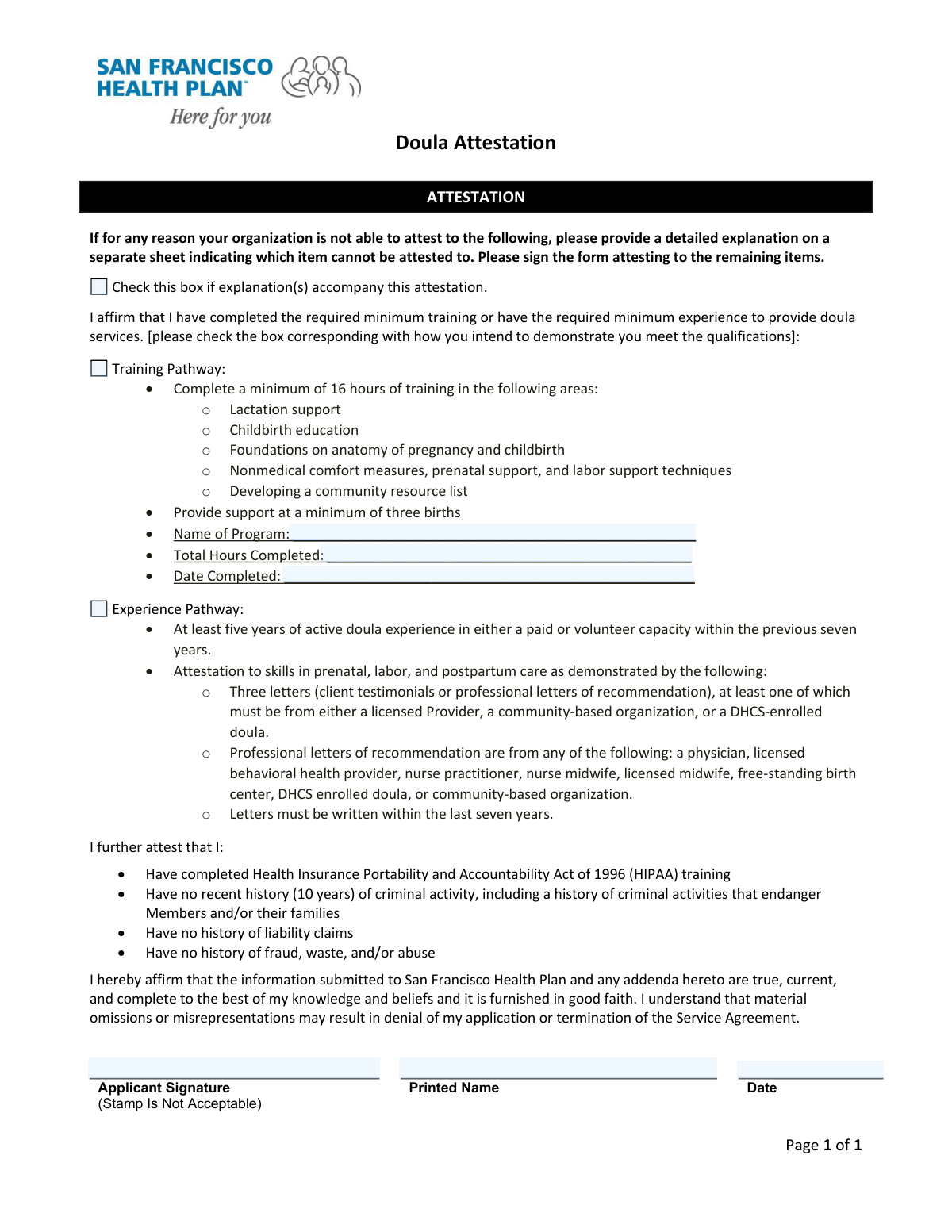
This form is a declaration for doulas seeking to partner with the San Francisco Health Plan (SFHP). It allows them to attest that they meet the required qualifications through either a 'Training Pathway' (completing specific training hours) or an 'Experience Pathway' (having extensive prior experience). This process ensures that SFHP members receive care from qualified and vetted doula professionals. Today, this form can be filled out quickly and accurately using AI-powered services like Instafill.ai, which can also convert non-fillable PDF versions into interactive fillable forms.
SFHP Doula Attestation Form is part of the
health forms and health services forms categories on Instafill.
Our AI automatically handles information lookup, data retrieval, formatting, and form filling.
It takes less than a minute to fill out SFHP Doula Attestation Form using our AI form filling.
Securely upload your data. Information is encrypted in transit and deleted immediately after the form is filled out.
Form specifications
| Form name: | San Francisco Health Plan (SFHP) Doula Services Attestation Form |
| Number of fields: | 9 |
| Number of pages: | 1 |
| Language: | English |
More forms in Health forms
Instafill Demo: How to fill out PDF forms in seconds with AI
How to Fill Out SFHP Doula Attestation Form Online for Free in 2026
Are you looking to fill out a SFHP DOULA ATTESTATION FORM form online quickly and accurately? Instafill.ai offers the #1 AI-powered PDF filling software of 2026, allowing you to complete your SFHP DOULA ATTESTATION FORM form in just 37 seconds or less.
Follow these steps to fill out your SFHP DOULA ATTESTATION FORM form online using Instafill.ai:
- 1 Navigate to Instafill.ai and upload or select the SFHP Doula Services Attestation Form.
- 2 Use the AI tool to check the box for your qualification method: either the 'Experience Pathway' or the 'Training Pathway'.
- 3 If you selected the 'Training Pathway', fill in the required details of your training program, including its name, completion date, and total hours.
- 4 Carefully review and confirm all attestation statements regarding your skills, professional history, and compliance with regulations like HIPAA.
- 5 If you are unable to attest to any specific item, check the box indicating an explanation is attached and prepare the separate document.
- 6 Provide your digital signature, printed name, and the current date in the applicant signature block to certify the information.
- 7 Download the completed and signed attestation form to submit to the San Francisco Health Plan.
Our AI-powered system ensures each field is filled out correctly, reducing errors and saving you time.
Why Choose Instafill.ai for Your Fillable SFHP Doula Attestation Form Form?
Speed
Complete your SFHP Doula Attestation Form in as little as 37 seconds.
Up-to-Date
Always use the latest 2026 SFHP Doula Attestation Form form version.
Cost-effective
No need to hire expensive lawyers.
Accuracy
Our AI performs 10 compliance checks to ensure your form is error-free.
Security
Your personal information is protected with bank-level encryption.
Frequently Asked Questions About Form SFHP Doula Attestation Form
This form is a Doula Attestation used to verify that you meet the qualification requirements for either the Training Pathway or the Experience Pathway, likely for credentialing with a health plan.
Doulas who are applying to be recognized or credentialed by an organization, such as the San Francisco Health Plan, must complete this form to attest to their qualifications and experience.
The Training Pathway is for doulas who have completed a minimum of 16 hours of formal training. The Experience Pathway is for doulas with at least five years of active experience within the last seven years.
If you select the Training Pathway, you must provide the name of the training program, the date you completed it, and the total number of hours completed.
You must submit three letters of recommendation or client testimonials. At least one of these letters must be from a licensed provider, a community-based organization, or a PERIN-enrolled doula.
You are attesting that you have completed HIPAA training and have no recent history of criminal activity, liability claims, or fraud that would compromise your ability to serve clients.
If you cannot agree to a statement, you must check the box indicating an explanation is attached and provide a written explanation on a separate sheet of paper.
You must provide a handwritten signature (stamps are not allowed), print your name clearly, and write the date you are signing the form in the designated Applicant Signature Block.
Material omissions or misrepresentations may result in the denial of your application or the termination of your service agreement. It is crucial to ensure all information is true and complete.
Yes, services like Instafill.ai use AI to help you accurately auto-fill form fields with your saved information, which saves time and helps prevent errors.
Upload the form to the Instafill.ai platform. The service will make the document interactive, allowing you to click and fill fields with your saved profile data or type in new information.
Tools like Instafill.ai can convert flat, non-fillable PDFs into interactive forms. Simply upload your document, and the platform will enable you to fill it out and sign it electronically.
Compliance SFHP Doula Attestation Form
Validation Checks by Instafill.ai
1
Pathway Selection Requirement
This validation ensures that the applicant has selected at least one of the two possible pathways: 'Training Pathway' or 'Experience Pathway'. An application is considered incomplete if no pathway is chosen, as this is the primary basis for qualification. If neither box is checked, the form submission should be rejected and returned to the applicant for correction.
2
Conditional Requirement for Training Pathway Details
This check verifies that if the 'Training Pathway' checkbox is selected, the associated detail fields ('Name of Program', 'Total Hours Completed', 'Date Completed') are all filled out. These details are essential for verifying the applicant's claim of completing the training pathway. A failure in this validation indicates missing information and should prevent the form from being processed until the details are provided.
3
Training Hours Minimum Threshold
This validation confirms that the value entered in 'Total Hours Completed' is a number greater than or equal to 16. The form explicitly states a minimum of 16 hours is required for the Training Pathway. This check prevents applicants who have not met the minimum time commitment from qualifying through this pathway and ensures compliance with program standards.
4
Training Completion Date Validity
This check ensures the 'Training Pathway — Date Completed' field contains a valid, properly formatted date that is not in the future. It confirms that the training has already been completed as attested. Submissions with future dates or invalid formats are rejected to maintain data integrity and prevent fraudulent claims.
5
Signature Block Completeness
This validation verifies that the 'Applicant Signature', 'Printed Name', and signature 'Date' fields are all present. The signature block is a legal attestation of the form's accuracy, and all components are required for the document to be considered valid and complete. An incomplete signature block would render the attestation void and requires the form to be returned for completion.
6
Signature Date Logic
This check ensures the 'Date' in the Applicant Signature Block is a valid, non-future date. The signature date captures the moment of attestation and must be a real, past or present date. This prevents logical impossibilities and ensures the attestation is current at the time of submission.
7
Logical Date Consistency Check
This validation compares the 'Training Pathway — Date Completed' with the signature 'Date'. The training completion date must be on or before the signature date. An applicant cannot attest to having completed training on a date that is after they signed the form, and this check prevents such logical errors.
8
Printed Name Format Validation
This check ensures the 'Printed Name' field contains a plausible full name, typically consisting of at least two words (first and last name) and containing only alphabetic characters. This is important for legibility and accurate identification of the applicant, as the signature itself may be difficult to read. The validation rejects entries with numbers, special characters, or single-word names.
9
Explanation Attachment Flag
This validation checks if the 'Check this box if explanation(s) accompany this attestation' box is selected. If it is, the system should flag the submission for mandatory manual review to ensure the corresponding physical or digital attachment is present. This ensures that exceptions to the attestation are properly documented and reviewed as required by the process.
10
Stray Data in Training Pathway Fields
This is the inverse of the conditional requirement; it ensures that if the 'Training Pathway' checkbox is *not* selected, the associated detail fields ('Name of Program', 'Total Hours Completed', 'Date Completed') are empty. This prevents confusion and the submission of irrelevant or accidental data. The system should clear these fields or return an error if they contain data without the corresponding pathway selection.
11
Total Hours Data Type and Range
This validation ensures the 'Total Hours Completed' field contains only a positive integer. It prevents the entry of text, decimals, or negative numbers, which are invalid for this field. This check maintains data quality and ensures that calculations or comparisons involving this field can be performed reliably.
12
Dual Pathway Selection Review
This check identifies submissions where both the 'Training Pathway' and 'Experience Pathway' checkboxes are selected. Since the rules for selecting both are not specified, such a submission may be valid but requires clarification. The validation should flag the application for manual review to confirm the applicant's intent and verify that they meet the criteria for both pathways.
Common Mistakes in Completing SFHP Doula Attestation Form
Applicants often check the 'Training Pathway' box but forget to fill in the corresponding details like the program name, completion date, and total hours. This happens when they don't have their training records handy while completing the form. An incomplete application cannot be processed and will be returned, causing significant delays in the qualification process. To avoid this, gather all necessary certificates and records before starting the form and double-check that all conditional fields are completed.
A common error is checking both the 'Training Pathway' and 'Experience Pathway' boxes, or checking neither. This creates ambiguity for the reviewer, who cannot determine the basis of the applicant's qualifications. Applications with unclear or conflicting information are typically marked as incomplete and rejected. Applicants should carefully read the requirements for each pathway and select only the one that accurately represents their qualifications.
Applicants pursuing the 'Experience Pathway' often misinterpret the specific time requirement, which is 'at least five years of active doula experience... within the previous seven years'. People may mistakenly count years outside the seven-year window or include periods of inactivity. This leads to immediate disqualification if an audit reveals the discrepancy. To prevent this, create a clear timeline of your active work history from the last seven years to confirm you meet the minimum five-year threshold before checking the box.
The form explicitly requires a 'handwritten signature', but many applicants use a typed font, a digital signature image, or a stamp. This occurs due to the convenience of filling forms digitally. However, it renders the attestation legally invalid, and the form will be rejected outright, requiring the applicant to print, sign, and resubmit it. Always print the form to provide a wet signature if a handwritten one is specified.
Applicants may attach a required explanation sheet but forget to check the corresponding box on the form, or vice-versa. This disconnect means the reviewer might not see the 'explanation attached' flag and discard the attachment, or see the flag but find no document, marking the application incomplete. To avoid this, treat the checkbox and the attachment as a single step: when you attach the document, immediately check the box on the form to ensure they are processed together.
An applicant's signature may not clearly match their printed name, or they might use a nickname or maiden name in one field and a legal name in another. This creates identity verification problems for the processing agency, potentially delaying background checks and the overall application. Always use your full, current legal name as printed on your official documents and ensure the printed name is a legible version of the name used in the signature.
The date field next to the signature is frequently left blank, entered in an ambiguous format (e.g., 01/02/2024), or post-dated. The signature date is a critical legal component that attests to the accuracy of the information on that specific day. An undated or improperly dated form is considered invalid and will be sent back for correction. Always enter the current date in a clear, unambiguous format (e.g., MM/DD/YYYY).
When a form is only available as a non-fillable PDF, applicants often print it and fill it out by hand, leading to illegible entries for names, dates, and program details. This illegibility can cause data entry errors by the receiving organization, leading to verification failures or incorrect records. AI-powered tools like Instafill.ai can convert non-fillable PDFs into fillable versions, allowing you to type directly into the fields for a clean, legible, and professional submission.
For the 'Training Pathway', applicants sometimes estimate or incorrectly add up their 'Total Hours Completed' rather than referring to their official certificate. This can happen when summarizing hours from multiple smaller training sessions. If the stated hours do not match the official documentation during a verification check, it can be grounds for rejecting the application. Always refer to the official training certificate for the exact number of hours and enter that figure.
Saved over 80 hours a year
“I was never sure if my IRS forms like W-9 were filled correctly. Now, I can complete the forms accurately without any external help.”
Kevin Martin Green
Your data stays secure with advanced protection from Instafill and our subprocessors

Robust compliance program
Transparent business model
You’re not the product. You always know where your data is and what it is processed for.
ISO 27001, HIPAA, and GDPR
Our subprocesses adhere to multiple compliance standards, including but not limited to ISO 27001, HIPAA, and GDPR.
Security & privacy by design
We consider security and privacy from the initial design phase of any new service or functionality. It’s not an afterthought, it’s built-in, including support for two-factor authentication (2FA) to further protect your account.
Fill out SFHP Doula Attestation Form with Instafill.ai
Worried about filling PDFs wrong? Instafill securely fills san-francisco-health-plan-sfhp-doula-services-attestation-form forms, ensuring each field is accurate.