Yes! You can use AI to fill out Blue Shield Promise Community Health Worker (CHW) Services Recommendation Form

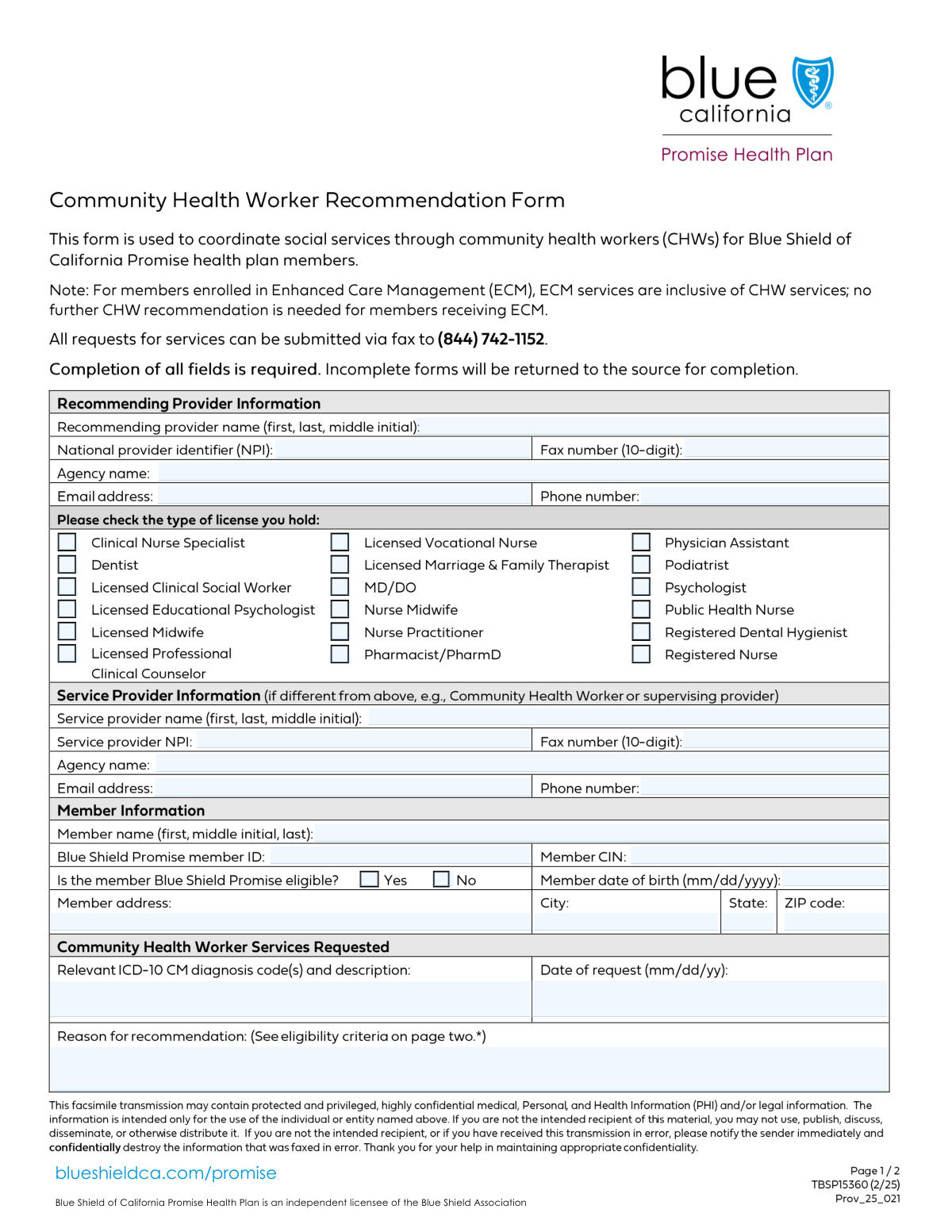
This form is a formal request submitted by a licensed provider to Blue Shield Promise to document a member's eligibility and medical necessity for receiving Community Health Worker (CHW) services. It is essential for authorizing services like health system navigation, education, and resource coordination, ensuring the member receives support and services can be billed correctly. Today, this form can be filled out quickly and accurately using AI-powered services like Instafill.ai, which can also convert non-fillable PDF versions into interactive fillable forms.
Our AI automatically handles information lookup, data retrieval, formatting, and form filling.
It takes less than a minute to fill out CHW Services Recommendation Form using our AI form filling.
Securely upload your data. Information is encrypted in transit and deleted immediately after the form is filled out.

Form specifications

Form name: Blue Shield Promise Community Health Worker (CHW) Services Recommendation Form
Number of fields: 72
Number of pages: 2
Language: English
Categories: health forms, health services forms
main-image

Instafill Demo: How to fill out PDF forms in seconds with AI

How to Fill Out CHW Services Recommendation Form Online for Free in 2026

Are you looking to fill out a CHW SERVICES RECOMMENDATION FORM form online quickly and accurately? Instafill.ai offers the #1 AI-powered PDF filling software of 2026, allowing you to complete your CHW SERVICES RECOMMENDATION FORM form in just 37 seconds or less.
Follow these steps to fill out your CHW SERVICES RECOMMENDATION FORM form online using Instafill.ai:
  1. 1 Navigate to Instafill.ai and upload the CHW Services Recommendation Form or select it from the template library.
  2. 2 Use the AI assistant to automatically fill in the Member's Details, including their name, Blue Shield Promise Member ID, and date of birth.
  3. 3 Provide the Recommending Provider's information, such as name, NPI, and license type, and let the AI pre-fill any saved contact details.
  4. 4 Enter the details for the designated Service Provider who will be delivering the CHW services.
  5. 5 Check the applicable boxes under the 'Reason for Recommendation' section to indicate the member's eligibility criteria and provide a detailed explanation.
  6. 6 Specify the requested CHW services, including relevant diagnosis codes, CPT codes, quantity of units, and service dates.
  7. 7 Review all entered information for accuracy, then securely sign and submit the form directly or download the completed document.

Our AI-powered system ensures each field is filled out correctly, reducing errors and saving you time.

Why Choose Instafill.ai for Your Fillable CHW Services Recommendation Form Form?

Speed

Complete your CHW Services Recommendation Form in as little as 37 seconds.

Up-to-Date

Always use the latest 2026 CHW Services Recommendation Form form version.

Cost-effective

No need to hire expensive lawyers.

Accuracy

Our AI performs 10 compliance checks to ensure your form is error-free.

Security

Your personal information is protected with bank-level encryption.

Frequently Asked Questions About Form CHW Services Recommendation Form

This form is used by a healthcare provider to recommend Community Health Worker (CHW) services for a Blue Shield Promise member. It documents the medical and social reasons why the member requires this type of support.

A licensed healthcare provider, such as a doctor (MD/DO), nurse practitioner, or licensed clinical social worker, who is recommending CHW services for their patient should complete and submit this form.

The 'Recommending Provider' is the clinician who identifies the need for and requests the services. The 'Service Provider' is the Community Health Worker or agency that will actually deliver the requested support to the member.

The NPI is a unique 10-digit ID for healthcare providers. It is required on this form to accurately identify both the recommending and service providers for administrative and billing purposes.

You will need the member's full name, date of birth, address, their Blue Shield Promise Member ID, and their Client Identification Number (CIN). You also need to provide the relevant ICD-10 CM diagnosis codes.

Provide a detailed explanation for why the member needs CHW services, referencing their health conditions, social needs, or risk factors. You should check the applicable eligibility criteria boxes on the form to support your written justification.

One unit of service is equal to 30 minutes. When you enter the quantity, you are specifying the total number of 30-minute time blocks you are requesting for the member between the service start and end dates.

These checkboxes represent the specific criteria that make a member eligible for CHW services. You must check all boxes that apply to the member's situation, such as having a chronic condition, unmet social needs, or recent hospitalizations.

The form has specific checkboxes to request services that exceed the standard limits (e.g., more than 12 units per year). If this is the case, check the appropriate 'Yes' box and provide a strong clinical justification in the 'Reason for Recommendation' section.

The form requires the fax number for the recommending provider and service provider, suggesting submission is likely via fax. Please refer to the instructions on the full form document or contact Blue Shield Promise for specific submission guidelines.

Yes, services like Instafill.ai use AI to accurately auto-fill form fields, which can save you time and reduce errors. This is especially helpful for entering recurring information like provider and agency details.

You can use a service like Instafill.ai to complete the form online. Simply upload a scan or PDF of the form, and the platform's AI will make it an interactive, fillable document you can type into directly.

If you have a non-fillable or 'flat' PDF, you can use a tool like Instafill.ai to instantly convert it into an interactive, fillable form. This allows you to easily type in your information instead of printing and filling it out by hand.

Compliance CHW Services Recommendation Form
Validation Checks by Instafill.ai

1
NPI Number Format and Length Validation
This check ensures that both the 'National Provider Identifier (NPI)' for the recommending provider and the 'Service Provider NPI' are exactly 10 digits long. The NPI is a unique identification number for covered health care providers, and an incorrect length will cause failures in processing and identification. If the number is not 10 digits, the form submission should be blocked with an error message prompting for correction.
2
Service Date Chronology
This validation confirms that the 'Service End Date' is on or after the 'Service Start Date'. It is logically impossible for a service period to end before it begins. This check prevents data entry errors that could lead to incorrect authorization periods and billing rejections.
3
Member Date of Birth is in the Past
This check validates that the 'Member Date of Birth' is a valid date that occurs before the current date. A future date of birth is impossible and indicates a data entry error. Ensuring the date is in the past is critical for accurate age calculation and eligibility verification.
4
Phone and Fax Number Format
This validation ensures that all phone and fax number fields ('Phone Number', 'Fax Number', 'Service Provider Phone Number', 'Service Provider Fax Number') contain exactly 10 digits, ignoring any formatting characters. This standardization is crucial for ensuring the contact numbers are complete and usable by automated dialing or data systems. An invalid format would prevent successful communication with the providers.
5
Email Address Structure Validation
This check verifies that the 'Email Address' and 'Service Provider Email Address' fields contain a value that conforms to the standard email format (e.g., '[email protected]'). An invalid email address will result in failed communications, preventing the delivery of important notifications or confirmations. The validation should check for the presence of an '@' symbol and a domain part.
6
Recommending Provider License Type Selection
This validation ensures that at least one checkbox under the 'Recommending Provider License Type' section is selected. A recommending provider must have a valid license to make a recommendation for services. If no license type is indicated, the provider's credentials cannot be verified, and the request may be invalid.
7
Service Eligibility Justification
This check requires that at least one of the eligibility criteria checkboxes (e.g., 'ED Visit (Past 6 Months)', 'Unmet SDOH Needs', 'Diagnosis of Chronic/Mental Disorder') is selected. These criteria justify the medical necessity for the requested services. A request without any justification is incomplete and cannot be approved.
8
ICD-10 Diagnosis Code and Description Presence
This validation ensures that the 'Relevant ICD-10 CM Diagnosis Code(s) and Description' field is not empty. The diagnosis code is fundamental for establishing medical necessity and for billing purposes. A missing code makes it impossible to process the request or link the service to a specific patient condition.
9
Exclusive 'Beyond Limits' Checkbox Pairs
This check validates that for each 'Yes'/'No' pair of checkboxes (e.g., 'CHW Services Beyond Limits (12 Units/Year) - Yes' and 'No'), a user has not selected both options. These are mutually exclusive choices, and selecting both creates a logical contradiction. The system should flag this as an error to force the user to make a single, clear choice for each question.
10
Member Identifier Completeness
This validation ensures that both the 'Blue Shield Promise Member ID' and 'Member CIN' fields are filled out. These unique identifiers are critical for correctly identifying the member within the system and verifying their eligibility for services. Failure to provide both could lead to processing delays or incorrect member matching.
11
ZIP Code Format Validation
This check ensures the 'ZIP Code' field contains a valid 5-digit or 9-digit (ZIP+4) numeric format. A valid ZIP code is essential for mail delivery, service area verification, and demographic analysis. An incorrectly formatted ZIP code can cause address validation to fail and may delay services.
12
State Abbreviation Format
This validation verifies that the 'State' field contains a valid two-letter postal abbreviation. Using a standardized abbreviation ensures data consistency and compatibility with address verification systems. An invalid entry, such as the full state name or an incorrect abbreviation, would cause data processing errors.
13
Request Date is Not in the Future
This check ensures the 'Date of Request' is not a future date. A request cannot be made on a day that has not yet occurred, and such an entry is always a mistake. This validation prevents logical errors in the timeline of the service authorization process.
14
Service Unit Quantity is a Positive Integer
This validation confirms that the 'Quantity of Units' field, if filled, contains a positive integer. Since a unit represents a block of time (30 minutes), it cannot be zero, negative, or a fraction. This ensures that the requested service quantity is valid and can be used for calculating total service time and cost.

Common Mistakes in Completing CHW Services Recommendation Form

Entering an Invalid or Incorrect NPI Number

Providers often enter their 10-digit National Provider Identifier (NPI) incorrectly due to typos or by transposing digits. An invalid NPI for either the recommending or service provider will cause an immediate processing failure, as it is the primary key for identification and verification. To avoid this, double-check the number before submission; AI-powered tools like Instafill.ai can help by validating the NPI's format and checksum digit to catch errors instantly.

Providing a Vague 'Reason for Recommendation'

The 'Reason for Recommendation' field is frequently filled with generic statements that lack specific details linking to the member's condition. This happens when the provider fails to reference the eligibility criteria mentioned elsewhere in the form, leading to denials for lack of medical necessity. To prevent this, provide a detailed narrative that clearly explains why the services are required based on the member's specific circumstances.

Mismatching ICD-10 Codes and Descriptions

A frequent error is entering an ICD-10 CM code that does not match the written diagnosis description, or using an outdated or non-specific code. This discrepancy can cause claim denials and delays in service authorization, as the medical justification is considered invalid. Always verify that the code and its corresponding description are current and accurately reflect the member's condition.

Omitting the Recommending Provider's License Type

With a long list of checkboxes for license types (e.g., MD/DO, Nurse Practitioner, LCSW), it is easy for the recommending provider to overlook selecting their specific credential. This omission leaves their qualifications unverified and can halt the entire review process until the information is corrected. It is essential to carefully review the list and check the one box that accurately reflects the provider's license.

Confusing the Member ID and Client Identification Number (CIN)

The form requests both a 'Blue Shield Promise Member ID' and a 'Member CIN,' and applicants often confuse these two distinct identifiers or transpose digits. This error leads to a failure in identifying the correct member in the system, causing significant delays or rejection of the request. Carefully copy each number from the member's official documentation into the correct field to ensure accuracy.

Miscalculating the 'Quantity of Units' for Services

The form specifies that 1 unit equals 30 minutes, but providers may miscalculate this when requesting time. For example, requesting 2 hours of service but entering '2' instead of '4' for the quantity of units will result in an authorization for only half the intended time. This leads to billing discrepancies and insufficient service allocation, so always convert the total service time into the correct number of 30-minute units.

Forgetting to Check All Applicable Eligibility Boxes

The form contains numerous checkboxes to establish member eligibility (e.g., 'ED Visit (Past 6 Months)', 'Unmet SDOH Needs'). Providers sometimes check only the primary reason for the request, neglecting other relevant factors from the member's history. Failing to check all applicable boxes weakens the justification for services and may lead to a denial, so a thorough review of the member's situation is critical.

Making Contradictory 'Yes/No' Checkbox Selections

The form includes several pairs of 'Yes/No' checkboxes for services exceeding standard limits. A common error is checking both boxes, neither box, or the incorrect box for a given question, creating ambiguity. This can lead to the request being processed incorrectly, either by denying needed extra services or flagging the form for manual correction and delay.

Using Acronyms or Abbreviations for Agency Names

When asked for an 'Agency Name,' providers may enter a common acronym instead of the full, official legal name. This can cause issues with database lookups and verification, as automated systems may not recognize the shortened version. To prevent processing delays, always write out the complete agency name as it is legally registered. If the form is a non-fillable PDF, a tool like Instafill.ai can convert it to a fillable version and help auto-complete full agency names.

Ignoring Conditional Field Instructions

Several sections are conditional and should only be filled if specific criteria are met, such as the member's eligibility. Users often miss these instructions, either leaving required fields blank or filling out unnecessary ones, which creates confusion. This can result in an incomplete application or one with extraneous information that slows down processing, so pay close attention to all field-level instructions.
Saved over 80 hours a year

“I was never sure if my IRS forms like W-9 were filled correctly. Now, I can complete the forms accurately without any external help.”

Kevin Martin Green

Your data stays secure with advanced protection from Instafill and our subprocessors

Robust compliance program

Transparent business model

You’re not the product. You always know where your data is and what it is processed for.

ISO 27001, HIPAA, and GDPR

Our subprocesses adhere to multiple compliance standards, including but not limited to ISO 27001, HIPAA, and GDPR.

Security & privacy by design

We consider security and privacy from the initial design phase of any new service or functionality. It’s not an afterthought, it’s built-in, including support for two-factor authentication (2FA) to further protect your account.

Fill out CHW Services Recommendation Form with Instafill.ai

Worried about filling PDFs wrong? Instafill securely fills blue-shield-promise-community-health-worker-chw-services-recommendation-form forms, ensuring each field is accurate.