Yes! You can use AI to fill out Blue Shield of California Community Supports (CS) Request Form
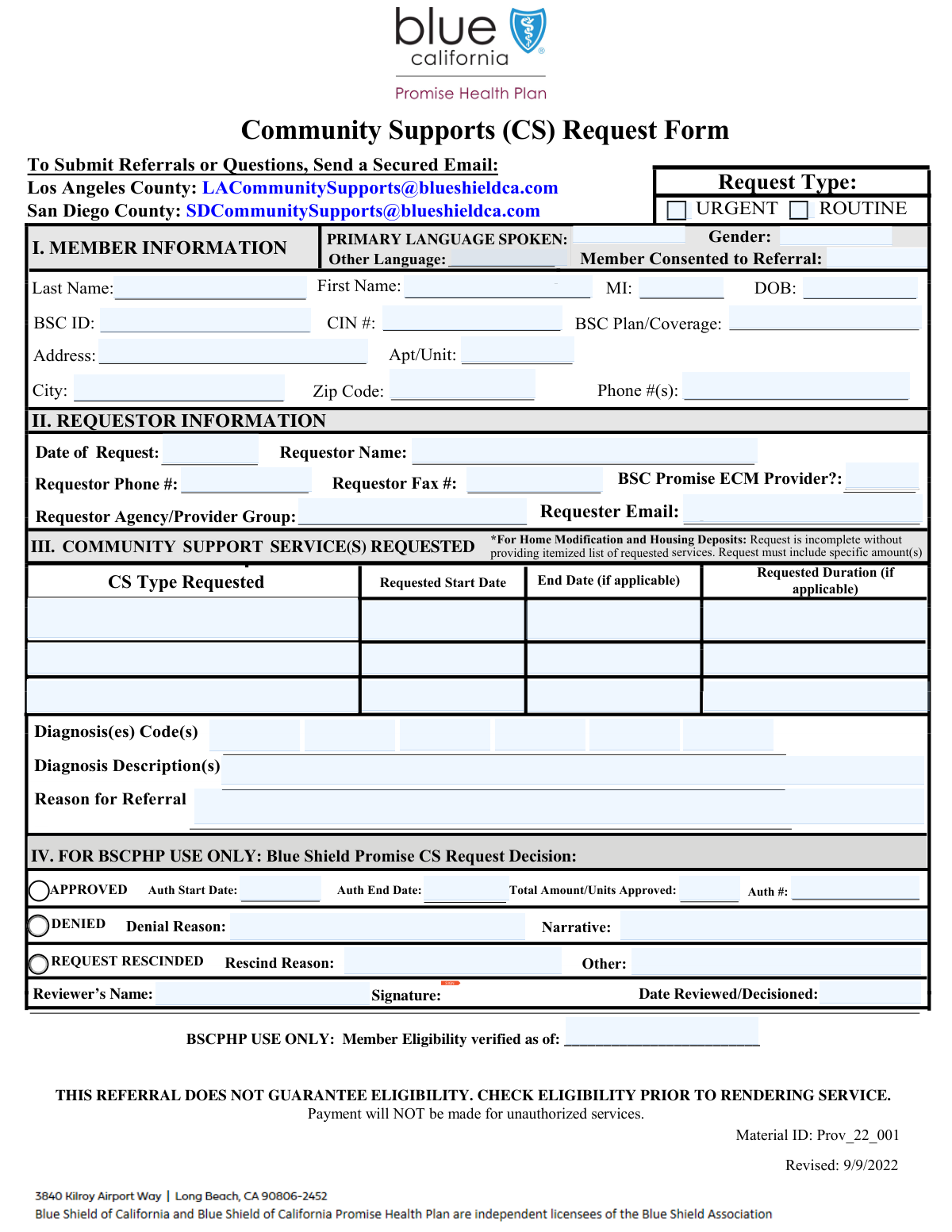
The Blue Shield of California Community Supports (CS) Request Form is a vital document for healthcare providers and agencies to formally request non-medical support services for eligible members. It captures essential patient information, diagnoses, and the specific reasons for the referral to facilitate approval for services that improve overall health outcomes. Today, this form can be filled out quickly and accurately using AI-powered services like Instafill.ai, which can also convert non-fillable PDF versions into interactive fillable forms.
Our AI automatically handles information lookup, data retrieval, formatting, and form filling.
It takes less than a minute to fill out BSC CS Request Form using our AI form filling.
Securely upload your data. Information is encrypted in transit and deleted immediately after the form is filled out.
Form specifications
| Form name: | Blue Shield of California Community Supports (CS) Request Form |
| Number of fields: | 60 |
| Number of pages: | 1 |
| Language: | English |
| Categories: | Blue Shield of California forms |
Instafill Demo: How to fill out PDF forms in seconds with AI
How to Fill Out BSC CS Request Form Online for Free in 2026
Are you looking to fill out a BSC CS REQUEST FORM form online quickly and accurately? Instafill.ai offers the #1 AI-powered PDF filling software of 2026, allowing you to complete your BSC CS REQUEST FORM form in just 37 seconds or less.
Follow these steps to fill out your BSC CS REQUEST FORM form online using Instafill.ai:
- 1 Navigate to Instafill.ai and upload the Blue Shield of California CS Request Form or select it from the template library.
- 2 Complete the 'Requestor Information' section with your name, agency, and contact details.
- 3 Fill in the 'Member Information' section with the patient's personal details, address, and Blue Shield of California (BSC) ID.
- 4 Enter the patient's diagnosis codes and a detailed description in the 'Diagnosis Information' and 'Reason for Referral' sections.
- 5 Specify the community support services being requested, including the start dates, end dates, and duration for each.
- 6 Review all entered information for accuracy, make any necessary corrections, and provide a signature where required.
- 7 Download, print, or securely submit the completed form to Blue Shield of California for processing.
Our AI-powered system ensures each field is filled out correctly, reducing errors and saving you time.
Why Choose Instafill.ai for Your Fillable BSC CS Request Form Form?
Speed
Complete your BSC CS Request Form in as little as 37 seconds.
Up-to-Date
Always use the latest 2026 BSC CS Request Form form version.
Cost-effective
No need to hire expensive lawyers.
Accuracy
Our AI performs 10 compliance checks to ensure your form is error-free.
Security
Your personal information is protected with bank-level encryption.
Frequently Asked Questions About Form BSC CS Request Form
This form is used to request, review, and document decisions for Community Support Services for a member covered by a Blue Shield of California (BSC) plan.
A healthcare provider or agency representative completes the requestor and member information sections. A reviewer from the authorizing entity then completes the sections related to the decision, such as approval or denial details.
You will need the member's full name, date of birth, Blue Shield of California (BSC) ID, Client Identification Number (CIN), and current address. You will also need their diagnosis information and consent for the referral.
Yes, this form allows you to request up to three different Community Support Services. There are separate sections to enter the start date, end date, and duration for each requested service.
In this section, you should provide a detailed clinical explanation justifying why the member needs the requested Community Support Services. Be as specific as possible to support the review process.
These sections are for the reviewer, not the initial requestor. They should only be completed after a decision has been made, by checking 'Approved', 'Denied', or 'Request Rescinded' and filling in the corresponding details.
To mark a request as urgent, check the 'Urgent' box in the Member Information section. If it is not time-sensitive, you can check the 'Routine' box instead.
CIN stands for Client Identification Number. It is a unique identifier assigned to the member that should be entered in the designated 'CIN Number' field for proper identification.
Yes, the form requires you to provide at least one, and up to six, diagnosis codes. You must also include a written 'Diagnosis Description' to provide context for the codes.
The 'Requestor Information' section is for the person or agency submitting the service request. The 'Reviewer Information' section is for the person who reviews the request and makes the final decision.
Yes, the form includes a field to confirm if the 'Member Consented to Referral'. You must indicate whether the member has given their consent for this request to be processed.
Yes, services like Instafill.ai use AI to accurately auto-fill form fields, which can save you significant time and reduce errors. This is especially helpful for forms with many repetitive fields.
You can use a service like Instafill.ai to easily fill out this form online. Simply upload the form, and the AI will identify the fields for you to fill, or it can auto-fill them with your saved information.
If you have a non-fillable or 'flat' PDF, you can use a tool like Instafill.ai. It can convert the static PDF into an interactive, fillable form that you can complete and sign electronically.
Compliance BSC CS Request Form
Validation Checks by Instafill.ai
1
Ensures Service End Date Follows Start Date
This validation confirms that for each community support service requested, the 'End Date' is on or after the 'Start Date'. This is crucial for defining a valid service period and preventing logical errors in authorization and billing. If the end date precedes the start date, the form submission will be rejected with an error message prompting the user to correct the dates.
2
Validates Member's Date of Birth is in the Past
This check ensures the 'Date of Birth' field contains a valid, complete date that is in the past. It prevents the entry of future dates or nonsensical dates, which is essential for accurate member identification and eligibility verification. An invalid date of birth would block the submission and require the user to enter a correct date.
3
Requires Denial Narrative When Request is Denied
This validation enforces that the 'Denial Narrative' field must be filled out if the 'Denied' checkbox is selected. This is a critical compliance and communication requirement, ensuring that a clear reason is documented for every denied request. Failure to provide the narrative when required will prevent form submission until the field is completed.
4
Requires Authorization Details When Request is Approved
This check ensures that if the 'Approved' checkbox is selected, the 'Auth Start Date', 'Auth End Date', 'Total Amount/Units Approved', and 'Auth #' fields are all mandatory. These details are essential for activating the authorization and communicating the specifics of the approval to the provider and member. The form will not be submittable without this information if the request is marked as approved.
5
Enforces Single Request Status (Approved, Denied, or Rescinded)
This validation ensures that only one of the 'Approved', 'Denied', or 'Request Rescinded' checkboxes can be selected at a time. A single request cannot have multiple conflicting final statuses, which prevents data ambiguity and ensures the record reflects a single, clear outcome. If a user tries to select more than one, an error will be displayed.
6
Validates Blue Shield of California ID Format
This check verifies that the 'BSC ID' field conforms to the expected format, which may include a specific length, character type (alphanumeric), and prefix. Correctly formatted IDs are fundamental for uniquely identifying the member within the Blue Shield system and avoiding processing errors. An incorrectly formatted ID will trigger an error and halt submission until corrected.
7
Validates Diagnosis Code Structure
This validation checks that the values entered into 'Diagnosis Code 1' through 'Diagnosis Code 6' follow a recognized standard format, such as ICD-10 (e.g., A12.34). Proper formatting is essential for accurate clinical data processing, reporting, and claims adjudication. The system should flag any codes that do not match the expected pattern.
8
Ensures Requester Email is a Valid Format
This check validates that the 'Requester Email' field contains a string that conforms to the standard email address format (e.g., [email protected]). A valid email is crucial for sending confirmations, notifications, and other important communications regarding the request. An invalid format will result in an error message, prompting the user to correct the entry before proceeding.
9
Ensures All Required Member Identification Fields are Complete
This validation confirms that the 'First Name', 'Last Name', 'Date of Birth', and 'BSC ID' fields are all filled out. These fields are the minimum required data set to uniquely and accurately identify a member. Missing any of this information could lead to misidentification or an inability to process the request, so the form cannot be submitted until they are all complete.
10
Validates that Review Date is Not Before Request Date
This check ensures that the 'Date Reviewed/Decisioned' is on or after the 'Date of Request'. It is logically impossible for a decision to be made on a request before the request itself was submitted. This validation maintains the integrity of the process timeline and prevents data entry errors.
11
Validates Phone Number Fields for Correct Formatting
This check verifies that the 'Phone Number(s)' and 'Requestor Phone Number' fields adhere to a standard phone number format (e.g., 10 digits, possibly with parentheses, spaces, or hyphens). Consistent formatting is important for data normalization and ensuring that communication systems can correctly dial the number. The user will be prompted to correct any numbers that do not match the expected pattern.
12
Requires 'Other Rescind Reason' When Applicable
This validation rule ensures that if the 'Request Rescinded' checkbox is selected and the reason for rescinding is 'Other', the 'Other Rescind Reason' text field must be completed. This prevents incomplete data by capturing the specific reason when a predefined option is not chosen. The form submission will be blocked until this narrative is provided.
13
Ensures Member's Zip Code is a Valid Format
This check validates that the 'Zip Code' field contains a valid 5-digit or 9-digit (ZIP+4) US postal code format. A correct zip code is essential for mail delivery, service area verification, and demographic analysis. An invalid entry will trigger an error, requiring the user to input a properly formatted zip code.
14
Enforces Single Urgency Status (Urgent or Routine)
This validation ensures that a request cannot be marked as both 'Urgent' and 'Routine' simultaneously. These statuses are mutually exclusive and define the processing priority of the request. This check prevents contradictory data and ensures clear handling instructions for the request.
Common Mistakes in Completing BSC CS Request Form
Users often mistype the Blue Shield of California ID (BSC ID) or Client Identification Number (CIN), or transpose digits. These unique identifiers are essential for locating the member's record and verifying eligibility. An error in these fields will cause an immediate processing failure or rejection, significantly delaying the request. To avoid this, carefully double-check the numbers against the member's official documentation before submission.
The 'Reason for Referral' field is frequently filled with overly brief or non-clinical statements like 'member needs help' or 'doctor's orders'. This lack of detail prevents the reviewer from understanding the medical necessity of the services requested, often leading to a denial or a request for more information. To prevent this, provide a detailed clinical justification that clearly explains the member's condition, functional limitations, and why the specific support is required.
A common error is a discrepancy between the numeric 'Diagnosis Code' (e.g., an ICD-10 code) and the written 'Diagnosis Description'. This can happen due to typos, using outdated codes, or a simple copy-paste error. Such inconsistencies raise doubts about the request's accuracy and can cause reviewers to pend the case for clarification, delaying approval. Always ensure the codes and their corresponding descriptions are accurate and aligned.
Requestors sometimes enter an 'End Date' for a service that is earlier than the 'Start Date', or the dates provided do not match the specified 'Duration'. These logical errors make the request impossible to process and require the reviewer to contact the requestor for correction, delaying the authorization. Carefully review all date fields to ensure they represent a coherent and logical timeline for the requested services.
Overlooking the 'Member Consented to Referral' checkbox is a critical compliance mistake. Processing a referral without documented consent violates privacy regulations (like HIPAA) and will cause the request to be halted immediately. No further action can be taken until consent is verified and documented, leading to major delays in the member receiving care. Always confirm consent with the member and check the box to certify it.
This form contains sections like 'Auth #' or 'Denial Narrative' that are conditional and should only be filled out by the reviewer based on the decision. Requestors sometimes mistakenly fill in these fields, or reviewers forget to provide the required narrative for a denial. This creates confusion, can invalidate the decision, and requires correction. Read field instructions carefully and only complete sections pertinent to your role and the request's status.
Entering a generic term like 'Blue Shield' or 'PPO' in the 'BSC Plan/Coverage' field is a frequent error. This ambiguity makes it difficult for staff to verify the member's specific benefits and eligibility for community support services. The request may be delayed while the correct plan is identified or denied if eligibility cannot be confirmed. Always use the full, specific plan name found on the member's insurance card.
Forgetting to sign the form in the designated signature field is a simple but fatal error that renders the entire document invalid. An unsigned request cannot be legally processed and will be rejected, forcing a complete resubmission and starting the process over from the beginning. If the form is a non-fillable PDF, tools like Instafill.ai can convert it into a fillable version that allows for easy electronic signatures, preventing this common oversight.
Requestors often omit key parts of the member's address, most commonly the 'Apartment/Unit Number'. An incomplete address can prevent the delivery of important mail regarding the request and complicate the coordination of in-home services. This can lead to communication breakdowns and delays in the start of care. Always provide the complete and verified mailing address to ensure seamless service delivery.
Users may incorrectly mark a 'Routine' request as 'Urgent' in an attempt to speed up processing, or conversely, fail to mark a genuinely time-sensitive case as urgent. Misclassifying the urgency clogs the queue for truly urgent cases and can lead to scrutiny or penalties from the reviewing agency. The 'Urgent' status should be reserved for situations where a delay could seriously jeopardize the member's health or safety.
Saved over 80 hours a year
“I was never sure if my IRS forms like W-9 were filled correctly. Now, I can complete the forms accurately without any external help.”
Kevin Martin Green
Your data stays secure with advanced protection from Instafill and our subprocessors

Robust compliance program
Transparent business model
You’re not the product. You always know where your data is and what it is processed for.
ISO 27001, HIPAA, and GDPR
Our subprocesses adhere to multiple compliance standards, including but not limited to ISO 27001, HIPAA, and GDPR.
Security & privacy by design
We consider security and privacy from the initial design phase of any new service or functionality. It’s not an afterthought, it’s built-in, including support for two-factor authentication (2FA) to further protect your account.
Fill out BSC CS Request Form with Instafill.ai
Worried about filling PDFs wrong? Instafill securely fills blue-shield-of-california-community-supports-cs-request-form forms, ensuring each field is accurate.