Yes! You can use AI to fill out Blue Shield of California Prior Authorization Request Form for Applied Behavioral Analysis (ABA) – Commercial Products
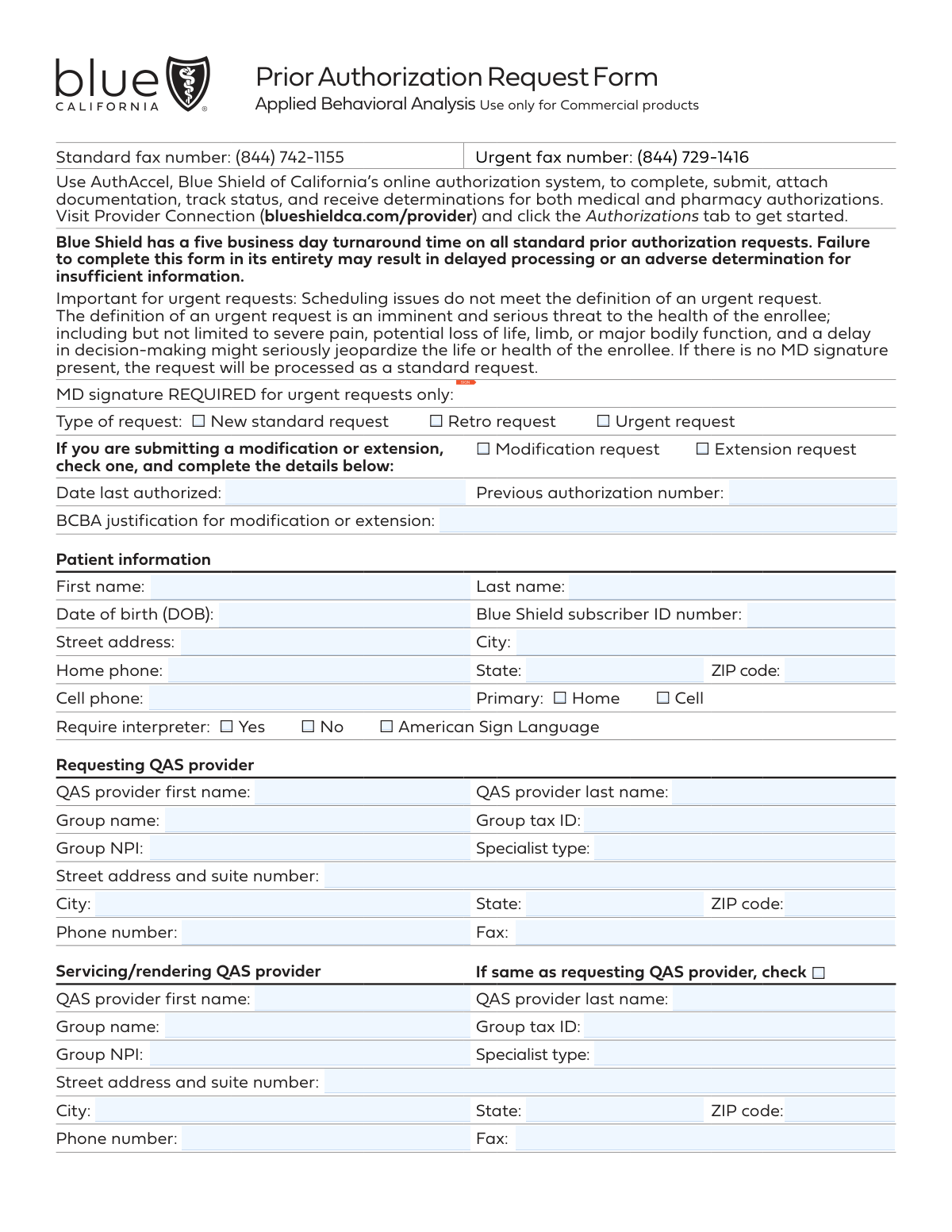
The Blue Shield of California Prior Authorization Request Form for Applied Behavioral Analysis (ABA) is an official document used by QAS providers to request approval for ABA therapy servicesâsuch as behavior assessments, treatment, and caregiver trainingâfor members enrolled in Blue Shield commercial health plans. The form captures patient demographics, provider details, procedure codes, diagnosis information, and requires supporting clinical documentation such as ABA treatment plans and progress reports to justify the requested services. Completing this form accurately and in its entirety is critical, as incomplete submissions can result in delayed processing or adverse determinations. Today, providers can fill out this form quickly and accurately using AI-powered services like Instafill.ai, which can also convert non-fillable PDF versions into interactive fillable forms.
Our AI automatically handles information lookup, data retrieval, formatting, and form filling.
It takes less than a minute to fill out Blue Shield ABA Prior Authorization Request Form using our AI form filling.
Securely upload your data. Information is encrypted in transit and deleted immediately after the form is filled out.
Form specifications
| Form name: | Blue Shield of California Prior Authorization Request Form for Applied Behavioral Analysis (ABA) – Commercial Products |
| Number of pages: | 2 |
| Language: | English |
Instafill Demo: filling out a legal form in seconds
How to Fill Out Blue Shield ABA Prior Authorization Request Form Online for Free in 2026
Are you looking to fill out a BLUE SHIELD ABA PRIOR AUTHORIZATION REQUEST FORM form online quickly and accurately? Instafill.ai offers the #1 AI-powered PDF filling software of 2026, allowing you to complete your BLUE SHIELD ABA PRIOR AUTHORIZATION REQUEST FORM form in just 37 seconds or less.
Follow these steps to fill out your BLUE SHIELD ABA PRIOR AUTHORIZATION REQUEST FORM form online using Instafill.ai:
- 1 Navigate to Instafill.ai and upload the Blue Shield of California ABA Prior Authorization Request Form PDF, or search for it in the Instafill.ai form library to access an interactive fillable version.
- 2 Select the type of request (New Standard, Retro, Urgent, Modification, or Extension) and, if applicable, provide the previous authorization number, date last authorized, and BCBA justification for modification or extension.
- 3 Complete the Patient Information section by entering the patient's full name, date of birth, Blue Shield subscriber ID number, address, phone numbers, primary contact preference, and interpreter requirements.
- 4 Fill in the Requesting QAS Provider and Servicing/Rendering QAS Provider sections with the provider's name, group name, tax ID, NPI, specialist type, address, phone, and fax number (or check the box if both providers are the same).
- 5 Indicate the place of service, enter the applicable CPT/HCPC procedure codes with the corresponding hours and frequency, and provide the patient's diagnosis and ICD-10 code(s) along with the requested authorization start date.
- 6 Enter the contact person's name, phone number, fax number, and voicemail confidentiality preference in the Contact Information section.
- 7 Review the completed form for accuracy, attach all required clinical documentation (ABA treatment plan, progress reports, assessments, etc.), and submit the form to Blue Shield of California via the standard or urgent fax number, or through the AuthAccel online authorization system.
Our AI-powered system ensures each field is filled out correctly, reducing errors and saving you time.
Why Choose Instafill.ai for Your Fillable Blue Shield ABA Prior Authorization Request Form Form?
Speed
Complete your Blue Shield ABA Prior Authorization Request Form in as little as 37 seconds.
Up-to-Date
Always use the latest 2026 Blue Shield ABA Prior Authorization Request Form form version.
Cost-effective
No need to hire expensive lawyers.
Accuracy
Our AI performs 10 compliance checks to ensure your form is error-free.
Security
Your personal information is protected with bank-level encryption.
Frequently Asked Questions About Form Blue Shield ABA Prior Authorization Request Form
This form is used to request prior authorization for Applied Behavioral Analysis (ABA) services for Blue Shield of California Commercial product members. It must be completed by a qualified ABA services (QAS) provider and submitted with supporting clinical documentation to obtain approval before services begin.
This form must be completed by the requesting QAS (Qualified ABA Services) provider seeking authorization for ABA therapy services on behalf of a Blue Shield of California Commercial plan member. Both the requesting provider and the servicing/rendering provider information must be included if they are different entities.
The preferred method is to use AuthAccel, Blue Shield of California's online authorization system, available through Provider Connection at blueshieldca.com/provider under the Authorizations tab. Alternatively, you can fax the completed form to the standard fax number (844) 742-1155 for standard requests or (844) 729-1416 for urgent requests.
Blue Shield of California has a five business day turnaround time for all standard prior authorization requests. Incomplete forms may result in delayed processing or an adverse determination due to insufficient information, so it is important to fill out the form entirely and include all required documentation.
An urgent request is defined as an imminent and serious threat to the health of the enrollee, including severe pain, potential loss of life, limb, or major bodily function, where a delay in decision-making might seriously jeopardize the enrollee's life or health. Scheduling issues do not meet the definition of an urgent request, and an MD signature is required for urgent requests to be processed as such.
This form supports five types of requests: New Standard Request, Retro Request (for services already rendered), Urgent Request, Modification Request (to change an existing authorization), and Extension Request (to extend an existing authorization). For modifications and extensions, you must provide the date last authorized, the previous authorization number, and a BCBA justification.
You must include an ABA treatment plan and/or progress report that covers service type and hours, baseline behaviors and skills, clinical findings, recent assessments, comorbidities, demographics, a clinical interview summary, the proposed treatment plan, outcome measurement criteria, instruments used (e.g., Vineland, ADOS-2, ABAS-3), a discharge plan, and care coordination details. Incomplete documentation may result in delayed processing or denial.
The form includes the following ABA procedure codes: 97151, 97152, 0362T, 97153, 97154, 97155, 97156, 97157, 97158, and 0373T. For each applicable code, you must specify the number of hours and the frequency (one time, per week, or per month) of the requested service.
You must provide the patient's first and last name, date of birth, Blue Shield subscriber ID number, street address, city, state, ZIP code, home and/or cell phone number, primary contact preference, and whether an interpreter (including American Sign Language) is required.
The Requesting QAS Provider is the provider submitting the authorization request, while the Servicing/Rendering QAS Provider is the one who will actually deliver the ABA services to the patient. If both roles are fulfilled by the same provider, you can simply check the box indicating they are the same, and you do not need to re-enter the provider's information.
Yes, AI-powered services like Instafill.ai can help you accurately auto-fill form fields, saving time and reducing errors. These tools are especially useful for complex forms like this one that require detailed provider, patient, and clinical information across many fields.
You can upload the ABA Prior Authorization Request Form PDF to Instafill.ai, and the AI will automatically populate the form fields with the relevant information you provide. Once completed, you can review, finalize, and submit or fax the form to Blue Shield of California.
If you have a flat, non-fillable PDF version of this form, Instafill.ai can convert it into an interactive fillable form, allowing you to type directly into the fields rather than printing and handwriting the information. This makes the process faster and ensures legibility.
The form allows you to indicate one of the following places of service: Office, Home, Telehealth, Community Setting, or Other (with a written specification). Only one place of service box should be checked per request.
No, this Prior Authorization Request Form for Applied Behavioral Analysis is for use with Blue Shield of California Commercial products only. It should not be used for other plan types, and providers should verify the member's plan type before submitting.
Compliance Blue Shield ABA Prior Authorization Request Form
Validation Checks by Instafill.ai
1
Ensures exactly one request type is selected
Validates that one and only one of the five request type checkboxes is selected: New Standard Request, Retro Request, Urgent Request, Modification Request, or Extension Request. Having multiple boxes checked or none checked creates ambiguity about how the request should be processed and routed. If no type is selected or multiple are selected, the form should be flagged for correction before processing, as an incorrect classification could result in the wrong turnaround time being applied or the request being denied.
2
Ensures MD signature is present for urgent requests
Validates that an MD signature is provided when the Urgent Request checkbox is selected. Per the form instructions, urgent requests without an MD signature will be downgraded and processed as standard requests, which carry a five business day turnaround time. If an urgent request is submitted without an MD signature, the submitter should be notified so they can either obtain the signature or reclassify the request type accordingly.
3
Ensures modification and extension fields are completed when applicable
Validates that when either the Modification Request or Extension Request checkbox is selected, the Date Last Authorized, Previous Authorization Number, and BCBA Justification fields are all populated. These fields are critical for Blue Shield to locate the original authorization record and evaluate the clinical rationale for the change. If any of these fields are missing when a modification or extension is requested, the form should be flagged as incomplete, as processing cannot proceed without the prior authorization reference.
4
Ensures patient date of birth is in a valid format and is a plausible date
Validates that the Date of Birth field is entered in a recognizable date format (e.g., MM/DD/YYYY) and represents a logically plausible date, meaning it is not a future date and reflects an age consistent with receiving ABA services. An incorrectly formatted or implausible date of birth can cause a mismatch when verifying the patient's eligibility against Blue Shield's member records. If the date of birth is invalid or in the future, the form should be rejected and returned for correction.
5
Ensures Blue Shield subscriber ID number is present and properly formatted
Validates that the Blue Shield Subscriber ID Number field is populated and conforms to the expected format for Blue Shield of California member IDs, which typically follow an alphanumeric pattern. The subscriber ID is the primary key used to look up the patient's coverage, benefits, and eligibility in Blue Shield's system. A missing or malformed subscriber ID will prevent the authorization from being linked to the correct member record, resulting in processing delays or an adverse determination.
6
Ensures patient phone number fields are in a valid format
Validates that the Home Phone and Cell Phone fields, when populated, contain a valid 10-digit U.S. phone number in a standard format such as (XXX) XXX-XXXX or XXX-XXX-XXXX. At least one phone number must be present so that Blue Shield can contact the patient or their representative regarding the authorization decision. If neither phone number is provided, or if a provided number contains non-numeric characters or an incorrect digit count, the form should be flagged for correction.
7
Ensures a primary contact method is selected when phone numbers are provided
Validates that exactly one of the Primary Contact checkboxesâHome or Cellâis selected when at least one phone number has been entered. The primary contact designation tells Blue Shield which number to use first when reaching out about the authorization, and leaving it blank creates ambiguity in the communication workflow. If phone numbers are present but no primary contact is designated, the form should prompt the submitter to make a selection.
8
Ensures interpreter type is specified only when interpreter is required
Validates that the American Sign Language interpreter checkbox is only selected when the 'Interpreter Required: Yes' checkbox is also selected. Selecting an interpreter type while simultaneously indicating no interpreter is needed represents a logical contradiction that could cause confusion in care coordination. If the ASL checkbox is checked but 'No' is selected for interpreter requirement, the form should flag this inconsistency and require the submitter to reconcile the selections.
9
Ensures requesting QAS provider required fields are fully completed
Validates that all required fields for the Requesting QAS Provider section are populated, including First Name, Last Name, Group Name, Group Tax ID, Group NPI, Specialist Type, Street Address, City, State, ZIP Code, and Phone Number. The requesting provider's information is essential for Blue Shield to verify the provider's credentials, network status, and authority to submit ABA authorization requests. Any missing required field in this section should cause the form to be flagged as incomplete, as an adverse determination for insufficient information may result.
10
Ensures Group NPI fields contain a valid 10-digit NPI number
Validates that the Group NPI fields for both the Requesting QAS Provider and the Servicing/Rendering QAS Provider (when not marked as same) contain exactly 10 numeric digits, consistent with the National Provider Identifier standard established by CMS. An invalid or missing NPI prevents Blue Shield from verifying the provider's registration and network participation, which is a prerequisite for authorization approval. If the NPI field contains fewer or more than 10 digits, or includes non-numeric characters, the form should be returned for correction.
11
Ensures servicing provider fields are completed when not marked as same as requesting provider
Validates that when the 'Same as Requesting QAS Provider' checkbox is not selected for the Servicing/Rendering QAS Provider section, all required fields in that sectionâincluding First Name, Last Name, Group Name, Group Tax ID, Group NPI, Specialist Type, Address, Phone, and Faxâare fully populated. The servicing provider is the entity actually delivering the ABA services, and their information must be on record for claims processing and care coordination. If the checkbox is unchecked and any required servicing provider field is blank, the form should be flagged as incomplete.
12
Ensures exactly one place of service is selected
Validates that one and only one Place of Service checkbox is selected from the available options: Office, Home, Telehealth, Community Setting, or Other. The place of service affects coverage rules, billing codes, and clinical appropriateness criteria applied during the authorization review. If no place of service is selected, or if multiple are selected, the form should be returned to the submitter for clarification before processing can proceed.
13
Ensures 'Other' place of service includes a written specification
Validates that when the 'Other' Place of Service checkbox is selected, the accompanying free-text field is populated with a specific description of the service location. Without a written specification, Blue Shield cannot assess whether the proposed setting is clinically appropriate or covered under the member's plan. If 'Other' is checked but the specification field is left blank, the form should be flagged and returned to the submitter for completion.
14
Ensures at least one procedure code has hours entered
Validates that at least one of the listed ABA procedure codes (97151, 97152, 0362T, 97153, 97154, 97155, 97156, 97157, 97158, 0373T) has a corresponding hours value entered. The procedure codes and their associated hours define the scope of services being requested and are the basis for the authorization determination. If no hours are entered for any procedure code, the form lacks the clinical specificity required for review and should be flagged as incomplete.
15
Ensures ICD-10 code(s) are present and properly formatted
Validates that the ICD-10 Code(s) field is populated and that each code entered follows the standard ICD-10-CM format, which begins with a letter followed by two digits, a decimal point, and up to four additional alphanumeric characters (e.g., F84.0). ICD-10 codes are required to establish medical necessity and link the requested ABA services to a covered diagnosis. If the field is blank or contains codes that do not match the ICD-10 format, the form should be rejected and returned for correction.
16
Ensures the requested start date is not in the past for non-retro requests
Validates that the Requested Start Date of Authorization is a current or future date when the request type is New Standard or Urgent, and that it is a past date when the request type is Retro. A future start date on a retro request or a past start date on a new standard request indicates a mismatch between the request type and the intended service timeline. If this logical inconsistency is detected, the form should be flagged so the submitter can correct either the request type or the start date before submission.
Common Mistakes in Completing Blue Shield ABA Prior Authorization Request Form
Many providers mark a request as 'urgent' but forget to obtain and include the required MD signature. Without the MD signature, Blue Shield will automatically downgrade the request to a standard request, resulting in a five-business-day turnaround instead of the expedited timeline. To avoid this, always ensure the attending physician signs the form before submission when checking the 'Urgent request' box. Tools like Instafill.ai can flag this requirement and prompt users to complete all mandatory fields before submission.
A common misunderstanding is treating scheduling inconveniences or appointment timing issues as qualifying for an urgent request. Blue Shield's definition of urgent is strictly limited to imminent and serious threats to the enrollee's health, such as severe pain, potential loss of life, limb, or major bodily function. Submitting a non-qualifying request as urgent can delay processing and damage provider credibility. Always review the urgent request definition carefully before selecting that option.
Providers frequently submit the form without attaching all required supporting documentation, such as the discharge plan, crisis plan, transition criteria, outcome measurement criteria, or the specific assessment instruments used (e.g., Vineland, ADOS-2, ABAS-3). Incomplete documentation is one of the most common reasons for delayed processing or adverse determinations due to insufficient information. Review the full documentation checklist on the form before faxing, and use the checklist boxes to confirm each item is included.
Submitters often leave the servicing/rendering QAS provider section entirely blank, assuming the requesting provider information is sufficient, even when a different provider will actually deliver the services. This omission can cause authorization to be issued to the wrong provider, leading to claim denials. If the servicing provider differs from the requesting provider, all fieldsâincluding NPI, Tax ID, address, and contact informationâmust be completed. Only check the 'same as requesting' box if the providers are truly identical.
Providers frequently confuse their individual NPI with their Group NPI, or enter an incorrect Tax ID for the group. These identifiers are critical for Blue Shield to verify provider credentials and process the authorization correctly; errors can result in the request being rejected or matched to the wrong provider record. Always verify the Group NPI and Group Tax ID against your credentialing documents before submission. AI-powered tools like Instafill.ai can help validate NPI formats and flag mismatches.
A frequent error is entering the patient's Medicare/Medicaid number, Social Security number, or a partial ID instead of the correct Blue Shield subscriber ID number. An incorrect subscriber ID will prevent Blue Shield from locating the member's record, causing significant processing delays or an outright rejection. Always copy the subscriber ID directly from the patient's Blue Shield insurance card, and double-check that the number matches exactly, including any letter prefixes.
When submitting a modification or extension request, providers often check the appropriate box but leave the 'Date Last Authorized,' 'Previous Authorization Number,' or 'BCBA Justification' fields blank. Without this information, Blue Shield cannot link the new request to the prior authorization or evaluate the clinical rationale for the change. All three fields are required for modification and extension requests, and the BCBA justification should be detailed and clinically specific.
Providers sometimes enter total hours without correctly aligning them with the required frequency (e.g., per week vs. per month), or they leave the frequency field blank for codes that require it. Codes 97153â97158 and 0373T require a weekly or monthly frequency designation, while 97151, 97152, and 0362T are one-time codes. Mismatched or missing frequency information can result in incorrect authorization quantities. Carefully review each procedure code's frequency requirement before completing the hours fields.
Submitters sometimes enter outdated ICD-10 codes, use unspecified codes when more specific ones are available, or omit relevant comorbidity codes that support medical necessity. Incorrect or insufficiently specific ICD-10 codes can lead to an adverse determination because the diagnosis does not clearly support the requested ABA services. Always verify ICD-10 codes against the current code set and ensure they accurately reflect the patient's documented diagnosis and comorbidities.
Providers frequently leave the 'Primary Contact' checkbox (Home vs. Cell) unchecked or fail to indicate whether the voicemail is confidential. If Blue Shield cannot determine the preferred contact method or whether it is safe to leave a detailed voicemail, they may be unable to communicate determination results efficiently, causing delays. Always select the primary contact preference and indicate voicemail confidentiality to ensure timely and appropriate communication.
The form lists two different fax numbersâa standard fax number (844) 742-1155 and an urgent fax number (844) 729-1416âand providers sometimes send urgent requests to the standard fax line or vice versa. Sending an urgent request to the standard fax line means it will not receive expedited review, potentially jeopardizing the patient's health. Always confirm which fax number corresponds to your request type before transmitting, and consider using Blue Shield's online AuthAccel system to avoid fax routing errors entirely.
Providers often leave the interpreter fields blank or check 'Yes' for interpreter required without specifying whether American Sign Language is needed. Omitting this information can result in the patient not receiving appropriate language assistance during care coordination or when Blue Shield contacts them directly. Always confirm the patient's language needs in advance and complete all interpreter-related fields accurately, including checking the ASL box if applicable.
Saved over 80 hours a year
âI was never sure if my IRS forms like W-9 were filled correctly. Now, I can complete the forms accurately without any external help.â
Kevin Martin Green
Your data stays secure with advanced protection from Instafill and our subprocessors

Robust compliance program
Transparent business model
Youâre not the product. You always know where your data is and what it is processed for.
ISO 27001, HIPAA, and GDPR
Our subprocesses adhere to multiple compliance standards, including but not limited to ISO 27001, HIPAA, and GDPR.
Security & privacy by design
We consider security and privacy from the initial design phase of any new service or functionality. Itâs not an afterthought, itâs built-in, including support for two-factor authentication (2FA) to further protect your account.
Fill out Blue Shield ABA Prior Authorization Request Form with Instafill.ai
Worried about filling PDFs wrong? Instafill securely fills blue-shield-of-california-prior-authorization-request-form-for-applied-behavioral-analysis-aba-commercial-products forms, ensuring each field is accurate.