Yes! You can use AI to fill out Blue Shield Promise Universal Prior Authorization Form
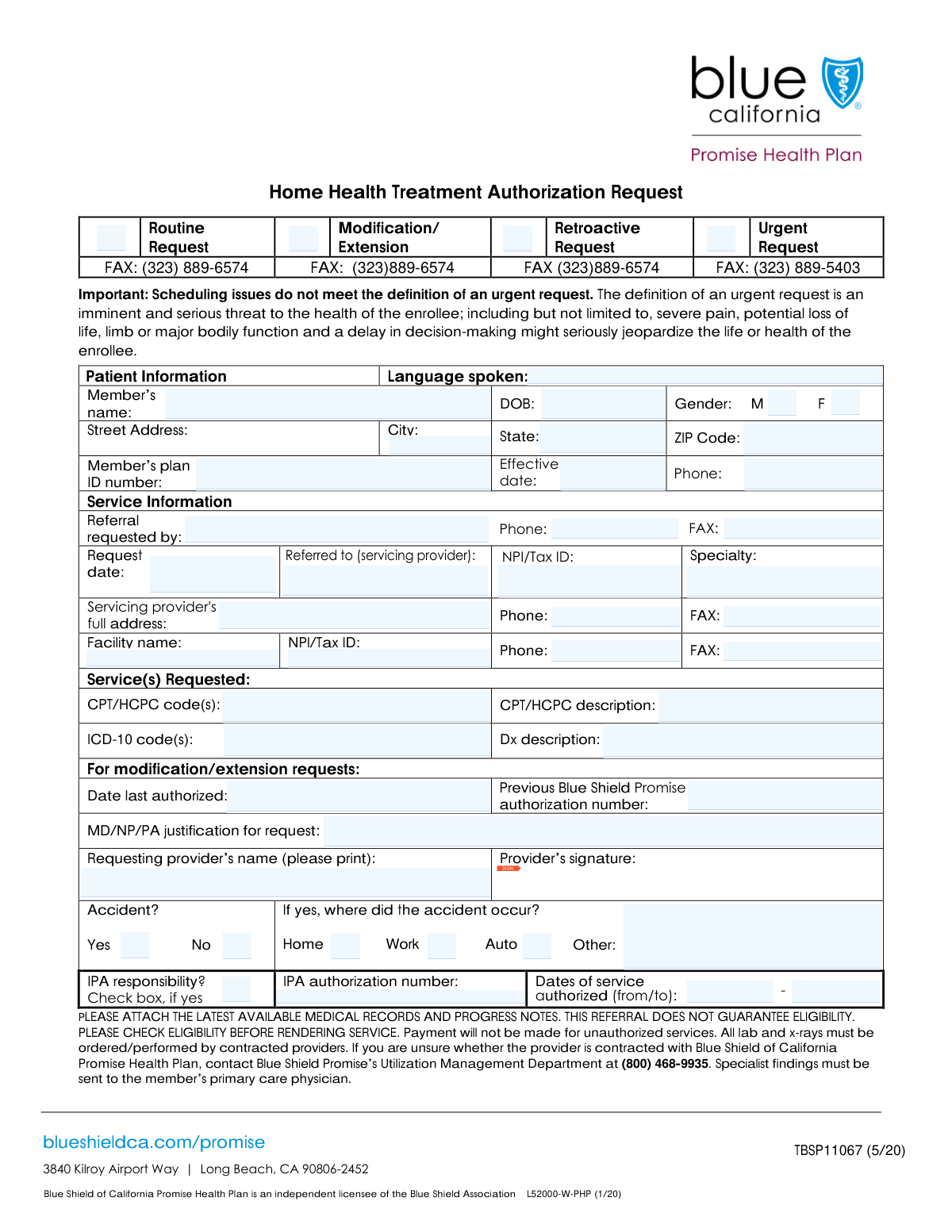
The Blue Shield Promise Universal Prior Authorization Form is a document submitted by healthcare providers to the insurance plan to get approval before a specific medical service is rendered. This process, known as prior authorization, confirms medical necessity and ensures the service is covered, preventing unexpected bills for the patient. Today, this form can be filled out quickly and accurately using AI-powered services like Instafill.ai, which can also convert non-fillable PDF versions into interactive fillable forms.
Our AI automatically handles information lookup, data retrieval, formatting, and form filling.
It takes less than a minute to fill out Blue Shield Promise Prior Auth using our AI form filling.
Securely upload your data. Information is encrypted in transit and deleted immediately after the form is filled out.
Form specifications
| Form name: | Blue Shield Promise Universal Prior Authorization Form |
| Number of fields: | 48 |
| Number of pages: | 1 |
| Language: | English |
| Categories: | authorization forms, prior authorization forms |
Instafill Demo: How to fill out PDF forms in seconds with AI
How to Fill Out Blue Shield Promise Prior Auth Online for Free in 2026
Are you looking to fill out a BLUE SHIELD PROMISE PRIOR AUTH form online quickly and accurately? Instafill.ai offers the #1 AI-powered PDF filling software of 2026, allowing you to complete your BLUE SHIELD PROMISE PRIOR AUTH form in just 37 seconds or less.
Follow these steps to fill out your BLUE SHIELD PROMISE PRIOR AUTH form online using Instafill.ai:
- 1 Navigate to Instafill.ai and upload or select the Blue Shield Promise Universal Prior Authorization Form.
- 2 Use the AI assistant to automatically populate patient demographic and plan information, such as name, date of birth, and Member ID.
- 3 Enter the details for the requesting and servicing providers, including NPI/Tax ID numbers and contact information.
- 4 Specify the requested services by inputting the relevant CPT/HCPC and ICD-10 codes, along with their descriptions.
- 5 Provide the clinical justification for the request, attach any necessary medical records, and indicate if the request is routine, urgent, or a modification.
- 6 Review all the auto-filled and manually entered information for completeness and accuracy.
- 7 Electronically sign the form and submit it directly to Blue Shield Promise as per their guidelines.
Our AI-powered system ensures each field is filled out correctly, reducing errors and saving you time.
Why Choose Instafill.ai for Your Fillable Blue Shield Promise Prior Auth Form?
Speed
Complete your Blue Shield Promise Prior Auth in as little as 37 seconds.
Up-to-Date
Always use the latest 2026 Blue Shield Promise Prior Auth form version.
Cost-effective
No need to hire expensive lawyers.
Accuracy
Our AI performs 10 compliance checks to ensure your form is error-free.
Security
Your personal information is protected with bank-level encryption.
Frequently Asked Questions About Form Blue Shield Promise Prior Auth
This form is used by healthcare providers to request authorization for medical services for a patient. It can be used for new requests, modifications to existing authorizations, or retroactive approvals.
This form should be completed by the requesting healthcare provider's office or the referring facility. Patients do not typically fill out this form themselves.
A 'Routine' request is a standard, non-emergency submission. An 'Urgent' request should only be selected if a delay in treatment could pose a serious threat to the patient's health, life, or major bodily function.
You will need the patient's demographic and insurance plan information, the servicing provider's NPI/Tax ID, and the specific medical codes (CPT/HCPC and ICD-10) for the requested service and diagnosis.
Check this box if you are requesting a change to an existing authorization, such as extending the service duration. You must also provide the 'Previous Authorization Number' and a clinical justification.
CPT/HCPC codes identify the specific medical services being requested, while ICD-10 codes represent the patient's diagnosis. Both are required for the health plan to process the authorization request.
If you check 'Accident - Yes', you must also indicate the location where the accident occurred by checking 'Home', 'Work', 'Auto', or specifying a location under 'Other Accident Location'.
The form includes fields for fax numbers, suggesting that it is typically submitted via fax to the appropriate health plan or IPA. Always verify the correct submission method with the payer.
This is the National Provider Identifier (NPI) or Tax ID of the provider or facility that will be performing the requested service. It is essential for identification and billing purposes.
Yes, services like Instafill.ai use AI to auto-fill form fields accurately and save time. This is especially useful for repetitive information like provider and patient details.
You can upload the form to the Instafill.ai platform, which uses AI to make the fields fillable. You can then enter the information once to have it populate the document automatically and accurately.
If you have a non-fillable or 'flat' PDF, you can use a service like Instafill.ai. It can convert the document into an interactive, fillable form that you can complete and sign digitally.
These fields are part of the 'IPA Responsibility' section and should only be completed by the authorizing entity, not the requesting provider. They indicate the approved service period.
Compliance Blue Shield Promise Prior Auth
Validation Checks by Instafill.ai
1
Date of Birth Format and Plausibility
This check validates that the 'Date of Birth' is in a valid format (e.g., MM/DD/YYYY) and represents a date in the past. It also ensures the calculated age is reasonable for a health plan member, preventing future dates or typographical errors. If the date is invalid, the form submission will be rejected with an error message prompting the user to correct the entry.
2
Mutually Exclusive Request Type Selection
This validation ensures that only one request type checkbox ('Routine', 'Modification/Extension', 'Retroactive', 'Urgent') is selected at a time. Selecting multiple types creates ambiguity in how the request should be processed. A failed validation would trigger a user-facing error asking them to select only one primary reason for the request.
3
Conditional Fields for Modification/Extension Request
This check verifies that if the 'Modification/Extension' checkbox is selected, the 'Date Last Authorized', 'MD NP PA Justification for Request', and 'Previous Authorization Number' fields are all populated. These fields are essential for processing a modification or extension, as they provide context and justification. Failure to provide this information will block submission and highlight the required fields.
4
Mutually Exclusive Accident Status
This validation ensures that exactly one of the 'Accident - Yes' or 'Accident - No' checkboxes is selected. This is a critical piece of information for determining liability and coverage details. If neither or both are selected, the form cannot be processed correctly, and an error will be displayed to force a clear choice.
5
Conditional Accident Location Requirement
If 'Accident - Yes' is checked, this validation ensures that at least one location ('Home', 'Work', 'Auto') is checked or the 'Other Accident Location' field is filled. This information is mandatory for insurance claims related to accidents. A failure will result in an error message indicating that the accident location must be specified.
6
Servicing Provider NPI/Tax ID Format
This check validates that the 'Servicing Provider NPI/Tax ID' field contains a number with the correct format, which is typically a 10-digit National Provider Identifier (NPI) or a 9-digit Tax ID. This unique identifier is crucial for correctly identifying the provider for billing and records. An invalid format would prevent the system from looking up the provider and cause the submission to fail.
7
Code and Description Field Consistency
This validation ensures that if a 'Referral Service CPT/HCPC Code(s)' or 'ICD-10 Code(s)' is entered, its corresponding description field ('CPT HCPC Description' or 'Diagnosis Description') is also filled out. This prevents submissions with codes that lack necessary context for reviewers. If a code is present without a description, the user will be prompted to provide the missing information.
8
State Abbreviation Format
This check ensures the 'State' field contains a valid two-letter US state or territory abbreviation. Using a standardized abbreviation is essential for address validation, mail delivery, and data consistency across systems. An invalid entry would be flagged, and the user would be asked to correct it to a recognized two-letter code.
9
Standardized Phone and Fax Number Format
This validation checks all phone and fax number fields (e.g., 'Phone Number', 'Servicing Provider Phone', 'Referral Facility Fax Number') to ensure they contain 10 digits. The system should attempt to strip common formatting characters like parentheses or hyphens before validation. This ensures data consistency and functional contact numbers, preventing communication failures due to malformed entries.
10
Authorized Service Date Range Logic
This check is triggered if 'Check Box14' is selected, validating that both 'Authorized Service From Date' and 'Authorized Service To Date' are provided and are valid dates. It also confirms that the 'To Date' is on or after the 'From Date'. This prevents logical errors in the authorization period, ensuring the service dates make sense chronologically.
11
Plan Effective Date vs. Request Date Logic
This validation compares the 'Effective Date' of the member's plan with the 'Request Date'. It ensures the plan's effective date is on or before the date the request is being made. A request made for a member whose plan is not yet active would be invalid, so this check prevents such requests from being processed.
12
ZIP Code Format Validation
This check ensures the 'ZIP Code' field contains either a 5-digit or a 9-digit (ZIP+4) numeric value. A valid ZIP code is critical for verifying the member's address and determining service area eligibility. An incorrectly formatted ZIP code will trigger an error, requiring the user to correct the entry before submission.
13
ICD-10 Code Format Validation
This validation checks that the 'ICD-10 Code(s)' field follows the proper format, which typically starts with a letter and is followed by a combination of numbers and letters. It can also check the code against a master list of valid ICD-10 codes to ensure it's a recognized diagnosis. This is crucial for accurate medical billing and statistical tracking, and an invalid code would be rejected.
14
Completeness of Member's Plan ID
This check ensures the 'Member's Plan ID Number' field is not empty. This ID is the primary key for identifying the patient within the health plan's system and is absolutely essential for linking the request to the correct member profile and coverage details. A missing ID would make the entire form submission unusable, so this field must be mandatory.
Common Mistakes in Completing Blue Shield Promise Prior Auth
Users often enter a CPT/HCPC or ICD-10 code but provide a description that does not match, or vice-versa. This frequently happens due to typos or using outdated code lists. Mismatched codes and descriptions are a primary reason for automatic denials, as they fail medical necessity validation and create billing conflicts. Always verify that the 'CPT HCPC Description' and 'Diagnosis Description' precisely match the corresponding codes entered.
The form requires additional information based on checkbox selections, such as providing a 'Previous Authorization Number' if 'Modification/Extension' is checked. People frequently check the box but forget to fill in the dependent fields. This omission results in an incomplete submission, causing processing delays while the reviewer requests the missing information. Carefully review all instructions associated with checkboxes before finalizing the form.
Entering an incorrect 'Member's Plan ID Number' or 'Servicing Provider NPI/Tax ID' is a frequent error due to manual data entry. A single transposed digit can make it impossible to identify the patient or provider, leading to an immediate rejection of the request. To prevent this, meticulously double-check these long numeric identifiers against source documents. AI-powered tools like Instafill.ai can help by validating number formats and saving correct information for future use.
Fields like 'Date of Birth' and 'Authorized Service From Date' are often filled with inconsistent formats (e.g., 'Jan 5, 2024' vs. '01/05/2024'). This can cause data import errors or misinterpretation by the processing system, potentially delaying care. Always use a consistent MM/DD/YYYY format unless specified otherwise to ensure clarity and prevent system rejections. Using a form-filling tool can automatically standardize date formats across the document.
A common mistake is checking the 'Accident - Yes' box but failing to complete the required follow-up information, such as checking the location ('Home', 'Work', 'Auto') or specifying the 'Other Accident Location'. This leaves critical context missing from the request, forcing a follow-up call and delaying the authorization process. If you indicate a service is accident-related, ensure you provide all associated details.
When 'Modification/Extension' is checked, the 'MD NP PA Justification for Request' field is often filled with vague statements like 'continued care needed'. This is not enough to prove medical necessity and almost always results in a denial or a request for more detailed clinical notes. The justification must be specific, detailing the patient's progress, clinical reasoning for continued treatment, and why the extension is medically necessary.
This form distinguishes between the 'Requesting Provider's Name' and the 'Referred to Servicing Provider'. Users often enter the same entity in both fields or reverse them, especially in complex referral situations. This error can lead to the authorization being sent to the wrong office or payment being misdirected. Clearly identify who is making the request versus who will be performing the service.
Fields such as 'Servicing Provider Phone' and 'Servicing Provider Fax' are sometimes left empty, especially if the person filling the form doesn't have the information readily available. Missing contact details prevent the health plan from verifying information or clarifying details about the request, leading to significant delays. If the form is a non-fillable PDF, a tool like Instafill.ai can convert it to a fillable version and help manage and populate provider contact details accurately.
Users may mistakenly check the wrong request type, such as 'Routine Request' when the situation meets the criteria for 'Urgent Request', or vice-versa. This error routes the request through the incorrect workflow, causing critical delays for urgent cases or unnecessary escalation for routine ones. Carefully read the definition for each request type to ensure your submission is processed with the appropriate priority.
Digital or paper forms often get submitted without the required 'Signature1' or 'Request Date'. A missing signature invalidates the entire request legally and professionally, while a missing date makes it impossible to track submission timelines. This simple oversight forces the form to be returned for completion, restarting the entire review clock. Always perform a final check for all signature and date fields before submitting.
Saved over 80 hours a year
“I was never sure if my IRS forms like W-9 were filled correctly. Now, I can complete the forms accurately without any external help.”
Kevin Martin Green
Your data stays secure with advanced protection from Instafill and our subprocessors

Robust compliance program
Transparent business model
You’re not the product. You always know where your data is and what it is processed for.
ISO 27001, HIPAA, and GDPR
Our subprocesses adhere to multiple compliance standards, including but not limited to ISO 27001, HIPAA, and GDPR.
Security & privacy by design
We consider security and privacy from the initial design phase of any new service or functionality. It’s not an afterthought, it’s built-in, including support for two-factor authentication (2FA) to further protect your account.
Fill out Blue Shield Promise Prior Auth with Instafill.ai
Worried about filling PDFs wrong? Instafill securely fills blue-shield-promise-universal-prior-authorization-form forms, ensuring each field is accurate.