Yes! You can use AI to fill out Blue Shield of California Servicing Provider Change Request Form
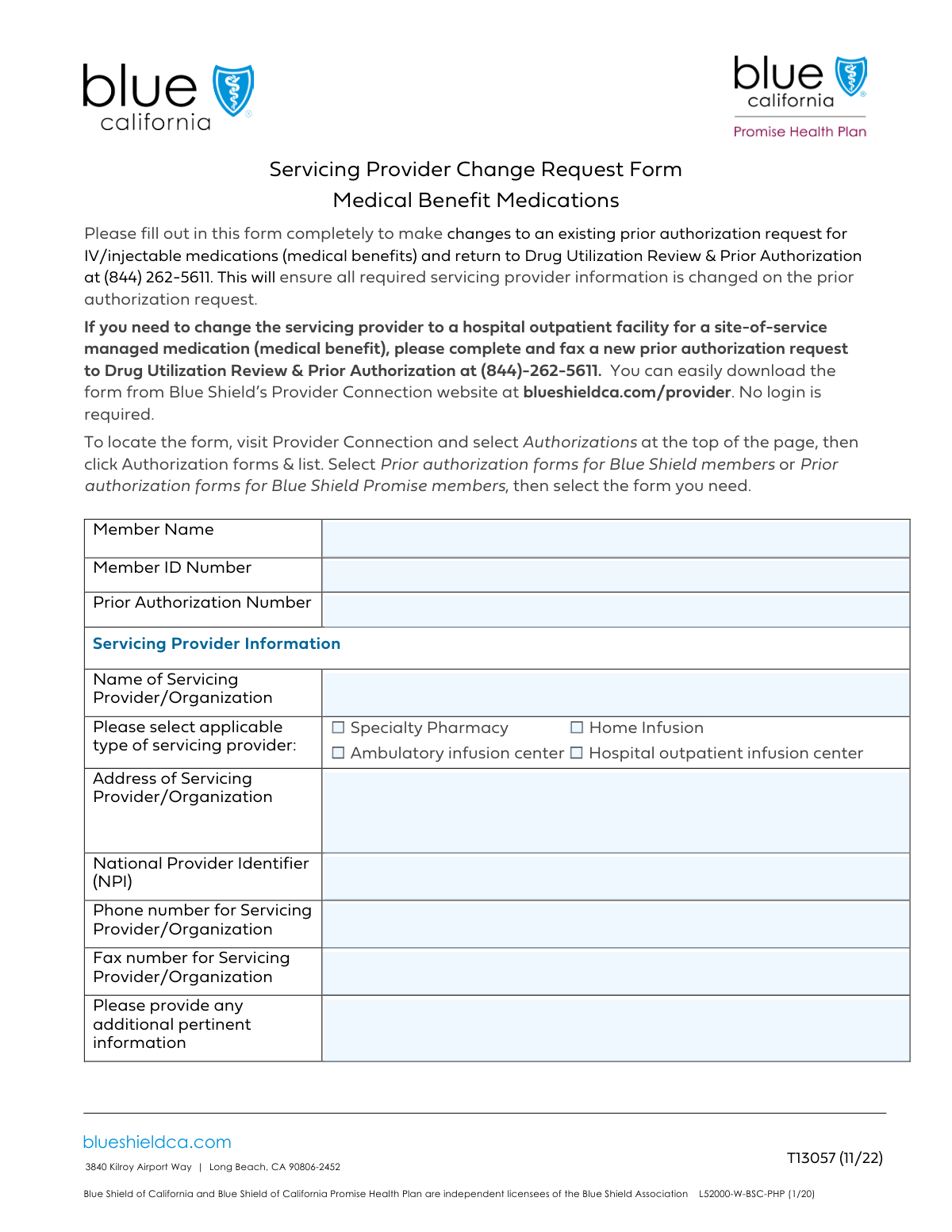
This form is a formal request submitted to Blue Shield of California to change the designated healthcare provider for a service that has already received prior authorization. It is important for ensuring that services like specialty pharmacy or infusion therapy are rendered by the member's preferred or newly selected provider and that billing is processed correctly. Today, this form can be filled out quickly and accurately using AI-powered services like Instafill.ai, which can also convert non-fillable PDF versions into interactive fillable forms.
Our AI automatically handles information lookup, data retrieval, formatting, and form filling.
It takes less than a minute to fill out Blue Shield CA Servicing Provider Change using our AI form filling.
Securely upload your data. Information is encrypted in transit and deleted immediately after the form is filled out.
Form specifications
| Form name: | Blue Shield of California Servicing Provider Change Request Form |
| Number of fields: | 13 |
| Number of pages: | 1 |
| Language: | English |
| Categories: | Blue Shield of California forms |
Instafill Demo: How to fill out PDF forms in seconds with AI
How to Fill Out Blue Shield CA Servicing Provider Change Online for Free in 2026
Are you looking to fill out a BLUE SHIELD CA SERVICING PROVIDER CHANGE form online quickly and accurately? Instafill.ai offers the #1 AI-powered PDF filling software of 2026, allowing you to complete your BLUE SHIELD CA SERVICING PROVIDER CHANGE form in just 37 seconds or less.
Follow these steps to fill out your BLUE SHIELD CA SERVICING PROVIDER CHANGE form online using Instafill.ai:
- 1 Navigate to Instafill.ai and upload the Blue Shield of California Servicing Provider Change Request Form or select it from their template library.
- 2 Enter the member's full name, Blue Shield ID number, and the relevant prior authorization number.
- 3 Input the new servicing provider's information, including their name, address, National Provider Identifier (NPI), and contact details.
- 4 Specify the type of provider by checking the appropriate box, such as 'Specialty Pharmacy' or 'Home Infusion'.
- 5 Include any additional pertinent information in the designated section to support your request.
- 6 Carefully review all entered information for accuracy before securely signing and submitting the completed form as instructed.
Our AI-powered system ensures each field is filled out correctly, reducing errors and saving you time.
Why Choose Instafill.ai for Your Fillable Blue Shield CA Servicing Provider Change Form?
Speed
Complete your Blue Shield CA Servicing Provider Change in as little as 37 seconds.
Up-to-Date
Always use the latest 2026 Blue Shield CA Servicing Provider Change form version.
Cost-effective
No need to hire expensive lawyers.
Accuracy
Our AI performs 10 compliance checks to ensure your form is error-free.
Security
Your personal information is protected with bank-level encryption.
Frequently Asked Questions About Form Blue Shield CA Servicing Provider Change
This form is used to provide Blue Shield of California with detailed information about a servicing provider or organization, typically in connection with a member's prior authorization request for specific medical services.
The healthcare provider's office or the servicing organization, such as a specialty pharmacy or infusion center, should complete this form to ensure the proper processing of a member's request or claim.
A Prior Authorization Number is a reference code issued by Blue Shield when a medical service is approved before it is provided. This number is typically included in the authorization approval notice sent to your office.
If a prior authorization number has not been issued or is not required for the service, you may be able to leave this field blank. However, it is best to contact Blue Shield of California to confirm how to proceed to avoid processing delays.
The National Provider Identifier (NPI) is a unique 10-digit ID number for healthcare providers. It is required for all administrative and financial transactions to ensure the accurate identification of the servicing provider.
You should check the box that best describes the primary service being provided to the member. If the provider fits multiple categories, you can provide clarification in the 'Additional Pertinent Information' section.
Use this section for any relevant details not captured elsewhere on the form. This could include a specific contact person, unique service details, or clarification on the provider's role.
The form includes a field for a fax number, which suggests faxing is a primary submission method. You should fax the form to the number provided by Blue Shield of California for prior authorization requests.
The Member ID Number is essential for identifying the patient and their benefits plan. Submitting the form without it will likely cause rejection or significant delays, so you must obtain this information before submission.
Yes, services like Instafill.ai use AI to help you fill out forms faster and more accurately. These tools can auto-fill fields using your saved provider and patient information, reducing manual data entry.
To fill this form out online, simply upload the PDF to the Instafill.ai platform. It will convert the document into a web-based fillable form that you can complete, save, and download easily.
If you have a non-fillable or 'flat' PDF, a service like Instafill.ai can make it interactive. Upload the file, and its AI will automatically detect the form fields, allowing you to type your information directly into them.
A Specialty Pharmacy dispenses medications for complex conditions, while a Home Infusion provider administers intravenous (IV) treatments in a patient's home. Check the box that accurately describes the service being authorized.
Compliance Blue Shield CA Servicing Provider Change
Validation Checks by Instafill.ai
1
Ensures Member Name is Provided
This check verifies that the 'Member Name' field is not empty. It is a required field because the member's name is essential for identifying the individual associated with the request and for cross-referencing with other provided details. If this field is left blank, the form submission will be rejected with an error message prompting the user to enter the full name.
2
Validates Member ID Number Format
This validation ensures the 'Member ID Number' is present and conforms to the specific format required by Blue Shield of California (e.g., specific length, prefix, or character type). A valid Member ID is critical for accurately locating the member's policy and records within the system. An invalid or missing ID will prevent the form from being processed and will trigger an error.
3
Verifies Prior Authorization Number Structure
This check validates that the 'Prior Authorization Number' follows the expected alphanumeric structure and length. This number links the current request to a previously approved service, ensuring continuity and correct billing. If the number is malformed, it could lead to processing delays or incorrect denials, so the system will flag it as an error.
4
Requires Servicing Provider Name
This validation confirms that the 'Servicing Provider/Organization Name' field has been completed. Identifying the provider is fundamental to processing the request, verifying network status, and directing payment. A submission without a provider name is incomplete and will be blocked until the information is supplied.
5
Ensures at Least One Provider Type is Selected
This check verifies that at least one of the provider type checkboxes ('Specialty Pharmacy', 'Home Infusion', etc.) is selected. This information is crucial for categorizing the provider and applying the correct reimbursement rules and policies. If no type is selected, the form is considered incomplete and the user will be prompted to make a selection.
6
Validates National Provider Identifier (NPI) Format
This check ensures the 'National Provider Identifier (NPI)' is exactly 10 digits long and contains only numbers. The NPI is a standard, unique identifier for health care providers, and its accuracy is non-negotiable for claims processing and regulatory compliance. An entry that does not meet the 10-digit numeric format will be rejected immediately.
7
Performs NPI Luhn Checksum Validation
This is a specific algorithmic check on the 10-digit NPI to verify its integrity using the Luhn algorithm (mod 10). This helps catch typos and transcription errors that might result in a valid-looking but incorrect NPI. An NPI failing the checksum is invalid and will prevent form submission, ensuring a higher level of data accuracy.
8
Cross-references NPI with Provider Name
This advanced validation performs a lookup against an external NPI registry to confirm that the submitted NPI belongs to the 'Servicing Provider/Organization Name' entered. This prevents fraud and ensures that the provider being referenced is the correct one. A mismatch would trigger a warning or block submission, pending manual review or correction.
9
Requires Servicing Provider Address
This check ensures the 'Servicing Provider/Organization Address' field is not left empty. The provider's physical address is necessary for record-keeping, network verification, and mailing correspondence. Submissions lacking a provider address will be flagged as incomplete and returned to the user for correction.
10
Validates Provider Phone Number Format
This validation checks that the 'Servicing Provider/Organization Phone Number' is in a recognizable U.S. phone number format (e.g., 10 digits, optionally with parentheses, spaces, or hyphens). A valid contact number is essential for communication if questions arise about the service or request. An invalid format will result in an error message asking the user to correct the number.
11
Validates Provider Fax Number Format if Provided
This check is triggered only if the 'Servicing Provider/Organization Fax Number' field is filled out. It ensures the number follows a valid phone number format, similar to the phone number validation. While often optional, if a fax number is provided, it must be valid to ensure any documents sent via fax are received, so an incorrect format will be flagged.
12
Confirms Member ID and Name Match
This is a backend validation that cross-references the 'Member ID Number' with the 'Member Name' against the insurance database. This check is critical to ensure the request is being filed for the correct person, preventing privacy breaches and processing errors. A mismatch will result in a hard stop, requiring the user to verify and correct the member's information.
Common Mistakes in Completing Blue Shield CA Servicing Provider Change
Long identification numbers like the Member ID and National Provider Identifier (NPI) are prone to transcription errors, such as swapping adjacent digits. This seemingly small mistake will cause a data mismatch, preventing the system from finding the correct member or provider record and leading to an immediate rejection of the form. To avoid this, carefully double-check these numbers against the source documents, like the member's insurance card or the provider's records.
Users often enter a familiar nickname (e.g., 'Mike' for 'Michael') or omit a middle name, but this can cause a mismatch with the member's official record. Insurance systems rely on an exact match of the full legal name for verification. Any discrepancy can lead to processing delays or denial while the identity is confirmed. Always enter the member's full name exactly as it appears on their insurance card.
Many specialized services require a Prior Authorization Number before they can be rendered or paid for. Submitters may forget to include this number or may not be aware it was required, leading to an automatic denial of the request or claim. Before submitting, always verify if the service requires prior authorization and ensure the complete, correct number is entered in its dedicated field.
When dealing with a large hospital or organization, it's tempting to use a common abbreviation (e.g., 'Mass General' instead of 'Massachusetts General Hospital'). This ambiguity can make it difficult for the system to identify the correct provider entity, especially if multiple facilities have similar names. Using the provider's full, official legal name is critical for accurate identification and payment.
The form requires specifying the provider type via checkboxes (e.g., 'Home Infusion', 'Ambulatory infusion center'). A user might be unsure of the provider's exact classification and either guess or leave it blank. This mistake can lead to incorrect benefit application or claim routing, as reimbursement rates and rules often differ by provider type. Always confirm the provider's official designation before making a selection.
A common error is omitting crucial details from the provider's address, such as a suite number, building name, or floor. An incomplete address can cause returned mail, delayed payments, and difficulty in verifying the provider's location and network status. It is essential to provide the complete and detailed street address to ensure all communications and payments are routed correctly.
Healthcare providers can have an individual NPI (Type 1) and an organizational NPI (Type 2). A frequent mistake is entering the individual doctor's NPI when the form requires the NPI for the 'Servicing Provider/Organization'. This mismatch between the organization's name and the NPI will cause a validation failure and claim rejection. Ensure the NPI entered corresponds to the entity named in the 'Servicing Provider/Organization Name' field.
If the form is only available as a non-fillable PDF, it must be printed and completed by hand, where illegible handwriting can make critical data like names and ID numbers unreadable. This forces manual data entry clerks to guess, leading to errors, rejections, and significant delays. To prevent this, use a tool like Instafill.ai, which can convert flat PDFs into digitally fillable forms, ensuring every entry is perfectly clear and legible.
It is easy to accidentally enter the phone number in the fax number field and vice versa. This simple mix-up can disrupt communication, as attempts to call the provider will fail, and faxes containing important medical information will not be received. Carefully check that each number is entered into its correct, corresponding field before submission.
In the 'Additional Pertinent Information' field, users sometimes write unhelpful notes like 'See attached documents' or provide irrelevant context. This forces the processor to search for information without guidance, slowing down the review process. This field should only be used for concise, factual information that is directly relevant to the provider and not captured elsewhere on the form.
Saved over 80 hours a year
“I was never sure if my IRS forms like W-9 were filled correctly. Now, I can complete the forms accurately without any external help.”
Kevin Martin Green
Your data stays secure with advanced protection from Instafill and our subprocessors

Robust compliance program
Transparent business model
You’re not the product. You always know where your data is and what it is processed for.
ISO 27001, HIPAA, and GDPR
Our subprocesses adhere to multiple compliance standards, including but not limited to ISO 27001, HIPAA, and GDPR.
Security & privacy by design
We consider security and privacy from the initial design phase of any new service or functionality. It’s not an afterthought, it’s built-in, including support for two-factor authentication (2FA) to further protect your account.
Fill out Blue Shield CA Servicing Provider Change with Instafill.ai
Worried about filling PDFs wrong? Instafill securely fills blue-shield-of-california-servicing-provider-change-request-form forms, ensuring each field is accurate.