Yes! You can use AI to fill out Blue Shield of California Promise Health Plan Health Education Referral Form
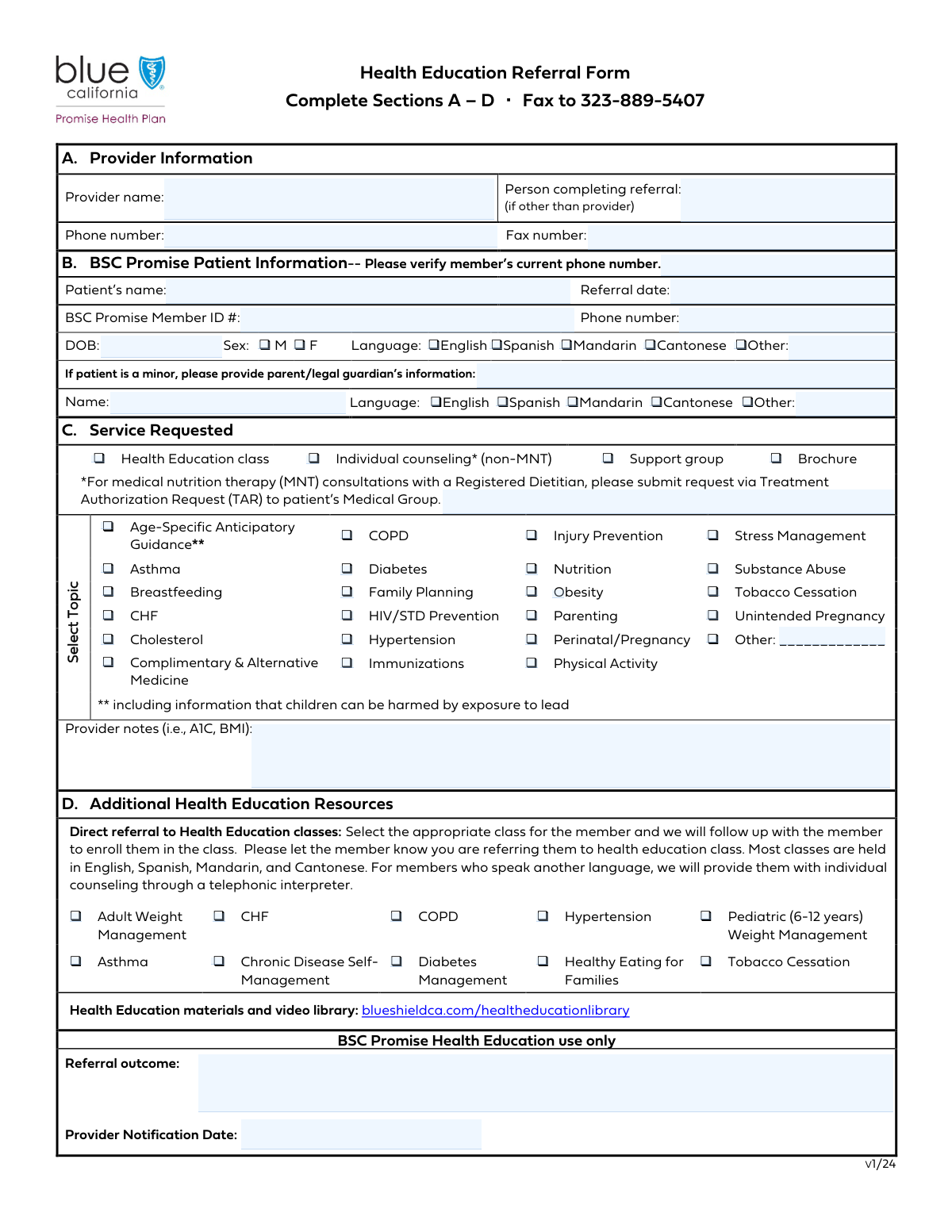
This form is the Blue Shield of California Promise Health Plan Health Education Referral Form, a crucial document for healthcare providers to request specific health education services for their patients. It allows providers to refer members to a wide range of programs, including individual counseling, support groups, and classes for managing chronic conditions like diabetes, asthma, and hypertension. By detailing the patient's needs, this form ensures they receive targeted support to improve their health outcomes. Today, this form can be filled out quickly and accurately using AI-powered services like Instafill.ai, which can also convert non-fillable PDF versions into interactive fillable forms.
Our AI automatically handles information lookup, data retrieval, formatting, and form filling.
It takes less than a minute to fill out BSC Health Education Referral Form using our AI form filling.
Securely upload your data. Information is encrypted in transit and deleted immediately after the form is filled out.
Form specifications
| Form name: | Blue Shield of California Promise Health Plan Health Education Referral Form |
| Number of fields: | 69 |
| Number of pages: | 1 |
| Language: | English |
| Categories: | Blue Shield of California forms, education forms, health forms |
Instafill Demo: How to fill out PDF forms in seconds with AI
How to Fill Out BSC Health Education Referral Form Online for Free in 2026
Are you looking to fill out a BSC HEALTH EDUCATION REFERRAL FORM form online quickly and accurately? Instafill.ai offers the #1 AI-powered PDF filling software of 2026, allowing you to complete your BSC HEALTH EDUCATION REFERRAL FORM form in just 37 seconds or less.
Follow these steps to fill out your BSC HEALTH EDUCATION REFERRAL FORM form online using Instafill.ai:
- 1 Navigate to Instafill.ai and upload or select the BSC Health Education Referral Form.
- 2 Use the AI assistant to automatically fill in the Provider and Patient Information sections, or enter the details manually.
- 3 Select the appropriate service type (e.g., Health Education class, individual counseling) and check the boxes for all relevant requested health topics.
- 4 If referring to a specific Health Education Class, select the appropriate class from the provided list, such as 'Diabetes Management' or 'Tobacco Cessation'.
- 5 Add any necessary clinical details or context, such as A1C or BMI, in the 'Provider Notes' section to support the referral.
- 6 Carefully review all entered information, including patient demographics, selected services, and provider notes, to ensure accuracy.
- 7 Securely download, print, or submit the completed referral form as required by Blue Shield of California.
Our AI-powered system ensures each field is filled out correctly, reducing errors and saving you time.
Why Choose Instafill.ai for Your Fillable BSC Health Education Referral Form Form?
Speed
Complete your BSC Health Education Referral Form in as little as 37 seconds.
Up-to-Date
Always use the latest 2026 BSC Health Education Referral Form form version.
Cost-effective
No need to hire expensive lawyers.
Accuracy
Our AI performs 10 compliance checks to ensure your form is error-free.
Security
Your personal information is protected with bank-level encryption.
Frequently Asked Questions About Form BSC Health Education Referral Form
This form is used by healthcare providers to refer a BSC Promise Member to various health education services, such as classes, individual counseling, or support groups, to help them manage their health.
A healthcare provider or a designated person within their office, such as a nurse or administrator, should complete this form on behalf of the patient being referred.
The BSC Promise Member ID is the patient's unique identification number for their health plan. This number can typically be found on the patient's insurance membership card.
You only need to fill out the 'Parent/Guardian Information' section if the patient is a minor. This is determined by the 'Date of Birth' entered in the Patient Information section.
'Requested Topics' indicates a general need for information on a subject, while 'Health Education Class Referral' is for enrolling the patient in a specific, structured class like 'Diabetes Management' or 'Tobacco Cessation'.
Use the 'Provider Notes' section to add clinically relevant details that will help with the referral, such as the patient's recent A1C, BMI, blood pressure readings, or specific health goals.
If the patient's language is not one of the options provided, check the 'Other Language' box and write the correct language in the space next to it.
In the 'Requested Topics' section, you can check the box labeled 'Other' and write in the specific topic in the 'Other Topic' field.
After submission, the referral is processed, and the member will be contacted regarding the requested health education service. The outcome of the referral is later documented in the 'Referral Outcome' section.
Yes, you can use services like Instafill.ai, which leverage AI to accurately auto-fill form fields from your records, saving you time and reducing potential errors.
To fill this form out online, you can use a service like Instafill.ai. Simply upload the form, and its AI will help you complete the required fields quickly and efficiently.
If you have a non-fillable or 'flat' PDF, you can use a tool like Instafill.ai to instantly convert it into an interactive, fillable form. This allows you to type your information directly into the fields.
'Provider Name' is for the main healthcare provider making the referral. 'Person Completing Referral' is for the staff member, like a medical assistant, who may be filling out the form on the provider's behalf.
This refers to one-on-one counseling services that are not Medical Nutrition Therapy (MNT). MNT is a specific nutritional therapy service for managing medical conditions and may require a different referral process.
Compliance BSC Health Education Referral Form
Validation Checks by Instafill.ai
1
Minor Patient Guardian Information Requirement
This check calculates the patient's age based on the 'Date of Birth' field. If the patient is determined to be a minor (e.g., under 18 years old), it verifies that the 'Parent/Guardian Name' field is filled out. This is crucial for legal consent and contact purposes for underage patients, and failure to provide this information will prevent form submission until the guardian's name is entered.
2
Date of Birth is a Valid Past Date
This validation ensures that the value entered in the 'Date of Birth' field is a real, correctly formatted date that occurs before the current date. It prevents the entry of future dates or impossible dates, which would make age-dependent calculations and eligibility checks incorrect. If the date is invalid or in the future, the user will be prompted to correct it.
3
Referral and Notification Date Consistency
This check compares the 'Referral Date' with the 'Provider Notification Date'. It ensures that the notification date is not earlier than the referral date, as notification cannot logically precede the event itself. This maintains the chronological integrity of the referral process timeline. An error will be flagged if the notification date is before the referral date, requiring the user to adjust one of the dates.
4
Standard Phone Number Formatting
This validation examines all phone number fields, including 'Provider Phone Number' and 'Patient Phone Number', to ensure they conform to a standard format (e.g., XXX-XXX-XXXX or (XXX) XXX-XXXX). Proper formatting is essential for ensuring the numbers are valid and can be used by automated dialing or messaging systems. Submissions with incorrectly formatted numbers will be rejected until they are corrected.
5
Exclusive Patient Sex Selection
This check validates that for the 'Patient Sex' section, either 'Male' or 'Female' is selected, but not both. It enforces a mutually exclusive choice to ensure data integrity for patient demographic records. If both or neither are selected, the form will display an error and require the user to select exactly one option.
6
Exclusive Patient Language Selection
This validation ensures that only one language option is selected from the 'Patient Language' checkboxes (English, Spanish, Mandarin, Cantonese, Other Language). A patient can only have one primary language in this context, and this rule prevents conflicting data entries. If multiple languages are checked, the user will be required to select only one before proceeding.
7
Conditional 'Patient Other Language' Field
This rule checks if the 'Other Language' checkbox is selected in the 'Patient Language' section. If it is checked, the corresponding 'Patient Other Language' text field must contain a value. Conversely, if the checkbox is not selected, the text field should be empty to avoid extraneous data. This ensures that when a user specifies 'Other', the language is actually named.
8
At Least One Service Type Required
This validation confirms that at least one checkbox under the 'Service Type' section has been selected. The service type is the primary reason for the referral, so this information is mandatory for routing and processing the request. If no service type is selected, the form submission will fail with a message indicating a selection is required.
9
Conditional Health Education Class Selection
This check is triggered if 'Health Education class' is selected as the 'Service Type'. It then verifies that at least one specific class (e.g., 'Adult Weight Management', 'Asthma') is chosen from the 'Health Education Class Referral' section. This ensures that a general request for a class is followed by a specific, actionable class referral. The form will be considered incomplete if no specific class is chosen.
10
Pediatric Weight Management Age Verification
This is a cross-field logical check that activates if the 'Pediatric (6-12 years) Weight Management' class is selected. It calculates the patient's age from their 'Date of Birth' and verifies that it falls within the 6 to 12-year range. This prevents inappropriate class referrals and ensures the patient meets the program's age criteria. If the patient's age is outside this range, an error will be shown, preventing the selection of this class.
11
Core Patient Identifier Completeness
This check ensures that the most critical patient identification fields—'Patient's Name', 'Date of Birth', and 'BSC Promise Member ID'—are not empty. These fields are fundamental for correctly identifying the patient in the system and processing the referral. The form cannot be submitted if any of these core identifiers are missing.
12
Conditional 'Other Topic' Field Requirement
This validation ensures that if the 'Other' checkbox is selected under 'Requested Topics', the adjacent 'Other Topic' text field is not left blank. This rule guarantees that a specific topic is provided when the predefined list is insufficient. Failure to specify the topic will result in a validation error, prompting the user to either enter a topic or uncheck the 'Other' box.
Common Mistakes in Completing BSC Health Education Referral Form
Users often check 'Health Education class' under 'Service Type' but then forget to select a specific class in the 'Health Education Class Referral' section. This inconsistency creates an ambiguous request, causing processing delays as staff must contact the provider for clarification. To avoid this, ensure that if the general class service is selected, a corresponding specific class is also checked to complete the referral.
Entering the 'BSC Promise Member ID' is highly prone to transcription errors, such as transposed numbers or missing characters. An incorrect ID is a critical failure point, as it prevents the system from identifying the patient and verifying their eligibility, leading to immediate rejection of the referral. Always double-check the ID against the patient's card; AI-powered tools like Instafill.ai can help validate such formats to prevent submission errors.
A frequent mistake is checking the 'Other Language' box for a patient or guardian but failing to write the specific language in the adjacent text field. This omission prevents the receiving organization from arranging for a qualified interpreter, creating significant communication barriers and delaying the patient's access to care. Always ensure the text field is completed whenever the 'Other' checkbox is selected.
This section is conditionally required only if the patient is a minor, a detail people often miss. Users either forget to complete it for a child, preventing legal consent and communication, or incorrectly fill it out for an adult, creating confusing records. To prevent this, always verify the patient's 'Date of Birth' first to determine if they are a minor before proceeding with this section.
Referrers frequently skip the 'Provider Notes' field, especially when rushed, even though it provides essential clinical context for the referral. For example, selecting 'Diabetes' without noting the patient's A1C level leaves the request vague and less actionable. This lack of detail forces follow-up calls that delay care and can be avoided by including key metrics (like A1C or BMI) that justify the referral.
Checking a broad category like 'Nutrition' or 'Stress Management' without providing context in the 'Provider Notes' is a common oversight. This results in the patient being referred for a generic service that may not address their specific clinical needs, reducing the intervention's effectiveness. To improve the referral, supplement any checked topic with specific details or goals in the notes section.
Users often enter dates for 'Date of Birth' or 'Referral Date' in various non-standard formats (e.g., DD-MM-YY, Month Day, YYYY). This can cause data import errors, miscalculation of the patient's age, and record-matching failures, especially with automated systems. To ensure accuracy, consistently use the MM/DD/YYYY format. Using a tool like Instafill.ai can automatically format dates correctly, preventing these issues.
The distinction between general counseling and 'Medical Nutrition Therapy (MNT)' can be confusing, leading providers to select this option incorrectly. Requesting non-MNT counseling for a condition that requires clinical MNT can result in a denied claim or an inappropriate service referral. Before selecting, confirm if the patient's condition requires a prescribed diet from a registered dietitian, which would be MNT.
When a desired topic isn't listed, users may type it into the 'Other Topic' field but forget to tick the corresponding 'Other' checkbox. Many data processing systems are programmed to ignore text fields if their associated checkbox is not selected, meaning the custom request is completely missed. To ensure your specific request is captured, always check the 'Other' box when providing information in an 'Other' text field.
The form asks for both 'Member's Current Phone Number' and 'Patient Phone Number,' which can be confusing. Users may leave one blank or enter conflicting information, increasing the risk that the patient cannot be reached for scheduling. This can delay or prevent service delivery. To avoid this, enter the patient's most reliable contact number in both fields to ensure successful contact.
Saved over 80 hours a year
“I was never sure if my IRS forms like W-9 were filled correctly. Now, I can complete the forms accurately without any external help.”
Kevin Martin Green
Your data stays secure with advanced protection from Instafill and our subprocessors

Robust compliance program
Transparent business model
You’re not the product. You always know where your data is and what it is processed for.
ISO 27001, HIPAA, and GDPR
Our subprocesses adhere to multiple compliance standards, including but not limited to ISO 27001, HIPAA, and GDPR.
Security & privacy by design
We consider security and privacy from the initial design phase of any new service or functionality. It’s not an afterthought, it’s built-in, including support for two-factor authentication (2FA) to further protect your account.
Fill out BSC Health Education Referral Form with Instafill.ai
Worried about filling PDFs wrong? Instafill securely fills blue-shield-of-california-promise-health-plan-health-education-referral-form forms, ensuring each field is accurate.