
Yes! You can use AI to fill out Education Course Costs and Student Details Claim Form
Don't type 117 fields by hand. Tell our AI about yourself, or upload a document you already have, and it fills every field in seconds. You check it, then download, print or sign.
The AI does the filling. You just check it.
No typing into boxes, nothing to install.
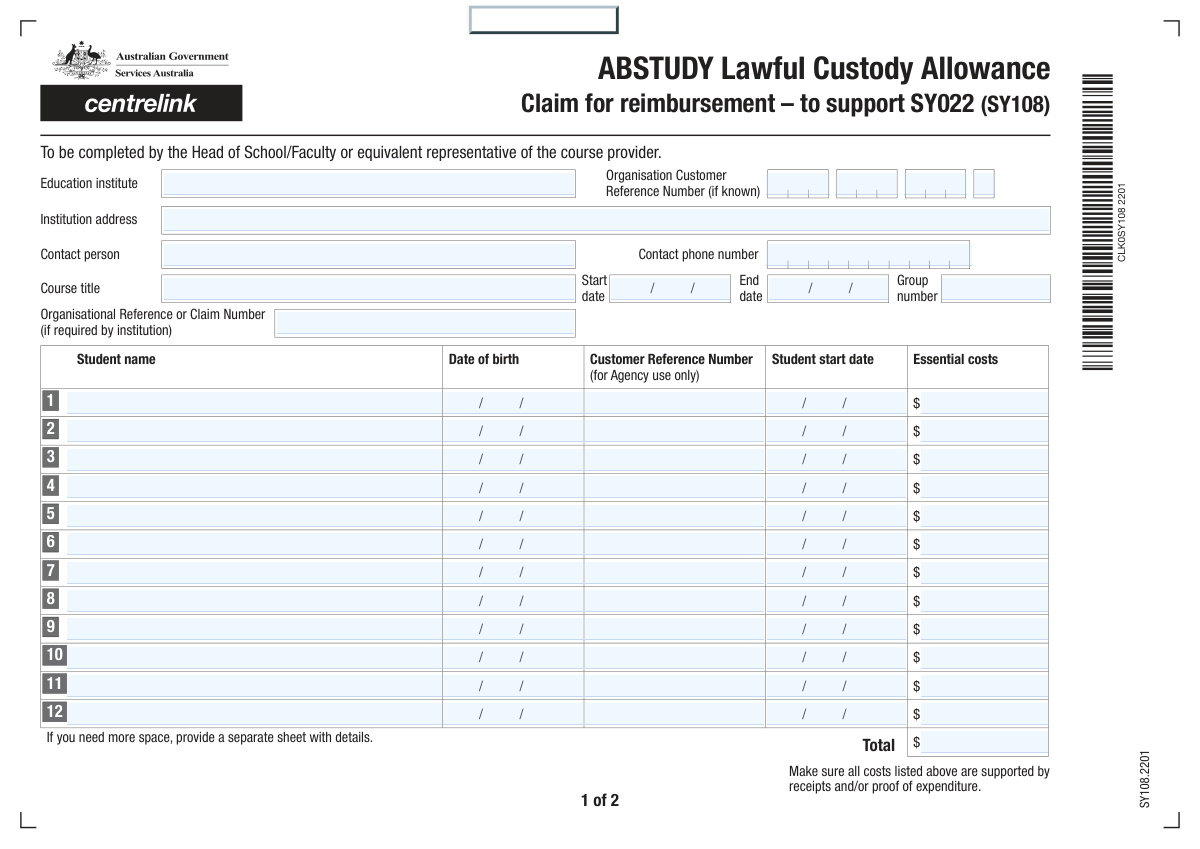
What this form asks for
The AI fills all of it, from your answers or your documents.
The AI checks your answers before you download
14 checks built for this form, so a wrong date or a missing answer is caught before anyone else sees it.
This check ensures the 'End Date' of the course is on or after the 'Start Date'. It prevents the submission of logically impossible course durations, which would cause processing errors. If the end date precedes the start date, the system will flag an error and require the user to correct the dates before proceeding.
This validation automatically sums all 'Student Essential Costs' and all 'Item Total Cost' fields and compares the result to the value entered in the 'Total Cost' field. This is critical for ensuring the financial accuracy of the claim. If the manually entered total does not match the calculated sum, an error is displayed, forcing a correction to ensure data integrity.
This check verifies that each student's individual 'Start Date' falls on or between the overall course 'Start Date' and 'End Date'. This maintains logical consistency and confirms that the student's claim is for participation within the official course timeframe. An error will be flagged for any student whose start date is outside this range.
If a 'Student Name' field is populated, this validation ensures that the corresponding 'Date of Birth', 'Start Date', and 'Essential Costs' fields for that student are also filled. This rule enforces the submission of complete records for each individual being claimed. An error message will highlight the missing information for any incomplete student entry.
This check ensures the 'Branch Number (BSB)' field contains exactly six numeric digits. Correct formatting is essential for successful electronic fund transfers to Australian bank accounts. The system will reject any input that does not meet this specific format, preventing payment processing failures.
This validation enforces the completion of the bank details section if the 'Reimbursement Claimant' is not the student. When a third party is claiming reimbursement, their 'Bank Name', 'BSB', 'Account Number', and 'Account Holder Name' become mandatory. This ensures the system captures the necessary information to process the payment to the correct entity.
And 8 more checks
- Confirmation Date Logic
- Claimant and Confirmer Presence for Claims
- Valid Currency Format for All Cost Fields
- Item Block Integrity
- At Least One Claim Item Exists
- Student Date of Birth Plausibility
- Account Holder Name Consistency
- Confirmer Position Requirement
Let AI fill out your Student Course Cost Claim
No typing. Every field filled in seconds, checked, ready to sign.
How to Fill Out Student Course Cost Claim Online for Free in 2026
What the AI walks you through.
- Navigate to Instafill.ai and upload the Education Course Costs and Student Details Claim Form, or select it from their library of templates.
- Enter the course provider's information, including the institute's name, address, reference number, and contact person.
- Input the specific course details, such as the title, start and end dates, and group number.
- For each student being claimed (up to twelve), fill in their full name, date of birth, start date, and the total essential costs.
- Itemize any additional costs for stationery, resources, or materials in the provided section, and enter the total cost of all claims.
- Provide the claimant's bank account details for reimbursement and have an authorized representative (e.g., Head of School) enter their confirmation details and signature.
- Review all entered information for accuracy using Instafill.ai's validation checks, then download, print, or securely submit the completed form as required.
Common Mistakes in Completing Student Course Cost Claim
The ones the AI is built to catch.
Incorrectly Formatting Dates
Miscalculating Total Costs
Filling 'Agency Use Only' Fields
Ignoring Conditional Field Instructions
Using Abbreviations for Institute or Claimant Names
Entering a Card Number Instead of a Bank Account Number
Data Entry Errors in Repetitive Student Sections
Incorrect Confirmer's Title
Incomplete or Incorrect 'Org Customer Reference No.'
Mismatch Between Student and Course Dates
Frequently Asked Questions About Student Course Cost Claim
Is it really free for 7 days?
Can I fill other forms too?
How do I cancel?
How does the AI fill out Student Course Cost Claim?
What happens to my information?
How complex is Student Course Cost Claim to fill out?
What is the purpose of this form?
Who is responsible for filling out this form?
What is the 'Org Customer Reference No.' and is it required?
The form asks for a 'Student Customer Reference Number' but says 'for agency use only.' Should I enter anything here?
What should I do if I need to claim costs for more than twelve students?
What qualifies as an 'Essential Cost'?
How do the 'Essential Costs' per student relate to the itemized list of costs?
When do I need to provide bank account details for reimbursement?
Who is authorized to sign in the 'Confirmation Details' section?
How do I submit the form after filling it out?
Can I use an AI tool to help fill out this form?
How can I use Instafill.ai to complete this form online?
My PDF version of this form is not fillable. What can I do?
Who can be listed as the 'Reimbursement Claimant'?
Get your Student Course Cost Claim filled out by AI
$0 today. Cancel before Nov 11 and you pay nothing.
Other forms like this one
education forms: Form 1099-Q, Payments From Qualified Education Programs, Illinois State Board of Education (ISBE) Application for Employment (ISBE 61-08), Prudential Group Disability Insurance – Education and Employment History Form (GL.2009.009, Ed. 06/2017), Income-Driven Repayment (IDR) Plan Request (PAYE, IBR, and ICR) — William D. Ford Federal Direct Loan (Direct Loan) Program and Federal Family Education Loan (FFEL) Programs (OMB No. 1845-0102), The Prudential Insurance Company of America Group Disability Insurance – Education and Employment History Form (GL.2009.009, Ed. 06/2017), Prudential Group Disability Insurance – Education and Employment History Form (GL.2009.009, Ed. 06/2017), Melbourne City College Australia Education Agent Application Form, Leaders Institute of Training and Education (LITE) Application for Enrolment, Loan Rehabilitation: Income and Expense Information, William D. Ford Federal Direct Loan (Direct Loan) Program/Federal Family Education Loan (FFEL) Program, Confirmation of Teaching Evidence, Form K-908-2085-E, Designation of Education Decision-Maker, Blue Shield of California Promise Health Plan Health Education Referral Form, Form 2, Certification of Professional Education, Form SY029 - Claim for Pensioner Education Supplement, Claim for Pensioner Education Supplement, CFS 431-1, Summary of the Child's Educational and Developmental Status, CFS 912, Referral Form for Life Skills/Financial Literacy Education
VA claim forms: Form OWCP-915, Claim for Medical Reimbursement, Form 8862, Information To Claim Certain Credits, Form CA-7, Claim for Compensation, Form CA-5, Claim for Compensation, Form SC-100, Plaintiff's Claim and ORDER to Go to Small Claims Court, Form 20-0995, Decision Review Request: Supplemental Claim, Form 104, List of Creditors 20 Largest Unsecured Claims, Form 941-X (Rev. April 2023), Adjusted Employer’s QUARTERLY Federal Tax Return or Claim for Refund, Judicial Council of California Form SC-104, Proof of Service (Small Claims), Immigration and Refugee Board of Canada (IRB) – Refugee Protection Division (RPD) Basis of Claim Form (for persons claiming refugee protection in Canada) (RPD.02.01), SC-108, Request to Correct or Cancel Judgment and Answer (Small Claims), Judicial Council of California Form SC-105, Request for Court Order and Answer (Small Claims), SC-120, Defendant’s Claim and ORDER to Go to Small Claims Court (Small Claims), Judicial Council of California Form SC-104, Proof of Service (Small Claims), Continental American Insurance Company (CAIC) / Aflac Group Critical Illness Claim Form (with Attending Physician’s Statement, HIPAA Authorization to Obtain Information, and Electronic Funds Transaction Authorization), Judicial Council of California Form SC-108, Request to Correct or Cancel Judgment and Answer (Small Claims), SC-105, Request for Court Order and Answer (Small Claims), Judicial Council of California Form SC-120, Defendant’s Claim and ORDER to Go to Small Claims Court (Small Claims), Small Claim and Notice of Small Claim (ORS 46.425) (OJD Official) (Jan 2026), VA Form 21-4138, Statement in Support of Claim
student forms: Form 1098-E, Student Loan Interest Statement, NSFAS Consent Form (National Student Financial Aid Scheme) – APP2026, International Student Application for Financial Aid 2026-2027 (International Student Application for Financial Assistance 2026-2027), Barber & Hairdresser Student/Apprentice Quarterly Report Form (Alaska Board of Barbers and Hairdressers) – Form 08-4315, ROTC Cadet Academic Plan / Degree and Credit Hour Worksheet (Student Identification, Term-by-Term Courses, GPA Summary, and Completion Certification), DNA Kingston Training Enrolment and Genuine Student Form for International Students, South Sydney College International Student Application Form, Darwin Institute of Trade International Student Application Form, 2026–27 FAFSA® Form, Free Application for Federal Student Aid, Free Application for Federal Student Aid (FAFSA), Student Change of Circumstances Form, Form SY022, Claim for ABSTUDY for students or Australian Apprentices in lawful custody, Student Claim for Essential Equipment Form, Form SY042, Details of income for student payments, Tertiary Student Enrolment Declaration
ETA forms: ETA Form 9061, Work Opportunity Tax Credit Individual Characteristics Form (ICF), Form UD-100, Complaint—Unlawful Detainer, 2420 - Served by Publication/Posting Forcible Detainer - Notice by Posting (CCM 0086), Oregon Practitioner Credentialing Application (including Attachment A: Professional Liability Action Detail), Judicial Council of California Form UD-105, Answer—Unlawful Detainer, Murrieta Police Department Citizen Complaint Form (California Penal Code § 148.6 Advisory Statement), Judicial Council of California Form UD-150, Request/Counter-Request to Set Case for Trial—Unlawful Detainer, Judicial Council of California Form UD-105, Answer—Unlawful Detainer, Louisiana Secretary of State – Notice of Change of Registered Office and/or Change of Registered Agent (Domestic Limited Liability Company) (R.S. 12:1308) (Form SS983, Rev. 01/24), Judicial Council of California Form UD-150, Request/Counter-Request to Set Case for Trial—Unlawful Detainer, TIAA-CREF Funds IRA 60-Day Rollover Request (Retail Class Only), TIAA-CREF Funds IRA Distribution Form (Retail Class Only), TIAA-CREF Funds Beneficiary Designation Form (Retail Class Only), Vanguard Personal Investor – Unregulated Trust details – Account information update, Application Form: Individual Investor | Monthly Liquidity – Retail Hedge Fund, Application Form: Legal Entities | Retail Hedge Fund - Fundrock, Application Form: Individual Investor | Retail Hedge Fund, Fundrock Application Form: Legal Entities | Monthly Liquidity – Retail Hedge Fund, Form C8, Confidential contact details, Judicial Council of California Form UD-100, Complaint—Unlawful Detainer
Let AI fill out your Student Course Cost Claim
Your trial starts once a card is added. You pay nothing before Nov 11.
Our AI already knows this form, all 117 fields of it. Skip the typing: tell it about yourself, or upload what you have, and it fills the whole form in seconds.
- AI fills every field on both pages, tables and checkboxes included
- No typing into boxes: answer a few questions, or upload a document you already have, an old copy of this form, a photo of a document
- The AI checks the answers; you review and change anything before you download
- Download the finished PDF, print it, or sign it online
- Encrypted, and never used to train AI
Cancel before Nov 11 and you pay nothing.
A card is needed to start the trial. Cancel in two clicks from your account.
Terms · Privacy