Yes! You can use AI to fill out Student Change of Circumstances Form
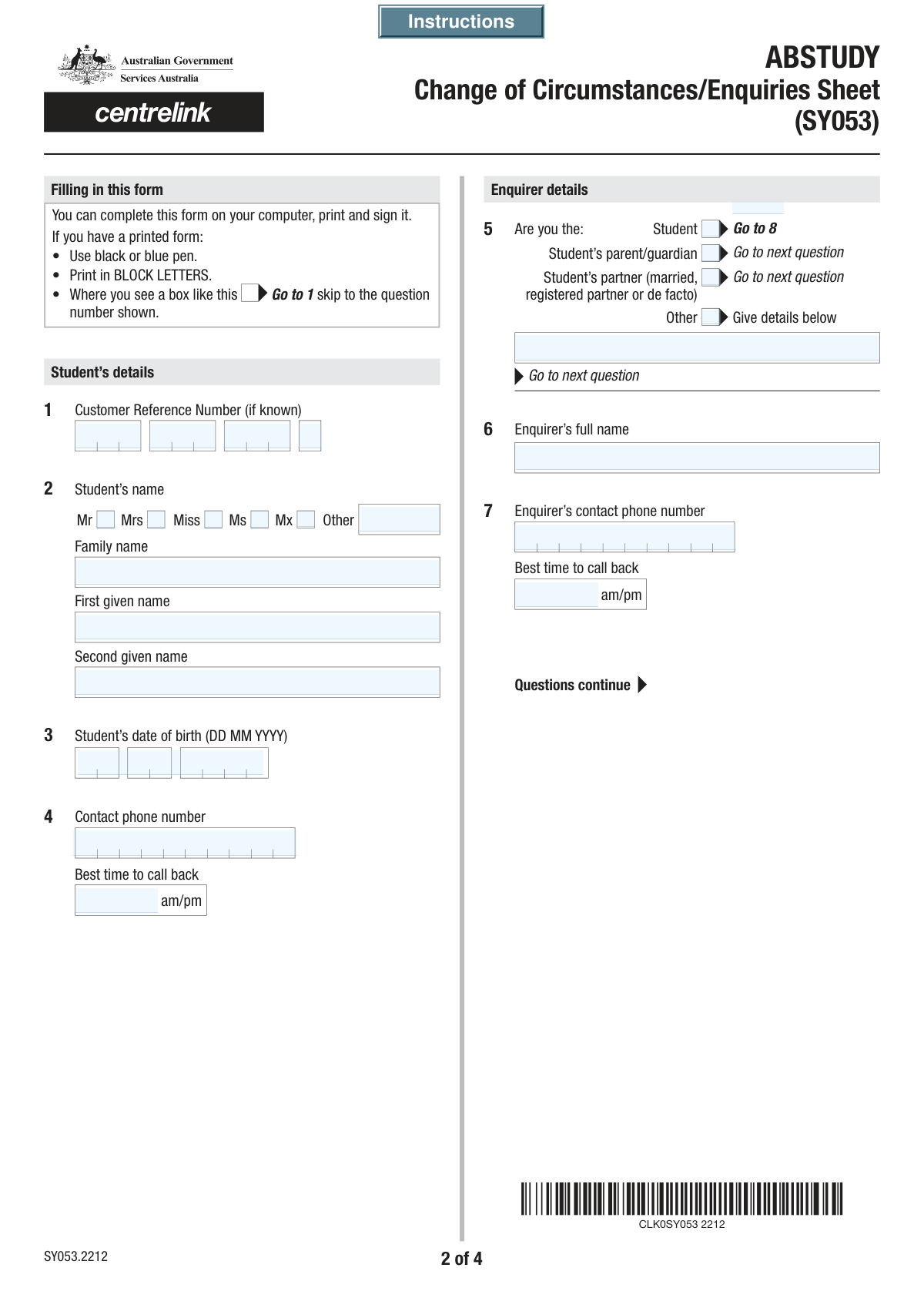
This form is a crucial document for students receiving financial support or benefits, allowing them to officially report changes in their personal, academic, or financial situation. It is important to submit this form promptly to ensure that payments are calculated correctly and records are up-to-date, preventing potential overpayments or delays in support. Today, this form can be filled out quickly and accurately using AI-powered services like Instafill.ai, which can also convert non-fillable PDF versions into interactive fillable forms.
Student Change of Circumstances is part of the
student forms category on Instafill.
Our AI automatically handles information lookup, data retrieval, formatting, and form filling.
It takes less than a minute to fill out Student Change of Circumstances using our AI form filling.
Securely upload your data. Information is encrypted in transit and deleted immediately after the form is filled out.
Form specifications
| Form name: | Student Change of Circumstances Form |
| Number of fields: | 77 |
| Number of pages: | 4 |
| Filled form examples: | Form Student Change of Circumstances Examples |
| Language: | English |
More forms in Student forms
Instafill Demo: How to fill out PDF forms in seconds with AI
How to Fill Out Student Change of Circumstances Online for Free in 2026
Are you looking to fill out a STUDENT CHANGE OF CIRCUMSTANCES form online quickly and accurately? Instafill.ai offers the #1 AI-powered PDF filling software of 2026, allowing you to complete your STUDENT CHANGE OF CIRCUMSTANCES form in just 37 seconds or less.
Follow these steps to fill out your STUDENT CHANGE OF CIRCUMSTANCES form online using Instafill.ai:
- 1 Navigate to Instafill.ai and upload or select the Student Change of Circumstances form.
- 2 Enter the student's personal details, including their name, date of birth, and customer reference number. If you are not the student, provide your details as the enquirer.
- 3 Identify the reason for the submission by checking the boxes corresponding to the changes you need to report, such as address, bank details, income, or study load.
- 4 Complete the required fields with the new information. For example, provide the new address, updated bank account details, or details about your change in institution or study load.
- 5 Provide details for any other changes not specifically listed in the designated section.
- 6 Carefully review all the entered information for accuracy, then use the digital signature tool to sign and date the form.
- 7 Download the completed form and submit it to the appropriate institution or government body as instructed.
Our AI-powered system ensures each field is filled out correctly, reducing errors and saving you time.
Why Choose Instafill.ai for Your Fillable Student Change of Circumstances Form?
Speed
Complete your Student Change of Circumstances in as little as 37 seconds.
Up-to-Date
Always use the latest 2026 Student Change of Circumstances form version.
Cost-effective
No need to hire expensive lawyers.
Accuracy
Our AI performs 10 compliance checks to ensure your form is error-free.
Security
Your personal information is protected with bank-level encryption.
Frequently Asked Questions About Form Student Change of Circumstances
This form is used to notify the relevant authority of any changes to a student's personal circumstances, such as a change of address, income, bank details, or study arrangements.
The student should typically complete this form. However, a parent, guardian, partner, or another authorized person can also fill it out on the student's behalf by completing the 'Enquirer's Details' section.
The Customer Reference Number is your unique identifier for your student account. You can usually find this number on previous correspondence, letters, or your online account portal from the institution.
No, if you are the student, you only need to check the 'Student' box in the 'Enquirer Relationship' section. The form indicates you can then skip to the next relevant question, bypassing the separate enquirer details fields.
Your 'Home' address is your permanent residence, while your 'Term' address is where you live during the academic semester. Your 'Postal' address is where you wish to receive mail if it's different from the other two.
Your bank account details are required to process any payments you may be entitled to, such as student allowances or support payments. Providing correct details ensures you receive your funds without delay.
In the 'Student Income Change' section, enter your new weekly income and then check the box corresponding to the specific semester. You can also provide specific start and end dates for the income change period if applicable.
This section allows you to have tax automatically deducted from your fortnightly payments. You can choose to have a fixed dollar amount or a specific percentage of your payment withheld for tax purposes.
If you do not have a second given name, you can simply leave the 'Second Given Name' field blank. Only provide the information that applies to you.
The form includes a 'Print' button, which suggests it may need to be submitted as a signed hard copy. Please check the official website or contact the institution for specific submission instructions.
Yes, services like Instafill.ai use AI to help you fill out forms like this one. These tools can accurately auto-fill your information, which saves time and helps reduce errors.
Simply upload the form to the Instafill.ai platform. The AI will make the form fillable, and you can complete it online, using your saved profile information to auto-fill fields in seconds.
If your PDF is a flat, non-fillable image or scan, you can use a service like Instafill.ai. It can convert any non-fillable PDF into an interactive, fillable form that you can easily complete on your computer or mobile device.
Compliance Student Change of Circumstances
Validation Checks by Instafill.ai
1
Student Name Completeness
This check ensures that both the 'Family Name' and 'First Given Name' fields for the student are filled. These fields are fundamental for identifying the student in the system and are considered mandatory for processing the form. If either field is left blank, the submission will be rejected with an error message prompting the user to provide the student's full name.
2
Student Date of Birth Validity
This validation verifies that the 'Student's Date of Birth' is a real, valid date and that it is in the past. It prevents nonsensical entries like future dates or invalid dates such as February 30th. This is crucial for eligibility checks and identity verification, and an invalid entry will prevent form submission until a logical past date is entered.
3
BSB Number Format
This check validates that the 'BSB Number' field contains a 6-digit number, optionally formatted with a hyphen (e.g., 123-456 or 123456). Correct BSB numbers are essential for successful bank transactions and preventing payment failures. If the entered value does not match the required format, the user will be notified that the BSB is invalid and must be corrected.
4
Conditional 'Other Relationship' Field
This validation ensures that if the 'Other' checkbox is selected under 'Enquirer Relationship', the 'Other Relationship Details' text field must be filled out. This context is necessary to understand the enquirer's authority to act on the student's behalf. If 'Other' is checked and the details field is empty, an error will prompt the user to specify their relationship.
5
Exclusive Title Selection
This check ensures that a user selects only one title from the available checkboxes (Mr, Mrs, Miss, Ms, Mx) or fills in the 'Other Title' text field, but not both. This maintains data integrity and prevents contradictory information. If a user selects a checkbox and also enters an 'Other Title', the system will display an error asking them to choose only one option.
6
Logical Income Change Dates
This validation compares the 'Income Change Start Date' and 'Income Change End Date' to ensure the end date is on or after the start date. This prevents illogical date ranges that would make calculating income changes impossible. If the end date is before the start date, the form will show an error and require the user to correct the date range.
7
Logical Institution Change Dates
This check verifies that the 'Date of Commencement' at the new institution is after the 'Last Date of Attendance' at the old institution. This ensures a logical and chronological progression of the student's academic history. An invalid sequence would indicate a data entry error, so the system will block submission until the dates are corrected.
8
Address Type Selection
This validation ensures that if any part of the new address (Line 1, Postcode, etc.) is filled out, at least one of the address type checkboxes ('Home', 'Term', 'Postal') must also be selected. This is important for correctly routing mail and updating the right address record in the system. Without an address type, the new address information is ambiguous and the form will prompt the user to specify the type.
9
Postcode Format Validation
This check validates that the 'Postcode' field contains a value that matches the expected format for the region (e.g., a 4-digit number for Australia). A valid postcode is critical for mail delivery and address verification. If the format is incorrect, the user will receive an error message asking them to enter a valid postcode.
10
Conditional Tax Deduction Details
This check enforces logic on the tax deduction section. If 'Yes' is selected for tax deduction, the user must then choose either 'A set amount' or 'A percentage' and fill in the corresponding value field ('Tax Deduction Amount' or 'Tax Deduction Percentage'). This ensures complete information is captured for payroll processing. Failure to provide the specific amount or percentage will result in an error.
11
Conditional Signature Date
This validation ensures that the 'Signature Date' field is filled if the 'Applicant/Student Signature' field is completed. The date of signature is a legal requirement to establish when the declaration was made. If the signature is present but the date is missing, the form will be considered incomplete and an error will prompt the user to add the date.
12
Enquirer and Student Identity Logic
This check validates that if the 'Student' checkbox is selected under 'Enquirer Relationship', the details in 'Enquirer's Full Name' and 'Enquirer's Phone Number' match the corresponding student information. This prevents inconsistencies and confirms the identity of the person filling out the form. If there is a mismatch, the system may flag the submission for review or prompt the user to correct the information.
13
Logical Study Status Change Dates
This validation ensures the 'Date Dropped to Part-time Studies' is on or after the 'Last Date of Full-time Studies'. This maintains a logical timeline for changes in the student's enrollment status, which is critical for calculating eligibility for payments or benefits. If the dates are out of sequence, the form will display an error message requiring correction.
14
Bank Account Details Completeness
This check verifies that if any of the bank detail fields (BSB, Account Number) are filled, the 'Account Holder Name(s)' field must also be completed. This is crucial to ensure payments are directed to the correct individual and to prevent transaction rejections. Submitting partial bank details will trigger an error, prompting the user to provide the full account holder name.
Common Mistakes in Completing Student Change of Circumstances
Users often transpose digits or fail to enter all four parts of the Customer Reference Number. This happens due to the number's length and segmented format, making manual entry prone to error. An incorrect reference number means the form cannot be matched to the student's file, leading to immediate rejection or significant processing delays until the correct number is provided.
When a parent or guardian fills out the form, they sometimes enter their own name and details in the 'Student's Name' section instead of the designated 'Enquirer' section. This critical error occurs from rushing and assuming the first name field is for the person filling out the form. It results in the wrong person's record being accessed or updated, causing processing to fail and requiring a complete refiling of the form.
Mistyping the BSB or Account Number, or entering an Account Holder Name that doesn't perfectly match the bank's records, is a frequent and serious error. These long strings of numbers are easy to transpose, and name variations (e.g., 'Jim' vs. 'James') cause mismatches. The consequence is failed payments, or worse, payments being sent to the wrong account, which can be difficult to recover and cause financial hardship.
Applicants may enter a preferred nickname instead of their legal first name, or swap their family and given names. This often happens out of habit or a misunderstanding of the requirement for legal names. This inconsistency causes identity verification to fail when cross-referenced with school or bank records, delaying the processing of payments, enrollments, or other changes.
A user might report a 'New Weekly Income' amount but forget to select the specific academic period (e.g., Semester 1, Full academic year) to which it applies. This oversight happens when focusing only on the number field and missing the associated checkboxes. This leads to the income change being applied incorrectly or not at all, potentially resulting in an overpayment that creates a future debt for the student.
Students often have multiple addresses and may select the wrong type of address to update (Home, Term, or Postal). This confusion arises from not understanding the specific purpose of each address type. The consequence is that critical documents, such as payment notifications or official correspondence, are sent to the wrong location and may be lost, leading to missed information and deadlines.
Users frequently make errors in the tax section by not following the conditional logic. For example, they might select 'Yes' to deduct tax but then fail to specify an amount or percentage, or they select 'No' but fill in the conditional fields anyway. This creates a contradictory and invalid submission that cannot be processed, forcing a manual follow-up that delays the entire application.
When reporting a change of institution or study load, applicants often provide estimated or incorrect dates for 'Last Date of Attendance' or 'Date of Commencement'. This happens when they guess the dates instead of consulting official academic calendars or enrollment letters. Incorrect dates can create perceived gaps or overlaps in study, potentially suspending benefit payments until the discrepancy is investigated and resolved.
Forgetting to sign the form or entering an incorrect date (e.g., date of birth) in the 'Signature Date' field is a common final-step error. This usually happens when rushing to complete the last page. An unsigned form is legally invalid and will be rejected immediately, while an incorrect date can cause processing delays, requiring the entire form to be submitted again.
The form provides instruction buttons, but users often skip them, assuming they understand all the fields. This leads to many of the other common mistakes, from data entry errors to misunderstanding complex sections like income changes. Taking a moment to read the instructions can prevent errors that cause significant delays. If the form is a non-fillable PDF, tools like Instafill.ai can convert it into an interactive, fillable version, making it easier to navigate and complete accurately.
Saved over 80 hours a year
“I was never sure if my IRS forms like W-9 were filled correctly. Now, I can complete the forms accurately without any external help.”
Kevin Martin Green
Your data stays secure with advanced protection from Instafill and our subprocessors

Robust compliance program
Transparent business model
You’re not the product. You always know where your data is and what it is processed for.
ISO 27001, HIPAA, and GDPR
Our subprocesses adhere to multiple compliance standards, including but not limited to ISO 27001, HIPAA, and GDPR.
Security & privacy by design
We consider security and privacy from the initial design phase of any new service or functionality. It’s not an afterthought, it’s built-in, including support for two-factor authentication (2FA) to further protect your account.
Fill out Student Change of Circumstances with Instafill.ai
Worried about filling PDFs wrong? Instafill securely fills student-change-of-circumstances-form forms, ensuring each field is accurate.



