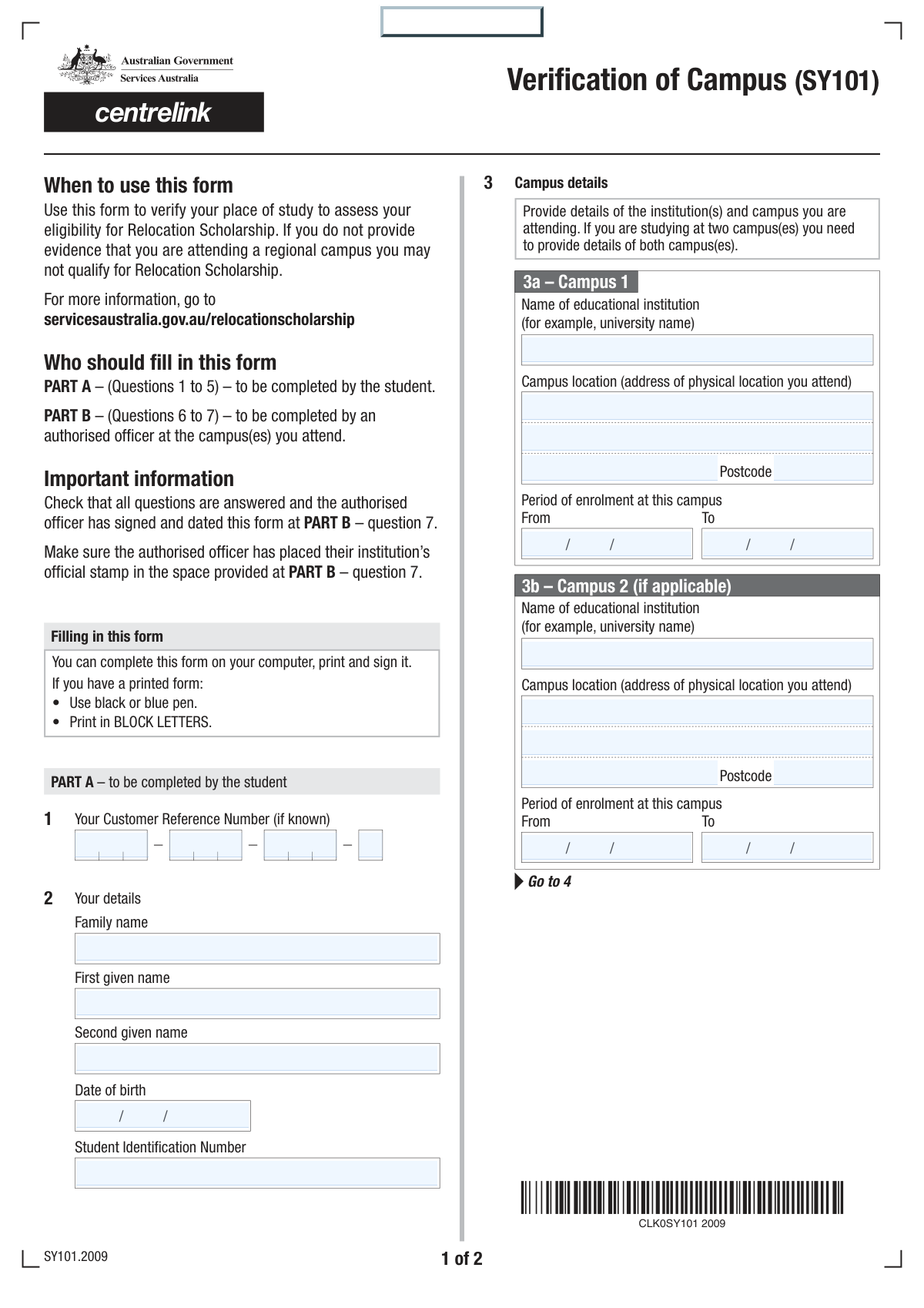
Yes! You can use AI to fill out Tertiary Student Enrolment Declaration
The Tertiary Student Enrolment Declaration is an official document that students use to formally declare their enrolment status, including campus details and study dates. This information is crucial for verifying eligibility for various student benefits, such as public transport concessions, scholarships, or government assistance programs. Today, this form can be filled out quickly and accurately using AI-powered services like Instafill.ai, which can also convert non-fillable PDF versions into interactive fillable forms.
Student Enrolment Declaration is part of the
student forms category on Instafill.
Our AI automatically handles information lookup, data retrieval, formatting, and form filling.
It takes less than a minute to fill out Student Enrolment Declaration using our AI form filling.
Securely upload your data. Information is encrypted in transit and deleted immediately after the form is filled out.
Form specifications
| Form name: | Tertiary Student Enrolment Declaration |
| Number of fields: | 30 |
| Number of pages: | 2 |
| Filled form examples: | Form Student Enrolment Declaration Examples |
| Language: | English |
More forms in Student forms
Instafill Demo: How to fill out PDF forms in seconds with AI
How to Fill Out Student Enrolment Declaration Online for Free in 2026
Are you looking to fill out a STUDENT ENROLMENT DECLARATION form online quickly and accurately? Instafill.ai offers the #1 AI-powered PDF filling software of 2026, allowing you to complete your STUDENT ENROLMENT DECLARATION form in just 37 seconds or less.
Follow these steps to fill out your STUDENT ENROLMENT DECLARATION form online using Instafill.ai:
- 1 Navigate to Instafill.ai and upload or select the Tertiary Student Enrolment Declaration form.
- 2 Provide your personal details, including your full name, date of birth, and student identification number.
- 3 Enter your unique Customer Reference Number as indicated on the form.
- 4 Input the details for your primary educational institution (Campus 1), including the institution name, address, and your enrolment dates.
- 5 If you are enrolled at a second campus, complete the 'Campus 2' section with the relevant institution and enrolment information.
- 6 Carefully review all the information you have entered to ensure it is correct and complete.
- 7 Electronically sign and date the declaration section to certify the accuracy of your provided details before submitting the form.
Our AI-powered system ensures each field is filled out correctly, reducing errors and saving you time.
Why Choose Instafill.ai for Your Fillable Student Enrolment Declaration Form?
Speed
Complete your Student Enrolment Declaration in as little as 37 seconds.
Up-to-Date
Always use the latest 2026 Student Enrolment Declaration form version.
Cost-effective
No need to hire expensive lawyers.
Accuracy
Our AI performs 10 compliance checks to ensure your form is error-free.
Security
Your personal information is protected with bank-level encryption.
Frequently Asked Questions About Form Student Enrolment Declaration
This form is used to collect or update a student's personal details and enrolment information for one or more educational institution campuses.
Your Customer Reference Number is a unique identifier typically found on official correspondence from the institution, such as your offer letter, statement of account, or student portal.
If you do not have a second given name (or middle name), you can simply leave that field blank.
No, you only need to complete the sections for the campuses where you are enrolled. If you attend only one campus, fill out the 'Campus 1' section and leave the 'Campus 2' section empty.
The signature and date are only required if you have provided enrolment details for a second campus in the 'Campus 2' section of the form.
Before you begin, you should have your Customer Reference Number, Student ID number, and official enrolment documents that confirm your campus location(s) and study dates.
Please use the official start and end dates for your course or study period. This information can be found in your enrolment confirmation letter or on your student portal.
This form does not appear to have an online submission feature. You should complete the fields, use the 'Print' button to print a copy, and then submit the physical form according to your institution's instructions.
The 'Clear' button will erase all the information you have entered into the form, allowing you to start over from a blank slate.
If you are an online student, you should typically use the address of the main campus that administers your program. If you are unsure, please contact your institution for guidance.
Yes, services like Instafill.ai use AI to auto-fill form fields accurately and save time. This can help you complete your form faster and with fewer errors.
You can upload the PDF to the Instafill.ai platform. Their service will make the form interactive, allowing you to fill it out easily online or use their AI to auto-fill your information.
If your PDF is a 'flat' or non-fillable version, you can use a tool like Instafill.ai. It can convert the document into an interactive, fillable form that you can complete on your computer.
Compliance Student Enrolment Declaration
Validation Checks by Instafill.ai
1
Customer Reference Number Completeness
This check ensures that all four parts of the Customer Reference Number are filled out. This number is critical for identifying the customer's account or prior correspondence. If any part is missing, the system cannot assemble the full reference number, leading to processing delays or failure to locate the customer's record.
2
Customer Reference Number Format
Validates that each of the four parts of the Customer Reference Number contains only numeric characters. This is important for data integrity and ensures the number conforms to the expected format for database lookups. If non-numeric characters are entered, the validation will fail, prompting the user to correct the input to prevent submission errors.
3
Required Name Fields Presence
Ensures that the 'Family Name' and 'First Given Name' fields are not left empty. These fields are fundamental for identifying the individual submitting the form. Failure to provide this information would make the form submission anonymous and unusable, so the form cannot be submitted until they are completed.
4
Date of Birth Logical Validity
This validation confirms that the 'Date of Birth' is a real date, is in the past, and represents a plausible age for a student (e.g., older than 14 and younger than 100). This prevents obvious data entry errors, such as selecting a future date or a date that would make the applicant impossibly old or young. An invalid entry would prompt the user for correction.
5
Student Identification Number Presence
Verifies that the 'Student Identification Number' field has been filled in. This ID is a key piece of information used by educational institutions to uniquely identify a student. Without it, the form cannot be correctly associated with the student's academic record, so submission is blocked until it is provided.
6
Campus 1 Postcode Format
Checks that the 'Postcode' for Campus 1 is in a valid format (e.g., a specific number of digits, like 4 for Australia). This ensures address data is accurate and standardized, which is crucial for mailings and regional analysis. An incorrectly formatted postcode will trigger an error, asking the user to enter a valid one.
7
Campus 1 Enrolment Date Chronology
This check ensures the 'Enrolment End Date' for Campus 1 is on or after the 'Enrolment Start Date'. This is a logical consistency check to prevent impossible date ranges. If the end date is before the start date, the form will show an error and require the user to correct the dates before proceeding.
8
Campus 2 Conditional Completeness
If any field in the 'Campus 2' section is filled, this validation ensures all other required fields in that section (Institution Name, Address, Postcode, Enrolment Dates) are also completed. This prevents partial or incomplete data for the second campus. The validation triggers if, for example, a name is entered but the corresponding dates are missing.
9
Campus 2 Enrolment Date Chronology
Similar to the check for Campus 1, this validates that the 'Campus 2 Enrolment To Date' is on or after the 'Campus 2 Enrolment From Date'. This maintains logical data integrity for the second enrolment period. An invalid date range will block submission until corrected.
10
Conditional Signature and Date Requirement
This validation enforces the rule that the 'Your Signature' and 'Declaration Date' fields are required if, and only if, the 'Campus 2' section has been filled out. This ensures the declaration is made only when necessary as per the form's instructions. If Campus 2 is filled and the signature is missing, the user will be prompted to sign.
11
Signature Name Match
Verifies that the value entered in the 'Your Signature' field matches the full name constructed from the 'First Given Name' and 'Family Name' fields. This acts as a confirmation of identity and intent, ensuring the person signing is the same person whose details are on the form. A mismatch would result in an error, asking the user to ensure the signature matches their name.
12
Declaration Date Validity
Checks that the 'Declaration Date' is a valid, non-future date. The date of declaration cannot be in the future, and it should be on or after the latest enrolment start date. This ensures the declaration is timestamped accurately at the time of submission. A future date would be flagged as an error.
Common Mistakes in Completing Student Enrolment Declaration
The form splits the Customer Reference Number into four separate parts, making it easy to transpose digits or enter segments in the wrong order. This mistake often happens when rushing and can lead to a complete failure to match the submission with the customer's account, causing significant processing delays. To avoid this, carefully enter each part of the number into its corresponding box, double-checking against your source document before proceeding.
A very common error is entering the family name in the 'First Given Name' field and vice versa, often due to cultural naming conventions or simply not reading the labels carefully. This creates a mismatch with official records and can cause failures in identity verification. Always confirm you are entering the correct information in the designated 'Family Name' and 'First Given Name' fields.
The form requests multiple dates (Date of Birth, Enrolment Dates) without specifying a format (e.g., DD/MM/YYYY vs. MM/DD/YYYY). Entering a date like '03/04/2025' can be interpreted as either March 4th or April 3rd, leading to incorrect data. To prevent this, use a clear, non-ambiguous format like 'DD-MMM-YYYY' (e.g., 04-MAR-2025) if possible, or use an AI-powered form filler like Instafill.ai which can automatically apply the correct, unambiguous format.
This form asks for both a 'Customer Reference Number' and a 'Student Identification Number'. Applicants sometimes confuse these two and enter the same number in both places, or enter their student ID in the customer reference field. This error prevents the system from linking the form to the correct student and account records. Ensure you are providing two distinct numbers, sourcing the Student ID from your official student card or portal.
Applicants often use common acronyms (e.g., 'MIT') or shortened names instead of the 'full name of the educational institution' as requested. Automated systems may fail to match an abbreviation to the official institution name in their database, leading to validation errors or processing exceptions. Always write out the institution's complete and official name to ensure accuracy.
The form requires the campus address to be split across 'Address', 'City/Suburb', and 'Postcode' fields. A frequent mistake is to paste the entire address into the first line, leaving the other fields blank. This creates poorly formatted data that can't be processed automatically and may cause communication to be misdirected. AI-powered tools like Instafill.ai excel at automatically parsing address data and distributing the components into the correct, separate fields.
When asked for 'Enrolment Start Date' and 'End Date', students may mistakenly provide the dates for the current semester instead of their entire course duration. This can lead to an incorrect assessment of their student status or eligibility. It is crucial to enter the official start date of your entire program and the expected final completion date.
The signature and declaration date are conditional, required only if the 'Campus 2' section is filled out. Users often miss these specific instructions, leading to two errors: forgetting to sign when required, which can invalidate the information, or signing unnecessarily, which can confuse processors. Carefully reading instructions tied to signature fields is critical for a valid submission.
Out of habit, applicants may automatically enter their own home postcode instead of the one for the campus location. This simple mistake can lead to the form being associated with the wrong geographical region, affecting data analysis and potentially even eligibility for certain services. Always verify the specific postcode for the campus address you are providing.
If the form is only available as a non-fillable PDF, users must print and complete it by hand, which often results in illegible entries for names, numbers, and addresses. An unreadable form can be rejected immediately or cause severe data entry errors, delaying the application by weeks. To avoid this, use a service like Instafill.ai that can convert a flat PDF into an easily fillable digital form, ensuring a clean, legible, and professional submission.
Saved over 80 hours a year
“I was never sure if my IRS forms like W-9 were filled correctly. Now, I can complete the forms accurately without any external help.”
Kevin Martin Green
Your data stays secure with advanced protection from Instafill and our subprocessors
Robust compliance program
Transparent business model
You’re not the product. You always know where your data is and what it is processed for.
ISO 27001, HIPAA, and GDPR
Our subprocesses adhere to multiple compliance standards, including but not limited to ISO 27001, HIPAA, and GDPR.
Security & privacy by design
We consider security and privacy from the initial design phase of any new service or functionality. It’s not an afterthought, it’s built-in, including support for two-factor authentication (2FA) to further protect your account.
Fill out Student Enrolment Declaration with Instafill.ai
Worried about filling PDFs wrong? Instafill securely fills tertiary-student-enrolment-declaration forms, ensuring each field is accurate.