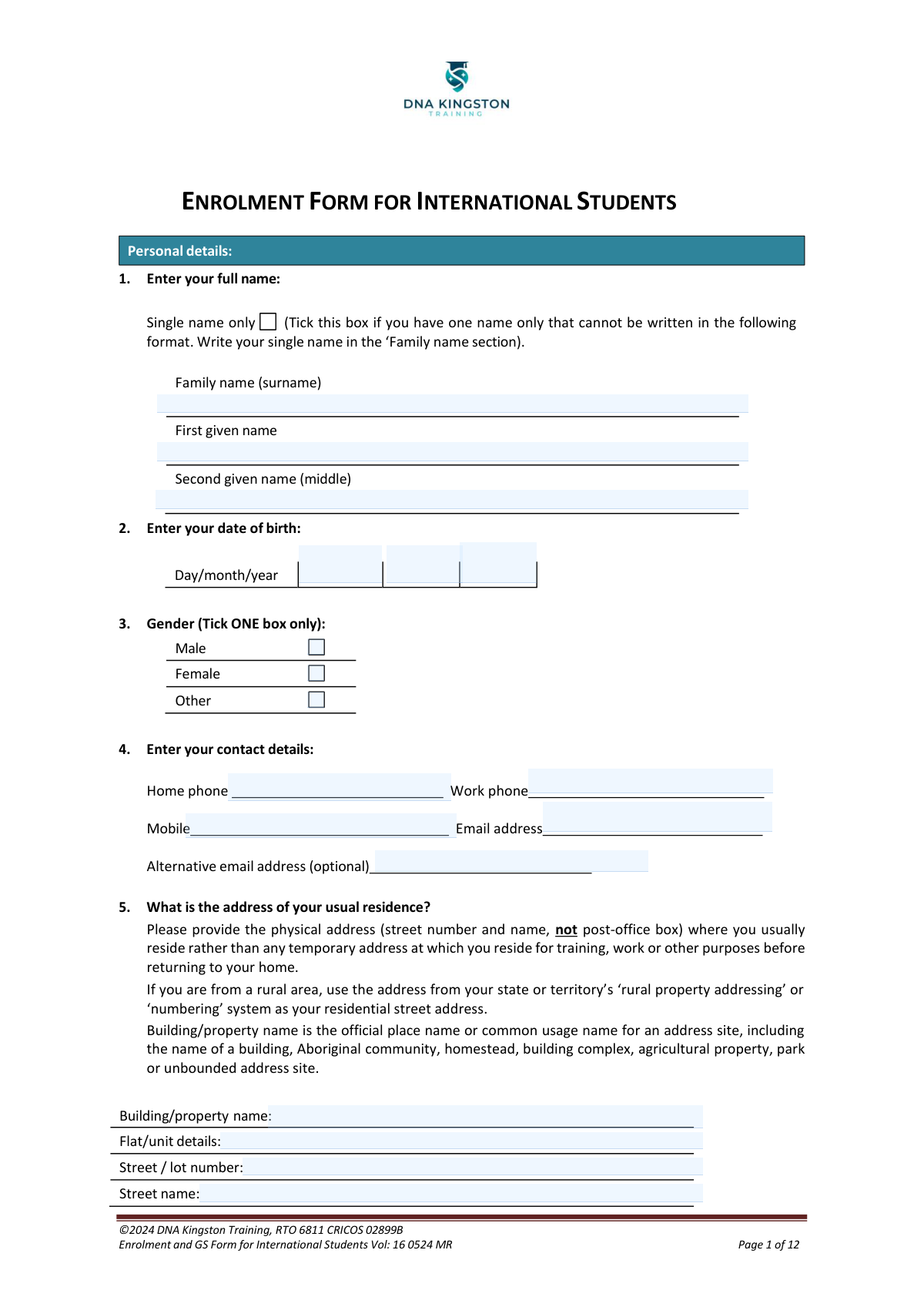
Yes! You can use AI to fill out DNA Kingston Training Enrolment and Genuine Student Form for International Students
The DNA Kingston Training Enrolment and Genuine Student Form for International Students is a 12-page official application document required for international students seeking to enrol in VET courses such as Dental Technology, Emergency Health Care, Work Health and Safety, Leadership and Management, and Individual Support programs at DNA Kingston Training in Australia. The form collects personal details, course selection, language and cultural diversity information, disability status, employment background, and a Genuine Student (GS) assessment to satisfy Australian Department of Home Affairs requirements for student visa applications. Completing this form accurately is essential for obtaining a Confirmation of Enrolment (CoE) and a student visa. Today, this form can be filled out quickly and accurately using AI-powered services like Instafill.ai, which can also convert non-fillable PDF versions into interactive fillable forms.
Our AI automatically handles information lookup, data retrieval, formatting, and form filling.
It takes less than a minute to fill out DNA Kingston Training International Enrolment Form using our AI form filling.
Securely upload your data. Information is encrypted in transit and deleted immediately after the form is filled out.
Form specifications
| Form name: | DNA Kingston Training Enrolment and Genuine Student Form for International Students |
| Number of pages: | 1 |
| Language: | English |
Instafill Demo: filling out a legal form in seconds
How to Fill Out DNA Kingston Training International Enrolment Form Online for Free in 2026
Are you looking to fill out a DNA KINGSTON TRAINING INTERNATIONAL ENROLMENT FORM form online quickly and accurately? Instafill.ai offers the #1 AI-powered PDF filling software of 2026, allowing you to complete your DNA KINGSTON TRAINING INTERNATIONAL ENROLMENT FORM form in just 37 seconds or less.
Follow these steps to fill out your DNA KINGSTON TRAINING INTERNATIONAL ENROLMENT FORM form online using Instafill.ai:
- 1 Navigate to Instafill.ai and upload the DNA Kingston Training Enrolment and Genuine Student Form PDF, or search for it in the Instafill.ai form library to begin filling it out online.
- 2 Complete the Personal Details section (Section 1–5) by entering your full name, date of birth, gender, contact details, residential address, nationality, passport number, and current visa information.
- 3 Select your desired course(s) from the list of available VET qualifications (e.g., Diploma of Dental Technology, Certificate IV in Work Health and Safety) and enter your preferred course commencement date.
- 4 Fill in the Government Requirement sections covering Language and Cultural Diversity, Disability status, highest completed school level, previous qualifications achieved, current employment status, and your main reason for undertaking the course.
- 5 Complete the Genuine Student (GS) Applicant Assessment Form (pages 8–12) by answering all questions about your travel history, visa history, ties to your home country, financial capacity, and motivations for studying in Australia and at DNA Kingston Training.
- 6 Review all information for accuracy, then sign the Student Declaration on both the Enrolment Form and the Genuine Student Declaration, and arrange a guardian signature if you are under 18 years of age.
- 7 Submit the completed form along with all required supporting documents (passport photo page, visa copy, academic transcripts, English test results, and the completed GS form) to [email protected] or as directed by the application instructions.
Our AI-powered system ensures each field is filled out correctly, reducing errors and saving you time.
Why Choose Instafill.ai for Your Fillable DNA Kingston Training International Enrolment Form Form?
Speed
Complete your DNA Kingston Training International Enrolment Form in as little as 37 seconds.
Up-to-Date
Always use the latest 2026 DNA Kingston Training International Enrolment Form form version.
Cost-effective
No need to hire expensive lawyers.
Accuracy
Our AI performs 10 compliance checks to ensure your form is error-free.
Security
Your personal information is protected with bank-level encryption.
Frequently Asked Questions About Form DNA Kingston Training International Enrolment Form
This is the official Enrolment and Genuine Student (GS) Form for International Students at DNA Kingston Training (RTO 6811, CRICOS 02899B). It is used to apply for enrolment in vocational education and training (VET) courses and to assess whether the applicant qualifies as a Genuine Student under Australian immigration requirements.
This form must be completed by international students who wish to enrol in any of the courses offered by DNA Kingston Training. It includes both the enrolment application and the Genuine Student (GS) assessment, which is required for student visa purposes in Australia.
You can apply for a range of courses including Diploma of Dental Technology, Diploma of Emergency Health Care, Certificate III/IV in Dental Assisting, Certificate IV/Diploma/Advanced Diploma of Work Health and Safety, Certificate IV/Diploma/Advanced Diploma of Leadership and Management, Certificate III in Individual Support, and Certificate IV in Ageing Support. Note that some courses have pre-requisites, such as the Certificate IV in Dental Assisting requiring completion of Certificate III first.
You must attach a copy of your passport photo page, your current and valid visa (if applicable), academic results or transcripts of previous study or qualifications, evidence of English test results (minimum IELTS 6.0, or IELTS 5.5 if packaged with ELICOS), and the completed Genuine Student form (pages 8–12 of the application).
The minimum English language score required is IELTS 6.0. If your course is packaged with ELICOS (English Language Intensive Courses for Overseas Students), the minimum requirement is IELTS 5.5. You must provide evidence or a transcript of your English test results with your application.
The Genuine Student (GS) form is a mandatory assessment that demonstrates your genuine intention to study in Australia. It must be completed by the student only — forms completed by agents will not be accepted. It includes questions about your travel history, ties to your home country, financial capacity, and reasons for choosing to study in Australia and at DNA Kingston Training.
Please allow up to 5 business days for your application to be processed. Once successfully processed, you will receive a Letter of Offer outlining your course information and fees payable.
You can submit your completed application by emailing it to [email protected], by post, or in person at the DNA Kingston Training reception. Make sure all required supporting documents are included with your submission.
After receiving your Letter of Offer, you should read and understand the offer, course information, Fee Policy, and Cancellation and Refund Policy. Once your initial payment has cleared and you have submitted your signed Acceptance of Offer, DNA Kingston Training will issue your electronic Confirmation of Enrolment (CoE).
Yes, a USI is required. Without it, DNA Kingston Training cannot issue you a nationally recognised VET qualification or statement of attainment upon completing your course. You can apply for a USI at https://www.usi.gov.au/students/create-your-usi and should provide it to the college once obtained.
Student visa applicants must show they have a minimum of AU$24,505 in savings to cover annual living costs. The Genuine Student form asks you to detail how you intend to sustain your living and study expenses throughout the duration of your course.
Yes, if the student is under 18 years of age, a guardian's signature, date, and name are required on both the Student Declaration in the enrolment form and the Student Declaration in the Genuine Student form.
Your personal information is collected to process and manage your enrolment and is disclosed to the National Centre for Vocational Education Research (NCVER) and relevant state or territory training authorities as required by law under the NVETR Act. DNA Kingston Training handles your data in accordance with the Privacy Act 1988. You can access, correct, or make a complaint about your personal information by contacting [email protected] or calling +61 8 9479 4865.
Yes, AI-powered services like Instafill.ai can help you accurately auto-fill form fields, saving you time and reducing errors. If the PDF version of this form is not interactive or fillable, Instafill.ai can also convert flat non-fillable PDFs into interactive fillable forms, making the process much easier.
You can visit Instafill.ai and upload the PDF of this enrolment form. The AI will guide you through each field, auto-fill information where possible, and help ensure all required sections are completed correctly before you submit. This is especially helpful for lengthy forms like this one, which includes both the enrolment application and the Genuine Student assessment.
Compliance DNA Kingston Training International Enrolment Form
Validation Checks by Instafill.ai
1
Full Name Completeness and Single Name Consistency
Validates that at minimum the Family Name field is populated, and that if the 'Single name only' checkbox is ticked, the name is entered exclusively in the Family Name field with First Given Name and Second Given Name left blank. If the single name checkbox is not ticked, the Family Name and First Given Name fields must both be completed. Failure to meet this check indicates an incomplete or contradictory name entry that could cause identity mismatches in government reporting and NCVER data submissions.
2
Date of Birth Format and Validity
Ensures the date of birth is entered in the correct day/month/year format and represents a real, valid calendar date (e.g., no 30th of February or 13th month). The date must also reflect an age that is plausible for a student applicant, typically between 15 and 80 years old. An invalid or missing date of birth will prevent accurate identity verification, NCVER reporting, and determination of whether a guardian signature is required for students under 18.
3
Gender Selection Completeness
Confirms that exactly one gender option (Male, Female, or Other) has been selected, as the form instructs the applicant to tick ONE box only. Leaving this field blank or selecting multiple options violates the government data collection requirement and will result in an incomplete submission that cannot be processed for NCVER reporting. This field is mandatory for all enrolment records submitted to the National VET Data Collection.
4
Email Address Format Validation
Checks that the primary email address field contains a properly formatted email address following the standard pattern ([email protected]), and that the optional alternative email address, if provided, also conforms to the same format. An invalid email address will prevent the college from delivering critical communications such as the Letter of Offer, Confirmation of Enrolment (CoE), and other enrolment-related correspondence. The alternative email, if entered, must be different from the primary email address.
5
Residential Address Physical Street Address Requirement
Validates that the residential address includes a Street/Lot Number and Street Name, ensuring it is a physical address rather than a post-office box, as explicitly required by the form instructions. The Suburb/Locality/Town and Postcode fields must also be populated to form a complete and deliverable address. Providing a PO Box or an incomplete address violates the form's stated requirement and may result in the application being returned for correction, as government data standards require a valid residential address.
6
Passport Number Presence and Format
Ensures the Passport Number field is populated, as this is a mandatory document for international student enrolment and identity verification. The passport number should conform to a recognisable alphanumeric format (typically 6–9 characters depending on the issuing country) and must not contain special characters or spaces. A missing or malformed passport number will prevent the college from verifying the applicant's identity and processing the required visa and immigration checks.
7
Visa Status and Visa Grant Number Consistency
Checks that if the applicant answers 'Yes' to being on a Visa, the Current Visa Grant Number field is completed with a valid entry. Conversely, if 'No' is selected, the Visa Grant Number field should be left blank to avoid contradictory data. Additionally, if the applicant is marked as 'Onshore', a current visa is expected to be present, and the absence of a visa grant number in this scenario should trigger a warning. Inconsistent visa information could jeopardise the student's enrolment eligibility and compliance with CRICOS obligations.
8
Course Selection and Pre-requisite Compliance
Validates that at least one course has been selected from the available list, and checks that any course with a stated pre-requisite is only selected in conjunction with the required prerequisite course or evidence of prior completion. For example, selecting HLT45021 Certificate IV in Dental Assisting requires that HLT35021 Certificate III in Dental Assisting is also selected or that prior completion is evidenced. Selecting a course without meeting its pre-requisite will result in an ineligible application that cannot proceed to a Letter of Offer.
9
Preferred Course Commencement Date Validity
Ensures that the Preferred Course Commencement Date includes both a valid Month and Year, and that the specified date is not in the past relative to the date of submission. The year must be a four-digit value and the month must correspond to a valid calendar month. A missing or past commencement date cannot be actioned by the admissions team and will delay the processing of the application and issuance of the Confirmation of Enrolment.
10
English Proficiency Self-Assessment Completeness
Confirms that the applicant has selected exactly one option for the 'How well do you speak English?' question (Very well, Well, Not well, or Not at all), as this is a mandatory government data collection field. This field must not be left blank, as it is required for NCVER reporting and helps the college assess whether additional English language support or ELICOS packaging may be required. Failure to complete this field results in an incomplete government statistical record.
11
Disability Disclosure Conditional Field Completion
Validates that if the applicant selects 'Yes' to having a disability, impairment, or long-term condition, at least one specific disability area checkbox must also be selected from the provided list. If 'No' is selected, none of the disability area checkboxes should be ticked, ensuring internal consistency. Incomplete disability disclosure prevents the college from arranging appropriate support services and results in non-compliant NCVER data submissions.
12
School Completion Year Logical Consistency
Checks that if the applicant has indicated a highest completed school level (other than 'Never attended school'), the Year of Completion field (Question 7) is populated with a valid four-digit year. The year of school completion must not be later than the current year and must be logically consistent with the applicant's date of birth (e.g., a student born in 2005 cannot have completed Year 12 in 2000). An illogical or missing school completion year will result in inaccurate educational background data being submitted to NCVER.
13
Guardian Signature Requirement for Underage Students
Validates that if the applicant's date of birth indicates they are under 18 years of age at the time of submission, both the Guardian Signature and Guardian Name fields are completed on both the Enrolment Form Student Declaration (Page 7) and the Genuine Student form Student Declaration (Page 12). An application from a minor without a guardian signature is legally incomplete and cannot be processed, as the guardian must consent to the enrolment and associated policies on behalf of the student.
14
Student Financial Capacity Statement Completeness (GS Form Question 9)
Ensures that the financial sustainability response in Genuine Student Form Question 9 is not left blank, given that student visa applicants must demonstrate a minimum of AU$24,505 in savings for annual living costs. The response should provide specific details about the source of funds (e.g., personal savings, family support, scholarship) rather than a vague or single-word answer. An empty or insufficiently detailed financial statement is a key indicator of an incomplete Genuine Student assessment and may result in application rejection.
15
Genuine Student Form Name and Date of Birth Consistency with Enrolment Form
Cross-validates that the Family Name, Given Names, and Date of Birth entered on the Genuine Student (GS) Applicant Assessment Form (Pages 8–12) exactly match the corresponding fields entered on the main Enrolment Form (Pages 1–2). Any discrepancy between these two sections of the same application suggests a data entry error or potential identity inconsistency that must be resolved before the application can be assessed. Mismatched personal details across form sections will prevent accurate identity verification and NCVER data submission.
16
Visa Denial History Conditional Detail Requirement
Validates that if the applicant answers 'Yes' to having ever had a visa application denied or a visa cancelled (GS Form Question 2), the accompanying free-text field providing details and the countries involved must be completed with substantive information. A 'Yes' response with an empty or vague explanation is insufficient for the Genuine Student assessment and may result in the application being flagged for further review or rejected. Full disclosure of visa refusal history is a critical component of the Australian Department of Home Affairs' Genuine Student requirement.
Common Mistakes in Completing DNA Kingston Training International Enrolment Form
Many international students write their full name in a single field or reverse the family name and given name order, which is common in many Asian and Eastern European cultures where the family name comes first. This causes mismatches with passport records and can delay or invalidate the application. Students should carefully separate their Family name (surname), First given name, and Second given name (middle name) into the correct individual fields exactly as they appear in their passport. If you have only one name, tick the 'Single name only' box and write it in the Family name field.
The form specifies a Day/Month/Year format, but many applicants — especially those from the United States or countries using MM/DD/YYYY — enter their date of birth in the wrong order. For example, someone born on March 5 might write '03/05/2000' intending May 3rd, but the form reads it as March 5th. This discrepancy with passport data can cause serious processing issues. Always follow the Day/Month/Year format explicitly stated on the form, and double-check the entry against your passport. AI-powered tools like Instafill.ai can automatically detect and apply the correct date format.
The form explicitly requests a physical street address (street number and name) for the usual residence, not a post-office box. Many applicants habitually provide their PO Box because it is what they use for correspondence, which does not satisfy the government's data collection requirements. Providing a PO Box can result in the application being flagged as incomplete or rejected. Ensure you enter your actual residential street address, and if you are in a rural area, use your state's rural property addressing system.
Applicants frequently submit the enrolment form without attaching all mandatory documents, such as the passport photo page, current visa, academic transcripts, English test results, and the completed Genuine Student (GS) form. Missing even one document will prevent the application from being properly assessed and will delay processing. Before submitting, carefully review the Application Instructions checklist and ensure every listed document is attached. Note that the GS form (pages 8–12) must be completed by the student themselves — forms completed by agents will not be accepted.
The form requires a minimum IELTS score of 6.0 (or 5.5 if packaged with ELICOS), and applicants sometimes submit applications without meeting this threshold or misreport their scores hoping it will go unnoticed. Submitting below the minimum score will result in automatic rejection, and providing false information can lead to permanent disqualification. Always attach your official English test results transcript and verify your score meets the stated minimum before applying.
Several courses listed have mandatory pre-requisites — for example, the Certificate IV in Dental Assisting requires completion of Certificate III in Dental Assisting, and the Advanced Diploma of Work Health and Safety requires the Diploma of WHS. Students sometimes tick higher-level courses without having completed the required pre-requisite qualifications, which leads to rejection or removal from the course. Carefully read the pre-requisite notes next to each course and only select courses for which you already hold the required prior qualification.
Many international students are unaware of the Australian USI requirement and leave this field blank or forget to provide it after enrolment. Without a USI, DNA Kingston Training is legally prevented from issuing a nationally recognised qualification or statement of attainment upon course completion. Apply for your USI at https://www.usi.gov.au/students/create-your-usi before or immediately after submitting your application, and provide it to the college as soon as it is issued.
The GS form requires detailed, thoughtful responses to questions about study motivation, financial capacity, ties to home country, and career plans. Applicants often give one-line or generic answers such as 'I want a better future,' which fail to demonstrate genuine student intent and can result in visa refusal. Each answer should be specific, honest, and well-reasoned — for example, explaining exactly how the chosen course relates to your career goals and how you will apply the qualification upon returning home. Weak GS responses are one of the most common reasons for student visa rejection.
Question 9 of the GS form asks students to detail how they will cover living and study expenses, with the Australian government requiring evidence of at least AU$24,505 in savings for annual living costs. Many applicants either leave this question vague, underestimate the required amount, or fail to attach supporting financial evidence such as bank statements. Provide a clear, specific explanation of your funding source (personal savings, family support, scholarship, etc.) and ensure supporting financial documents are included with your application.
Students under 18 years of age are required to have a guardian sign and date both the Student Declaration on page 7 and the GS form declaration on page 12, and to provide the guardian's name. Many underage applicants submit the form with only their own signature, which renders the declaration legally incomplete and can cause the application to be rejected. If the applicant is under 18, a parent or legal guardian must complete all required guardian fields on both declaration sections.
Applicants sometimes tick the wrong box for onshore (currently in Australia) or offshore (outside Australia) status, or leave the Current Visa Grant Number blank when they are on an existing visa. This information is critical for determining the correct application pathway and compliance with immigration requirements. Check your current visa documentation carefully to confirm your status and copy the Visa Grant Number exactly as it appears on your visa grant letter before completing these fields.
Many applicants enter a commencement date that is too soon — sometimes only days away — without accounting for the up-to-5-business-day processing time, visa application and grant timelines, and the Letter of Offer and Confirmation of Enrolment (CoE) issuance process. Choosing an unrealistic start date can create complications with visa applications and course scheduling. Select a commencement date that allows sufficient time for all administrative steps, and consult with the college or your agent to confirm available intake dates before submitting.
Saved over 80 hours a year
“I was never sure if my IRS forms like W-9 were filled correctly. Now, I can complete the forms accurately without any external help.”
Kevin Martin Green
Your data stays secure with advanced protection from Instafill and our subprocessors
Robust compliance program
Transparent business model
You’re not the product. You always know where your data is and what it is processed for.
ISO 27001, HIPAA, and GDPR
Our subprocesses adhere to multiple compliance standards, including but not limited to ISO 27001, HIPAA, and GDPR.
Security & privacy by design
We consider security and privacy from the initial design phase of any new service or functionality. It’s not an afterthought, it’s built-in, including support for two-factor authentication (2FA) to further protect your account.
Fill out DNA Kingston Training International Enrolment Form with Instafill.ai
Worried about filling PDFs wrong? Instafill securely fills dna-kingston-training-enrolment-and-genuine-student-form-for-international-students forms, ensuring each field is accurate.