Yes! You can use AI to fill out Darwin Institute of Trade International Student Application Form

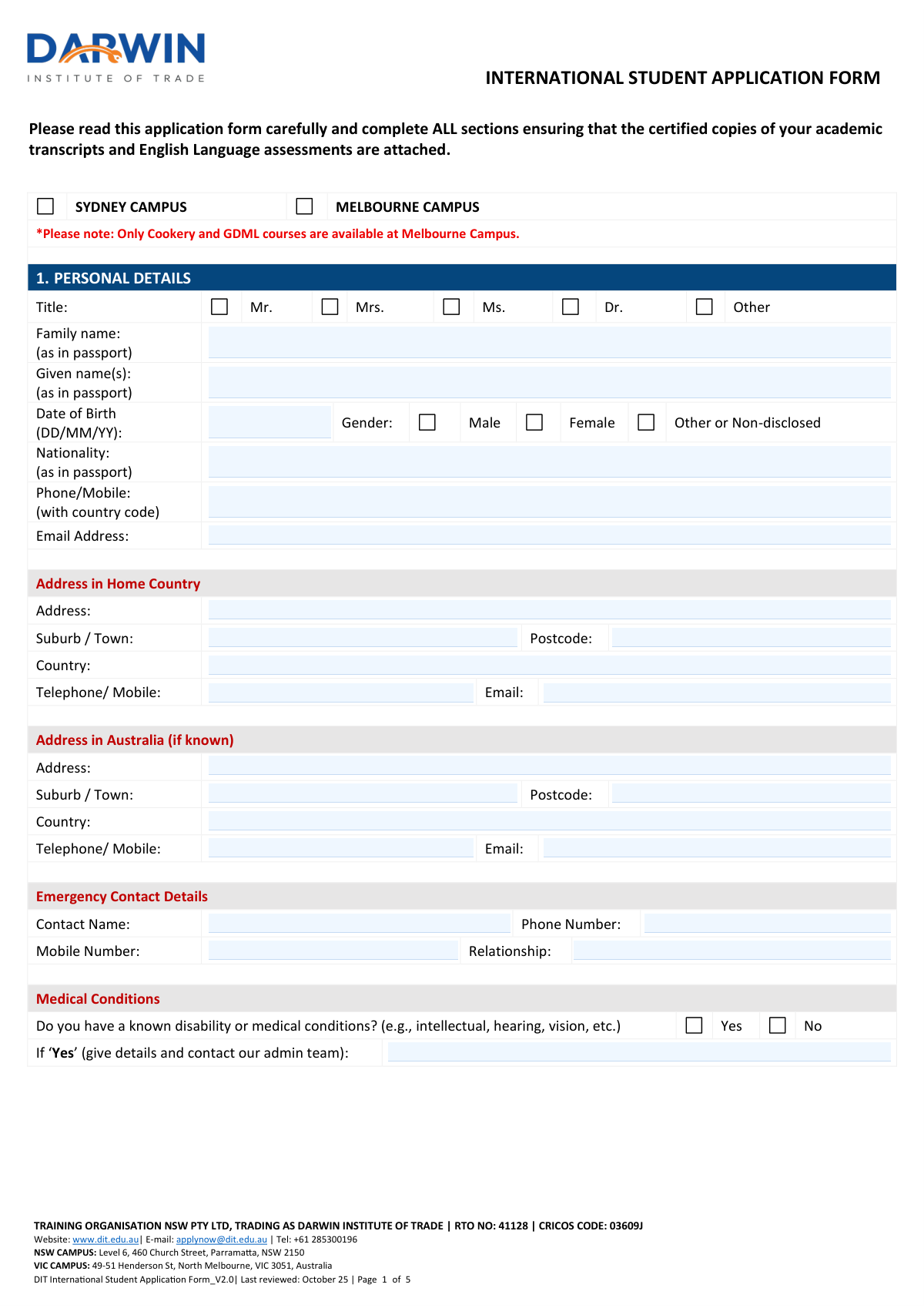
The Darwin Institute of Trade (Training Organisation NSW Pty Ltd, RTO No: 41128, CRICOS Code: 03609J) International Student Application Form is an official document required for international students seeking enrollment in vocational education and training courses at DIT's campuses in Parramatta (NSW) or North Melbourne (VIC). The form collects personal details, passport and visa information, language background, academic history, employment status, course selection, and declarations to assess eligibility and compliance with Australian student visa requirements, including the ESOS Act and ESOS National Code 2018. It is a critical step in the admissions process, ensuring students meet Genuine Temporary Entrant (GTE) criteria and have appropriate Overseas Student Health Cover (OSHC). Today, this form can be filled out quickly and accurately using AI-powered services like Instafill.ai, which can also convert non-fillable PDF versions into interactive fillable forms.
Our AI automatically handles information lookup, data retrieval, formatting, and form filling.
It takes less than a minute to fill out DIT International Student Application Form using our AI form filling.
Securely upload your data. Information is encrypted in transit and deleted immediately after the form is filled out.

Form specifications

Form name: Darwin Institute of Trade International Student Application Form
Number of pages: 5
Language: English
main-image

Instafill Demo: filling out a legal form in seconds

How to Fill Out DIT International Student Application Form Online for Free in 2026

Are you looking to fill out a DIT INTERNATIONAL STUDENT APPLICATION FORM form online quickly and accurately? Instafill.ai offers the #1 AI-powered PDF filling software of 2026, allowing you to complete your DIT INTERNATIONAL STUDENT APPLICATION FORM form in just 37 seconds or less.
Follow these steps to fill out your DIT INTERNATIONAL STUDENT APPLICATION FORM form online using Instafill.ai:
  1. 1 Navigate to Instafill.ai and upload the DIT International Student Application Form PDF or select it from the available form library to begin filling it out online.
  2. 2 Complete Section 1 (Personal Details) by entering your title, full name as shown in your passport, date of birth, gender, nationality, contact information, home country address, Australian address (if known), emergency contact details, and any known medical conditions.
  3. 3 Fill in Section 2 (Passport and Visa Details) with your country of birth, citizenship, passport number and expiry date, current visa type and subclass, visa expiry date, and Overseas Student Health Cover (OSHC) information, selecting the appropriate cover type if required.
  4. 4 Complete Sections 3–6 by providing your language and cultural diversity background, previous academic qualifications and English language proficiency scores (IELTS, TOEFL, PTE, or other), current employment status, and your main reason for undertaking the course.
  5. 5 Select your desired course and preferred intake date in Section 7, then complete Sections 8–11 regarding transferring student information, course credit intentions, your Unique Student Identifier (USI), and education agent details if applicable.
  6. 6 Review the Privacy Notice in Section 12 to understand how your personal information will be used and disclosed, then carefully read and acknowledge all declarations in Section 13 confirming the accuracy of your application.
  7. 7 Sign and date the Student Declaration section, attach certified copies of your academic transcripts and English language assessment results, and submit the completed application to DIT via email at [email protected] or through your education agent.

Our AI-powered system ensures each field is filled out correctly, reducing errors and saving you time.

Why Choose Instafill.ai for Your Fillable DIT International Student Application Form Form?

Speed

Complete your DIT International Student Application Form in as little as 37 seconds.

Up-to-Date

Always use the latest 2026 DIT International Student Application Form form version.

Cost-effective

No need to hire expensive lawyers.

Accuracy

Our AI performs 10 compliance checks to ensure your form is error-free.

Security

Your personal information is protected with bank-level encryption.

Frequently Asked Questions About Form DIT International Student Application Form

This form is used by international students applying to study at Darwin Institute of Trade (DIT), a Registered Training Organisation (RTO No: 41128, CRICOS Code: 03609J). Any international student wishing to enrol in a course at DIT's Sydney (Parramatta) or Melbourne (North Melbourne) campus must complete this form.

Only Cookery courses (SIT40521 Certificate IV in Kitchen Management and SIT50422 Diploma of Hospitality Management) and the Graduate Diploma of Management (Learning) (BSB80120) are available at the Melbourne campus. All other courses, including construction and trade qualifications, are only available at the Sydney campus.

You must attach certified copies of your academic transcripts (latest 2-year results) and English language assessment results such as IELTS, TOEFL, or PTE scores. If you are transferring from another Australian institution, you must also provide a release letter from your current provider.

DIT accepts IELTS, TOEFL, and PTE (Pearson) scores, as well as other recognised English language tests. Only results achieved within two years of the test date will be considered. If you haven't sat a test yet, you can indicate your planned test date on the form.

Yes, OSHC is mandatory for all international students studying in Australia. DIT can arrange OSHC on your behalf — you can choose from Single Cover (student only), Couple Cover (student and one adult), or Family Cover (student and more than one dependent) on the application form.

A USI is a mandatory reference number for all students undertaking nationally recognised training in Australia. If you don't already have one, DIT can create a USI account on your behalf — simply indicate your agreement on the form. You can also create one yourself at https://www.usi.gov.au/.

If you are transferring from another Australian institution, you must indicate this in Section 8 of the form and provide a release letter from your current provider. You must also confirm whether you have completed the first 6 months of your principal course, as this affects your eligibility to transfer.

Yes, you can apply for course credit if you have relevant prior qualifications or experience. Indicate your intention in Section 9 of the form, then download and complete the separate Course Credit form from www.dit.edu.au.

You can commence study on a Student visa, Working Holiday visa, Tourist visa, or another visa type. However, as an international student you are strongly encouraged to hold a Student visa. You must declare your visa type at commencement in Section 2 of the application form.

The GTE requirement means you must demonstrate that your primary intention in coming to Australia is to study temporarily, not to use the student visa as a pathway to permanent residency. If DIT determines you do not meet the GTE criteria, they may refuse, withdraw, or cancel your enrolment offer.

You can submit your completed application form along with all required supporting documents by emailing [email protected] or by contacting DIT directly at +61 285300196. Ensure all sections are completed and certified copies of required documents are attached before submitting.

Yes, AI-powered services like Instafill.ai can help you accurately auto-fill the DIT International Student Application Form, saving you time and reducing errors. If you have a non-fillable (flat) PDF version of the form, Instafill.ai can also convert it into an interactive fillable form so you can complete it digitally.

Simply upload the DIT International Student Application Form PDF to Instafill.ai, and the AI will guide you through each field, auto-filling information where possible based on your details. Once completed, you can download the filled form and submit it to DIT along with your supporting documents.

Your personal information may be shared with the National Centre for Vocational Education Research (NCVER), government departments, and other authorised agencies as required under the Data Provision Requirements 2012, the ESOS Act, and the ESOS National Code 2018. This data is used for statistical, regulatory, and research purposes related to vocational education and training.

In Section 1 of the form, select 'Yes' under Medical Conditions and provide details of your disability or condition in the space provided. You should also contact DIT's admin team directly so they can discuss any support or adjustments that may be available to you during your studies.

Compliance DIT International Student Application Form
Validation Checks by Instafill.ai

1
Ensures a Campus Selection is Made (Sydney or Melbourne)
This check verifies that the applicant has selected exactly one campus — either Sydney or Melbourne — before submitting the form. Campus selection is required to route the application to the correct administrative team and determine course availability. If neither or both campuses are selected, the application cannot be processed correctly and must be returned to the applicant for clarification.
2
Validates Melbourne Campus Course Eligibility
This check confirms that if the Melbourne Campus is selected, the applicant has only chosen a Cookery course (SIT40521, SIT50422, or the packaged combination) or the Graduate Diploma of Management (Learning) (BSB80120), as only these courses are available at the Melbourne campus. Construction and trade courses (CPC and MSF codes) are not offered at Melbourne. If an ineligible course is selected alongside the Melbourne campus, the application must be flagged and the applicant notified to either change their campus or course selection.
3
Validates Date of Birth Format and Applicant Age
This check ensures the Date of Birth field is entered in the correct DD/MM/YY format and represents a valid calendar date. Additionally, it verifies that the applicant is of a reasonable age to be enrolling in vocational education (typically 18 years or older for international students). If the date is malformed, contains impossible values (e.g., 31/02/YY), or indicates the applicant is under the minimum age, the application must be flagged for review.
4
Ensures Passport Expiry Date is Valid and Not Expired
This check verifies that the Passport Expiry Date is entered in a valid date format and that the passport has not already expired at the time of application submission. For international student visa purposes, the passport must typically remain valid for the duration of the intended course. If the passport is expired or will expire before the course end date, the application should be flagged with a warning requiring the applicant to renew their passport before enrolment.
5
Validates Visa Expiry Date is Not in the Past
This check ensures that if a Visa Expiry Date is provided, it represents a valid date format and falls on or after the date of application submission. An expired visa at the time of application is a critical compliance issue under the ESOS Act and National Code 2018. If the visa expiry date is in the past, the application must be flagged immediately and the applicant advised to resolve their visa status before the application can proceed.
6
Ensures Visa Type at Commencement is Appropriate for Study
This check verifies that the visa type selected for commencement of studies is appropriate for undertaking a full-time course in Australia. Tourist visas generally do not permit full-time study, and Working Holiday visas have restrictions on study duration. If a Tourist visa is selected as the commencement visa, a warning should be generated advising the applicant that this visa type may not permit the intended study, and the application should be flagged for manual review by admissions staff.
7
Validates English Language Proficiency Score Recency
This check ensures that any IELTS, TOEFL, or PTE score provided is accompanied by a test date, and that the test date falls within two years of the application submission date, as stated in the form's instructions. English proficiency results older than two years are not accepted per DIT's policy. If a score is entered without a test date, or if the test date indicates the result is more than two years old, the application must be flagged and the applicant advised to provide a current test result or indicate a future test date.
8
Ensures at Least One English Language Proficiency Entry is Provided
This check verifies that the applicant has provided at least one form of English language proficiency evidence — either an IELTS, TOEFL, PTE, or other recognised test score, or a future/past test date. As an international student application, English proficiency is a mandatory admissions requirement. If all proficiency fields are left blank and no test date is provided, the application must be returned to the applicant with a request to supply the required documentation.
9
Validates OSHC Selection Consistency
This check ensures that if the applicant indicates they have already organised OSHC (Yes), they have also provided details of their existing cover in the OSHC details field. Conversely, if they have not organised OSHC (No), they must select one of the three cover types (Single, Couple, or Family) so that DIT can arrange it on their behalf. If the applicant selects 'Yes' but leaves the details field blank, or selects 'No' but does not choose a cover type, the application must be flagged as incomplete.
10
Validates Transferring Student Completeness and Release Letter Requirement
This check ensures that if the applicant indicates they are transferring from another Australian education provider, they have also answered whether they have completed the first six months of their principal course and provided the name of the current institute. Under the ESOS National Code 2018, transfer before completing six months of a principal course requires special consideration. If the transferring student fields are partially completed, or if the applicant indicates they have not completed six months but no explanation or supporting documentation is referenced, the application must be flagged for compliance review.
11
Ensures Emergency Contact Details are Fully Completed
This check verifies that all required Emergency Contact fields — Contact Name, Phone Number, and Relationship — are populated with non-empty values. Emergency contact information is critical for student welfare and is required under duty-of-care obligations for international students. If any of these mandatory sub-fields are left blank, the application must be returned to the applicant with a request to complete the missing emergency contact information before processing can continue.
12
Validates Email Address Format in All Email Fields
This check ensures that all email address fields across the form — including the primary Email Address, Home Email Address, Australian Address Email, and any agent email — conform to a valid email format (i.e., contain an '@' symbol, a domain name, and a valid top-level domain such as .com or .edu.au). Invalid email addresses will prevent DIT from communicating critical enrolment information, offer letters, and visa-related correspondence to the applicant. Any field containing a malformed email address must be flagged and the applicant prompted to correct it.
13
Ensures Phone Numbers Include Country Code
This check verifies that the primary Phone/Mobile field includes an international country code (e.g., beginning with '+' followed by the country code digits) as explicitly instructed on the form. Since this is an international student application, phone numbers without a country code cannot be reliably used to contact the applicant. If the phone number field does not begin with a '+' or a recognisable international dialling prefix, the application must be flagged and the applicant asked to resubmit with the correct format.
14
Validates USI Number Format and Consent Consistency
This check ensures that if the applicant indicates they already have a USI number, the USI field is populated with a value matching the standard USI format (10 alphanumeric characters). It also checks that if the applicant does not have a USI, they have indicated either 'Agree' or 'Disagree' regarding DIT creating one on their behalf, since a USI is mandatory for all students. If a USI is claimed but the field is blank or incorrectly formatted, or if neither the USI field nor the consent option is addressed, the application must be flagged as incomplete.
15
Ensures Student Declaration Fields are Completed
This check verifies that the Applicant Name, Applicant Signature, and Declaration Date fields at the end of Section 13 are all populated before the form is considered complete. The student declaration is a legally significant statement confirming the accuracy of the application and the applicant's understanding of their obligations under Australian law and the ESOS Act. If any of these three fields are missing, the application is legally incomplete and cannot be processed or used as a binding document.
16
Validates Education Agent Declaration Completeness When Agent is Specified
This check ensures that if an Education Agent is named in Section 11, both the Agent Signature and the Agent Declaration Date fields are completed, and the applicant has checked the authorisation box. An incomplete agent declaration undermines the integrity of the application and may create compliance issues under the National Code 2018 regarding registered education agent obligations. If agent details are provided but the signature, date, or authorisation checkbox is missing, the application must be flagged and returned for the agent to complete their declaration.

Common Mistakes in Completing DIT International Student Application Form

Entering name details that don't exactly match the passport

Applicants frequently enter nicknames, shortened versions, or anglicised versions of their names instead of copying them exactly as they appear in their passport. This is a critical error because DIT uses passport details to verify identity and process visa-related documentation — any discrepancy can cause delays or rejection. Always open your passport to the photo page and transcribe your family name and given name(s) character by character, including hyphens, spaces, and middle names. Tools like Instafill.ai can help by prompting you to cross-check passport fields before submission.

Using an incorrect date format for dates

The form explicitly requires dates in DD/MM/YY format (e.g., Date of Birth, Passport Expiry, Visa Expiry, Permanent Residency Application date), but many applicants — especially those from the US — habitually enter dates in MM/DD/YY or YYYY/MM/DD format. This can result in incorrect records, visa processing errors, or outright rejection of the application. Always double-check that the day appears first, followed by the month, then the two-digit year. AI-powered form filling tools like Instafill.ai can automatically detect and apply the correct date format to prevent this mistake.

Omitting the country code from phone numbers

The form specifically requests phone and mobile numbers 'with country code,' yet many applicants enter only their local number without the international dialling prefix (e.g., entering '0412345678' instead of '+61412345678'). This makes it impossible for DIT staff to contact the applicant from Australia. Ensure you include the '+' symbol followed by your country code before the local number, and remove any leading zero from the local number where required by international format conventions. Instafill.ai can validate phone number formats automatically to catch this common omission.

Selecting the wrong campus without checking course availability

Applicants often select the Melbourne Campus without realising that only Cookery (SIT40521/SIT50422) and GDML (BSB80120) courses are available there. Students applying for construction or trade courses such as Carpentry, Bricklaying, or Cabinet Making must select the Sydney Campus, or their application will be invalid. The form includes a clear note about this restriction, but it is frequently overlooked. Carefully read the campus note before ticking your preferred campus, and verify your chosen course is offered at that location on www.dit.edu.au.

Failing to attach certified copies of academic transcripts and English language results

The form's instructions clearly state that certified copies of academic transcripts and English language assessments must be attached, yet many applicants submit the form without these documents or attach uncertified photocopies. This is one of the most common reasons applications are delayed or rejected. Ensure all documents are certified by an authorised person (e.g., a Justice of the Peace, notary, or official from the issuing institution) and that English test results are no older than two years from the test date. Instafill.ai can generate a document checklist to remind you of required attachments before submission.

Providing an English test score that is more than two years old

The form explicitly states that only English language proficiency results achieved within two years of the test date will be considered, but applicants frequently submit IELTS, TOEFL, or PTE scores that have expired. Submitting an out-of-date score will result in the application being assessed as incomplete, causing significant delays. Check the date on your test certificate before entering the score, and if your result has expired, use the 'I will sit an English language proficiency test' option and provide a planned test date. Instafill.ai can flag whether a test date entered falls outside the two-year validity window.

Not completing the OSHC section correctly or selecting the wrong cover type

Many applicants either leave the Overseas Student Health Cover (OSHC) section blank, fail to select a cover type (Single, Couple, or Family), or incorrectly indicate they have arranged OSHC when they have not. OSHC is a legal requirement for international students studying in Australia under the ESOS Act, and failure to arrange it can jeopardise a student visa application. If you have already arranged OSHC, provide the provider name and policy number; if not, select the appropriate cover type so DIT can arrange it on your behalf. Review the definitions of Single, Couple, and Family cover carefully before selecting.

Skipping or incorrectly completing the transferring student section

Students who are transferring from another Australian education provider often leave Section 8 blank or answer 'No' when they should answer 'Yes,' failing to disclose their current enrolment. Under the ESOS Act and National Code 2018, providers must verify transfer eligibility, and omitting this information is considered providing false or misleading information — a serious offence. If you are currently enrolled at another Australian institution, you must answer 'Yes,' confirm whether you have completed the first six months of your principal course, name the institution, and provide a release letter. Failure to do so can result in application cancellation.

Not providing or applying for a Unique Student Identifier (USI)

Many applicants leave Section 10 blank or are unaware that a USI is mandatory for all students undertaking nationally recognised training in Australia. Without a valid USI, DIT cannot issue qualifications or statements of attainment, which means the student's study may not be formally recognised. If you already have a USI, enter it accurately in the provided field. If you do not have one, either create one via https://www.usi.gov.au/ or tick 'Agree' to authorise DIT to create one on your behalf — do not leave this section unanswered.

Incorrectly completing the parallel study or primary course intention (Section 4.3)

Applicants who are currently enrolled with another education provider often skip Section 4.3 or misunderstand the difference between 'Parallel Study' and 'Primary Course.' Selecting the wrong option has significant visa implications: a student visa holder must correctly identify their principal course, and misrepresenting course intention can be treated as a breach of visa conditions. If you are currently enrolled elsewhere and wish to study at DIT as your main course, select 'Primary Course'; if you intend to study at DIT alongside your existing enrolment, select 'Parallel Study.' Read the guidance at www.dit.edu.au before making this selection.

Leaving the emergency contact section incomplete or providing a contact in the same location

Applicants frequently leave the emergency contact section partially filled — omitting the phone number, mobile number, or relationship — or list themselves or a fellow student as the emergency contact. In a genuine emergency, DIT needs to reach a reliable person who is not the student themselves, ideally a family member or trusted adult in the student's home country or Australia. Provide the full name, at least one working phone number with country code, and the correct relationship (e.g., 'Mother,' 'Father,' 'Spouse'). Instafill.ai can flag incomplete emergency contact fields before the form is submitted.

Failing to sign the student declaration or leaving the applicant name and date blank

Section 13 requires the applicant's printed name, signature, and date, but many applicants submit the form without completing these fields, rendering the entire application legally invalid. The declaration confirms the truthfulness of all information provided and acknowledges key obligations under Australian law and the ESOS Act — an unsigned form cannot be processed. Ensure you print your full name, provide your signature (or digital equivalent), and enter the current date in the correct DD/MM/YY format before submitting. If using a PDF version, note that Instafill.ai can convert flat non-fillable PDFs into fillable versions, making it easier to complete and sign all required fields.
Saved over 80 hours a year

“I was never sure if my IRS forms like W-9 were filled correctly. Now, I can complete the forms accurately without any external help.”

Kevin Martin Green

Your data stays secure with advanced protection from Instafill and our subprocessors

Robust compliance program

Transparent business model

You’re not the product. You always know where your data is and what it is processed for.

ISO 27001, HIPAA, and GDPR

Our subprocesses adhere to multiple compliance standards, including but not limited to ISO 27001, HIPAA, and GDPR.

Security & privacy by design

We consider security and privacy from the initial design phase of any new service or functionality. It’s not an afterthought, it’s built-in, including support for two-factor authentication (2FA) to further protect your account.

Fill out DIT International Student Application Form with Instafill.ai

Worried about filling PDFs wrong? Instafill securely fills darwin-institute-of-trade-international-student-application-form forms, ensuring each field is accurate.