Yes! You can use AI to fill out Public Service Loan Forgiveness (PSLF) & TEPSLF Certification & Application

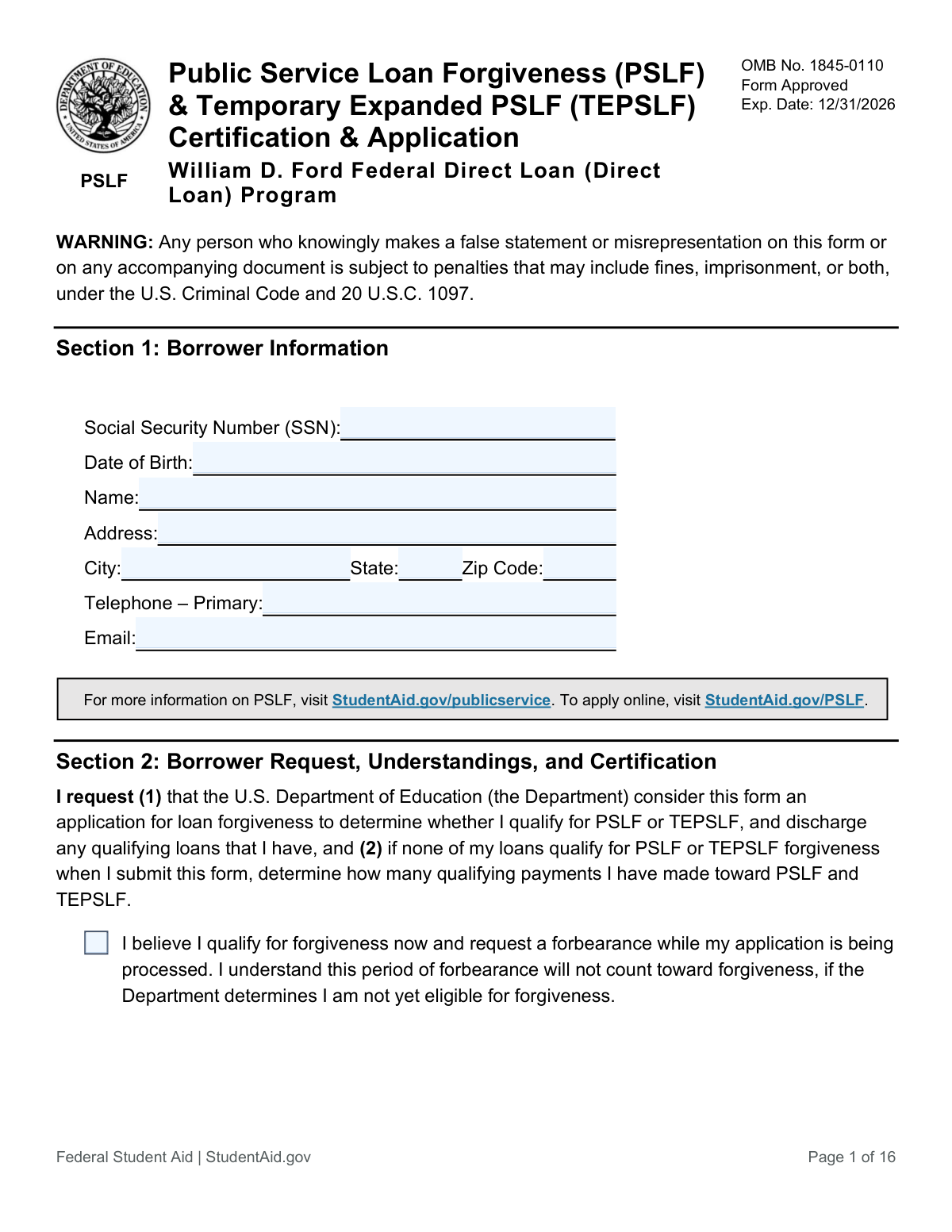
The Public Service Loan Forgiveness (PSLF) & TEPSLF Certification & Application is a U.S. Department of Education form for federal student loan borrowers to certify their public service employment and apply for loan forgiveness. Borrowers use this form to track their qualifying payments toward the 120 needed for forgiveness or to apply for final forgiveness once eligible. Submitting it regularly is important to ensure you are on the right track for loan cancellation. Today, this form can be filled out quickly and accurately using AI-powered services like Instafill.ai, which can also convert non-fillable PDF versions into interactive fillable forms.
PSLF Form has a moderate Form Complexity Index of 46/100 — 34 fillable fields across 3 pages. Instafill’s AI completes it accurately in under a minute.

Form specifications

Form name: Public Service Loan Forgiveness (PSLF) & TEPSLF Certification & Application
Number of fields: 34
Number of pages: 16
FCI: Moderate (46/100)
Filled form examples: PSLF Form Examples
Language: English
Our AI automatically handles information lookup, data retrieval, formatting, and form filling.
It takes less than a minute to fill out PSLF Form using our AI form filling.
Securely upload your data. Information is encrypted in transit and deleted immediately after the form is filled out.
Preview of Public Service Loan Forgiveness (PSLF) & TEPSLF Certification & Application

Instafill Demo: How to fill out PDF forms in seconds with AI

How to Fill Out PSLF Form Online for Free in 2026

Are you looking to fill out a PSLF FORM form online quickly and accurately? Instafill.ai offers the #1 AI-powered PDF filling software of 2026, allowing you to complete your PSLF FORM form in just 37 seconds or less.
Follow these steps to fill out your PSLF FORM form online using Instafill.ai:
  1. 1 Navigate to Instafill.ai and upload or select the PSLF & TEPSLF Certification & Application form.
  2. 2 Use the AI assistant to automatically fill in your personal details in Section 1: Borrower Information, such as your name, SSN, and address.
  3. 3 Review and complete Section 2: Borrower Request, Understandings, and Certification. The AI can help you understand each clause before you agree and e-sign.
  4. 4 Provide your employer's information in Section 4. Instafill.ai can help you find details like the Employer Identification Number (EIN) from previous documents.
  5. 5 Use the platform to securely send the form to your employer's authorized official for their review and electronic signature in Section 5A.
  6. 6 Once your employer has signed and returned the form, perform a final review of all sections for accuracy and completeness.
  7. 7 Submit the completed and certified form to the Department of Education through the recommended channels, such as the StudentAid.gov upload portal.

Our AI-powered system ensures each field is filled out correctly, reducing errors and saving you time.

Why Choose Instafill.ai for Your Fillable PSLF Form Form?

Speed

Complete your PSLF Form in as little as 37 seconds.

Up-to-Date

Always use the latest 2026 PSLF Form form version.

Cost-effective

No need to hire expensive lawyers.

Accuracy

Our AI performs 10 compliance checks to ensure your form is error-free.

Security

Your personal information is protected with bank-level encryption.

Frequently Asked Questions About PSLF Form

PSLF Form has a Form Complexity Index of 46 out of 100, placing it in the moderate complexity tier. This score is calculated deterministically from the form’s own structure using Instafill’s published Form Complexity Index methodology, so it can be reproduced and independently verified — it is not a subjective estimate.

For PSLF Form specifically, the score reflects 34 fillable fields across 3 pages, plus 13 pages of printed instructions. The number of fields is the largest factor in the base score (weighted 36%), followed by how difficult those fields are to complete based on their type, where free-text and signature fields count for more than simple checkboxes (26%). The number of pages that actually contain fields (15%), the amount of conditional “fill-only-if” logic (16%), and how many sections the form is divided into (7%) account for the rest of the base. On top of that base, the index adds points for tables and repeating lists, bundled instruction pages, and dense page layouts — capturing difficulty the base alone can miss.

In practical terms, a moderate score means the form takes real effort: there are enough fields, pages and rules that errors are easy to make by hand. Instafill removes that effort entirely: our AI reads your information, maps each value to the correct field — including the conditional ones — and completes PSLF Form accurately in under a minute, with every field available for you to review before you download. See exactly how the Form Complexity Index is calculated.

This form is used to certify your employment with a qualifying public service employer and to track your progress toward loan forgiveness. If you have made 120 qualifying payments, you can also use this form to apply for loan forgiveness under the Public Service Loan Forgiveness (PSLF) or Temporary Expanded PSLF (TEPSLF) programs.

You should submit this form if you are employed by a qualifying public service organization and have Direct Loans that you want to be forgiven. It is recommended to submit the form annually or whenever you change employers to ensure you remain on track for forgiveness.

You will need your personal details like your Social Security Number, your employment history, and your employer's Federal Employer Identification Number (FEIN/EIN). The FEIN can typically be found in box b of your IRS Form W-2.

You can mail the form to the U.S. Department of Education, fax it to 540-212-2415, or upload it via your StudentAid.gov account. The Department highly recommends using the online PSLF Help Tool to complete and submit the form electronically.

If your employer has closed, check the box in Section 4 and submit alternative documentation as described in Section 5B. This typically includes W-2s or paystubs for the employment period you are trying to certify.

No, only loans from the William D. Ford Federal Direct Loan (Direct Loan) Program are eligible for PSLF. If you have FFEL or Perkins loans, you must first consolidate them into a Direct Consolidation Loan to make them eligible.

TEPSLF is a temporary program for borrowers who would qualify for PSLF but had some payments made under a non-qualifying repayment plan. It expands the list of eligible repayment plans, but all other PSLF requirements, like qualifying employment, must still be met.

Yes, if you work part-time for two or more qualifying employers simultaneously, you can meet the full-time requirement. You will be considered full-time as long as your combined average hours are at least 30 per week.

You can request a forbearance if you believe you have already made 120 qualifying payments, which pauses your payment obligation. However, if it is determined you are not yet eligible, this forbearance period will not count toward your forgiveness.

A qualifying payment is a full, on-time payment made after October 1, 2007, on an eligible Direct Loan, under a qualifying repayment plan, while you are employed full-time by a qualifying public service employer. You need to make 120 of these payments to be eligible for forgiveness.

For PSLF, full-time means working an average of 30 hours or more per week for a qualifying employer. This is regardless of whether your employer considers that to be full-time for other purposes.

Yes, services like Instafill.ai use AI to accurately auto-fill form fields with your personal information, which can save you time and help reduce errors. This makes completing complex forms faster and more efficient.

Simply upload the PSLF form PDF to the Instafill.ai platform. The AI will make the form fillable, and you can use its browser extension to automatically populate your information into the correct fields before printing for signatures.

If your PDF is not interactive, you can use a service like Instafill.ai to convert it into a fillable form. This allows you to easily type your information directly into the fields on your computer.

Compliance PSLF Form
Validation Checks by Instafill.ai

1
SSN Format and Requirement
This check verifies that the Social Security Number (SSN) in Section 1 is present and follows the 9-digit format (XXX-XX-XXXX or XXXXXXXXX). The SSN is a primary identifier for the borrower's federal student aid account and is essential for matching records. If the SSN is missing or malformed, the application cannot be processed, leading to rejection or significant delays.
2
Federal Employer Identification Number (FEIN/EIN) Format
This validation ensures the Federal Employer Identification Number (FEIN/EIN) in Section 4 consists of exactly 9 digits, often formatted as XX-XXXXXXX. This number is critical for verifying the employer's status as a qualifying public service organization against the PSLF Employer Database. An incorrect or improperly formatted EIN will prevent employer verification and halt the application review.
3
Employment Dates Chronology
This check ensures the 'Employment or Certification Begin Date' in Section 4 is chronologically before the 'Employment or Certification End Date'. This logical consistency is fundamental for calculating the period of qualifying employment. If the end date is before the begin date, the employment period is invalid and cannot be used to certify payments, requiring the applicant to correct the form.
4
Mutually Exclusive Employment End Status
This validation confirms that for a given employer in Section 4, either the 'Employment or Certification End Date' is provided OR the 'Still Employed' box is checked, but not both. These two fields represent mutually exclusive statuses. An invalid submission with both filled or neither filled creates ambiguity about the employment period, and the form will be returned for correction.
5
Employment Status and Hours Consistency
This check cross-references the 'Employment Status' selection with the 'Average hours per week' in Section 4. If 'Full-Time' is selected, the hours must be 30 or greater; if 'Part-Time' is selected, the hours must be less than 30. This is crucial because full-time employment is a core requirement for PSLF. A mismatch indicates a data entry error and prevents accurate determination of qualifying employment months.
6
Employer Certification Date Validity
This validation verifies that the signature date provided by the Authorized Official in Section 5A is on or after the 'Employment End Date' listed in Section 4. The official can only certify a period of employment that has already occurred. A certification date that precedes the employment end date is illogical and invalidates the employer's attestation, requiring a new, correctly dated signature.
7
Cross-Page Borrower SSN Consistency
This check ensures the borrower's SSN is identical across all pages where it is entered (e.g., Page 1 Section 1, Page 2 header, Page 3 header). Consistency is vital for document integrity and to ensure all pages of a single application belong to the same individual. A mismatch could lead to the application being flagged as incomplete or associated with the wrong account.
8
Date of Birth Logical Plausibility
This check validates that the borrower's Date of Birth in Section 1 is a plausible date in the past and indicates the applicant is of a reasonable working age (e.g., over 16). It prevents processing applications with obvious errors, such as a future date or a date indicating the applicant is a minor. An illogical date would cause the application to be rejected pending correction of the personal information.
9
Alternative Certification Path Logic
This validation checks the logic related to employer certification. If the box in Section 4 indicating the employer cannot be contacted is checked, the system must verify that Section 5A (Employer Certification) is left blank. It should also flag the submission as requiring alternative documentation as described in Section 5B. Failure to provide the required alternative documents in this scenario will result in the employment not being certified.
10
Completeness of Borrower and Employer Signatures
This check verifies the presence of required signatures: the borrower's signature in Section 2 and the Authorized Official's signature in Section 5A. Signatures are a legal attestation to the accuracy of the information provided. A missing signature on either part renders the form invalid and legally non-binding, forcing an automatic rejection of the submission.
11
Borrower Signature Date Logic
This check ensures the borrower's signature date in Section 2 is a valid date, is not in the future, and is not significantly older than the submission date. The date establishes when the borrower certified their information and request. An invalid or future date would render the certification void, while a very old date might trigger a request for a more current form.
12
Average Hours Numeric Validation
This validation ensures that the 'Average hours per week' field in Section 4 contains only a positive whole number, as instructed by the form. Non-numeric or decimal values would be invalid and prevent calculation of employment status. This check maintains data quality and ensures the information can be used in automated eligibility calculations.
13
State Abbreviation Validity
This check validates that the 'State' fields in both the borrower's address (Section 1) and the employer's address (Section 4) contain a valid two-letter U.S. state or territory abbreviation. This ensures mailability and accurate location data for record-keeping and employer verification. An invalid entry could cause correspondence to be returned and may delay processing.
14
Forbearance Request Acknowledgment
This check validates that if the borrower checks the box in Section 2 to request a forbearance, the system correctly flags the account for this action upon receipt. This is important because it directly impacts the borrower's payment obligations while the application is processed. Failure to correctly process this request could lead to the borrower being reported as delinquent for non-payment.

Common Mistakes in Completing PSLF Form

Entering an Incorrect Federal Employer Identification Number (FEIN)

Applicants often mistakenly enter their employer's State ID number or the FEIN of a third-party payroll company (Professional Employer Organization - PEO) found on their W-2. This happens because the correct FEIN for the qualifying public service organization may not be the one listed for payroll. An incorrect FEIN is a primary reason for rejection as it prevents the Department of Education from verifying the employer's qualifying status. To avoid this, applicants must obtain the specific FEIN of the actual public service entity they work for, not the payroll processor, by consulting with their HR department.

Using an Invalid or Unacceptable Signature

The form explicitly rejects typed names, even in a cursive font, and requires a handwritten or hand-drawn electronic signature. Both the borrower and the employer's authorized official often make this mistake, assuming a typed name is a valid e-signature, which leads to immediate rejection of the form. To prevent this, ensure you and your employer either physically sign with dark ink or use a tool to draw a signature with a mouse or stylus. AI-powered tools like Instafill.ai can facilitate the process of capturing a valid, hand-drawn electronic signature.

Having the Form Signed by an Unauthorized Person

Borrowers frequently have their direct supervisor sign the form, but this person may not be an 'Authorized Official' with access to HR records. The form requires certification from someone officially designated by the employer (usually in HR) to verify employment data. A signature from an unauthorized individual will invalidate the certification, causing the entire application to be rejected and requiring the borrower to start the process over. Always confirm with your HR department who the correct Authorized Official is for PSLF form certification.

Incorrectly Reporting Employment Dates

Applicants may list their entire tenure with an employer, even if their status changed from part-time to full-time. The form requires separate certification for periods with different employment statuses, as only full-time work counts toward the 120 payments. This error can lead to an inaccurate payment count and delay forgiveness. You must submit a new form for each period your employment status changed to ensure each month is evaluated correctly.

Forgetting to Sign or Date the Form

Omitting a signature or date in Section 2 (Borrower Certification) or Section 5A (Employer Certification) is a simple but surprisingly common mistake. An unsigned or undated form is considered incomplete and will be immediately rejected, forcing the applicant to resubmit and causing significant delays. Always double-check that both your signature and the current date, as well as your employer's, are present in the correct format (mm/dd/yyyy) before submission.

Submitting for Ineligible Loan Types Without Consolidation

Many applicants with Federal Family Education Loan (FFEL) or Perkins Loans fill out the PSLF form without realizing these loans are not directly eligible. This mistake stems from a misunderstanding of the program's complex rules, leading to a rejected application and lost time. To qualify, these loans must first be consolidated into a Direct Consolidation Loan; only payments made after consolidation will count. Before filling out this form, verify your loan types on StudentAid.gov and consolidate if necessary.

Miscalculating Average Weekly Hours

To qualify as 'full-time,' an applicant must work an average of 30 hours per week, but they often guess this number or miscalculate it. The form specifies that paid leave should be included, but volunteer hours should not, which can be confusing. An incorrect calculation that falls below the 30-hour threshold can lead to the denial of qualifying payments for that period. Carefully calculate your average hours based on pay stubs or HR records for the specific certification period.

Failing to Have Corrections Initialed by the Employer

If an employer corrects any information in Section 4, such as an employment date or average hours, they must initial the change. Borrowers and employers often overlook this small but critical instruction. A form submitted with un-initialed cross-outs or alterations will be rejected, as the verifier cannot be sure the change was authorized. Remind your Authorized Official to initial any corrections they make to avoid this processing delay.

Using an Abbreviated or Incorrect Employer Name

Applicants may enter a common name, acronym, or 'doing business as' name for their employer instead of the full legal name associated with the FEIN. This creates a mismatch in the verification database, which can cause delays or rejection while the servicer attempts to identify the correct entity. To avoid this, use the precise employer name as it would appear on official legal or tax documents, which can be confirmed with your HR department. AI-powered form fillers like Instafill.ai can help by cross-referencing against official databases to ensure accuracy.

Submitting an Illegible or Incomplete PDF

When not using the recommended online tool, applicants often print the form, fill it out with poor handwriting, and submit a low-quality scan. This can result in unreadable information, missing fields, or data entered in the wrong place, all of which lead to processing errors or rejection. If you must use a PDF, it is crucial to type directly into the fields or write legibly in dark ink. Tools like Instafill.ai can convert flat, non-fillable PDFs into easy-to-use fillable versions to prevent these legibility and data entry issues.
Saved over 80 hours a year

“I was never sure if my IRS forms like W-9 were filled correctly. Now, I can complete the forms accurately without any external help.”

Kevin Martin Green

Your data stays secure with advanced protection from Instafill and our subprocessors

Robust compliance program

Transparent business model

You’re not the product. You always know where your data is and what it is processed for.

ISO 27001, HIPAA, and GDPR

Our subprocesses adhere to multiple compliance standards, including but not limited to ISO 27001, HIPAA, and GDPR.

Security & privacy by design

We consider security and privacy from the initial design phase of any new service or functionality. It’s not an afterthought, it’s built-in, including support for two-factor authentication (2FA) to further protect your account.

Fill out PSLF Form with Instafill.ai

Worried about filling PDFs wrong? Instafill securely fills public-service-loan-forgiveness-pslf-tepslf-certification-application forms, ensuring each field is accurate.