Yes! You can use AI to fill out Leaders Institute of Training and Education (LITE) Application for Enrolment
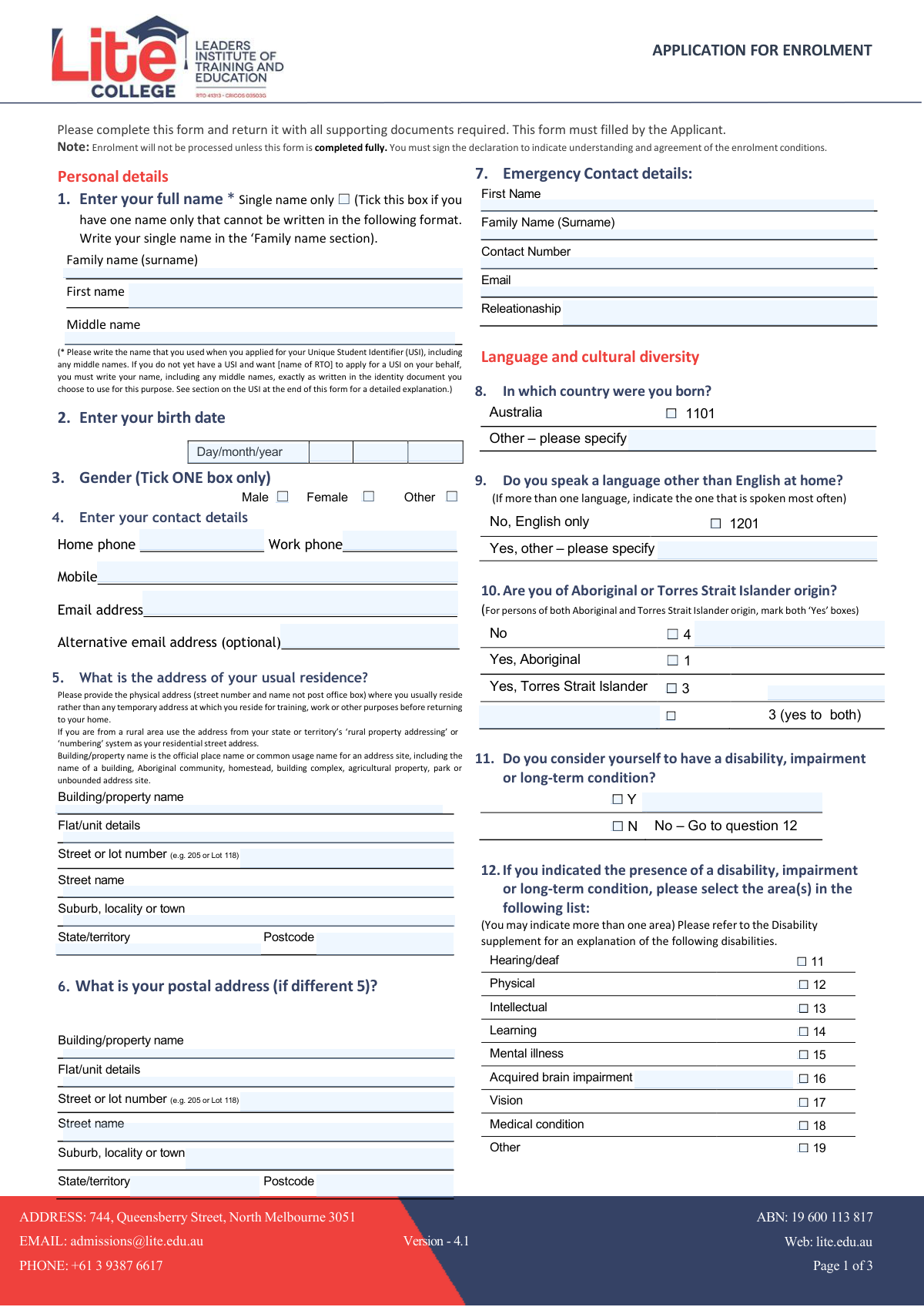
The Leaders Institute of Training and Education (LITE) Application for Enrolment is an official form required for all prospective students wishing to enrol in nationally recognised VET courses offered by LITE, including certificates, diplomas, and advanced diplomas. The form collects personal details, contact information, cultural and diversity data, prior qualifications, employment status, Unique Student Identifier (USI), and course selection, and must be fully completed and signed before enrolment can be processed. It is a critical document that ensures compliance with Australian government reporting requirements, including NCVER data submission. Today, this form can be filled out quickly and accurately using AI-powered services like Instafill.ai, which can also convert non-fillable PDF versions into interactive fillable forms.
Our AI automatically handles information lookup, data retrieval, formatting, and form filling.
It takes less than a minute to fill out LITE Enrolment Application using our AI form filling.
Securely upload your data. Information is encrypted in transit and deleted immediately after the form is filled out.
Form specifications
| Form name: | Leaders Institute of Training and Education (LITE) Application for Enrolment |
| Number of pages: | 3 |
| Language: | English |
Instafill Demo: filling out a legal form in seconds
How to Fill Out LITE Enrolment Application Online for Free in 2026
Are you looking to fill out a LITE ENROLMENT APPLICATION form online quickly and accurately? Instafill.ai offers the #1 AI-powered PDF filling software of 2026, allowing you to complete your LITE ENROLMENT APPLICATION form in just 37 seconds or less.
Follow these steps to fill out your LITE ENROLMENT APPLICATION form online using Instafill.ai:
- 1 Navigate to Instafill.ai and upload the LITE Application for Enrolment PDF or select it from the available form library to begin filling it out online.
- 2 Enter your personal details including your full name (family, given, and middle names exactly as on your identity documents), date of birth, and gender.
- 3 Provide your contact details (home, work, and mobile phone numbers, primary and alternative email addresses), your usual residential address, postal address if different, and emergency contact information.
- 4 Complete the language and cultural diversity section by indicating your country of birth, language spoken at home, Aboriginal or Torres Strait Islander status, and any disability, impairment, or long-term condition.
- 5 Fill in your education and employment background, including your highest completed school level, whether you are still enrolled in secondary education, any previous qualifications successfully completed, and your current employment status.
- 6 Enter your Unique Student Identifier (USI) if you already have one, select your main reason for undertaking the course, indicate whether you wish to apply for Recognition of Prior Learning (RPL) or Credit Transfer, and tick the specific course(s) you wish to enrol in.
- 7 Review all sections for completeness and accuracy, sign the student declaration (or provide electronic acknowledgement), and submit the completed form along with all required supporting documents to LITE admissions.
Our AI-powered system ensures each field is filled out correctly, reducing errors and saving you time.
Why Choose Instafill.ai for Your Fillable LITE Enrolment Application Form?
Speed
Complete your LITE Enrolment Application in as little as 37 seconds.
Up-to-Date
Always use the latest 2026 LITE Enrolment Application form version.
Cost-effective
No need to hire expensive lawyers.
Accuracy
Our AI performs 10 compliance checks to ensure your form is error-free.
Security
Your personal information is protected with bank-level encryption.
Frequently Asked Questions About Form LITE Enrolment Application
This is the Application for Enrolment form for the Leaders Institute of Training and Education (LITE) in North Melbourne. Any person wishing to enrol in a vocational education course at LITE must complete this form. The form must be filled out by the applicant themselves and returned with all required supporting documents.
Your enrolment will not be processed unless the form is completed in full. You must also sign the declaration at the end of the form to confirm your understanding and agreement of the enrolment conditions. Incomplete forms will not be accepted.
A USI is a nationally recognised identifier required for all students undertaking vocational education and training (VET) in Australia. Without a USI, LITE cannot issue you a qualification or statement of attainment upon completing your course. You can apply for a USI at https://www.usi.gov.au/students/create-your-usi, or you may authorise LITE to apply on your behalf by providing your name exactly as it appears on your identity document.
You must enter your name exactly as it was used when you applied for your USI, including any middle names. If you have only a single name (no separate family and given names), tick the 'Single name only' checkbox and write your name in the 'Family name' section. If LITE is applying for your USI on your behalf, your name must match exactly what is on the identity document you choose to use.
You must provide your physical residential address — the street number and name where you usually live — not a post office box or a temporary address used for training or work purposes. If you live in a rural area, use the address from your state or territory's rural property addressing or numbering system.
The form lists several courses you can tick to enrol in, including CPC33020 Certificate III in Bricklaying and Blocklaying, CPC31020 Certificate III in Solid Plastering, ELICOS (English Language Intensive Courses for Overseas Students), MEM40119 Certificate IV in Engineering, BSB50120 Diploma of Business, BSB60120 Advanced Diploma of Business, BSB80120 Graduate Diploma of Management (Learning), and CPP20218 Certificate II in Security Operations. Simply tick the course(s) you wish to enrol in.
Recognition of Prior Learning (RPL) is a process that assesses your existing skills, knowledge, and experience gained outside of formal study to grant credit towards a qualification. You can indicate on the form (Question 20) whether you wish to apply for RPL. Similarly, Question 21 asks if you wish to apply for Credit Transfer for any previously completed formal qualifications.
Payment can be made in person at the LITE institution or via bank transfer (EFT). The EFT details are: Account Name — Leaders Institute of Training and Education, BSB: 063 225, Account Number: 10439998, Commonwealth Bank of Australia. When making a transfer, use your name and the start date of your course as the reference. Please refer to the Enrolment Agreement for full details of payment schedules.
This information is collected for statistical and reporting purposes as required by the Australian government for vocational education and training data. It helps LITE and national bodies like NCVER understand the diversity of students and ensure appropriate support services are available. Providing this information is voluntary, but it helps LITE better support your learning needs.
If you consider yourself to have a disability, impairment, or long-term condition, tick 'Yes' in Question 11 and then select the relevant category or categories in Question 12 (such as Hearing/deaf, Physical, Intellectual, Learning, Mental illness, Vision, Medical condition, or Other). The Disability Supplement at the end of the form provides detailed explanations of each category to help you choose the most appropriate option. Note that short-term conditions like a fractured leg or corrected vision with glasses do not qualify.
Yes, the form requires you to provide emergency contact details including the contact's first name, family name, contact number, email address, and their relationship to you (for example, parent, spouse, or friend). This information is used in case LITE needs to reach someone on your behalf in an emergency.
Yes, AI-powered services like Instafill.ai can help you accurately auto-fill this enrolment form, saving you time and reducing the chance of errors. Instafill.ai guides you through each field and ensures all required information is entered correctly before you submit. This is especially helpful for a detailed form like this one that covers personal details, qualifications, employment status, and more.
To fill out this form online, visit Instafill.ai and upload the LITE Application for Enrolment PDF. The AI will walk you through each section — from personal details and USI to course selection and payment — auto-filling fields based on the information you provide. Once complete, you can download the filled form and submit it to LITE at [email protected] or in person at 744 Queensberry Street, North Melbourne 3051.
If you have a flat, non-fillable PDF version of the LITE enrolment form, Instafill.ai can convert it into an interactive fillable form so you can type directly into the fields digitally. This eliminates the need to print, handwrite, and scan the form, making the enrolment process faster and more convenient.
Once completed, return the form along with all required supporting documents to LITE by email at [email protected], by phone enquiry at +61 3 9387 6617, or in person at 744 Queensberry Street, North Melbourne 3051. The specific supporting documents required will depend on your course and circumstances — contact LITE directly if you are unsure what to include.
Compliance LITE Enrolment Application
Validation Checks by Instafill.ai
1
Ensures Full Name Fields Are Completed or Single Name Checkbox Is Ticked
This check verifies that at minimum the Family Name (Surname) and First Name fields are populated, unless the 'Single name only' checkbox is ticked, in which case only the Family Name field must contain the applicant's single name. The name entered must match exactly what was used when applying for the Unique Student Identifier (USI), including any middle names. If neither condition is satisfied, enrolment cannot be processed, as the applicant's identity cannot be confirmed against official records.
2
Validates Date of Birth Is a Real and Logically Consistent Date
This check confirms that the day, month, and year fields for date of birth together form a valid calendar date — for example, the day must be between 01 and 31, the month between 01 and 12, and the combined date must actually exist (e.g., 30 February is invalid). The year must also indicate that the applicant is of a plausible age to enrol in vocational education (typically at least 15 years old). If the date of birth is invalid or implausible, the form must be returned for correction, as this field is critical for identity verification and NCVER reporting.
3
Ensures Exactly One Gender Option Is Selected
This check verifies that one and only one of the three gender options — Male, Female, or Other — has been ticked in Question 3. Selecting multiple options or leaving the field blank violates the instruction 'Tick ONE box only' and would result in ambiguous or incomplete data being submitted to the national training dataset. If no selection or multiple selections are detected, the form must be returned to the applicant for correction before enrolment can proceed.
4
Validates Primary Email Address Format for Contact Details
This check ensures that the primary email address entered in the Contact Details section conforms to a standard email format, containing a local part, an '@' symbol, a domain name, and a valid top-level domain (e.g., [email protected]). An incorrectly formatted email address would prevent the institution from communicating course schedules, enrolment confirmations, and other critical information to the applicant. If the alternative email address is also provided, it must independently pass the same format validation.
5
Ensures Usual Residential Address Contains Required Physical Address Components
This check verifies that the usual residence address includes at minimum a street or lot number, a street name, a suburb/locality/town, a state/territory, and a postcode, and that a post office box has not been entered in place of a physical address as explicitly prohibited by the form instructions. The postcode must be a valid four-digit Australian postcode that is consistent with the nominated state or territory. Incomplete or invalid address data would compromise the institution's ability to meet its AVETMISS reporting obligations and contact the student by post.
6
Validates Australian Postcode Format and State Consistency
This check confirms that any postcode entered — for either the usual residence or postal address — consists of exactly four numeric digits and falls within the valid postcode range for the selected Australian state or territory (e.g., postcodes beginning with 3 or 8 for Victoria, 2 or 1 for NSW/ACT). A mismatch between the postcode and the state/territory field indicates a data entry error that could cause mail to be misdirected or AVETMISS records to be rejected. If the postcode and state are inconsistent, the applicant must be asked to verify and correct the address details.
7
Ensures Emergency Contact Details Are Fully Completed
This check verifies that all required emergency contact fields — First Name, Family Name, Contact Number, and Relationship to Applicant — have been filled in. The contact number must contain a valid phone number format (including area or country code where applicable), and the relationship field must not be left blank, as it is essential for the institution to know how to appropriately engage the contact in an emergency. An incomplete emergency contact record means the institution cannot fulfil its duty of care obligations if an incident occurs during training.
8
Validates Unique Student Identifier (USI) Format When Provided
This check confirms that if a USI has been entered across the ten individual character fields, all ten characters are populated and the identifier consists only of uppercase alphanumeric characters as specified by the USI authority (letters and digits, excluding characters that could be confused such as O and 0 in some implementations). An incomplete or incorrectly formatted USI cannot be submitted to NCVER and would prevent the institution from issuing a nationally recognised qualification or statement of attainment upon course completion. If the USI fields are partially filled (some characters entered and others blank), the form must be returned for correction.
9
Ensures Disability Type Is Selected When Disability Status Is Marked 'Yes'
This check verifies that if the applicant has ticked 'Yes' in Question 11 to indicate the presence of a disability, impairment, or long-term condition, at least one disability type checkbox in Question 12 (Hearing/deaf, Physical, Intellectual, Learning, Mental illness, Acquired brain impairment, Vision, Medical condition, or Other) has also been selected. Conversely, if 'No' is selected in Question 11, none of the disability type checkboxes in Question 12 should be ticked. Inconsistency between these two questions would result in incomplete or contradictory AVETMISS data being submitted to the national regulator.
10
Ensures Exactly One Employment Status Option Is Selected in Question 18
This check verifies that one and only one employment status option has been selected in Question 18, as the form explicitly instructs applicants to 'Tick ONE box only.' For applicants who work casually, seasonally, on contract, or on shift, the check also confirms that the selection of full-time (35 hours or more) or part-time (less than 35 hours) is consistent with the number of hours noted in any supplementary details field. Selecting no option or multiple options would result in invalid AVETMISS employment data that cannot be submitted to NCVER.
11
Validates That Previous Qualifications Are Specified When Question 15 Is Answered 'Yes'
This check ensures that if the applicant selects 'Yes' in Question 15 (indicating they have successfully completed a prior qualification), at least one qualification checkbox in Question 16 has been ticked. If 'No' is selected in Question 15, no checkboxes in Question 16 should be ticked, maintaining logical consistency between the two questions. Failing this check would produce an incomplete or contradictory prior qualifications record, which is a mandatory field for AVETMISS statistical reporting.
12
Ensures Exactly One Study Reason Is Selected in Question 19
This check confirms that one and only one option has been selected in Question 19 (main reason for undertaking the course), as the form instructs applicants to select the option that 'BEST describes' their main reason. Selecting multiple options or leaving the question blank would violate the single-selection requirement and produce ambiguous data for the national training dataset. If 'Other reasons' is selected, any associated text field for specifying the reason should also be reviewed for completeness.
13
Ensures at Least One Course Is Selected for Enrolment
This check verifies that the applicant has ticked at least one of the listed vocational education courses (e.g., CPC33020 Certificate III in Bricklaying and Blocklaying, BSB50120 Diploma of Business, etc.) on Page 3 of the form. Without a course selection, the enrolment application is fundamentally incomplete and cannot be processed, as there is no programme to enrol the student into. If the ELICOS course is selected, the number of weeks field must also be completed with a valid positive integer.
14
Validates That the Student Declaration Has Been Signed and Dated
This check confirms that the Student Declaration section at the end of the form includes a valid signature (or electronic acknowledgement) and a complete date in the format DD/MM/20YY. The form explicitly states that the applicant must sign the declaration to indicate understanding and agreement of the enrolment conditions, and that enrolment will not be processed without this. A missing signature, missing date, or an incomplete date (e.g., only day and month without the year) must be flagged and the form returned to the applicant before processing can begin.
15
Ensures Aboriginal and Torres Strait Islander Status Has Exactly One Valid Selection
This check verifies that exactly one of the four options in Question 10 has been selected: No, Yes (Aboriginal), Yes (Torres Strait Islander), or Yes (both Aboriginal and Torres Strait Islander). If an applicant identifies as both Aboriginal and Torres Strait Islander, both individual 'Yes' boxes should be marked and the combined option should also be indicated, consistent with the form's instruction. Leaving this question blank or selecting contradictory options (e.g., 'No' alongside a 'Yes' option) would result in invalid Indigenous status data that cannot be submitted to NCVER for mandatory reporting.
16
Validates Phone Number Format for All Contact and Emergency Contact Fields
This check ensures that any phone number entered — across the Home Phone, Work Phone, Mobile, and Emergency Contact Number fields — contains only numeric digits, spaces, hyphens, or parentheses, and meets a minimum length consistent with Australian domestic numbers (8 digits excluding area code) or international numbers (including a '+' country code prefix). At least one of the three applicant contact phone fields (Home, Work, or Mobile) must be populated so the institution has a means of reaching the applicant. An incorrectly formatted or entirely absent phone number would prevent the institution from contacting the applicant or their emergency contact when required.
Common Mistakes in Completing LITE Enrolment Application
Applicants often write a preferred or shortened version of their name (e.g., 'Mike' instead of 'Michael') rather than the exact name on their identity documents or used when registering for their Unique Student Identifier (USI). This causes a mismatch in government records, which can prevent the institution from issuing a nationally recognised qualification or statement of attainment. Always write your full legal name exactly as it appears on your passport, driver's licence, or other identity document used for your USI. AI-powered form filling tools like Instafill.ai can help by prompting you to enter your name consistently across all fields.
Applicants who legally have only one name frequently leave the 'Single name only' checkbox unticked and then struggle to fill in both the 'Family name' and 'First name' fields, sometimes leaving one blank or repeating the same name in both fields. This creates data inconsistencies in the enrolment system. If you have only one legal name, tick the 'Single name only' box and write that name solely in the 'Family name (surname)' section, leaving the 'First name' field blank.
Many applicants enter their date of birth in the wrong format (e.g., month/day/year instead of the required day/month/year), or split the year incorrectly across the 'first two digits' and 'last two digits' fields. This can result in an incorrect date being recorded, causing issues with identity verification and government data submissions. Always use the day/month/year format and double-check that the year is split correctly (e.g., '19' and '85' for 1985). Tools like Instafill.ai can automatically validate and format date fields to prevent these errors.
The form explicitly requires a physical street address (street number and name) for your usual residence, yet many applicants enter a PO Box number out of habit or privacy concerns. A PO Box is not accepted as a residential address and will cause the enrolment to be incomplete or rejected. If you live in a rural area, use your state or territory's rural property addressing system. Reserve the PO Box for the separate postal address field (Question 6) if applicable.
Applicants frequently omit one or more fields in the emergency contact section — most commonly the email address or the relationship field — or they misspell 'Relationship' (the form itself contains the typo 'Releationaship', which can cause confusion). An incomplete emergency contact record means the institution cannot reach a nominated person in an urgent situation. Ensure all fields (first name, family name, contact number, email, and relationship) are fully completed with accurate information.
Students currently enrolled in secondary school often tick the year level they are currently studying rather than the highest year they have actually completed. For example, a student currently in Year 10 should tick 'Year 9 or equivalent,' not 'Year 10.' The form clearly states that the highest school level completed refers to what has been fully finished, not the current year of study. Read the instruction carefully and select only the level you have fully completed.
Some applicants either leave the USI field blank when they already have one, enter it with errors (wrong characters or incorrect order), or attempt to create a new USI when they already have one — which is not permitted. A missing or incorrect USI means the institution cannot submit required data to NCVER and cannot issue a nationally recognised qualification. Before completing this field, use the 'Forgotten USI' link at https://www.usi.gov.au/faqs/i-have-forgotten-my-usi/ to retrieve your existing USI, and enter each of the 10 characters carefully into the individual character boxes. Instafill.ai can help validate the format of your USI entry.
Questions 3 (Gender) and 18 (Employment status) both instruct applicants to tick ONE box only, yet some applicants tick more than one option — for example, ticking both 'Full-time employee' and 'Self employed.' This creates ambiguous data that cannot be processed correctly. For employment status, note that casual, seasonal, contract, and shift workers should determine their category based on their current average weekly hours (full-time if 35 or more hours, part-time if fewer than 35 hours). Select only the single most accurate option for each question.
Applicants either skip Question 11 entirely or incorrectly assume that conditions like managed impaired vision (corrected by glasses) or short-term conditions (e.g., a broken leg) qualify as disabilities under this form. The form's Disability supplement clearly states that short-term or corrected conditions do not count. Conversely, applicants with genuine long-term conditions sometimes leave the section blank out of embarrassment. Read the Disability supplement definitions carefully, answer Question 11 honestly, and if you answer 'Yes,' complete Question 12 by selecting all applicable disability types.
Many applicants complete all personal and background information but forget to tick the specific course(s) they wish to enrol in on Page 3. Since the form states that enrolment will not be processed unless the form is completed fully, leaving the course selection blank will result in the application being rejected or delayed. Carefully review the list of available courses (e.g., Certificate III in Bricklaying, Diploma of Business, ELICOS) and tick the appropriate box(es) before submitting.
A surprisingly common mistake is submitting the form without signing the Student Declaration and Consent section, or signing it but leaving the date blank. The form explicitly states that enrolment will not be processed unless the declaration is signed, as it confirms the accuracy of the information provided and consent to data collection and use. Always sign and date the declaration before submitting, or provide an electronic acknowledgement if submitting digitally. Instafill.ai can remind you to complete mandatory signature fields before finalising your submission.
Applicants who identify as both Aboriginal and Torres Strait Islander sometimes tick only one of the two 'Yes' boxes, missing the instruction that both boxes should be marked if both identities apply. Others confuse the 'No' option with a refusal to answer and leave the question blank entirely. This question is required for government statistical reporting. Read the instruction carefully: if you identify as both Aboriginal and Torres Strait Islander, tick both the 'Yes, Aboriginal' and 'Yes, Torres Strait Islander' boxes.
Saved over 80 hours a year
“I was never sure if my IRS forms like W-9 were filled correctly. Now, I can complete the forms accurately without any external help.”
Kevin Martin Green
Your data stays secure with advanced protection from Instafill and our subprocessors
Robust compliance program
Transparent business model
You’re not the product. You always know where your data is and what it is processed for.
ISO 27001, HIPAA, and GDPR
Our subprocesses adhere to multiple compliance standards, including but not limited to ISO 27001, HIPAA, and GDPR.
Security & privacy by design
We consider security and privacy from the initial design phase of any new service or functionality. It’s not an afterthought, it’s built-in, including support for two-factor authentication (2FA) to further protect your account.
Fill out LITE Enrolment Application with Instafill.ai
Worried about filling PDFs wrong? Instafill securely fills leaders-institute-of-training-and-education-lite-application-for-enrolment forms, ensuring each field is accurate.




