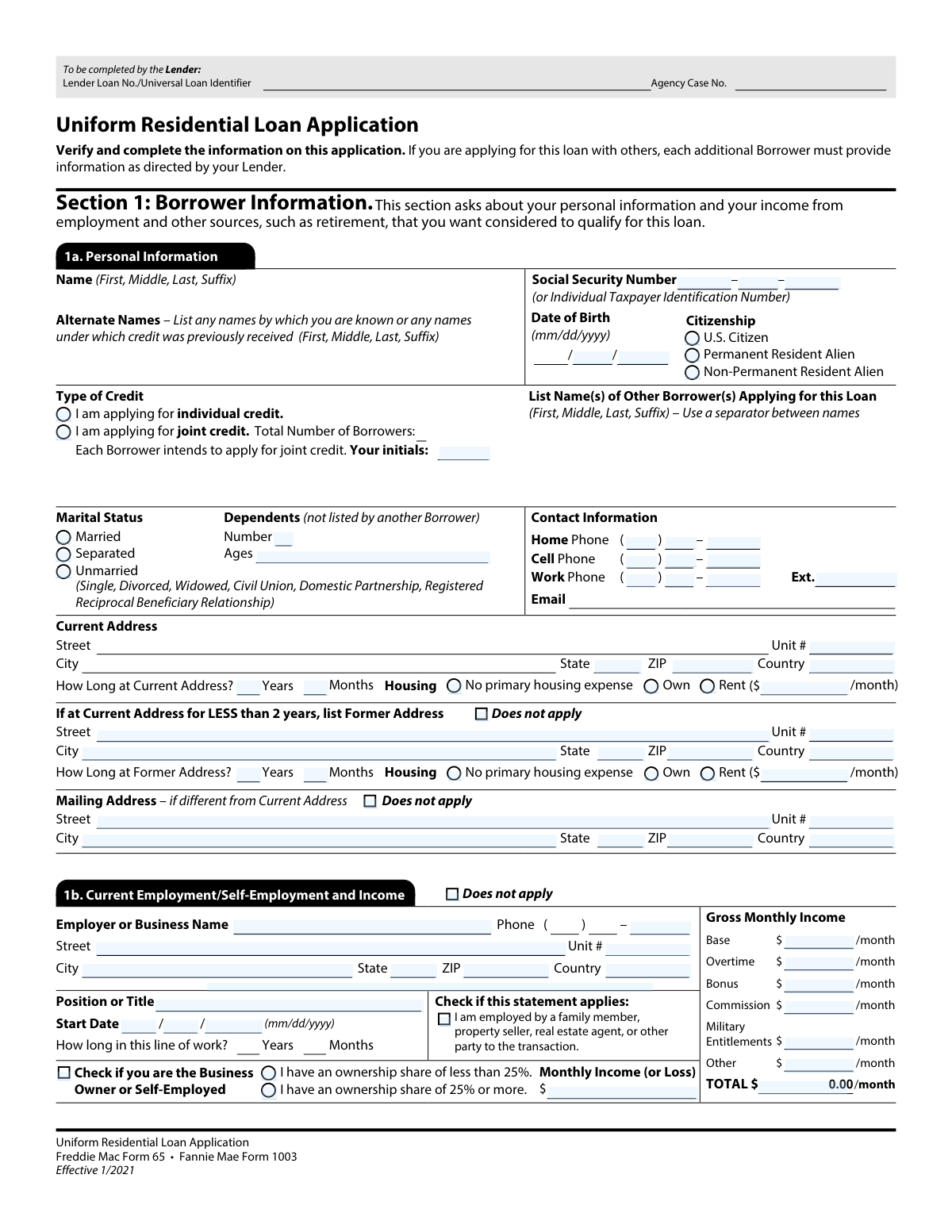
Yes! You can use AI to fill out Uniform Residential Loan Application (Freddie Mac Form 65 / Fannie Mae Form 1003)

The Uniform Residential Loan Application (URLA), commonly referred to as Form 1003, is the industry-standard document required by lenders for anyone applying for a residential mortgage in the U.S. It collects extensive information about the borrower's identity, income, assets, and liabilities, which lenders use to assess creditworthiness and make a lending decision. Today, this form can be filled out quickly and accurately using AI-powered services like Instafill.ai, which can also convert non-fillable PDF versions into interactive fillable forms.
Our AI automatically handles information lookup, data retrieval, formatting, and form filling.
It takes less than a minute to fill out Form 1003 / Form 65 using our AI form filling.
Securely upload your data. Information is encrypted in transit and deleted immediately after the form is filled out.

Form specifications

Form name: Uniform Residential Loan Application (Freddie Mac Form 65 / Fannie Mae Form 1003)
Number of pages: 1
Language: English
Categories: loan application forms, Fannie Mae forms, Freddie Mac forms, loan forms
main-image

Instafill Demo: How to fill out PDF forms in seconds with AI

How to Fill Out Form 1003 / Form 65 Online for Free in 2026

Are you looking to fill out a FORM 1003 / FORM 65 form online quickly and accurately? Instafill.ai offers the #1 AI-powered PDF filling software of 2026, allowing you to complete your FORM 1003 / FORM 65 form in just 37 seconds or less.
Follow these steps to fill out your FORM 1003 / FORM 65 form online using Instafill.ai:
  1. 1 Navigate to Instafill.ai and upload or select the Uniform Residential Loan Application (Form 1003).
  2. 2 Use the AI assistant to automatically populate personal information, including your name, contact details, SSN, and address history.
  3. 3 Enter detailed information about your current and past employment, allowing the AI to guide you through income calculations for base pay, bonuses, and commissions.
  4. 4 List your assets (bank accounts, investments, real estate) and liabilities (credit cards, other loans, debts) in the designated sections.
  5. 5 Provide details about the loan you are requesting and the property you are financing, including purchase price and loan amount.
  6. 6 Complete the declarations, answering questions about your financial history and intentions for the property.
  7. 7 Carefully review all auto-filled and manually entered data for accuracy, then e-sign and download the completed application to submit to your lender.

Our AI-powered system ensures each field is filled out correctly, reducing errors and saving you time.

Why Choose Instafill.ai for Your Fillable Form 1003 / Form 65 Form?

Speed

Complete your Form 1003 / Form 65 in as little as 37 seconds.

Up-to-Date

Always use the latest 2026 Form 1003 / Form 65 form version.

Cost-effective

No need to hire expensive lawyers.

Accuracy

Our AI performs 10 compliance checks to ensure your form is error-free.

Security

Your personal information is protected with bank-level encryption.

Frequently Asked Questions About Form Form 1003 / Form 65

This is the standard application form used by lenders when you apply for a mortgage to purchase or refinance a home. It collects your personal, financial, and employment information for the lender to evaluate your loan eligibility.

Anyone applying for a residential mortgage loan must complete this form. If you are applying with a co-borrower, each person will need to provide their information as directed by the lender.

You will need to provide personal details like your name, Social Security Number, date of birth, and contact information. You also must detail your current and former addresses, housing status, and your employment and income history.

You should check the box for "I am applying for joint credit" and indicate the total number of borrowers. Each borrower must provide their own personal and financial information and initial the application where required.

If you have lived at your current address for two years or more, you do not need to provide a former address. You can simply check the "Does not apply" box in the Former Address section.

You should enter your gross (pre-tax) monthly income, broken down into categories like base pay, overtime, bonuses, and commissions. Be prepared to provide documentation like pay stubs or tax returns to verify these amounts.

List your business name as the employer and check the box indicating you are a "Business Owner or Self-Employed." You will also need to specify your ownership share and report your monthly income or loss from the business.

It is helpful to have your Social Security card, driver's license, recent pay stubs, W-2s or tax returns, and bank statements available. Having these documents on hand will make it easier to accurately complete the application.

You will submit the completed Uniform Residential Loan Application directly to your mortgage lender. They will provide instructions for submission, which is often done through a secure online portal or in person.

"U.S. Citizen" is for citizens of the United States. "Permanent Resident Alien" is for non-citizens who have a green card, and "Non-Permanent Resident Alien" is for individuals in the U.S. on a visa or other temporary status.

Lenders use marital status to understand financial rights and obligations, especially in community property states. Select the option that reflects your legal status: Married, Separated, or Unmarried (which includes single, divorced, or widowed).

Yes, services like Instafill.ai use AI to help you accurately auto-fill form fields, which can save you significant time and reduce errors. This is especially useful for long and detailed forms like the mortgage application.

Simply upload the Uniform Residential Loan Application PDF to the Instafill.ai platform. The AI will identify the fields, allowing you to fill them out interactively online and save your progress as you go.

You can use a service like Instafill.ai, which can convert flat, non-fillable PDFs into interactive, fillable forms. This allows you to type your information directly into the fields instead of printing and filling it out by hand.

Compliance Form 1003 / Form 65
Validation Checks by Instafill.ai

1
Validates Social Security Number Format and Completeness
This check ensures that all three parts of the Social Security Number (SSN) or Individual Taxpayer Identification Number (ITIN) are filled out with the correct number of digits (3, 2, and 4 respectively) and contain only numeric characters. This is critical for identity verification and pulling a credit report, which are fundamental steps in the loan underwriting process. An invalid or incomplete SSN will prevent the application from being processed.
2
Verifies Borrower is of Legal Age
This validation checks the borrower's 'Date of Birth' to confirm it is a valid calendar date and that the calculated age is at least 18 years. Lenders can only enter into legal contracts with adults, so this check is essential for ensuring the loan agreement is legally enforceable. An application from an underage individual would be immediately rejected.
3
Ensures Exclusive Citizenship Status Selection
This check confirms that exactly one of the three citizenship options ('U.S. Citizen', 'Permanent Resident Alien', or 'Non-Permanent Resident Alien') is selected. A borrower's citizenship status is a required piece of information that determines eligibility for different loan programs and compliance with federal regulations. Failure to select one and only one option will result in an incomplete application.
4
Enforces Two-Year Address History Logic
This validation checks if the 'How Long at Current Address' is less than two years. If it is, the system verifies that the 'Former Address' section is completely filled out, unless the 'Does not apply' checkbox for the former address is selected. A continuous two-year residency history is required by most lenders for identity verification and risk assessment, and incomplete information can delay or halt the application.
5
Validates Conditional Mailing Address Fields
This check ensures that if the 'Does not apply' checkbox for the Mailing Address is unchecked, all mailing address fields (Street, City, State, ZIP) are populated. Conversely, if the box is checked, these fields should be empty. This logic prevents incomplete data and ensures critical loan documents and communications are sent to the correct address.
6
Requires Rent Amount when 'Rent' is Selected
This validation confirms that if the 'Rent' checkbox is selected for the borrower's current housing situation, the corresponding 'Monthly Housing Payment' field must contain a positive numerical value. This expense is a key component of the borrower's debt-to-income (DTI) ratio, which is a primary metric for determining loan qualification. Missing this value would lead to an inaccurate DTI calculation.
7
Verifies Gross Monthly Income Summation
This check ensures that the 'TOTAL' gross monthly income field is the correct sum of all individual income components (Base, Overtime, Bonus, Commission, Military, Other). This is a crucial cross-field validation to maintain data integrity and ensure the income used for qualification is calculated correctly. A discrepancy would require manual correction and could indicate a data entry error.
8
Validates Employment Start Date is in the Past
This check verifies that the 'Start Date' for the borrower's employment is a valid date that is not in the future. A future start date is logically impossible for current employment and would indicate a data entry error. Accurate employment history is essential for verifying income stability, a cornerstone of loan approval.
9
Confirms Intent for Joint Credit with Initials
This validation ensures that if the 'I am applying for joint credit' checkbox is selected, the 'Your initials' field is also filled out. The initials serve as a legally required confirmation of the borrower's intent to apply for credit jointly. An application for joint credit without the required initials is considered incomplete and cannot be processed.
10
Requires Business Ownership Share Declaration
This check validates that if the 'Business Owner or Self-Employed' checkbox is selected, the borrower must also select one of the two ownership share options ('less than 25%' or '25% or more'). This information is critical for underwriters to determine the correct method for analyzing business income and what documentation is required. An incomplete declaration will halt the income verification process.
11
Ensures Exclusive Marital Status Selection
This validation ensures the borrower has selected exactly one option from the marital status choices ('Married', 'Separated', 'Unmarried'). A person's marital status can affect how assets, liabilities, and property titles are handled, making it a required data point for the application. Selecting none or more than one option creates an ambiguity that must be resolved.
12
Validates Dependent Ages are Listed if Dependents Exist
This check confirms that if the 'Number' of dependents is a value greater than zero, the corresponding 'Ages' field must be populated. While the number of dependents is the primary factor for financial calculations, providing their ages can be important for certain underwriting guidelines or state requirements. This ensures all requested information about the borrower's financial responsibilities is captured.

Common Mistakes in Completing Form 1003 / Form 65

Incomplete Two-Year Address History

Applicants often overlook the requirement to provide a full two-year address history. If they have lived at their current address for less than two years, they frequently forget to fill out the 'Former Address' section. This omission creates a gap in the residency timeline, which is critical for identity verification and credit checks, leading to processing delays as the lender must request the missing information. To avoid this, carefully calculate your time at the current address and be prepared to provide the previous address if it's less than 24 months.

Incorrect Gross Monthly Income Calculation

A frequent error is reporting net (take-home) pay instead of the required Gross Monthly Income. Applicants also struggle to accurately average variable income like overtime, bonuses, or commissions into a monthly figure. This miscalculation can lead to an inaccurate debt-to-income (DTI) ratio, potentially causing the loan to be incorrectly assessed or even denied. Always use your pre-tax earnings and consult your pay stubs to calculate a stable monthly average for all income sources you wish to have considered.

Omitting Alternate or Previous Names

Borrowers often forget to list all names under which they have previously received credit, such as a maiden name or a former legal name. This information is crucial for the lender to pull a complete and accurate credit history. Failing to provide these names can result in an incomplete credit profile, causing delays or raising red flags during the underwriting process. Ensure you list any name that might be associated with your financial records.

Confusing 'Time in Line of Work' with 'Time at Current Job'

Applicants commonly mistake the 'How long in this line of work?' field for the length of time at their current company. The form is asking for total experience in their profession, which demonstrates income stability. Entering only the time at the current job can underrepresent your experience and stability, potentially weakening your application. Always calculate the total years and months you have been working in your specific field or profession, across all employers.

Errors in Joint Credit Application Section

When applying for joint credit, applicants may check the box but forget to include the co-borrower's initials or list the total number of borrowers. This is a compliance requirement indicating all parties intend to apply jointly. An incomplete section can halt the application process until the form is corrected and re-signed. To prevent this, ensure all borrowers review the 'Type of Credit' section and provide their initials where required.

Inaccurate Self-Employment Reporting

Self-employed applicants or business owners often fill out the employment section as if they were a standard employee, forgetting to check the 'Business Owner or Self-Employed' box. They may also struggle to provide a consistent 'Monthly Income (or Loss)' figure, as business income can be highly variable. This leads to confusion and requires significant follow-up from the lender for clarification and additional documentation like tax returns. It's crucial to correctly identify as self-employed and use tax documents to calculate an average monthly income.

Transposing SSN or Date of Birth Digits

Simple typographical errors, such as transposing digits in the Social Security Number (SSN) or Date of Birth (DOB), are extremely common yet have severe consequences. An incorrect SSN or DOB will cause credit report failures and identity verification mismatches, immediately stopping the loan application. Double-check these numbers carefully before submission. AI-powered tools like Instafill.ai can help prevent these errors by validating number formats and flagging potential mistakes.

Leaving Housing Status Ambiguous

In the address sections, applicants sometimes fail to check a housing status (Own, Rent, or No primary housing expense) or they check 'Rent' but neglect to enter the monthly payment amount. This leaves the lender unable to calculate the applicant's current housing expense, a key part of their financial profile. This ambiguity requires the lender to contact the applicant for clarification, delaying the process. Always complete this part fully, ensuring a status is checked and a rent amount is provided if applicable.

Omitting Dependent Ages

Borrowers may correctly enter the number of dependents but forget to list their corresponding ages in the designated field. Lenders may use this information as part of their overall assessment of the borrower's financial obligations. Leaving this field blank results in an incomplete application that must be returned for correction. To avoid delays, ensure you list the specific ages of all dependents you are claiming.

Incorrect Citizenship Status Selection

Applicants can be unsure of the precise legal definitions and may incorrectly select their citizenship status, particularly between 'Permanent Resident Alien' and 'Non-Permanent Resident Alien'. This is a critical data point that determines eligibility for certain loan programs and dictates the documentation required (e.g., Green Card, work visa). An incorrect selection can lead to significant delays or denial if the applicant does not meet the requirements for the chosen status. If unsure, confirm your status before filling out the form. If the form is a non-fillable PDF, a tool like Instafill.ai can make it fillable and guide you through these fields.
Saved over 80 hours a year

“I was never sure if my IRS forms like W-9 were filled correctly. Now, I can complete the forms accurately without any external help.”

Kevin Martin Green

Your data stays secure with advanced protection from Instafill and our subprocessors

Robust compliance program

Transparent business model

You’re not the product. You always know where your data is and what it is processed for.

ISO 27001, HIPAA, and GDPR

Our subprocesses adhere to multiple compliance standards, including but not limited to ISO 27001, HIPAA, and GDPR.

Security & privacy by design

We consider security and privacy from the initial design phase of any new service or functionality. It’s not an afterthought, it’s built-in, including support for two-factor authentication (2FA) to further protect your account.

Fill out Form 1003 / Form 65 with Instafill.ai

Worried about filling PDFs wrong? Instafill securely fills uniform-residential-loan-application-freddie-mac-form-65-fannie-mae-form-1003 forms, ensuring each field is accurate.