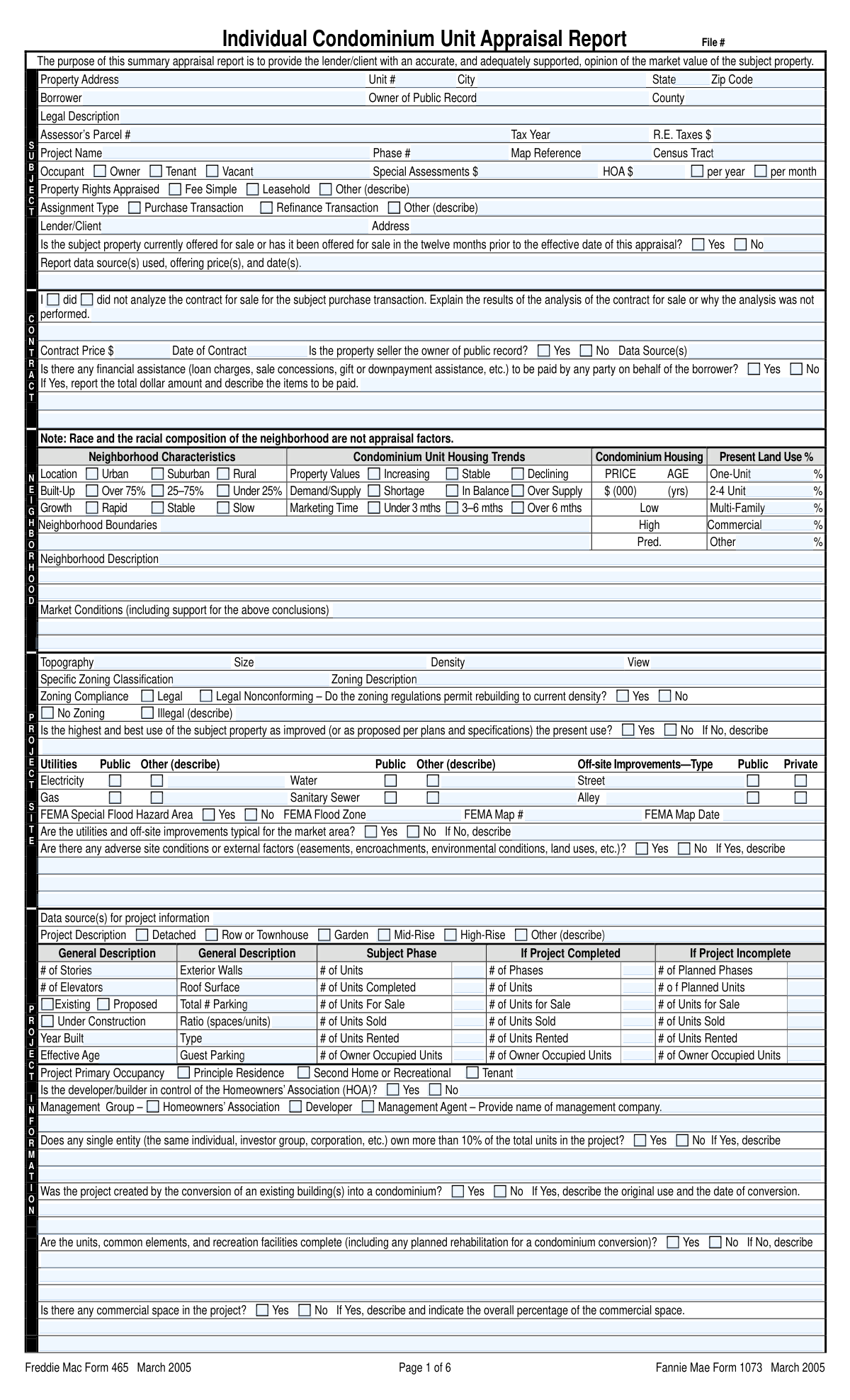
Yes! You can use AI to fill out Fannie Mae Form 1073 / Freddie Mac Form 465, Individual Condominium Unit Appraisal Report

The Individual Condominium Unit Appraisal Report (Fannie Mae Form 1073 / Freddie Mac Form 465) is a standardized form used by real estate appraisers to document the value of a single unit within a condominium project. It is essential for lenders as it provides a thorough analysis of the property, the overall project, and comparable sales, ensuring the property's value supports the mortgage amount. This detailed report covers everything from the unit's condition to the financial stability of the homeowners' association. Today, this form can be filled out quickly and accurately using AI-powered services like Instafill.ai, which can also convert non-fillable PDF versions into interactive fillable forms.
Form 1073 / 465 is part of the Fannie Mae forms, Freddie Mac forms and EDD forms categories on Instafill.
Our AI automatically handles information lookup, data retrieval, formatting, and form filling.
It takes less than a minute to fill out Form 1073 / 465 using our AI form filling.
Securely upload your data. Information is encrypted in transit and deleted immediately after the form is filled out.

Form specifications

Form name: Fannie Mae Form 1073 / Freddie Mac Form 465, Individual Condominium Unit Appraisal Report
Number of fields: 634
Number of pages: 7
Language: English
main-image

Instafill Demo: How to fill out PDF forms in seconds with AI

How to Fill Out Form 1073 / 465 Online for Free in 2026

Are you looking to fill out a FORM 1073 / 465 form online quickly and accurately? Instafill.ai offers the #1 AI-powered PDF filling software of 2026, allowing you to complete your FORM 1073 / 465 form in just 37 seconds or less.
Follow these steps to fill out your FORM 1073 / 465 form online using Instafill.ai:
  1. 1 Navigate to Instafill.ai and upload or select the Individual Condominium Unit Appraisal Report (Form 1073/465).
  2. 2 Use the AI assistant to populate key information such as the property address, borrower details, legal description, and lender information.
  3. 3 Complete the Neighborhood and Project Information sections by answering AI-guided questions about property trends, zoning, HOA details, and project amenities.
  4. 4 Detail the subject unit's characteristics, including room counts, materials, condition, and any special features, letting the AI structure the data correctly.
  5. 5 Input data for the subject property and at least three comparable sales; the AI will help organize the data and calculate adjustments for the Sales Comparison Approach.
  6. 6 Finalize the report by entering the indicated values from the appraisal approaches, completing the reconciliation, and stating the final opinion of market value.
  7. 7 Review the entire AI-completed form for accuracy, then electronically sign and date the document as the appraiser and/or supervisory appraiser to finalize the report.

Our AI-powered system ensures each field is filled out correctly, reducing errors and saving you time.

Why Choose Instafill.ai for Your Fillable Form 1073 / 465 Form?

Speed

Complete your Form 1073 / 465 in as little as 37 seconds.

Up-to-Date

Always use the latest 2026 Form 1073 / 465 form version.

Cost-effective

No need to hire expensive lawyers.

Accuracy

Our AI performs 10 compliance checks to ensure your form is error-free.

Security

Your personal information is protected with bank-level encryption.

Frequently Asked Questions About Form Form 1073 / 465

This form is an Individual Condominium Unit Appraisal Report, used by a professional appraiser to determine the market value of a condominium unit, typically for a mortgage transaction like a purchase or refinance.

A licensed or certified real estate appraiser is responsible for completing this form. The appraiser gathers data, inspects the property, analyzes the market, and provides a final opinion of value to the lender or client.

This information is typically found on the property's deed, title report, or in public records available through the county assessor's office. It provides a precise definition of the property's location and boundaries.

This section is used to determine the property's value by comparing it to at least three similar, recently sold properties (comparables). The appraiser makes monetary adjustments for differences in features, location, and condition to arrive at an indicated value.

'Fee Simple' means you have complete ownership of the unit and an interest in the common areas. 'Leasehold' means you have the right to use the property for a set period under a lease agreement, but you do not own the land itself.

For incomplete projects, you must provide details on the number of planned phases and units, as well as the number of units sold, for sale, or rented. This helps the lender assess the project's overall viability and risk.

If you indicate there are adverse conditions or physical deficiencies, you must provide a detailed description in the corresponding text fields. This includes explaining the issue and its potential impact on the property's livability, soundness, or value.

Enter the amount of the Homeowners Association (HOA) dues in the 'HOA Dues' field, and then check the appropriate box to indicate if this amount is paid 'Per Month' or 'Per Year'.

When the appraisal is for a purchase, this section requires the appraiser to analyze the sales contract. It helps them understand the terms of the sale, including the contract price and any financial concessions, which can influence the final valuation.

The completed appraisal report is typically submitted directly by the appraiser to the lender or client who ordered it. It is usually delivered electronically as a secure PDF.

Yes, services like Instafill.ai use AI to accurately auto-fill form fields, which can save appraisers significant time and reduce data entry errors. This is especially helpful for repetitive information across multiple sections and comparable properties.

Simply upload your form to the Instafill.ai platform. Their AI will analyze the fields and automatically populate them with your provided data, allowing you to review, edit, and complete the form quickly online.

You can use a service like Instafill.ai to solve this problem. Instafill.ai can convert flat, non-fillable PDFs into interactive, fillable forms that you can easily complete and manage online.

If you check 'Yes' to indicate the property is in a FEMA Special Flood Hazard Area, you must also provide the specific FEMA Flood Zone, the FEMA Map Number, and the FEMA Map Date.

In the Reconciliation section, the appraiser summarizes the valuation approaches used (like the Sales Comparison Approach) and explains how they arrived at the final 'Opinion of Market Value'. It provides the rationale for the final value conclusion.

Compliance Form 1073 / 465
Validation Checks by Instafill.ai

1
Validates Sum of Present Land Use Percentages
This check verifies that the sum of the percentages entered for 'One-Unit', '2-4 Unit', 'Multi-Family', 'Commercial', and 'Other Land Use' equals exactly 100%. This is crucial for ensuring the land use breakdown is mathematically correct and provides a complete picture of the neighborhood composition. If the total does not equal 100%, an error message should be displayed, preventing form submission until the values are corrected.
2
Ensures Exclusive Selection for Occupancy Status
This validation ensures that only one of the 'Owner Occupied', 'Tenant Occupied', or 'Vacant' checkboxes can be selected at a time. A property cannot have multiple primary occupancy statuses simultaneously, so enforcing a single choice prevents contradictory and nonsensical data. If a user tries to select more than one, the system should automatically deselect the previous choice or show an error.
3
Conditional Requirement for 'Other' Description Fields
This check ensures that if an 'Other (describe)' checkbox is selected, the corresponding description text field must be filled out. This applies to multiple sections like 'Assignment Type', 'Property Rights Appraised', and 'Project Description'. This rule is important to prevent ambiguous selections and ensure that the specific details for the 'Other' category are captured. Failure to provide a description will result in a validation error prompting the user to complete the field.
4
Validates Date of Contract is Not in the Future
This check validates that the 'Date of Contract' field contains a valid date that is not in the future. A contract date cannot logically occur after the appraisal is being prepared. This validation ensures temporal consistency and data accuracy. If a future date is entered, the system should reject the input and display an error message.
5
Conditional Requirement for FEMA Flood Details
This validation rule mandates that if the 'Yes' checkbox is selected for 'FEMA Flood Information', then the 'FEMA Flood Zone', 'FEMA Map Number', and 'FEMA Map Date' fields must be populated. This information is critical for risk assessment and is required when a property is identified as being in a flood hazard area. The form should not be considered complete if these dependent fields are left empty after a 'Yes' selection.
6
Ensures HOA Dues Frequency is Specified
This check verifies that if a value is entered into the 'HOA Dues' field, then exactly one of the 'Per Year' or 'Per Month' checkboxes must be selected. The monetary amount for HOA dues is meaningless without its frequency, which is essential for calculating total housing expenses. The system should display an error if the amount is present but the frequency is not specified.
7
Validates Appraiser License Expiration Date
This check ensures the 'Expiration Date of Certification or License' for both the appraiser and supervisory appraiser is a future date relative to the 'Date of Signature and Report'. An appraisal performed by an individual with an expired license is invalid and would be rejected by lenders and regulatory bodies. If the license is expired, the system should display a critical warning or block submission.
8
Logical Consistency of Comparable Price Range
This validation ensures that the 'Minimum Price of Comparable Properties Offered for Sale' is less than or equal to the 'Maximum Price of Comparable Properties Offered for Sale'. Entering a minimum value that is higher than the maximum is a logical impossibility and indicates a data entry error. The system should flag this inconsistency and require the user to correct the values before proceeding.
9
Conditional Requirement for Contract Analysis Explanation
This rule requires the 'Contract Analysis Explanation' field to be filled if 'Purchase Transaction' is selected as the assignment type. The appraiser must either explain the results of their contract analysis or provide a reason why the analysis was not performed. This is a standard requirement for purchase appraisals, and leaving the explanation blank would render the report incomplete.
10
Validates Zip Code Format
This check ensures that the 'Zip Code (Property Address)' field is in a valid 5-digit or 9-digit (ZIP+4) format. A correct zip code is essential for mail delivery, location services, and data aggregation. The validation prevents entry of incorrectly formatted or incomplete postal codes, improving the overall quality and usability of the address data.
11
Ensures Exclusive Selection for Property Inspection Status
This validation enforces that only one of the three inspection checkboxes ('Did not inspect', 'Did inspect exterior', 'Did inspect interior and exterior') can be selected. The level of inspection is a critical detail of the appraisal process and must be stated unambiguously. Allowing multiple selections would create confusion about the scope of the appraiser's work, so the system must enforce a single, clear choice.
12
Conditional Requirement for Adverse Conditions Description
This check ensures that if the 'Yes' checkbox for 'Adverse Site Conditions' is selected, the corresponding description field ('text_f299_11fe' or 'Additional Adverse Conditions') must contain an explanation. Identifying adverse conditions without describing them provides incomplete and unhelpful information to the user of the report. This validation forces the appraiser to provide necessary context, which is critical for understanding potential impacts on property value and safety.
13
Verifies Calculation of Sale Price per Gross Living Area
This check validates the consistency between the 'Sale Price', 'Square Feet of Gross Living Area Above Grade', and the 'Sale Price per Gross Living Area' fields for the subject property and all comparables. The system should verify that 'Sale Price' divided by 'Square Feet' equals the 'Sale Price per Gross Living Area', within a small tolerance for rounding. This ensures mathematical accuracy and prevents data entry errors in these critically related fields.
14
Conditional Requirement for Prior Sale Details
This rule mandates that if 'My research did reveal sales' is checked for the subject property, then the 'Subject Property Prior Sale Date' and 'Subject Property Price' fields must be filled. Acknowledging the existence of a prior sale without providing the details makes the disclosure incomplete. This validation ensures that all relevant data points for the prior transfer are captured as required.
15
Validates Consistency of Project Completion Status and Details
This check ensures logical consistency between the project's status ('Existing', 'Proposed', 'Under Construction') and the unit count details provided. For example, if 'Existing' is checked, fields like 'Planned Units (Incomplete Project)' should be disabled or validated as empty. Conversely, if 'Proposed' or 'Under Construction' is checked, these 'Incomplete Project' fields become mandatory. This prevents contradictory information about the project's development stage.

Common Mistakes in Completing Form 1073 / 465

Failing to Complete Required Conditional Fields

The form has many fields that are only required if a specific checkbox is selected, such as providing a description for 'Other' or filling FEMA details if the property is in a flood zone. Users often check the box but forget to provide the corresponding detailed information. This results in an incomplete submission, causing processing delays and requiring follow-up correspondence to obtain the missing data. To avoid this, carefully review each checked box and ensure any dependent fields are filled; AI-powered tools like Instafill.ai can highlight these required conditional fields to prevent such oversights.

Inconsistent Data Entry in the Sales Comparison Grid

The sales comparison section requires meticulous data entry for the subject property and multiple comparables. Common errors include mixing up data between comparables, using inconsistent formats for dates or monetary values, and failing to provide a description for an adjustment value. These inconsistencies undermine the credibility of the appraisal analysis and can lead to the report being rejected by the lender. It is crucial to cross-reference all data points for each comparable; using a structured data entry tool can help maintain consistency across the grid.

Confusing 'Borrower Name' with 'Owner of Public Record'

Users frequently enter the borrower's name in the 'Owner of Public Record' field, but these can be different, especially in purchase transactions where the seller is the current owner of record. This mistake can cause title verification issues and delays in the lending process. It is essential to consult official public records to accurately identify the current legal owner and enter that name separately from the borrower's information.

Providing an Inaccurate or Abbreviated Legal Description

The 'Legal Description' field requires the complete, official description of the property, which is often long and complex, and is not the same as the street address. People may try to shorten it, use the property address, or make transcription errors from the source document. An incorrect legal description can invalidate the appraisal and create significant legal and title issues for the transaction. Always copy the full legal description verbatim from a reliable source like a title report or deed.

Ambiguous HOA Dues Frequency

The form requires users to enter the 'HOA Dues' amount and then check a separate box for 'Per Month' or 'Per Year'. A common mistake is to enter the dollar amount but forget to check the corresponding frequency box. This ambiguity makes it impossible to know the total annual cost and can lead to incorrect debt-to-income calculations for the borrower. Always ensure that after entering the dues amount, the correct frequency box is checked to provide complete information.

Incorrectly Calculating 'Present Land Use Percentages'

The form asks for the percentage breakdown of land use in the neighborhood (One-Unit, 2-4 Unit, Multi-Family, Commercial, etc.), which must logically add up to 100%. Users often estimate these values and fail to ensure they sum correctly, which questions the appraiser's market knowledge and attention to detail. Before submitting, manually add all entered percentages to confirm they total 100% to ensure the report is internally consistent.

Applying Monetary Adjustments Without Justification

In the sales comparison grid, a frequent error is entering a dollar value for an adjustment (e.g., 'Comparable Sale 2 Location Adjustment') without providing a clear explanation in the corresponding description field. Unexplained adjustments are a major red flag for underwriters and can lead to requests for clarification or rejection of the appraisal. Every adjustment must be accompanied by a logical and well-supported narrative to be considered valid.

Contradictory Unit Counts in Project Details

The form requests various unit counts (total, completed, sold, for sale) for different project statuses. It is easy to enter conflicting numbers, such as stating more units are sold than have been completed. These logical inconsistencies create doubt about the data's accuracy, potentially halting the review process. It is vital to treat these sections as a single dataset and ensure all numbers are consistent and logical relative to each other.

Omitting FEMA Flood Map Details

If a user checks 'Yes' for the property being in a 'FEMA Special Flood Hazard Area,' they must then fill out the 'FEMA Flood Zone', 'FEMA Map Number', and 'FEMA Map Date' fields. A common oversight is to indicate the flood risk without providing these mandatory supporting details. This omission renders the flood risk assessment incomplete and will be immediately flagged by the lender, requiring the appraiser to revise and resubmit the report.

Mismatching Appraisal Condition with Property Deficiencies

A critical error is selecting 'As Is' for the appraisal condition while also noting significant 'Physical Deficiencies or Adverse Conditions' elsewhere in the report. The appraisal condition must be consistent with the property's described state; if repairs are needed, the appraisal should be marked 'Subject to Repairs or Alterations.' This mistake can lead to the lender misjudging the risk associated with the property and can cause major issues during underwriting.

Incomplete or Mixed-Up Appraiser and Supervisor Details

The final section requires detailed information for both the appraiser and a supervisory appraiser. Errors include leaving fields like license numbers or expiration dates blank, or accidentally swapping the information between the two individuals. Incomplete or incorrect credential information can prevent the lender from verifying the appraiser's qualifications, causing significant delays. AI-powered form fillers like Instafill.ai can help by storing and accurately populating this repetitive information, reducing the chance of manual error.

Forgetting to Check the 'Per Month' or 'Per Year' Box for HOA Dues

A common oversight is filling in the 'HOA Dues' amount but failing to check the adjacent 'Per Month' or 'Per Year' box. This omission creates ambiguity and forces the reviewer to guess the frequency, potentially leading to incorrect financial calculations and processing delays. To prevent this, always complete both parts of the entry: the amount and the time period. Smart form-filling tools can often flag such incomplete paired fields.
Saved over 80 hours a year

“I was never sure if my IRS forms like W-9 were filled correctly. Now, I can complete the forms accurately without any external help.”

Kevin Martin Green

Your data stays secure with advanced protection from Instafill and our subprocessors

Robust compliance program

Transparent business model

You’re not the product. You always know where your data is and what it is processed for.

ISO 27001, HIPAA, and GDPR

Our subprocesses adhere to multiple compliance standards, including but not limited to ISO 27001, HIPAA, and GDPR.

Security & privacy by design

We consider security and privacy from the initial design phase of any new service or functionality. It’s not an afterthought, it’s built-in, including support for two-factor authentication (2FA) to further protect your account.

Fill out Form 1073 / 465 with Instafill.ai

Worried about filling PDFs wrong? Instafill securely fills fannie-mae-form-1073-freddie-mac-form-465-individual-condominium-unit-appraisal-report forms, ensuring each field is accurate.