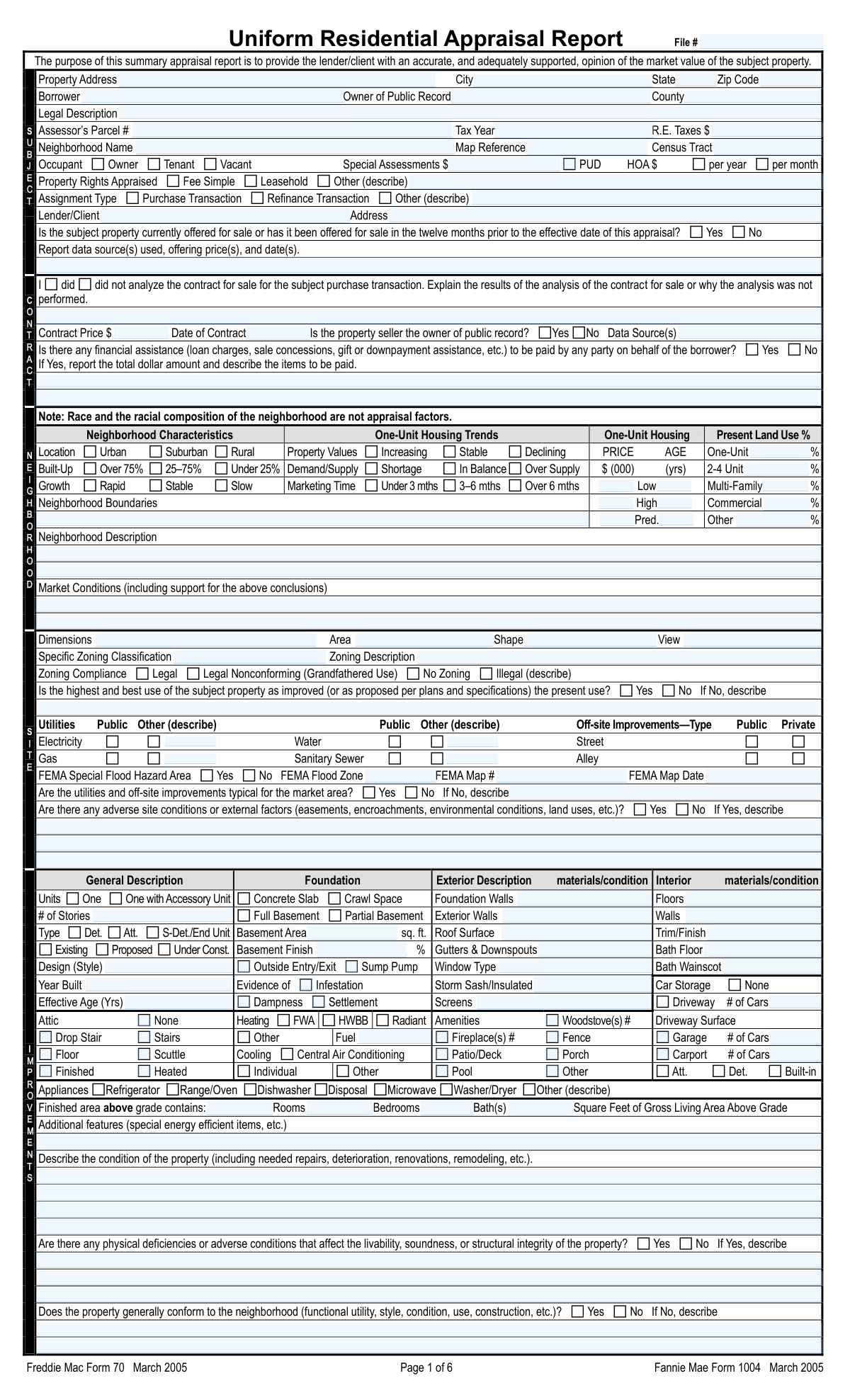
Yes! You can use AI to fill out Uniform Residential Appraisal Report (Fannie Mae Form 1004 / Freddie Mac Form 70)

The Uniform Residential Appraisal Report, commonly known as Fannie Mae Form 1004 or Freddie Mac Form 70, is the industry-standard document for residential real estate appraisals. It provides lenders with a detailed analysis and opinion of a property's market value, based on an inspection, neighborhood analysis, and comparison with similar recent sales. This report is critical for mortgage finance transactions as it helps lenders evaluate the collateral. Today, this form can be filled out quickly and accurately using AI-powered services like Instafill.ai, which can also convert non-fillable PDF versions into interactive fillable forms.
Our AI automatically handles information lookup, data retrieval, formatting, and form filling.
It takes less than a minute to fill out Fannie Mae Form 1004 / Freddie Mac Form 70 using our AI form filling.
Securely upload your data. Information is encrypted in transit and deleted immediately after the form is filled out.

Form specifications

Form name: Uniform Residential Appraisal Report (Fannie Mae Form 1004 / Freddie Mac Form 70)
Number of fields: 592
Number of pages: 6
Language: English
Categories: Fannie Mae forms, Freddie Mac forms
main-image

Instafill Demo: How to fill out PDF forms in seconds with AI

How to Fill Out Fannie Mae Form 1004 / Freddie Mac Form 70 Online for Free in 2026

Are you looking to fill out a FANNIE MAE FORM 1004 / FREDDIE MAC FORM 70 form online quickly and accurately? Instafill.ai offers the #1 AI-powered PDF filling software of 2026, allowing you to complete your FANNIE MAE FORM 1004 / FREDDIE MAC FORM 70 form in just 37 seconds or less.
Follow these steps to fill out your FANNIE MAE FORM 1004 / FREDDIE MAC FORM 70 form online using Instafill.ai:
  1. 1 Navigate to Instafill.ai and upload or select the Uniform Residential Appraisal Report (Form 1004).
  2. 2 Allow the AI to scan the document and accurately identify all data fields, including subject property details, neighborhood characteristics, and sales comparison grids.
  3. 3 Follow the guided prompts to input appraisal data, such as property address, legal description, comparable sales information, and cost approach calculations.
  4. 4 Instafill.ai will automatically populate the corresponding sections of the form, including the complex tables for sales comparison and value adjustments.
  5. 5 Review the auto-filled report, verifying the accuracy of all entries, from borrower information to the final opinion of market value.
  6. 6 Add your digital signature, appraiser certification details, and effective date to finalize the report.
  7. 7 Download, print, or securely share the completed Form 1004 directly with the lender/client.

Our AI-powered system ensures each field is filled out correctly, reducing errors and saving you time.

Why Choose Instafill.ai for Your Fillable Fannie Mae Form 1004 / Freddie Mac Form 70 Form?

Speed

Complete your Fannie Mae Form 1004 / Freddie Mac Form 70 in as little as 37 seconds.

Up-to-Date

Always use the latest 2026 Fannie Mae Form 1004 / Freddie Mac Form 70 form version.

Cost-effective

No need to hire expensive lawyers.

Accuracy

Our AI performs 10 compliance checks to ensure your form is error-free.

Security

Your personal information is protected with bank-level encryption.

Frequently Asked Questions About Form Fannie Mae Form 1004 / Freddie Mac Form 70

This form's purpose is to provide a lender or client with a professional appraiser's opinion of the market value for a single-unit residential property. It is used to support decision-making for mortgage finance transactions, such as purchases or refinances.

A licensed or certified real estate appraiser must complete this form. The appraiser is required to perform a visual inspection of the property's interior and exterior, inspect the neighborhood, and analyze comparable sales data.

This is the primary method used to determine the property's value by comparing it to at least three similar, recently sold properties, known as 'comparables'. The appraiser makes monetary adjustments for differences in features like location, size, condition, and amenities to arrive at an indicated value.

An 'as is' valuation is the property's value in its current condition. A 'subject to repairs' valuation is contingent on specific repairs or alterations being completed, and the value reflects the property's condition after that work is done.

The appraiser must attach several exhibits, including a street map showing the property and comparables, a building sketch with dimensions, and clear photographs of the subject property's front, back, street scene, and the front of each comparable sale.

Yes. The form specifies that the lender/client is permitted to disclose or distribute the appraisal report to the borrower involved in the mortgage finance transaction.

This section is for properties located in a Planned Unit Development (PUD) and gathers details about the project and its Homeowners' Association (HOA). This information is especially critical if the developer is still in control of the HOA, as it can impact the property's value and marketability.

No, the form explicitly states that the Cost Approach and Income Approach are not required by Fannie Mae. The appraiser must consider these valuation methods but may choose not to develop them if the Sales Comparison Approach provides a reliable opinion of value.

This section provides context for the property's value by analyzing local market trends, such as property value changes, demand/supply balance, and average marketing time. It helps justify the conclusions made in the Sales Comparison Approach.

Yes, while the core valuation analysis requires an appraiser's expertise, AI-powered services like Instafill.ai can streamline the process. These tools can accurately auto-fill repetitive data fields, saving time and reducing clerical errors.

You can upload the Uniform Residential Appraisal Report PDF to Instafill.ai, and the platform will make it an interactive, fillable form. This allows you or your team to easily enter data into all required fields, check boxes, and even add electronic signatures.

If you have a non-fillable or 'flat' PDF, you can use a service like Instafill.ai to convert it into a fully interactive form. The AI automatically detects all the fields, making it ready for you to complete online without needing to print it.

This is a critical section where the appraiser makes a series of legally binding statements. They certify that they have followed professional standards, performed the required inspections, have no bias, and that their compensation is not tied to a predetermined value.

No, this report form is specifically designed for a one-unit property or a one-unit property with an accessory unit, including those in a PUD. It is not designed for appraising manufactured homes, condominiums, or cooperative projects, which require different, specialized forms.

Compliance Fannie Mae Form 1004 / Freddie Mac Form 70
Validation Checks by Instafill.ai

1
Conditional Validation for FEMA Flood Information
This check ensures that if the 'Yes' box for 'FEMA Special Flood Hazard Area' is selected, then the 'FEMA Flood Zone', 'FEMA Map #', and 'FEMA Map Date' fields must be populated. This information is crucial for assessing flood risk and determining mandatory insurance requirements for the loan. Failure to provide these details when required makes the risk assessment incomplete and will halt loan processing.
2
Requires Contract Analysis for Purchase Transactions
Validates that if 'Purchase Transaction' is selected as the 'Assignment Type', then the 'Contract Analysis Explanation' field must be completed. This analysis is essential for the lender to understand the terms of the sale, including concessions and other factors that may influence the property's true market value. An empty explanation on a purchase appraisal represents a significant omission of required analysis and will be rejected.
3
Ensures Financial Assistance Details are Provided When Applicable
This rule verifies that if the 'Yes' box for 'Financial Assistance Status' is checked, the corresponding description field detailing the total dollar amount and items paid is not empty. Lenders must know about sales concessions or other assistance as they can artificially inflate the contract price and affect the property's value. Missing this information can lead to an inaccurate valuation and an unsound lending decision.
4
Validates Chronological Order of Appraisal Dates
This check ensures that the 'Date of Signature and Report' is on or after the 'Effective Date of Appraisal'. The effective date is the date of inspection, and the report cannot be signed before the work it describes has been completed. A signature date preceding the effective date indicates a logical impossibility and invalidates the report's timeline, making it non-compliant.
5
Cross-references Gross Living Area for Subject Property
This validation confirms that the 'Square Feet of Gross Living Area Above Grade' on page 1 matches the 'Subject Gross Living Area (sq. ft.)' in the Sales Comparison Approach grid on page 2. Consistency in this key metric is vital for accurate valuation and comparison. A discrepancy suggests a data entry error and undermines the credibility of the entire appraisal analysis.
6
Verifies Sum of Present Land Use Percentages
This check calculates the sum of the 'Present Land Use' percentages (One-Unit, 2-4 Unit, Multi-Family, Commercial, Other) and ensures it equals 100%. This confirms a complete and accurate breakdown of the neighborhood composition. A total other than 100% indicates an error in the appraiser's assessment or data entry, making the neighborhood analysis unreliable.
7
Validates Logical Range for One-Unit Housing Prices and Ages
This rule ensures that the 'Low Price' is less than or equal to the 'High Price' and that the 'Lowest Age' is less than or equal to the 'Highest Age'. It also checks that the 'Predominant Price' and 'Predicted Age' fall within their respective ranges. This maintains logical consistency in the market data presented; an inverted or illogical range indicates a clear data entry error that must be corrected.
8
Compares Year Built with Effective Age
This validation checks that the 'Effective Age' is not substantially greater than the property's actual age (current year minus 'Year Built'). The effective age reflects the property's condition and utility, which can be lower than the actual age due to renovations, but is rarely higher. An effective age greater than the actual age is highly unusual and likely an error, requiring justification or correction.
9
Ensures Final Appraised Value is Supported by Approaches
This check verifies that the final 'opinion of the market value' on page 2 is consistent with the 'Indicated Value by Sales Comparison Approach' and any other approaches developed (Cost, Income). The final value must be logically reconciled from the appraisal analysis. A final value that does not align with the supporting data will be flagged for review as it may be arbitrary or unsupported.
10
Requires Explanation for Adverse Conditions
This check ensures that if 'Yes' is selected for 'Adverse site conditions' or 'Physical deficiencies', the corresponding description field must be filled out. Identifying a problem without describing it provides no value and raises significant questions about the property's condition, safety, and soundness. A detailed explanation is mandatory for the lender to assess the severity of the issue and its impact on value and collateral risk.
11
Verifies Calculation of Net and Gross Adjustments
This validation automatically calculates the sum of all individual dollar adjustments for each comparable sale and verifies that it matches the 'Net Adjustment (Total)'. It also verifies the gross adjustment percentage calculation. This serves as a critical mathematical check to prevent errors that would lead to an incorrect 'Adjusted Sale Price of Comparables', which is the foundation of the sales comparison approach.
12
Ensures Exclusive Selection of Occupancy Status
This validation confirms that only one of the checkboxes ('Owner', 'Tenant', 'Vacant') in the Occupant section is selected. A property cannot simultaneously have multiple occupancy statuses. Selecting more than one indicates a data entry error and creates ambiguity about the property's current use, which affects risk assessment and potential rental income calculations.
13
Validates Address and Assessor's Parcel Number Presence
This check ensures that the full 'Property Address' (Street, City, State, Zip) and the 'Assessor’s Parcel #' are both present. These two fields are the primary identifiers for the subject property. Missing or incomplete information prevents proper record-keeping, linking to tax and title data, and can cause the report to be rejected by automated underwriting systems.
14
Requires Explanation for Non-Conforming Use
This rule validates that if 'Illegal' is selected for 'Zoning Compliance' or 'No' is selected for 'Highest and best use', the corresponding description field must be completed. These are significant red flags that heavily impact the property's value and marketability. Failure to explain the situation makes it impossible for the lender to evaluate the risk associated with the non-conformity.

Common Mistakes in Completing Fannie Mae Form 1004 / Freddie Mac Form 70

Incomplete or Incorrect Legal Description or APN

Appraisers may truncate the legal description or make transcription errors when entering the Assessor's Parcel Number (APN) from source documents. This often happens due to the complexity of metes-and-bounds descriptions or the long string of digits in an APN. An incorrect legal identifier can cause significant title and closing issues, as it may not accurately identify the property being financed, potentially invalidating the loan. To avoid this, meticulously double-check the description against the title commitment or public records; AI-powered tools like Instafill.ai can help by cross-referencing databases to validate this information automatically.

Mismatched HOA/PUD Fee Frequency

The form requires entering an HOA or PUD fee amount and separately checking a box for 'per month' or 'per year'. A common mistake is to enter a monthly amount but accidentally check the 'per year' box, or vice-versa. This leads to a wildly inaccurate calculation of housing expenses by the lender's underwriter, which can delay loan approval or lead to rejection. Always verify the fee amount and its payment frequency from official HOA documents and carefully select the corresponding checkbox on the form.

Omitting Financial Assistance and Concession Details

Appraisers may fail to report seller concessions, down payment assistance, or other financial aid involved in the transaction. This often occurs when the appraiser does not fully analyze the sales contract or misunderstands what qualifies as a concession. Omitting this information is a major compliance failure, as it can artificially inflate the contract price and affect the true market value, leading to loan rejection or future buy-back demands from the lender. It is crucial to thoroughly review the sales contract and explicitly report the dollar amount and description of any financial assistance.

Vague or Subjective Property Condition Descriptions

The form requires factual, specific descriptions of the property's condition, materials, and any deficiencies. Appraisers sometimes use generic, subjective terms like 'good,' 'average,' or 'fair condition' without providing supporting details. This fails to give the underwriter a clear picture of the property's physical state and can trigger requests for more information, delaying the appraisal review. To prevent this, describe specific materials (e.g., 'asphalt shingle roof,' 'vinyl siding') and detail any observed issues (e.g., 'minor settlement cracks in foundation,' 'worn carpeting in bedrooms').

Inconsistent Sales Comparison Adjustments

In the Sales Comparison Approach grid, appraisers must adjust comparable sales for differences from the subject property. A frequent error is applying inconsistent logic, such as making a $10,000 adjustment for a garage on one comparable but a $15,000 adjustment on another without clear justification. This undermines the credibility of the valuation and can lead to the appraisal being rejected. Adjustments should be market-derived and applied uniformly, with any deviations clearly explained in the analysis summary.

Mathematical Errors in Net/Gross Adjustment Calculations

The Sales Comparison grid requires calculating both the net adjustment (the sum of all adjustments) and the gross adjustment (the sum of the absolute value of all adjustments). Manual calculations can easily lead to mathematical errors, which invalidate the adjusted sales prices of the comparables and call the entire valuation into question. Using appraisal software with built-in calculators is standard, but it's vital to double-check the outputs to ensure accuracy before finalizing the report.

Failure to Analyze Prior Sales History Correctly

The form mandates researching and analyzing the subject property's sales history for the past three years and the comparables' history for the past year. Appraisers may forget to perform this research, fail to report their findings, or neglect to analyze the significance of a recent sale (e.g., a property flip). This is a critical compliance failure that can hide market volatility or property flipping schemes, posing a risk to the lender. Always use reliable data sources and provide a clear analysis of any prior transfers found within the required timeframes.

Mismatched Effective Date and Signature Date

The 'Effective Date of Appraisal' must be the date of the physical inspection of the property, while the 'Date of Signature and Report' is the date the appraiser signs the completed report. A common error is making these dates the same when the report was actually completed and signed on a later day. This misrepresents the timeline of the appraisal process and can create legal and compliance issues. It is crucial to accurately record the inspection date as the effective date and the signing date separately.

Contradictory Information Across Form Sections

In a dense document like this, it's easy to enter contradictory information, such as describing a 'newly renovated kitchen' in the improvements section but rating the overall property condition as 'fair' without explanation. These inconsistencies signal carelessness and undermine the report's credibility, often leading to a full review or rejection. A final, thorough review of the entire form is necessary to ensure all data points are consistent. AI-powered tools like Instafill.ai can help by flagging such inconsistencies during data entry.

Forgetting Required Exhibits and Attachments

The appraisal report is considered incomplete without all required exhibits, such as a street map, an exterior building sketch with Gross Living Area (GLA) calculations, and photos of the subject and comparables. Appraisers, especially when rushed, may forget to compile and attach all necessary documents. An incomplete submission will be immediately rejected by the lender, causing significant delays. Creating a submission checklist can help ensure all required exhibits are included before the report is sent.
Saved over 80 hours a year

“I was never sure if my IRS forms like W-9 were filled correctly. Now, I can complete the forms accurately without any external help.”

Kevin Martin Green

Your data stays secure with advanced protection from Instafill and our subprocessors

Robust compliance program

Transparent business model

You’re not the product. You always know where your data is and what it is processed for.

ISO 27001, HIPAA, and GDPR

Our subprocesses adhere to multiple compliance standards, including but not limited to ISO 27001, HIPAA, and GDPR.

Security & privacy by design

We consider security and privacy from the initial design phase of any new service or functionality. It’s not an afterthought, it’s built-in, including support for two-factor authentication (2FA) to further protect your account.

Fill out Fannie Mae Form 1004 / Freddie Mac Form 70 with Instafill.ai

Worried about filling PDFs wrong? Instafill securely fills uniform-residential-appraisal-report-fannie-mae-form-1004-freddie-mac-form-70 forms, ensuring each field is accurate.