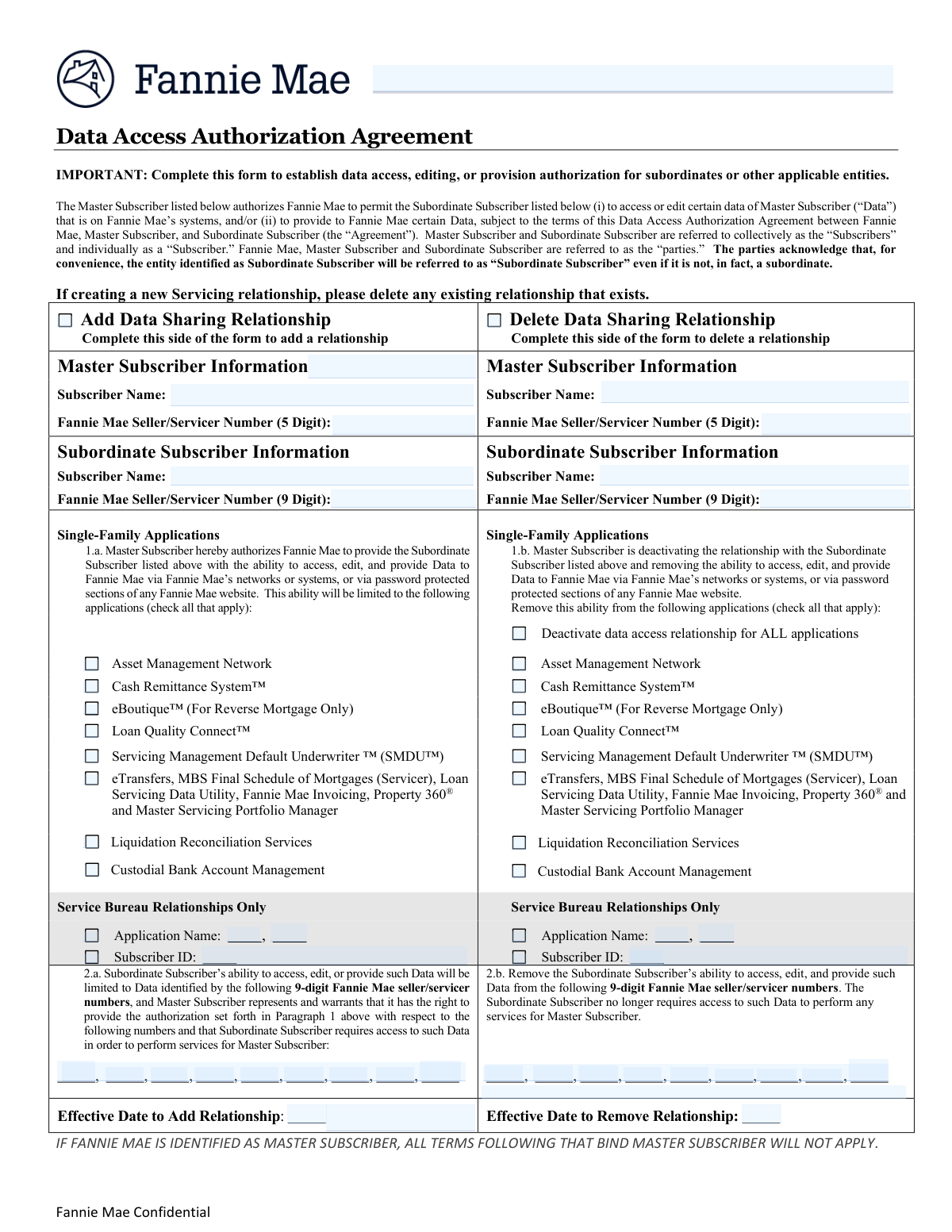
Yes! You can use AI to fill out Fannie Mae Form 1009, Master-Subordinate Subscriber Data Sharing Relationship Form
Fannie Mae Form 1009, the Master-Subordinate Subscriber Data Sharing Relationship Form, is a critical document for managing subservicing agreements within the Fannie Mae ecosystem. It allows a primary servicer (Master Subscriber) to grant or revoke a subservicer's (Subordinate Subscriber's) access to specific Fannie Mae software applications and loan data, which is essential for proper loan servicing. Today, this form can be filled out quickly and accurately using AI-powered services like Instafill.ai, which can also convert non-fillable PDF versions into interactive fillable forms.
Our AI automatically handles information lookup, data retrieval, formatting, and form filling.
It takes less than a minute to fill out Fannie Mae Form 1009 using our AI form filling.
Securely upload your data. Information is encrypted in transit and deleted immediately after the form is filled out.
Form specifications
| Form name: | Fannie Mae Form 1009, Master-Subordinate Subscriber Data Sharing Relationship Form |
| Number of fields: | 67 |
| Number of pages: | 2 |
| Language: | English |
| Categories: | Fannie Mae forms |
Instafill Demo: How to fill out PDF forms in seconds with AI
How to Fill Out Fannie Mae Form 1009 Online for Free in 2026
Are you looking to fill out a FANNIE MAE FORM 1009 form online quickly and accurately? Instafill.ai offers the #1 AI-powered PDF filling software of 2026, allowing you to complete your FANNIE MAE FORM 1009 form in just 37 seconds or less.
Follow these steps to fill out your FANNIE MAE FORM 1009 form online using Instafill.ai:
- 1 Navigate to Instafill.ai and upload your Fannie Mae Form 1009, or select it from the template library.
- 2 Indicate the primary action by checking the box to either 'Add Data Sharing Relationship' or 'Delete Data Sharing Relationship'.
- 3 Use the AI assistant to accurately input the Master and Subordinate Subscriber names and their respective Fannie Mae Seller/Servicer numbers in the correct sections.
- 4 Specify the scope of the relationship by checking the boxes for the individual Single-Family Applications (e.g., Loan Quality Connect™, SMDU™) for which access is being granted or revoked.
- 5 Enter the effective date for the addition or removal of the data sharing relationship.
- 6 Complete the authorization section by providing the names, titles, and dates for the authorized representatives of both the Master and Subordinate Subscribers.
- 7 Review all the auto-filled information for accuracy, then download, print, or securely share your completed Form 1009 directly from the platform.
Our AI-powered system ensures each field is filled out correctly, reducing errors and saving you time.
Why Choose Instafill.ai for Your Fillable Fannie Mae Form 1009 Form?
Speed
Complete your Fannie Mae Form 1009 in as little as 37 seconds.
Up-to-Date
Always use the latest 2026 Fannie Mae Form 1009 form version.
Cost-effective
No need to hire expensive lawyers.
Accuracy
Our AI performs 10 compliance checks to ensure your form is error-free.
Security
Your personal information is protected with bank-level encryption.
Frequently Asked Questions About Form Fannie Mae Form 1009
This form is used to manage data sharing relationships between a 'Master Subscriber' and a 'Subordinate Subscriber' within the Fannie Mae system. It allows you to add, delete, or modify a Subordinate's access to specific applications and data.
The Master Subscriber is the primary institution, such as a seller or servicer, that owns the data. The Subordinate Subscriber is typically a third-party vendor, subservicer, or partner who is being granted access to work with that data on the Master's behalf.
To add a new relationship, check the 'Add Data Sharing Relationship' box and complete the information on the left side of the form. To remove an existing relationship, check the 'Delete Data Sharing Relationship' box and fill out the details on the right side.
The 5-digit number is the unique identifier for the Master Subscriber (the primary seller/servicer). The 9-digit number is the unique identifier for the Subordinate Subscriber, which may be a branch or a subservicing partner.
No, you can grant access selectively. When adding a relationship, you can check the boxes for individual applications like 'Loan Quality Connect™' or 'Cash Remittance System™' to provide access only where it is needed.
Checking this box will revoke the Subordinate Subscriber's access to all listed single-family applications simultaneously. If you only want to remove access for specific applications, leave this box unchecked and select the individual applications to deactivate.
This section is required when adding a new subservicing relationship. You must provide the name and address of the servicer that borrowers should contact, ensuring proper communication about the change.
An authorized representative from both the Master Subscriber and the Subordinate Subscriber must provide their name, title, and signature date. This confirms that both parties agree to the requested changes in data access.
This refers to a specific arrangement where a Subordinate Subscriber acts as a service bureau, processing data for certain applications using a unique Subscriber ID. This section allows you to manage access for these specialized relationships.
The effective date specifies the exact date on which the data sharing relationship will begin (for additions) or end (for deletions). This ensures permissions are managed according to a precise timeline.
Yes, services like Instafill.ai use AI to help you accurately auto-fill form fields with your saved information, which saves time and helps prevent common errors.
Simply upload the form's PDF to the Instafill.ai platform. The AI will make the document interactive, allowing you to click on fields and populate them with your saved company or personal details before downloading the completed form.
You can use a tool like Instafill.ai to solve this problem. It can convert flat, non-fillable PDFs into interactive, fillable forms that you can easily complete and save on your computer.
Compliance Fannie Mae Form 1009
Validation Checks by Instafill.ai
1
Exclusive Action Selection
This check ensures that the user selects either 'Add Data Sharing Relationship' or 'Delete Data Sharing Relationship', but not both. Selecting one action is mandatory to define the form's purpose. If neither or both are selected, the submission should be rejected with an error message prompting the user to choose a single action.
2
Master Seller/Servicer Number Format
Validates that the 'Master Subscriber Fannie Mae Seller/Servicer Number' field contains exactly 5 digits. This format is critical for correctly identifying the master subscriber entity in Fannie Mae's systems. A failure would prevent the system from locating the correct master account, leading to a processing failure.
3
Subordinate Seller/Servicer Number Format
Ensures the 'Subordinate Subscriber Fannie Mae Seller/Servicer Number' field contains exactly 9 digits. This specific format is required to uniquely identify the subordinate subscriber. Incorrect formatting will result in a failure to establish or remove the correct data sharing link, potentially impacting the wrong entity.
4
Completeness Check for 'Add' Action
If 'Add Data Sharing Relationship' is checked, this validation confirms that all required fields for adding a relationship are filled. This includes Master and Subordinate names and numbers, at least one application, effective date, and authorization details. Incomplete forms cannot be processed and will be returned to the user for completion.
5
Completeness Check for 'Delete' Action
If 'Delete Data Sharing Relationship' is checked, this validation verifies that all necessary fields for deleting a relationship are provided. This includes the Master and Subordinate identifiers and the effective date for removal. Missing information would make it impossible to identify and terminate the correct relationship, so the form would be rejected.
6
Minimum Application Selection for 'Add'
When adding a new data sharing relationship, this check ensures at least one application checkbox is selected under 'Add Single-Family Applications'. A relationship must grant access to at least one application to be meaningful. If no applications are selected, the form is considered incomplete and an error is shown.
7
Deactivation Logic Consistency
This validation checks the logic for deactivating applications. If the 'Deactivate data access relationship for ALL applications' box is checked, no individual application deactivation boxes should be checked. This prevents contradictory instructions and ensures a clear, unambiguous request. A conflict would result in a validation error.
8
Effective Date Validity
Validates that the 'Effective Date to Add Relationship' and 'Effective Date to Remove Relationship' are valid, fully-formed dates. The check also ensures the date is not in the past, as actions should be scheduled for the present or future. An invalid or past date would cause a rejection, preventing accidental or nonsensical scheduling.
9
Authorization Date Validity
This check ensures the 'Master Subscriber Authorized Representative Date' and 'Subordinate Representative Date' are valid dates that are not in the future. The authorization date confirms when the agreement was made and must be current or in the recent past. A future date is illogical and would invalidate the authorization, causing the form submission to fail.
10
Conditional Borrower Notification Fields
Verifies that the 'Servicer Name' and 'Servicer Address' fields under 'Borrower Notification Letter Information' are filled out if and only if the 'Add Data Sharing Relationship' box is checked. This information is required for borrower communication when a new subservicing relationship is established. The validation fails if the fields are empty on an 'Add' request.
11
Master and Subordinate Distinction
This check ensures that the Master Subscriber and Subordinate Subscriber are not the same entity. It compares the 'Master Subscriber Fannie Mae Seller/Servicer Number' with the 'Subordinate Subscriber Fannie Mae Seller/Servicer Number' to ensure they are different. A company cannot form a data sharing relationship with itself, so a match would result in a logical error.
12
Master Subscriber Reference ID Uniqueness
When adding a new relationship, this validation checks if the provided 'Master Subscriber Reference ID' is unique and does not already exist in the system. This ID is a primary key for the relationship, and duplicates would cause data corruption and ambiguity. If the ID is not unique, the submission must be rejected.
13
Representative Name Completeness
Ensures that the 'Master Subscriber Authorized Representative Name' and 'Subordinate Representative Name' fields are not empty and contain a full name. A simple check could be to require at least two words separated by a space. This is important for legal and auditing purposes to ensure a valid authorization from a specific individual.
Common Mistakes in Completing Fannie Mae Form 1009
Users sometimes check both the 'Add Data Sharing Relationship' and 'Delete Data Sharing Relationship' boxes, or fill out fields on both sides of the form. This creates an ambiguous request that cannot be processed, leading to rejection and delays. To avoid this, carefully determine the single action you need to perform and only check the corresponding box and fill out the relevant side of the form.
The form requires a 5-digit Seller/Servicer number for the Master Subscriber but a 9-digit number for the Subordinate Subscriber. A common error is transposing these, entering the wrong number of digits, or using an incorrect ID. This causes an immediate data validation failure and rejection. AI-powered form filling tools like Instafill.ai can help prevent these errors by automatically validating data formats before submission.
When deactivating access, users may check the 'Deactivate data access relationship for ALL applications' box and also check individual application boxes. The form instructions state that individual applications should only be selected if the 'ALL' box is not checked. This contradiction makes the request unclear and can lead to processing errors. To prevent this, either check the 'ALL' box exclusively or leave it blank and select only the specific applications to be deactivated.
The form requires the full name, title, and date for both the Master and Subordinate Subscriber authorized representatives to be valid. It is common for filers to leave one or more of these fields blank, rendering the submission invalid and unauthorized. This requires the form to be returned for completion, delaying the requested changes. Ensure every field in the authorization section is filled out completely before submission.
Due to the side-by-side layout for 'Add' and 'Delete' actions, users often enter information in the wrong column, especially on non-fillable PDFs. For example, they might enter details for a new subscriber in the 'Delete' section. This error guarantees the form will be processed incorrectly or rejected. Tools like Instafill.ai can convert flat PDFs into interactive, fillable versions, which helps guide users to the correct fields and prevent such mistakes.
Users may enter a common name, abbreviation, or 'Doing Business As' (DBA) name instead of the full, official legal name for the Master or Subordinate Subscriber. The system validates against the official legal name on record, so any discrepancy will cause a mismatch and rejection. Always use the complete and correct legal entity name as registered with Fannie Mae to ensure successful processing.
The 'Borrower Notification Letter Information' section, which includes the Servicer Name and Address, is required only when adding a new data sharing relationship. Filers often overlook this conditional requirement and leave it blank on 'Add' requests. This omission results in an incomplete submission and delays the setup of the new relationship. When checking 'Add Data Sharing Relationship,' always remember to complete this section.
An applicant might enter a correct subscriber name but pair it with an incorrect Seller/Servicer number, or vice-versa, often due to typos or referencing outdated information. Since both data points are used for validation, a mismatch will cause the system to fail to identify the correct entity, leading to rejection. Carefully verify that the name and number correspond to the same entity before submitting.
The 'Service Bureau' sections contain checkboxes next to fields for 'Application Name' and 'Subscriber ID.' Users may mistakenly believe that only checking the box is required, forgetting to also write in the specific application name or ID number. This results in an incomplete request that cannot be fulfilled. To avoid this, ensure that for every checkbox selected in this section, the corresponding text field is also filled with the required information.
The form lists several applications, some with specific conditions, such as 'eBoutique™ (For Reverse Mortgage Only)'. Users may check this box for a standard mortgage servicer, not realizing it's inapplicable, or fail to select the correct bundle of applications needed. This can result in granting incorrect permissions or requiring a corrected form to be submitted. Carefully read the description of each application to ensure you are requesting the appropriate access.
Saved over 80 hours a year
“I was never sure if my IRS forms like W-9 were filled correctly. Now, I can complete the forms accurately without any external help.”
Kevin Martin Green
Your data stays secure with advanced protection from Instafill and our subprocessors

Robust compliance program
Transparent business model
You’re not the product. You always know where your data is and what it is processed for.
ISO 27001, HIPAA, and GDPR
Our subprocesses adhere to multiple compliance standards, including but not limited to ISO 27001, HIPAA, and GDPR.
Security & privacy by design
We consider security and privacy from the initial design phase of any new service or functionality. It’s not an afterthought, it’s built-in, including support for two-factor authentication (2FA) to further protect your account.
Fill out Fannie Mae Form 1009 with Instafill.ai
Worried about filling PDFs wrong? Instafill securely fills fannie-mae-form-1009-master-subordinate-subscriber-data-sharing-relationship-form forms, ensuring each field is accurate.