Yes! You can use AI to fill out Loan Rehabilitation: Income and Expense Information, William D. Ford Federal Direct Loan (Direct Loan) Program/Federal Family Education Loan (FFEL) Program
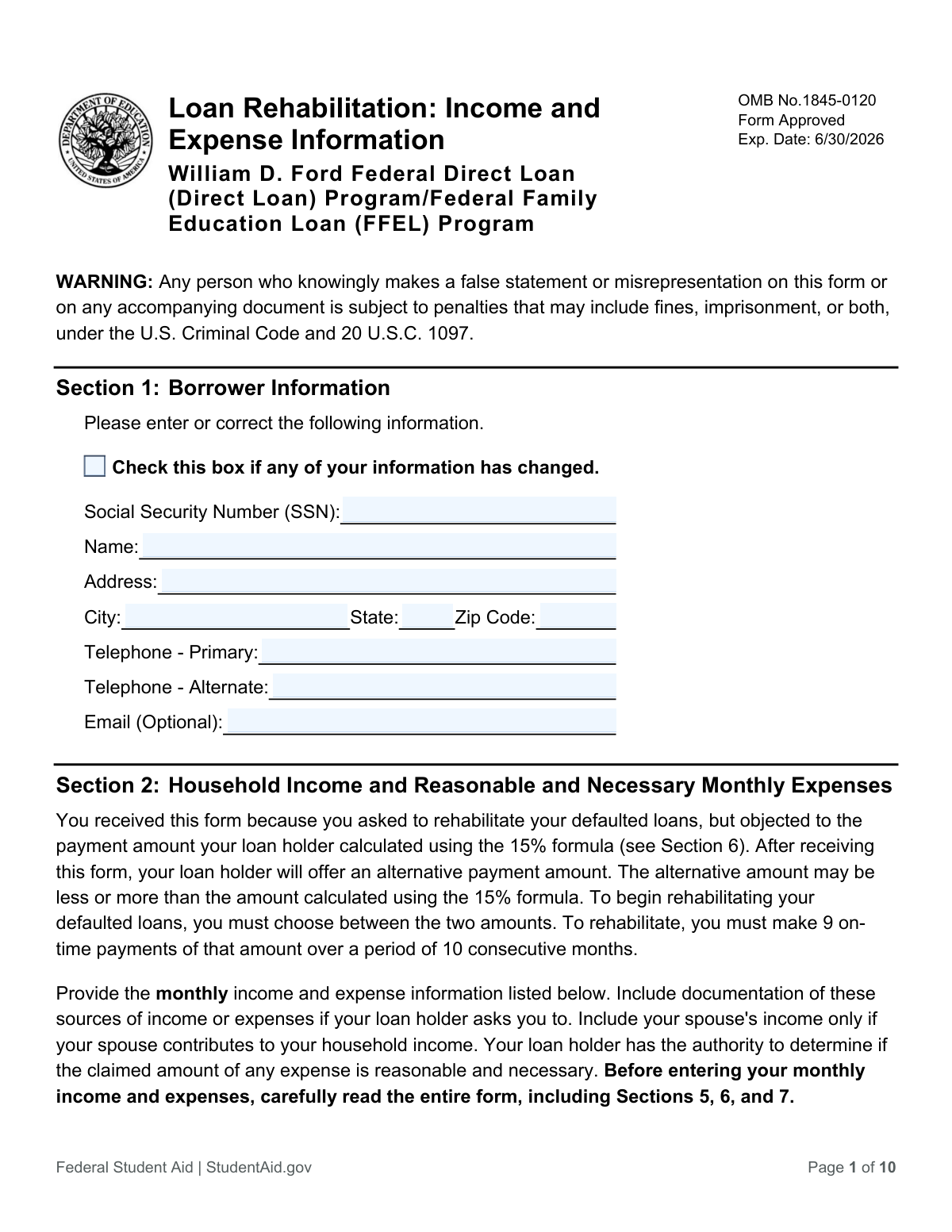
This form is submitted by borrowers with defaulted federal student loans who are seeking to rehabilitate their loans but object to the standard payment amount calculated by their loan holder. It allows the borrower to provide detailed information about their monthly income and expenses to establish an alternative, affordable payment plan. Today, this form can be filled out quickly and accurately using AI-powered services like Instafill.ai, which can also convert non-fillable PDF versions into interactive fillable forms.
OMB No. 1845-0120 is part of the
education forms, federal forms, federal loan forms, income and expense forms, loan forms and income expense forms categories on Instafill.
Rather not fill this in by hand? Instafill is an online form filler that completes PDF forms automatically — upload the blank form, answer a few questions, and the AI fills every field.
Form specifications
| Form name: | Loan Rehabilitation: Income and Expense Information, William D. Ford Federal Direct Loan (Direct Loan) Program/Federal Family Education Loan (FFEL) Program |
| Number of pages: | 1 |
| Language: | English |
Our AI automatically handles information lookup, data retrieval, formatting, and form filling.
It takes less than a minute to fill out OMB No. 1845-0120 using our AI form filling.
Securely upload your data. Information is encrypted in transit and deleted immediately after the form is filled out.
Instafill Demo: How to fill out PDF forms in seconds with AI
How to Fill Out OMB No. 1845-0120 Online for Free in 2026
Are you looking to fill out a OMB NO. 1845-0120 form online quickly and accurately? Instafill.ai offers the #1 AI-powered PDF filling software of 2026, allowing you to complete your OMB NO. 1845-0120 form in just 37 seconds or less.
Follow these steps to fill out your OMB NO. 1845-0120 form online using Instafill.ai:
- 1 Navigate to Instafill.ai and upload or select the Loan Rehabilitation: Income and Expense Information form.
- 2 Provide your personal details in Section 1, including your name, Social Security Number, and current address.
- 3 Use the AI assistant to accurately list all monthly income sources and necessary monthly expenses in Section 2.
- 4 Complete Section 3 by providing your family size and, if applicable, your spouse's information.
- 5 Carefully read the understandings, certifications, and authorization in Section 4 to understand the terms of the rehabilitation agreement.
- 6 Electronically sign and date the form to certify the accuracy of the information provided and authorize the loan holder to proceed.
- 7 Securely download the completed form to print and mail, or submit it electronically as instructed by your loan holder.
Our AI-powered system ensures each field is filled out correctly, reducing errors and saving you time.
Why Choose Instafill.ai for Your Fillable OMB No. 1845-0120 Form?
Speed
Complete your OMB No. 1845-0120 in as little as 37 seconds.
Up-to-Date
Always use the latest 2026 OMB No. 1845-0120 form version.
Cost-effective
No need to hire expensive lawyers.
Accuracy
Our AI performs 10 compliance checks to ensure your form is error-free.
Security
Your personal information is protected with bank-level encryption.
Frequently Asked Questions About OMB No. 1845-0120
This form is for borrowers with defaulted federal student loans who object to the initial monthly payment amount offered for loan rehabilitation. It allows you to provide detailed financial information so your loan holder can calculate an alternative payment amount based on your actual income and expenses.
You should fill out this form only if you have a defaulted federal student loan, have started the rehabilitation process, and believe the initial monthly payment calculated by your loan holder is unaffordable. This form is your request for an alternative payment calculation.
You must provide your personal details, family size, and a complete breakdown of your total monthly household income and necessary living expenses. This includes income from all sources and expenses like housing, food, utilities, and transportation.
You are not required to submit documents with the form itself, but your loan holder may request them later to verify your stated income and expenses. It is wise to have documents like pay stubs, benefit statements, and bills ready in case they are requested.
Your loan holder will use the information to calculate an alternative monthly payment amount and present it to you in a written agreement. You must then choose between this new amount and the original one, sign the agreement, and begin making payments to rehabilitate your loan.
Your family size includes you, your spouse, and your children if you provide more than half of their support. It can also include other people if they live with you and you provide more than half of their financial support for the year.
If you have no monthly income, you must enter $0 in the total income field. In the space provided, you must also include a written explanation of how you are supporting yourself, for example, through help from family or friends.
After making 9 on-time payments over 10 months, the record of default will be removed from your credit history and you will regain eligibility for federal student aid. Your loan will be transferred to a new servicer, and you will need to select a new repayment plan.
You should only include your spouse's income if they contribute to your household's income. Your spouse only needs to sign the form if you are rehabilitating a joint consolidation loan that was made to both of you.
The 15% formula is the standard method used to calculate your initial rehabilitation payment, based on your Adjusted Gross Income (AGI) and the federal poverty guidelines. You fill out this form if you are objecting to the payment amount calculated with that formula.
Return the completed form and any requested documentation to the address listed in Section 8 of the form. If no address is provided, you should send it directly to your loan holder.
Yes, services like Instafill.ai use AI to help you accurately auto-fill form fields, which can save you time and reduce errors. This is especially helpful for complex forms that require detailed financial information.
You can upload the PDF to Instafill.ai, and its AI will identify the fields and guide you through filling them out. The platform allows you to enter your information, review it for accuracy, and then download the completed, ready-to-submit form.
If you have a non-fillable or 'flat' PDF, you can use a service like Instafill.ai to make it interactive. Simply upload the file, and the tool will convert it into a fillable form that you can complete on your computer.
Compliance OMB No. 1845-0120
Validation Checks by Instafill.ai
1
Validates Borrower Social Security Number Format
This check ensures the Social Security Number (SSN) entered in Section 1 and subsequent pages is a valid 9-digit number. The SSN is the primary identifier for the borrower in federal systems, and an incorrect format would prevent the system from locating the correct loan records. Failure to provide a valid 9-digit SSN will result in an immediate rejection of the form.
2
Verifies Total Monthly Income Calculation
This validation confirms that the value entered for 'Total monthly income' (Item 8) is the exact sum of the individual income sources listed in Items 1 through 7. This is critical for ensuring the loan holder has an accurate basis for calculating an affordable payment amount. If the sum does not match the total provided, the form will be flagged for correction, as it indicates a mathematical error.
3
Verifies Total Monthly Expenses Calculation
This check ensures the value for 'Total monthly expenses' (Item 22) is the correct sum of the individual expense categories listed in Items 10 through 21. An accurate total expense figure is essential for determining the borrower's discretionary income and calculating a fair payment. A discrepancy between the individual items and the total will cause a validation failure, requiring the user to review and correct their entries.
4
Requires Explanation for Zero Monthly Income
This validation checks that if the 'Total monthly income' (Item 8) is $0, the explanation field (Item 9, 'explain your means of support') must be completed. It is crucial for the loan holder to understand how the borrower is meeting basic living needs without income. Failure to provide this mandatory explanation will render the application incomplete and prevent it from being processed.
5
Ensures Spouse Details are Provided for Joint Loan
If the borrower answers 'Yes' to question 24 (regarding a joint consolidation loan), this check validates that the 'Spouse’s Name' and 'Spouse’s SSN' fields are both filled out. This information is a legal and administrative requirement to process a rehabilitation request for a loan with a co-borrower. The form cannot be processed for a joint loan without these details.
6
Validates Spouse's Signature Requirement
This check verifies that the 'Spouse’s Signature' and the corresponding 'Date' field are completed if the spouse's name and SSN were provided in Section 3. A spouse's signature is a legal attestation required when they are a party to the loan, certifying the accuracy of the provided information. An absent signature will make the application legally incomplete and invalid.
7
Validates Signature Date Format and Plausibility
This check ensures that the dates provided in the Borrower's and Spouse's signature sections are in the correct 'mm/dd/yyyy' format and represent a valid, non-future date. This is important for establishing a legal record of when the certification was made. An invalid date format or a future date will result in a validation error and prevent submission.
8
Ensures Family Size is a Valid Number
This validation confirms that the 'Family Size' field (Item 23) contains a positive integer of 1 or greater. Family size is a critical factor in the formula used to determine an affordable payment amount, so the value must be realistic. An entry of zero, a negative number, or non-numeric text would halt processing until a valid number is provided.
9
Requires Description for 'Other Income'
If a monetary value greater than zero is entered for 'Other income' (Item 7), this check ensures the corresponding 'Describe' field is not empty. The loan holder needs to understand the source of all income to determine its eligibility for the payment calculation. Failure to describe the income source will result in an incomplete application that cannot be fully evaluated.
10
Requires Description for 'Other Expenses'
This validation ensures that if an amount greater than zero is entered for 'Other expenses' (Item 21), the 'Describe' field is also filled out. The loan holder must be able to assess whether these expenses are necessary and reasonable as per program rules. Undescribed expenses will not be considered in the payment calculation and may cause the form to be rejected for being incomplete.
11
Validates Primary Telephone Number Format
This check verifies that the 'Telephone - Primary' field contains a valid 10-digit phone number. A correct and reliable contact number is essential for the loan holder to communicate with the borrower about their application status, payment agreement, and other critical matters. An incorrectly formatted number could lead to missed communications and significant delays in the rehabilitation process.
12
Ensures Consistency of Borrower Identifying Information
This validation compares the 'Borrower Name' and 'Borrower SSN' fields that appear at the top of pages 2, 3, and 4 to ensure they are identical to the information provided in Section 1. This cross-page consistency is critical for data integrity and to confirm that all pages of the submitted document belong to the same applicant. Any mismatch would indicate a potential scanning or data entry error that must be resolved.
13
Validates Completeness of Borrower Address
This check ensures that the core address fields (Address, City, State, Zip Code) in Section 1 are all filled out. A complete and valid mailing address is mandatory for all official correspondence, including the final loan rehabilitation agreement. An incomplete address will prevent the loan holder from communicating with the borrower and will stop the application process.
14
Ensures All Financial Fields are Non-Negative Numeric Values
This validation verifies that all monetary fields for income (Items 1-7) and expenses (Items 10-21) contain only valid, non-negative numbers. Text or negative values in these fields would make it impossible to perform the required summations for total income and expenses. The form will be rejected until all financial fields contain valid numeric data.
Common Mistakes in Completing OMB No. 1845-0120
Borrowers often count everyone living in their household, but the form uses a specific definition based on providing more than half of a person's financial support. This mistake can lead to an incorrect payment calculation, as family size is a key factor in the formula. To avoid this, carefully read the definition in Section 3 and only include yourself, your spouse, and dependents for whom you provide more than 50% of their support.
A frequent error is reporting net (take-home) pay instead of gross pay, or vice-versa, leading to confusion and inaccurate income totals. This directly impacts the calculated payment amount, potentially making it higher or lower than it should be. To prevent this, use your most recent pay stubs to consistently report either gross or net income and be prepared to provide documentation if your loan holder requests it.
People often list an expense in more than one category, which can inflate their total expenses and lead to the form being rejected or recalculated. A common example is including homeowner's insurance under both 'Housing' (as part of a mortgage payment) and 'Necessary insurance'. Carefully review the instructions for each expense category in Section 5 to ensure each cost is listed only once.
When a borrower has no expenses for a specific category, they may leave the field blank, which can be interpreted as an incomplete form. This can cause processing delays as the loan holder may need to follow up for clarification. The instructions explicitly state to enter '0' for any category with no expenses, ensuring the form is complete and can be processed efficiently.
An unsigned form is invalid and will be immediately rejected, causing significant delays in the rehabilitation process. Borrowers may forget to sign, or in the case of a joint consolidation loan, they may forget to have their spouse sign in Section 4. Always double-check that all required signature and date fields are completed before submission to avoid automatic rejection.
If a borrower reports zero total monthly income in item 8, they must also complete item 9 to explain their means of support (e.g., living with family, using savings). Leaving this explanation blank raises questions about how they are covering living expenses and will halt the application process until clarification is provided. Be sure to provide a brief but clear explanation if you report no monthly income.
The form has specific instructions for categorizing expenses that are easy to miss, leading to errors. For instance, auto insurance premiums should be listed under 'Necessary insurance', not 'Transportation', which is reserved for fuel, car payments, and maintenance. Such miscategorization can cause confusion and may require correction, slowing down the review of your financial situation.
The form requires the applicant to manually sum total monthly income (items 1-7) and total monthly expenses (items 10-21). Simple arithmetic mistakes are common and can result in an incorrect financial picture, leading to a flawed payment calculation and processing delays. Using a calculator and double-checking your totals is crucial for accuracy. AI-powered tools like Instafill.ai can eliminate these errors by performing the calculations automatically.
The form requires the borrower's name and SSN to be written at the top of pages 2, 3, and 4, in addition to the first page. People often overlook these repeating fields, and if pages get separated during processing, it can cause major delays or require resubmission. To avoid this, complete the header on every single page before moving on to the main content.
When entering amounts for 'Other income' or 'Other expenses', it is mandatory to provide a description in the space provided. Failing to describe these amounts leaves the loan holder unable to determine if they are valid and necessary, which will delay the application until the information is provided. Always specify the source of any 'other' funds or the reason for any 'other' expenses.
Saved over 80 hours a year
“I was never sure if my IRS forms like W-9 were filled correctly. Now, I can complete the forms accurately without any external help.”
Kevin Martin Green
Your data stays secure with advanced protection from Instafill and our subprocessors




Robust compliance program
Transparent business model
You’re not the product. You always know where your data is and what it is processed for.
ISO 27001, HIPAA, and GDPR
Our subprocesses adhere to multiple compliance standards, including but not limited to ISO 27001, HIPAA, and GDPR.
Security & privacy by design
We consider security and privacy from the initial design phase of any new service or functionality. It’s not an afterthought, it’s built-in, including support for two-factor authentication (2FA) to further protect your account.
Fill out OMB No. 1845-0120 with Instafill.ai
Worried about filling PDFs wrong? Instafill securely fills loan-rehabilitation-income-and-expense-information-william-d-ford-federal-direct-loan-direct-loan-programfederal-family forms, ensuring each field is accurate.
